9 Best Instantly Alternatives for Cold Email in 2026
Instantly built the category playbook for inbox rotation and warmup — but it is not the only option, and it is rarely the cheapest at scale. Here is an honest breakdown of nine alternatives, what each one actually costs, and who should switch.

TL;DR
- Instantly is a strong sending and warmup platform. Most people who leave it are not leaving because of deliverability — they leave because of seat pricing, lead-credit add-ons, or a support experience that did not scale with them.
- Smartlead is the closest like-for-like swap. Saleshandy is the cheapest credible one. Lemlist wins on multichannel. Reply.io and Amplemarket win when you need a full sales engagement layer, not just a sender.
- No sending tool fixes bad data. A 12% bounce rate on a "verified" purchased list will sink any of these platforms equally fast.
- Budget for two line items, not one: a sender (roughly $30–$100/mo for a small team) and a data/verification layer (Tomba starts free, then $49/mo).
- Switch if you are paying for seats you do not use, hitting lead-credit walls, or sending across 20+ inboxes where per-inbox pricing starts compounding.
Why are so many teams searching for Instantly alternatives?#
Because the market matured. Three years ago, "unlimited inboxes plus built-in warmup" was a genuine moat. In 2026, that combination is table stakes — Smartlead, Saleshandy, Emelia, and half a dozen others ship it. Once the core feature is commoditized, buyers start comparing the things they previously ignored: total cost at their actual volume, how the lead credits are metered, whether support answers in under 48 hours, and how much of the stack they are locked into.
The four complaints that actually drive churn, based on public review patterns on G2 and vendor community forums:
- Cost creep from add-ons. The sending plan is the advertised number. Lead credits, extra inbox slots, and CRM-grade enrichment are separate meters.
- Support response times on lower tiers. Chat-only support is fine until a domain gets flagged mid-campaign.
- Data quality of bundled B2B leads. Bundled databases are convenient and almost never as fresh as a dedicated data vendor.
- Feature bloat. Teams who want a reliable sender do not want to pay for an AI SDR they never turned on.
None of these make Instantly a bad product. They make it a product with a specific shape — and if your shape is different, there is probably a better fit.

What does Instantly actually do well?#
Give credit where it is due, because half the "alternatives" content online pretends the incumbent is broken. Instantly does three things genuinely well:
- Unlimited inbox connections on paid plans, which is why agencies adopted it first. If you are rotating 40 mailboxes across 10 domains, per-inbox pricing elsewhere gets painful fast.
- A large warmup network. Warmup pools work on network effects; a bigger pool produces more natural-looking engagement signals.
- Deliverability tooling that is actually opinionated — inbox placement tests, spam-word flags, and sending-volume ramps that are on by default rather than buried in settings.
If those three things are your bottleneck and the price is fine, you do not need an alternative. Read the rest of this to understand your leverage at renewal instead.
How should you compare cold email platforms in 2026?#
Do not start with a feature matrix. Start with these six questions, in this order — they eliminate most of the market before you book a single demo.
- What is your inbox count? Under 10 mailboxes, per-inbox pricing is cheaper. Over 25, unlimited-inbox plans win decisively. This single variable flips the cost ranking.
- Do you need seats or sends? Tools priced per user (Lemlist, Reply.io, Outreach) punish teams where five people need read access. Tools priced per workspace (Instantly, Smartlead, Emelia) do not.
- Is email your only channel? If LinkedIn touches, calls, or a task queue matter, a pure sender will force a second purchase anyway.
- Where does your data come from? If you are buying static lists, the sender is not your problem. If you are building lists per-campaign, you need a finder and verifier with API access.
- Who owns deliverability? Agencies want per-client workspaces and white-label reporting. In-house teams want one workspace with clean role permissions.
- What is your realistic monthly send volume? Most "cheap" plans cap at 5,000–30,000 emails/mo. Model twelve months out, not one.
Answer those and the shortlist writes itself.
Which Instantly alternatives are worth testing in 2026?#
Prices below are published list prices at the time of writing, annualized-discount excluded. Vendors change pricing frequently — confirm on the vendor page before you budget.
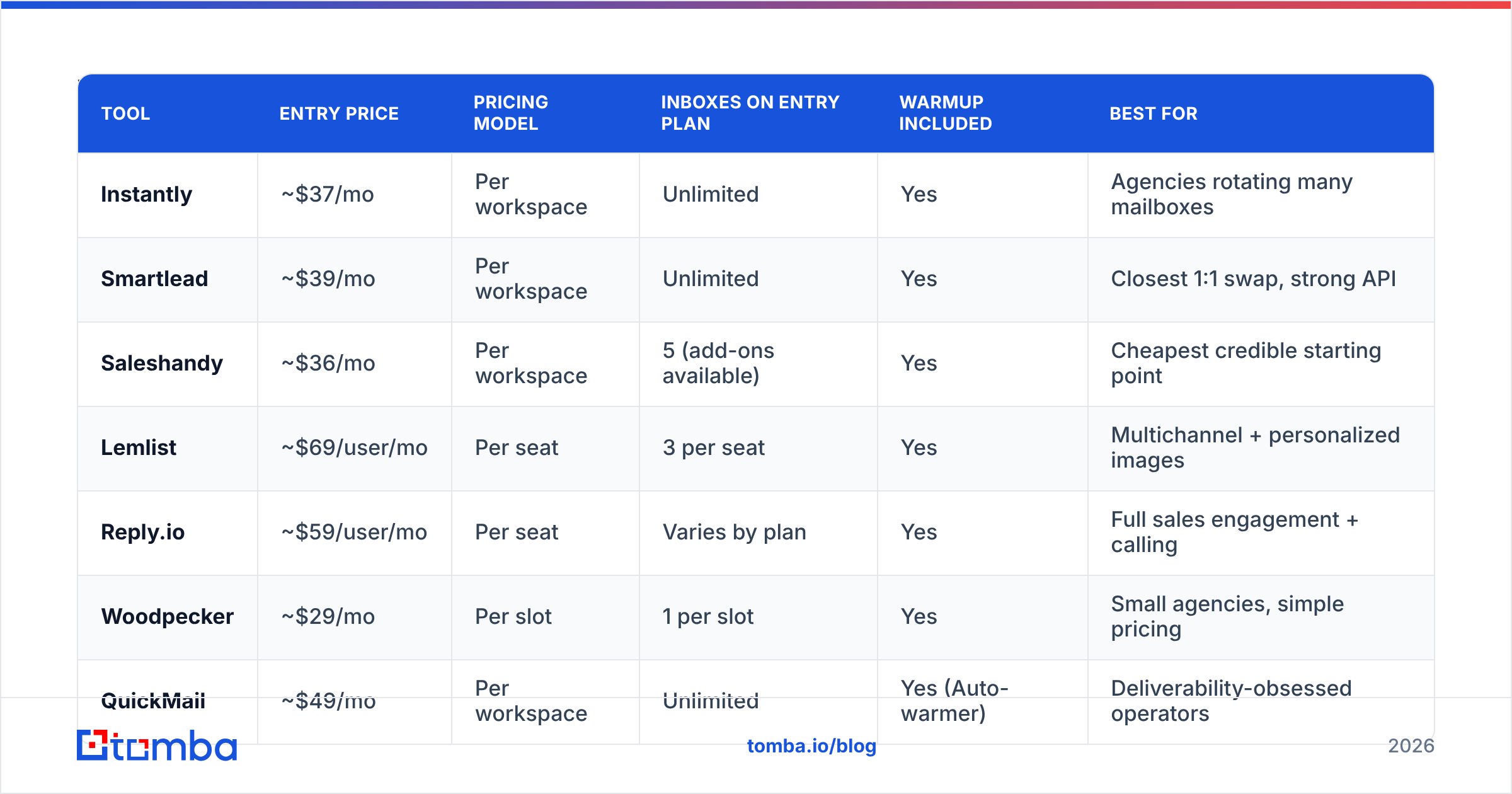
| Tool | Entry price | Pricing model | Inboxes on entry plan | Warmup included | Best for |
|---|---|---|---|---|---|
| Instantly | ~$37/mo | Per workspace | Unlimited | Yes | Agencies rotating many mailboxes |
| Smartlead | ~$39/mo | Per workspace | Unlimited | Yes | Closest 1:1 swap, strong API |
| Saleshandy | ~$36/mo | Per workspace | 5 (add-ons available) | Yes | Cheapest credible starting point |
| Lemlist | ~$69/user/mo | Per seat | 3 per seat | Yes | Multichannel + personalized images |
| Reply.io | ~$59/user/mo | Per seat | Varies by plan | Yes | Full sales engagement + calling |
| Woodpecker | ~$29/mo | Per slot | 1 per slot | Yes | Small agencies, simple pricing |
| QuickMail | ~$49/mo | Per workspace | Unlimited | Yes (Auto-warmer) | Deliverability-obsessed operators |
| Emelia | ~$37/mo | Per workspace | Unlimited | Yes | Budget EU-based alternative |
| Amplemarket | Custom | Per seat | Bundled | Yes | Enterprise AI-assisted outbound |
Smartlead — the closest like-for-like swap#
Smartlead is the alternative most Instantly refugees land on, and the migration is genuinely low-friction: unlimited mailbox rotation, a warmup network of comparable size, and a master inbox for replies. Its real edge is the API and webhook layer — if you run a RevOps team that pushes leads in from a warehouse and syncs replies back to the CRM, Smartlead's endpoints are more complete. Its weakness is UI polish; the interface assumes you already know what a sending schedule and a bounce guard do.
Switch if: you want feature parity plus better programmatic control.
Saleshandy — the value pick#
Saleshandy has quietly become the price floor for a serious sender. Sequences, unified inbox, sender rotation, and warmup all ship on the entry tier. The entry plan meters email accounts rather than giving unlimited, so run the math at your inbox count. For a two-person team sending 20–30k emails a month across five domains, it is usually the cheapest legitimate option on this list. Teams evaluating it often look at a Saleshandy alternative comparison first — worth doing, because the add-on pricing is where the sticker price moves.
Switch if: you are under ten mailboxes and want to cut your bill roughly in half.
Lemlist — multichannel and creative personalization#
Lemlist is the one tool here that is not really competing on sending infrastructure. It competes on the message: dynamic images, personalized landing pages, LinkedIn steps, and a lead database bundled on higher tiers. It is priced per seat, which makes it expensive for agencies and reasonable for a three-rep in-house team that values reply rate over volume.
Switch if: your bottleneck is response rate, not send capacity.
Reply.io and Amplemarket — when you need the whole engagement layer#
Both go well beyond email: calling, LinkedIn automation, task queues, AI-assisted reply handling, and reporting your VP of Sales will actually look at. They cost several times what a pure sender costs. That is the correct trade if your reps live in the tool eight hours a day, and a waste if you run a volume outbound motion with two operators. Evaluate them as CRM-adjacent purchases, not as Instantly alternatives in the narrow sense.
Woodpecker, QuickMail, and Emelia — the specialists#
Woodpecker prices per "slot" and stays deliberately simple, which small agencies like. QuickMail's Auto-warmer and its deliverability reporting have a devoted following among people who obsess over inbox placement and read raw headers for fun. Emelia is the budget European option with unlimited inboxes and straightforward GDPR posture. None of the three will win a feature bake-off. All three will do the job for less money and less noise.
Is a cheaper Instantly alternative actually cheaper?#
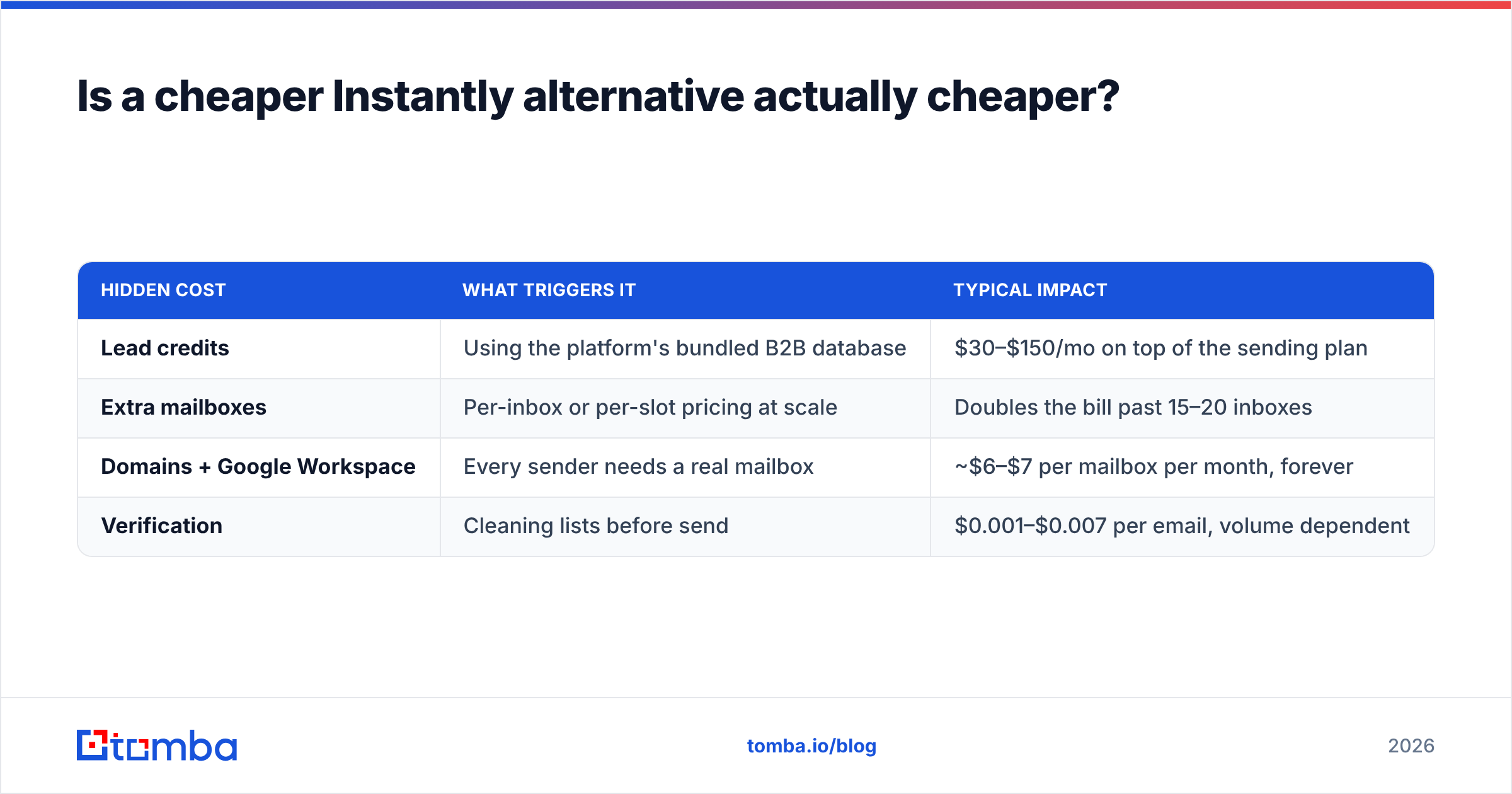
Usually yes on the sending line, and usually no on the total. Three costs get left out of comparison posts:
| Hidden cost | What triggers it | Typical impact |
|---|---|---|
| Lead credits | Using the platform's bundled B2B database | $30–$150/mo on top of the sending plan |
| Extra mailboxes | Per-inbox or per-slot pricing at scale | Doubles the bill past 15–20 inboxes |
| Domains + Google Workspace | Every sender needs a real mailbox | ~$6–$7 per mailbox per month, forever |
| Verification | Cleaning lists before send | $0.001–$0.007 per email, volume dependent |
That last row is the one teams skip and then regret. A 25,000-contact list with a 9% invalid rate produces roughly 2,250 hard bounces. Push that through any platform on this list and your domain reputation degrades in a week — new tool, same crater. Verification costs a few dollars. Rebuilding a burned domain costs six weeks.

Where does the data layer fit in your stack?#
Separately from the sender, and deliberately so. Bundled databases are a convenience feature; they are optimized for breadth, not freshness. The stack that holds up looks like this:
- Source — build the target account list (LinkedIn, funding databases, job boards, your own product signals).
- Find — resolve contacts to work emails. An email finder with domain-level pattern detection beats guessing formats, and a bulk email finder handles the list-level work in one pass.
- Verify — run every address through an email verifier before it touches a sequence, including catch-all handling, which is where most verification tools quietly give up.
- Enrich — add firmographics and role data so personalization tokens are not empty.
- Send — whichever platform you picked above.
Vendors occupy different slots here. BookYourData is a solid choice when you want a pre-built, pay-as-you-go list with a bounce guarantee and no subscription commitment — useful for one-off campaigns or for teams without engineering time to spend. Tomba fits the opposite pattern: continuous, API-driven discovery and verification against domains you choose, with a free tier at 25 searches/month and paid plans starting at $49/mo. Plenty of teams use both — a purchased base list plus ongoing enrichment.
The point is that neither of them is a sending tool, and no sending tool is a serious substitute for either.
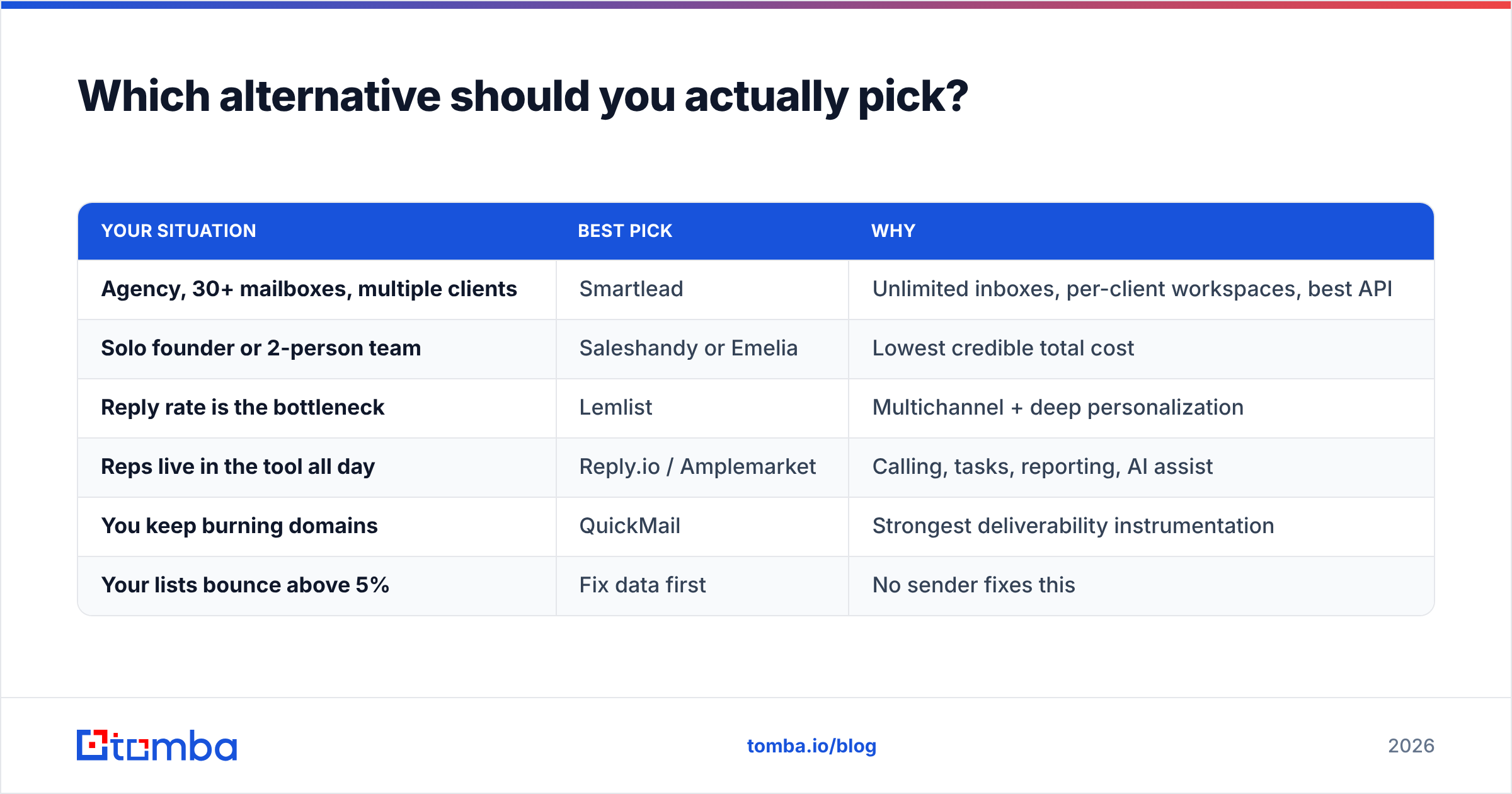
Which alternative should you actually pick?#
| Your situation | Best pick | Why |
|---|---|---|
| Agency, 30+ mailboxes, multiple clients | Smartlead | Unlimited inboxes, per-client workspaces, best API |
| Solo founder or 2-person team | Saleshandy or Emelia | Lowest credible total cost |
| Reply rate is the bottleneck | Lemlist | Multichannel + deep personalization |
| Reps live in the tool all day | Reply.io / Amplemarket | Calling, tasks, reporting, AI assist |
| You keep burning domains | QuickMail | Strongest deliverability instrumentation |
| Your lists bounce above 5% | Fix data first | No sender fixes this |
A practical migration sequence, if you decide to move: run both platforms in parallel for two weeks on a single domain, keep the copy identical, and compare reply rate and bounce rate — not open rate, which has been unreliable since Apple Mail Privacy Protection normalized pixel prefetching. If the new tool matches within noise, migrate the rest of your domains one at a time over a month. Never move 40 mailboxes in a weekend.
Frequently asked questions#
Is there a free Instantly alternative? Not a fully free sender worth running a business on. Woodpecker, Saleshandy, and Emelia all run trials, and Smartlead offers a 14-day window. The free tier that does exist meaningfully is on the data side — you can find and verify contacts at no cost before committing to a sending subscription.
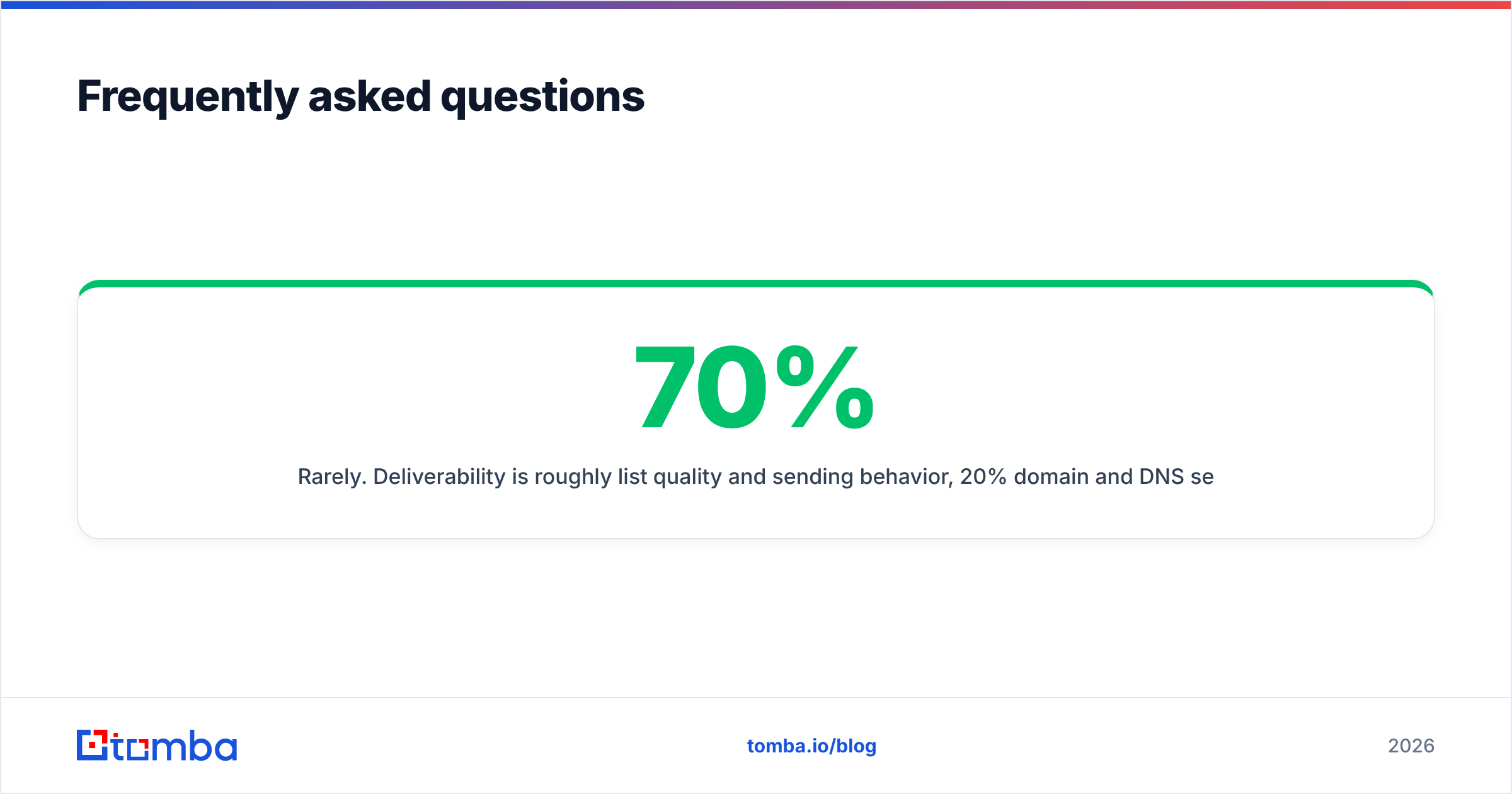
Will switching platforms fix my deliverability? Rarely. Deliverability is roughly 70% list quality and sending behavior, 20% domain and DNS setup (SPF, DKIM, DMARC), and 10% platform. If you are landing in spam on Instantly, audit your SPF record and bounce rate before you audit vendors.
How many emails per mailbox per day is safe in 2026? Conservative operators cap at 20–30 per mailbox on aged domains and ramp new ones over four to six weeks. The platforms differ on defaults; the biology of the filters does not.
Do I still need warmup? Yes for new domains and dormant mailboxes. Continuous warmup on a healthy, high-reply mailbox produces diminishing returns and some inbox providers have gotten better at recognizing reciprocal warmup traffic. Use it as a ramp, not as life support.
Start with the data, then pick the sender#
Every tool on this list can deliver an email. None of them can invent a correct address for a prospect who changed jobs eight months ago. Before you sign a new sending contract, run your current list through verification and see what percentage survives — that number tells you whether your problem is the platform or the pipeline feeding it.
Build the list properly with the Tomba Email Finder: find work emails by domain, name, or company, verify them in the same pass, and export straight into whichever sender you land on. The free tier covers 25 searches a month so you can test against your own target accounts before spending anything; paid plans start at $49/mo when you are ready to scale. See full Tomba pricing for volume tiers and API access.
Related guides#
// get started
Find, verify and enrich your first contacts today
Start on the free plan with 25 searches a month, then scale when your team is ready.
Free plan · No credit card required · GDPR & CCPA
// about the author