Intro Email Format: How to Structure an Introduction Email
Most introduction emails die in the first line. Here is the six-part intro email format that actually earns replies in 2026 — with templates, length targets, and the checks to run before you hit send.
TL;DR
- A working intro email format has six parts: subject, first line about them, one-sentence credibility, one-sentence relevance, one specific ask, and a plain sign-off.
- Target 75–125 words. Anything over 150 words gets skimmed, and anything under 40 reads like a template blast.
- The first line is the whole game. If it could be pasted into 500 other emails unchanged, rewrite it.
- Different situations need different structures — a cold intro, a referral intro, and a new-hire intro are not the same email with a different name swapped in.
- Format cannot save a bad address. Verify before you send, or your carefully structured intro bounces into a spam folder and drags your domain down with it.
What is an intro email format?#
An intro email format is the fixed skeleton you drop variable content into when you email someone who does not know you yet. Think of it like a resume layout: nobody praises the layout, but a bad one gets you rejected before a single word is read.
The format exists to solve one problem — a stranger is deciding, in roughly three seconds, whether you are worth another twenty. Every element in the structure buys you the next line.
Here is the skeleton, in order:
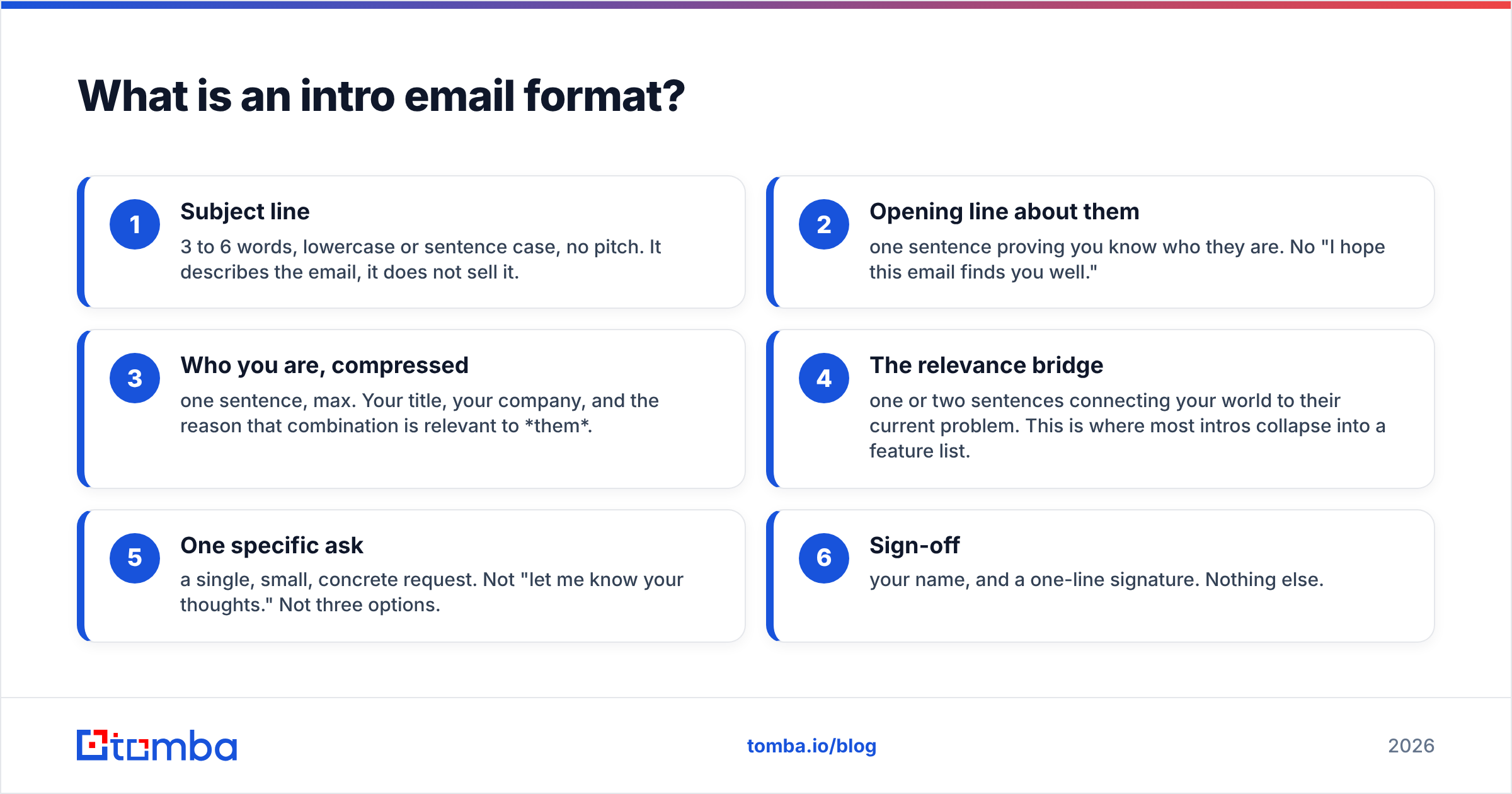
- Subject line — 3 to 6 words, lowercase or sentence case, no pitch. It describes the email, it does not sell it.
- Opening line about them — one sentence proving you know who they are. No "I hope this email finds you well."
- Who you are, compressed — one sentence, max. Your title, your company, and the reason that combination is relevant to them.
- The relevance bridge — one or two sentences connecting your world to their current problem. This is where most intros collapse into a feature list.
- One specific ask — a single, small, concrete request. Not "let me know your thoughts." Not three options.
- Sign-off — your name, and a one-line signature. Nothing else.
Six parts. Six to nine sentences. That is the entire structure, and it holds whether you are emailing a VP of Engineering, a journalist, or the person who just joined your team.
Why do most introduction emails fail?#
Because they are written from the sender's point of view and formatted for the sender's convenience.
The typical failed intro opens with "My name is [X] and I'm the [title] at [company]." That sentence answers a question the reader has not asked yet. Before they care who you are, they need a reason to keep reading — and the only reason that works is that the email is visibly about them.
The second failure mode is density. A 240-word intro with three paragraphs, a bulleted feature list, and two links reads as work. On mobile — where the majority of B2B email is first opened, according to most vendor deliverability reports — that email is four thumb-scrolls of unpaid labor.
The third failure is the multi-ask ending. "Would you be open to a call, or I could send over a deck, or happy to connect on LinkedIn if that's easier." Three options is not flexibility; it is a decision the reader now has to make. One ask converts better than three because it requires a yes or a no, not a strategy.

What does the six-part intro email format look like line by line?#
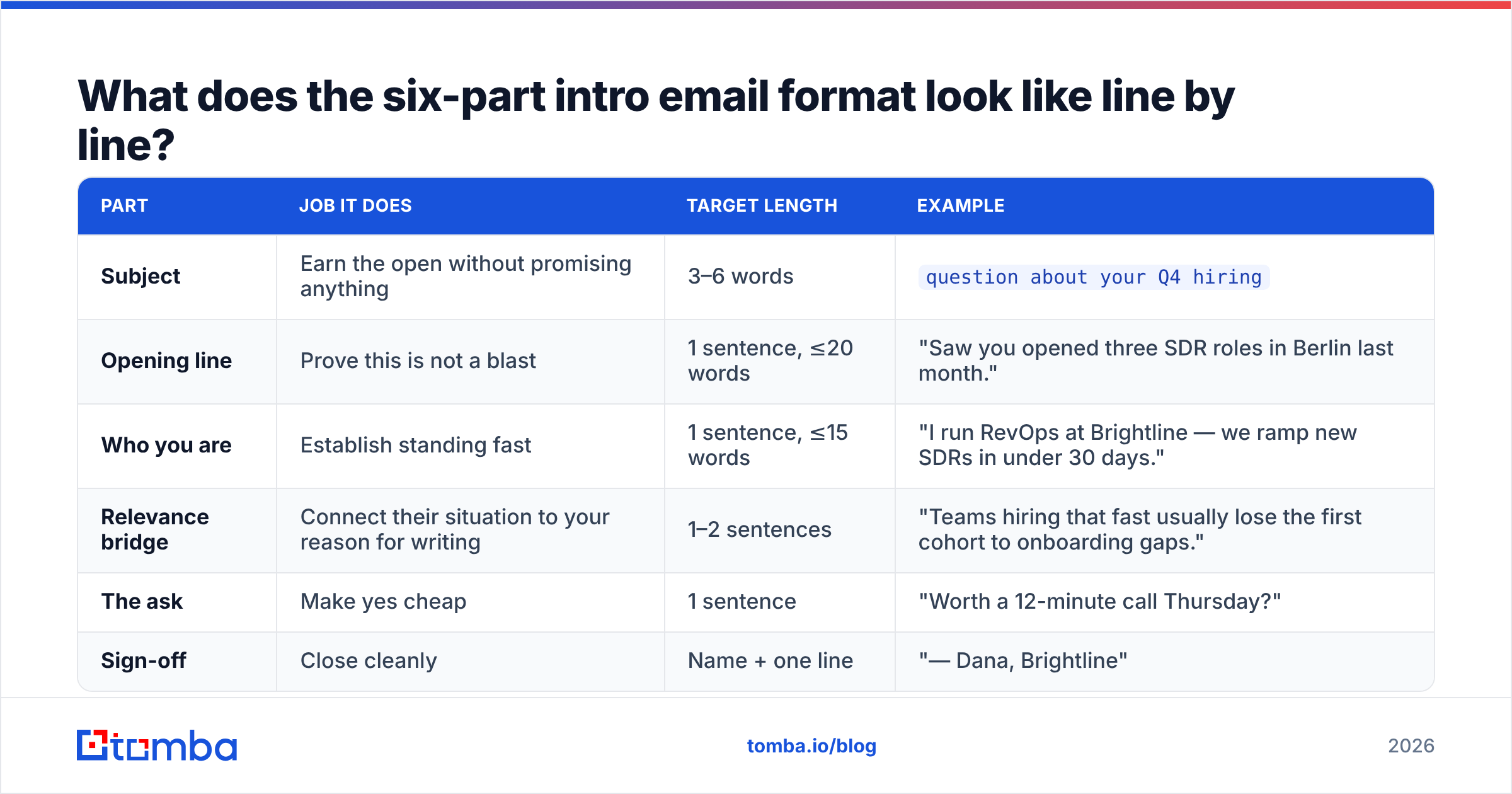
| Part | Job it does | Target length | Example |
|---|---|---|---|
| Subject | Earn the open without promising anything | 3–6 words | question about your Q4 hiring |
| Opening line | Prove this is not a blast | 1 sentence, ≤20 words | "Saw you opened three SDR roles in Berlin last month." |
| Who you are | Establish standing fast | 1 sentence, ≤15 words | "I run RevOps at Brightline — we ramp new SDRs in under 30 days." |
| Relevance bridge | Connect their situation to your reason for writing | 1–2 sentences | "Teams hiring that fast usually lose the first cohort to onboarding gaps." |
| The ask | Make yes cheap | 1 sentence | "Worth a 12-minute call Thursday?" |
| Sign-off | Close cleanly | Name + one line | "— Dana, Brightline" |
Total: roughly 90 words. Read it aloud and it takes about 25 seconds. That is the budget.
Two structural notes that matter more than they sound:
- Put the ask on its own line. A question buried at the end of a paragraph gets skimmed past. A question with white space above and below it gets answered.
- Never open with your company name. The recipient's brain classifies "Hi, I'm X from Y" as advertising within one line. Lead with an observation about them and your company name lands as context instead of as a pitch.
Which intro email format fits your situation?#
Not every introduction email is cold outreach. The structure shifts depending on how much trust you already have.
| Scenario | Opening move | Ideal length | The ask | Reply rate you should expect |
|---|---|---|---|---|
| Cold intro to a prospect | Specific observation about their company | 75–110 words | 10–15 min call, one proposed time | 3–8% |
| Referral / mutual connection | Referrer's name in the subject line | 60–90 words | Call or quick question | 20–40% |
| Post-event or post-content intro | The exact talk, post, or panel | 70–100 words | One question they can answer in a line | 10–20% |
| New hire intro to the team | Your role and what people should come to you for | 90–130 words | Nothing — or an open door | N/A |
| Vendor-to-partner intro | The overlap in customer base | 100–140 words | Intro call between the two teams | 15–30% |
| Journalist / author outreach | Reference the specific article | 60–90 words | One-line offer of a source or data point | 5–15% |
The referral format deserves its own note. Putting the mutual connection's name in the subject line — literally Sarah Kim suggested I reach out — outperforms almost every clever subject line you can write, because it converts a cold email into a warm one before the preview pane even renders. If you are researching who actually shares a connection with your prospect, a LinkedIn finder is faster than scrolling through profiles manually.
For the author and journalist case, the bottleneck is usually finding the right address rather than writing the email; an author finder resolves a byline to a contact in one step so you can spend your time on the first line instead of on the hunt.
How long should an intro email be?#
Between 75 and 125 words, with a hard ceiling at 150.
This is not arbitrary. Below roughly 40 words an email reads as automated — there is not enough specific content to prove a human wrote it. Above 150 words, the reader stops reading and starts scanning, and scanning kills the relevance bridge because that is the part that requires actual attention.
A practical test: your intro email should fit on one mobile screen without scrolling. If you have to scroll, cut. The first thing to cut is always the second sentence about your company. The second thing to cut is any sentence containing the words "leverage," "solutions," "streamline," or "synergies." HubSpot's sales blog has published the same finding repeatedly across their template libraries: shorter cold emails outperform longer ones at nearly every stage of the funnel.
One more length rule that people ignore: your signature counts. A six-line signature with a logo, a booking link, a podcast plug, and a legal disclaimer adds visual weight to a 90-word email and makes it look like marketing. Name, title, company. That is the signature for an intro.
What subject line works for an intro email?#
Descriptive beats clever, and lowercase beats title case.
The subject line of an intro email has exactly one job: get the email opened without setting up an expectation you cannot meet. "Quick question about [specific thing]" works. "Revolutionize your pipeline" does not — not because it is cheesy, but because it announces that the email is a pitch, which lets the reader make a decision without opening it.
Patterns that hold up:
- The referral:
Sarah Kim suggested I reach out - The specific observation:
your Berlin SDR roles - The genuine question:
how are you handling catch-all domains? - The content reference:
your post on RevOps attribution
Patterns to avoid: anything with Re: that is not a reply, anything in ALL CAPS, anything with an emoji in a first-touch B2B email, and anything over about 45 characters — it truncates on mobile and the important half disappears. If you want to pressure-test variants before sending, run them through a subject line tester and compare truncation and spam-trigger scores side by side.
How do you write the first line so it doesn't sound generic?#
Apply the swap test. Copy your first line, paste it into a document, and ask whether it would be equally true of any other company on your list. If yes, it is not a first line — it is filler.
Filler: "I've been following your company for a while and I'm really impressed with what you're building."
Not filler: "Your changelog mentions you moved billing in-house in March — congrats, that's usually a nine-month project."
The second one required thirty seconds of research. That is the actual price of a good intro email, and it is the reason automation-heavy outbound underperforms: the tool can send 2,000 emails, but the thirty seconds is what gets the reply.
If you are working at volume, the compromise is tiering. Spend three minutes each on your top 50 accounts, and use a pattern-level observation — industry, funding stage, hiring signal, tech stack — for the next 500. A website tech checker gives you a defensible observation at scale ("saw you're running HubSpot alongside Salesforce") without pretending you read their blog.
What does a finished intro email actually look like?#
Cold intro, 88 words:
Subject: your Berlin SDR roles
Hi Marcus,
Saw the three SDR openings in Berlin went up last month — that's a big cohort to ramp at once.
I run RevOps at Brightline. We build onboarding tracks for teams hiring SDRs in batches, and the pattern we see is that cohort three onward ramps 40% slower than cohort one unless the playbook gets rewritten.
Worth 12 minutes Thursday to compare notes on how you're structuring ramp?
— Dana Okafor, Brightline
Referral intro, 64 words:
Subject: Sarah Kim suggested I reach out
Hi Priya,
Sarah Kim mentioned you're rebuilding your lead routing this quarter and thought we should talk — she and I worked through the same project at Northwind last year.
Happy to share what broke for us before you hit it. Any time Tuesday or Wednesday?
— Dana Okafor, Brightline
New hire intro, 106 words:
Subject: new here — RevOps
Hi all,
I joined this week as RevOps lead, reporting to Marcus. Before this I spent four years doing the same job at Northwind, mostly on routing, forecasting, and making Salesforce tell the truth.
For the next few weeks I'll mostly be listening. If something in your pipeline reporting has annoyed you for months and nobody has fixed it, I'd genuinely like to hear about it — that's the fastest way for me to learn where the bodies are buried.
My calendar is open. Grab time whenever.
— Dana
Notice what none of them contain: a paragraph about company history, a list of features, a PDF attachment, or the phrase "I hope this email finds you well."
Does the format matter if the email never arrives?#
No. And this is the part teams skip.
A perfectly structured intro email sent to a stale address does two things: it fails to reach anyone, and it increments your bounce rate. Push past roughly a 3% bounce rate and mailbox providers begin treating your domain as a low-quality sender, which means the next 500 intro emails — the ones with valid addresses — land in spam. One bad list poisons months of good sending.
Three checks before any intro campaign goes out:
- Verify every address. Run the list through an email verifier and remove anything that does not return a valid result. Catch-all domains deserve their own treatment rather than a blanket delete.
- Warm the sending domain. A brand-new domain sending 300 intros on day one looks exactly like a spam operation, because statistically it is one.
- Authenticate. SPF, DKIM, and DMARC records need to exist and pass. Gartner's sales research and every major ESP's documentation agree on this baseline, and Google and Yahoo have enforced it for bulk senders since 2024.
It is also worth being precise about terminology when you write these emails at scale. The salutation you choose — "Hi Marcus" versus "Dear Mr. Okafor" — signals register, and in B2B English the informal first-name greeting has won almost everywhere except legal, government, and parts of APAC and DACH. Match the norm of the recipient's market, not your own.
What metrics tell you the format is working?#
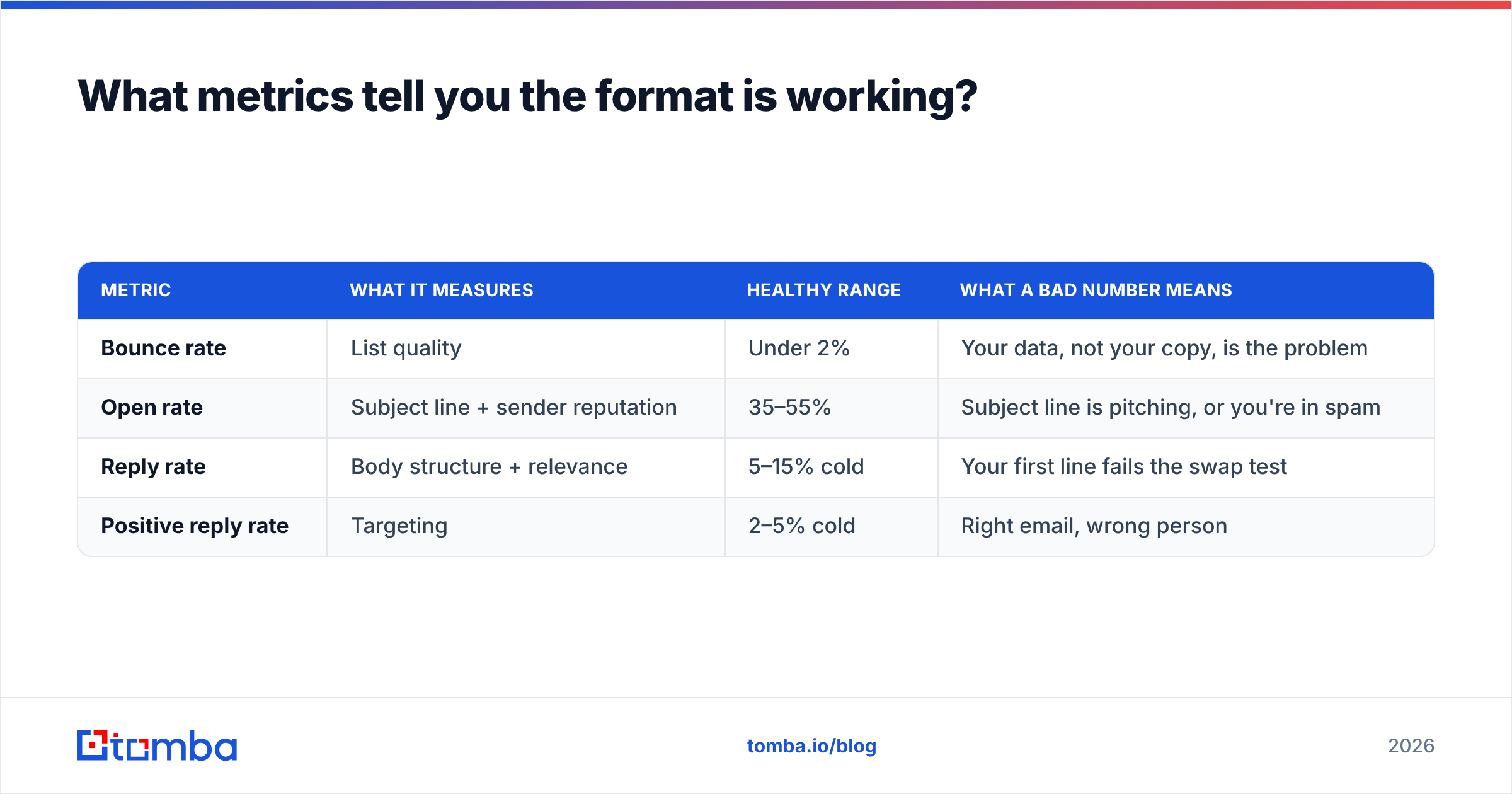
Track three numbers, and track them separately:
| Metric | What it measures | Healthy range | What a bad number means |
|---|---|---|---|
| Bounce rate | List quality | Under 2% | Your data, not your copy, is the problem |
| Open rate | Subject line + sender reputation | 35–55% | Subject line is pitching, or you're in spam |
| Reply rate | Body structure + relevance | 5–15% cold | Your first line fails the swap test |
| Positive reply rate | Targeting | 2–5% cold | Right email, wrong person |
The diagnostic order matters. Do not rewrite your body copy because replies are low if your bounce rate is 9% — fix the data first, then judge the copy. Most teams tune the wrong variable for a quarter because they never separated the two. If you want the underlying definitions, the response rate entry in the glossary spells out how each figure is calculated.
Where should you start?#
Pick one scenario — cold, referral, or event follow-up — and write five emails in the six-part format by hand. No templates, no AI first draft. You will feel immediately which lines are filler, because writing filler by hand is boring in a way that generating it is not.
Then template only the parts that are genuinely fixed: the credibility sentence, the ask, the sign-off. Leave the first line and the relevance bridge permanently manual. That split — automate the skeleton, hand-write the muscle — is what separates outbound that scales from outbound that just sends.
When you have the format right, the remaining bottleneck is reaching the correct person at all. Tomba's Email Finder resolves a name and domain into a verified professional address so your intro lands in a real inbox instead of a bounce log. The free tier covers 25 searches a month if you want to test the workflow on your next ten prospects; paid plans start at $49/month, and you can compare them on the Tomba pricing page. Get the address right first — then the six lines can do their job.
Related guides#
// get started
Find, verify and enrich your first contacts today
Start on the free plan with 25 searches a month, then scale when your team is ready.
Free plan · No credit card required · GDPR & CCPA
// about the author