Intro Email to New Client: Templates That Get Replies 2026
The first email you send a signed client sets the tone for the whole relationship. Here is the structure, timing, and template set that turns a formality into momentum.
TL;DR
- An intro email to a new client is not a welcome banner. It is a working document that confirms scope, names owners, and asks for exactly one thing.
- Send it within 24 hours of signature. After 72 hours, the buying energy has evaporated and you are restarting from cold.
- The highest-reply structure is short: one line of context, three lines of substance, one specific ask, one calendar link.
- Most intro emails fail for boring reasons — wrong recipients, unverified addresses, and a CTA that asks the client to think instead of click.
- Reply rate within 48 hours is the only metric that matters early. Below 50% and your onboarding is already behind schedule.
What is an intro email to a new client?#
An intro email to a new client is the first message you send after a deal closes, introducing the people who will do the work and setting the terms of how you will work together.
Think of it like the first five minutes of a contractor showing up at your house. Nobody wants a speech about the company's founding story. They want to know who is holding the keys, what happens today, what happens next week, and who to call when something goes wrong. The intro email does the same job in about 150 words.
This is a different animal from a cold outreach email. The recipient already said yes. You are not selling; you are converting a signature into motion. That changes almost every writing decision: you can drop the hook, drop the social proof, drop the "quick question" framing. What you cannot drop is clarity about the next action.
The stakes are higher than they look. Onboarding friction is one of the most reliable predictors of early churn, and the first week sets the expectation for responsiveness across the entire contract. Onboarding research in HR has made this point for decades, and B2B account management inherited the same dynamic. If your first email takes four days and arrives as a 600-word essay, the client learns something about your operating speed. They will not forget it at renewal.
When should you send the intro email to a new client?#
Within 24 hours of contract signature. Ideally within four business hours.
The window matters more than the wording. A client who signed on Tuesday morning still has your solution top of mind Tuesday afternoon — they have probably just told their boss about it. By Friday, they have a full inbox, three other priorities, and a vague memory of what they bought.
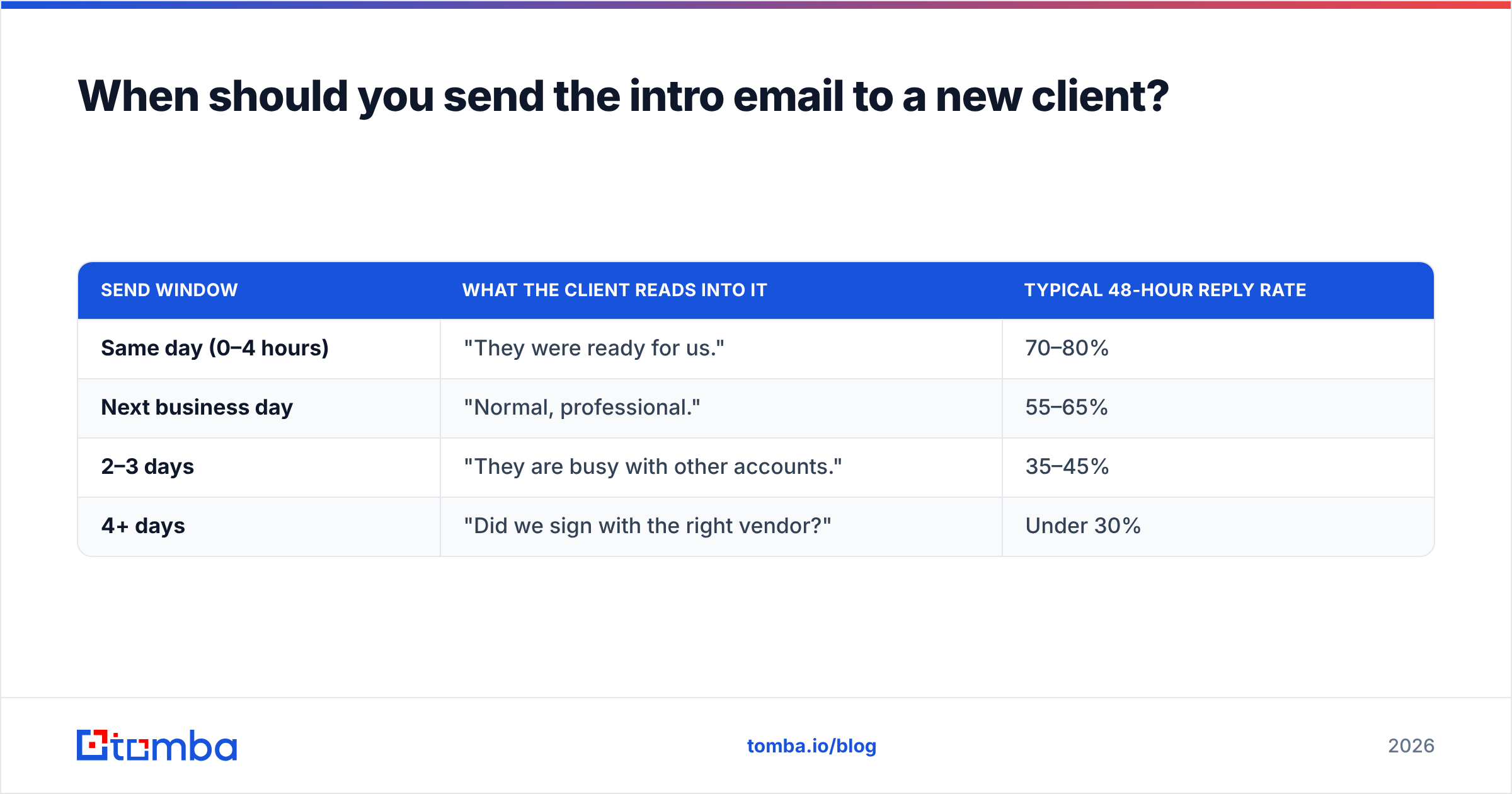
Here is a realistic timing ladder:
| Send window | What the client reads into it | Typical 48-hour reply rate |
|---|---|---|
| Same day (0–4 hours) | "They were ready for us." | 70–80% |
| Next business day | "Normal, professional." | 55–65% |
| 2–3 days | "They are busy with other accounts." | 35–45% |
| 4+ days | "Did we sign with the right vendor?" | Under 30% |
Those ranges come from account-management patterns, not a controlled study — treat them as directional. What holds consistently is the shape of the curve. Reply rate decays fast and does not recover.
One practical fix: draft the intro email before the deal closes. Your sales team knows the scope, the stakeholders, and the timeline a week before signature. Templating it at that point costs ten minutes and removes the most common excuse for a three-day delay.

What goes into a client intro email that actually gets read?#
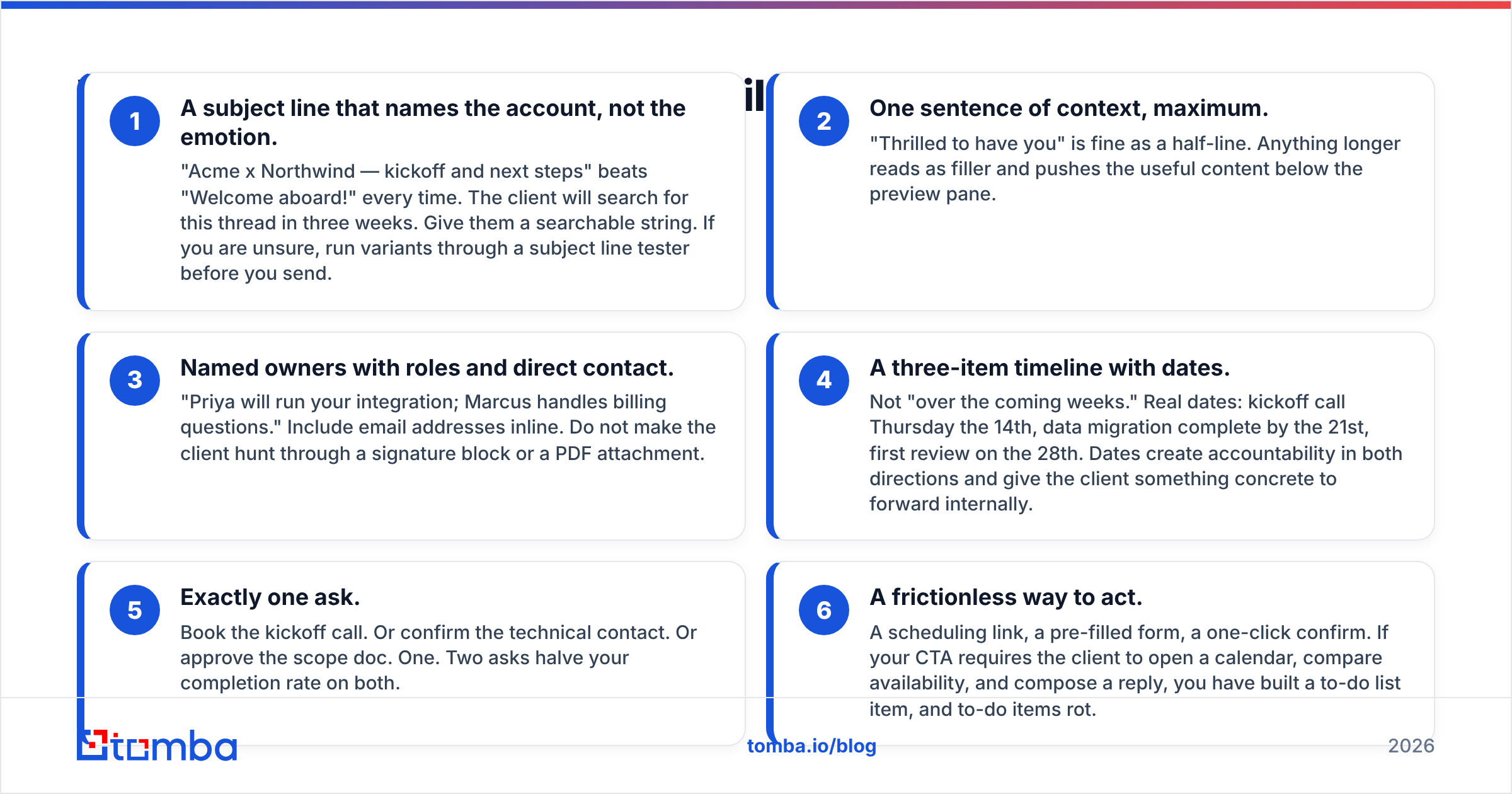
Six components. Not five, not twelve. Each one earns its place because it removes a question the client would otherwise have to ask.
- A subject line that names the account, not the emotion. "Acme x Northwind — kickoff and next steps" beats "Welcome aboard!" every time. The client will search for this thread in three weeks. Give them a searchable string. If you are unsure, run variants through a subject line tester before you send.
- One sentence of context, maximum. "Thrilled to have you" is fine as a half-line. Anything longer reads as filler and pushes the useful content below the preview pane.
- Named owners with roles and direct contact. "Priya will run your integration; Marcus handles billing questions." Include email addresses inline. Do not make the client hunt through a signature block or a PDF attachment.
- A three-item timeline with dates. Not "over the coming weeks." Real dates: kickoff call Thursday the 14th, data migration complete by the 21st, first review on the 28th. Dates create accountability in both directions and give the client something concrete to forward internally.
- Exactly one ask. Book the kickoff call. Or confirm the technical contact. Or approve the scope doc. One. Two asks halve your completion rate on both.
- A frictionless way to act. A scheduling link, a pre-filled form, a one-click confirm. If your CTA requires the client to open a calendar, compare availability, and compose a reply, you have built a to-do list item, and to-do items rot.
Everything else — company history, product tour links, a PDF welcome pack — belongs in email two. Send it after they have booked the call.
Is an intro email different from a cold email or a kickoff agenda?#
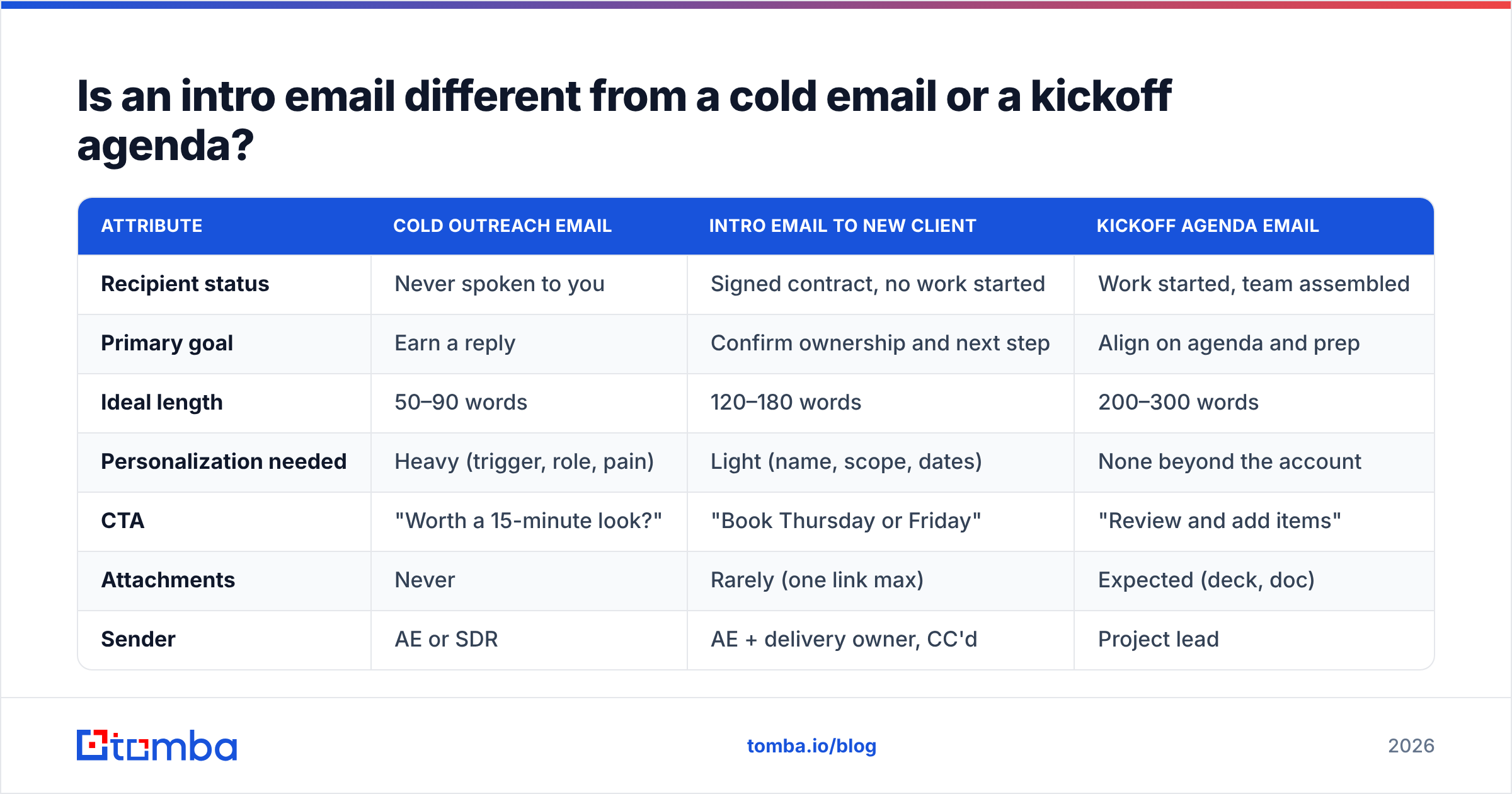
Yes, and conflating them is the single most common structural mistake. Teams recycle their cold email template because it is already written, then wonder why a paying client reads it as spam.
| Attribute | Cold outreach email | Intro email to new client | Kickoff agenda email |
|---|---|---|---|
| Recipient status | Never spoken to you | Signed contract, no work started | Work started, team assembled |
| Primary goal | Earn a reply | Confirm ownership and next step | Align on agenda and prep |
| Ideal length | 50–90 words | 120–180 words | 200–300 words |
| Personalization needed | Heavy (trigger, role, pain) | Light (name, scope, dates) | None beyond the account |
| CTA | "Worth a 15-minute look?" | "Book Thursday or Friday" | "Review and add items" |
| Attachments | Never | Rarely (one link max) | Expected (deck, doc) |
| Sender | AE or SDR | AE + delivery owner, CC'd | Project lead |
| Acceptable send delay | Anytime | Under 24 hours | 48 hours before call |
The practical takeaway: the intro email is the shortest of the three in terms of persuasion work but the highest in terms of operational precision. You are not convincing anyone. You are preventing ambiguity.
What do strong intro email templates look like?#
Three variants, covering most B2B situations. Adapt the specifics; keep the skeleton.
Template 1 — Standard handoff (AE to delivery team)
Subject: Northwind x Acme — kickoff + your team
Hi Dana,
Great to have Northwind signed. Quick map of who does what:
- Priya Raman (priya@acme.com) — your implementation lead, day-to-day contact
- Me — commercial, escalations, anything contractual
Proposed timeline:
- Kickoff call: Thursday 14th or Friday 15th, 45 min
- Data import complete: 21st
- First performance review: 28th
One thing from you: pick a kickoff slot here → [link]
Priya will send the prep checklist once the slot is locked.
— Sam
Template 2 — Solo consultant or small agency
Subject: Getting started — Ridgeline project
Hi Tomas,
Contract's signed, so here's how week one runs.
I'll audit your current setup Monday and Tuesday and send findings Wednesday morning. Nothing needed from you until then except access to the analytics account — invite request is already in your inbox from access@ridgeline.co.
If anything in the scope changed since we last spoke, tell me now rather than in week three. It's cheap to adjust today.
Grab 30 minutes Thursday to walk through the findings: [link]
— Elena
Template 3 — Multi-stakeholder enterprise
Subject: Meridian implementation — owners, dates, first action
Hi Jordan, Aisha, Rick,
Copying the three of you since each of you owns a piece of this.
- Jordan — commercial and renewal (with me)
- Aisha — technical integration (with Priya, priya@acme.com)
- Rick — end-user rollout (with our CS lead, marcus@acme.com)
Milestones we committed to:
- Sandbox access: 16th
- Production cutover: 30th
- 60-day business review: March 2nd
Action for today: Aisha, can you confirm whether your SSO runs through Okta or Entra? That determines which integration path we prep this week.
Everything else can wait until kickoff.
— Sam
Notice what none of these do. No "we're excited to partner with you on this journey." No product feature list. No 400-word paragraph about company values. If you want a broader library to start from, the cold email templates collection covers adjacent formats, though remember the structural differences above before you reuse one verbatim.
How do you get the intro email to the right people?#
This is where most intro emails quietly break, and it has nothing to do with copywriting.
The person who signed the contract is frequently not the person who will use the product. Procurement signs; operations implements. If your intro email goes only to the signer, it sits unread for a week while the actual implementation owner wonders why nothing has started.
Three fixes, in order of effort:
- Ask during the sales cycle. "Who will own this day to day once we're live?" is a normal question in a late-stage call. Most reps never ask it.
- Verify every address before the first send. A bounced intro email is a brutal first impression, and it also quietly damages your domain's sender reputation if it happens at volume. Run new contacts through an email verifier as part of the handoff checklist, not after a bounce.
- Fill the gaps you were not given. When you know a name and a company but not an address, a domain search surfaces the pattern that organization uses and the colleagues who sit in the relevant department. That is how you get the ops lead CC'd on day one instead of day nine.

Getting the recipient list right does more for your reply rate than any amount of wordsmithing. A perfectly written email to the wrong inbox is worth zero.
How do you measure whether your intro email worked?#
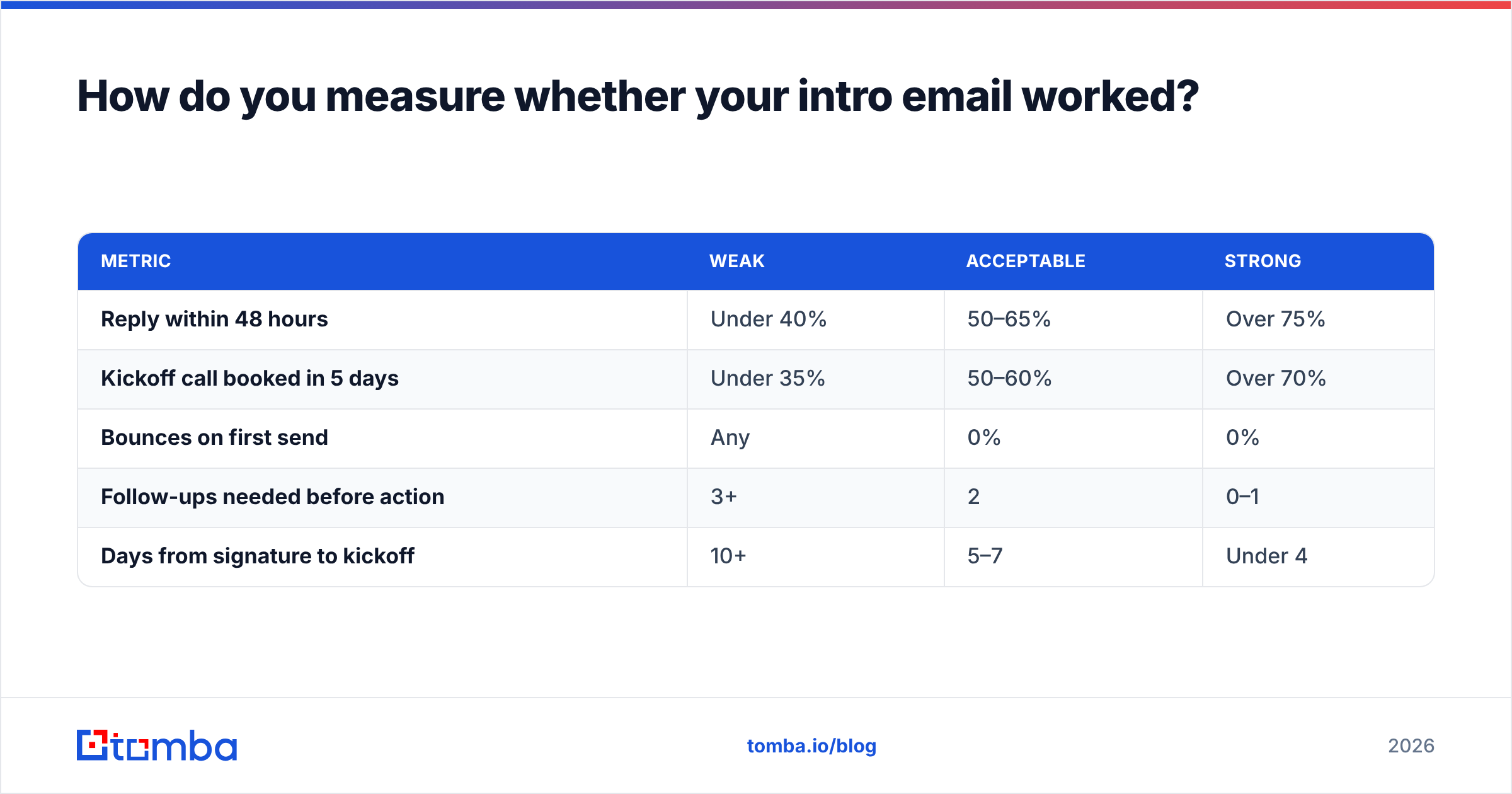
Reply rate in 48 hours, and completion of the single CTA. Everything else is vanity.
| Metric | Weak | Acceptable | Strong |
|---|---|---|---|
| Reply within 48 hours | Under 40% | 50–65% | Over 75% |
| Kickoff call booked in 5 days | Under 35% | 50–60% | Over 70% |
| Bounces on first send | Any | 0% | 0% |
| Follow-ups needed before action | 3+ | 2 | 0–1 |
| Days from signature to kickoff | 10+ | 5–7 | Under 4 |
If your numbers sit in the weak column, diagnose in this order: recipient accuracy first, timing second, CTA friction third, copy last. Teams almost always rewrite the copy first, which is the lowest-leverage change available. The benchmarks published across account-management and customer-success literature — the kind you will find in HubSpot's sales resources or Gartner's sales research — consistently point the same direction: speed and ownership clarity move outcomes more than phrasing.
Track your response rate by segment too. Enterprise accounts with four stakeholders behave nothing like a 12-person startup with one. Averaging them together hides both problems.
What mistakes kill an intro email to a new client?#
- Sending from a no-reply or shared alias. The intro email must come from a human whose inbox is monitored. A
hello@address signals that nobody in particular owns this relationship. - Attaching the welcome pack immediately. A 14-slide PDF on day one guarantees it is never opened. Send the link after the kickoff call, when it answers a question they actually have.
- Over-CCing. Six people on the thread means zero people feel responsible for replying. Three is usually the ceiling, and each one should have a named role in the body.
- Burying the CTA at the bottom. Put the ask above the signature and, if the email runs long, repeat it as the last line. Do not hide it in the middle of a paragraph.
- Writing in future tense. "We will be reaching out to schedule" is a promise of a future email. Schedule now, in this email.
- Using a cold-email subject line. "Quick question" on a signed account reads as a bot. Name the account.
The pattern behind all six: each one transfers work from you to the client. The intro email should do the opposite. Every sentence you write should remove a decision they would otherwise have to make.
What should you do right after the intro email?#
Wait 48 hours, then send one short nudge if the CTA is incomplete — three lines, no apology, restate the single action. If that fails, pick up the phone. A signed client who has ignored two emails is not offended; they are busy. A two-minute call resolves what a third email will not.
Then log what happened. Which accounts replied same day, which stalled, which needed a call. After twenty accounts you will have a real picture of where your handoff process leaks, and it is almost never where you assumed.
The intro email is a small artifact with disproportionate influence. It is the first thing you do after the client commits money, and it either confirms their decision or seeds doubt. Get the recipients right, send it fast, ask for one thing, and let the rest of the relationship do the persuading.
Start with the right inbox. Before you send a single intro email, make sure you have the implementation owner, the technical contact, and the billing lead — not just whoever signed. Tomba Email Finder surfaces verified professional addresses by name and domain so your day-one email lands with everyone who actually needs it. The free tier covers 25 searches a month, and paid plans start at $49/mo on Tomba pricing when your account volume grows.
Related guides#
// get started
Find, verify and enrich your first contacts today
Start on the free plan with 25 searches a month, then scale when your team is ready.
Free plan · No credit card required · GDPR & CCPA
// about the author