Introduction Email Subject Line Examples That Get Replies
Sixty introduction email subject line examples sorted by scenario — cold intro, referral, new account owner, partnership — plus the length rules, the formulas that actually earn opens, and the 12 phrases that quietly kill them.
TL;DR
- The best introduction email subject lines are 3–6 words, lowercase-friendly, and describe a reason, not a greeting. "Introducing myself" is a greeting. "your Q3 hiring plan" is a reason.
- Scenario matters more than cleverness. A referral intro, a cold intro, and a new-account-owner intro need three completely different subject lines.
- Mobile clients cut off around 33–41 characters. If your hook lives at character 50, it does not exist.
- Personalization tokens beat adjectives. A company name, a mutual contact, or a specific number outperforms "exciting," "quick," and "amazing" every time.
- None of it matters if the address bounces. Subject line testing on an unverified list produces garbage data, because bounces and opens get scrambled together.
What counts as an introduction email?#
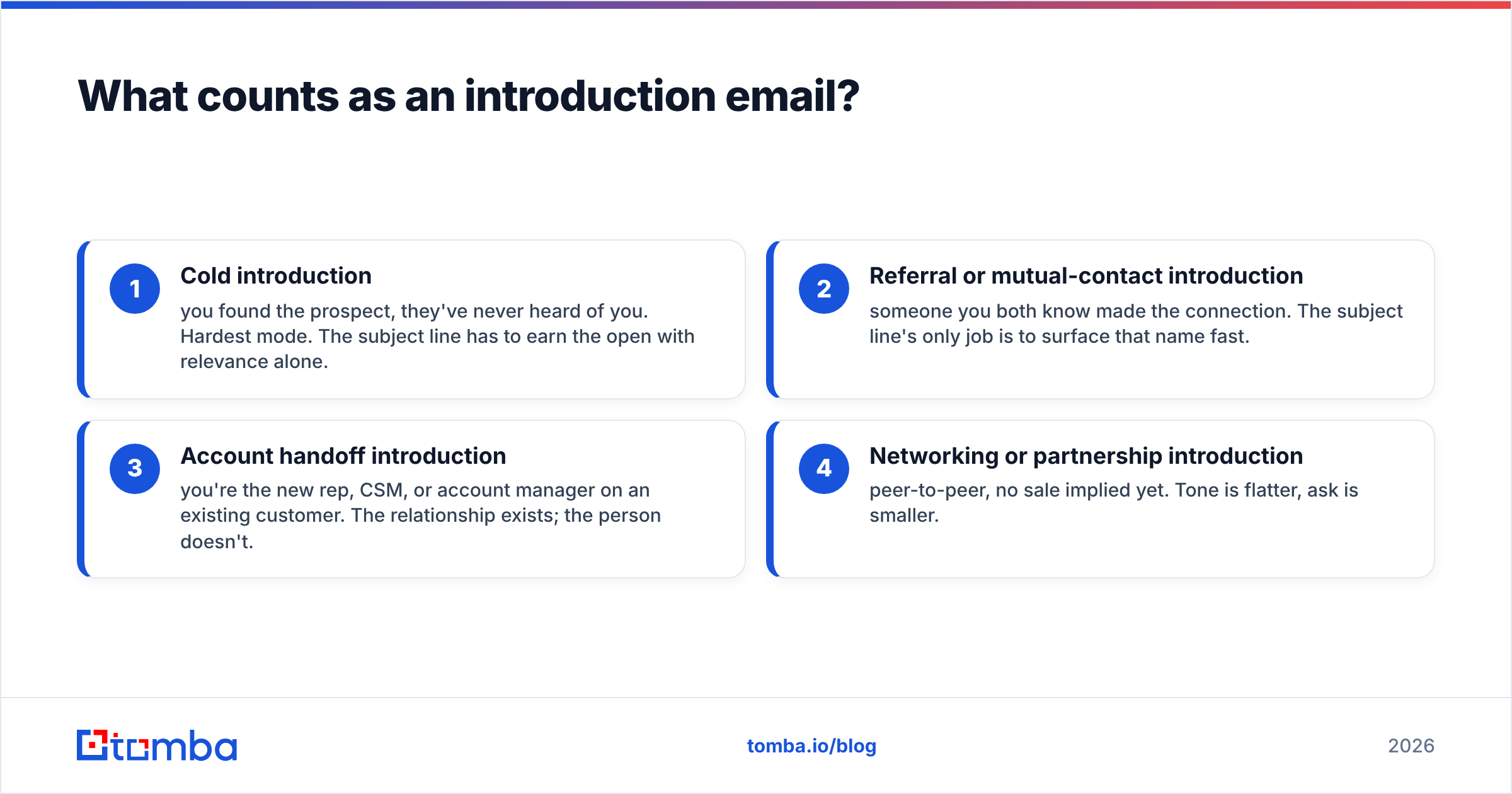
An introduction email is any first message where the recipient does not yet have a relationship with you. That covers four distinct jobs, and people keep blending them into one bland template:
- Cold introduction — you found the prospect, they've never heard of you. Hardest mode. The subject line has to earn the open with relevance alone.
- Referral or mutual-contact introduction — someone you both know made the connection. The subject line's only job is to surface that name fast.
- Account handoff introduction — you're the new rep, CSM, or account manager on an existing customer. The relationship exists; the person doesn't.
- Networking or partnership introduction — peer-to-peer, no sale implied yet. Tone is flatter, ask is smaller.
Each one changes what belongs in the first 40 characters. A cold intro leads with the recipient's world. A referral intro leads with the referrer's name. A handoff leads with the account. A partnership intro leads with the overlap. Use a cold-email subject line on a warm handoff and you sound like a stranger who bought a list.
What makes an introduction email subject line work?#
Four variables do most of the work. In rough order of impact:
- Specificity — a detail only someone who researched the recipient would know. "your Series B" beats "growth opportunities."
- Length — short subject lines survive mobile truncation and read as human. Long ones read as marketing.
- Familiarity signal — a shared name, a shared event, a shared customer. This is why referral intros outperform cold intros by a wide margin.
- Low-pressure framing — a question or a noun phrase invites a read. A command ("Book a call today") invites a delete.
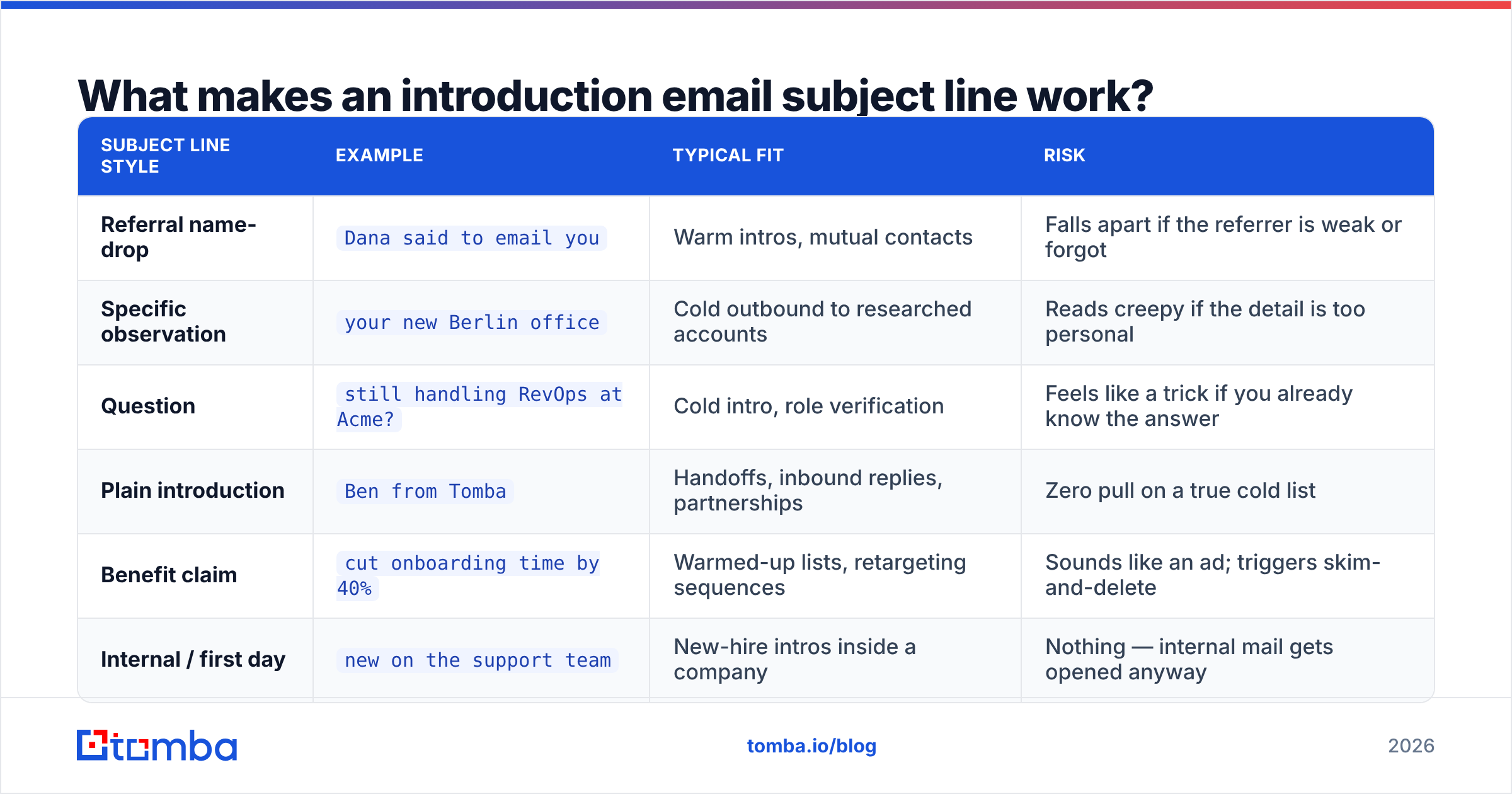
Here's the trade-off between the common formats:
| Subject line style | Example | Typical fit | Risk |
|---|---|---|---|
| Referral name-drop | Dana said to email you |
Warm intros, mutual contacts | Falls apart if the referrer is weak or forgot |
| Specific observation | your new Berlin office |
Cold outbound to researched accounts | Reads creepy if the detail is too personal |
| Question | still handling RevOps at Acme? |
Cold intro, role verification | Feels like a trick if you already know the answer |
| Plain introduction | Ben from Tomba |
Handoffs, inbound replies, partnerships | Zero pull on a true cold list |
| Benefit claim | cut onboarding time by 40% |
Warmed-up lists, retargeting sequences | Sounds like an ad; triggers skim-and-delete |
| Internal / first day | new on the support team |
New-hire intros inside a company | Nothing — internal mail gets opened anyway |
Notice that no row says "use emojis" or "use ALL CAPS." Both raise spam-filter suspicion and neither has held up in credible testing. The HubSpot sales blog has published years of subject line data pointing the same direction: short, specific, and lowercase-ish wins for one-to-one sales mail, while polished title case belongs to newsletters.

What are the best introduction email subject line examples?#
Below are 60 examples grouped by scenario. Swap the bracketed tokens. Do not send any of them verbatim to 500 people — they work because they look hand-written.
Cold introduction to a prospect (15)#
quick question about [Company]'s onboardingyour [job posting] for [role][Company] + [your company]?saw your post on [topic]idea for [specific team]still using [tool] at [Company]?[Competitor] does this differentlyabout your [recent launch][Metric] question for [First name]noticed [Company] is hiring 12 SDRsworth 9 minutes, [First name]?re: your [conference] talka shortcut for [painful process][First name] — data questionwrong person? happy to be pointed
Referral and mutual-contact introduction (12)#
[Referrer] said we should talkintro from [Referrer][Referrer] → [First name]following up on [Referrer]'s intro[Referrer] mentioned your [project]via [Referrer] at [Company]we both know [Referrer][Referrer] thought this was relevantsent by [Referrer][Mutual customer] recommended I reach outfrom your [event] connection[Referrer] copied me in — continuing here
New account owner or handoff (11)#
new point of contact at [Vendor]taking over your account[Your name], your new CSMhi from [Vendor] — same team, new face[Company] account: quick handoff notepicking up where [Previous rep] left offyour renewal, and who to askintro + your open ticketstill the right contact for billing?[Vendor] check-in, new rep30 seconds on your account
Networking, partnership, and peer intros (12)#
[Your company] × [Their company]fellow [industry] person saying hienjoyed your [article]partnership idea, no pitch[Event] follow-upsame problem, different sidequestion from a [role] in [city]your take on [industry shift]?mutual customers: [Customer A], [Customer B]co-marketing thoughtswapping notes on [topic]?saw we both use [tool]
New-hire and internal introductions (10)#
new on the [team] teamhi — I'm the new [role][Your name], joining [team] Mondayyour new [function] contactintro: [Your name], [role]taking over [project] from [Predecessor]hello from the [office] officewho I am and what I'll bug you aboutfirst week questions[Your name] here — say hi anytime
How long should an introduction email subject line be?#
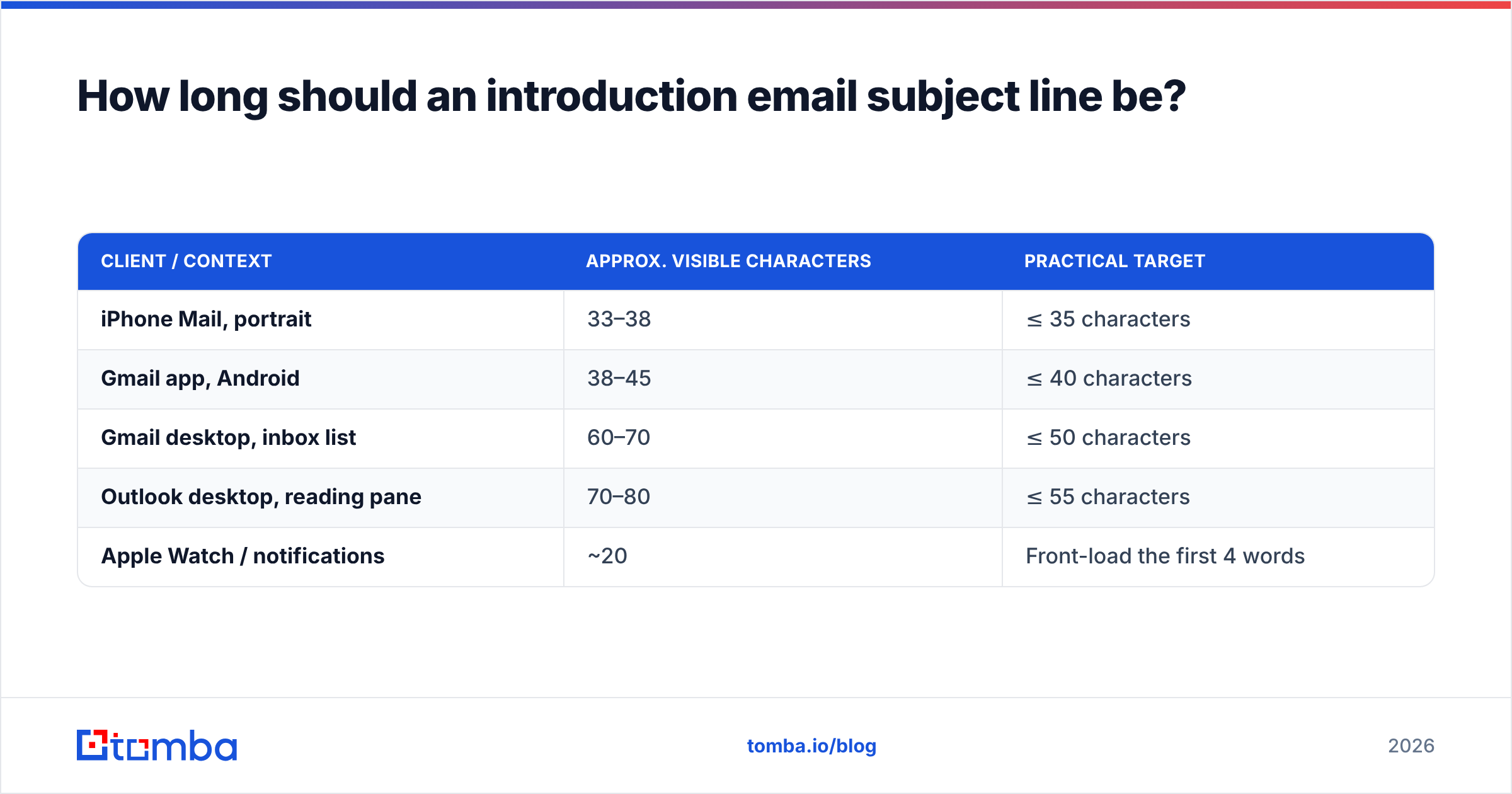
Short enough to survive truncation on the recipient's most likely client. That is the whole rule, and it's device-dependent rather than taste-dependent.
| Client / context | Approx. visible characters | Practical target |
|---|---|---|
| iPhone Mail, portrait | 33–38 | ≤ 35 characters |
| Gmail app, Android | 38–45 | ≤ 40 characters |
| Gmail desktop, inbox list | 60–70 | ≤ 50 characters |
| Outlook desktop, reading pane | 70–80 | ≤ 55 characters |
| Apple Watch / notifications | ~20 | Front-load the first 4 words |
Since most B2B mail gets triaged on a phone first and actioned on a desktop later, write for the phone. A four-word subject line renders identically everywhere. "I wanted to introduce myself and share how we help teams like yours" renders as "I wanted to introduce myself an…" — a sentence fragment with zero information.
A second, quieter reason to stay short: preview text. Whatever you cut from the subject line gets a second chance in the preheader, and the preheader is where most people bury a generic "Hi {{First name}}, hope you're well." Use the subject line tester to see how the pair renders together before you commit a sequence to it.
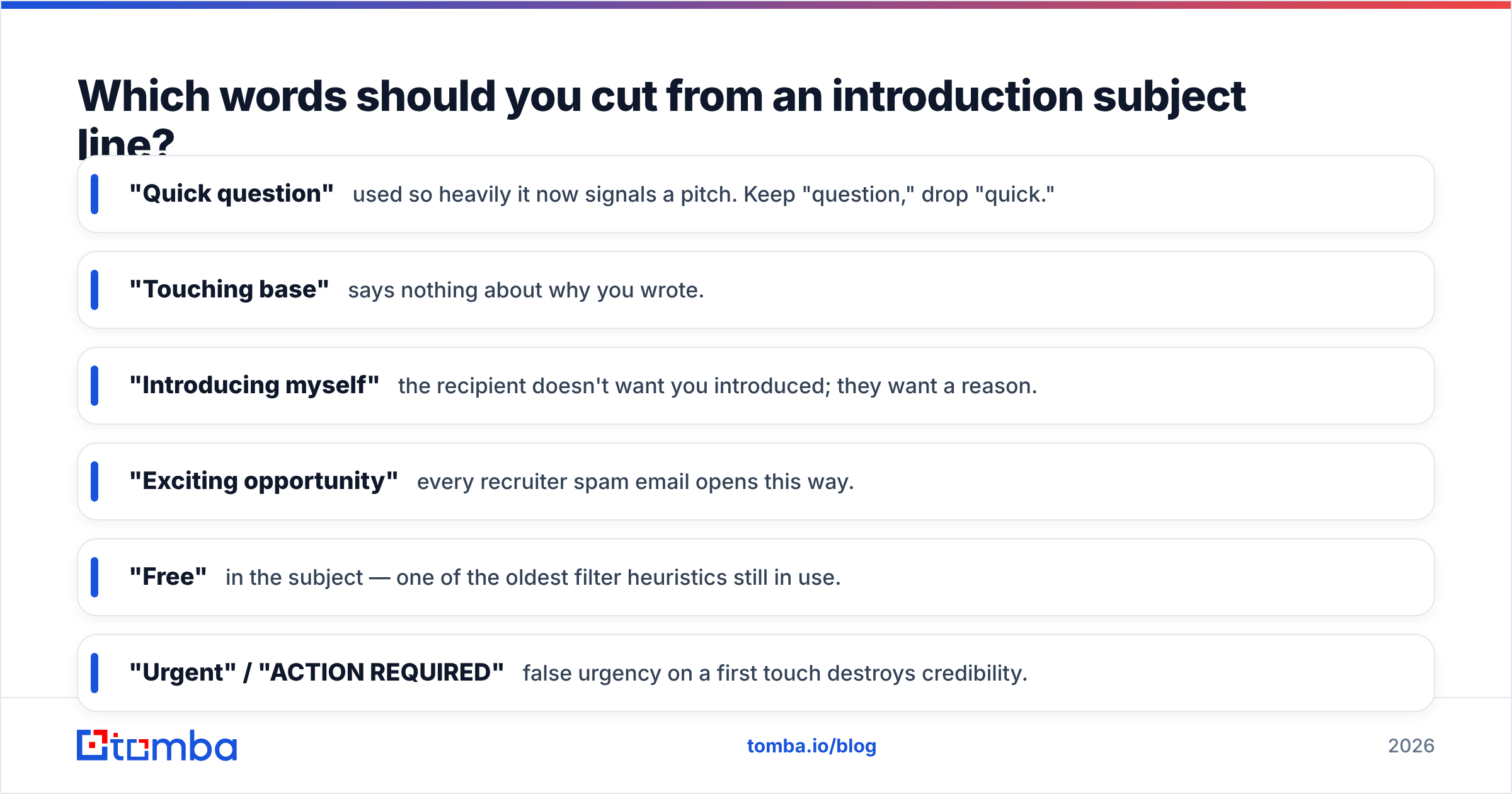
Which words should you cut from an introduction subject line?#
Twelve phrases that consistently underperform or trip filters in one-to-one B2B mail:
- "Quick question" — used so heavily it now signals a pitch. Keep "question," drop "quick."
- "Touching base" — says nothing about why you wrote.
- "Introducing myself" — the recipient doesn't want you introduced; they want a reason.
- "Exciting opportunity" — every recruiter spam email opens this way.
- "Free" in the subject — one of the oldest filter heuristics still in use.
- "Urgent" / "ACTION REQUIRED" — false urgency on a first touch destroys credibility.
- "RE:" or "FWD:" when there is no thread — deceptive, and Gmail's sender guidelines treat deceptive headers as abuse.
- "Let's connect" — LinkedIn-flavored filler.
- "Per my last email" — this is a first email.
- Emoji stacks — one may be fine in B2C; in B2B sales mail it reads as a bulk blast.
- ALL CAPS words — reliably associated with promotional mail.
- Your own company name alone — the recipient has no reason to care yet. Save it for the signature.
Everything in that list shares a trait: it describes your intention rather than their situation. Flip the sentence and the subject line usually writes itself.
Does the subject line matter more than the list?#
No. And this is the part most subject line articles skip.
Open rate is a ratio, and the denominator is delivered messages. If 18% of your list is invalid, your bounce rate climbs, your sender reputation drops, and your genuinely good subject lines start landing in spam — where nobody opens them. You will conclude that "your take on [industry shift]?" underperforms "quick question," when in reality the second variant simply happened to hit more valid inboxes that week.
Two operational rules fix this:
- Verify before you split-test. Run the list through an email verifier and drop anything that isn't deliverable, including risky catch-all domains you can't confirm. A/B results on a clean list are actually readable.
- Test one variable at a time, at real volume. Subject line A vs B, same body, same send window, minimum ~300 sends per arm before you believe anything. Anything smaller is noise dressed as insight.

How do you test introduction subject lines without burning the list?#
Treat the first touch like an experiment with a budget. A workable cadence:
- Week 1 — pick two formats from the table above (say, referral name-drop vs. specific observation). Hold everything else constant.
- Week 2 — keep the winning format, vary only the length: a 3-word version against a 7-word version.
- Week 3 — keep the winner, vary the personalization token: company name vs. person's role vs. a number.
- Week 4 — re-verify the segment, then lock the champion and rotate a fresh challenger in.
Log reply rate, not just opens. Apple Mail Privacy Protection has made open tracking soft since 2021, and any serious measurement now anchors on response rate. A subject line that wins opens and loses replies is a clickbait subject line; it borrowed attention it couldn't repay in the body.
If you want a starting bank of variants rather than writing 40 by hand, the subject line generator will produce scenario-specific options you can then trim to four words. Generated lines are raw material, not finished copy — every one of them still needs the specific detail that only you know about the account.
What does a full introduction email look like around these subject lines?#
The subject line is a promise; the first sentence has to pay it. Three matched pairs:
| Subject line | Opening line that keeps the promise |
|---|---|
saw your post on hiring |
"Your point about junior SDR ramp time is why I'm writing —" |
Dana said to email you |
"Dana mentioned you're rebuilding the outbound stack this quarter." |
taking over your account |
"I'm the new CSM on Acme, replacing Priya as of Monday." |
still using Outreach at Acme? |
"Asking because two of your competitors just moved off it." |
What never works: a compelling subject line followed by "I hope this email finds you well. My name is ___ and I'm reaching out from ___." That opening discards the specificity you just spent your subject line earning. Delete it permanently. For a full set of structures, see the cold email templates library and adapt rather than copy.
Where should you get the addresses in the first place?#
Your subject line strategy is only as good as the contact record behind it. Scraped lists and bought CSVs produce three problems at once: wrong role, wrong company, wrong address — and no subject line survives being sent to a person who left 14 months ago. Build the list from the domain outward: identify the company, find the specific decision-maker by name and role, then confirm the address is live before the first send. That sequence is also what keeps your research specific enough to write "your new Berlin office" instead of "growth opportunities."
Start with the Tomba Email Finder to pull verified professional addresses by name and domain, then run your segment through verification before you test a single subject line. The free tier covers 25 searches a month if you just want to sanity-check a short list; paid plans start at $49/mo on Starter and $99/mo on Growth when you're running real outbound volume — full details on Tomba pricing. Clean data first, clever subject lines second. In that order, both actually work.
Related guides#
// get started
Find, verify and enrich your first contacts today
Start on the free plan with 25 searches a month, then scale when your team is ready.
Free plan · No credit card required · GDPR & CCPA
// about the author