Introduction Email to Client About Company: 2026 Playbook
Most company introduction emails read like a brochure and get deleted in four seconds. Here are the structures, templates, and send-side checks that actually earn a reply in 2026.
TL;DR
- An introduction email to a client about your company fails when it's about your company. Lead with the client's situation, then earn the right to explain who you are in one sentence.
- Keep it to 90–130 words, one ask, no attachments, no calendar link in the first send. Attachments and links are the two biggest early-send deliverability drags.
- Use a different structure for cold intros, warm referrals, handoffs to an existing account, and post-signup welcomes. Same template for all four is why reply rates sit under 3%.
- Your subject line does about 40% of the work and your "from" name does another chunk. "Introduction" as a subject is the weakest option available.
- Verify the address before you send. A 5% bounce rate on a 200-person intro list will quietly damage the domain you need for the next six months.
Why do most company introduction emails get ignored?#
Because they answer a question nobody asked.
Open any inbox and the intro emails all read the same: "Hi {FirstName}, I'm Sarah from Acme Solutions. We're a leading provider of end-to-end workflow automation, founded in 2016, trusted by over 400 companies..." The reader's brain processes that as ad, and ad-shaped text gets archived in about four seconds.
The mechanical problem is ordering. You are writing the email in the order you discovered the information — company first, offer second, relevance third. The reader needs it inverted: relevance first, offer second, company third, and company gets one sentence, not a paragraph.
The second problem is the ask. Most intro emails contain three: "let me know if this resonates," "here's a link to book time," and "I've attached our one-pager." Three asks is zero asks. The reader defers, and deferred email is dead email.
The third is send-side. You can write the best introduction email to client about company relevance ever drafted, and it still loses if it lands in Promotions, if your domain has no SPF record, or if the address was a guess from a permutation tool.

What does a strong introduction email actually contain?#
Six components, in this order. If a sentence doesn't map to one of these, cut it.
- The trigger — one specific reason you're writing now, tied to them: a funding round, a job posting, a product launch, a mutual connection, a form fill. Without a trigger the email is spam by definition, even if it's technically compliant.
- The bridge — one sentence connecting the trigger to a problem you actually solve. Not a feature. A problem in their words.
- The company line — who you are in ≤20 words, with one proof point that matches their segment. "We run outbound data for 60 recruiting agencies" beats "leading B2B data platform."
- The evidence — a number, a named comparable customer, or a result. One only. Two proof points read as insecurity.
- The single ask — an interest-check question ("worth a look?") or a low-commitment ask ("want me to send the two-minute version?"). Not a 30-minute meeting on the first touch.
- The sign-off — name, role, company, one link. No banner images, no six-line signature with social icons, no legal footer on a one-to-one email.
That's roughly 90–130 words. If you're at 250, you've written a brochure.
Which template should you use for which situation?#
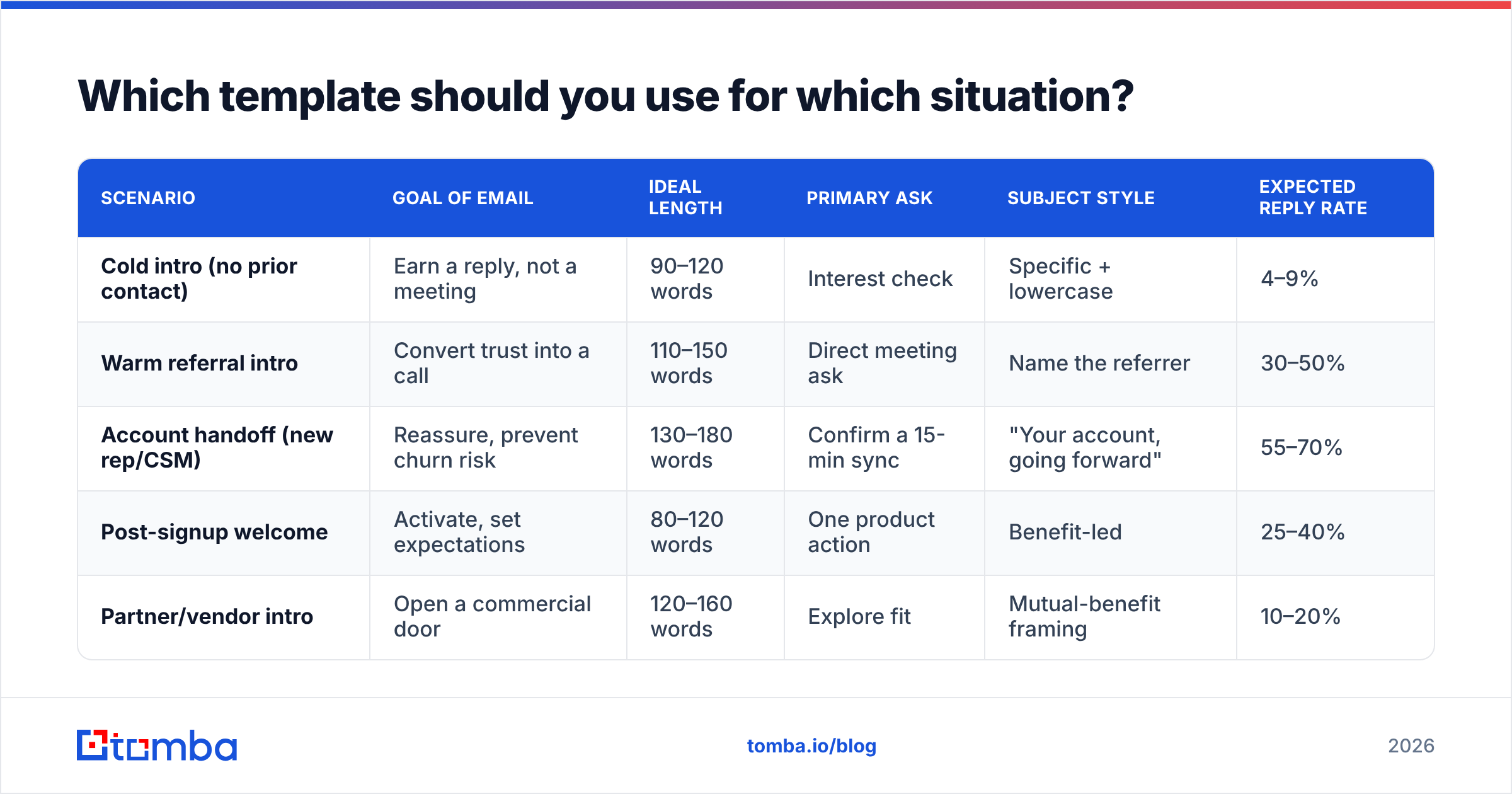
The four common scenarios need genuinely different emails. Here's how they differ on every axis that matters.
| Scenario | Goal of email | Ideal length | Primary ask | Subject style | Expected reply rate |
|---|---|---|---|---|---|
| Cold intro (no prior contact) | Earn a reply, not a meeting | 90–120 words | Interest check | Specific + lowercase | 4–9% |
| Warm referral intro | Convert trust into a call | 110–150 words | Direct meeting ask | Name the referrer | 30–50% |
| Account handoff (new rep/CSM) | Reassure, prevent churn risk | 130–180 words | Confirm a 15-min sync | "Your account, going forward" | 55–70% |
| Post-signup welcome | Activate, set expectations | 80–120 words | One product action | Benefit-led | 25–40% |
| Partner/vendor intro | Open a commercial door | 120–160 words | Explore fit | Mutual-benefit framing | 10–20% |
Reply-rate ranges reflect what's realistic for a targeted list of under 500 contacts with verified addresses. Blast a 10,000-row purchased list and every number in that column drops by an order of magnitude.
Template 1 — Cold introduction#
Subject: your Series B hiring plan
Hi Dana,
Saw you opened four AE roles in Berlin this month — that usually means the SDR handoff process is about to get noisy.
We're Tomba. We supply verified contact data to about 60 European sales teams, mostly ones scaling from 5 to 25 reps. The common fix is getting prospect emails verified before they hit the CRM, so new reps aren't burning their first month on bounces.
Worth a look, or is data already sorted on your side?
Mo
Tomba.io
Note what's missing: no attachment, no calendar link, no "hope this finds you well," no three-paragraph company history.
Template 2 — Warm referral#
Subject: Priya suggested I reach out
Hi Marcus,
Priya Chandra mentioned you're rebuilding the outbound stack at Northwind and said we should talk.
Quick context: we handle the email-finding and verification layer — Priya's team cut bounce rate from 11% to under 2% after switching. That's the whole pitch.
Are you free Thursday or Friday afternoon for 20 minutes? Happy to work around you.
Mo
Template 3 — Account handoff#
Subject: taking over your account from Jenna
Hi Sam,
Jenna's moved to our enterprise team, so I'm your point of contact from today. I've read through your last six months of tickets — the Airtable sync issue from March and the seat expansion you flagged in July.
Two things I want to confirm: whether the sync is behaving now, and whether you still want to add those four seats before renewal.
Can we do 15 minutes this week? I'll come with answers, not questions.
Mo
Template 4 — Post-signup welcome#
Subject: your first 25 searches
Hi Alex,
You're in. Your free plan includes 25 searches a month — enough to test whether our match rate holds on your actual target accounts.
Best first move: run a domain search on the three companies you most want to reach. If the results look thin, reply to this email and I'll check what's happening on our side.
Mo
How do you write the subject line?#
Assume the subject line is the whole email, because for 60% of recipients it is.
Rules that hold up across industries:
- Lowercase beats title case on one-to-one email. Title case reads as marketing; lowercase reads as a person typing quickly.
- Specific beats clever. "your Series B hiring plan" outperforms "a thought on scaling."
- Three to five words. Mobile clients truncate around 35 characters.
- Never use "Introduction," "Quick question," or "Touching base." These are the three most-used subject lines in B2B, which means they're the three most-trained-to-ignore.
- No brackets, no emoji, no ALL CAPS, no "Re:" fakery. The last one is a trust-destroyer and some filters flag it.
If you want a starting point, run a few variations through a subject line tester before you commit. The scoring won't be gospel, but it catches spam-trigger words and length problems fast.
Does the email even reach the inbox?#
This is where good copy dies quietly.
Three things determine whether your introduction email lands:
Authentication. SPF, DKIM, and DMARC must all pass. Google and Yahoo have required this for bulk senders since 2024, and enforcement has only tightened since. If you're unsure, check your SPF record before your next campaign — a broken one means Gmail may reject outright rather than filter. Google's own sender guidelines spell out the current requirements.
List hygiene. Bounce rate above 3% is the single fastest way to wreck sender reputation. If you sourced addresses from scraping or pattern-guessing, run them through an email verifier before the first send, not after the damage.
Volume shape. Sending 400 identical emails from a cold domain in one hour is a filter trigger regardless of content. Ramp over weeks, vary the first line, and keep daily volume per mailbox under ~50 for new domains.

What separates a good intro email from a spammy one?#
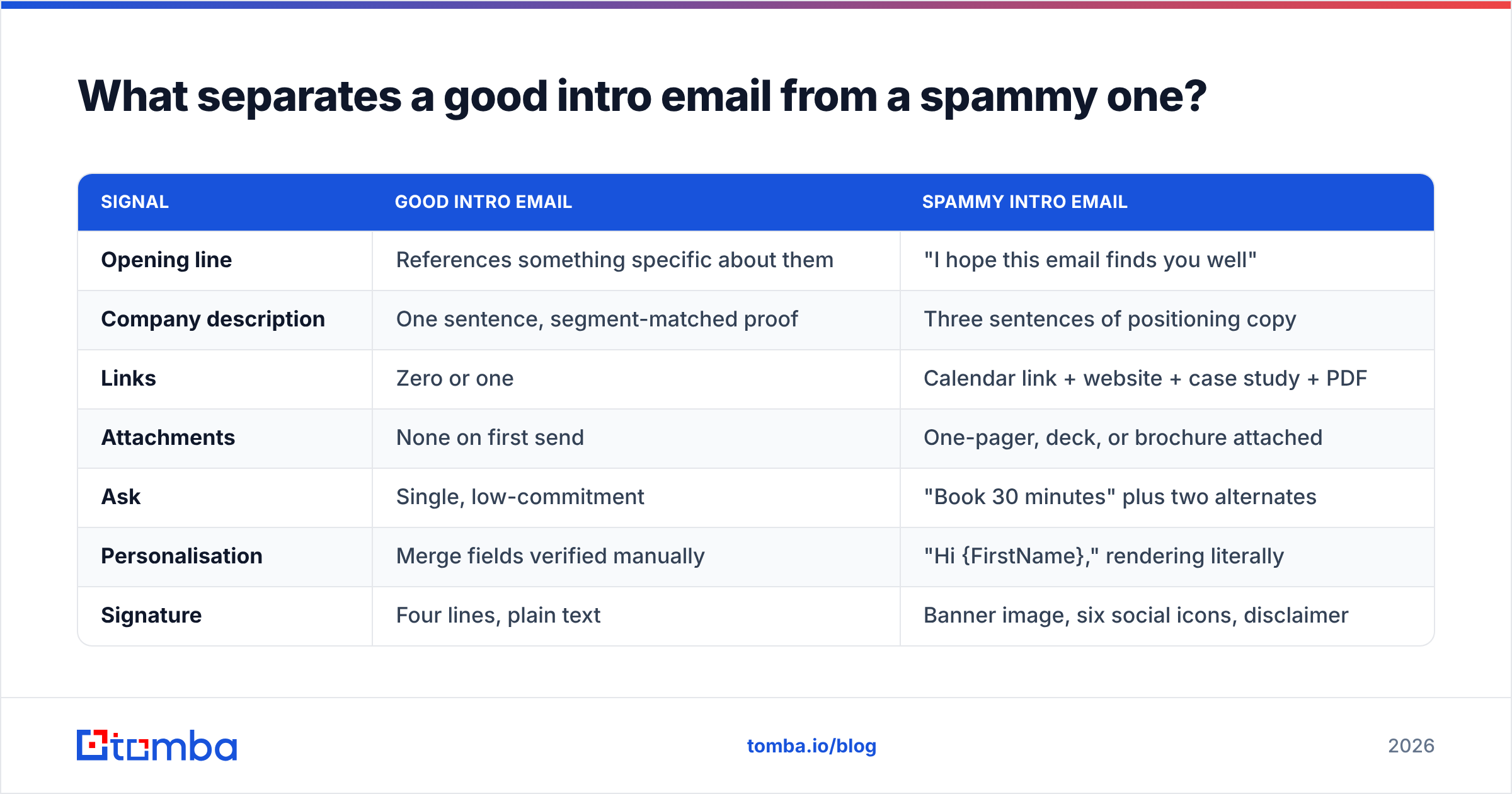
The difference is usually four or five concrete choices, not tone.
| Signal | Good intro email | Spammy intro email |
|---|---|---|
| Opening line | References something specific about them | "I hope this email finds you well" |
| Company description | One sentence, segment-matched proof | Three sentences of positioning copy |
| Links | Zero or one | Calendar link + website + case study + PDF |
| Attachments | None on first send | One-pager, deck, or brochure attached |
| Ask | Single, low-commitment | "Book 30 minutes" plus two alternates |
| Personalisation | Merge fields verified manually | "Hi {FirstName}," rendering literally |
| Signature | Four lines, plain text | Banner image, six social icons, disclaimer |
| Send list | Verified, under 500, targeted | Purchased, 10k rows, unverified |
The attachment line matters more than people expect. A first-contact email with a PDF attached from an unknown sender is one of the strongest spam signals in most corporate filters. Send the PDF in email two, after they've replied.
How do you find and verify the right address?#
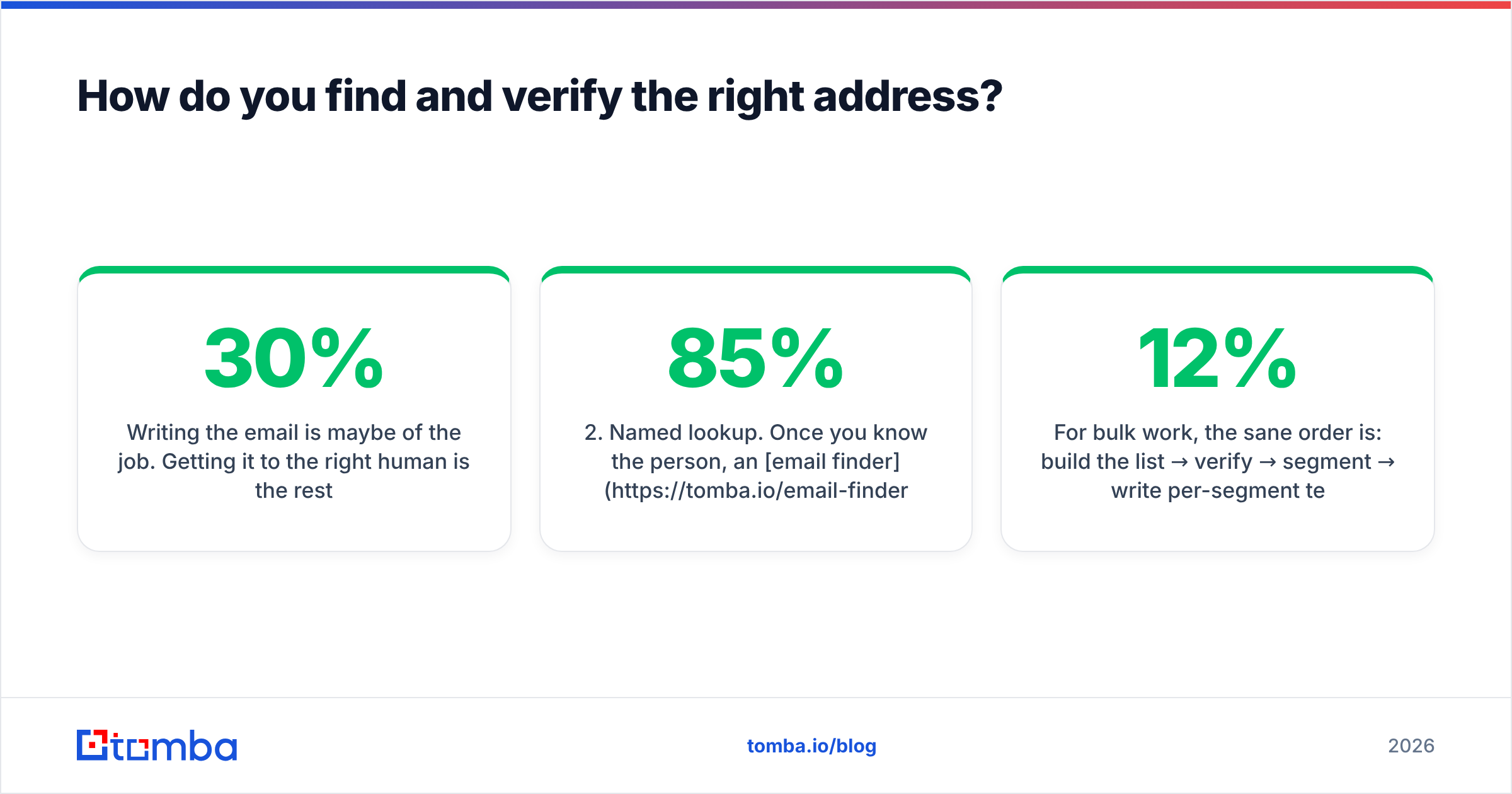
Writing the email is maybe 30% of the job. Getting it to the right human is the rest.
Three practical paths, in order of reliability:
- Domain search. Pull the known email addresses and the company's email pattern from the domain itself. Running a domain search on a target company tells you whether they use
first.last@,flast@, orfirst@before you guess anything. - Named lookup. Once you know the person, an email finder resolves name + domain into a specific address with a confidence score. Treat anything under ~85% confidence as unverified.
- Verification pass. Even a high-confidence find deserves an SMTP-level check. Catch-all domains are the trap here — they accept everything, so a "valid" result means nothing without a catch-all verifier to separate real mailboxes from the black hole.
For bulk work, the sane order is: build the list → verify → segment → write per-segment templates → send in small waves. Inverting that — writing first, sending, then discovering a 12% bounce rate — is the standard mistake.
Worth noting that the tooling market here is wide. Tomba, BookYourData, Hunter, and Apollo all solve versions of this problem with different trade-offs around database size, pay-per-lead versus subscription, and verification depth. Read the G2 category rather than any single vendor's comparison page — including this one.
What should you measure after sending?#
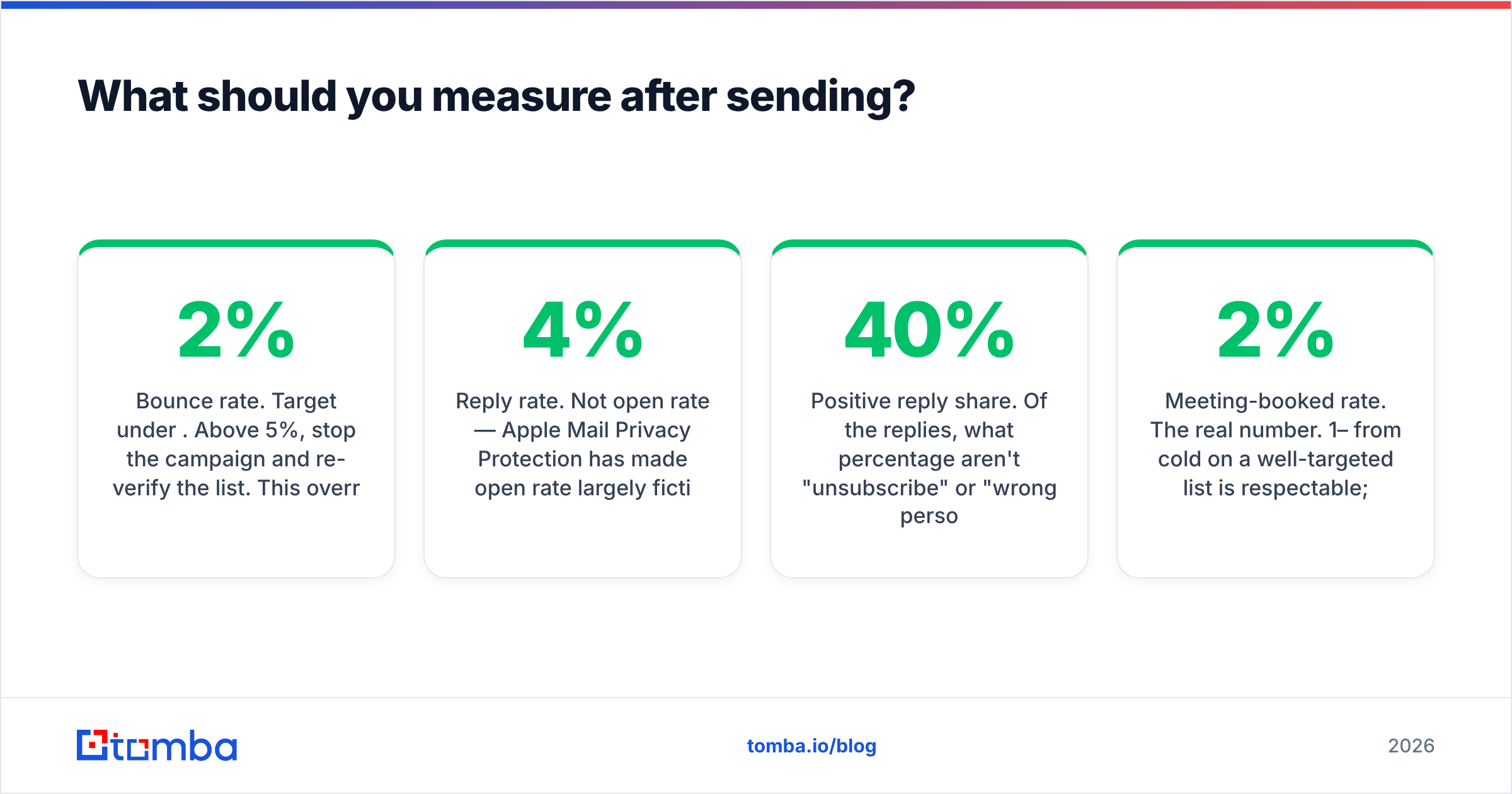
Four numbers, checked at day 3 and day 10:
- Bounce rate. Target under 2%. Above 5%, stop the campaign and re-verify the list. This overrides everything else.
- Reply rate. Not open rate — Apple Mail Privacy Protection has made open rate largely fiction since 2021. Reply rate on a targeted cold list should clear 4%. Under 2% means the trigger or the targeting is wrong, not the copy.
- Positive reply share. Of the replies, what percentage aren't "unsubscribe" or "wrong person"? Below 40% and your ICP definition is loose.
- Meeting-booked rate. The real number. 1–2% from cold on a well-targeted list is respectable; anyone quoting 15% is counting warm inbound.
Track these per template, not per campaign. Otherwise your handoff emails' 60% reply rate masks the cold sequence's 1.5%.
How many follow-ups should an introduction get?#
Two, maybe three, and each must add something new.
- Follow-up 1 (day 3): Reply in the same thread. Add one piece of context you left out — a specific result, a relevant customer in their vertical.
- Follow-up 2 (day 8): Change the angle entirely. If the first was about bounce rates, make this about onboarding speed. Different problem, same company.
- Follow-up 3 (day 16, optional): The close-the-loop email. "Assuming this isn't a priority — I'll stop here. If that changes, reply to this thread." No guilt, no "just bumping this."
Four or more follow-ups on a cold intro converts a low reply rate into spam complaints, and spam complaints are far more expensive than a lost deal. Watch your response rate by follow-up number — if number three is producing nothing but unsubscribes, cut it.
Common mistakes worth avoiding#
- Writing the company history. Nobody has ever bought because a vendor was "founded in 2016."
- Merge-field failure. Test-send to yourself. "Hi ," is an instant delete and a permanent impression.
- The 2,000-word "personalised" email. Length is not effort. Specificity is effort.
- Sending Monday 9am. Everyone's inbox is a warzone. Tuesday–Thursday, mid-morning in the recipient's timezone, does measurably better.
- Using your primary domain for cold volume. Use a separate sending domain. If it burns, your invoices and support email still work.
- Skipping verification because "it's only 50 people." Fifty unverified addresses can contain three spam traps. Three spam traps is enough.
Get the address right before you get the words right#
The best introduction email to client about company fit is worthless if it hits a dead mailbox or a spam trap. Start at the data layer: use the Tomba Email Finder to resolve names and domains into verified, confidence-scored addresses, with catch-all detection built in so you know what you're actually sending to.
The free tier gives you 25 searches a month — enough to test match quality on your real target accounts before committing. Paid plans start at $49/mo (Starter), with Growth at $99/mo and Pro at $249/mo; full Tomba pricing is public. Build the list, verify it, then write the email. In that order.
Related guides#
// get started
Find, verify and enrich your first contacts today
Start on the free plan with 25 searches a month, then scale when your team is ready.
Free plan · No credit card required · GDPR & CCPA
// about the author