Introduction Email to Client for Services: Templates That Work
Most service introduction emails read like a brochure and get deleted in two seconds. Here are seven tested templates, the six-part structure behind them, and the research step that decides whether anyone replies.
TL;DR
- An introduction email to client for services has one job: earn a reply, not describe your company. Everything about your agency, credentials, and process belongs in the second email.
- The winning structure is six parts — subject, trigger line, one-sentence positioning, one proof point, one specific ask, and a clean signature. Under 150 words.
- Seven templates below cover the realistic situations: cold outreach, warm referral, inbound lead, event follow-up, account handover, re-engagement, and RFP response.
- Reply rates die on the research step, not the writing step. A generic first line and an unverified address will sink even excellent copy.
- Send to a verified individual, never to
info@. Bounces damage your domain long before your copy ever gets a chance.
What is an introduction email to client for services?#
An introduction email to client for services is the first written contact between a service provider and a prospective or newly assigned client. It covers a narrow but common set of moments: a cold prospect who has never heard of you, a referral someone just handed you, an inbound form fill you need to convert into a call, or an existing account you have just inherited from a colleague who left.
The trap is treating all four as the same email. They have wildly different levels of permission. A referral email can open with a name and close with a calendar link. A cold email that does the same thing reads as presumptuous and gets deleted. The template you choose should be decided by how much trust already exists, not by what you feel like writing.
One more framing that helps: this email is not a pitch. It is a request for a small amount of attention, backed by evidence that you deserve it. Sales teams that treat the first touch as a qualification step rather than a closing attempt consistently report better downstream conversion, a pattern HubSpot's sales research has documented across thousands of outbound programs.
Why do most service introduction emails get ignored?#
Four reasons, in order of how often they show up in real inboxes.
It opens with you. "I'm reaching out from Acme Digital, a full-service agency founded in 2014..." The recipient has no reason to care yet. The first sentence must be about them or about something they did.
It asks for too much. "Do you have 30 minutes this week to discuss your digital transformation roadmap?" That is a large commitment from someone who met you eleven seconds ago. Shrink the ask.
It lists services instead of naming a problem. Service menus are interchangeable. Twelve agencies offer SEO, paid media, and content. Nobody picks based on the list.
It never reaches a human. A meaningful share of first-touch emails land at a generic inbox, a departed employee, or a catch-all domain that silently swallows everything. No amount of copy improvement fixes an address problem.
That last point is worth sitting with. If you send 300 introduction emails and 40 of them bounce, you have not just lost 40 prospects — you have signalled to mailbox providers that you buy or guess addresses. Sustained bounce rates above roughly 2% start eroding email deliverability for every message you send afterward, including the ones to clients who already like you.
What structure should an introduction email to client for services follow?#
Six parts. Every template further down is a variation on this skeleton.
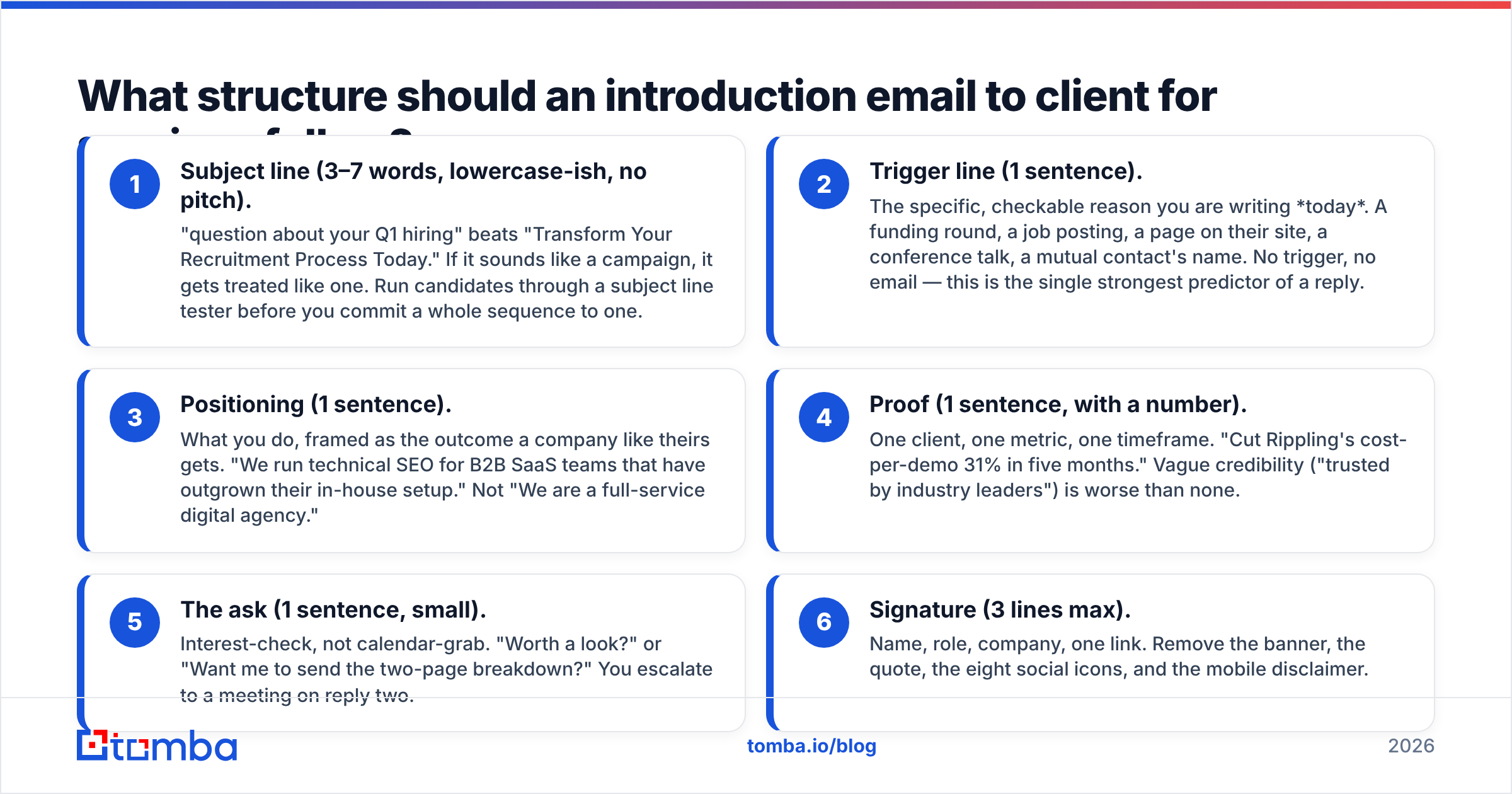
- Subject line (3–7 words, lowercase-ish, no pitch). "question about your Q1 hiring" beats "Transform Your Recruitment Process Today." If it sounds like a campaign, it gets treated like one. Run candidates through a subject line tester before you commit a whole sequence to one.
- Trigger line (1 sentence). The specific, checkable reason you are writing today. A funding round, a job posting, a page on their site, a conference talk, a mutual contact's name. No trigger, no email — this is the single strongest predictor of a reply.
- Positioning (1 sentence). What you do, framed as the outcome a company like theirs gets. "We run technical SEO for B2B SaaS teams that have outgrown their in-house setup." Not "We are a full-service digital agency."
- Proof (1 sentence, with a number). One client, one metric, one timeframe. "Cut Rippling's cost-per-demo 31% in five months." Vague credibility ("trusted by industry leaders") is worse than none.
- The ask (1 sentence, small). Interest-check, not calendar-grab. "Worth a look?" or "Want me to send the two-page breakdown?" You escalate to a meeting on reply two.
- Signature (3 lines max). Name, role, company, one link. Remove the banner, the quote, the eight social icons, and the mobile disclaimer.
Total: under 150 words, ideally under 110. If you cannot say it in that space, you have not decided what you are saying.
What do the seven templates actually look like?#
1. Cold prospect (no prior relationship)
Subject: your careers page
Hi Dana — saw you're hiring two more field techs in Austin, which usually means dispatch is the bottleneck before headcount is.
We build scheduling automation for HVAC operators in the 20–80 tech range. Sunbelt Air added 14% more jobs per week without adding dispatchers.
Worth a quick look at how they did it?
— Marcus, Ops Lead, Routewise
2. Warm referral
Subject: Priya suggested I reach out
Hi Tom — Priya Raman mentioned you're rebuilding the reporting layer at Northwind and thought our work on her side might be relevant.
We do analytics engineering for mid-market retail; with Priya's team we cut month-end close from nine days to three.
Happy to share the approach, or just send the architecture doc if that's more useful. Which do you prefer?
— Elena, Northstar Data
3. Inbound lead (they filled a form)
Subject: your pricing page question
Hi Sam — thanks for downloading the migration checklist. Most people who grab it are somewhere between "we should probably move" and "we have a date."
Where are you? If it's the first one, I'll send two things worth reading and leave you alone. If it's the second, I'll send a 20-minute slot.
— Jordan, Cloudshift
4. Event or webinar follow-up
Subject: your question about attribution
Hi Rachel — you asked during Tuesday's session how we handle attribution when the buying committee is seven people. Short answer: we stop attributing and start measuring account-level lift.
I wrote up the method for a client in your space. Want it?
— Devon, Halcyon
5. Account handover (existing client, new owner)
Subject: taking over from Ben
Hi Nadia — Ben has moved to our product team and I'm now looking after Vertex. I've read the last six months of notes, so you won't have to re-explain the Q3 migration.
Two things I want to confirm are still priorities: the Shopify sync and the SLA change you raised in June. Correct?
15 minutes this week, or reply here — your call.
— Alicia, Client Partner
6. Re-engagement (went quiet 6+ months ago)
Subject: closing your file?
Hi Owen — we spoke in March about the warehouse rollout and it went quiet, which usually means priorities moved. Totally fine.
One thing changed since: we now handle the WMS integration ourselves instead of scoping it separately, which was the sticking point last time.
Still relevant, or should I close the file?
— Marcus, Routewise
7. RFP or procurement intro
Subject: Re: RFP 2026-114 — clarifying question
Hi Ms. Adeyemi — before we submit for RFP 2026-114, one clarification: section 4.2 asks for SOC 2 Type II; does the audit need to cover the subprocessor list as well, or the primary vendor only?
We're a 40-person managed security firm; we've run this scope for three state agencies. Our submission lands Thursday either way.
— Chris Vale, Aegis
Which introduction email template fits which situation?#
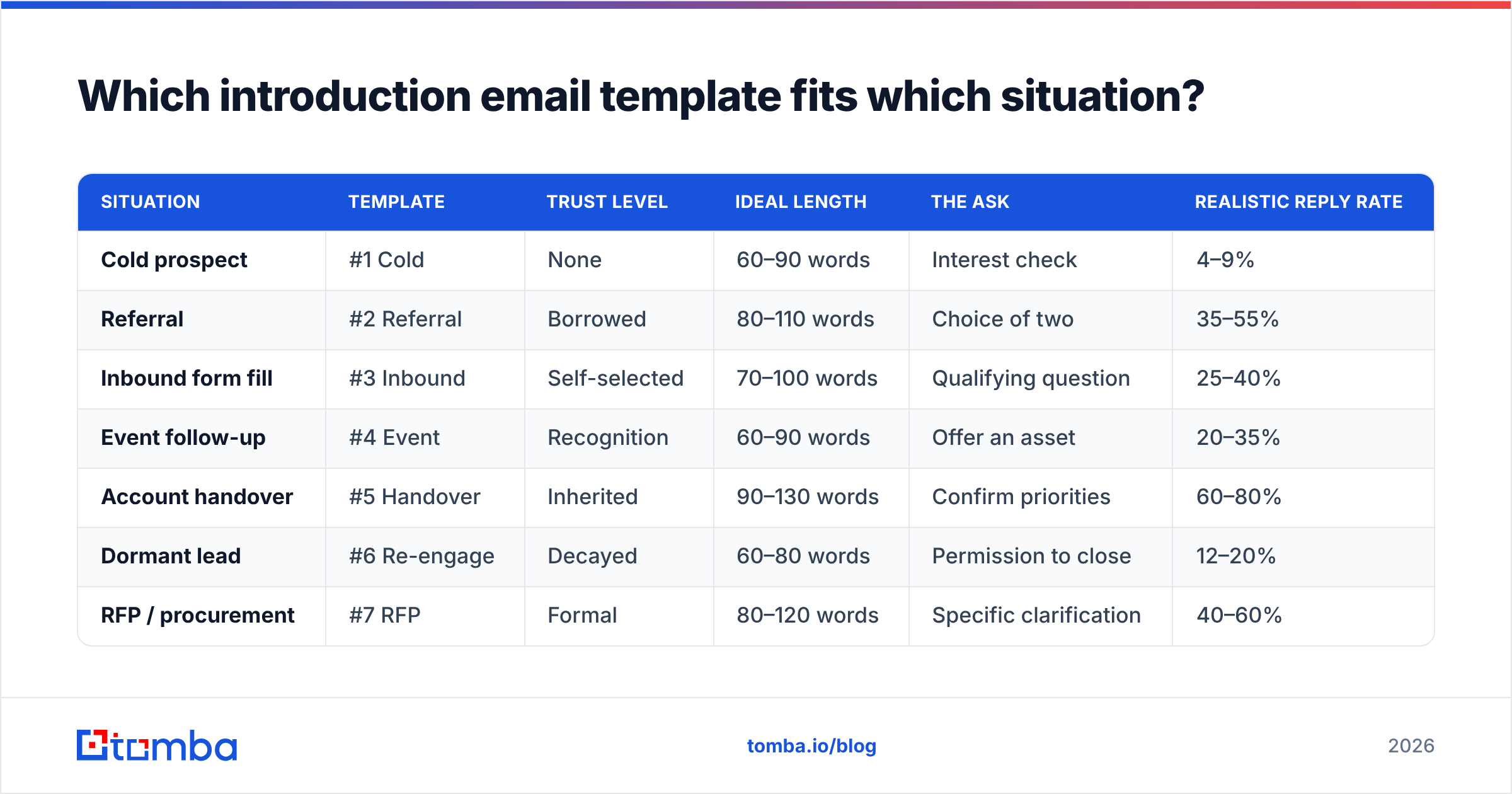
| Situation | Template | Trust level | Ideal length | The ask | Realistic reply rate |
|---|---|---|---|---|---|
| Cold prospect | #1 Cold | None | 60–90 words | Interest check | 4–9% |
| Referral | #2 Referral | Borrowed | 80–110 words | Choice of two | 35–55% |
| Inbound form fill | #3 Inbound | Self-selected | 70–100 words | Qualifying question | 25–40% |
| Event follow-up | #4 Event | Recognition | 60–90 words | Offer an asset | 20–35% |
| Account handover | #5 Handover | Inherited | 90–130 words | Confirm priorities | 60–80% |
| Dormant lead | #6 Re-engage | Decayed | 60–80 words | Permission to close | 12–20% |
| RFP / procurement | #7 RFP | Formal | 80–120 words | Specific clarification | 40–60% |
Those ranges assume a verified list, a warmed sending domain, and plain-text formatting. Treat them as sanity checks, not guarantees — vertical, seniority, and season all move them. If your cold number sits at 1%, the problem is almost never the template.
How do you find and verify the right client contact?#
This is the step that quietly decides everything, and it is the step most teams rush.
Work in this order:
- Identify the role, not the person. Decide who owns the outcome you affect. For a service business that is often a director-level operator, not the VP whose calendar is already a fortress.
- Find the individual. Use a domain-level lookup to pull the named contacts and pattern for a company — a domain search returns the addresses tied to a company plus its format convention, which is far more reliable than guessing
first.last@. - Verify before sending. Run every address through an email verifier. Catch-all domains need their own handling; a plain SMTP ping returns "accepted" for every mailbox on those, which is why they inflate apparent list quality and then bounce later.
- Enrich for the trigger line. Job title, recent role change, tech stack, headcount growth. This is the raw material for part 2 of the structure. Without it you fall back to "I hope this email finds you well," and you already know how that ends.

A useful discipline: if you cannot write a specific, checkable trigger line for a contact in under 90 seconds, drop them from this batch. Ten researched emails beat two hundred templated ones, and they will not torch your domain reputation on the way.
What mistakes kill reply rates on service intro emails?#
Attachments on first contact. Proposals, PDFs, and decks on email one are a spam-filter risk and a commitment ask. Offer, don't attach.
More than one link. Two or more links in a cold email measurably increases spam placement. One link, in the signature, is plenty.
Merge-field damage. Hi {{FirstName}}, that renders as Hi , or Hi CEO, is not a small typo — it is a public admission that the email is automated. Always send a test to yourself against real row data.
Fake personalization. "I loved your recent post!" without naming the post is worse than no compliment, because it proves the rest is templated too.
Ignoring the legal layer. Commercial email in the US needs a physical address and a working opt-out under the CAN-SPAM Act; EU recipients bring GDPR's legitimate-interest test into play. Neither rule blocks B2B outreach — both punish sloppy outreach.
No follow-up plan. A large share of replies to service introductions arrive on touch two or three. One bump, four business days later, referencing the original message in the same thread, is the highest-yield line of copy you will ever write.
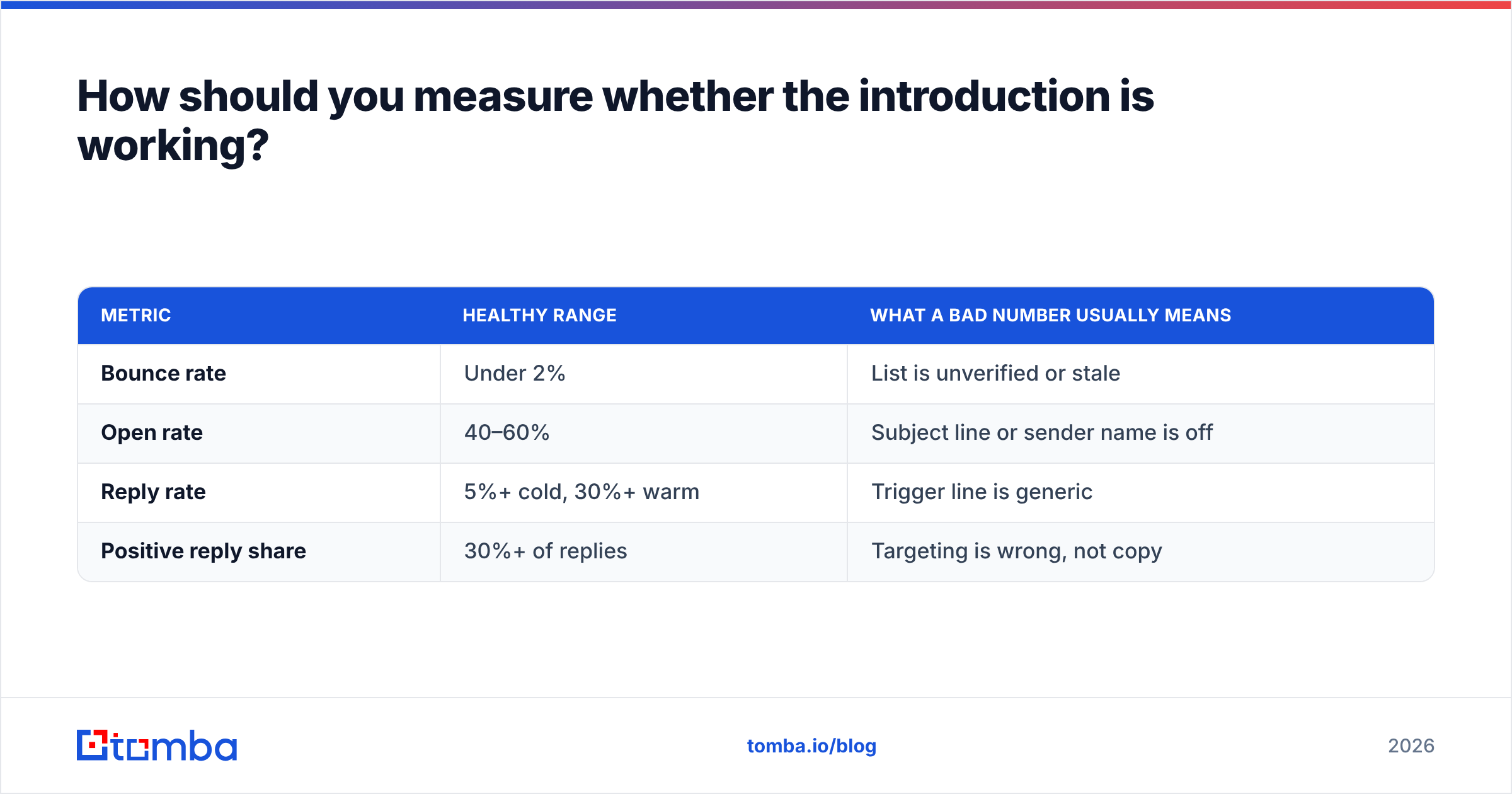
How should you measure whether the introduction is working?#
Track four numbers and ignore the rest.
| Metric | Healthy range | What a bad number usually means |
|---|---|---|
| Bounce rate | Under 2% | List is unverified or stale |
| Open rate | 40–60% | Subject line or sender name is off |
| Reply rate | 5%+ cold, 30%+ warm | Trigger line is generic |
| Positive reply share | 30%+ of replies | Targeting is wrong, not copy |
Open rate is the least trustworthy of the four post-MPP, so use it directionally. The diagnostic sequence matters: fix bounces first, then targeting, then subject, then body. Rewriting body copy while 8% of your sends bounce is rearranging deck chairs. Peer reviews on G2 are a decent sanity check when you are evaluating which part of your stack is actually underperforming.
Run your intro email as a controlled test: one variable at a time, minimum 100 sends per arm, and let it run a full week before you call it. Changing subject and first line together tells you nothing about which one moved the number.
Start with the contact, not the copy#
The best introduction email to client for services is an ordinary email sent to exactly the right person at a moment when the timing makes sense. Templates get you 30% of the way. The other 70% is knowing who to write to and being certain the address is real.
That is where Tomba's Email Finder fits: find the named decision-maker behind a company domain, confirm the address resolves before you send, and export a clean list your sequencing tool won't choke on. The free tier covers 25 searches a month if you want to test it against a handful of target accounts first; paid plans start at $49/mo on Tomba pricing when you're ready to run real volume. Pick ten accounts, research them properly, and send template #1 tomorrow.
Related guides#
// get started
Find, verify and enrich your first contacts today
Start on the free plan with 25 searches a month, then scale when your team is ready.
Free plan · No credit card required · GDPR & CCPA
// about the author