Introduction Email to Customer: Templates That Get Replies
Most introduction emails read like a press release and get deleted in four seconds. Here's the structure, timing, and seven copy-paste templates that actually earn a reply from a new customer.
TL;DR
- An introduction email to a customer has one job: earn a reply, not explain your company. Everything that does not serve that job gets cut.
- The structure that works in 2026 is five blocks — relevant trigger, one-line who you are, one specific value claim, proof, single low-friction ask.
- Keep it between 60 and 120 words. Longer intros correlate with lower reply rates in almost every sales-email dataset published since 2021.
- Deliverability is half the battle: a wrong address burns your domain reputation before your copy ever gets read. Verify before you send.
- Use the seven templates below as skeletons, not scripts. Swap the trigger line and the ask; keep the shape.
What is an introduction email to a customer?#
An introduction email to a customer is the first written contact between you and a person who is not yet buying from you — or who is buying, but has just been handed to you. It covers four different situations that people wrongly treat as one:
- Cold introduction — you have never spoken. The recipient does not know your name, your company, or why you are in their inbox.
- Warm introduction — a mutual contact, event, or inbound action created context. You are borrowing someone else's credibility.
- Account handoff — the customer already pays you, and you are the new account manager, CSM, or rep. The risk here is churn, not indifference.
- New product or service introduction — an existing customer needs to hear about something adjacent to what they already own.
Think of it like walking into a dinner party. The cold intro is arriving uninvited — you get about one sentence to justify yourself. The handoff is being introduced by the host — you already have permission, so the job is to not waste it. The copy that works in one situation reads as arrogant or needy in the other.
Most teams write one template and use it for all four. That is the single biggest reason intro emails underperform.
When should you send an introduction email?#
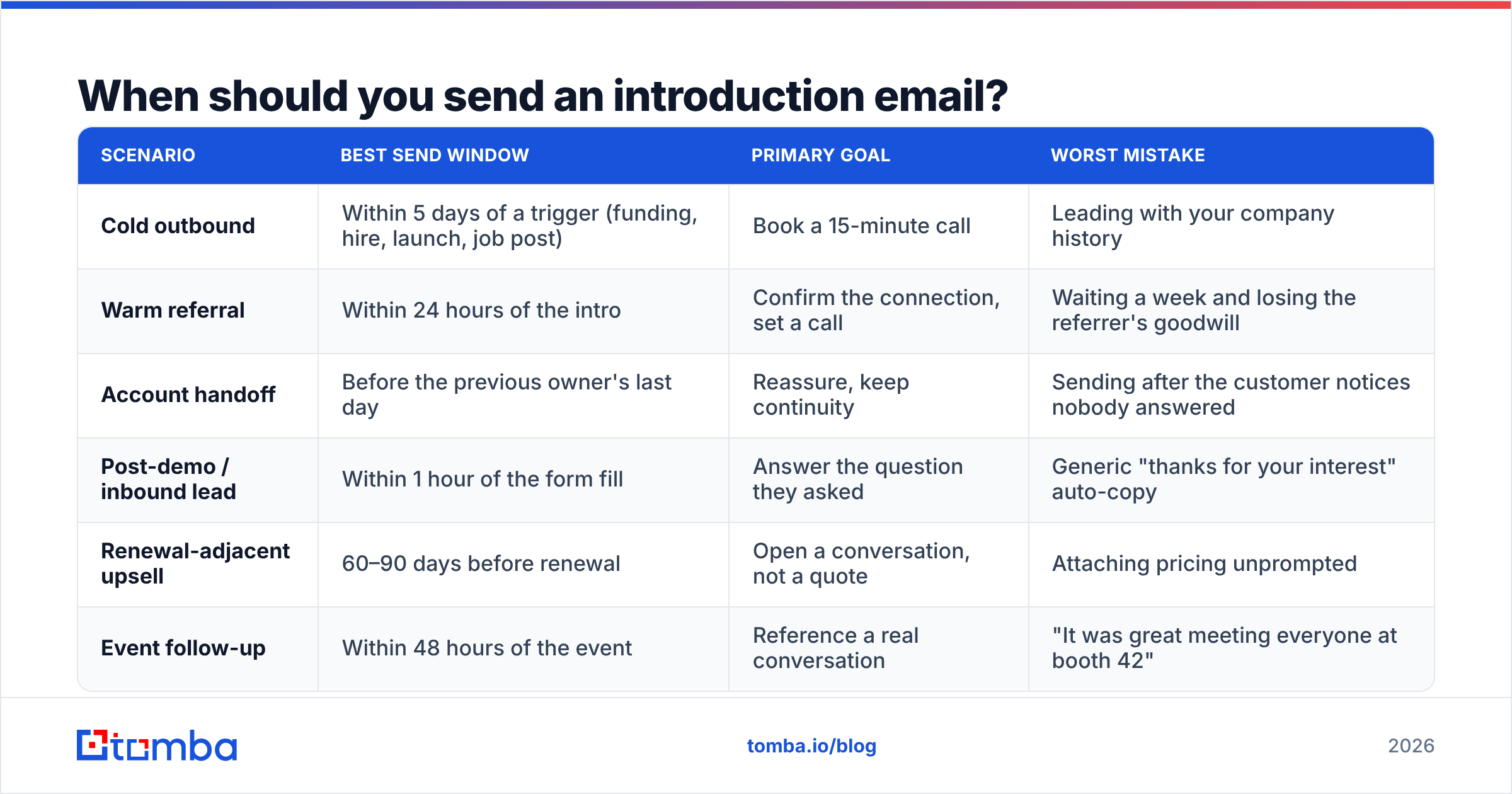
Timing beats copy more often than salespeople want to admit. A mediocre email sent two days after a trigger event outperforms a beautiful one sent into silence.
| Scenario | Best send window | Primary goal | Worst mistake |
|---|---|---|---|
| Cold outbound | Within 5 days of a trigger (funding, hire, launch, job post) | Book a 15-minute call | Leading with your company history |
| Warm referral | Within 24 hours of the intro | Confirm the connection, set a call | Waiting a week and losing the referrer's goodwill |
| Account handoff | Before the previous owner's last day | Reassure, keep continuity | Sending after the customer notices nobody answered |
| Post-demo / inbound lead | Within 1 hour of the form fill | Answer the question they asked | Generic "thanks for your interest" auto-copy |
| Renewal-adjacent upsell | 60–90 days before renewal | Open a conversation, not a quote | Attaching pricing unprompted |
| Event follow-up | Within 48 hours of the event | Reference a real conversation | "It was great meeting everyone at booth 42" |
The pattern: every row has a trigger. If you cannot name the trigger, you are not sending an introduction email — you are sending a broadcast, and the recipient can tell.
What does a high-performing introduction email look like?#
Five blocks, in this order. Each block does exactly one thing, and none of them is "background about us."
- The trigger line — one sentence proving you looked. "Saw you opened a second warehouse in Lyon last month." Not "I hope this email finds you well." This line earns the next four.
- The identity line — who you are in under twelve words. "I run partnerships at Arbor, we handle cross-border returns." No mission statement, no founding year, no adjective stack.
- The value claim — one specific, falsifiable outcome tied to their situation. "Teams shipping from two EU sites usually cut return handling from 9 days to 3." Specific numbers beat superlatives every time.
- The proof — one comparable customer, one metric, or one sentence of evidence. Not a logo wall. "Did this for Maisons du Sud after their Lyon expansion."
- The ask — one option, low commitment, easy to answer. "Worth a 15-minute look next week?" Never stack two asks. Never ask them to "let you know their availability" — that is homework.
That is the whole architecture. Everything else — signatures, PS lines, links — is optional and usually subtractive.
How long should an introduction email to a customer be?#
Sixty to 120 words for cold. Up to 150 for a handoff, because reassurance needs a little more room.
The reason is mechanical, not stylistic. Over 60% of B2B email is opened on mobile, where roughly 90 words fill the screen before the fold. Anything past that is read only if the first 90 earned it. HubSpot's sales blog has published the same finding across multiple years of their own send data, and every sequencing vendor's benchmark report echoes it.
A practical test: paste your draft into a phone-width note app. If you scroll, cut.
Three specific cuts that almost always help:
- Delete the first sentence. It is usually throat-clearing.
- Delete any sentence containing "we are a leading" or "we help companies like yours."
- Replace every adjective with a number or delete it.
What are the best introduction email templates for customers?#
Seven skeletons. Replace the bracketed parts; keep the rhythm.
1. Cold intro after a trigger event
Subject: your Lyon warehouse
Hi [Name] — saw [Company] opened a second EU site last month. Congrats.
I run partnerships at [Your Company]; we handle cross-border returns for multi-site retailers. Teams that add a second EU location usually see return handling slip from 3 days to 9 in the first quarter — we fixed that for [Comparable Customer] in about six weeks.
Worth 15 minutes next Tuesday or Thursday?
[Your name]
2. Warm referral
Subject: [Referrer] suggested I reach out
Hi [Name] — [Referrer] mentioned you are rebuilding the onboarding flow this quarter and thought we should talk.
We do [one-line]. [Referrer]'s team cut their time-to-first-value from 21 days to 9 using it.
Happy to just send you what we did for them if a call is too much right now — which do you prefer?
[Your name]
3. Account handoff (new AM/CSM)
Subject: taking over from [Previous Owner]
Hi [Name] — [Previous Owner] is moving to a new team on the 30th, and I am picking up your account from there. I have read through your last two QBRs, so you will not have to re-explain the [specific project].
Two things already on my list: [specific open item] and [specific open item]. If there is a third, tell me now and I will own it.
20 minutes this week to say hello properly?
[Your name]
4. Post-demo inbound
Subject: the SSO question you asked
Hi [Name] — you asked whether we support SCIM provisioning alongside SAML. We do; here is the doc: [link].
Based on what you described (400 seats, Okta, phased rollout), the piece that usually bites is [specific risk]. Happy to walk through how [Similar Customer] handled it.
Free Thursday at 10?
[Your name]
5. New product introduction to an existing customer
Subject: something adjacent to what you already use
Hi [Name] — you have been running [Product A] with us since March. We shipped [Product B] last week, and it solves the [specific adjacent problem] you flagged in your March ticket.
Not a sales email: your plan includes it. Want me to switch it on for the sandbox so your team can poke at it?
[Your name]
6. Event follow-up
Subject: the pricing-migration thing we talked about
Hi [Name] — you mentioned at [Event] that you are moving from seat-based to usage-based pricing next year and dreading the billing rewrite.
We did exactly that migration with [Customer] — 40k accounts, no downtime. I can send the runbook we used, or walk you through it live.
Which is more useful?
[Your name]
7. Re-introduction after a long gap
Subject: picking this back up
Hi [Name] — we spoke in [Month/Year] about [topic]. You said the timing was wrong because [reason]. That reason looks like it changed: [evidence].
Still worth a conversation, or should I close the loop on my end?
[Your name]
Template 7's closing question — the permission to say no — consistently outperforms the softer "let me know your thoughts" because it is answerable in one word.
Which subject lines work for an introduction email?#
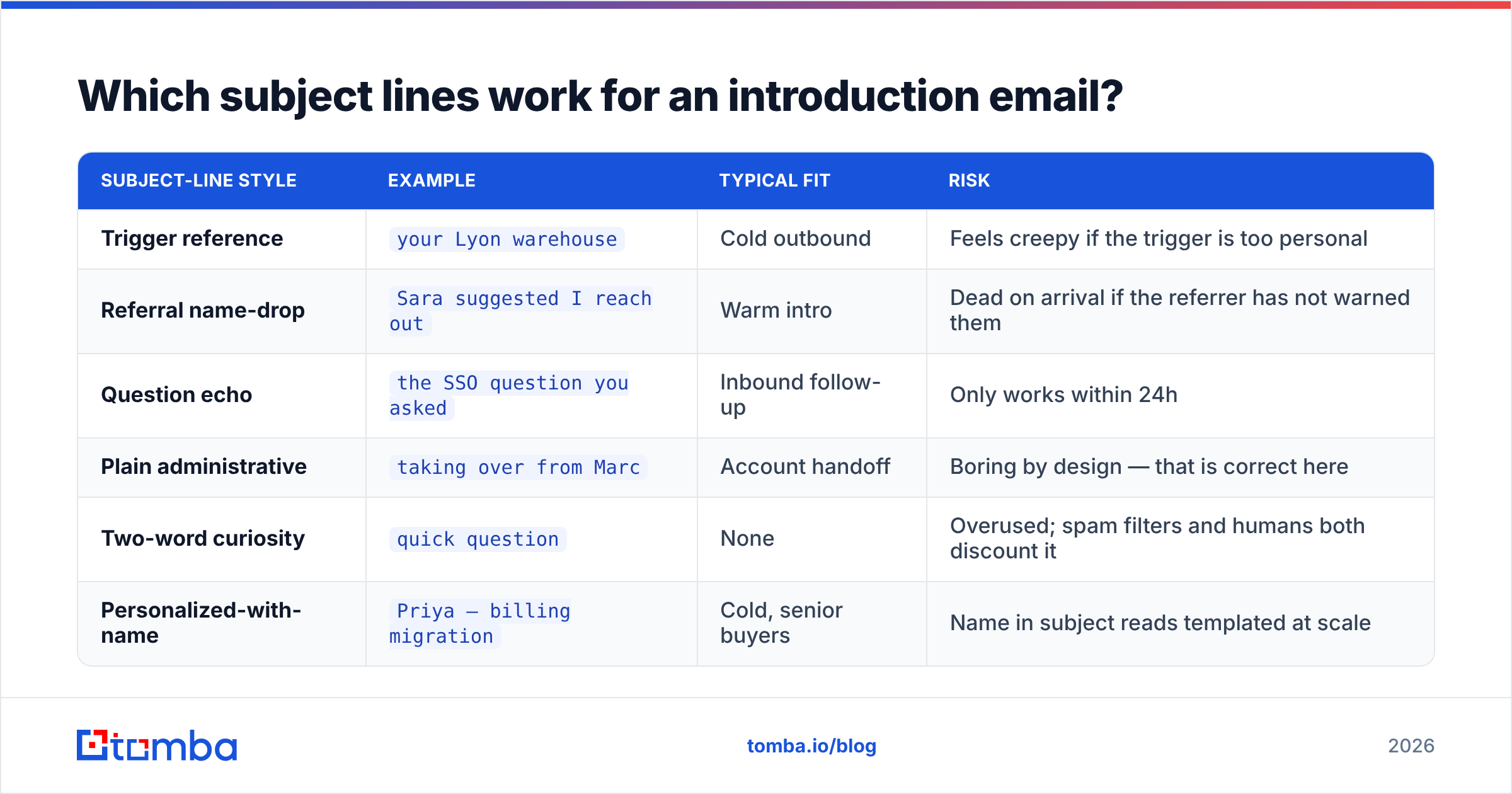
Lowercase, short, specific, and never a promise the body does not keep. The subject line is a preview, not an ad.
| Subject-line style | Example | Typical fit | Risk |
|---|---|---|---|
| Trigger reference | your Lyon warehouse |
Cold outbound | Feels creepy if the trigger is too personal |
| Referral name-drop | Sara suggested I reach out |
Warm intro | Dead on arrival if the referrer has not warned them |
| Question echo | the SSO question you asked |
Inbound follow-up | Only works within 24h |
| Plain administrative | taking over from Marc |
Account handoff | Boring by design — that is correct here |
| Two-word curiosity | quick question |
None | Overused; spam filters and humans both discount it |
| Personalized-with-name | Priya — billing migration |
Cold, senior buyers | Name in subject reads templated at scale |
If you want to pressure-test variants before a send, run them through a subject line tester rather than arguing about them in a Slack thread.
Why do introduction emails bounce, and how do you stop it?#
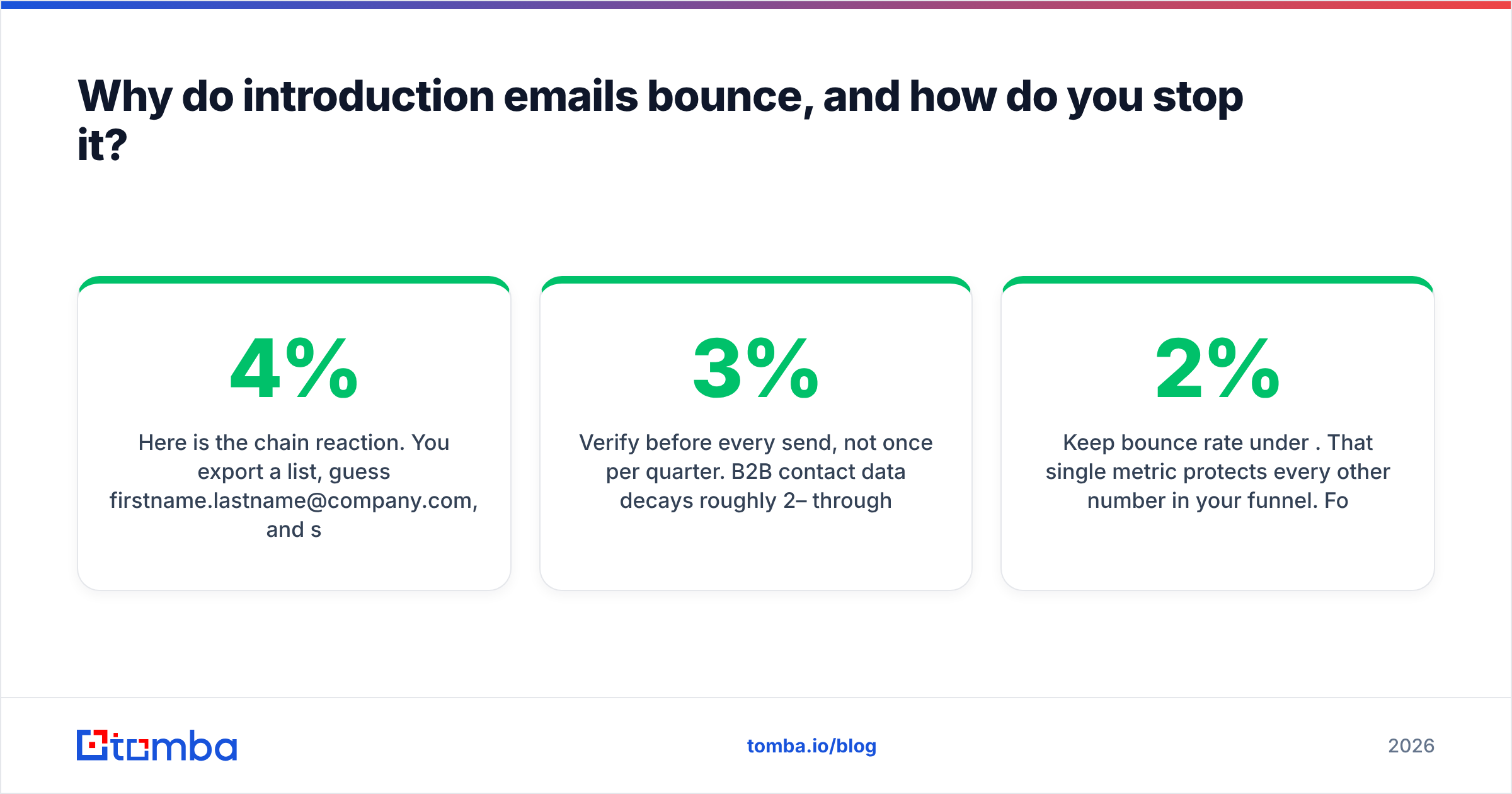
Because the address was guessed. This is the least glamorous and most expensive failure mode in the whole workflow.
Here is the chain reaction. You export a list, guess firstname.lastname@company.com, and send 400 intros. Ninety bounce. Your bounce rate crosses 4%. Google and Microsoft both start throttling your domain. The 310 emails that did land now go to Promotions or Spam. Your beautifully written template never gets a fair test, and you conclude that "cold email doesn't work anymore."
The fix is ordinary hygiene:
- Find the address rather than invent it. A proper email finder resolves the real pattern for a domain instead of assuming one of the six common formats.
- Verify before every send, not once per quarter. B2B contact data decays roughly 2–3% per month through job changes alone. A list verified in January is meaningfully wrong by April. Run it through an email verifier as a pre-send step.
- Handle catch-all domains separately. They accept everything and tell you nothing. Segment them, send lower volume, and watch engagement rather than bounce codes.
- Warm new sending domains. A brand-new domain blasting 300 intros on day one is the clearest spam signal there is.
Keep bounce rate under 2%. That single metric protects every other number in your funnel. For the underlying mechanics of why mailbox providers weigh this so heavily, email deliverability is worth understanding once, properly.
How do you personalize without spending an hour per email?#
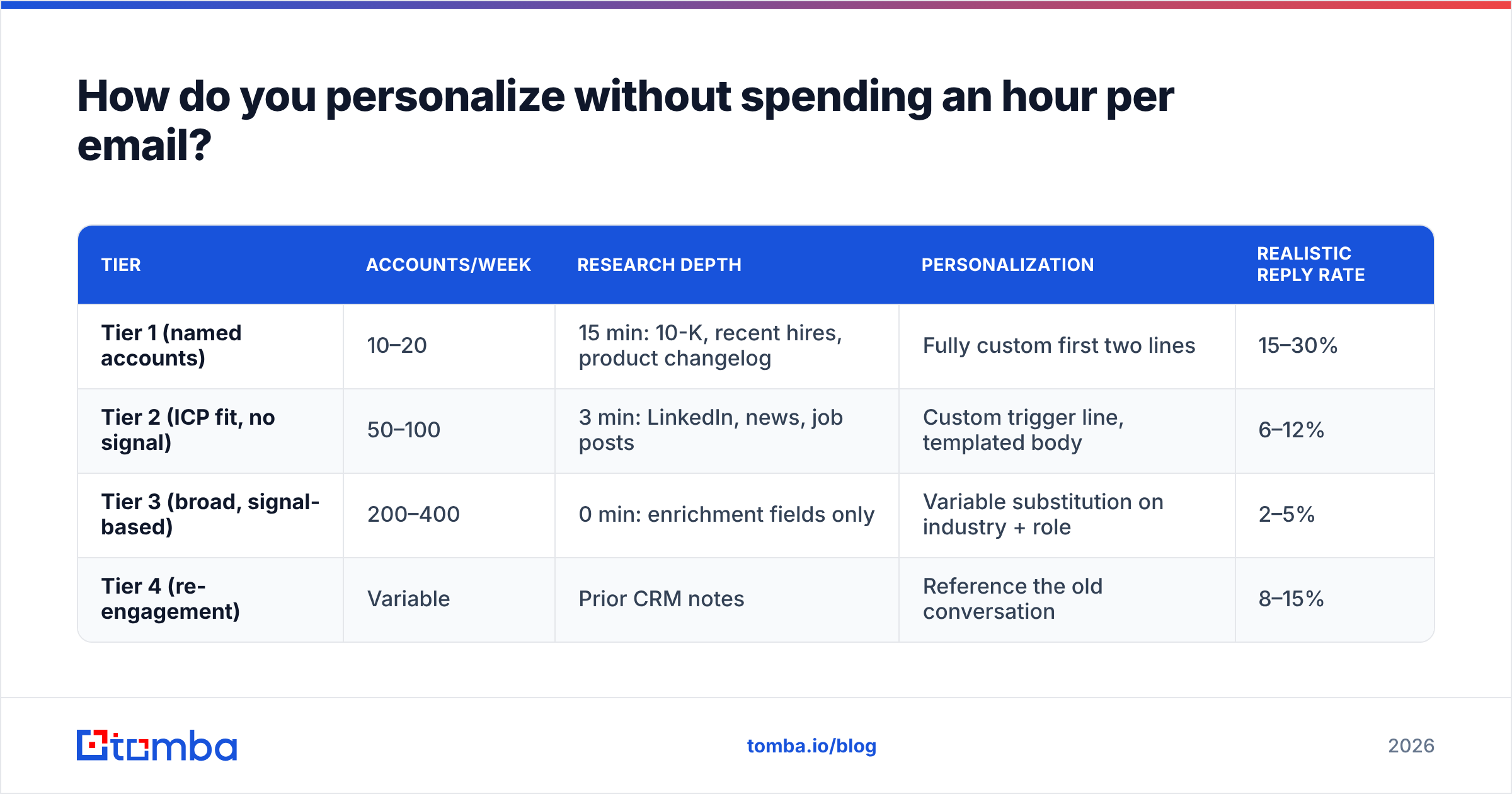
Tier your effort. Not every account deserves the same research budget, and pretending otherwise is how reps end up sending forty identical emails at 5pm.
| Tier | Accounts/week | Research depth | Personalization | Realistic reply rate |
|---|---|---|---|---|
| Tier 1 (named accounts) | 10–20 | 15 min: 10-K, recent hires, product changelog | Fully custom first two lines | 15–30% |
| Tier 2 (ICP fit, no signal) | 50–100 | 3 min: LinkedIn, news, job posts | Custom trigger line, templated body | 6–12% |
| Tier 3 (broad, signal-based) | 200–400 | 0 min: enrichment fields only | Variable substitution on industry + role | 2–5% |
| Tier 4 (re-engagement) | Variable | Prior CRM notes | Reference the old conversation | 8–15% |
Tier 3 is where most teams cheat and get punished. Variable substitution only works when the variables are accurate — {{industry}} filled with "Miscellaneous Business Services" reads worse than no personalization at all. That is a data problem, not a copy problem, and contact enrichment is the part of the stack that fixes it.
Research from Salesforce and most analyst coverage of outbound lands in the same place: relevance beats volume, but relevance depends entirely on the quality of the underlying record. The history of email marketing is basically a long argument about that trade-off.
How do you know whether your introduction email worked?#
Reply rate, and nothing else, is the primary metric. Open rates have been unreliable since Apple Mail Privacy Protection started pre-fetching images; treat them as directional at best.
Track four numbers per template, per segment:
- Bounce rate — under 2%. If it is not, stop everything and fix the data.
- Reply rate — the real scoreboard. Benchmark by tier using the table above.
- Positive reply rate — replies that are not "unsubscribe" or "wrong person." This is the number that predicts pipeline.
- Meeting-booked rate — lagging, noisy, but the one your manager asks about.
Run one variable at a time. Changing the subject line and the ask in the same test teaches you nothing. Give each variant at least 100 sends before you draw a conclusion — below that, you are reading noise.
What are the most common mistakes?#
- Opening with "I hope this email finds you well." It finds them skimming.
- Explaining your company before explaining why you are relevant to them.
- Two asks in one email. The recipient picks neither.
- Attachments on a first touch. They trip filters and nobody opens them.
- Fake urgency ("circling back," "just bumping this") on a first email. There is nothing to circle back to.
- A nine-line signature with four social icons and a legal disclaimer on a 70-word email.
- Sending to a guessed address and blaming the copy when it fails.
Start with an address that actually exists#
The best introduction email in your drafts folder is worth zero if it lands on a mailbox that was decommissioned in March. Before you spend another afternoon rewriting subject lines, fix the layer underneath: get the real address, confirm it is deliverable, and send with a clean domain.
Tomba Email Finder resolves verified professional addresses by name, domain, or company, with confidence scoring and source attribution so you can see why an address is trusted. The free tier covers 25 searches a month; paid plans start at $49/mo and scale to bulk work — full Tomba pricing is public. Find the person, verify the address, then send the 90-word intro you just wrote.
Related guides#
// get started
Find, verify and enrich your first contacts today
Start on the free plan with 25 searches a month, then scale when your team is ready.
Free plan · No credit card required · GDPR & CCPA
// about the author