Introduction Email to New Contact: Templates That Get Replies
Most introduction emails fail before anyone reads them: wrong address, wrong reason, wrong ask. Here is the structure, six templates, and the follow-up cadence that actually earns a reply from a brand new contact.
TL;DR
- An introduction email to a new contact has exactly one job: earn a reply. Not a demo, not a signature, not a 30-minute call. A reply.
- The structure that works every time: verified address, a specific trigger, one line of relevance, one small ask, and a plain-text signature.
- Format changes with context. A referral intro, a post-event intro, and a pure cold intro are three different emails, not one template with the name swapped.
- Reply rates collapse when the address is wrong. Bounces hurt your domain before your copy ever gets judged.
- Follow up three times over 12 days, then stop. Most replies to an introduction email arrive on touch two or three.
What is an introduction email to a new contact?#
An introduction email to a new contact is the first message you send to someone who has no prior relationship with you or your company. It is the sales equivalent of walking up to a stranger at a conference: you get about eight seconds of attention, and everything you say in those eight seconds decides whether the conversation continues.
Think of it like a job application for two minutes of someone's time. Nobody hires on the strength of a résumé alone, but a bad one gets you screened out instantly. The introduction email works the same way. It does not close anything. It buys you permission to keep talking.
That reframe matters because most people write the intro email as if it were a pitch deck. They open with company history, list three product capabilities, and close with "let me know if you'd like to schedule a call." The recipient reads none of it. They scan the first line, decide it is about the sender rather than about them, and archive.
A strong introduction email does the opposite. It is short enough to read on a phone lock screen, specific enough that it could not have been sent to anyone else, and it asks for something so small that saying yes costs nothing.
What are the parts of an introduction email that actually get replies?#
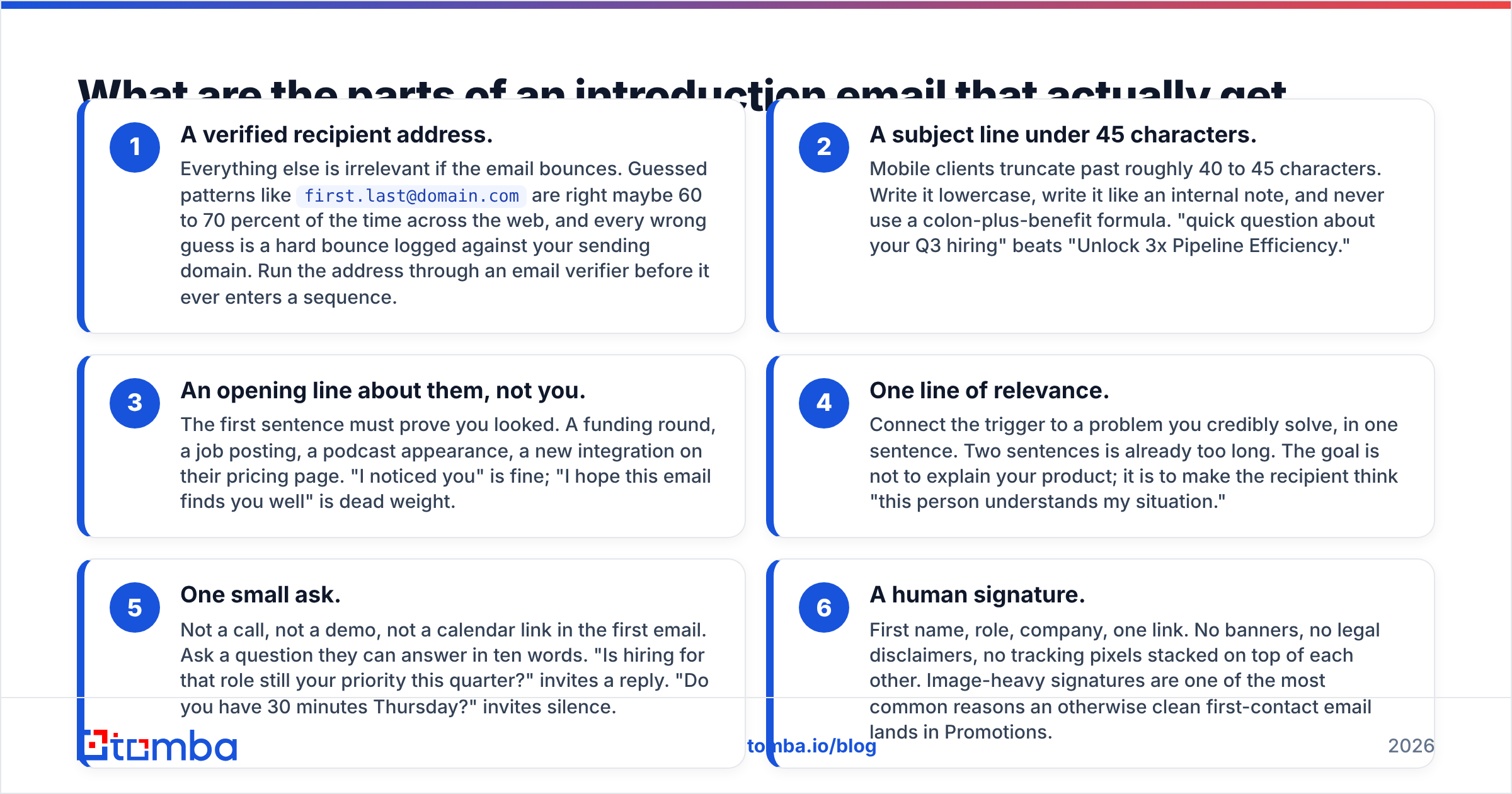
Six components, in this order. Drop any of them and the reply rate drops with it.
- A verified recipient address. Everything else is irrelevant if the email bounces. Guessed patterns like
first.last@domain.comare right maybe 60 to 70 percent of the time across the web, and every wrong guess is a hard bounce logged against your sending domain. Run the address through an email verifier before it ever enters a sequence. - A subject line under 45 characters. Mobile clients truncate past roughly 40 to 45 characters. Write it lowercase, write it like an internal note, and never use a colon-plus-benefit formula. "quick question about your Q3 hiring" beats "Unlock 3x Pipeline Efficiency."
- An opening line about them, not you. The first sentence must prove you looked. A funding round, a job posting, a podcast appearance, a new integration on their pricing page. "I noticed you" is fine; "I hope this email finds you well" is dead weight.
- One line of relevance. Connect the trigger to a problem you credibly solve, in one sentence. Two sentences is already too long. The goal is not to explain your product; it is to make the recipient think "this person understands my situation."
- One small ask. Not a call, not a demo, not a calendar link in the first email. Ask a question they can answer in ten words. "Is hiring for that role still your priority this quarter?" invites a reply. "Do you have 30 minutes Thursday?" invites silence.
- A human signature. First name, role, company, one link. No banners, no legal disclaimers, no tracking pixels stacked on top of each other. Image-heavy signatures are one of the most common reasons an otherwise clean first-contact email lands in Promotions.

The total should land between 50 and 125 words. If you cannot say it in that budget, you have not decided what you want yet.
Which introduction email format fits your situation?#
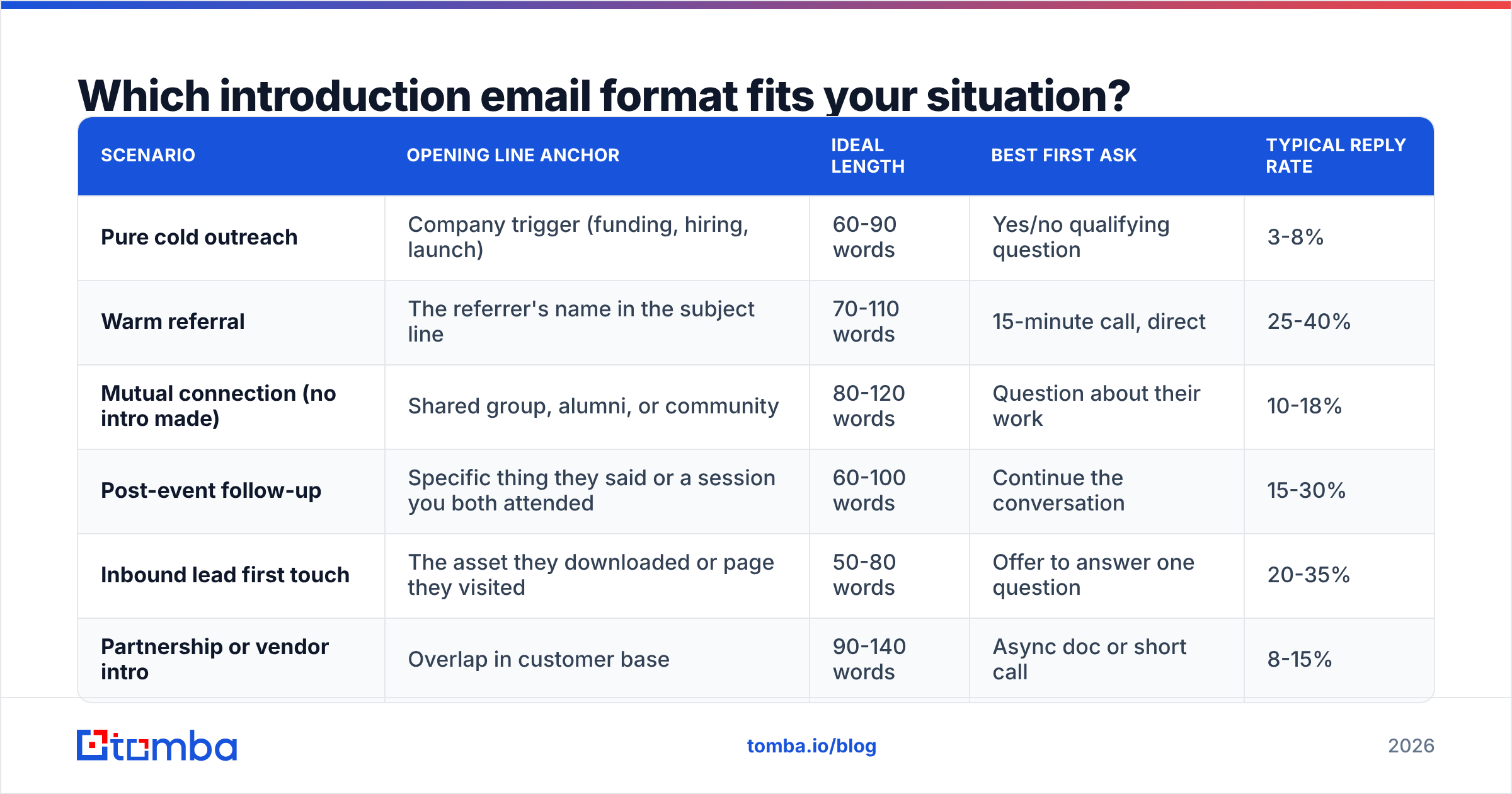
Not every new contact is equally cold. The temperature of the relationship should change the structure, the ask, and how aggressively you follow up. Here is how the five common scenarios differ:
| Scenario | Opening line anchor | Ideal length | Best first ask | Typical reply rate |
|---|---|---|---|---|
| Pure cold outreach | Company trigger (funding, hiring, launch) | 60-90 words | Yes/no qualifying question | 3-8% |
| Warm referral | The referrer's name in the subject line | 70-110 words | 15-minute call, direct | 25-40% |
| Mutual connection (no intro made) | Shared group, alumni, or community | 80-120 words | Question about their work | 10-18% |
| Post-event follow-up | Specific thing they said or a session you both attended | 60-100 words | Continue the conversation | 15-30% |
| Inbound lead first touch | The asset they downloaded or page they visited | 50-80 words | Offer to answer one question | 20-35% |
| Partnership or vendor intro | Overlap in customer base | 90-140 words | Async doc or short call | 8-15% |
Two things stand out in that table. First, the warm referral is worth roughly five times a cold email, which is why building a referral loop beats buying another 10,000 contacts. Second, the ideal length never exceeds 140 words. Even the most complex scenario stays short.
Reply-rate benchmarks vary by industry and seniority. HubSpot's sales research and analyst coverage from Gartner both point to the same trend: buyer response to unsolicited outreach has declined steadily, and the gap between personalized and templated messages keeps widening. Treat the numbers above as directional, then measure your own baseline for four weeks before you judge any template.
What do good introduction emails look like?#
Six templates you can adapt. Replace the bracketed parts with real specifics, and delete anything that does not survive the "could I have sent this to 200 people" test.
1. Cold intro, trigger-based
Subject: your [specific role] opening
Hi [First name] — saw you're hiring [role] in [city]. Usually that means [specific consequence, e.g. "support volume outgrew the current team"].
We help [similar company type] handle that without adding headcount. [One-sentence proof with a number.]
Is that actually the bottleneck right now, or am I reading it wrong?
[Your name]
The closing question is the engine. It gives the recipient an easy way to correct you, and people love correcting strangers.
2. Warm referral
Subject: [Referrer's name] suggested I reach out
Hi [First name], [Referrer] mentioned you're rebuilding [team/process] this year and said we should talk.
We did the same thing with [Company], mostly around [specific problem].
Worth 15 minutes next week, or is this the wrong quarter for it?
[Your name]
Always name the referrer in the subject line. That is the entire value of a referral and it is wasted in the body.
3. Mutual connection, no formal introduction
Subject: fellow [community/group] member
Hi [First name] — we're both in [group], and your post on [topic] stuck with me, particularly the part about [detail].
I work on [adjacent problem] at [Company]. Curious how you're currently handling [specific thing], since most teams your size end up choosing between [option A] and [option B].
[Your name]
4. Post-event follow-up
Subject: your question during [session name]
Hi [First name], you asked [speaker] about [topic] during [session] — I've been chewing on the same problem.
Here's how we ended up solving it: [one link or two-sentence summary].
Happy to share the full breakdown if it's useful.
[Your name]
5. Inbound lead, first human touch
Subject: the [asset name] you downloaded
Hi [First name], you grabbed our [guide] yesterday. Most people who download it are trying to figure out [specific question].
If that's you, reply with your situation and I'll tell you what we'd do — no call needed.
[Your name]
6. Partnership intro
Subject: [Their company] + [Your company]
Hi [First name], we both sell into [ICP], and about [number] of our customers already use [their product] alongside ours.
There's an obvious co-marketing angle here: [one specific idea, not "explore synergies"].
Want me to send a one-pager, or is a short call easier?
[Your name]
Notice what none of these do: no "I hope this finds you well," no three-paragraph company backstory, no calendar link in touch one. If you want raw starting points to adapt, the free cold email templates library is a reasonable place to begin, but rewrite at least 40 percent of any template before you send it.
Why do most introduction emails get ignored?#
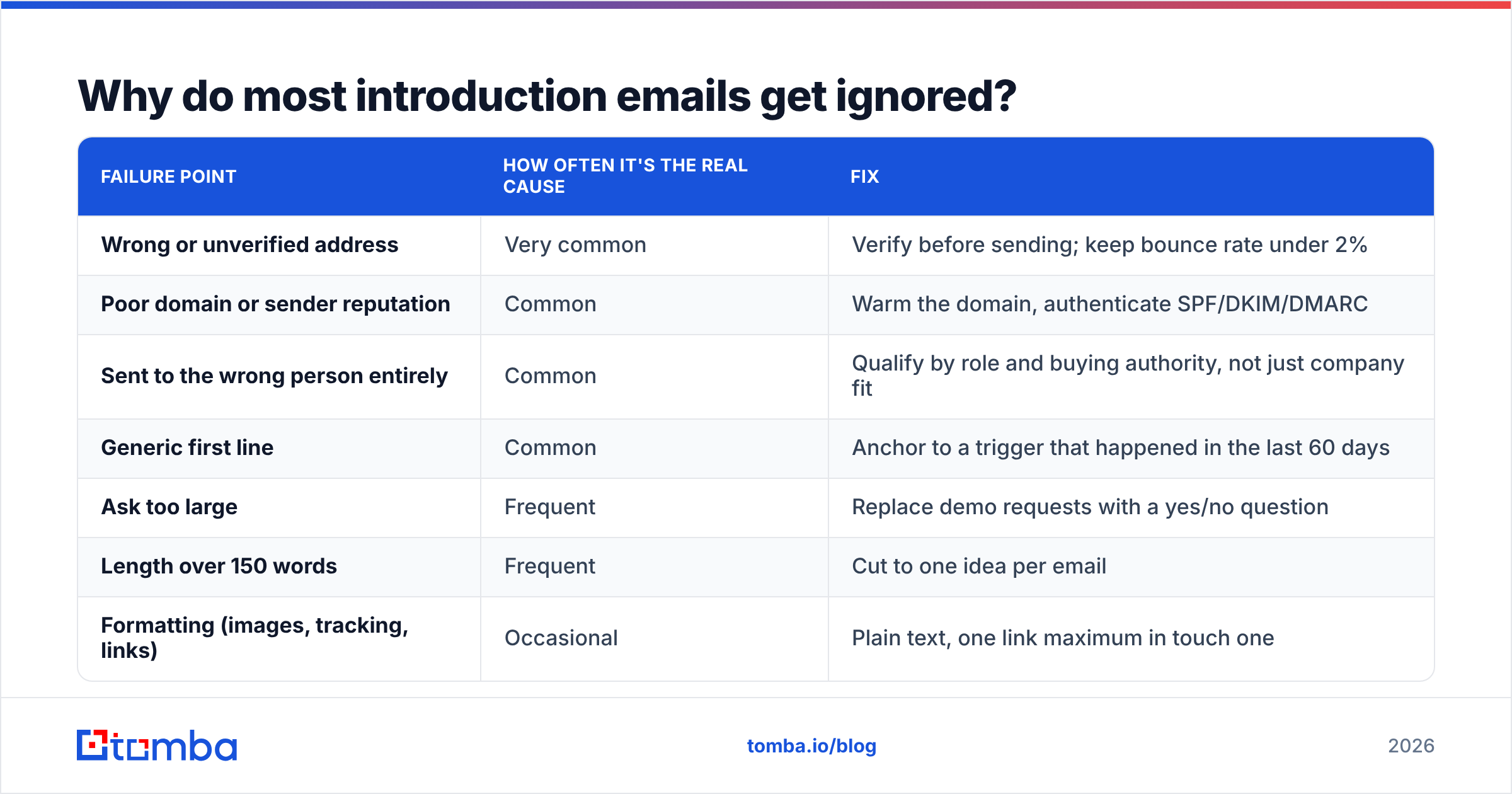
Copy is usually the third reason, not the first. Here is the honest ranking of what kills an introduction email to a new contact:
| Failure point | How often it's the real cause | Fix |
|---|---|---|
| Wrong or unverified address | Very common | Verify before sending; keep bounce rate under 2% |
| Poor domain or sender reputation | Common | Warm the domain, authenticate SPF/DKIM/DMARC |
| Sent to the wrong person entirely | Common | Qualify by role and buying authority, not just company fit |
| Generic first line | Common | Anchor to a trigger that happened in the last 60 days |
| Ask too large | Frequent | Replace demo requests with a yes/no question |
| Length over 150 words | Frequent | Cut to one idea per email |
| Formatting (images, tracking, links) | Occasional | Plain text, one link maximum in touch one |

The first two rows deserve extra attention because they compound. A 12 percent bounce rate on a new sending domain does not just waste 12 percent of your list; it signals to mailbox providers that you are sending to a purchased or scraped list, and your deliverable emails start landing in spam too. That is why email deliverability work belongs upstream of copywriting work, not after it.
If you are building lists from scratch, the cleanest path is finding contacts by company domain and role rather than buying a static file. A domain search returns the addresses and patterns actually in use at a company, which is a materially different input than a permutation generator guessing at j.smith@.
How do you know an address is real before you send?#
Three checks, in increasing order of confidence.
- Pattern match. Does the address follow the company's known format? Useful as a sanity check, worthless as proof.
- Syntax and MX validation. Is the domain real, and does it accept mail at all? Catches typos and dead domains, nothing more.
- SMTP-level verification. Does the mailbox actually exist on the receiving server? This is the check that separates a 2 percent bounce rate from a 12 percent one.
Catch-all domains complicate the last step, since they accept everything at the SMTP layer and reject later. That is a real and growing share of B2B domains, especially at enterprises, and it is why a dedicated catch-all verifier exists as a separate tool rather than a checkbox. If your verifier returns "accept-all" and you treat that as valid, you are guessing with extra steps.
A practical rule: send to verified addresses at full volume, send to accept-all addresses in small, isolated batches on a secondary domain, and never send to addresses that failed verification no matter how good the prospect looks.
How should you follow up after the first email?#
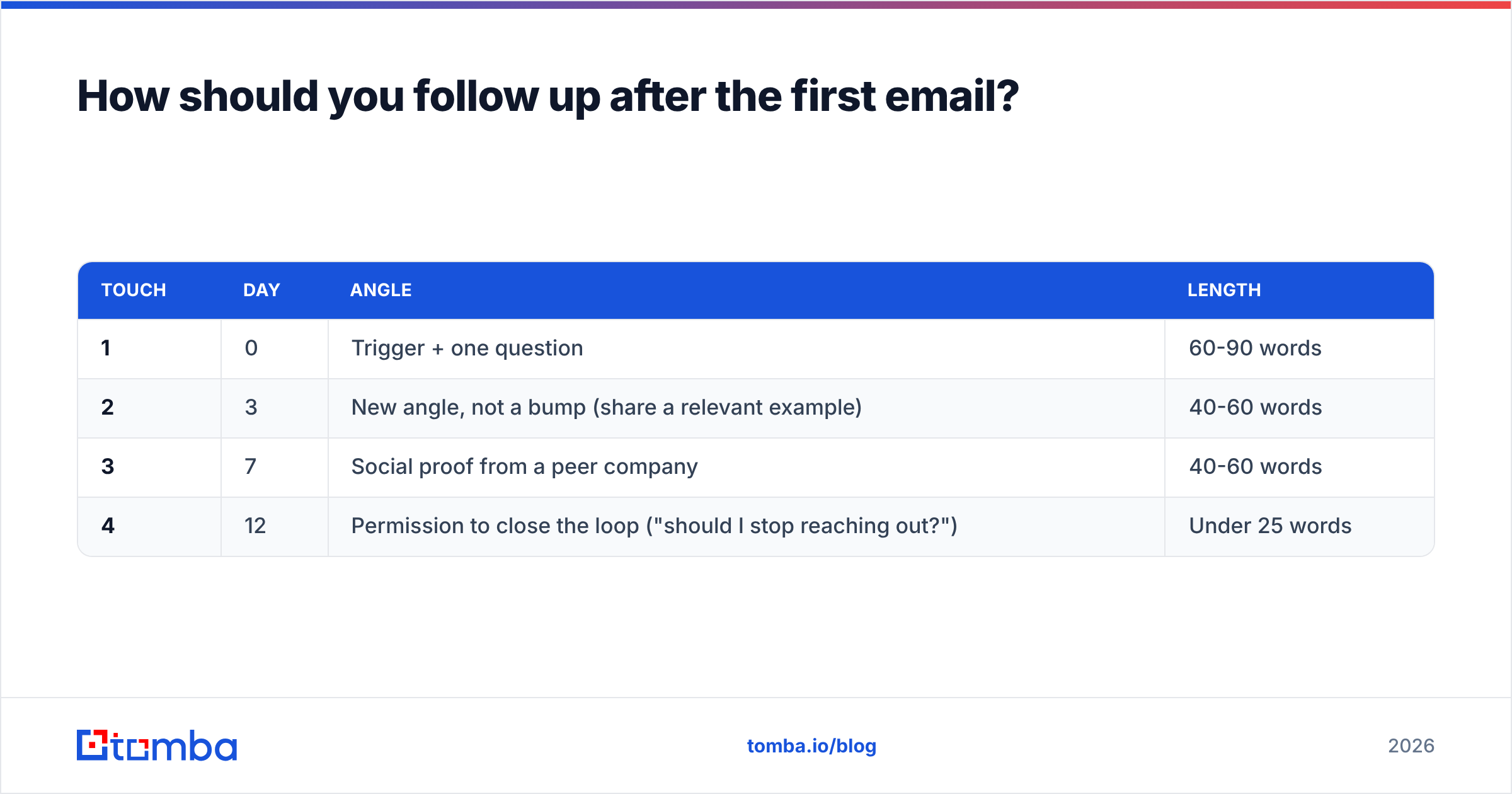
Three follow-ups, spread over roughly 12 days, then stop and move the contact to a quarterly nurture list. The sequence matters more than the individual messages.
| Touch | Day | Angle | Length |
|---|---|---|---|
| 1 | 0 | Trigger + one question | 60-90 words |
| 2 | 3 | New angle, not a bump (share a relevant example) | 40-60 words |
| 3 | 7 | Social proof from a peer company | 40-60 words |
| 4 | 12 | Permission to close the loop ("should I stop reaching out?") | Under 25 words |
Two rules that get broken constantly. First, never send "just bumping this to the top of your inbox." It communicates that you have nothing new to say and that you expect them to feel guilty. Second, the breakup email works precisely because it is genuinely the last one. Send a fifth and you have trained the contact to ignore you permanently.
Reply timing is also worth tracking. In most B2B sequences, a meaningful share of total replies arrive on touches two and three, which means teams that send once and give up are leaving a large fraction of their pipeline unclaimed. Check your own numbers in your CRM rather than trusting a blog benchmark, including this one. Peer reviews on G2 are similarly useful for sanity-checking vendor claims about reply rates, which are almost always measured under favorable conditions.
What should you measure to know it's working?#
Track four numbers and ignore the rest for the first quarter:
- Bounce rate. Target under 2 percent. Above 5 percent, stop sending and fix the data.
- Reply rate. Positive plus negative replies divided by delivered. Cold intros: 3 to 8 percent is normal, above 10 percent is strong.
- Positive reply rate. The only number that predicts pipeline. Aim for at least a third of total replies.
- Meetings booked per 100 contacted. The honest efficiency metric. One to three is typical for cold; five or more means your targeting is genuinely good.
Open rate deliberately does not appear on that list. Privacy protections on major mail clients have made pixel-based open tracking unreliable enough that optimizing for it actively misleads teams. If your reporting still treats open rate as a primary KPI, that is a reporting problem, not an insight.
For context on how tracking and consent norms have shifted, the background on email marketing practices is a reasonable neutral primer before you set your own policy.
Where should you start this week?#
Pick 50 target accounts, not 500. Find the right person at each one, verify every address, write 50 genuinely specific first lines, and send over five days. That is a manageable experiment with a real signal at the end of it. Scaling a broken sequence to 5,000 contacts only tells you how fast you can burn a domain.
Once the copy is landing, the constraint shifts back to data volume, and that is where tooling earns its keep. Tomba's email finder resolves names and company domains into verified, deliverable addresses, with a free tier of 25 searches per month to test on your own account list before committing. Paid plans start at $49 per month for Starter and $99 for Growth; the full breakdown lives on the Tomba pricing page. Get the address right first, then the introduction email to your new contact has a fair chance of being judged on what it actually says.
Related guides#
// get started
Find, verify and enrich your first contacts today
Start on the free plan with 25 searches a month, then scale when your team is ready.
Free plan · No credit card required · GDPR & CCPA
// about the author