Introduction Email to Potential Client: Templates That Work
Most introduction emails to potential clients fail in the first two lines. Here is the structure, three tested templates, and the send-time and verification steps that actually move reply rates.
TL;DR
- An introduction email to a potential client has one job: earn a reply, not close a deal. Optimise for the reply, and everything downstream gets easier.
- The first two lines decide the outcome. If line one is about you, your company, or your "innovative solution", you have already lost the preview pane.
- Keep it to 80-125 words, one specific observation, one relevance claim, one low-friction ask. No attachments, no calendar links in the first touch.
- Deliverability is half the battle. A 6% bounce rate on an unverified list will quietly suppress every send that follows, no matter how good the copy is.
- Cold, warm, and referral introductions need genuinely different structures. Sending the same template to all three is the most common and most expensive mistake.
What is an introduction email to a potential client?#
An introduction email to a potential client is the first written contact between you and someone who has never bought from you, usually sent without a prior meeting or inbound request. It is not a pitch, a proposal, or a newsletter. It is a request for permission to have a conversation.
That framing matters because it changes what "success" means. A proposal is judged on whether it wins the deal. An introduction email is judged on a single metric: did a human write back? Everything in the email should serve that one outcome. The moment you try to make the first email do the work of a discovery call, a pricing page, and a case study at once, it stops doing any of them.
Think of it like knocking on a neighbour's door for the first time. You do not open with your life story and a contract. You say who you are, why you are standing there specifically, and ask if now is a decent time. Ten seconds, maximum. The technical version of that is a 100-word email with one question at the end.
Why do most introduction emails get ignored?#
Because they are written from the sender's point of view. Open any inbox and the ignored emails share a pattern: they lead with the company, then the product, then a vague benefit claim, then a 30-minute meeting request. The reader has to do all the translation work — figuring out what this has to do with them — and nobody does unpaid translation work at 9am.
The four failure modes, in the order they cost you the most replies:
- No relevance trigger. Nothing in the email proves you looked at this specific company. "I saw you're in fintech" is not research; "I saw you posted three backend roles in Lisbon last month" is.
- Front-loaded credentials. Your funding round, your client logos, and your years in business are proof, not hooks. Proof goes in sentence four, not sentence one.
- A heavy ask. "Do you have 30 minutes this week?" asks a stranger to spend more time with you than they have spent thinking about you. "Is this worth a look, or is it the wrong quarter?" costs one word to answer.
- Bad data underneath. The email was technically excellent and went to a role account, a departed employee, or a catch-all domain. No copy fixes a wrong address.

The fourth one is the quiet killer because it looks like a copy problem. A campaign that bounces at 8% will see the surviving emails land in spam more often over the following weeks, so the next round of "better copy" also underperforms. You end up rewriting subject lines to fix a list-hygiene problem. Running the list through an email verifier before the first send removes that variable entirely.
What are the six parts of an introduction email that gets replies?#
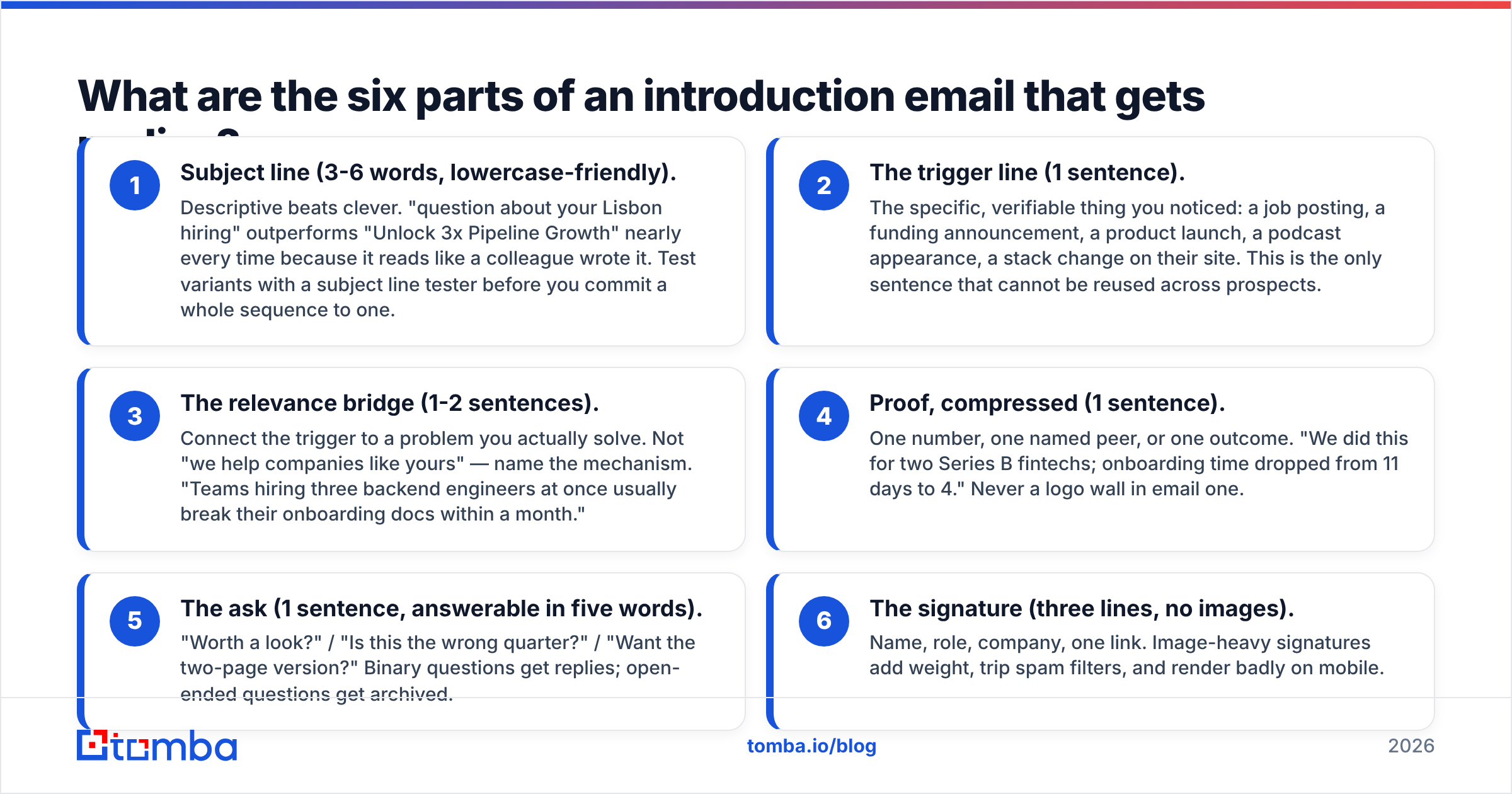
Every high-performing introduction email to a potential client contains the same six components in roughly the same order. Treat this as a checklist, not a script.
- Subject line (3-6 words, lowercase-friendly). Descriptive beats clever. "question about your Lisbon hiring" outperforms "Unlock 3x Pipeline Growth" nearly every time because it reads like a colleague wrote it. Test variants with a subject line tester before you commit a whole sequence to one.
- The trigger line (1 sentence). The specific, verifiable thing you noticed: a job posting, a funding announcement, a product launch, a podcast appearance, a stack change on their site. This is the only sentence that cannot be reused across prospects.
- The relevance bridge (1-2 sentences). Connect the trigger to a problem you actually solve. Not "we help companies like yours" — name the mechanism. "Teams hiring three backend engineers at once usually break their onboarding docs within a month."
- Proof, compressed (1 sentence). One number, one named peer, or one outcome. "We did this for two Series B fintechs; onboarding time dropped from 11 days to 4." Never a logo wall in email one.
- The ask (1 sentence, answerable in five words). "Worth a look?" / "Is this the wrong quarter?" / "Want the two-page version?" Binary questions get replies; open-ended questions get archived.
- The signature (three lines, no images). Name, role, company, one link. Image-heavy signatures add weight, trip spam filters, and render badly on mobile.
Notice what is absent: attachments, calendar embeds, tracking pixels on the first touch, and the phrase "I hope this email finds you well." All four correlate with lower reply rates and higher spam placement.
What does a good introduction email actually look like?#
Three versions, calibrated to three situations.
Template 1 — Cold, trigger-based (no prior relationship)
Subject: your Lisbon backend roles
Hi Marta,
Saw the three backend openings in Lisbon on your careers page this month.
Most teams hiring at that pace hit the same wall: onboarding docs written for two engineers stop working for six, and ramp time roughly doubles by month two.
We rebuilt onboarding for two Series B fintechs last year — time-to-first-commit went from 11 days to 4.
Worth a look, or is this already handled?
— Ali, Onboarding Lead, Rampline
Ninety-one words. One trigger, one mechanism, one number, one binary question.
Template 2 — Warm, post-event or post-content
Subject: your comment on the RevOps panel
Hi Jonas,
You said something on Tuesday's panel that stuck with me — that your attribution model breaks the moment a deal touches more than four channels.
We ran into the same ceiling and ended up solving it with a two-stage model rather than a longer lookback window. Happy to send the one-pager on how it's wired.
Useful, or already solved on your side?
— Ali, Rampline
Template 3 — Referral introduction
Subject: Petra suggested I reach out
Hi Sam,
Petra Lindqvist mentioned you're rebuilding the partner reporting stack this quarter and thought the overlap was worth ten minutes of your time.
Short version: we did the same migration at Northwind, and the one thing that saved us three weeks was mapping partner IDs before touching the warehouse.
Want the notes, or is this old news for you?
— Ali, Rampline
The referral version leads with the name because the name is the strongest asset in the email. Never bury a referral in paragraph three.
Should you send a cold, warm, or referral introduction?#
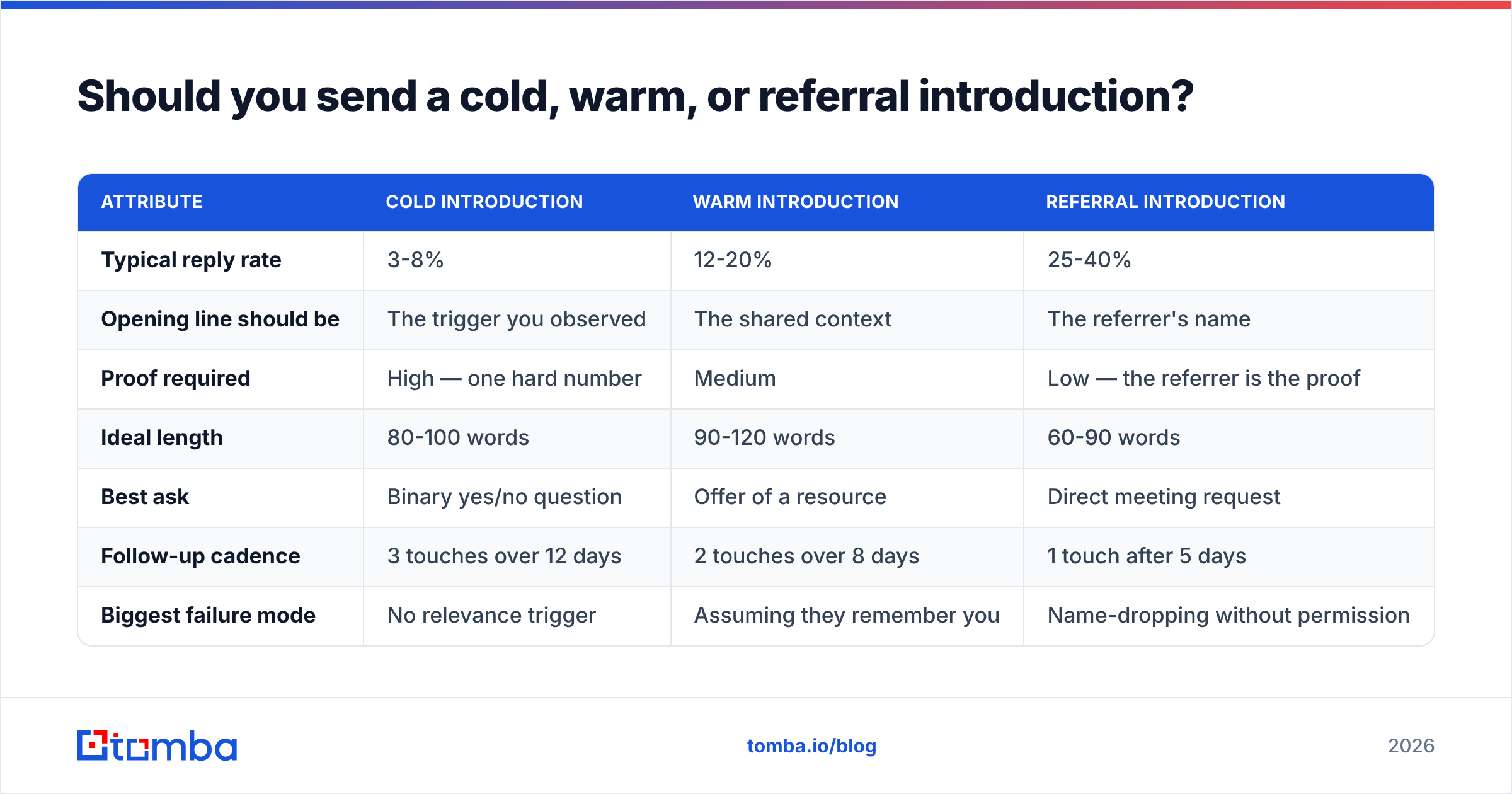
The answer is usually "whichever you can honestly earn," but the structural differences are worth internalising. Here is how the three compare in practice.
| Attribute | Cold introduction | Warm introduction | Referral introduction |
|---|---|---|---|
| Typical reply rate | 3-8% | 12-20% | 25-40% |
| Opening line should be | The trigger you observed | The shared context | The referrer's name |
| Proof required | High — one hard number | Medium | Low — the referrer is the proof |
| Ideal length | 80-100 words | 90-120 words | 60-90 words |
| Best ask | Binary yes/no question | Offer of a resource | Direct meeting request |
| Follow-up cadence | 3 touches over 12 days | 2 touches over 8 days | 1 touch after 5 days |
| Biggest failure mode | No relevance trigger | Assuming they remember you | Name-dropping without permission |
| Data prep needed | Verified email + firmographics | Event list or engagement data | Referrer's written OK |
Two notes on that table. First, the reply-rate ranges assume a verified list and a warmed sending domain; halve them if either is missing. Second, the referral column has the highest ceiling and the highest reputational risk — always get the referrer's explicit permission in writing before you use their name, because "Petra suggested I reach out" is unrecoverable if Petra did not.
Research on B2B buying behaviour consistently shows buyers spend the majority of their process without a vendor in the room, which is why the first email's job is to get into the consideration set rather than to force a demo. Gartner's B2B buying journey research is the standard reference here, and HubSpot's sales blog publishes ongoing benchmark data if you want to sanity-check your own numbers against a wider sample.
How do you find and verify the right contact before sending?#
You need three things: the right person, the right address, and confidence the address is live. Skipping the third step is where most campaigns quietly break.

A workable sequence:
- Identify the role, not the person, first. Decide whether you need the VP of Engineering, the Head of RevOps, or the founder. Writing to the wrong level produces polite forwards at best.
- Pull the company's address pattern. Most organisations use one of six formats. A domain search returns the pattern plus the known addresses on that domain, which is faster than guessing and testing.
- Resolve the individual address. An email finder maps a name plus domain to a specific address with a confidence score. Treat anything under about 90% confidence as a candidate, not a fact.
- Verify before the send, not after. Verification catches departed employees, typo domains, and disabled mailboxes. Catch-all domains need separate handling — they accept everything at the SMTP layer, so a plain verify returns "unknown" rather than "valid."
- Deduplicate across the team. Two reps introducing themselves to the same prospect in one week is the fastest way to look disorganised.
One compliance note: commercial email is regulated differently by jurisdiction, and the rules govern identification, opt-out handling, and header accuracy rather than whether you had prior consent in every market. The CAN-SPAM Act is the common US baseline; GDPR's legitimate-interest test is the European equivalent and is stricter. Include a real physical address and a genuine way to opt out, even in a one-to-one introduction.
When should you send, and how should you follow up?#
Send-time optimisation is real but overrated relative to list quality. The differences are measurable and small — usually a few percentage points — while a bad list costs you an order of magnitude.
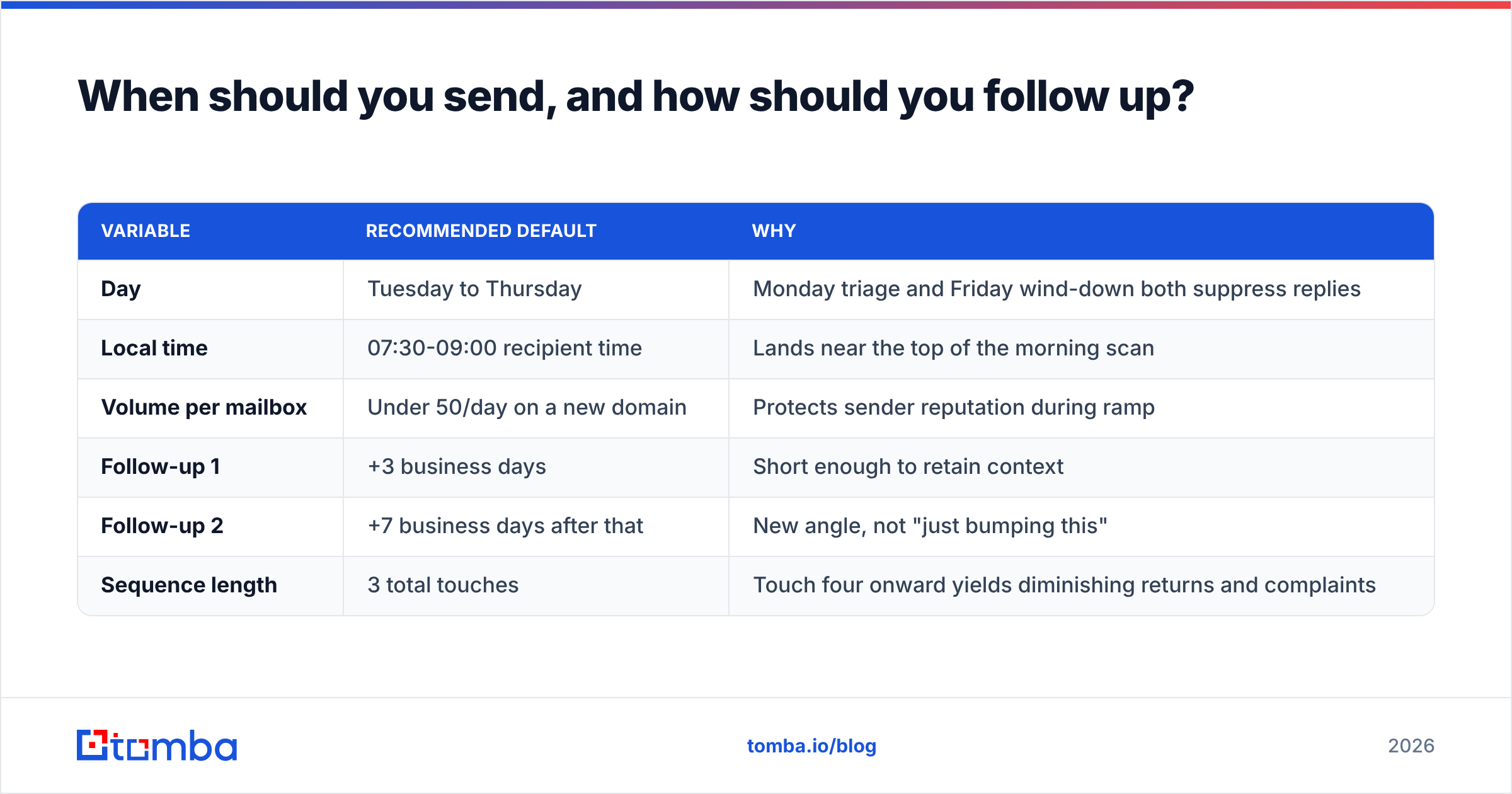
That said, the defaults that hold up across most B2B segments:
| Variable | Recommended default | Why |
|---|---|---|
| Day | Tuesday to Thursday | Monday triage and Friday wind-down both suppress replies |
| Local time | 07:30-09:00 recipient time | Lands near the top of the morning scan |
| Volume per mailbox | Under 50/day on a new domain | Protects sender reputation during ramp |
| Follow-up 1 | +3 business days | Short enough to retain context |
| Follow-up 2 | +7 business days after that | New angle, not "just bumping this" |
| Sequence length | 3 total touches | Touch four onward yields diminishing returns and complaints |
Each follow-up must add something: a different angle, a relevant resource, a new trigger. A message whose entire content is "following up on my last email" teaches the recipient that ignoring you works. If you want a baseline to measure against, our glossary entry on response rate covers how to calculate it consistently across campaigns so your numbers stay comparable quarter to quarter.
What mistakes kill reply rates fastest?#
- Writing 300 words. Anything past roughly 150 words gets skimmed to the ask, and the ask alone rarely justifies a reply.
- Leading with "I hope this finds you well." It marks the email as a template in the first four words.
- Asking for 30 minutes in touch one. Ask for a yes/no, then ask for time once they have answered something.
- Sending from a brand-new domain at volume. Warm the domain for two to three weeks first; there is no shortcut.
- Personalising the wrong variable. Merging a first name into a generic body is not personalisation. One genuinely specific sentence beats ten merge tags.
- Never testing the subject line. Subject lines carry most of the open-rate variance and are the cheapest thing in the whole email to test.
- Treating bounces as noise. Bounces are a leading indicator of deliverability collapse. Track them per domain, not just per campaign.
How do you know if it worked?#
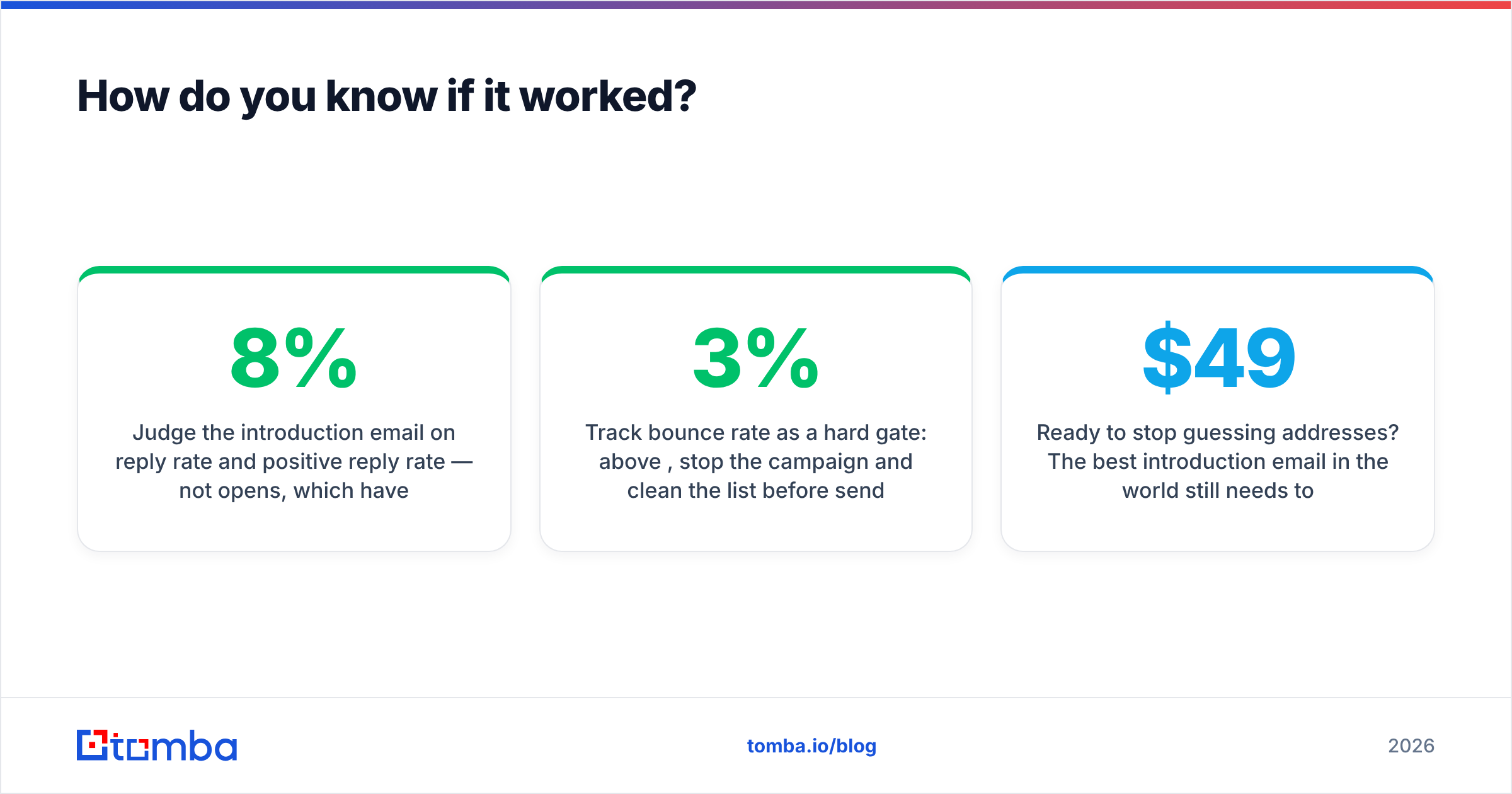
Judge the introduction email on reply rate and positive reply rate — not opens, which have been unreliable since privacy-protection features started pre-fetching images. A healthy cold introduction campaign on a verified list lands somewhere around 5-8% total replies with a third of those positive or neutral-curious. Below 2%, the problem is almost always targeting or data, not wording. Between 2% and 5%, the copy is worth rewriting. Above 10% on cold traffic, document what you did and scale it carefully.
Track bounce rate as a hard gate: above 3%, stop the campaign and clean the list before sending another batch. That single rule prevents most of the slow-motion deliverability failures that get blamed on copy six weeks later.
Ready to stop guessing addresses? The best introduction email in the world still needs to reach a real inbox. Tomba's Email Finder resolves names and domains into verified, confidence-scored addresses so your first touch actually lands — with a free tier of 25 searches a month to test it, then Starter at $49/mo and Growth at $99/mo as your volume grows. Check the full Tomba pricing breakdown, or start with the free tier and run your next 25 prospects through it before you write a single line of copy.
Related guides#
// get started
Find, verify and enrich your first contacts today
Start on the free plan with 25 searches a month, then scale when your team is ready.
Free plan · No credit card required · GDPR & CCPA
// about the author