Introductory Meeting Email: 7 Templates That Get Replies
Most introductory meeting emails fail on the ask, not the pitch. Here is the seven-part structure, scenario-matched templates, and the follow-up cadence that turns a cold contact into a booked call.
TL;DR
- An introductory meeting email has one job: earn a short, specific block of someone's calendar. It is not a pitch, a newsletter, or a company overview.
- The structure that works is seven parts long and fits in 90-130 words. Anything longer trades reply rate for ego.
- Your meeting ask is the highest-leverage line in the email. "15 minutes Thursday or Friday?" outperforms "let me know a time that works" by a wide margin in practice.
- Scenario matters more than wording. A cold contact, a warm referral, a conference follow-up, and an inbound lead need four different openers — same skeleton.
- None of it matters if the email bounces. Verified contact data is the floor, not a nice-to-have.
What is an introductory meeting email?#
An introductory meeting email is a short message whose only conversion goal is a booked meeting with someone who has never spoken to you. That is the whole definition, and the second half of it is where most people go wrong.
Think of it like knocking on a stranger's door. You do not deliver your life story on the doorstep. You say who you are, why you picked this door, what you want (two minutes, not two hours), and you make it easy to say yes. The pitch happens inside the house, later, if you get invited in.
Three things this email is not:
- Not a company introduction. Nobody books time to hear about your Series B.
- Not a value-prop dump. If the email fully explains the value, the meeting becomes redundant.
- Not a "just checking in" note. That has no ask and no reason to exist.
The distinction matters because the wrong frame produces the wrong email. When people set out to "introduce themselves," they write 250 words about their company. When they set out to "book 15 minutes," they write 100 words about the recipient. The second one gets replies.
Why do most introductory meeting emails get ignored?#
Because they ask for an expensive, vague commitment from someone who has no reason to trust that the time will be well spent.
Gartner's research on the B2B buying journey makes the underlying problem clear: buyers spend the majority of their evaluation time on independent research, not with sellers. A meeting request is an interruption of that process. It has to justify itself in the first two lines.
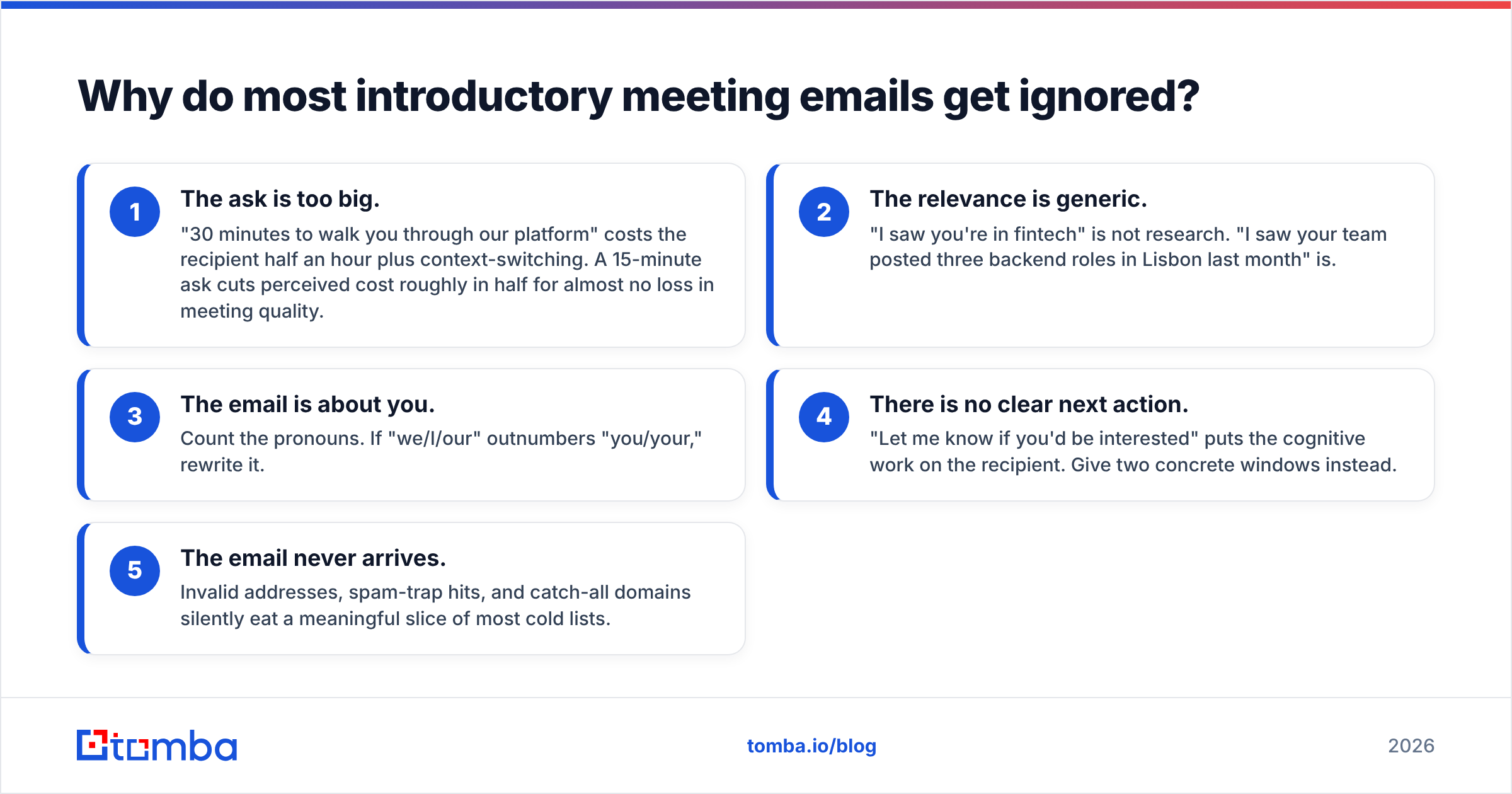
Here are the failure modes I see most often when auditing outbound sequences:
- The ask is too big. "30 minutes to walk you through our platform" costs the recipient half an hour plus context-switching. A 15-minute ask cuts perceived cost roughly in half for almost no loss in meeting quality.
- The relevance is generic. "I saw you're in fintech" is not research. "I saw your team posted three backend roles in Lisbon last month" is.
- The email is about you. Count the pronouns. If "we/I/our" outnumbers "you/your," rewrite it.
- There is no clear next action. "Let me know if you'd be interested" puts the cognitive work on the recipient. Give two concrete windows instead.
- The email never arrives. Invalid addresses, spam-trap hits, and catch-all domains silently eat a meaningful slice of most cold lists.
That last point deserves more weight than it usually gets. You can write the best introductory meeting email in your industry and still see a 0% reply rate if a third of your list bounces and your domain reputation tanks in week two. Run your list through an email verifier before the first send, not after the first disaster.
What are the seven parts of an introductory meeting email that works?#
Every high-performing introductory meeting email I have taken apart contains these seven elements, in roughly this order. Together they should total 90-130 words.
- The subject line — 3 to 6 words, lowercase or sentence case, no brackets, no "RE:" trickery. It should read like a note from a colleague, not a campaign.
- The trigger line — one sentence naming the specific thing that made you write today. A funding round, a job posting, a podcast appearance, a product launch, a mutual connection.
- The bridge — one sentence connecting that trigger to a problem you have seen in similar companies. Not your product. The problem.
- The credibility beat — one clause, not a paragraph. A named customer in their segment, a specific number, or a relevant role you held. Skip it entirely if you have nothing real.
- The ask — one sentence with a duration and two concrete windows. "Worth 15 minutes Thursday afternoon or Friday morning?"
- The easy out — a half-sentence that makes declining costless. "If this is not your area, happy to close the loop." This raises reply rate because it removes the social cost of saying no.
- The signature — name, role, company, one link. No banner image, no quote, no eleven social icons. Image-heavy signatures hurt deliverability and read as marketing.
Drop any one of these and the email still functions. Drop the ask or the trigger line and it does not.
Which introductory meeting email template fits your scenario?#
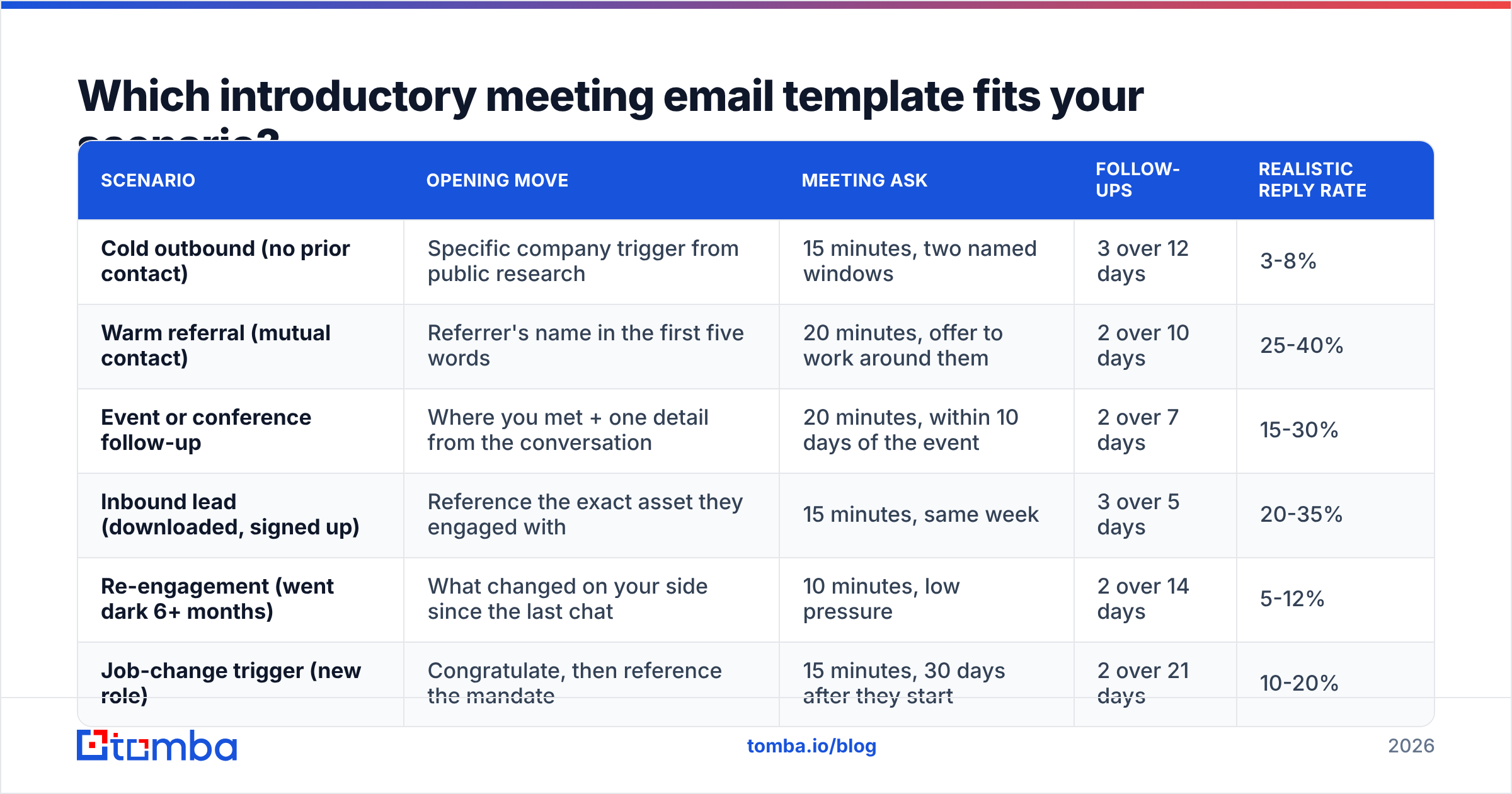
The skeleton stays constant; the trigger line and the size of the ask change with how warm the contact is. Use this table to pick the right variant before you start writing.
| Scenario | Opening move | Meeting ask | Follow-ups | Realistic reply rate |
|---|---|---|---|---|
| Cold outbound (no prior contact) | Specific company trigger from public research | 15 minutes, two named windows | 3 over 12 days | 3-8% |
| Warm referral (mutual contact) | Referrer's name in the first five words | 20 minutes, offer to work around them | 2 over 10 days | 25-40% |
| Event or conference follow-up | Where you met + one detail from the conversation | 20 minutes, within 10 days of the event | 2 over 7 days | 15-30% |
| Inbound lead (downloaded, signed up) | Reference the exact asset they engaged with | 15 minutes, same week | 3 over 5 days | 20-35% |
| Re-engagement (went dark 6+ months) | What changed on your side since the last chat | 10 minutes, low pressure | 2 over 14 days | 5-12% |
| Job-change trigger (new role) | Congratulate, then reference the mandate | 15 minutes, 30 days after they start | 2 over 21 days | 10-20% |
Treat the reply-rate column as a sanity range, not a promise. It varies enormously by industry, seniority, and list quality. What it does tell you is the relative payoff: chasing a 3% cold list when you have an untouched referral list is a poor use of your week.
Template 1 — Cold outbound#
Subject: lisbon backend hiring
Hi Marta,
Saw the three backend roles your team posted in Lisbon this month — that usually means the platform rewrite is real.
When teams scale that fast, the contact data in their CRM tends to decay quietly until pipeline reporting stops making sense. We fixed exactly that for two Series B fintechs last quarter.
Worth 15 minutes Thursday afternoon or Friday morning to compare notes?
If data hygiene is not your remit, tell me who owns it and I'll stop bothering you.
— Ben
Template 2 — Warm referral#
Subject: Sofia suggested I reach out
Hi David,
Sofia Mendes mentioned you're rebuilding the outbound motion at Northwind and said we should talk.
She and I worked through the same problem last year — her team cut list-building time from six hours a week to about forty minutes.
Do you have 20 minutes next week? Tuesday or Wednesday both work on my side, and I'll happily take whatever slot is least disruptive.
— Ben
Template 3 — Conference follow-up#
Subject: the routing question from SaaStock
Hi Priya,
We spoke briefly at the SaaStock coffee line on Wednesday — you were describing how inbound leads get routed to the wrong rep about a third of the time.
I've seen two clean fixes for that, one of which takes an afternoon.
Twenty minutes next week to walk through both? Monday or Thursday work.
— Ben
Notice what none of these do: explain the product, attach a deck, or ask the recipient to "find some time in my calendar." Adapt them, do not copy them verbatim — and if you want a broader starting library, the cold email templates collection covers adjacent use cases.
How long should the meeting ask actually be?#
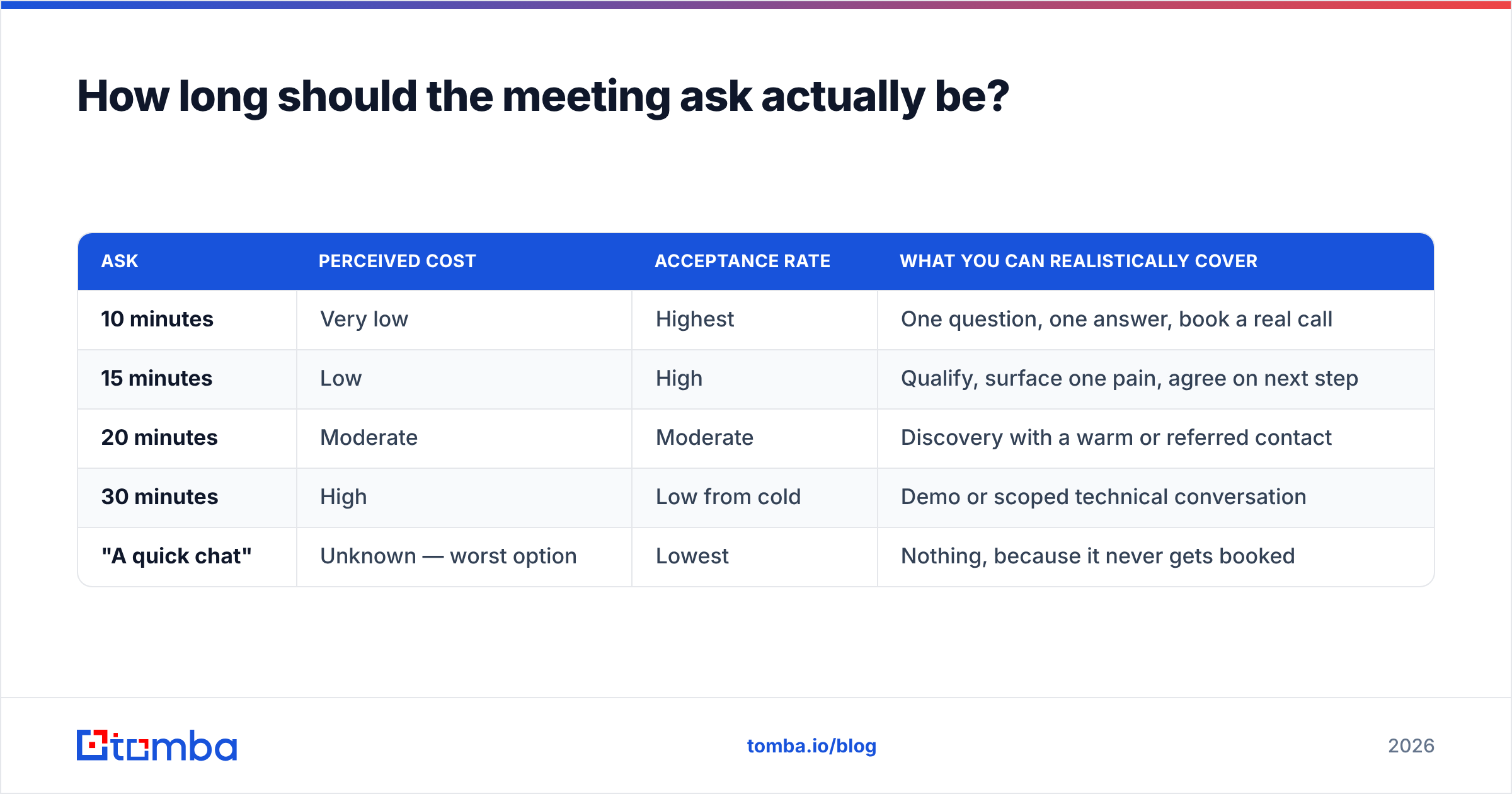
Shorter than you want. Here is the honest tradeoff:
| Ask | Perceived cost | Acceptance rate | What you can realistically cover |
|---|---|---|---|
| 10 minutes | Very low | Highest | One question, one answer, book a real call |
| 15 minutes | Low | High | Qualify, surface one pain, agree on next step |
| 20 minutes | Moderate | Moderate | Discovery with a warm or referred contact |
| 30 minutes | High | Low from cold | Demo or scoped technical conversation |
| "A quick chat" | Unknown — worst option | Lowest | Nothing, because it never gets booked |
The unnamed duration is the real trap. "A quick chat" sounds friendly but forces the recipient to imagine the worst case, which is a 45-minute demo. Name a number. Then respect it — ending a 15-minute call at minute 14 does more for your credibility than anything in the email did.
What subject lines get an introductory meeting email opened?#
Subject lines do not book meetings. They only buy you the first two lines of the body. Optimise for "looks like internal mail," not for cleverness.
What consistently performs:
- Lowercase fragments —
lisbon backend hiring,the routing question - A mutual name —
Sofia suggested I reach out - A specific noun from their world —
your Q3 partner program - A question under six words —
who owns data hygiene there?
What consistently underperforms: anything with an exclamation mark, anything containing "quick question" (burned out years ago), anything in Title Case With Every Word Capitalised, and anything promising a percentage improvement. HubSpot's ongoing analysis of sales email templates reaches the same conclusion from a much larger sample: specificity beats persuasion language.
If you are testing at volume, run candidates through a subject line tester before committing a whole sequence to one variant.
How do you make sure the email actually reaches a human?#
Three layers, in order of how badly they break things when ignored.
Layer one: the address is real. A guessed firstname.lastname@ pattern is a coin flip on most domains. Bounces above roughly 3% start damaging sender reputation, and once that slides, even your perfect referral emails land in spam. Source addresses properly with an email finder rather than a permutator, and confirm them before send.
Layer two: the domain is configured. SPF, DKIM, and DMARC records present and aligned. This is a 20-minute task that people postpone for months. Check your SPF record if you have never looked at it.
Layer three: the sending pattern looks human. No 400-email blasts from a fresh domain. Ramp volume over weeks, keep daily sends per mailbox modest, and keep email deliverability in the same dashboard where you track replies. A high open rate with a zero reply rate is often a deliverability artifact, not a copy problem.
Catch-all domains deserve a special mention. They accept everything at the SMTP layer, which means a standard verification returns "unknown" rather than valid or invalid. Either exclude them from cold campaigns or run them through dedicated catch-all verification so you know what you are actually sending into.
How many times should you follow up?#
Two to three follow-ups over 10-14 days, each one adding something new. A follow-up that only says "bumping this to the top of your inbox" is a reply-rate tax.
A cadence that holds up:
- Day 0 — the introductory meeting email.
- Day 3 — a one-line addition: a relevant customer result, a link to something genuinely useful, or a sharper version of the ask.
- Day 8 — change the angle. If the first two emails led with a hiring trigger, lead with a peer-company observation instead.
- Day 13 — the close-the-loop email. "Assuming this isn't a priority right now — I'll stop here. Happy to reconnect in Q2." This one reliably produces replies, some of which are "actually, wait."
Stop after that. A fifth and sixth email buy you a complaint rate, not a meeting. Track response rate per step so you can see which touch is doing the work, and prune the ones that are not.
What numbers tell you the email is working?#
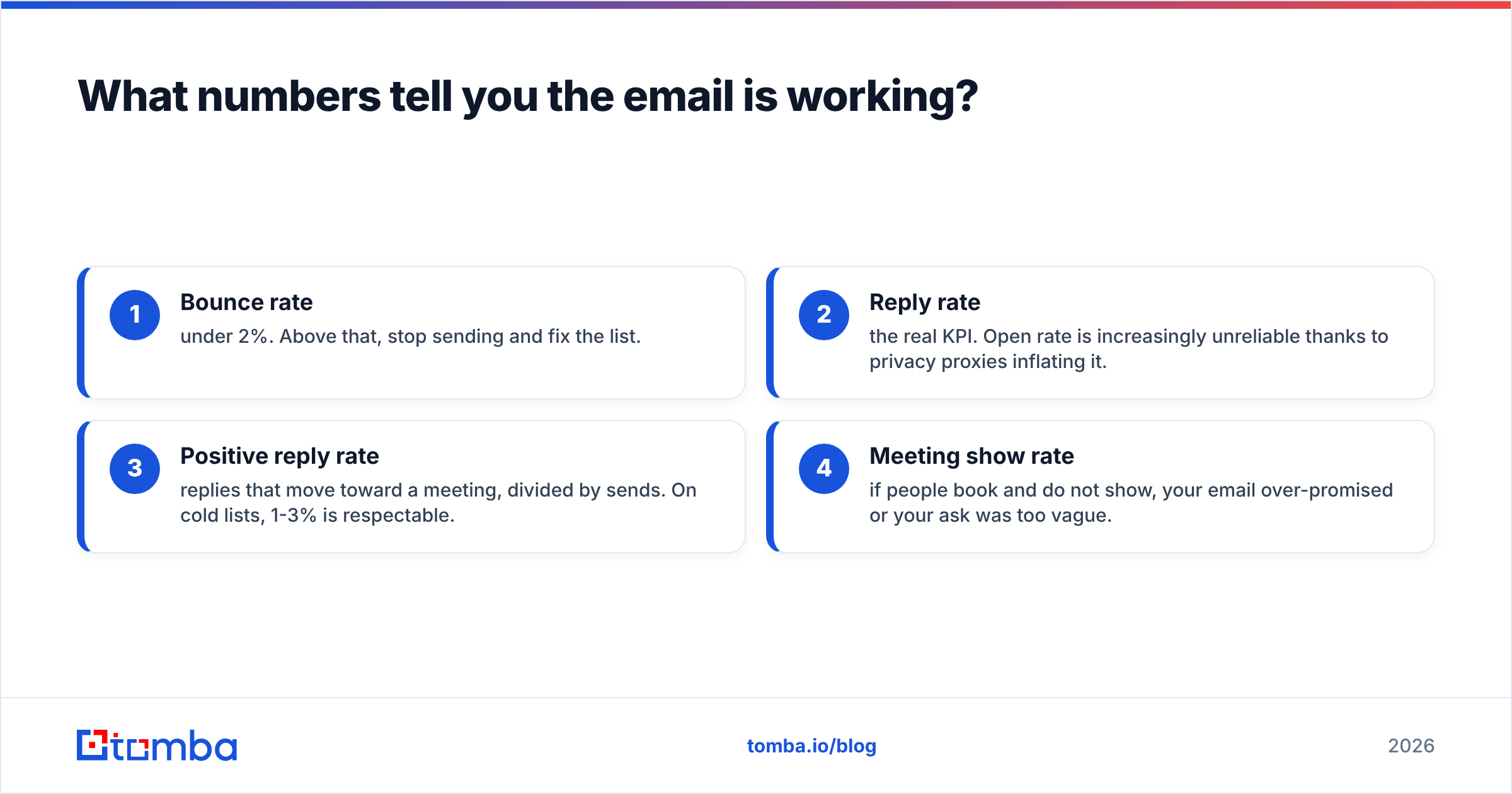
Watch four, in this order:
- Bounce rate — under 2%. Above that, stop sending and fix the list.
- Reply rate — the real KPI. Open rate is increasingly unreliable thanks to privacy proxies inflating it.
- Positive reply rate — replies that move toward a meeting, divided by sends. On cold lists, 1-3% is respectable.
- Meeting show rate — if people book and do not show, your email over-promised or your ask was too vague.
Segment those by scenario, not by campaign. A single blended reply rate across cold, referral, and inbound tells you nothing actionable, because the referral segment will mask a broken cold segment for months.
Where should you start?#
Fix the list before you fix the copy. The single most common cause of a failing introductory meeting email program is not the wording — it is sending well-crafted messages to addresses that were guessed, stale, or never valid in the first place.
Build your contact list with Tomba's Email Finder, which sources professional addresses by domain, name, or company and returns a confidence signal with each result rather than a hopeful guess. The free tier gives you 25 searches a month to test the workflow; paid plans start at $49/month on Starter, with Growth at $99/month if you are running volume across a team. Full details are on the Tomba pricing page.
Get the addresses right, keep the ask to 15 minutes, and let the seven-part structure do the rest.
Related guides#
// get started
Find, verify and enrich your first contacts today
Start on the free plan with 25 searches a month, then scale when your team is ready.
Free plan · No credit card required · GDPR & CCPA
// about the author