IP Warming Strategy: A 30-Day Schedule for 2026 Senders
A new IP has no reputation, and mailbox providers treat no reputation as suspicious. Here is a day-by-day IP warming strategy, the metrics that gate each ramp step, and the mistakes that get fresh IPs blocked in week one.
TL;DR
- An IP warming strategy is a controlled volume ramp that teaches mailbox providers your new sending IP is legitimate. Skip it and Gmail, Outlook, and Yahoo will throttle or block you inside 48 hours.
- Plan for 4-6 weeks, not 4-6 days. Roughly double daily volume every 24-48 hours, starting at 20-50 messages, and never ramp on a day where bounces exceeded 2% or complaints exceeded 0.1%.
- Warm with your best recipients first — people who opened something in the last 30 days — not your oldest, coldest list.
- Domain reputation now matters more than IP reputation at Gmail. Warm both, and never point a brand-new domain at a brand-new IP on day one.
- The single largest cause of failed warmups is dirty data, not schedule design. Verify every address before it enters a ramp.
What is an IP warming strategy?#
An IP warming strategy is a staged sending plan that builds reputation for a new or dormant sending IP address by starting with tiny volumes to your most engaged recipients, then increasing daily send volume gradually while watching bounce, complaint, and placement metrics.
Think of it like getting a credit limit. A bank does not hand a stranger a $50,000 line on day one. It gives you $500, watches how you repay it, and raises the limit as trust accrues. Mailbox providers do exactly this with sending IPs: a new IP has zero history, and because spammers rotate through fresh IPs constantly, "zero history plus 100,000 messages in an hour" is the clearest spam signal there is.
Technically, providers like Google and Microsoft maintain per-IP and per-domain reputation records that combine volume consistency, bounce rate, spam complaint rate, engagement signals (opens, replies, "not spam" clicks), authentication status, and spam-trap hits. Warming is the process of writing a clean version of that record before you need the capacity.
Why do new IPs get throttled at all?#
Because providers apply rate limits to unknown senders by default. When an unrecognised IP suddenly pushes volume, you see one of three responses:
- 4xx deferrals — "too many messages from your IP, try later." Temporary, recoverable, and the most common first symptom.
- Bulk-folder placement — mail is accepted but filed in spam, which quietly destroys engagement and makes the next ramp step worse.
- 5xx blocks or blocklist entries — hard rejections, sometimes accompanied by a listing at Spamhaus or a similar service.
The nasty part is the feedback loop. Deferred and bulked mail generates no opens and no replies, so the engagement signal stays flat, so the provider keeps throttling. A botched warmup does not just delay you — it creates a reputation hole that takes weeks to climb out of.

What does a 30-day IP warming schedule look like?#
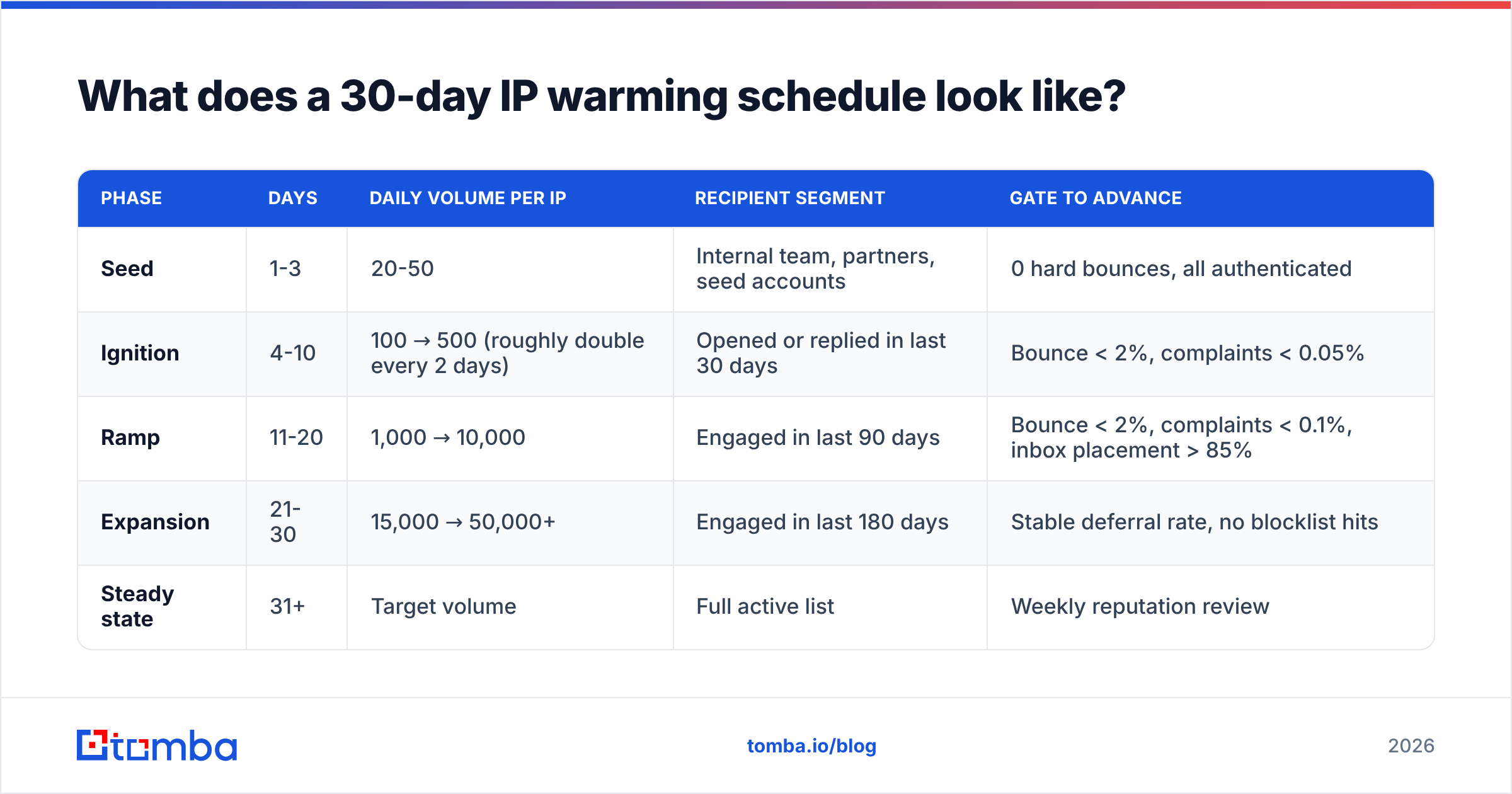
Use this as a baseline for a dedicated IP sending commercial or outbound mail. Adjust to your list size — the ratios matter more than the absolute numbers.
| Phase | Days | Daily volume per IP | Recipient segment | Gate to advance |
|---|---|---|---|---|
| Seed | 1-3 | 20-50 | Internal team, partners, seed accounts | 0 hard bounces, all authenticated |
| Ignition | 4-10 | 100 → 500 (roughly double every 2 days) | Opened or replied in last 30 days | Bounce < 2%, complaints < 0.05% |
| Ramp | 11-20 | 1,000 → 10,000 | Engaged in last 90 days | Bounce < 2%, complaints < 0.1%, inbox placement > 85% |
| Expansion | 21-30 | 15,000 → 50,000+ | Engaged in last 180 days | Stable deferral rate, no blocklist hits |
| Steady state | 31+ | Target volume | Full active list | Weekly reputation review |
Three rules govern the table:
- Send on a consistent cadence. Providers reward predictability. Sending 5,000 on Monday and zero until Friday reads worse than 1,000 every weekday.
- Never advance on a bad day. If bounces spiked, repeat the previous day's volume instead of doubling. Repeating a step costs you 24 hours; blowing through a warning costs you three weeks.
- Split across IPs proportionally. With four IPs in a pool, each one needs its own ramp. Four IPs do not warm four times faster — they warm at the same rate, in parallel, on a quarter of the traffic each.
For ESP-specific guidance, check the vendor's own documentation before you design the ramp. Amazon SES publishes an explicit dedicated-IP warming schedule, and M3AAWG's sender best practices remain the industry reference for acceptable thresholds.
Which metrics should gate each ramp step?#
Do not ramp on the calendar. Ramp on evidence. These six numbers decide whether tomorrow's volume goes up, stays flat, or comes down:
- Hard bounce rate — hard ceiling 2%. Above 2% and you are telling providers your list is unverified. Above 5% and expect an immediate block. Run every address through an email verifier before it enters the warmup pool, not after a bounce teaches you.
- Spam complaint rate — hard ceiling 0.1%. Gmail's stated threshold is 0.3% as a disaster line, but healthy senders sit under 0.05%. One complaint per 1,000 is already a signal to slow down.
- Deferral (4xx) rate — watch the trend, not the value. Some deferrals are normal during warming. A rising percentage across three consecutive days means you are ramping faster than the provider is willing to trust.
- Inbox placement by provider — target 85%+ before expansion. Track Gmail, Outlook, and Yahoo separately. They warm at different speeds, and Microsoft is usually the slowest and most opaque.
- Engagement rate (open + reply) — should stay flat or rise as volume grows. A falling engagement rate while volume climbs means you are dipping into stale segments too early.
- Blocklist status — check weekly, minimum. A single listing can undo a fortnight of work. A blacklist checker run on a schedule catches it before your reply rate tells you.
Log these daily in a sheet. The pattern across days is far more diagnostic than any single day's number, and you will want the history when you are arguing with a postmaster team.
Is domain warming different from IP warming?#
Yes, and in 2026 domain reputation is the one that usually bites first.
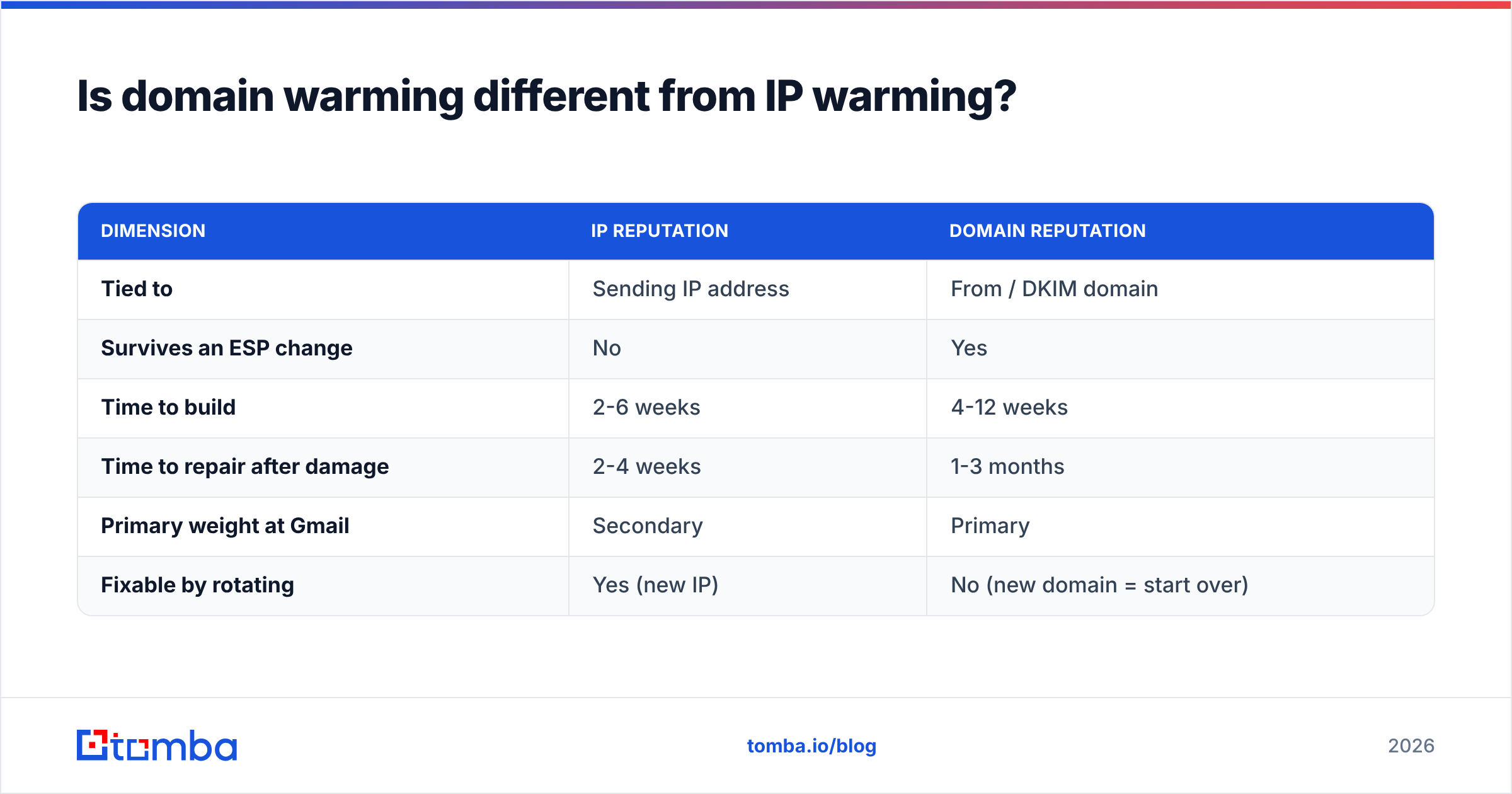
IP reputation is tied to the address your mail transfer agent connects from. Domain reputation is tied to the From: domain and the domain in your DKIM signature — it follows you even if you change ESPs or IPs. Gmail in particular leans heavily on domain reputation, which is why moving to a fresh IP does not rescue a domain you have already burned.
| Dimension | IP reputation | Domain reputation |
|---|---|---|
| Tied to | Sending IP address | From / DKIM domain |
| Survives an ESP change | No | Yes |
| Time to build | 2-6 weeks | 4-12 weeks |
| Time to repair after damage | 2-4 weeks | 1-3 months |
| Primary weight at Gmail | Secondary | Primary |
| Fixable by rotating | Yes (new IP) | No (new domain = start over) |
Practical consequences:
- If you are moving an established domain to a new dedicated IP, you only need IP warming. That is the easy case.
- If you registered a new domain and a new IP, warm the domain on shared infrastructure first for 2-4 weeks, then introduce the dedicated IP. Two unknowns at once doubles the risk.
- Subdomain separation is cheap insurance. Send transactional mail from
mail.yourdomain.comand outbound prospecting fromgo.yourdomain.comso a bad campaign cannot poison your password resets.
Before any of this, confirm authentication is correct. SPF, DKIM, and DMARC must all pass on day one — a warmup with broken auth is just a slow-motion failure. Run an SPF checker and verify your DMARC policy is at least p=none with reporting enabled so you can see what is happening.
How do you warm an IP for cold outreach specifically?#
Cold outbound is the hardest warming case because you have, by definition, no engaged segment to start with. The workarounds:
Use seed and peer networks for the first two weeks. Automated warmup tools exchange mail between real inboxes, generating opens, replies, and "move to inbox" actions. This builds early positive signal that you cannot get from cold prospects. It is not a substitute for real engagement, and providers have grown better at spotting synthetic patterns, but as a phase-one bridge it still works.
Cap per-inbox volume hard. For cold outreach, 30-50 messages per mailbox per day is the practical ceiling in 2026, regardless of what the IP can handle. Scale by adding mailboxes and domains, not by pushing a single inbox to 200.
Personalise the earliest sends most. Your first 500 cold emails on a new IP should be the most researched, most relevant messages you will ever send. Reply rate is a reputation asset during warming — treat those sends as an investment, not a volume test.
Clean before you send, every time. This is where most cold warmups die. A purchased or scraped list will contain 15-30% invalid addresses, which will blow past the 2% bounce ceiling on day one and end the warmup before it begins. Source contacts from tools that verify at the point of discovery — a proper email finder returns a confidence score with the address, which is very different from guessing a pattern and hoping.
Handle catch-all domains deliberately. Catch-all servers accept everything, so they will not bounce — they will silently dump your mail or, worse, feed a spam trap. Segment them out of your warmup entirely and revisit them with a catch-all verifier once your reputation is established.
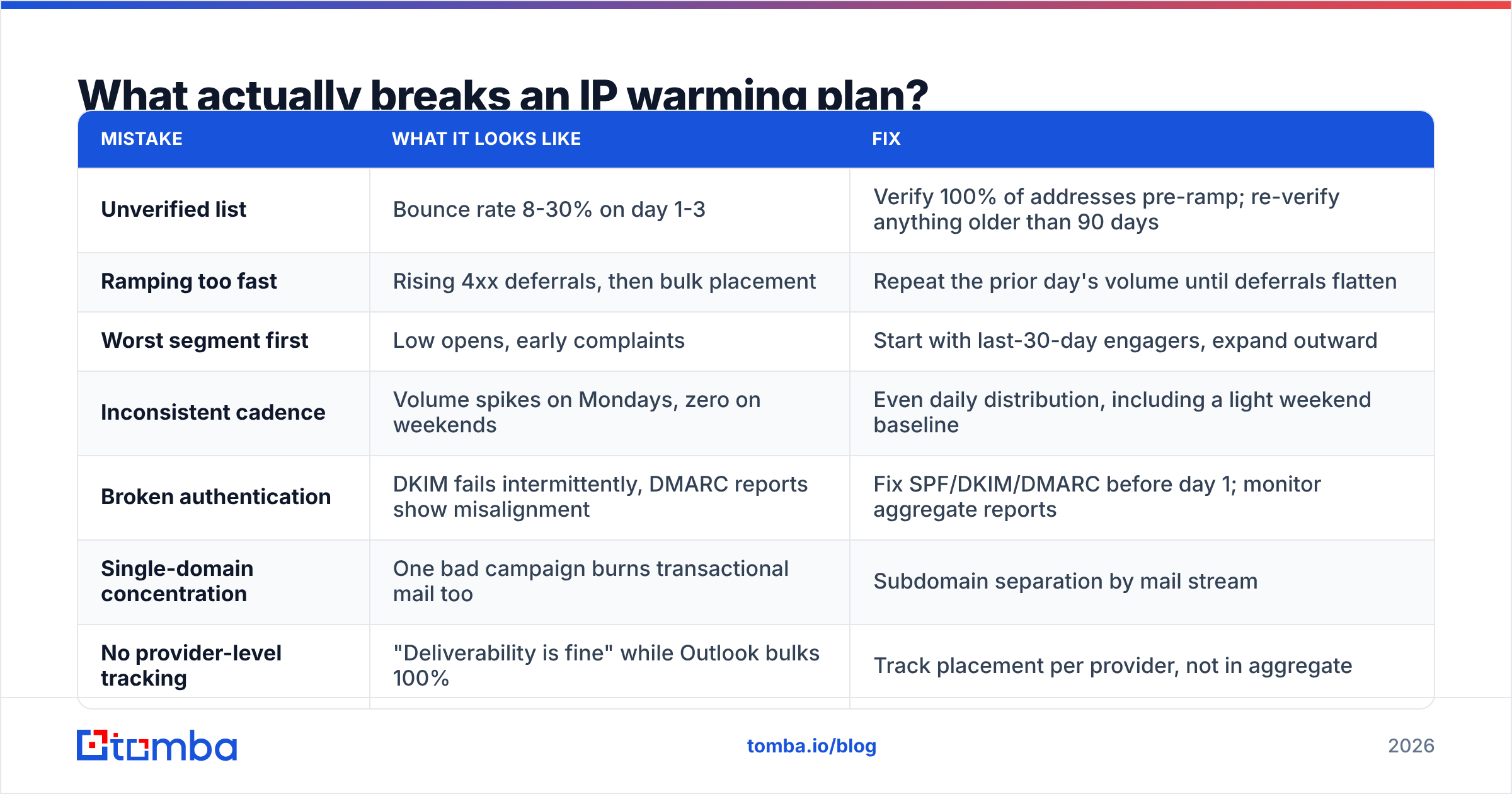
What actually breaks an IP warming plan?#
From post-mortems on failed ramps, the recurring causes, roughly in order of frequency:
| Mistake | What it looks like | Fix |
|---|---|---|
| Unverified list | Bounce rate 8-30% on day 1-3 | Verify 100% of addresses pre-ramp; re-verify anything older than 90 days |
| Ramping too fast | Rising 4xx deferrals, then bulk placement | Repeat the prior day's volume until deferrals flatten |
| Worst segment first | Low opens, early complaints | Start with last-30-day engagers, expand outward |
| Inconsistent cadence | Volume spikes on Mondays, zero on weekends | Even daily distribution, including a light weekend baseline |
| Broken authentication | DKIM fails intermittently, DMARC reports show misalignment | Fix SPF/DKIM/DMARC before day 1; monitor aggregate reports |
| Single-domain concentration | One bad campaign burns transactional mail too | Subdomain separation by mail stream |
| No provider-level tracking | "Deliverability is fine" while Outlook bulks 100% | Track placement per provider, not in aggregate |
Two monitoring tools are non-negotiable and free: Google Postmaster Tools for Gmail domain and IP reputation, and your ESP's own bounce and complaint dashboards. Microsoft's SNDS covers the Outlook side. If you are not looking at Postmaster Tools during a warmup, you are ramping blind.
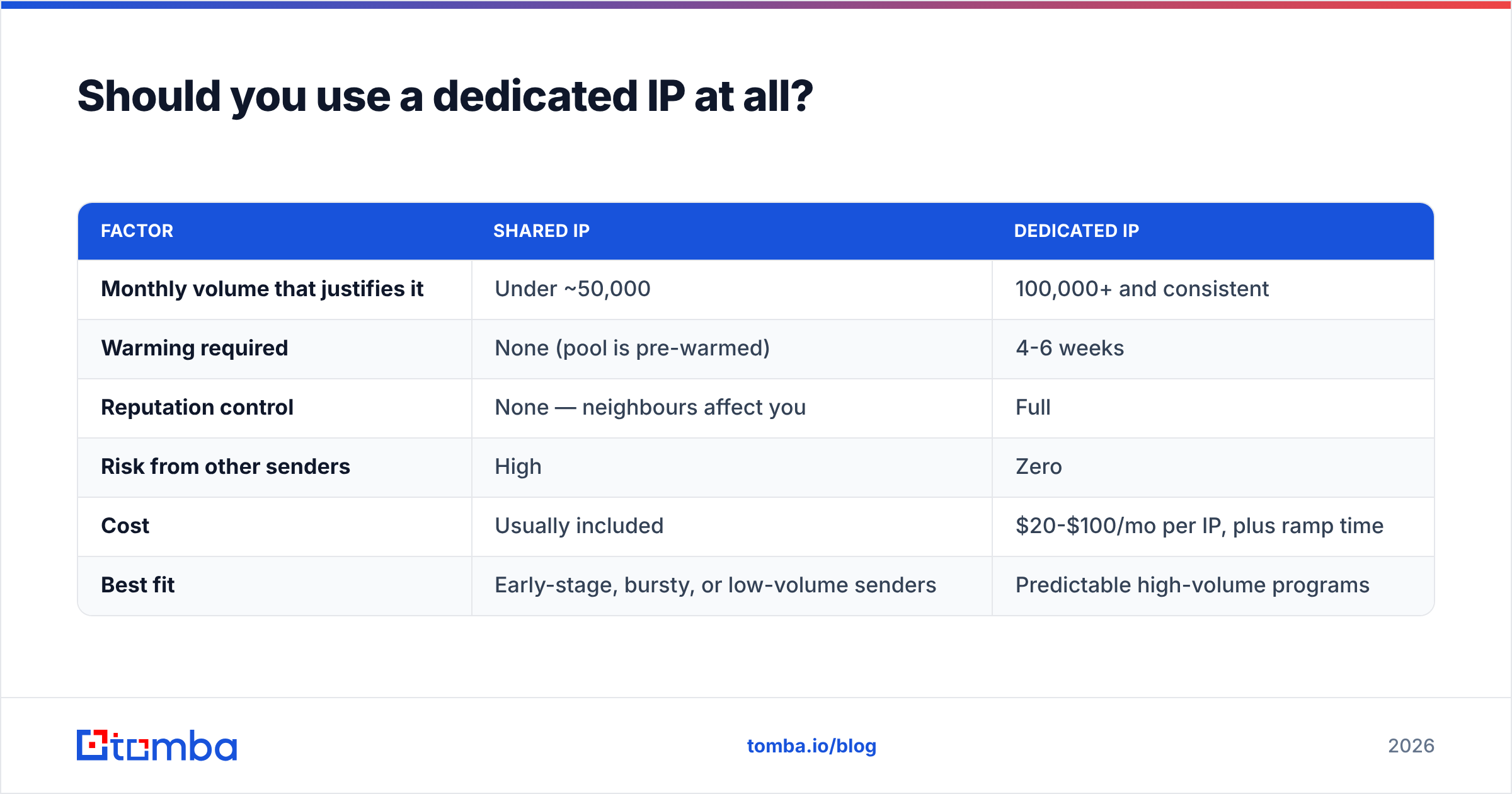
Should you use a dedicated IP at all?#
Not always. Dedicated IPs are worth the warming effort only above a certain volume and consistency threshold.
| Factor | Shared IP | Dedicated IP |
|---|---|---|
| Monthly volume that justifies it | Under ~50,000 | 100,000+ and consistent |
| Warming required | None (pool is pre-warmed) | 4-6 weeks |
| Reputation control | None — neighbours affect you | Full |
| Risk from other senders | High | Zero |
| Cost | Usually included | $20-$100/mo per IP, plus ramp time |
| Best fit | Early-stage, bursty, or low-volume senders | Predictable high-volume programs |
The failure mode nobody warns about: a dedicated IP with too little volume is worse than a shared pool. Providers want regular traffic to form a judgement. If you send 3,000 messages a month from a dedicated IP, your reputation resets toward neutral between sends and you get the warming penalty permanently. Stay on shared until your volume is genuinely steady.
How long until the warmup is done?#
Treat it as finished when three things are simultaneously true for seven consecutive days: bounce rate under 2%, complaint rate under 0.05%, and inbox placement above 90% at your top three providers. Calendar-wise, that is 30 days for a straightforward IP move on an established domain, 45-60 days for a new domain and new IP together, and longer for cold outbound where engagement is structurally lower.
After that, reputation still needs maintenance. Re-verify your list quarterly, sunset recipients who have not engaged in 180 days, and watch for the slow drift that shows up as a 3-point decline in open rate over a month. And if you pause sending for more than two weeks, plan on a short re-warm before returning to full volume — reputation decays.
Start with data clean enough to warm on#
Every warming schedule in this post assumes one thing: the addresses you send to actually exist and actually belong to the people you think they do. That assumption is where most ramps fail, and no ramp design compensates for a 12% bounce rate on day three.
Tomba's Email Finder returns verified professional email addresses with a confidence score attached, so the list entering your warmup is clean before the first send rather than after the first block. Start free with 25 searches a month, or move to Starter at $49/mo when you are ready to scale the ramp — see Tomba pricing for the full breakdown. Warm the IP properly, feed it verified data, and the schedule above will hold.
Related guides#
// get started
Find, verify and enrich your first contacts today
Start on the free plan with 25 searches a month, then scale when your team is ready.
Free plan · No credit card required · GDPR & CCPA
// about the author