IPWAY Pricing Reviews: Pros, Cons and a 2026 Breakdown
An independent breakdown of IPWAY pricing, reviews, pros and cons — how per-IP proxy billing really adds up, where IPWAY fits in a B2B data stack, and when an enrichment API is the cheaper answer.
Most IPWAY pricing reviews stop at the rate card. This one goes further. We look at what proxy access really costs a B2B team, where IPWAY fits in a sales stack, and when an enrichment API is the cheaper buy.
TL;DR
- IPWAY sells proxy infrastructure: static datacenter, ISP, and residential IPs. It is not a lead database. You will not get a single verified contact.
- Pricing follows the usual proxy model. You pay per IP each month for static pools, or per GB for rotating residential traffic.
- Your real cost is bandwidth and ban rate, not the sticker price.
- Most IPWAY pricing reviews land on the same themes: fast static pools, thin self-serve tooling, and support by ticket or Telegram.
- The better question is whether you need a scraper at all. If you only want work emails and firmographics, an API removes the proxy line entirely.
- Rule of thumb: proxies for data you must collect yourself, APIs for data someone already maintains.
What is IPWAY, and who actually buys it?#
IPWAY sells IP addresses. That is the whole product. You rent a pool of proxy endpoints — datacenter IPs, static ISP IPs, or rotating residential exits. You route your traffic through them, so the target site sees the proxy instead of your server.
Buyers fall into a few predictable groups. Scraping teams pulling public web data at volume. Ad verification and rank-tracking tools that need vantage points in other countries. Sneaker and ticket resellers who want clean residential IPs. Growth teams running homegrown prospecting scripts. You can read the vendor's own pitch on the IPWAY site. For the category basics, the proxy server primer is a good start.
What IPWAY is not: a contact database, a verification service, or a compliance layer. It is plumbing. That matters when you price it, because the proxy invoice is only the first line of a much longer bill.

How does IPWAY pricing actually work?#
Proxy vendors rarely sell seats. They sell one of three units, and IPWAY mixes all three.
- Per-IP monthly rental (datacenter). You lease a fixed block of IPs for a flat fee. It is the cheapest option per request and the easiest to budget. It is also the first to get blocked on well-defended sites. The 2026 market range sits in the low single-digit dollars per IP.
- Per-IP monthly rental (ISP or static residential). Same flat rental, but the IPs are registered to consumer ISPs. They look like real households and stay static. Expect to pay several times more per IP than plain datacenter.
- Per-GB rotating residential. You pay for bandwidth, not addresses. Every request can exit from a different device. This is where budgets blow up, because pages are heavier than people expect and retries cost you twice.
Two more lines land on the invoice. Committed volume tiers cut your unit rate, but they carry monthly minimums and bandwidth that does not roll over. Add-ons are priced on their own: dedicated subnets, city-level targeting, and longer sticky sessions.
Two things follow. First, published starting prices mean very little. The number that matters is cost per successful request, and that depends on your target's defenses. Second, a per-GB plan turns your invoice into a scorecard for your engineering. A scraper that loads images, fonts, and trackers can burn three to five times the bandwidth of one that blocks them.
Rate cards change often, and large deals are quoted privately. Treat any figure you read in a blog post — including this one — as directional. Pull live numbers from the vendor before you model anything.
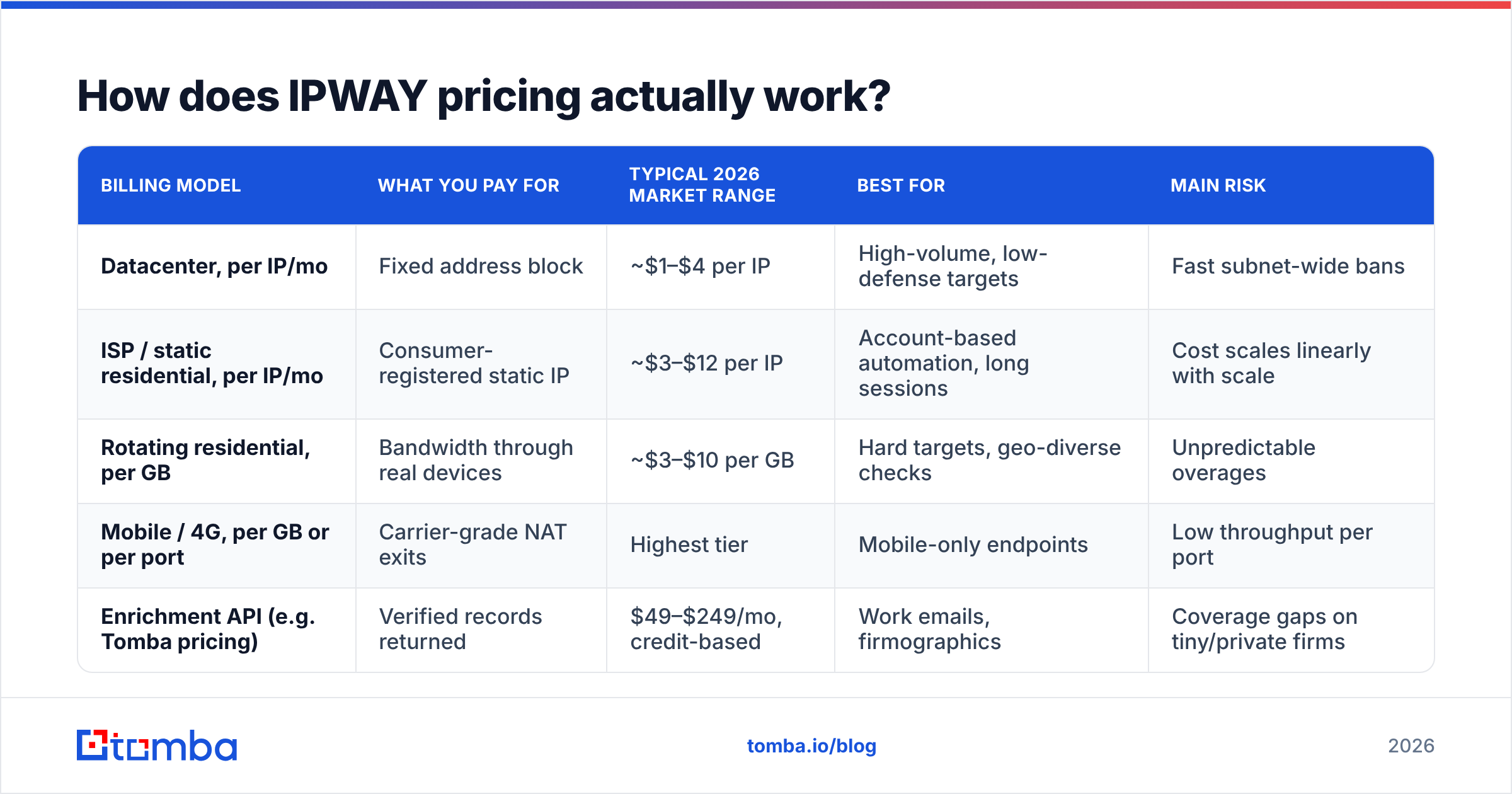
| Billing model | What you pay for | Typical 2026 market range | Best for | Main risk |
|---|---|---|---|---|
| Datacenter, per IP/mo | Fixed address block | ~$1–$4 per IP | High-volume, low-defense targets | Fast subnet-wide bans |
| ISP / static residential, per IP/mo | Consumer-registered static IP | ~$3–$12 per IP | Account-based automation, long sessions | Cost scales linearly with scale |
| Rotating residential, per GB | Bandwidth through real devices | ~$3–$10 per GB | Hard targets, geo-diverse checks | Unpredictable overages |
| Mobile / 4G, per GB or per port | Carrier-grade NAT exits | Highest tier | Mobile-only endpoints | Low throughput per port |
| Enrichment API (e.g. Tomba pricing) | Verified records returned | $49–$249/mo, credit-based | Work emails, firmographics | Coverage gaps on tiny/private firms |
What do IPWAY pricing reviews say?#
Review volume for mid-size proxy vendors is thin. Calibrate your expectations. You will find far fewer verified entries on G2 than you would for a CRM. Much of the proxy chatter also lives on forums, where the writer's incentives are unclear. Read accordingly.
Across the category, the praise and the complaints repeat often enough to be useful.
What reviewers consistently like
- Latency on static pools. Datacenter and ISP proxies usually beat the big residential networks on response time. You are not hopping through someone's phone.
- Cleaner subnets at the entry tier. Smaller pools tend to be less burned than ranges resold across dozens of white-label storefronts.
- Direct support. Reply times at boutique vendors are often faster, simply because the queue is shorter.
- Simple auth. IP whitelisting plus user:pass is standard. It takes minutes to wire into a scraper.
What reviewers consistently flag
- Dashboards that trail the majors. Usage analytics, per-subuser budgets, and fine-grained geo-targeting are the usual gaps.
- Bandwidth disputes. The most common proxy complaint anywhere: "the counter says I used more than I think I did." Log your own bytes from day one.
- Refund friction. Prepaid bandwidth and short trials are the norm. Assume prepaid balances are use-it-or-lose-it unless the contract says otherwise.
- Pool volatility. IP quality is not fixed. A pool that works in March can be blacklisted by June if other tenants abuse it.
None of this is an indictment of IPWAY. It is the shape of the market. So run a paid pilot against your targets before you commit, and measure success rate rather than speed.
What are the pros and cons of IPWAY?#
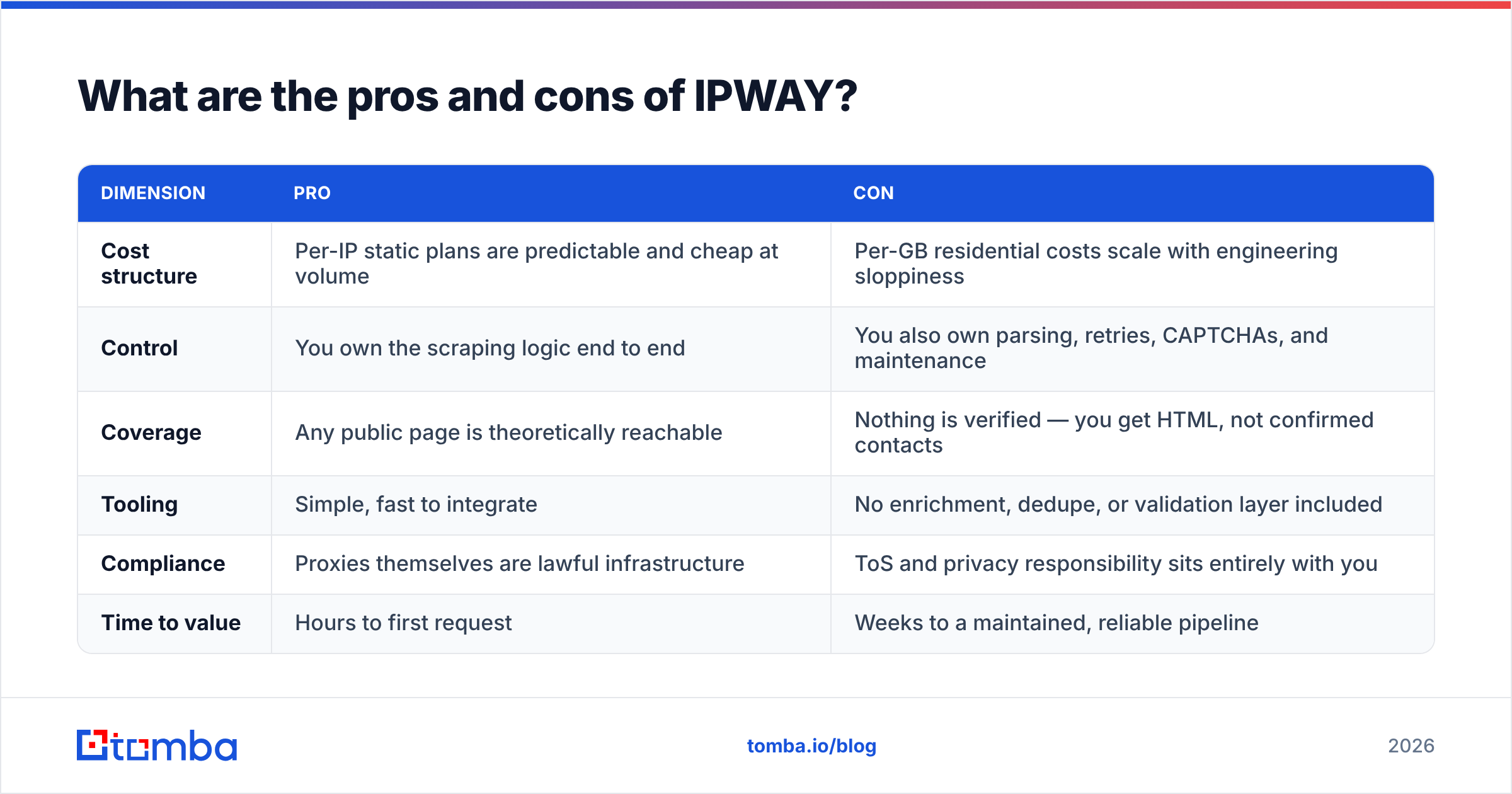
| Dimension | Pro | Con |
|---|---|---|
| Cost structure | Per-IP static plans are predictable and cheap at volume | Per-GB residential costs scale with engineering sloppiness |
| Control | You own the scraping logic end to end | You also own parsing, retries, CAPTCHAs, and maintenance |
| Coverage | Any public page is theoretically reachable | Nothing is verified — you get HTML, not confirmed contacts |
| Tooling | Simple, fast to integrate | No enrichment, dedupe, or validation layer included |
| Compliance | Proxies themselves are lawful infrastructure | ToS and privacy responsibility sits entirely with you |
| Time to value | Hours to first request | Weeks to a maintained, reliable pipeline |
The pro column is real. Say your data need is genuinely unusual — a niche directory, a regional marketplace, a public registry no vendor indexes. Then proxies plus your own crawler are the only path, and paying per IP beats paying per record.
The con column is where most B2B teams get burned. A proxy plan is the cheapest line in a scraping stack. The costly parts are the engineer who maintains selectors, the queueing setup, the CAPTCHA spend, and the cleanup when 30% of your harvested emails bounce. Bounce rate is the hidden tax. Skip verification and your sender reputation pays for it, and that bill shows up as lost replies rather than an invoice.
Is IPWAY worth it for B2B lead generation specifically?#
Usually not, if contact data is the goal.
Here is the arithmetic. Say you want 10,000 verified work emails for decision-makers at mid-market SaaS companies. The proxy route means renting IPs, building crawlers for several sources, guessing email patterns, then verifying every guess over SMTP. Those checks need clean IPs too, or you get rate-limited. You will spend weeks of engineering time and still hold guesses of unknown quality.
The API route is one call per contact against a maintained index, with verification status attached. A bulk email finder run takes a CSV of names and domains and returns statuses in minutes. A domain search returns the known addresses and the detected pattern for a company in one request. No proxies, no selectors, no CAPTCHA budget.

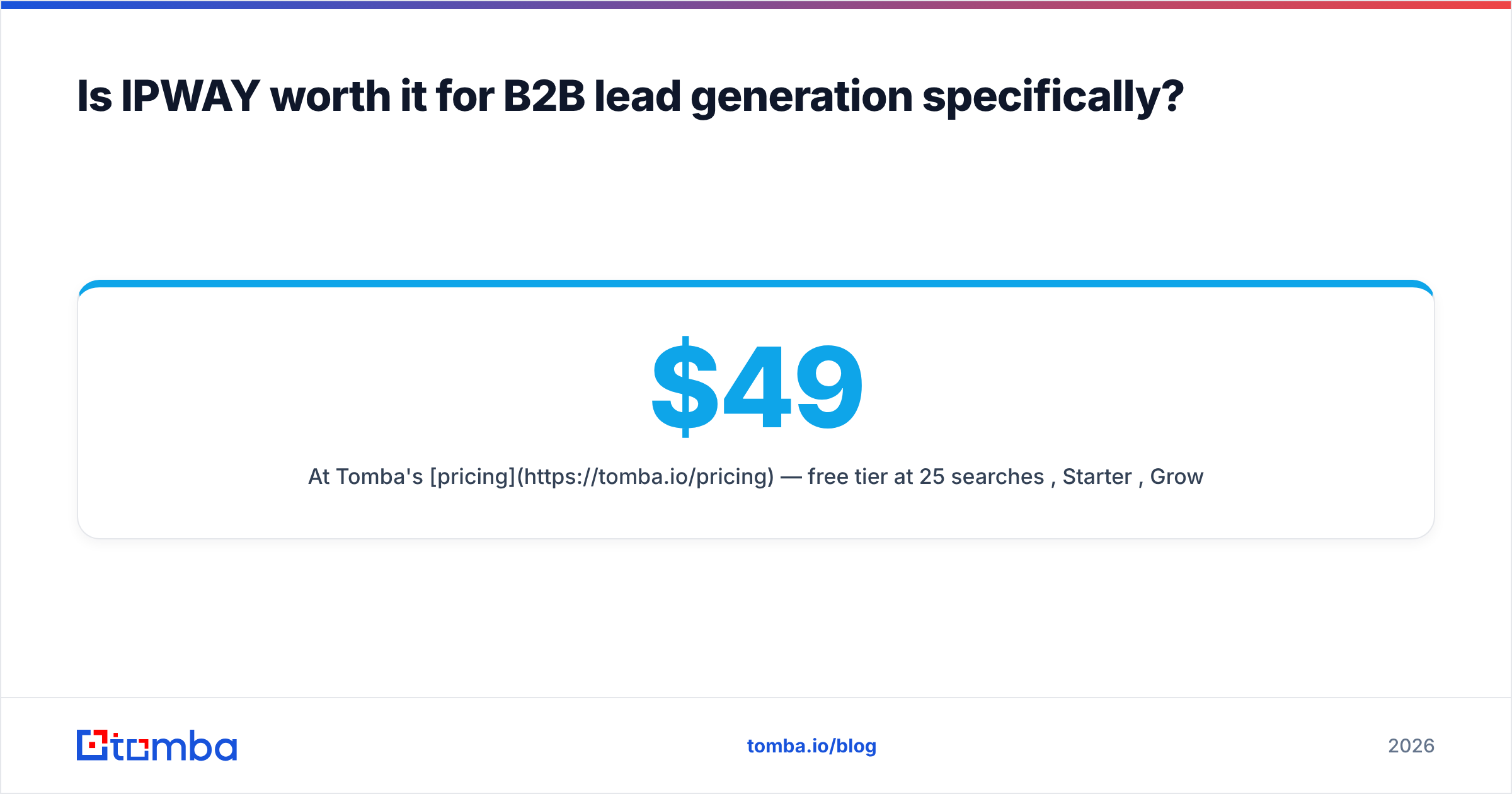
Tomba's pricing runs from a free tier at 25 searches a month to Starter at $49, Growth at $99, Pro at $249, and custom Enterprise. So the real comparison is not cheap proxies against an expensive API. It is cheap proxies plus an engineer against an API. Once you price the engineer, the API wins most contact-data jobs. Tomba documents where the data comes from on its data sources page, which is a fair thing to ask of any vendor.
When should you actually pay for proxies?#
Proxies earn their keep in four cases:
- Ad verification and rank tracking. You need to see what a user in Lisbon or São Paulo sees. No API replaces a real vantage point.
- Price and inventory monitoring. Competitor pages, marketplace listings, and travel inventory change hourly, and few are licensed through an API.
- Sources nobody indexes. Municipal registries, trade directories, niche job boards. If no vendor covers it, you collect it yourself.
- Brand-safety testing. Checking that your own pages render correctly across regions and networks.
Notice what is missing: finding someone's work email. Data vendors already solve, maintain, and verify that, at a unit cost no in-house scraper beats.
Many teams land on a hybrid. Use proxies for the signal layer — who is hiring, who changed their pricing page, who just shipped a product. Then use an enrichment API for the contact layer. Your crawler finds the account; the Tomba API resolves the person. That split keeps bandwidth low, because you fetch a few pages per company instead of crawling whole directories.
How should you evaluate IPWAY before you buy?#
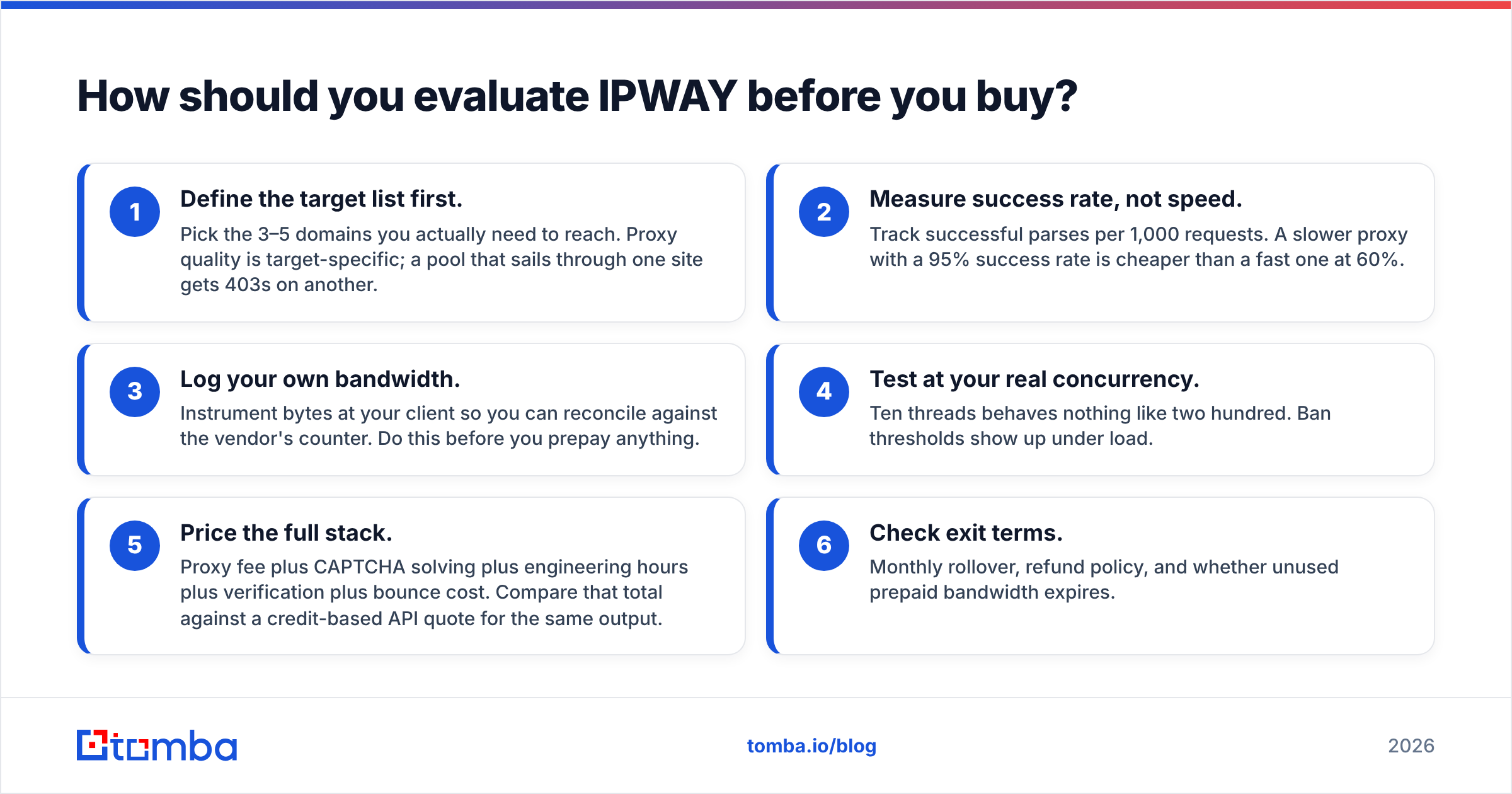
Run a structured pilot instead of trusting any review, including this one.
- Define the target list first. Pick the 3–5 domains you actually need. Proxy quality is target-specific. A pool that sails through one site gets 403s on another.
- Measure success rate, not speed. Track successful parses per 1,000 requests. A slow proxy at 95% beats a fast one at 60%.
- Log your own bandwidth. Count bytes at your client so you can check the vendor's counter. Do this before you prepay.
- Test at real concurrency. Ten threads behaves nothing like two hundred. Ban thresholds show up under load.
- Price the whole stack. Proxy fee, CAPTCHA solving, engineering hours, verification, bounce cost. Compare that total with a credit-based API quote.
- Check the exit terms. Rollover, refunds, and whether unused prepaid bandwidth expires.
If step 5 says the API is cheaper — and for most contact-data jobs it will — then you were never really shopping for proxies.
The verdict#
IPWAY is sound infrastructure for one job: routing your own traffic through IPs you control, at a set per-IP or per-GB rate. Running ad verification, rank tracking, or collecting data nobody else indexes? Then it belongs on the shortlist with the other mid-tier providers. Judge it on a paid pilot against your real targets, not on a star rating — that is the one thing IPWAY pricing reviews cannot do for you.
If what you need is verified work emails, direct dials, and firmographics for outbound, proxies are a detour. You will spend more on maintenance than you save on unit cost, and you will still be guessing at deliverability.
Skip the scraper. Start with the Tomba Email Finder — 25 free searches a month, no credit card, no proxy pool to maintain. Give it a name and a domain. You get back a verified work email with a confidence score and its sources. If it covers your market, you just deleted an infrastructure line item from your budget. If it does not, you lost twenty minutes and learned something concrete about your data problem.
Related guides#
// get started
Find, verify and enrich your first contacts today
Start on the free plan with 25 searches a month, then scale when your team is ready.
Free plan · No credit card required · GDPR & CCPA
// about the author