Is There a Way to Find Someone's Email Address? 2026 Guide
Yes, there is — and you can do most of it without paying anything. Here are nine methods for finding someone's email address, ranked by how often they actually return a working inbox.
TL;DR
- Yes, there is a way to find someone's email address — usually several, and the first three cost nothing.
- Manual methods (company site, LinkedIn contact card, GitHub commits, published PDFs) work well for one or two people and collapse at scale.
- Pattern guessing is the most overrated method: it produces a plausible address roughly 60-70% of the time, and the other 30-40% becomes a bounce on your domain.
- Email finder tools resolve name + domain against a verified index in under a second; the good ones hit 90%+ accuracy on well-indexed B2B domains.
- Whatever method you use, verify before you send. A single unverified send is cheap; 500 of them cost you your sender reputation.
Is there actually a way to find someone's email address?#
Yes — and the honest version of the answer is that there are about nine of them, with wildly different hit rates.
Think of it like finding a phone number before smartphones. You could call directory assistance (fast, usually right), flip through a phone book (slow, often stale), or ask a mutual friend (reliable, doesn't scale). Email works the same way. Some methods query an index that already knows the answer. Some methods reconstruct the answer from patterns. Some methods ask a human.
The one thing that has changed since 2020: guessing has gotten more expensive. Gmail and Microsoft now weigh bounce rate heavily in inbox placement decisions, so a 30% bounce rate on a cold campaign doesn't just waste sends — it damages every future send from that domain. The method you pick is no longer just a time question. It's a deliverability question.
Here's what actually works, in rough order of effort.
What are the free ways to find someone's email address?#
Start here before you pay for anything. On a single contact, these methods take four minutes and succeed more often than people expect.
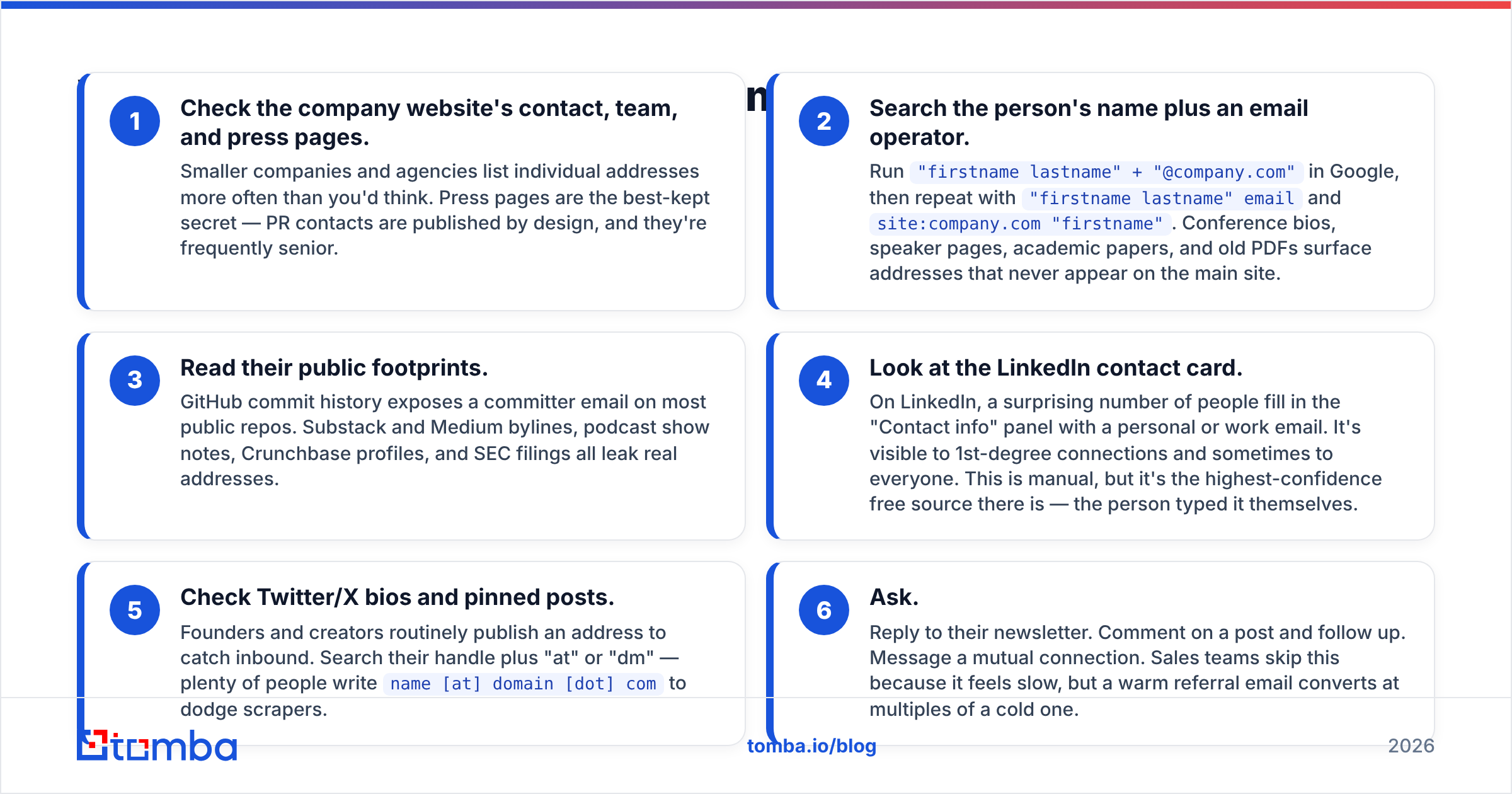
- Check the company website's contact, team, and press pages. Smaller companies and agencies list individual addresses more often than you'd think. Press pages are the best-kept secret — PR contacts are published by design, and they're frequently senior.
- Search the person's name plus an email operator. Run
"firstname lastname" + "@company.com"in Google, then repeat with"firstname lastname" emailandsite:company.com "firstname". Conference bios, speaker pages, academic papers, and old PDFs surface addresses that never appear on the main site. - Read their public footprints. GitHub commit history exposes a committer email on most public repos. Substack and Medium bylines, podcast show notes, Crunchbase profiles, and SEC filings all leak real addresses.
- Look at the LinkedIn contact card. On LinkedIn, a surprising number of people fill in the "Contact info" panel with a personal or work email. It's visible to 1st-degree connections and sometimes to everyone. This is manual, but it's the highest-confidence free source there is — the person typed it themselves.
- Check Twitter/X bios and pinned posts. Founders and creators routinely publish an address to catch inbound. Search their handle plus "at" or "dm" — plenty of people write
name [at] domain [dot] comto dodge scrapers. - Ask. Reply to their newsletter. Comment on a post and follow up. Message a mutual connection. Sales teams skip this because it feels slow, but a warm referral email converts at multiples of a cold one.

Free methods have one structural problem: they're linear. Four minutes per contact is fine for five prospects and impossible for five hundred. That's where the second category comes in.
How do email finder tools actually work?#
An email finder doesn't guess. It queries an index.
The mechanics, simplified: a provider crawls the public web — company sites, press releases, job boards, developer commits, open directories, published documents — and extracts every address it encounters alongside the name and domain it appeared with. That index gets deduplicated, scored, and re-verified on a schedule. When you submit "Jane Doe, acme.com," the tool checks whether it already has a confirmed address for that pair, and returns it with a confidence score.
When there's no indexed match, the better tools fall back to pattern inference — they know acme.com uses first.last@ because they've confirmed 400 other acme.com addresses — and then they run an SMTP-level check to confirm the inferred address actually resolves before handing it to you. That combination is why a good tool beats a permutator: the permutator produces twelve candidates, the tool produces one confirmed answer.

Accuracy varies more by target than by vendor. Any reputable tool will return 90%+ verified matches on a 200-person US SaaS company with an active careers page. The same tool will struggle on a 12-person German manufacturing firm with a catch-all mail server and no web presence. When a vendor advertises a single accuracy number, they're averaging across a sample that may look nothing like your list.
Two things genuinely separate providers:
- Catch-all handling. A catch-all domain accepts mail to every address, so a standard SMTP check returns "valid" for
asdfgh@company.com. Providers that flag catch-alls honestly — or run deeper probes through a catch-all verifier — save you from a list that looks clean and bounces anyway. - Freshness. Roughly 25-30% of B2B contact data decays per year through job changes. An index refreshed quarterly is meaningfully better than one refreshed annually, and neither vendor will tell you which they do unless you ask.
Which email finder tool should you use?#
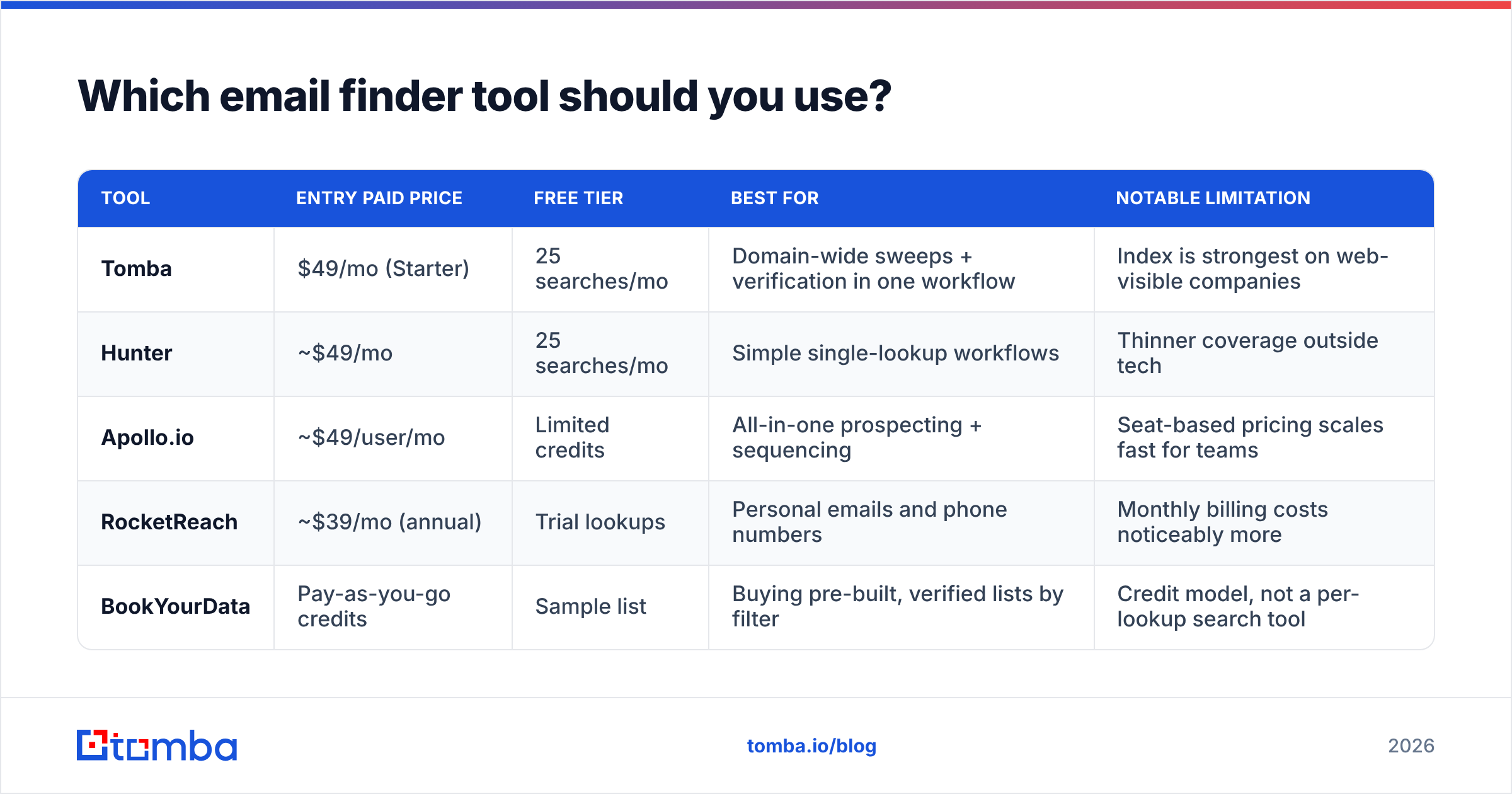
Prices below are list prices for entry-level paid tiers at the time of writing — always confirm on the vendor's own page, since credit definitions differ enough to make direct comparison misleading.
| Tool | Entry paid price | Free tier | Best for | Notable limitation |
|---|---|---|---|---|
| Tomba | $49/mo (Starter) | 25 searches/mo | Domain-wide sweeps + verification in one workflow | Index is strongest on web-visible companies |
| Hunter | ~$49/mo | 25 searches/mo | Simple single-lookup workflows | Thinner coverage outside tech |
| Apollo.io | ~$49/user/mo | Limited credits | All-in-one prospecting + sequencing | Seat-based pricing scales fast for teams |
| RocketReach | ~$39/mo (annual) | Trial lookups | Personal emails and phone numbers | Monthly billing costs noticeably more |
| BookYourData | Pay-as-you-go credits | Sample list | Buying pre-built, verified lists by filter | Credit model, not a per-lookup search tool |

The real selection question isn't "who is most accurate." It's "what shape is my task."
- If you know the company but not the person, you want a domain search that returns every indexed address at that domain with roles and confidence scores. This is the highest-leverage move in B2B prospecting and most people never run it.
- If you know the person but not the company email, a name-plus-domain finder is the right call.
- If you have a LinkedIn profile URL and nothing else, use a LinkedIn finder that maps the profile to a work address.
- If you're buying volume in a defined segment — say, 5,000 HR directors in DACH — a list vendor like BookYourData is a legitimate fit and often cheaper per record than running 5,000 individual lookups.
- If you need it inside a spreadsheet or your app, pick on API and integration quality, not UI. Cross-check independent reviews on G2 rather than vendor case studies.
Is guessing an email address ever a good idea?#
Rarely, and never at volume.
Roughly 70% of B2B domains use one of four patterns: first.last@, first@, flast@, or firstl@. So if you generate permutations with an email permutator, one of them is probably right. The trouble is you don't know which one, and sending to all twelve is the single fastest way to get a domain blacklisted.

Guessing is defensible in exactly one scenario: you have confirmed the domain's pattern from a known-good address at that company, the person's name has no spelling ambiguity, and you verify the candidate before sending. That's not really guessing — that's inference plus verification. The failure mode is everything else: hyphenated surnames, married names, two Sarah Chens in the same org, regional subdomains, and companies that quietly moved to first.last@eu.company.com after an acquisition.
If you want to understand why the syntax rules matter here, the email address specification is worth ten minutes — local-part rules are looser than most people assume, which is why naive permutators produce invalid candidates.
How do you verify an email before you send it?#
Verification is the step people skip and then blame the finder for.
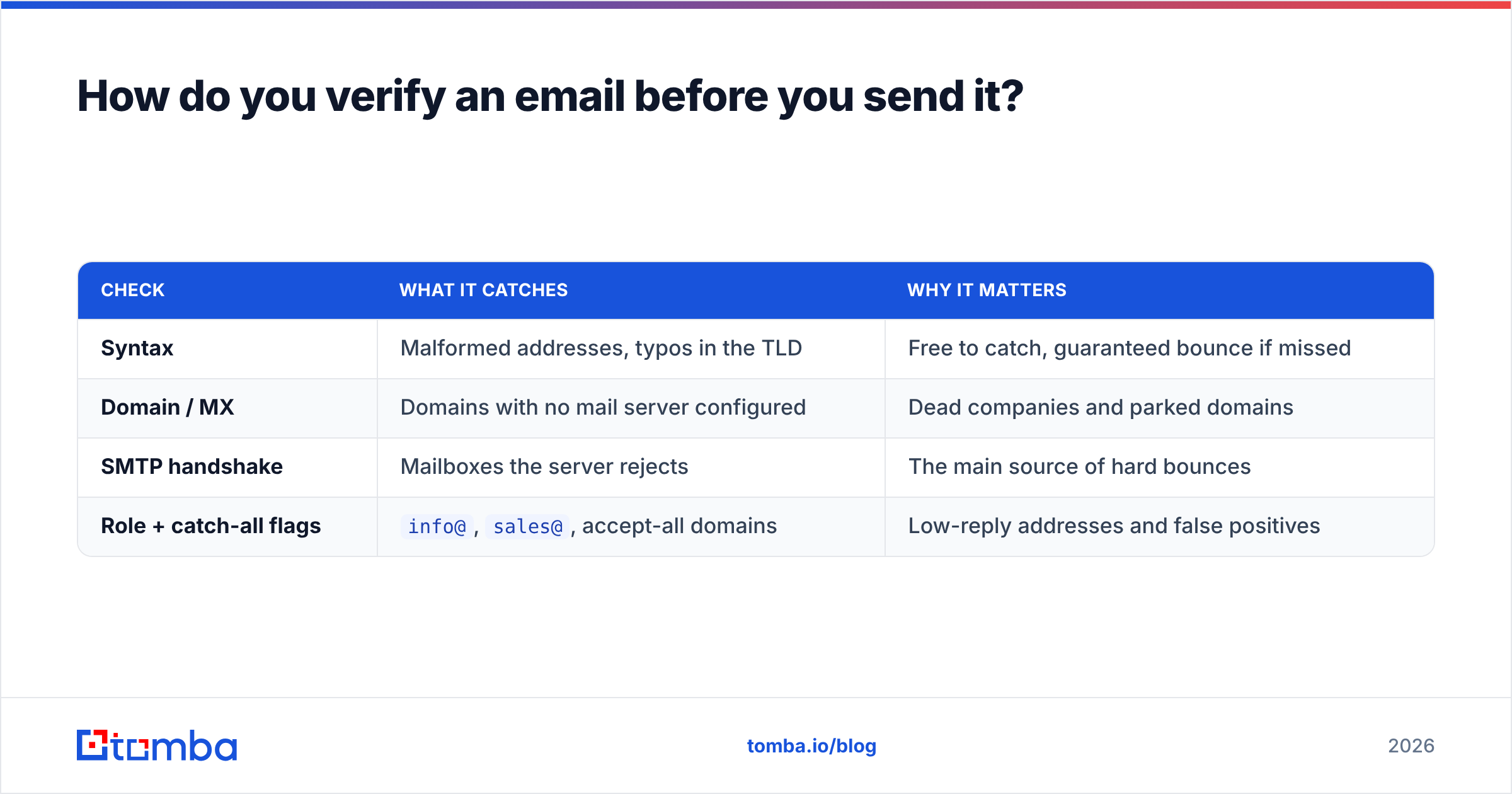
A proper verification pass runs four checks in sequence:
| Check | What it catches | Why it matters |
|---|---|---|
| Syntax | Malformed addresses, typos in the TLD | Free to catch, guaranteed bounce if missed |
| Domain / MX | Domains with no mail server configured | Dead companies and parked domains |
| SMTP handshake | Mailboxes the server rejects | The main source of hard bounces |
| Role + catch-all flags | info@, sales@, accept-all domains |
Low-reply addresses and false positives |
Run your list through an email verifier before every campaign — not just when the list is new. A list verified six months ago is already 12-15% decayed. If your bounce rate on a fresh campaign exceeds 3%, stop sending and re-verify; above 5% you're actively burning sender reputation with Gmail and Outlook.
One practical rule: treat "catch-all" as its own bucket, not as "valid." Send to catch-all addresses in small, separate batches so a bad segment can't poison your main domain's reputation.
Is it legal to find someone's email address?#
Finding a publicly available business email address is legal in most jurisdictions. Sending unsolicited mail to it is where the rules bite, and they differ by region.
In the EU and UK, GDPR Article 6 requires a lawful basis for processing. B2B outreach usually leans on legitimate interest, which means you need a genuine business relevance to the recipient's role, a documented assessment, and a working opt-out. In the US, CAN-SPAM is far more permissive: you need accurate headers, a physical address, and a functioning unsubscribe. Canada's CASL is stricter than both and effectively requires consent or a demonstrable existing relationship.
Practical guardrails that keep you on the right side of all three: target work addresses tied to a role your product actually serves, keep a suppression list, honor opt-outs within 48 hours, and never scrape personal addresses for commercial outreach. If your list includes EU contacts, document why each segment is relevant to their job. That document is your defense.
What's the fastest workflow for finding 100 emails?#
Here's the sequence that takes a 100-company target list to a verified send list in about 40 minutes, versus roughly seven hours manually:
- Build the company list first, not the person list. Pull 100 domains that match your ICP from your CRM, a funding database, or a job-board scrape.
- Run a domain sweep on each. You'll get every indexed address per company with department and seniority labels. Expect 8-30 contacts per mid-size company.
- Filter by role, not by name. You're looking for the VP of Engineering, not for "Chris." Filtering after the sweep is far faster than searching person by person.
- Bulk verify the survivors. Push the filtered set through verification in one batch and split the output into valid, catch-all, and invalid.
- Enrich what's left. Add job title, company size, and tech stack so your first line can be specific instead of generic.
- Suppress and dedupe. Remove existing customers, open opportunities, and anyone who's opted out before a single email leaves the building.
Steps 2 and 4 are the entire time saving. Everything else is list hygiene you'd do anyway.
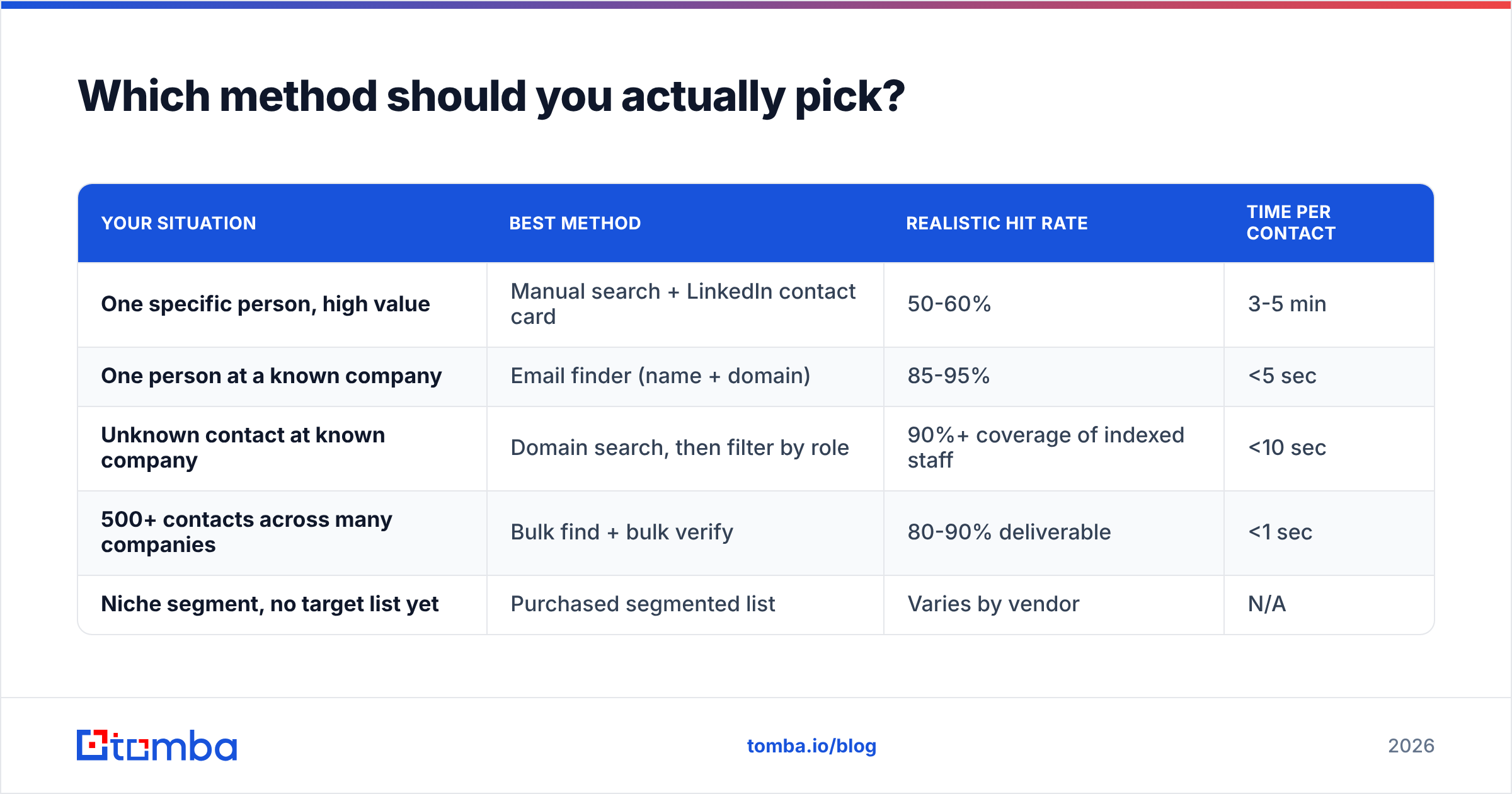
Which method should you actually pick?#
| Your situation | Best method | Realistic hit rate | Time per contact |
|---|---|---|---|
| One specific person, high value | Manual search + LinkedIn contact card | 50-60% | 3-5 min |
| One person at a known company | Email finder (name + domain) | 85-95% | <5 sec |
| Unknown contact at known company | Domain search, then filter by role | 90%+ coverage of indexed staff | <10 sec |
| 500+ contacts across many companies | Bulk find + bulk verify | 80-90% deliverable | <1 sec |
| Niche segment, no target list yet | Purchased segmented list | Varies by vendor | N/A |
The pattern across all five rows: manual methods win on single high-value targets where a personal touch matters, and lose everywhere else. If you're doing more than ten lookups a week, the tooling pays for itself in the first hour.
Start with the free tier before you commit#
If you only need a handful of addresses this month, run them through the Tomba Email Finder on the free plan — 25 searches a month, no card required — and see what the hit rate looks like on the companies you actually sell to. That's a better test than any vendor's published accuracy number, because it's measured on your list, not their sample.
If it holds up, the $49/mo Starter plan covers most solo operators and small teams, with domain search, verification, and bulk processing in the same workspace. Run one campaign, compare your bounce rate to the last one you sent from a manually built list, and let the delta decide.
Related guides#
// get started
Find, verify and enrich your first contacts today
Start on the free plan with 25 searches a month, then scale when your team is ready.
Free plan · No credit card required · GDPR & CCPA
// about the author