Is This Email Address Valid? How to Check Before You Send
A single bad address can cost you a whole sending domain. Here is the exact five-layer check that tells you whether an email address is valid, what each verification status really means, and when a free tool is enough.
TL;DR
- "Valid" is not one thing. An address can be syntactically correct, have a live mail server, and still bounce. You need to check four or five separate layers.
- Syntax and MX checks are free and instant. SMTP handshake checks are where the real answer lives, and they are the part free tools usually fake.
- Catch-all domains (roughly 15-20% of B2B domains) accept every address at the SMTP layer, so no verifier can give you a hard "valid" on them. Anyone who claims 100% certainty there is selling you something.
- Keep hard bounces under 2%. Gmail and Yahoo bulk-sender rules make 2% the practical ceiling before your sender reputation starts sliding.
- For one-off checks, a free email checker is fine. For lists over a few hundred addresses, use a verifier with an API and a documented confidence score.
What does "valid" actually mean for an email address?#
Think of an email address like a street address on an envelope. "Valid" could mean the address is formatted correctly, that the street exists, that a building stands on it, or that someone actually lives there and opens mail. Four different questions, four different answers, and only the last one matters to your reply rate.
When someone asks "is this email address valid," they usually mean the last one: will a message sent here land in a real human's inbox? But every tool on the market answers a different subset of those questions and then reports a single green checkmark. That gap is where bounce rates come from.
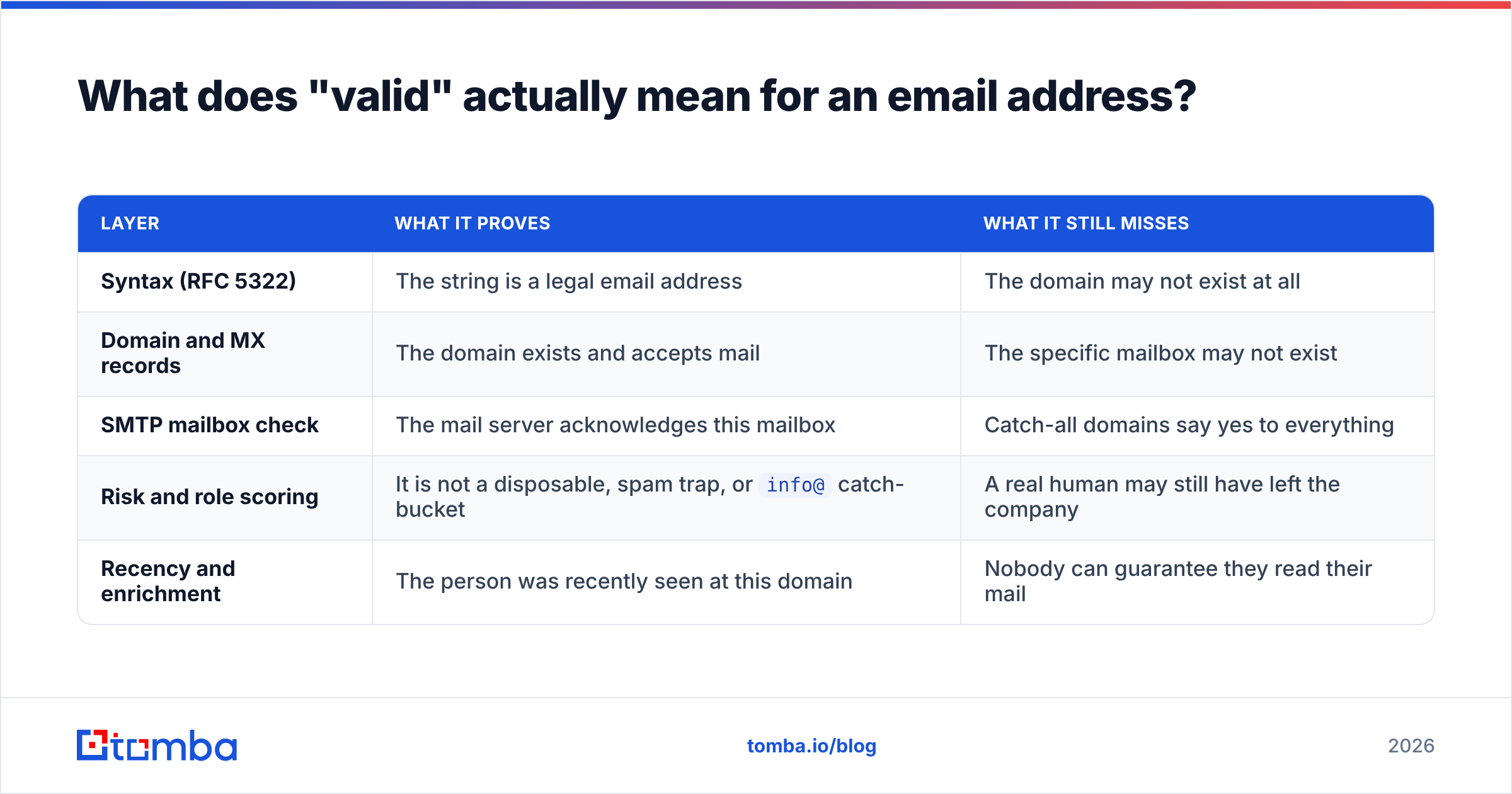
Here is the breakdown that actually matters:
| Layer | What it proves | What it still misses |
|---|---|---|
| Syntax (RFC 5322) | The string is a legal email address | The domain may not exist at all |
| Domain and MX records | The domain exists and accepts mail | The specific mailbox may not exist |
| SMTP mailbox check | The mail server acknowledges this mailbox | Catch-all domains say yes to everything |
| Risk and role scoring | It is not a disposable, spam trap, or info@ catch-bucket |
A real human may still have left the company |
| Recency and enrichment | The person was recently seen at this domain | Nobody can guarantee they read their mail |
A tool that stops at layer two will happily approve asdfgh@microsoft.com. Microsoft's MX records are perfectly healthy. The mailbox does not exist. That message bounces, and the bounce counts against you.
Most of the frustration people have with email verification comes from not knowing which layer their tool stopped at. Read the docs. If a vendor never mentions the SMTP handshake, it is almost certainly doing syntax plus MX plus a blocklist lookup and calling it verification.
How do you check if an email address is valid without sending a test message?#
You run the layers in order, cheapest first, and stop as soon as you get a hard no. Here is the sequence a serious verifier follows:
Normalize and syntax-check the string. Strip whitespace, lowercase the domain, check the local part against RFC rules. This kills typos like
john@@acme.comandjane@acmein microseconds. The Wikipedia entry on email addresses is a surprisingly good reference for what is technically legal here, and the answer is "more than you think" — plus signs, dots, and quoted strings are all valid.Resolve the domain and its MX records. A DNS lookup tells you whether
acme.comexists and which servers handle its mail. No MX record and no A record fallback means the domain cannot receive mail at all. This is also where you catch parked domains and expired registrations, which are extremely common in lists older than a year.Check the domain against known-bad lists. Disposable providers (Mailinator, 10minutemail and their thousands of rotating clones), known spam-trap domains, and blocked ranges. A technically valid address on a disposable domain is worse than useless because it inflates your list and never replies.
Open an SMTP conversation and ask about the mailbox. The verifier connects to the MX host, introduces itself with
HELO, declares a sender withMAIL FROM, and then issuesRCPT TO: <the address you are checking>. It reads the response code and disconnects before sending any data. A250means the server accepts mail for that mailbox. A550means no such user. Nothing is delivered, nobody is notified.Score what is left. Role accounts (
sales@,support@,hello@), catch-all domains, greylisting servers, and accept-all-then-bounce configurations all land in a grey zone. Good tools give you a confidence percentage and a reason code instead of pretending the answer is binary.
Step four is the one that separates real verification from theatre. It also gets harder every year. Major providers rate-limit SMTP probes aggressively, and Microsoft 365 in particular has moved much of its tenant infrastructure toward accept-all behaviour, which means a 250 from an Outlook-hosted domain tells you less than it did in 2020. Any verifier worth paying for maintains its own IP pool, rotates it, respects backoff, and blends SMTP evidence with pattern data from other sources. That infrastructure cost is most of what you are paying for.
What do verification statuses actually mean?#
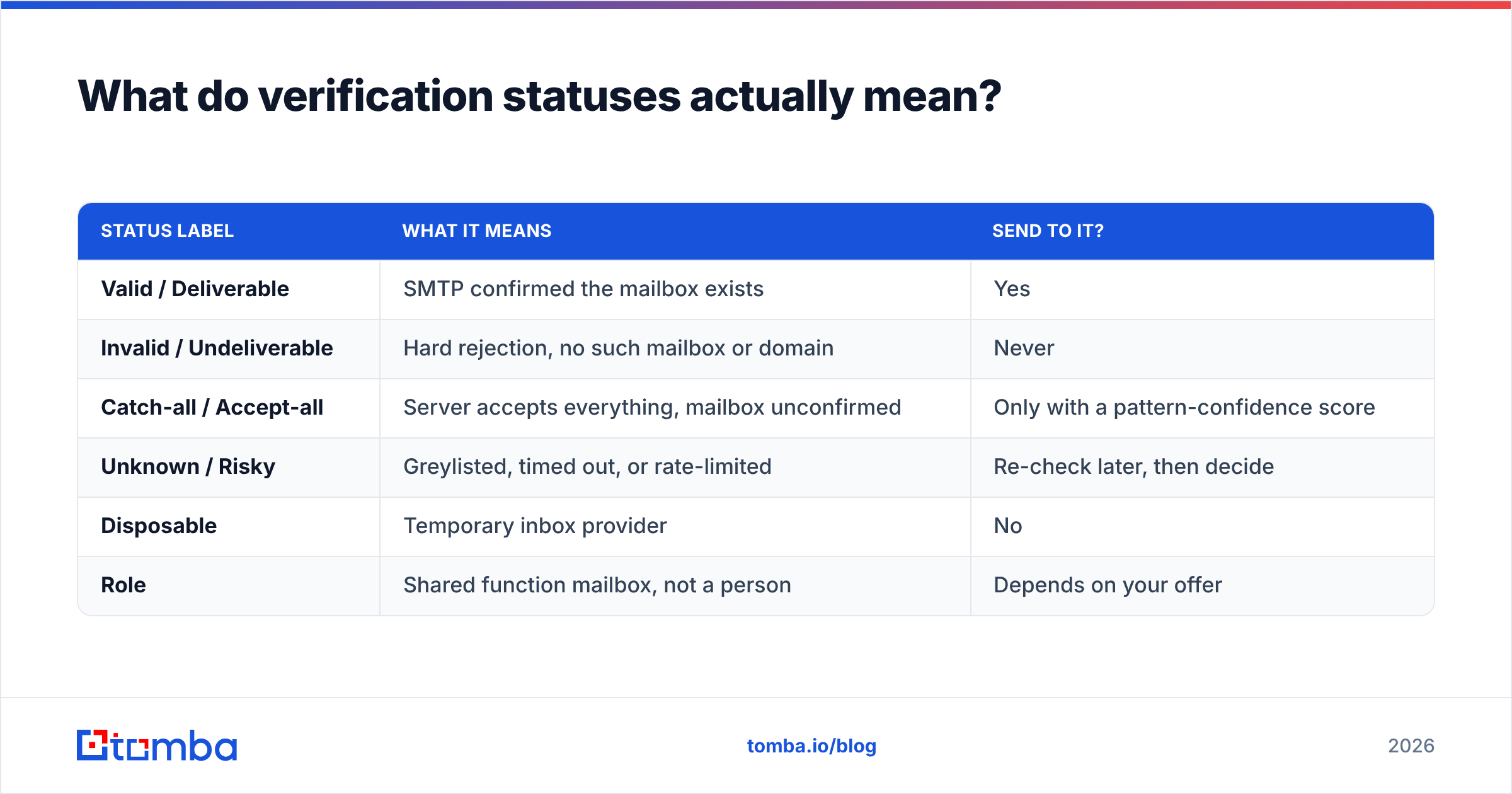
Every vendor uses slightly different labels, which makes cross-tool comparison miserable. Here is the translation table:
| Status label | What it means | Send to it? |
|---|---|---|
| Valid / Deliverable | SMTP confirmed the mailbox exists | Yes |
| Invalid / Undeliverable | Hard rejection, no such mailbox or domain | Never |
| Catch-all / Accept-all | Server accepts everything, mailbox unconfirmed | Only with a pattern-confidence score |
| Unknown / Risky | Greylisted, timed out, or rate-limited | Re-check later, then decide |
| Disposable | Temporary inbox provider | No |
| Role | Shared function mailbox, not a person | Depends on your offer |
The "unknown" bucket deserves attention. Some servers deliberately greylist unfamiliar senders, returning a temporary 4xx code on first contact and expecting a retry. A verifier that runs one probe and gives up marks these unknown. A verifier that retries on a schedule converts a meaningful share of them into definitive answers. When you compare tools, ask what percentage of a sample list comes back unknown. Lower is better, and the spread between vendors on the same list is often 5-10 percentage points.
You can test this yourself in ten minutes. Take 200 addresses you already know the outcome for, because you sent to them last quarter and have the bounce log. Run them through two or three tools. Count how many known-bounces each one caught and how many known-good addresses each one wrongly flagged. That false-positive number matters more than most people realise: a tool that aggressively marks good addresses invalid is quietly deleting pipeline.
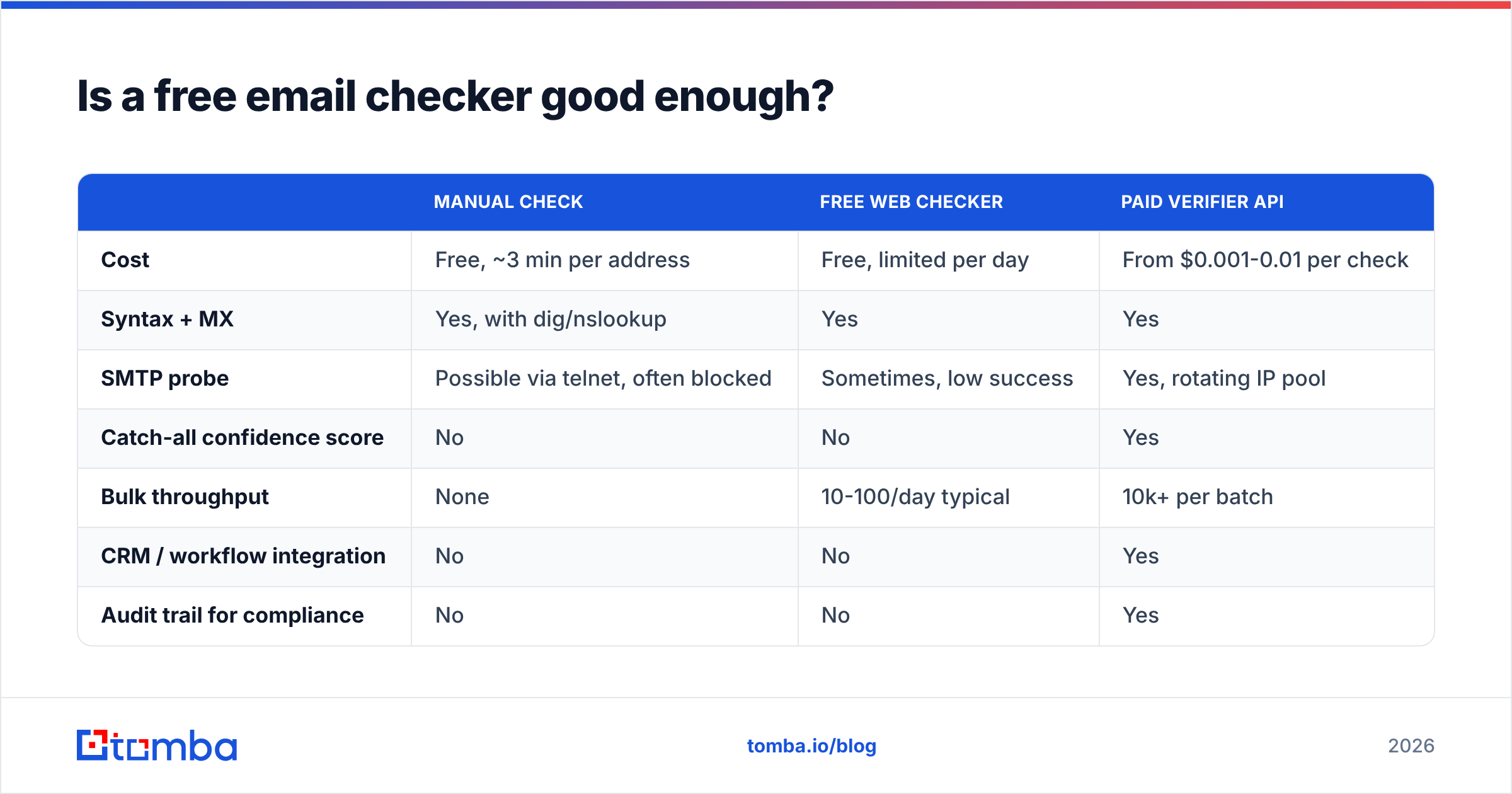
Is a free email checker good enough?#
For a handful of addresses, yes. For a list, no, and the reason is structural rather than a matter of quality.
Free checkers run from a small shared IP pool that thousands of people hammer all day. Mail servers throttle or block those IPs quickly, which pushes results into the unknown bucket. Free tools also rarely do catch-all pattern analysis, because that requires a historical database of which addresses at a domain have actually been confirmed before.
| Manual check | Free web checker | Paid verifier API | |
|---|---|---|---|
| Cost | Free, ~3 min per address | Free, limited per day | From $0.001-0.01 per check |
| Syntax + MX | Yes, with dig/nslookup | Yes | Yes |
| SMTP probe | Possible via telnet, often blocked | Sometimes, low success | Yes, rotating IP pool |
| Catch-all confidence score | No | No | Yes |
| Bulk throughput | None | 10-100/day typical | 10k+ per batch |
| CRM / workflow integration | No | No | Yes |
| Audit trail for compliance | No | No | Yes |
For single lookups, Tomba's free email checker will answer the question without an account. For anything list-shaped, the email verifier with the bulk verify flow is the practical path, and Tomba pricing starts with a free tier of 25 searches per month before the $49/mo Starter plan. Independent user reviews across the category are worth skimming on G2's email verification listings before you commit to anyone, including us.
One warning about the manual route. You can absolutely open a telnet session to port 25 and run the SMTP handshake by hand. It is a genuinely useful exercise once, because it demystifies the whole process. But most residential and cloud ISPs block outbound port 25 entirely, and doing it repeatedly from a single IP gets that IP flagged fast. Learn it, then stop doing it.
Why are catch-all domains the hardest case?#
A catch-all domain is a company that has told its mail server "accept anything at this domain and sort it out later." Ask about ceo@acme.com and you get a 250. Ask about definitely-not-real-9f3@acme.com and you also get a 250. The SMTP layer has nothing left to tell you.
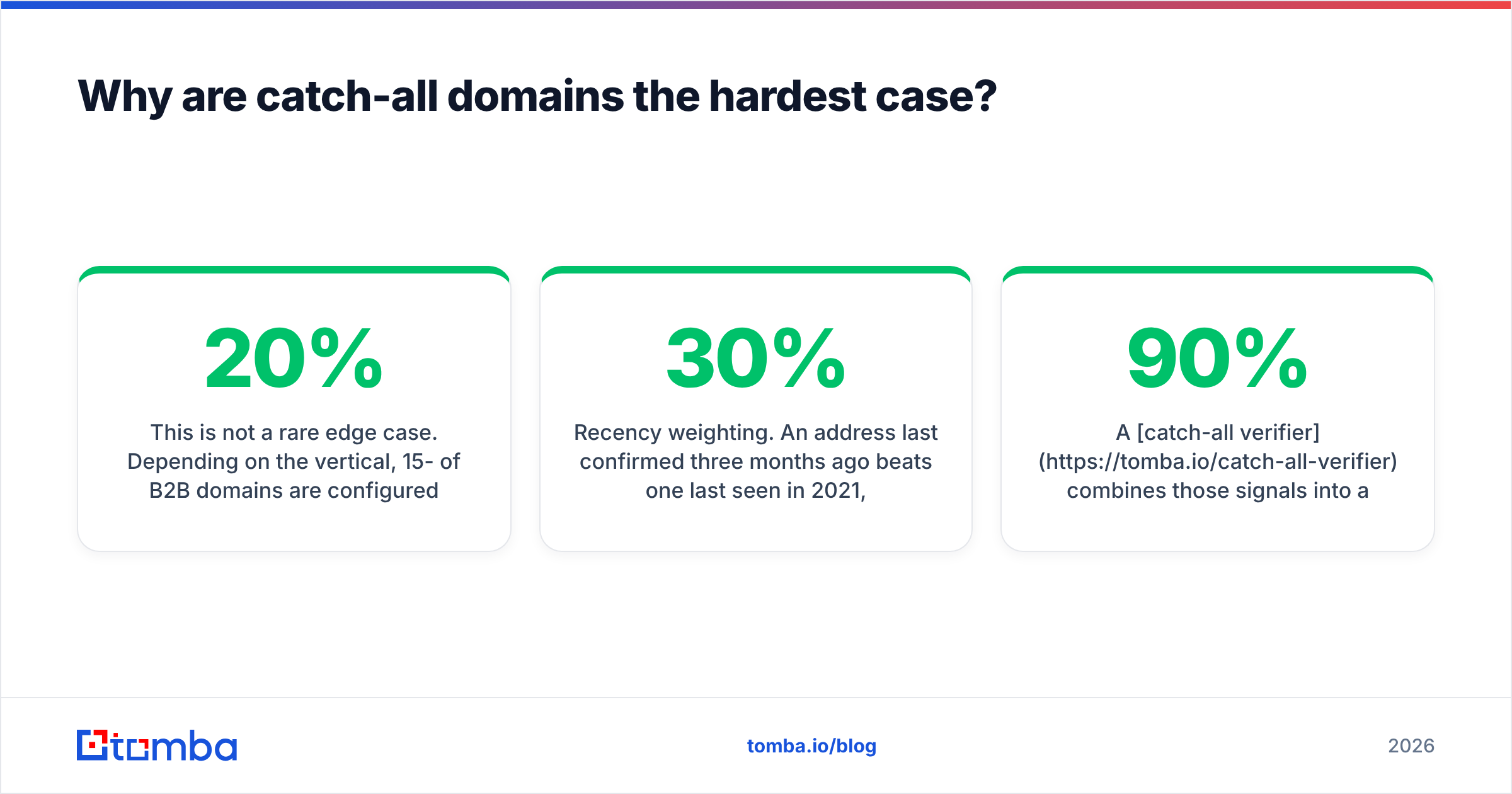
This is not a rare edge case. Depending on the vertical, 15-20% of B2B domains are configured this way, and it skews higher among enterprises running Microsoft 365 with aggressive anti-harvesting settings.
What actually works on catch-alls is inference rather than probing:
- Pattern matching. If 400 confirmed addresses at
acme.comfollowfirst.last@acme.com, thenjane.doe@acme.comfor a Jane Doe who demonstrably works there is a high-confidence guess. Tomba's company email pattern tool exposes this directly. - Corroborating sources. The same address appearing in a public git commit, a conference speaker list, a press release, and a WHOIS record is far stronger evidence than any single probe.
- Recency weighting. An address last confirmed three months ago beats one last seen in 2021, because B2B contact data decays at roughly 25-30% per year through job changes alone.
- Engagement feedback. If you have sent to a catch-all domain before and the messages opened and replied, that is the strongest signal available.
A catch-all verifier combines those signals into a percentage rather than a yes/no. Treat anything above about 90% as sendable, 70-90% as worth including in a low-volume warm segment, and below 70% as not worth the deliverability risk.
What bounce rate should you actually target in 2026?#
Under 2% hard bounces, and ideally under 1%.
That number is not arbitrary. Since the Gmail and Yahoo bulk-sender requirements landed, providers have been explicit about spam-complaint thresholds and implicit about bounce tolerance, and the practical enforcement point sits around 2%. Google's own bulk sender guidance spells out the authentication and complaint-rate side of the rules; bounces feed the same reputation model from a different direction.
What a high bounce rate signals to a receiving provider is that you did not obtain your list through consent or maintenance. That is precisely the pattern spam operations exhibit. The penalty is not just the bounced message. It is throttling, then spam-folder placement, then outright rejection for your entire domain, and it takes weeks of clean sending to recover.
Practical thresholds to run your program against:
- Hard bounces: under 2%, alarm at 3%, stop the campaign at 5%.
- Unknown/risky addresses in a send: under 10% of the batch.
- Verification recency: re-verify anything older than 90 days before it enters a sequence.
- Role accounts: cap them at 10-15% of any given send unless your offer genuinely targets shared inboxes.
If you are sending from a new domain, tighten all of those. A fresh domain has no reputation buffer, and your sender reputation is the only asset standing between your outbound program and the spam folder.
How do you keep addresses valid over time?#
Verification is not a one-time gate, it is a maintenance schedule. Contact data rots whether or not you look at it.
Build the check into four places:
- At capture. Real-time API validation on your signup and demo-request forms. This catches typos while the user is still on the page, and it is the single highest-ROI place to verify because the person can fix it themselves.
- At import. Any list you buy, scrape, export from a conference app, or inherit from a previous rep gets verified before it touches your CRM. No exceptions. A purchased list with no verification step is a reputation grenade.
- On a schedule. Re-verify your active outbound universe quarterly. Archive anything that turns invalid rather than deleting it, so you have an audit trail for why a contact was suppressed.
- On bounce. Suppress immediately and permanently on a hard bounce. Most ESPs do this automatically, but if you are running multiple sending tools they do not share suppression lists unless you make them.
Wiring this through an API rather than a CSV round-trip is what makes it actually happen. The email verification API handles the form-capture and CRM-sync cases, and the HubSpot integration covers the scheduled re-verification path without anyone needing to remember to export anything. If your team lives in spreadsheets, Tomba's Google Sheets add-on puts the same check one formula away.
What should you do right now?#
If you came here with one address in hand, run it through a free checker and read the status label against the translation table above. If it comes back catch-all, look up the domain's email pattern and judge the confidence yourself.
If you came here with a list, do three things in order. Verify it. Segment out everything that is not confirmed-valid. Send to the clean segment first and watch your bounce rate for the first 200 messages before you scale.
And if the real problem is that you do not have the addresses yet, verification is the wrong starting point. Tomba's Email Finder returns addresses with a confidence score already attached, sourced and verified at lookup time, so you skip the find-then-clean two-step entirely. Start on the free tier at 25 searches a month, and move to the $49/mo Starter plan when the volume justifies it. Your sending domain will thank you.
Related guides#
// get started
Find, verify and enrich your first contacts today
Start on the free plan with 25 searches a month, then scale when your team is ready.
Free plan · No credit card required · GDPR & CCPA
// about the author