Is This Email Valid? How to Check Any Address in 2026
Syntax checkers lie. MX records only prove a domain exists. Here are the five layers of email validation that actually predict whether a message lands or bounces — and the exact order to run them in.
TL;DR
- "Valid" has four separate meanings: correct syntax, a real domain, a real mailbox, and a mailbox that actually accepts your mail. Most free checkers only test the first two.
- A syntax-only checker will happily approve
ceo@micorsoft.com. A DNS check will approve every address at a domain that has never had a mailbox by that name. - The only test that meaningfully predicts a bounce is an SMTP-level mailbox probe, and even that returns "unknown" on catch-all domains — roughly 15-20% of B2B domains.
- Keep hard bounces under 2% (under 1% if you're on a new domain). At 5% you start losing inbox placement across the whole sending domain.
- For one address, use a free checker. For a list, use a verification API with catch-all handling and confidence scoring so you can segment instead of guess.
What does "valid" actually mean for an email address?#
Start here, because the word hides four different questions.
When someone asks "is this email valid," they usually mean will this message reach a human. But a validation tool can answer any of these four, and they are not the same thing:
- Is the syntax legal? Does it follow the local-part@domain structure defined in the SMTP spec?
john..doe@acme.comfails."john doe"@acme.comis technically legal and almost never real. - Does the domain resolve and accept mail? The domain has valid MX records pointing at a mail server that answers on port 25.
- Does the mailbox exist? The receiving server, when asked about that specific local part, indicates it will accept mail for it.
- Is the mailbox in use and safe to send to? Not a spam trap, not a role account, not abandoned, not a disposable 10-minute address.
A free "email checker" that returns a green tick in 200 milliseconds answered questions 1 and 2. It did not answer 3 or 4. That gap is where bounce rates come from.
The Email address specification is more permissive than almost anyone expects, which is exactly why regex-only validation is a trap. Plus addressing, subdomain addressing, and internationalized characters are all legal. If your checker rejects sales+q4@mail.acme.co.uk, your checker is the problem.

How do you check if an email is valid without sending?#
Run these in order. Each layer is cheaper than the one below it, so failing fast saves money and time.
- Syntax and normalization. Strip whitespace, lowercase the domain, reject obviously malformed strings. Catches typos from form fills and CSV exports. Cost: free, instant.
- Domain and MX record lookup. Query DNS for MX records. No MX and no A record fallback means nothing can receive mail there. Also catches dead companies and parked domains.
- Typo and disposable detection. Compare the domain against known provider spellings (
gmial.com,outlok.com) and against disposable-provider lists. A free email checker handles this layer in one pass. - Role and risk classification. Flag
info@,support@,sales@,admin@. These are valid but go to a shared queue, convert poorly in outbound, and correlate with complaint rates. - SMTP mailbox probe. Open a connection to the MX host, issue
HELO,MAIL FROM, andRCPT TOfor the target address, read the response code, then quit without sendingDATA. A 250 means the server accepts it. A 550 means it does not. - Catch-all detection. Before trusting the 250, probe a random, certainly-nonexistent address at the same domain. If that also returns 250, the domain accepts everything and the mailbox probe told you nothing.
Steps 1-4 are pure data lookups. Steps 5-6 are the ones that separate a real verifier from a regex wrapper, and they are also the ones that get your probing IP blocked if you run them from a residential connection at volume. That is the actual product you buy from a verification vendor: a pool of warm, reputable IPs and a request pattern that mail servers tolerate.
Which validation method catches which failure?#
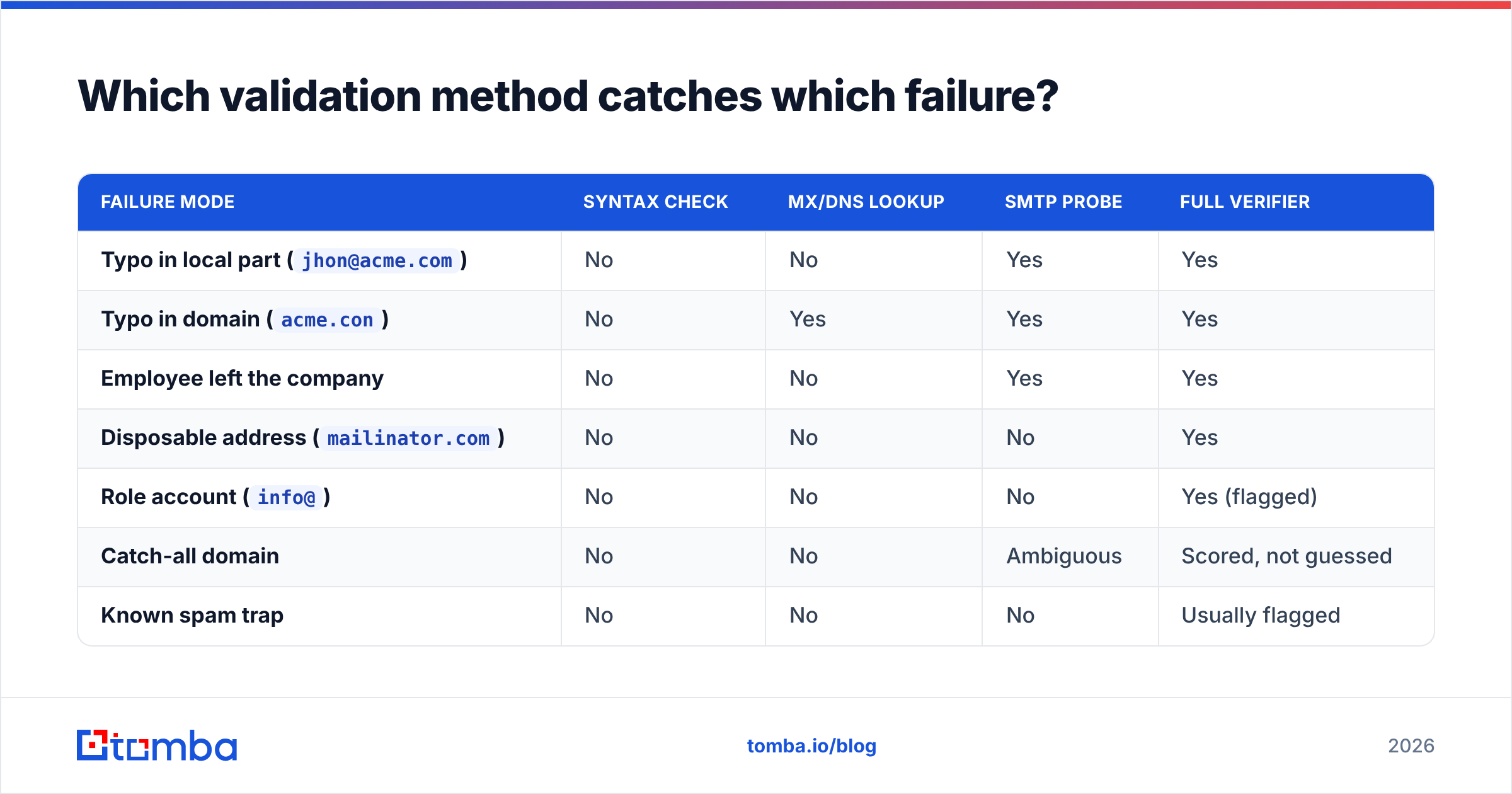
| Failure mode | Syntax check | MX/DNS lookup | SMTP probe | Full verifier |
|---|---|---|---|---|
Typo in local part (jhon@acme.com) |
No | No | Yes | Yes |
Typo in domain (acme.con) |
No | Yes | Yes | Yes |
| Employee left the company | No | No | Yes | Yes |
Disposable address (mailinator.com) |
No | No | No | Yes |
Role account (info@) |
No | No | No | Yes (flagged) |
| Catch-all domain | No | No | Ambiguous | Scored, not guessed |
| Known spam trap | No | No | No | Usually flagged |
| Greylisting / temporary reject | No | No | False negative | Retried |
Read that table as a buying guide. If the tool in front of you only fills the first two columns, it is a syntax linter with a nice UI. That is fine for a signup form. It is not fine for a 20,000-row outbound list.
Why do syntax checkers say "valid" when the inbox is dead?#
Because syntax and existence are unrelated.
Think of it like checking a street address. A syntax checker confirms "742 Evergreen Terrace, Springfield" is formatted like a real address — number, street, city. It does not walk to the door. MX lookup confirms Springfield exists and has a post office. Only the SMTP probe knocks on the door and listens for someone inside.
This is why so many teams get burned by free validators. They export a list, run it through a browser tool, see 97% "valid," send, and watch an 11% bounce rate roll in. Nothing malfunctioned. The tool answered a question they did not ask.
There's a second reason, and it's structural: mail servers have gotten deliberately quieter. Microsoft 365 tenants increasingly return a uniform accept for unknown recipients and generate the bounce asynchronously after the message is queued. Google Workspace rate-limits repeated RCPT TO probes from the same IP. A verifier that hasn't updated its logic for those two platforms — which together cover the majority of B2B mailboxes — will report confident nonsense. When you evaluate vendors, ask specifically how they handle Microsoft 365 and how recently that logic was updated.
What about catch-all domains — is the address valid or not?#
Honest answer: unknown, and any tool that tells you otherwise is guessing.
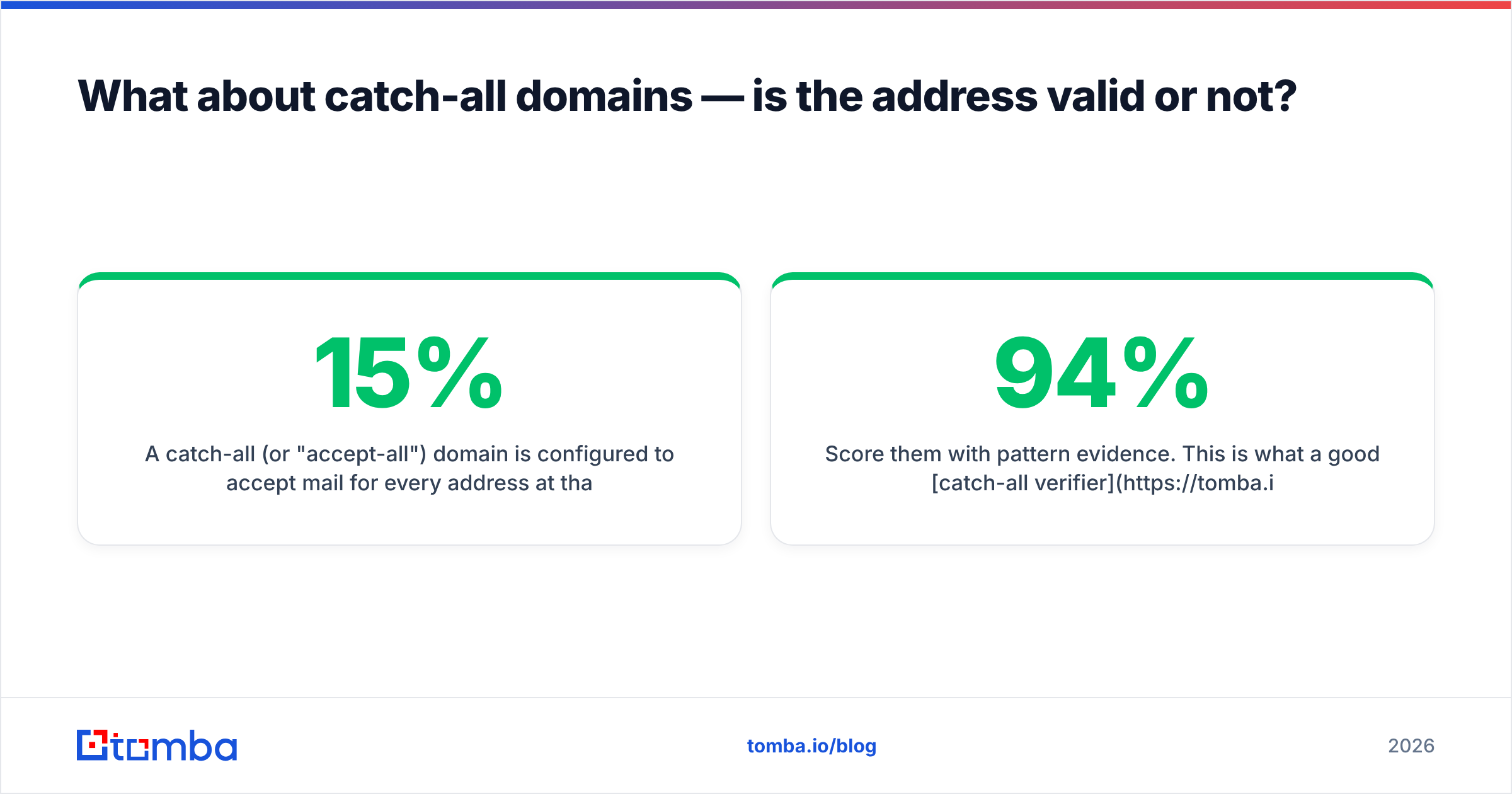
A catch-all (or "accept-all") domain is configured to accept mail for every address at that domain and sort it out later. From the outside, ceo@acme.com and asdkjh2983@acme.com look identical — both return 250. Between 15% and 20% of business domains run this way, and it skews heavily toward larger enterprises and agencies.
You have three options, in increasing order of sophistication:
- Discard them. Safe, wasteful. You just threw away a chunk of your enterprise TAM.
- Send anyway, isolated. Put catch-all addresses on a separate sending domain or subdomain so a bad batch does not contaminate your primary sender reputation.
- Score them with pattern evidence. This is what a good catch-all verifier does: cross-reference the address against the domain's known email pattern, against sightings of that exact address in public sources, and against employment signals.
firstname.lastname@acme.comat a domain where 94% of confirmed contacts usefirstname.lastnameis a very different bet than a random permutation.

The practical rule: treat catch-all addresses as a distinct tier with its own expected bounce rate, not as a binary. If your verifier only gives you "valid / invalid / unknown," you are being forced into a coin flip on a fifth of your list.
How do the main verification approaches compare on cost and coverage?#
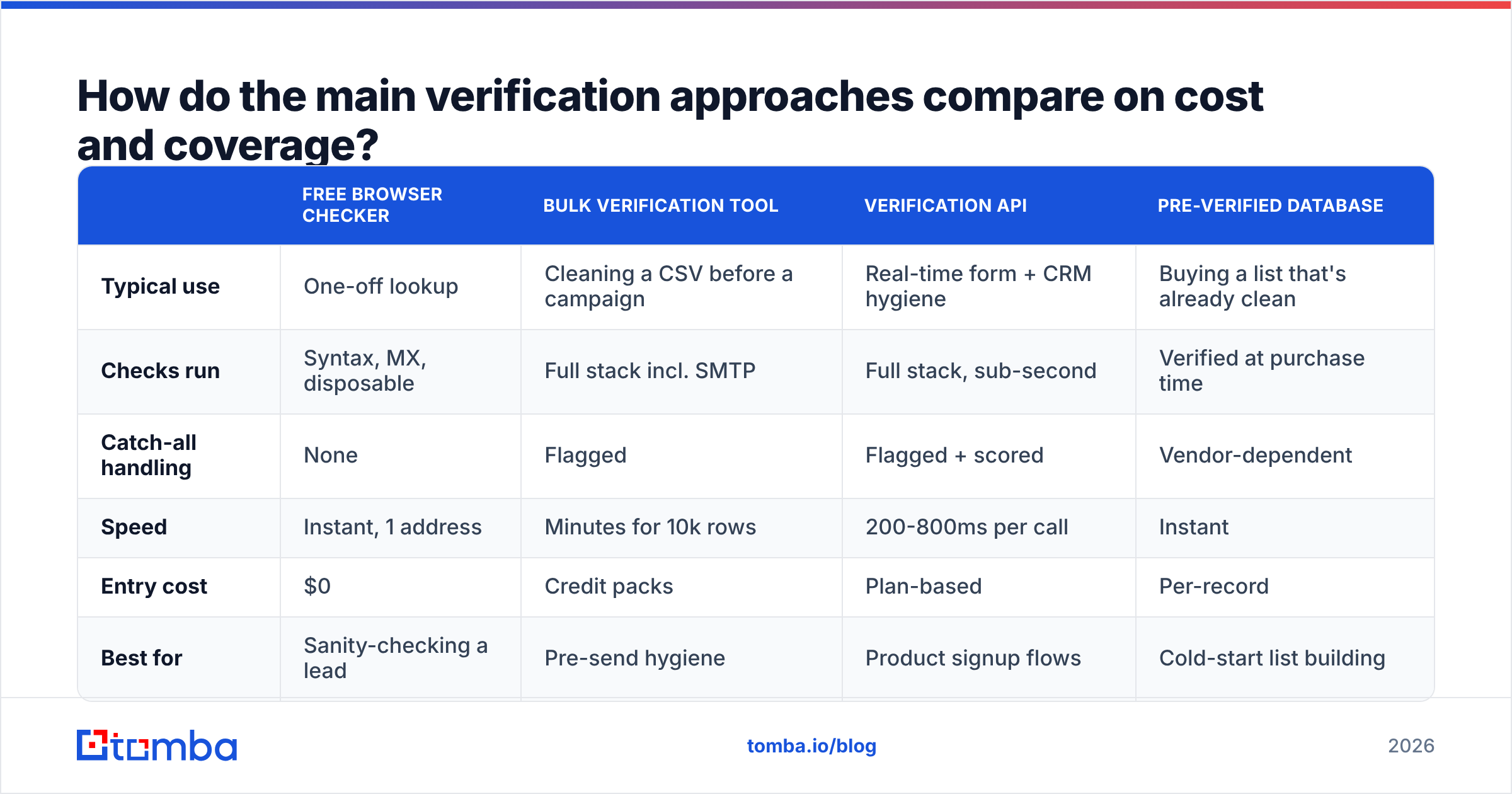
| Free browser checker | Bulk verification tool | Verification API | Pre-verified database | |
|---|---|---|---|---|
| Typical use | One-off lookup | Cleaning a CSV before a campaign | Real-time form + CRM hygiene | Buying a list that's already clean |
| Checks run | Syntax, MX, disposable | Full stack incl. SMTP | Full stack, sub-second | Verified at purchase time |
| Catch-all handling | None | Flagged | Flagged + scored | Vendor-dependent |
| Speed | Instant, 1 address | Minutes for 10k rows | 200-800ms per call | Instant |
| Entry cost | $0 | Credit packs | Plan-based | Per-record |
| Best for | Sanity-checking a lead | Pre-send hygiene | Product signup flows | Cold-start list building |
On the vendor side, the market splits into three camps. Dedicated verifiers (ZeroBounce, NeverBounce, Bouncer) do one job well and price per credit. Finder-plus-verifier platforms like Tomba bundle discovery and verification so you're not paying two vendors for one contact — Tomba pricing starts with a free tier at 25 searches per month, then $49/mo Starter, $99/mo Growth, and $249/mo Pro, with verification included rather than metered separately. And data providers such as BookYourData sell records that arrive verified, which is a genuinely different model: you're buying coverage and freshness, not a cleaning service. If you need net-new contacts in a vertical you have no presence in, that route is often faster than finding-then-verifying from scratch.
Independent user reviews on G2's email verification category are worth ten minutes before you commit, mostly for the complaints — accuracy claims are marketing, but recurring gripes about support and refund policies are signal.
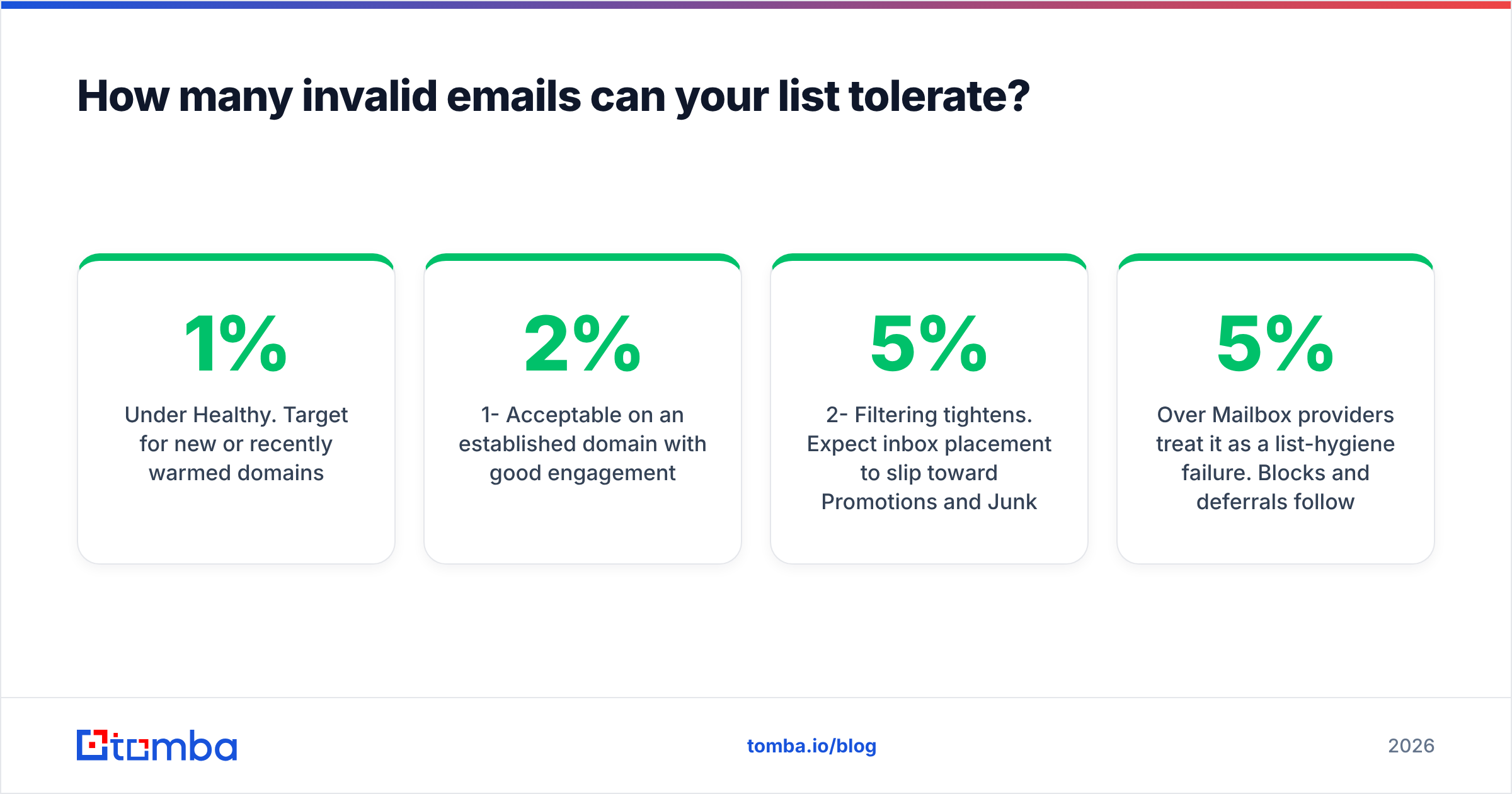
How many invalid emails can your list tolerate?#
Concrete thresholds, because "keep it low" is useless advice:
| Hard bounce rate | What happens |
|---|---|
| Under 1% | Healthy. Target for new or recently warmed domains. |
| 1-2% | Acceptable on an established domain with good engagement. |
| 2-5% | Filtering tightens. Expect inbox placement to slip toward Promotions and Junk. |
| Over 5% | Mailbox providers treat it as a list-hygiene failure. Blocks and deferrals follow. |
| Over 10% | Domain reputation damage that takes weeks of clean sending to repair. |
The asymmetry matters: a bounce costs you far more than a skipped send. One bad 5,000-address batch can degrade email deliverability for every message from that domain for a month, including your renewals and support replies. Suppressing 400 questionable addresses costs you 400 possible conversations. That trade is not close.
Also worth knowing: bounce messages come in hard and soft flavors, and only hard bounces count against you in the way described above. Soft bounces — full mailbox, server temporarily down, greylisting — should be retried, not suppressed. A verifier that lumps them together will shrink your list for no reason.
How do you validate at scale without wrecking your workflow?#
Three integration points, and you want all three eventually:
At capture. Validate on form submit, before the record hits your CRM. This is the highest-leverage fix and almost nobody does it. A single API call rejects the typo while the user is still on the page and can correct it. Use an email verification API with a sub-second response and fail open — never block a signup because your validator timed out.
Before each send. Re-verify anything older than 90 days. B2B data decays at roughly 2-3% per month through job changes alone; a list verified in January is meaningfully dirty by June. Run the whole segment through bulk verify as a pre-flight step, not as an annual spring clean.
Continuously, from bounce feedback. Wire your ESP's bounce webhook back into your CRM so hard bounces mark the record invalid automatically. Most teams have this data sitting in their sending tool and never push it back to the source of truth, which means the same dead address gets re-imported every quarter.
If you're finding addresses rather than cleaning existing ones, verification should be built into discovery. There's no point in a domain search that returns 40 contacts if you then have to pay a second vendor to find out which 31 are real. Check whether your finder returns a confidence score and a verification status in the same response — if it does, you can set a threshold in code and skip the second pipeline entirely.
What should you do with each verification result?#
- Valid, personal mailbox — send normally, full sequence.
- Valid, role account — send, but shorten the sequence and lower expectations; these convert at a fraction of personal addresses.
- Catch-all / accept-all — isolate on a secondary sending domain, cap volume, watch the bounce rate on that segment specifically.
- Unknown / temporary error — retry verification in 48 hours before deciding; often greylisting.
- Invalid — suppress permanently and mark the CRM record, don't just delete the row. Deleted rows get re-imported.
- Disposable or spam trap — suppress and audit where it came from. A cluster of these points at a bad list purchase or a scraped source you should stop using.
Start with the address in front of you#
If you're checking one address right now, run it through a free checker and read the reason code, not just the colour of the badge. If you're about to send to a list, verify the whole thing first and segment by result instead of treating it as one blob.
And if the real problem is that you don't have the address yet — you have a name and a company and a guess — skip the permutation-and-pray approach. The Tomba Email Finder returns the address alongside its verification status and confidence score in a single call, so "is this email valid" is answered at the moment you find it rather than three steps later when the bounce report arrives. The free tier covers 25 searches a month, which is enough to test it against contacts you already know are real — which is exactly how you should evaluate any tool in this category.
Related guides#
// get started
Find, verify and enrich your first contacts today
Start on the free plan with 25 searches a month, then scale when your team is ready.
Free plan · No credit card required · GDPR & CCPA
// about the author