Is Ymail a Valid Email Address? Everything to Know in 2026
Ymail.com looks like a typo, gets flagged by half the verification tools on the market, and still lands in real inboxes every day. Here's what ymail actually is, why it breaks bounce checks, and how to verify one before you hit send.
Is ymail a valid email address? Yes. Ymail.com is Yahoo's own domain. It has live MX records, and mail sent there lands in a normal Yahoo inbox. The trouble is not the address. It's the tools that judge it.
TL;DR
- Yes, ymail.com is a real, working email domain. Yahoo owns it, Yahoo's servers run it, and it delivers to a normal Yahoo Mail inbox.
- Yahoo launched ymail.com (and rocketmail.com) in 2008 because good yahoo.com usernames had run out. Addresses made then still work today.
- Ymail addresses fail many verification tools. Not because they are fake, but because Yahoo throttles SMTP probes and acts like an accept-all under load. Unknown is not the same as invalid.
- For B2B outbound, a ymail.com address is a personal address. It is deliverable, but it is usually the wrong contact. Treat it as a cue to go find the work email.
- The safe workflow: confirm the domain is webmail (not disposable), check syntax and MX, then lean on reputation data instead of a single SMTP ping.
Is ymail a valid email domain, and what is ymail.com?#
Yes. Ymail.com is a legitimate Yahoo-operated email domain, and someone@ymail.com is a valid, deliverable address.
Think of a phone company that runs out of numbers in one area code and opens a second one. The new area code isn't fake. It routes to the same network, the same switchboard, the same people. Ymail.com is Yahoo's second area code.
Here's what that means in practice:
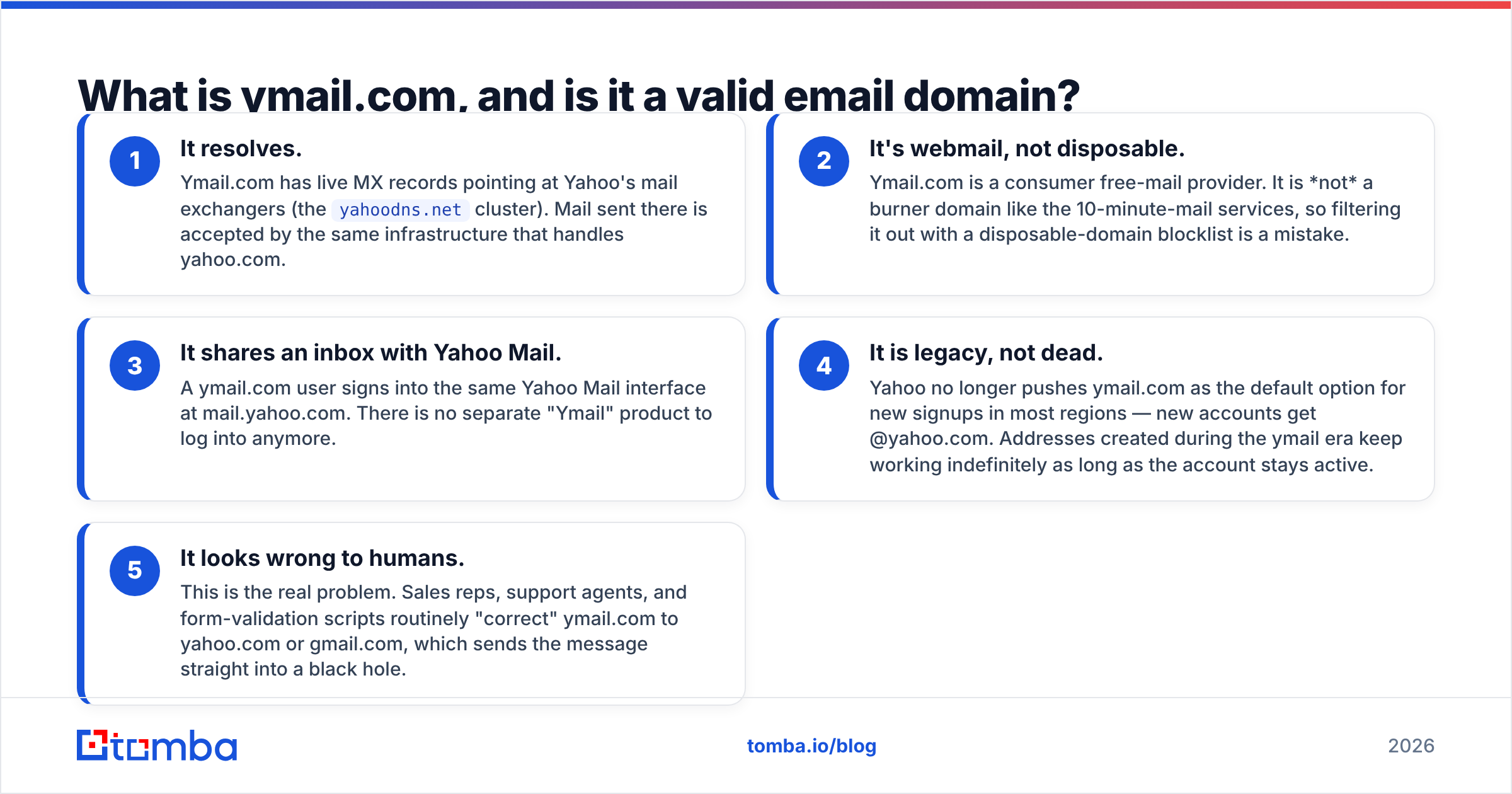
- It resolves. Ymail.com has live MX records on Yahoo's mail exchangers (the
yahoodns.netcluster). Mail sent there lands on the same infrastructure as yahoo.com. - It's webmail, not disposable. Ymail.com is a consumer free-mail provider, not a burner domain. Blocking it with a disposable-domain list is a mistake.
- It shares an inbox with Yahoo Mail. A ymail.com user signs in at mail.yahoo.com. There is no separate Ymail product anymore.
- It is legacy, not dead. New signups now get @yahoo.com in most regions. Older ymail addresses keep working as long as the account stays active.
- It looks wrong to humans. This is the real problem. Reps, agents, and form scripts often correct ymail.com to yahoo.com, and the message dies there.
That last point is worth sitting with. Most of the damage ymail.com causes isn't technical. It's a person or a regex deciding the address must be a typo.
Where did ymail.com actually come from?#
Yahoo launched ymail.com in June 2008, alongside rocketmail.com. The reason was simple: good usernames had run out. Yahoo.com had been live for over a decade, and every sane mix of first name, last name, and initials was taken. Two fresh domains freed up millions of short, clean usernames overnight.
Rocketmail.com came to Yahoo in 1997, when Yahoo bought RocketMail, one of the first free webmail services online. The Yahoo Mail history on Wikipedia covers that deal in full. Yahoo revived the dormant domain as a second overflow option.
Neither domain was ever a separate product. From day one, a ymail.com signup created a standard Yahoo account with a standard Yahoo inbox. Yahoo's own mail help documentation still treats ymail.com addresses as ordinary Yahoo accounts for password resets, forwarding, and account recovery.
Over time, Yahoo quietly narrowed the signup flow. It stopped offering ymail.com as a default choice for new accounts, and some regions dropped it from the dropdown. Existing addresses were never revoked. That is why ymail.com sits in an awkward middle. It is common enough that you will hit it in any consumer-heavy list, and rare enough that half your tooling has never seen one.
How do ymail.com, yahoo.com, and rocketmail.com compare?#
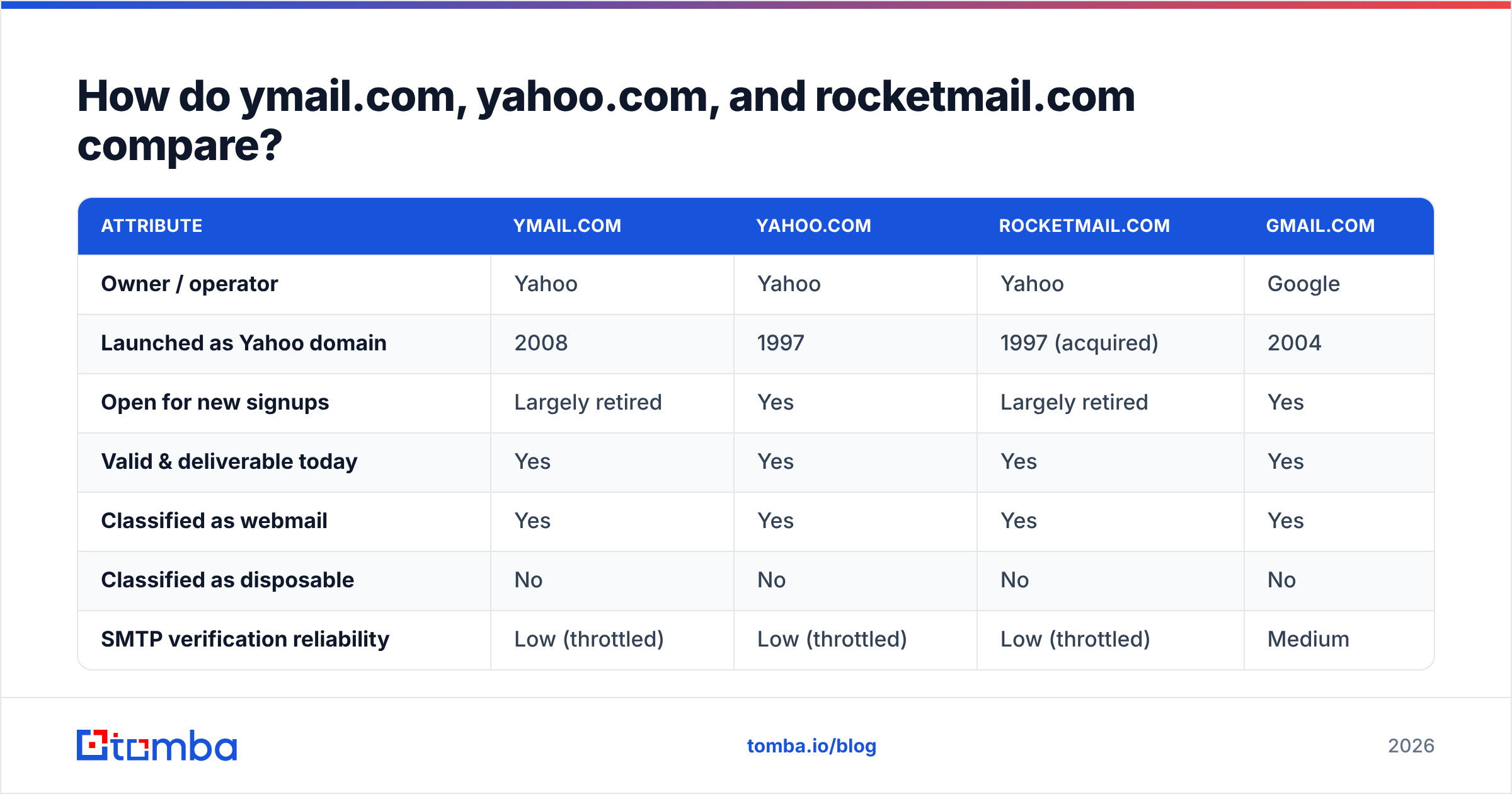
All three route to the same place, but they behave differently in the wild, especially when they hit your data stack.
| Attribute | ymail.com | yahoo.com | rocketmail.com | gmail.com |
|---|---|---|---|---|
| Owner / operator | Yahoo | Yahoo | Yahoo | |
| Launched as Yahoo domain | 2008 | 1997 | 1997 (acquired) | 2004 |
| Open for new signups | Largely retired | Yes | Largely retired | Yes |
| Valid & deliverable today | Yes | Yes | Yes | Yes |
| Classified as webmail | Yes | Yes | Yes | Yes |
| Classified as disposable | No | No | No | No |
| SMTP verification reliability | Low (throttled) | Low (throttled) | Low (throttled) | Medium |
| Typical B2B usefulness | Low, personal | Low, personal | Very low | Low, personal |
| Common failure mode | Corrected to yahoo.com | Bounces on dormant accounts | Assumed defunct | Dot/alias confusion |
The pattern across the Yahoo family is consistent. All of it is technically valid, operationally annoying, and commercially thin for B2B. Rocketmail is the most likely of the three to be a decade-dormant account nobody checks.
Why do ymail.com addresses fail email verification tools?#
Because Yahoo does not want you probing its mail servers, and it defends itself hard.
Most verifiers open an SMTP conversation with the recipient's mail server and issue a RCPT TO command. No message is ever sent. A cooperative server answers 250 OK (the mailbox exists) or 550 no such user (it does not). Clean signal, zero email.
Yahoo does not cooperate, and neither does Microsoft's consumer mail. Yahoo rate-limits probe traffic, greylists unfamiliar IPs, and often returns a generic acceptance whether or not the mailbox exists. To a verifier, that looks exactly like a catch-all domain. So you get unknown, risky, accept-all, or catch-all instead of a clean valid.
Three things follow from that, and getting them straight will save you a lot of wasted list-cleaning:
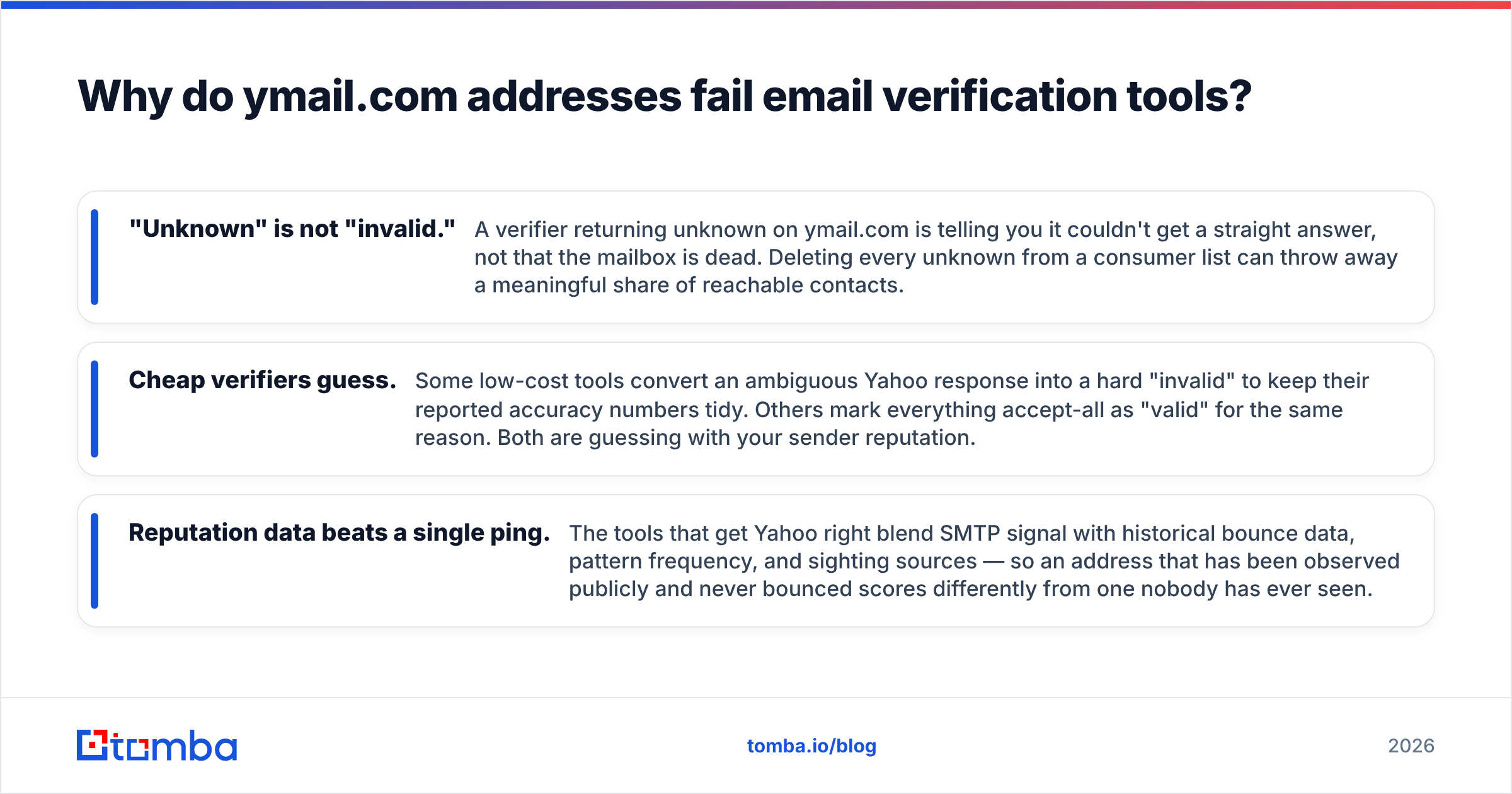
- Unknown is not invalid. A verifier that returns unknown on ymail.com is saying it could not get a straight answer. It is not saying the mailbox is dead. Delete every unknown from a consumer list and you throw away real contacts.
- Cheap verifiers guess. Some low-cost tools turn an ambiguous Yahoo response into a hard invalid to keep their accuracy numbers tidy. Others mark every accept-all as valid for the same reason. Both are gambling with your sender reputation.
- Reputation data beats a single ping. Tools that get Yahoo right blend SMTP signal with bounce history, pattern frequency, and sighting sources. An address seen in public and never bounced scores differently from one nobody has ever seen.
The fallout is predictable, and it is still the most common way a decent list gets its sender blocklisted. You blast a consumer segment full of dormant Yahoo and ymail accounts. A large slice hard-bounces. Your sender reputation takes the hit. Yahoo spells this out at Yahoo Postmaster, and the summary is blunt: keep your bounce rate low or get throttled.
How do you verify a ymail.com address the right way?#
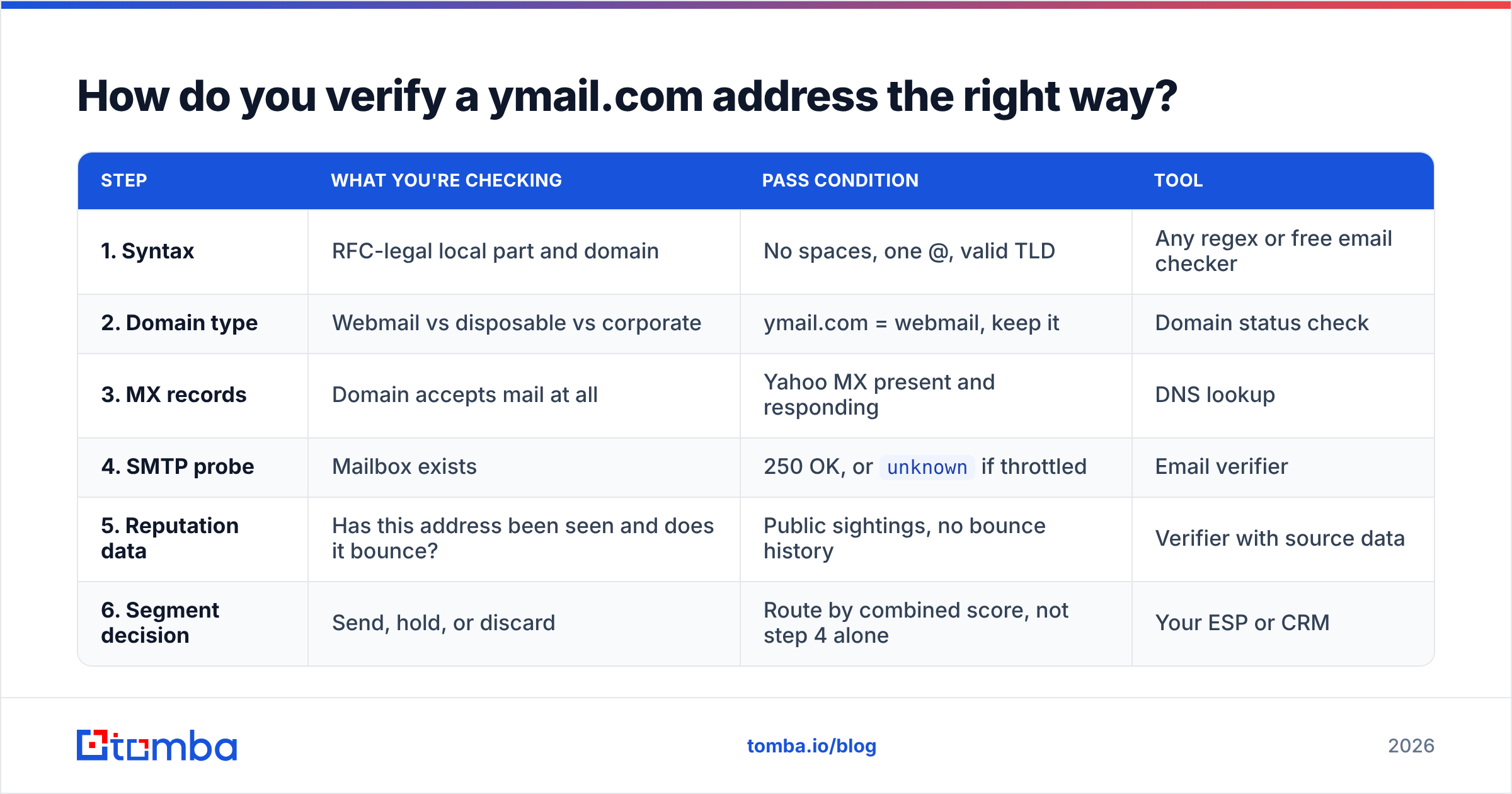
By now, the answer to is ymail a valid email domain is settled. The real job is proving that one specific mailbox is live. Run the checks in order, cheapest first, and stop treating the SMTP result as the whole answer.
| Step | What you're checking | Pass condition | Tool |
|---|---|---|---|
| 1. Syntax | RFC-legal local part and domain | No spaces, one @, valid TLD | Any regex or free email checker |
| 2. Domain type | Webmail vs disposable vs corporate | ymail.com = webmail, keep it | Domain status check |
| 3. MX records | Domain accepts mail at all | Yahoo MX present and responding | DNS lookup |
| 4. SMTP probe | Mailbox exists | 250 OK, or unknown if throttled |
Email verifier |
| 5. Reputation data | Has this address been seen and does it bounce? | Public sightings, no bounce history | Verifier with source data |
| 6. Segment decision | Send, hold, or discard | Route by combined score, not step 4 alone | Your ESP or CRM |
Two rules make this workflow actually work.
First, never delete on step 4 alone. If a verifier returns unknown for a ymail.com address, move it to a low-volume warm-up segment instead of the trash. Send slowly, watch the bounce, and let real delivery data make the call. That beats a throttled SMTP handshake every time.
Second, check the domain classification before anything else. Plenty of teams run blocklists that quietly nuke unfamiliar free-mail domains. Ymail.com, rocketmail.com, and ymail.co.uk get caught in those nets constantly. Confirm the domain is webmail, not disposable, and keep it.
If you are processing more than a few hundred addresses, do this as a batch job rather than one at a time. A bulk verify run returns status plus confidence for the whole file, which is what you need to build segments.
Should you keep ymail.com addresses in a B2B list?#
Usually not in your primary outbound segment. The reason is commercial, not technical.
A ymail.com address is a personal inbox. If the only address you have for a prospect is firstname.lastname@ymail.com, you are looking at one of these situations:
- A freelancer or solo operator who really does run the business from a personal account. Legitimate target. Keep it.
- A form fill from someone dodging sales contact. They gave you a throwaway-adjacent address on purpose. Low intent, low priority.
- An enriched record with the wrong identity. A loose data provider matched a personal address to a business contact. Verify before you trust it.
- A stale record from a job change. The person moved on, and the database kept the personal address as a fallback. Go find the new work email.
For the last three, the fix is not to clean the ymail address. It is to replace it. Take the person's name and their company domain, then run an email finder lookup for the work address. Corporate domains verify far more reliably than Yahoo, land in a monitored inbox, and are easier to defend under B2B outreach rules in most jurisdictions.
No company domain to work from? Start with the company. A domain search returns the addresses and the dominant email pattern for that organization, which is usually enough to reconstruct the contact you want.
Providers here span very different models. BookYourData sells pre-built, pay-as-you-go B2B lists with verified business addresses. Search-first tools like Tomba resolve a specific person or domain on demand. Both sidestep the ymail problem, because neither is built on consumer webmail data. Pick based on whether you need volume or precision.
What about ymail spelling variants and lookalikes?#
Watch for three distinct cases, because they get conflated constantly:
- ymail.com is the real Yahoo domain, and it is deliverable. Keep it.
- ymail.co.uk, ymail.ca, and other ccTLD variants. Some are legitimate regional Yahoo domains. Others are unrelated. Check MX records before you assume either way.
- Typosquats such as
ymaail.com,ymail.co, andymial.com. These are parked or actively malicious. Never send. Flag for review.
Your validation layer should tell an unfamiliar domain apart from an invalid domain. The test is simple. Does it have live MX records, and does a reputable provider classify it? If both answers are yes, the address deserves a real verification pass instead of a silent drop. A quick reverse email lookup will also tell you whether a real person is attached to it.
What's the practical takeaway?#
If you landed here asking is ymail a valid email address, the answer is yes, with one caveat: valid is not the same as useful. Ymail.com was always just Yahoo. The address in your CRM that looks like a typo probably isn't one, and the verifier that returned unknown probably just failed to get a straight answer out of Yahoo.
Handle it in three moves. Confirm the domain is webmail and not disposable. Verify with a tool that blends SMTP signal with reputation data instead of trusting one throttled probe. If the contact is B2B, spend thirty seconds finding the work email instead of arguing with the personal one.
Ready to stop guessing? Run your ymail and Yahoo contacts through the Tomba Email Finder to resolve the business address behind a personal one, then score whatever is left with the verifier. The free tier covers 25 searches a month, Starter is $49/mo, and Growth is $99/mo. Full Tomba pricing breaks down credits per plan. Fix the address before the bounce, not after.
Related guides#
// get started
Find, verify and enrich your first contacts today
Start on the free plan with 25 searches a month, then scale when your team is ready.
Free plan · No credit card required · GDPR & CCPA
// about the author