Is ZoomInfo Accurate? A 2026 Data Quality Reality Check
ZoomInfo markets one of the largest B2B databases on the market, but size and accuracy are different metrics. Here is how its data actually holds up in 2026 — and how to test it on your own segment before you sign.

Is ZoomInfo accurate? Yes and no, and the split is what matters. Company data holds up well. Work emails and direct dials go stale fast. Here is what that gap looks like in 2026, and how to test it on your own list.
TL;DR
- Is ZoomInfo accurate? Not as one number. Company facts are strong. Person-level emails and dials decay fastest, and that gap is where teams get burned.
- Results swing by segment. US mid-market and enterprise records are the best. SMB, EMEA, APAC, and high-churn roles age fast.
- Vendor accuracy stats are marketing inputs, not audits. No big provider submits to an outside, repeatable test.
- The only number that counts is your bounce rate on your buyers. Sample 200 records. Verify them. Measure before you renew.
- Use any database to find leads. Then check them right before you send. That costs less than one seat.
What does "accurate" actually mean for a B2B database?#
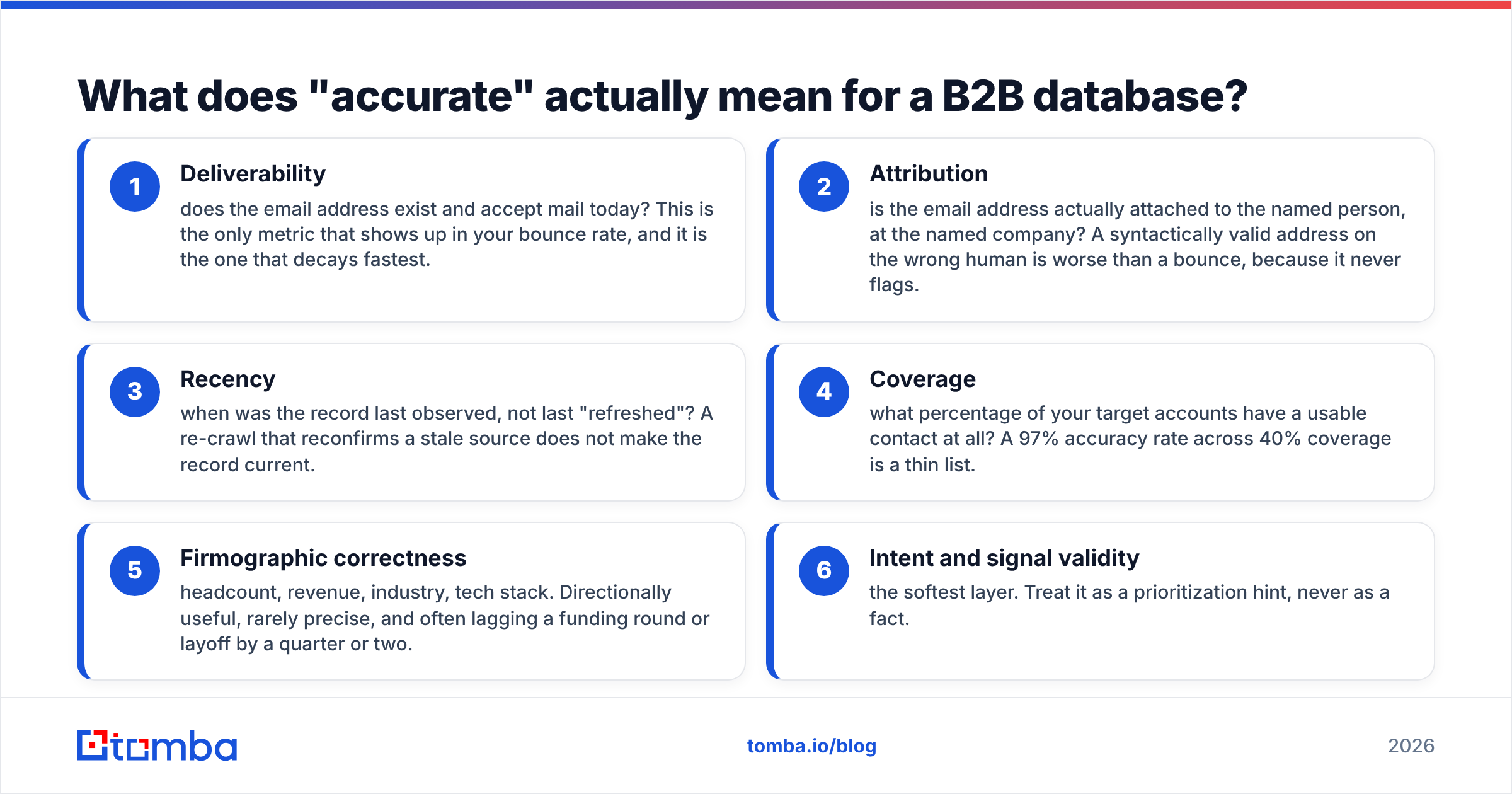
Most accuracy arguments go nowhere because each side measures a different thing. "Accurate" is really six things. A vendor can ace three and fail the ones you care about.
- Delivery — does the address exist and take mail today? This is the one that shows up in your bounce rate. It also decays fastest.
- Ownership — does the address belong to that person, at that company? A valid address on the wrong human is worse than a bounce. It never flags.
- Recency — when was the record last seen, not last "refreshed"? A re-crawl of a stale source does not make it current.
- Coverage — how many of your target accounts have a usable contact at all? A 97% hit rate across 40% coverage is a thin list.
- Company facts — headcount, revenue, industry, tech stack. Useful in broad strokes. Rarely exact. Often a quarter behind a raise or a layoff.
- Intent signals — the softest layer. Treat it as a hint. Never as a fact.
ZoomInfo scores differently on each one. When people ask "is ZoomInfo accurate" and answer yes, they mean 4 and 5. When they answer no, they mean 1 and 2.
Is ZoomInfo accurate in 2026?#
Short answer: accurate enough to stay the default for big enterprise teams. It is also loose enough that most cold email teams add a checking step in front of it.
ZoomInfo pulls data from several places. Users sync inboxes and contact lists for credits. Crawlers scrape the web. Public filings, AI extraction, and human researchers fill the rest. That mix is strong for company-level truth.
It is weaker for personal work emails. Shared data only shows who sits in someone else's CRM. That skews toward the roles and regions other reps already worked.

Teams that measure carefully report a wide band. Clean US enterprise lists often bounce in the low single digits. SMB, non-US, and long-tail records run five to ten times worse. Skim the reviews in G2's sales intelligence category and you see the same split. High marks for coverage and workflow. Repeat gripes about old contacts and credits burned on dead records.
ZoomInfo is not broken. It is loose in a way that makes unverified sending expensive.
Why does contact data go stale so fast?#
Because people move faster than any crawler. B2B contact data decays about 25–30% a year. That rate jumps during hiring freezes, layoffs, and buyouts. Each of these events kills records:
- Someone changes jobs. The email dies. The phone follows within a quarter.
- A company rebrands or gets bought. The domain moves and every address on it breaks at once.
- IT tightens the mail gateway. Catch-all flips on or off, and SMTP replies stop telling you much.
- A title changes inside the company. The person stays. Your buyer does not.
No vendor escapes this. Vendors differ in two ways. How fast they spot the change. And whether they charge you a credit to learn that a record is dead.
So when you ask "is ZoomInfo accurate," you are really asking "accurate as of when?" Every database is a photo, not a live feed.
Where is ZoomInfo strongest and weakest?#
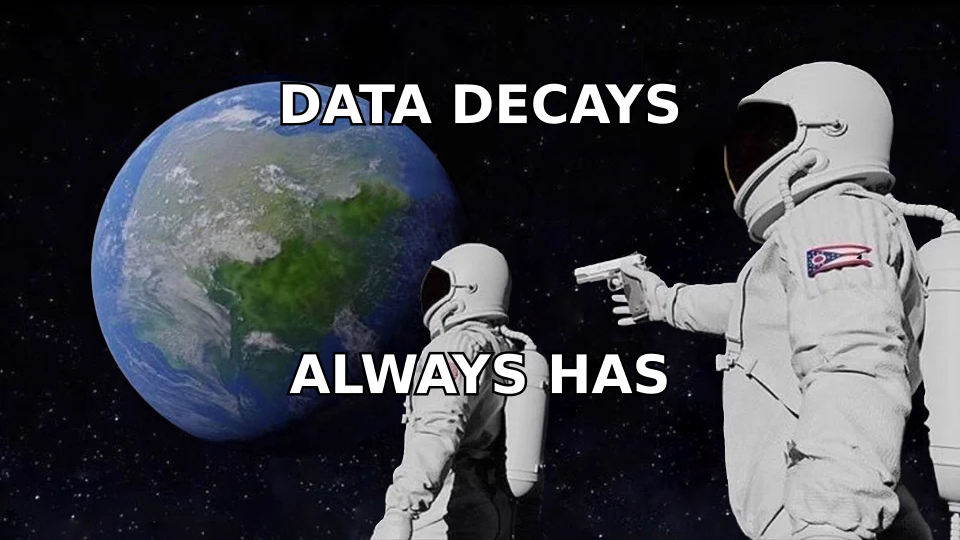
Is ZoomInfo accurate for your buyers? Split your view by segment first. Judge it on a Brazilian SMB list and on a US enterprise list, and you get opposite answers. Both are real.
| Segment | Coverage | Email reliability | Direct dial reliability | Practical verdict |
|---|---|---|---|---|
| US enterprise (1,000+ employees) | Excellent | Strong | Strong — the flagship use case | Use as-is, spot-check only |
| US mid-market (100–999) | Very good | Good | Good | Verify before send |
| SMB / sub-50 employees | Patchy | Weak to moderate | Weak | Verify everything, expect gaps |
| EMEA | Good on firmographics | Moderate, GDPR-constrained | Limited | Verify, check consent basis |
| APAC / LATAM | Thin | Weak | Very limited | Supplement with another source |
| High-churn roles (SDR, RevOps, growth) | Good | Decays fastest | Moderate | Re-verify monthly |
That table explains most of the fights online. An enterprise rep selling to Fortune 500 IT leaders will defend the tool flat out. A founder chasing 30-person shops in Spain will call it broken. Each of them is right about their own slice.
How does ZoomInfo compare to other data sources?#
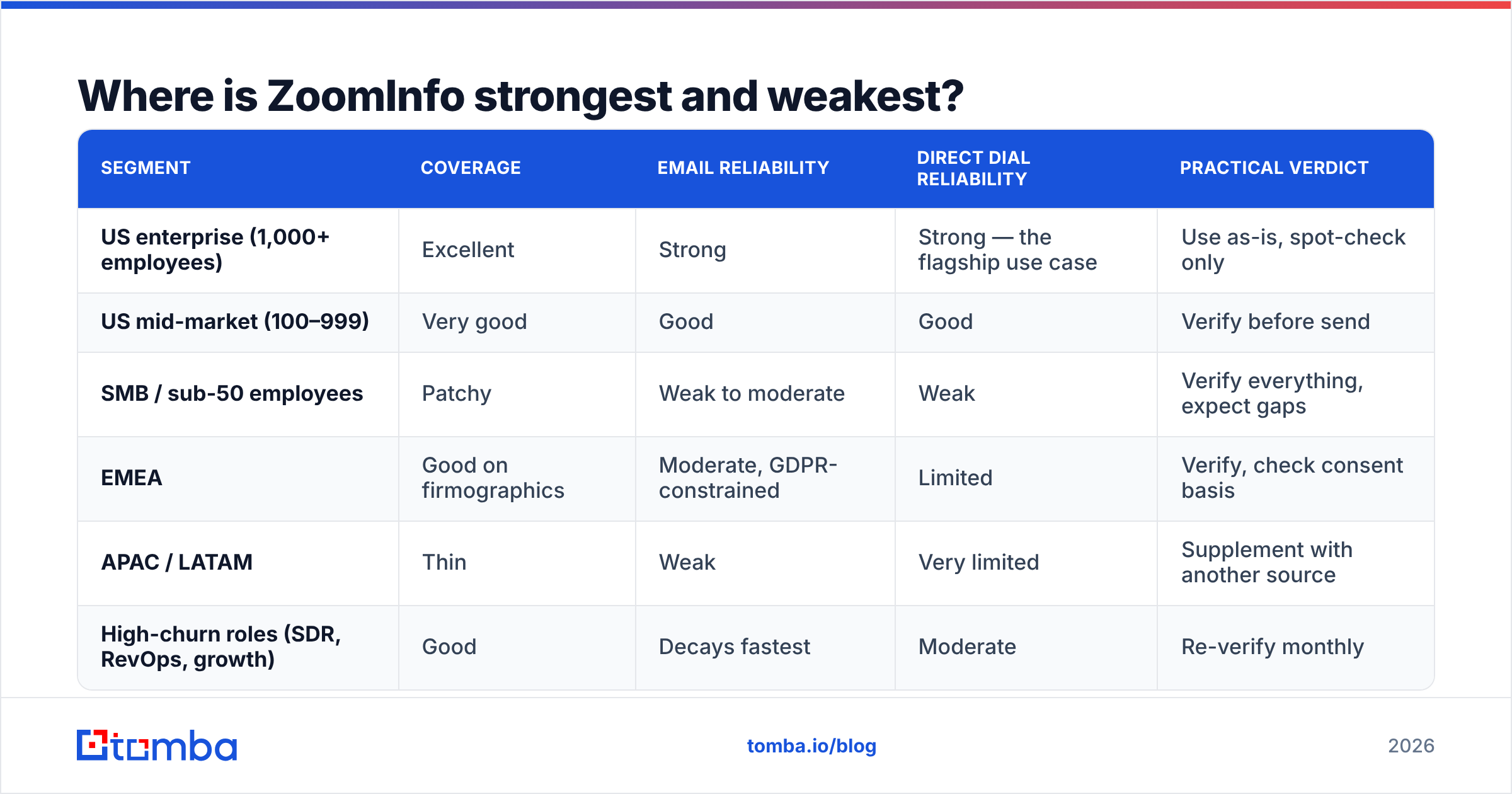
Accuracy only matters next to price and to the job you need done. A suite priced for a 30-seat team is not chasing the same job as a per-lookup email finder.

| Provider | Core strength | Email approach | Entry cost | Contract model |
|---|---|---|---|---|
| ZoomInfo | Deepest US enterprise coverage, intent, workflow suite | Contributory + crawl, credit-based | Commonly reported in the five figures annually | Annual, seat + credit minimums |
| Apollo | All-in-one prospecting plus sequencing | Waterfall from its own database | Free tier, paid from roughly $49/user/mo | Monthly or annual |
| Tomba | Verified email discovery by domain and name | Pattern detection plus live SMTP verification | Free (25 searches/mo), Starter $49/mo | Monthly, no minimum seats |
| BookYourData | Prebuilt, targeted B2B lists with an accuracy guarantee | Curated lists, verified before delivery | Pay-as-you-go credit packs | No annual lock-in |
| Clearbit / HubSpot data | Enrichment inside an existing CRM | Firmographic and technographic enrichment | Bundled with HubSpot tiers | Tied to CRM contract |
Two things stand out. First, price is the real story. For many teams the accuracy gap is smaller than the cost gap. So is ZoomInfo accurate enough to justify that spread? Run the numbers on your own list before you answer.
Second, these tools are not either/or. Plenty of teams keep ZoomInfo for account research. Then they push email lookup and checks elsewhere. Per-record checks are cheap. Suite credits are not.
Want to know where a vendor gets its records? Read the data sources page of anyone you are weighing. A vendor that will not explain its pipeline is asking for faith you should not give.
How do you test ZoomInfo accuracy yourself?#
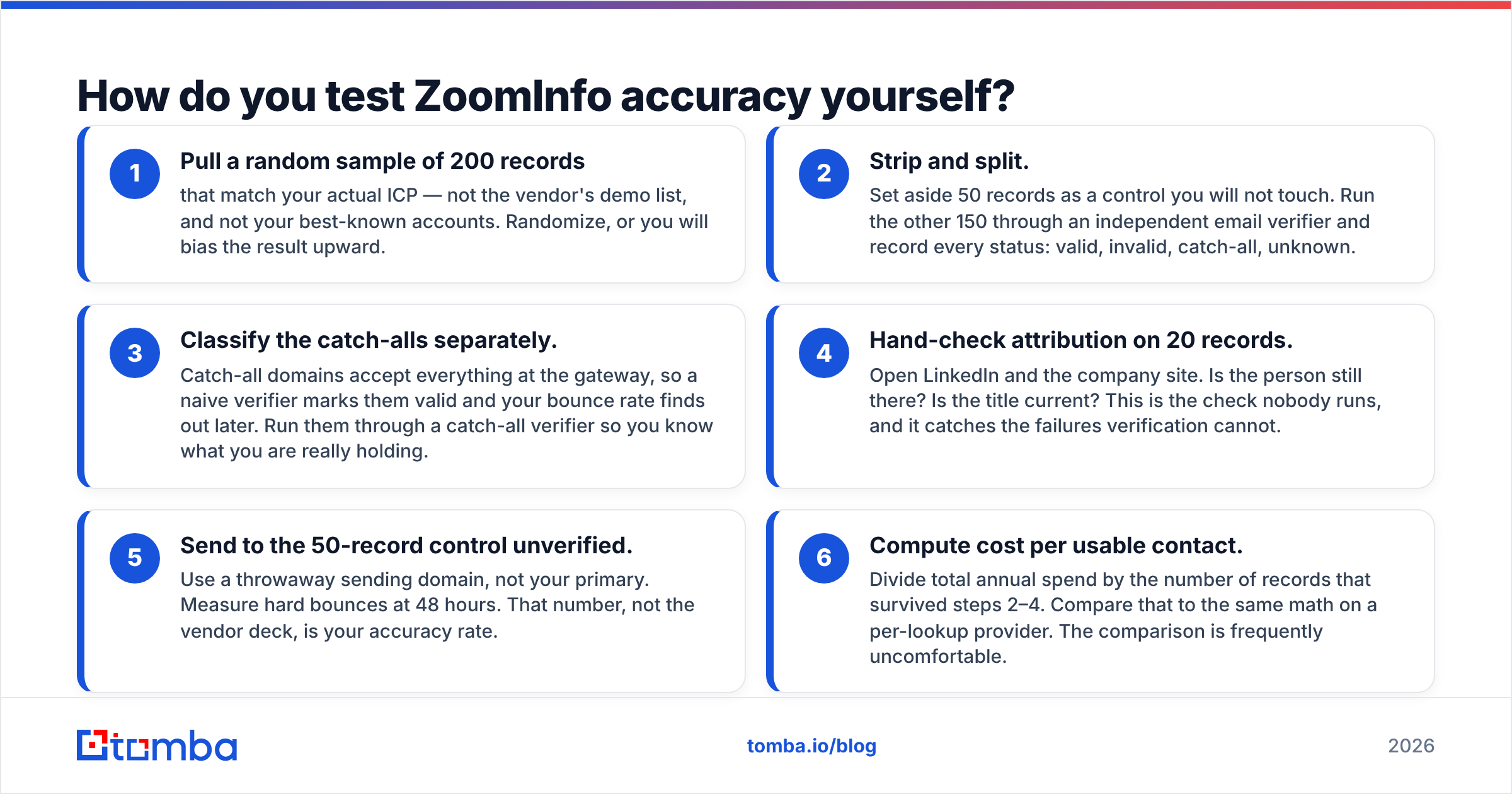
Do not take anyone's word for it. Not even this post. Run a 90-minute test on your own buyers before you sign or renew. The test answers "is ZoomInfo accurate for me" with a number you can act on.
- Pull 200 random records that match your real buyer. Not the demo list. Not your best-known accounts. Randomize, or you will flatter the result.
- Split the sample. Hold back 50 records as a control you never touch. Run the other 150 through an outside email verifier. Log every status: valid, invalid, catch-all, unknown.
- Sort the catch-alls on their own. Catch-all domains accept mail at the door. A basic checker calls them valid, and your bounce rate learns the truth later. Run them through a catch-all verifier so you know what you hold.
- Hand-check 20 records. Open LinkedIn and the company site. Is the person still there? Is the title current? Almost nobody runs this check, and it catches what tools miss.
- Mail the 50-record control unverified. Use a spare sending domain, not your main one. Count hard bounces at 48 hours. That number is your real accuracy rate, not the vendor deck.
- Work out cost per usable contact. Divide yearly spend by the records that survived steps 2–4. Run the same math on a per-lookup provider. The gap is often ugly.
Is step 5 above 3%? Then you cannot send unverified. You risk sender reputation damage that outlives the campaign.

Should you verify ZoomInfo emails before sending?#
Yes. This is not a dig at ZoomInfo. Verify every list from every vendor, right before you send. Is ZoomInfo accurate enough to skip this step? No database is. Three reasons:
Timing beats sourcing. A list checked at export and mailed three weeks later has already rotted. Checks spoil like milk. Run them days before the send, not at the start of the quarter.
Mailbox providers now police this. Google and Microsoft tightened bulk sender rules. They watch bounce and complaint signals all the time. One campaign above a 2% hard bounce rate can hurt inbox placement for weeks. That costs far more than the credits would have.
Checks are the cheapest insurance in the stack. Running a list through bulk verification costs a rounding error next to a data contract. No version of this math favors skipping it.
Here is the workflow that holds up. Use the database to find people and read accounts. Put an outside checker right before the send. Keep one suppression list that works across every tool. Anything else trusts a photo.
Is ZoomInfo worth it despite the accuracy gaps?#
Is ZoomInfo accurate enough to be worth the price? That depends on what you are buying, and being honest about that beats a blanket verdict.
It earns the money when you sell to US enterprise. You need direct dials at scale. Your team lives inside the workflow and intent layers. And the contract spreads across enough seats that the per-record cost stops looking absurd. For 25 reps chasing the Fortune 1000, it holds up.
It is the wrong buy when your buyers are SMB, overseas, or long-tail. Or when you need a few thousand good emails a month, not a data platform. Or when a small team is about to sign a yearly minimum it will never use. In those segments the gap is real. You pay enterprise rates for the weakest part of the database.
Most teams land in the middle. Keep or drop the suite based on dials and intent. Then handle email lookup with a tool priced per lookup. That limits the damage from any one vendor's decay. You also stop paying credits to find out a contact left in March. Compare the pricing details of a focused finder against your cost per usable contact. The gap is usually the whole argument.
What should you do next?#
Stop asking "is ZoomInfo accurate" in the abstract. Run the 200-record test instead. It takes an afternoon. It costs almost nothing. It trades a year of forum arguments for a number that fits your segment. Whatever that number says, keep a checking gate between your database and your sending tool.
Is your bounce rate the problem, not your coverage? Start there. The Tomba Email Finder finds work addresses by domain, name, or company. It checks them at lookup time. What lands in your sequence is what accepts mail. The free tier gives you 25 searches a month to test against your current export. The $49/mo Starter plan covers most solo and small-team volume, with no yearly lock-in. Run both on the same 200 records and let the bounce rates decide.
Related guides#
// get started
Find, verify and enrich your first contacts today
Start on the free plan with 25 searches a month, then scale when your team is ready.
Free plan · No credit card required · GDPR & CCPA
// about the author