IT Decision Makers: How to Find, Reach, and Convert Them
IT decision makers ignore most outbound for a reason: it targets the wrong person, in the wrong channel, at the wrong stage. Here is who actually signs, where they reply, and how to build a list that reaches them.
TL;DR
- "IT decision maker" is not one person. In most mid-market and enterprise deals it is a committee of 6-10 people where the technical evaluator, the budget owner, and the security reviewer are three different humans with three different fears.
- The person with the title you want (CIO, CTO, VP Engineering) is rarely the person who starts the evaluation. Start with the practitioner or the manager who owns the pain, then earn the exec conversation.
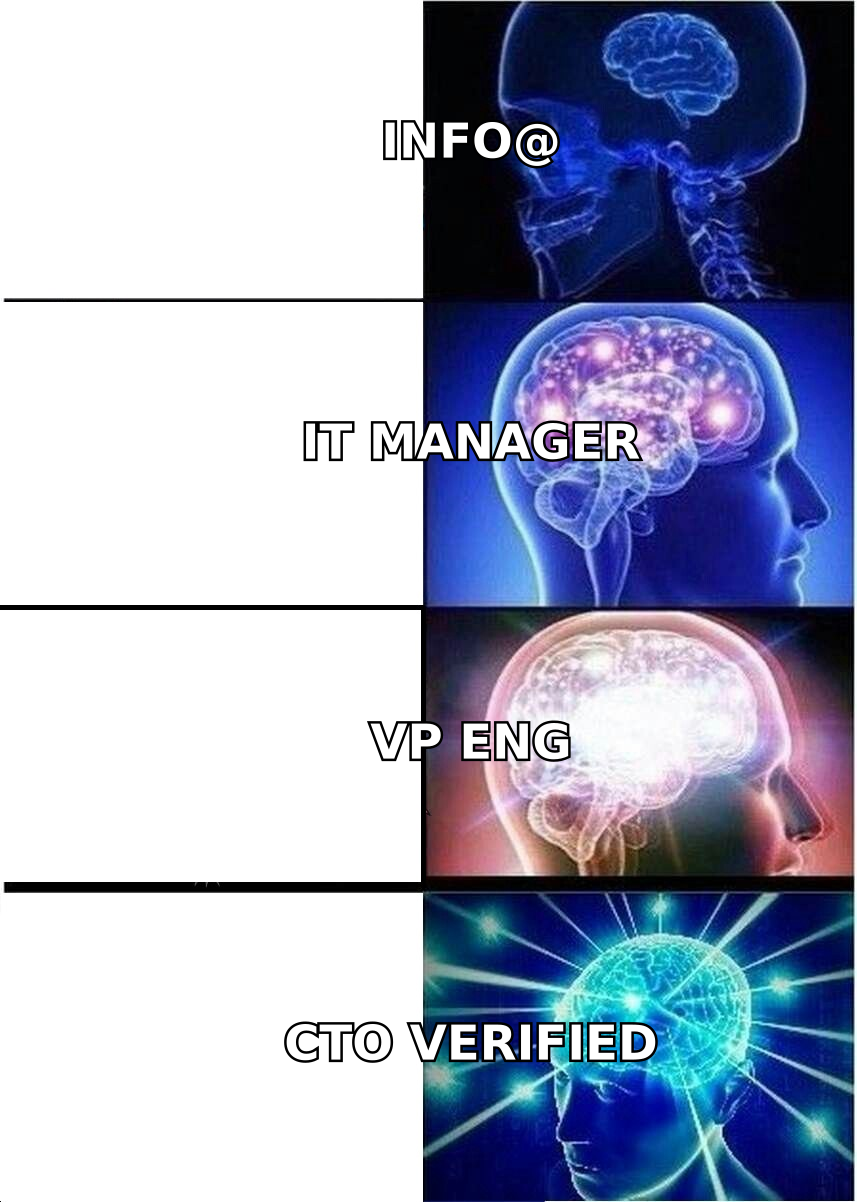
- Generic
info@andit@inboxes are where outbound goes to die. Role-based addresses route to ticketing systems, not people. - Channel mix matters more than volume: email plus LinkedIn plus a technical artifact (docs, changelog, benchmark) outperforms email-only sequences by a wide margin with technical buyers.
- List hygiene is the whole game. IT titles churn fast, and a list built six months ago is already 15-25% stale. Verify before you send, not after you bounce.
What is an IT decision maker, really?#
An IT decision maker is anyone who can say "no" to your technology purchase and make it stick. That definition is deliberately broader than the org chart, because in practice a security analyst three levels below the CISO kills more deals than the CISO ever will.
Think of it like getting a mortgage approved. The bank manager signs the paper, but the underwriter, the appraiser, and the compliance officer each hold a veto. You do not win by charming the manager. You win by making every reviewer's checklist easy to satisfy.
Here is the practical breakdown of who sits in a typical IT buying committee:
- The practitioner / champion — a senior engineer, sysadmin, or IT manager who feels the pain daily. They find you, they test you, and they carry your pitch internally. Without them nothing moves.
- The line manager (Director of IT, Engineering Manager) — owns the team's roadmap and headcount. They care whether your tool reduces tickets or adds another system to babysit.
- The budget owner (VP IT, CTO, CIO) — signs above a threshold, usually $25K-$50K ARR depending on company size. They care about consolidation, vendor count, and whether this shows up in a board deck.
- The security and compliance reviewer (CISO, GRC analyst) — cares about SOC 2, data residency, subprocessors, and SSO. They rarely champion anything; they only remove risk.
- The procurement / finance gate — cares about contract terms, auto-renewal language, and whether you will discount at 11 months.
- The end user — the team that actually has to log in. Ignored constantly, and the reason plenty of signed deals never renew.
Gartner's research on B2B technology buying has consistently put the average enterprise buying group in the 6-10 person range, with buyers spending only a small fraction of their evaluation time with any individual vendor. Your job is not to monopolize that time. It is to arm the champion so they can sell for you in the rooms you will never be in.
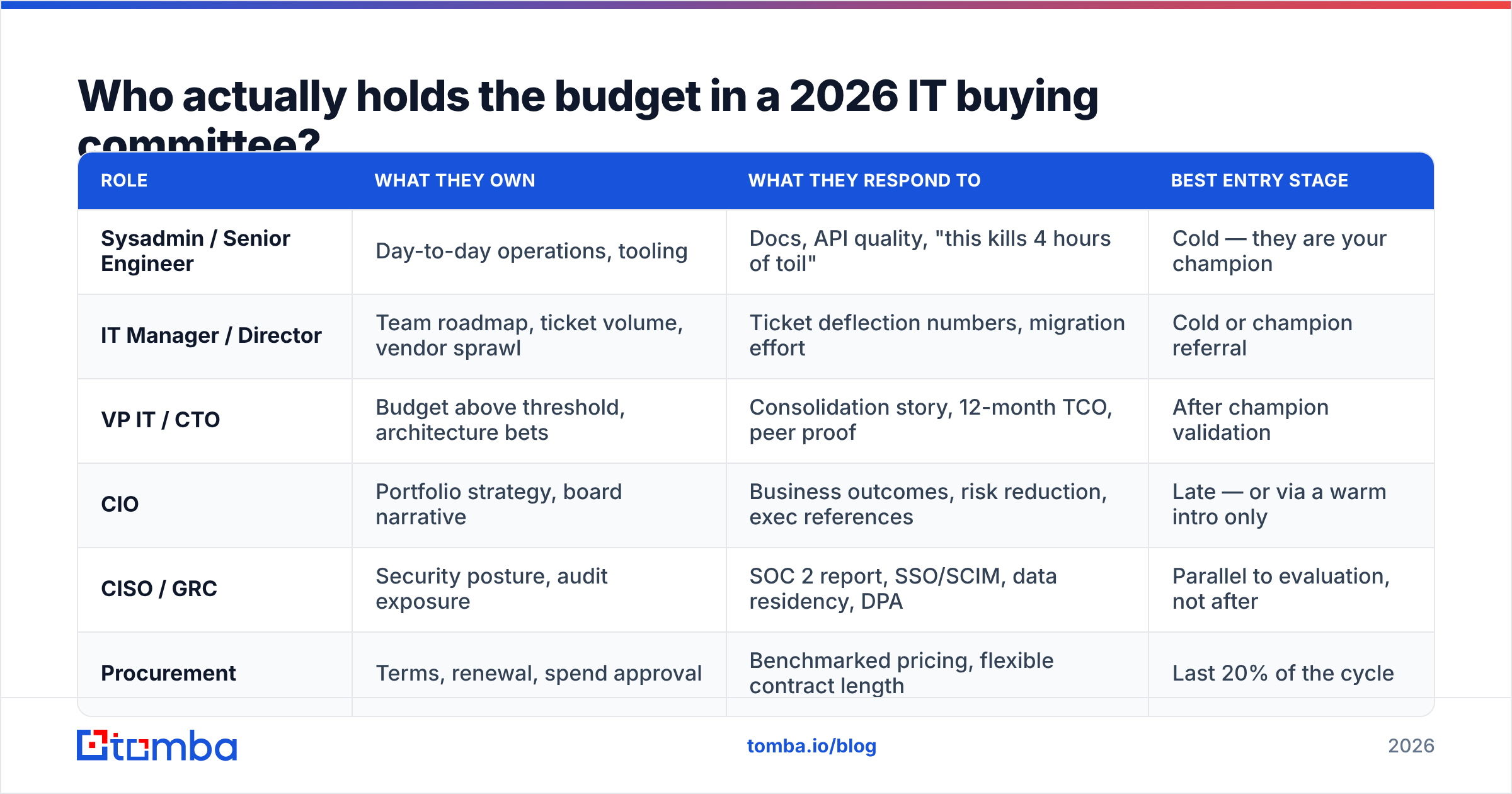
Who actually holds the budget in a 2026 IT buying committee?#
Use this as a targeting map, not a rigid hierarchy. The right entry point depends on deal size: under $10K ARR, the IT manager can often expense it; above $100K, you will meet every row below.
| Role | What they own | What they respond to | Best entry stage |
|---|---|---|---|
| Sysadmin / Senior Engineer | Day-to-day operations, tooling | Docs, API quality, "this kills 4 hours of toil" | Cold — they are your champion |
| IT Manager / Director | Team roadmap, ticket volume, vendor sprawl | Ticket deflection numbers, migration effort | Cold or champion referral |
| VP IT / CTO | Budget above threshold, architecture bets | Consolidation story, 12-month TCO, peer proof | After champion validation |
| CIO | Portfolio strategy, board narrative | Business outcomes, risk reduction, exec references | Late — or via a warm intro only |
| CISO / GRC | Security posture, audit exposure | SOC 2 report, SSO/SCIM, data residency, DPA | Parallel to evaluation, not after |
| Procurement | Terms, renewal, spend approval | Benchmarked pricing, flexible contract length | Last 20% of the cycle |
The common mistake is cold-emailing the CIO on day one with a feature pitch. CIOs do not evaluate features. They evaluate whether their team has already validated something and whether it reduces the number of vendors in their stack. A cold feature email to a CIO is a delete. The same email to the engineer who owns that workflow is a reply.
Why is reaching IT decision makers harder than reaching other buyers?#
Four structural reasons, and none of them are about your copy.
They are the most-targeted segment in B2B. Every security, observability, DevOps, and SaaS-management vendor on earth is emailing the same 40,000 people. A VP of Engineering at a 500-person company routinely gets 50+ cold emails a week.
They control the spam filter. This is the part most SDR teams miss. IT buyers are not just protected by filtering infrastructure — they configure it. They are more likely to have aggressive quarantine rules, disposable aliases, and plus-addressing traps. Your sender reputation gets less benefit of the doubt here than in any other segment.
Their titles are unstable. "Head of Platform," "Director of Infrastructure," "Principal SRE," and "VP Technical Operations" can all describe the same job at four companies. Title-based filtering alone produces noisy lists, which is why you should filter on a combination of title keywords, department, seniority, and company technographics.
Role-based inboxes absorb the rest. it@, support@, helpdesk@, and info@ route into ticketing queues where commercial email is closed unread. If a meaningful share of your list is role-based addresses, your reply rate is structurally capped no matter how good the message is.
The fix for all four is the same: fewer contacts, better verified, with a message that proves you understand the specific system they operate.
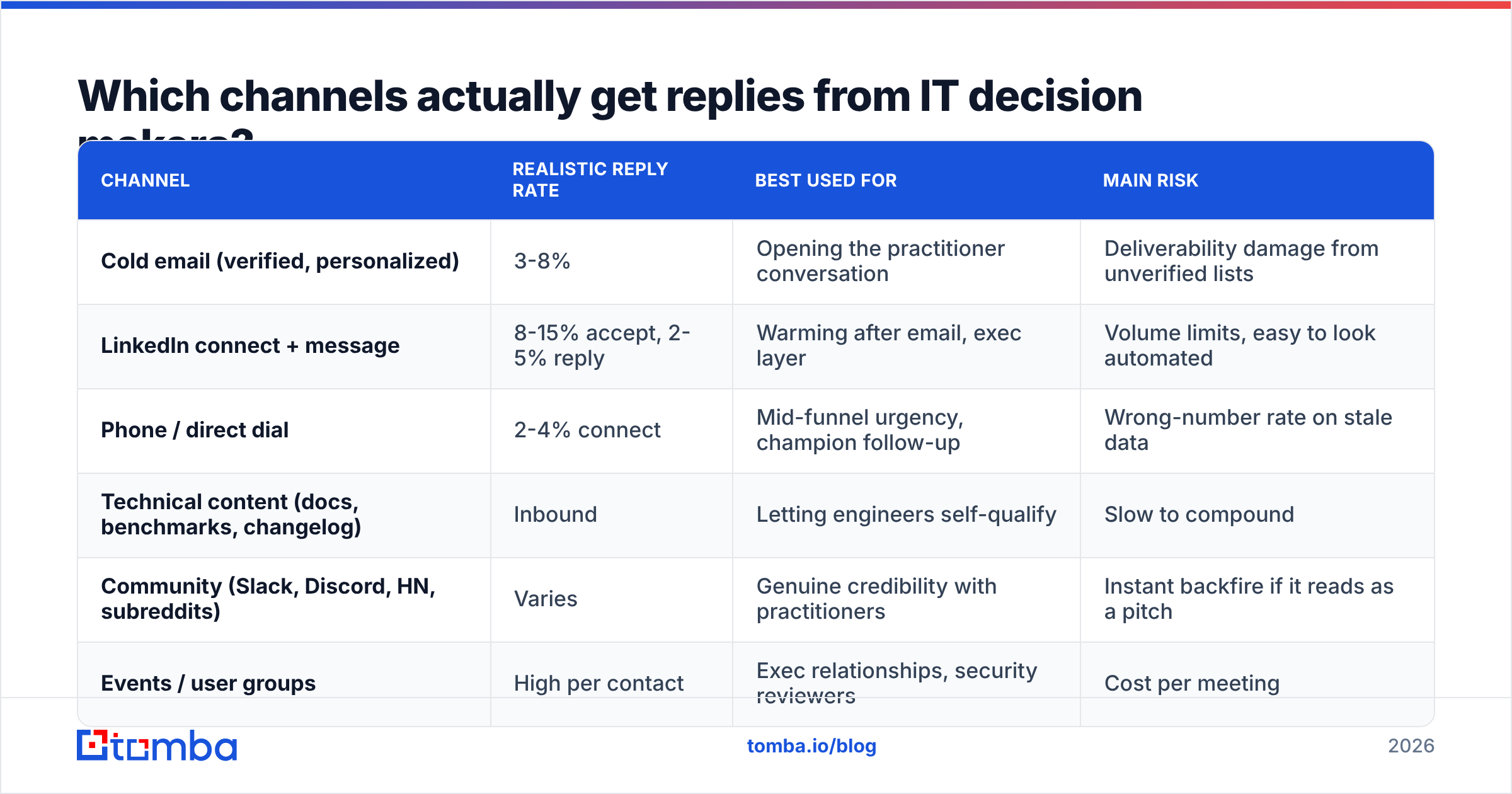
Which channels actually get replies from IT decision makers?#
Multi-threading beats channel maximalism. Two well-executed channels plus one piece of technical proof outperforms a six-channel blast.
| Channel | Realistic reply rate | Best used for | Main risk |
|---|---|---|---|
| Cold email (verified, personalized) | 3-8% | Opening the practitioner conversation | Deliverability damage from unverified lists |
| LinkedIn connect + message | 8-15% accept, 2-5% reply | Warming after email, exec layer | Volume limits, easy to look automated |
| Phone / direct dial | 2-4% connect | Mid-funnel urgency, champion follow-up | Wrong-number rate on stale data |
| Technical content (docs, benchmarks, changelog) | Inbound | Letting engineers self-qualify | Slow to compound |
| Community (Slack, Discord, HN, subreddits) | Varies | Genuine credibility with practitioners | Instant backfire if it reads as a pitch |
| Events / user groups | High per contact | Exec relationships, security reviewers | Cost per meeting |
A few practical notes on the mix:
- Email first, LinkedIn second, phone third. Email establishes context. LinkedIn confirms you are a real person. A call without either of those is a cold interruption to someone whose calendar is already fragmented.
- Lead with an artifact, not a meeting. "Here's a 90-second read on how we handle SCIM deprovisioning" converts better than "Do you have 15 minutes Thursday?" with technical buyers.
- Respect the asynchronous default. Many engineering orgs are meeting-averse by policy. Offer a doc, a sandbox, or an API key as the first step. HubSpot's sales research has repeatedly found that low-friction first asks outperform calendar-first CTAs, and that gap widens with technical audiences.
- Check peer proof. IT buyers validate on G2 and in private Slack communities before they reply to you. Make sure what they find there matches what you claimed.
How do you build a clean IT decision maker list?#
Build it in four passes. Each pass shrinks the list and raises its value.
Pass 1 — define the account, not the person. Start with firmographics and technographics: company size, industry, cloud provider, existing stack. If your product integrates with Okta, a company that does not run Okta is not an account regardless of who works there. A website tech stack check at the account level saves you from hundreds of wasted contacts later.
Pass 2 — map the committee per account. For each target account, identify three contacts minimum: the likely champion, the likely budget owner, and the likely blocker. Single-threaded IT deals die when your one contact changes jobs — which, in IT, happens constantly.
Pass 3 — find real, individual addresses. Use a domain search to pull the company's actual email pattern (first.last@, flast@, first@), then resolve named people against it with an email finder rather than guessing. Pattern-guessing without validation is how lists end up 30% invalid. If your starting point is a LinkedIn list, a LinkedIn finder maps profiles to work addresses directly.
Pass 4 — verify, then segment by confidence. Run everything through an email verifier and split the output. Send confidently to valid addresses. Route catch-all domains — extremely common in enterprise IT — to a separate, lower-volume sequence, because a catch-all domain accepts everything at SMTP and tells you nothing. A dedicated catch-all verifier narrows that gray zone considerably. Discard the unknowns rather than "testing" them against your main domain.

That fourth pass is not optional busywork. Mailbox providers evaluate you on complaint rate and unknown-user rate. A list that bounces at 8% will degrade placement for every campaign you run afterward, including the ones to accounts you actually care about.
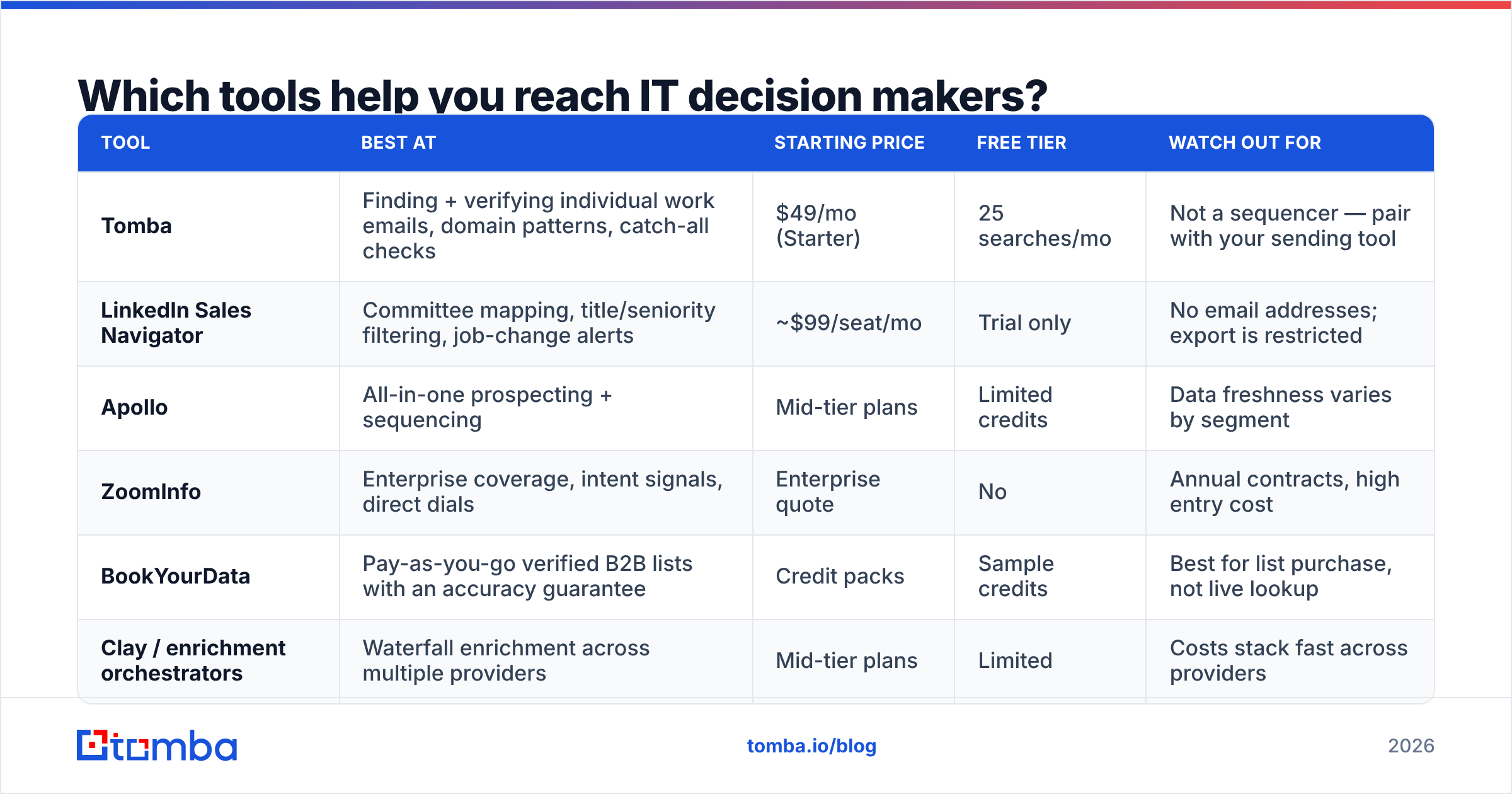
Which tools help you reach IT decision makers?#
No single platform does all four passes well. Here is an honest split of what each category is good at.
| Tool | Best at | Starting price | Free tier | Watch out for |
|---|---|---|---|---|
| Tomba | Finding + verifying individual work emails, domain patterns, catch-all checks | $49/mo (Starter) | 25 searches/mo | Not a sequencer — pair with your sending tool |
| LinkedIn Sales Navigator | Committee mapping, title/seniority filtering, job-change alerts | ~$99/seat/mo | Trial only | No email addresses; export is restricted |
| Apollo | All-in-one prospecting + sequencing | Mid-tier plans | Limited credits | Data freshness varies by segment |
| ZoomInfo | Enterprise coverage, intent signals, direct dials | Enterprise quote | No | Annual contracts, high entry cost |
| BookYourData | Pay-as-you-go verified B2B lists with an accuracy guarantee | Credit packs | Sample credits | Best for list purchase, not live lookup |
| Clay / enrichment orchestrators | Waterfall enrichment across multiple providers | Mid-tier plans | Limited | Costs stack fast across providers |
Two practical recommendations. First, separate your finding layer from your sending layer. When one vendor owns both, you are structurally discouraged from verifying aggressively — bad addresses still consume credits. Second, if you run high volumes, wire the lookup into your workflow rather than exporting CSVs; the Tomba API and the bulk email finder exist precisely so enrichment happens at list-build time instead of after a bounce report.
Compare plans directly on the Tomba pricing page if you are sizing credits — the honest answer for most teams starting IT outbound is that Starter at $49/mo covers a 1-2 SDR motion, and you only need Growth at $99/mo once you are enriching at account scale.
What should your first email to an IT decision maker say?#
Short, specific, and provably researched. Four rules:
- Name the system, not the category. "Your Terraform modules for the EKS migration" beats "your cloud infrastructure." Specificity is the only credential you have in a cold email.
- Lead with the failure mode, not the feature. Technical buyers respond to a precisely described problem they recognize. If they finish your first sentence thinking "yes, that happens to us," you have earned the second sentence.
- Give them something to click that is not a calendar. Docs, a benchmark, a sandbox, a one-page comparison. Let them evaluate you privately first — that is how engineers prefer to buy.
- Make the ask reversible. "Worth a look?" or "Want the doc?" is a lower-stakes yes than a 30-minute meeting, and it opens the thread you actually needed.
Keep it under 90 words. Skip the paragraph about your funding round. And send from a warmed domain with correct SPF, DKIM, and DMARC — IT buyers are the single audience most likely to notice when authentication is misconfigured, and some of them will tell you so in the reply.
How do you know if your IT outbound is actually working?#
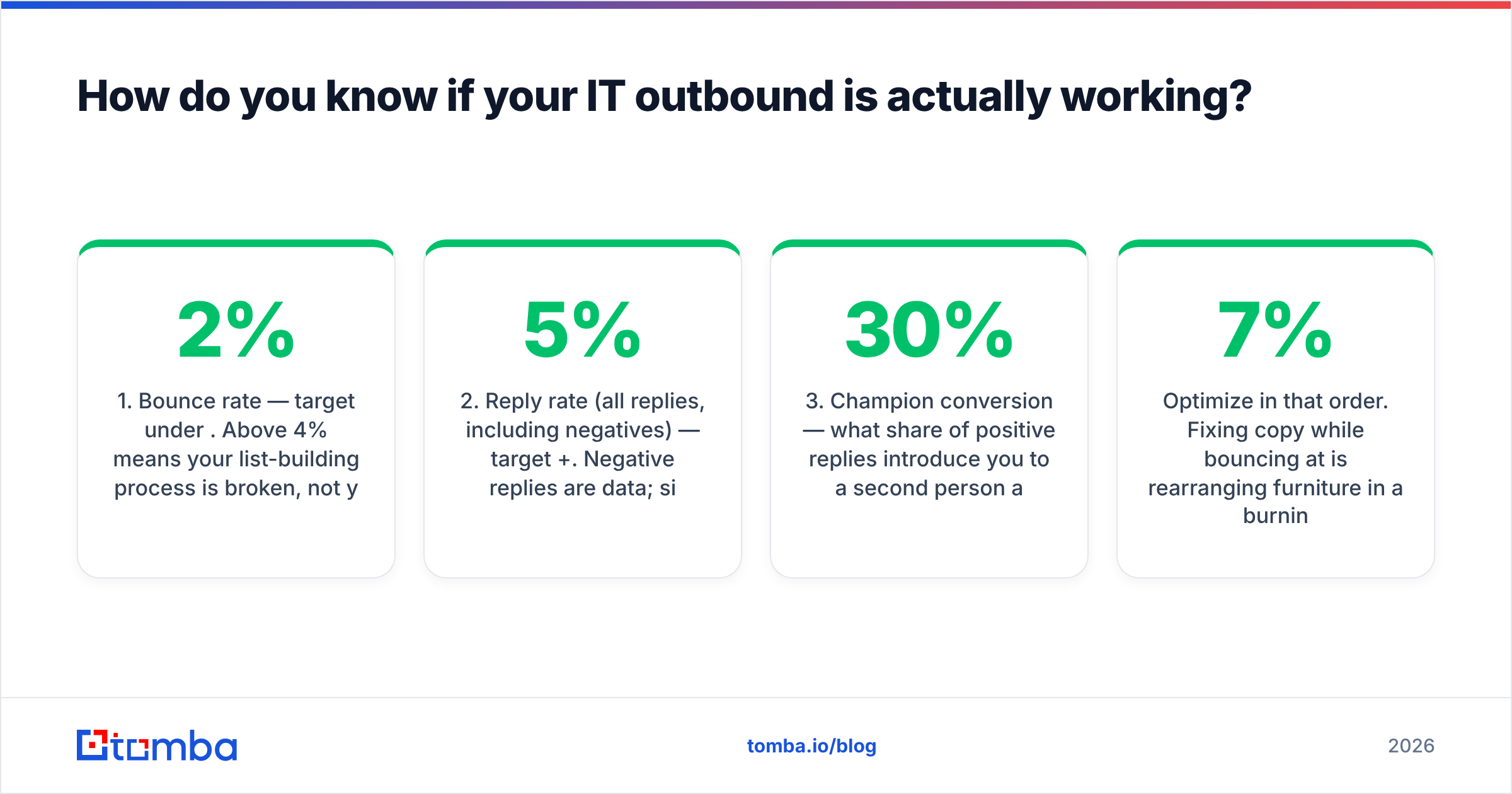
Track four numbers weekly, in this order:
- Bounce rate — target under 2%. Above 4% means your list-building process is broken, not your copy.
- Reply rate (all replies, including negatives) — target 5%+. Negative replies are data; silence is not.
- Champion conversion — what share of positive replies introduce you to a second person at the account? Under 30% means you are pitching, not equipping.
- Security-review survival rate — what share of opportunities die at the CISO gate? If it is high, the fix is a better trust page, not a better SDR.
Optimize in that order. Fixing copy while bouncing at 7% is rearranging furniture in a burning house.
Where should you start this week?#
Pick 50 accounts that genuinely match your technographic profile. Map three roles at each: champion, budget owner, blocker. Find and verify those 150 addresses properly. Send a 90-word, artifact-first email to the champions only, then multi-thread upward once one of them replies.
That is a better week of outbound than 3,000 unverified sends to it@ inboxes, and it will not cost you your sending domain.
To build that list without guessing at email patterns, start with the Tomba Email Finder — search by domain, name, or company, get the verification status before you send, and keep your bounce rate where IT buyers' spam filters will forgive you. The free tier gives you 25 searches a month to test it against your own target accounts before you commit to anything.
Related guides#
// get started
Find, verify and enrich your first contacts today
Start on the free plan with 25 searches a month, then scale when your team is ready.
Free plan · No credit card required · GDPR & CCPA
// about the author