IT Lead Generation: How to Build a Pipeline That Converts
IT buyers ignore 98% of cold outreach because most vendors pitch software to people who evaluate risk. Here's how IT lead generation actually works in 2026 — channels, data, cost per lead, and the stack.
TL;DR
- IT lead generation fails when you sell features to a buying committee that is actually evaluating risk, migration cost, and vendor survivability — not your roadmap.
- The average enterprise IT purchase now involves 9-14 stakeholders. You need contact data for the whole committee, not just the CTO.
- Cost per qualified IT lead runs roughly $150-$600 depending on deal size; MSP and SMB IT services land far lower, enterprise infrastructure far higher.
- Outbound still works, but only with verified contact data. Bounce rates above 3% on a technical domain will quietly kill your sender reputation before your copy ever gets judged.
- Build the stack in this order: ICP definition → account list → committee mapping → verified contacts → multi-channel sequence → attribution.
What is IT lead generation, and why is it different?#
IT lead generation is the process of identifying, contacting, and qualifying buyers of technology products and services — software, infrastructure, managed services, cybersecurity, cloud, hardware — and moving them into a sales pipeline.
The difference from generic B2B lead gen is the buyer. A marketing director buying a design tool is optimizing for output. An IT director buying a monitoring platform is optimizing for not getting fired. That single distinction reshapes everything downstream: your messaging, your proof points, your channel mix, and how long your sales cycle runs.
Think of it like selling a replacement engine to a pilot mid-flight. The pilot is not excited about horsepower. The pilot wants to know how you install it without the plane falling out of the sky. Technical buyers evaluate switching cost, integration debt, security posture, and whether you will still exist in three years — usually before they read your feature list.
Four structural realities you're working against:
- The committee is large and hidden. Gartner's research on B2B buying consistently puts enterprise technology purchases in the 9-14 stakeholder range, spanning IT, security, finance, legal, and the business unit that actually feels the pain.
- The buyer is anti-marketing by default. IT professionals are the most gated-content-fatigued audience in B2B. They block trackers, use ad blockers at 2-3x the general rate, and route cold calls to voicemail on principle.
- The cycle is long. Median enterprise IT deals run 4-9 months. A "lead" generated in Q1 books revenue in Q3 or Q4, which wrecks naive attribution models.
- Existing vendor inertia is enormous. Most IT buyers are not in-market. They enter the market when a contract renews, a breach happens, a system fails, or headcount changes — and those triggers are what you should be monitoring.

Who actually makes the decision in an IT purchase?#
Map the committee before you write a single email. Selling into IT without a committee map is how deals die at "we need to run this by security."
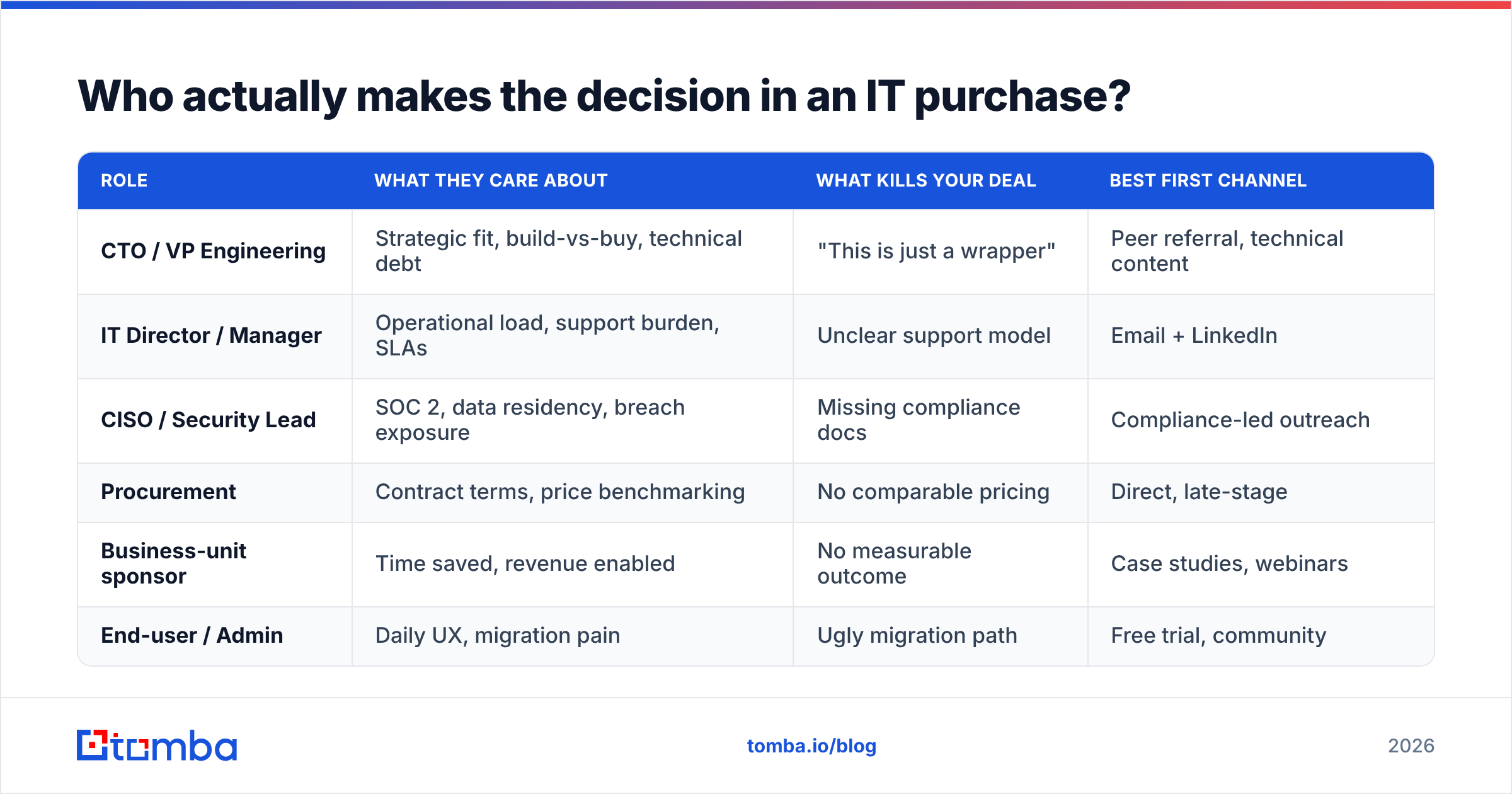
| Role | What they care about | What kills your deal | Best first channel |
|---|---|---|---|
| CTO / VP Engineering | Strategic fit, build-vs-buy, technical debt | "This is just a wrapper" | Peer referral, technical content |
| IT Director / Manager | Operational load, support burden, SLAs | Unclear support model | Email + LinkedIn |
| CISO / Security Lead | SOC 2, data residency, breach exposure | Missing compliance docs | Compliance-led outreach |
| Procurement | Contract terms, price benchmarking | No comparable pricing | Direct, late-stage |
| Business-unit sponsor | Time saved, revenue enabled | No measurable outcome | Case studies, webinars |
| End-user / Admin | Daily UX, migration pain | Ugly migration path | Free trial, community |
Two practical rules follow from this table:
- Never single-thread. If your only contact is the IT Director and they change jobs — and IT churns fast — your deal evaporates. Get 3-5 contacts per account minimum.
- Arm your champion. Your internal sponsor has to sell you to security and finance in meetings you will never attend. Give them a one-page risk summary, a security questionnaire pre-filled, and a pricing sheet they can forward without embarrassment.
Which IT lead generation channels actually produce pipeline?#
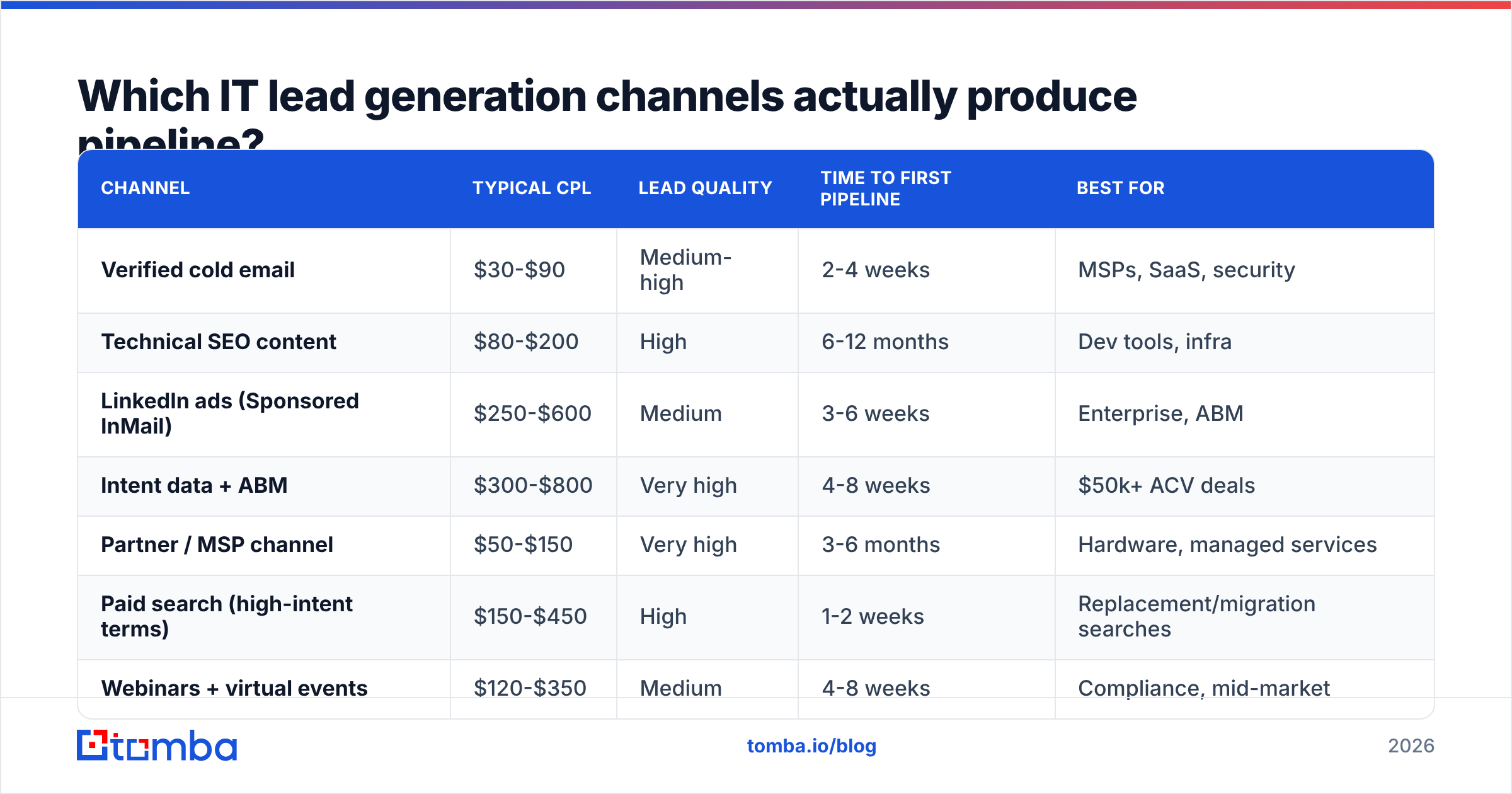
Here's the honest ranking based on how these channels perform for technology vendors, not how vendors market them.
| Channel | Typical CPL | Lead quality | Time to first pipeline | Best for |
|---|---|---|---|---|
| Verified cold email | $30-$90 | Medium-high | 2-4 weeks | MSPs, SaaS, security |
| Technical SEO content | $80-$200 | High | 6-12 months | Dev tools, infra |
| LinkedIn ads (Sponsored InMail) | $250-$600 | Medium | 3-6 weeks | Enterprise, ABM |
| Intent data + ABM | $300-$800 | Very high | 4-8 weeks | $50k+ ACV deals |
| Partner / MSP channel | $50-$150 | Very high | 3-6 months | Hardware, managed services |
| Paid search (high-intent terms) | $150-$450 | High | 1-2 weeks | Replacement/migration searches |
| Webinars + virtual events | $120-$350 | Medium | 4-8 weeks | Compliance, mid-market |
| Cold calling | $100-$300 | Medium | 1-3 weeks | MSP, SMB IT services |
Verified cold email remains the highest-ROI channel for most IT vendors under $50k ACV, but the word "verified" is carrying the entire sentence. Technical domains are disproportionately catch-all configured, which means naive verification tools return "unknown" and reps send anyway. That's how you end up with a 9% bounce rate and a domain that can't reach Microsoft 365 inboxes anymore.
Technical SEO is the compounding play. Comparison pages, migration guides ("moving from X to Y"), and genuinely useful documentation pull in-market buyers at the exact moment their contract renewal is on the calendar. It is slow and it does not stop working.
Intent data plus ABM is where enterprise IT lead generation lives. When a target account's engineers start reading about Kubernetes cost management three weeks in a row, that's your window. Pair intent signals with website visitor reveal so you can act on anonymous traffic from your target accounts instead of waiting for a form fill that never comes.
Cold calling is not dead in IT — it's just narrow. It works for MSPs selling to SMBs where the IT decision-maker is the office manager or owner. It largely fails for enterprise infrastructure, where nobody answers an unknown number.
How do you build an IT prospect list that doesn't bounce?#
This is where most IT lead generation programs quietly fail. Your copy can be excellent and your offer compelling, but if 12% of your sends bounce, email deliverability collapses and nothing lands.
Follow this sequence:
- Define the account ICP with firmographics and technographics. Company size and industry are table stakes. For IT, the signal is the tech stack: who runs Okta, who's on AWS, who just posted a job req for a Kubernetes engineer. Technographic filters cut list size by 80% and raise reply rates by more.
- Build the account list before the contact list. Pull 300-800 target accounts. Resist the urge to buy 50,000 contacts — volume is what got the last team's domain blacklisted.
- Map the committee per account. For each account, identify 3-5 roles from the table above. This is where a domain search earns its keep: give it a company domain, get back the people and the email pattern the company actually uses.
- Find and verify every address. Run each contact through an email verifier before it enters a sequence. For technical companies — which are heavily catch-all — a dedicated catch-all verifier is the difference between a usable list and a guess.
- Enrich with the context you'll actually use in copy. Job title alone is not personalization. Tenure, recent funding, stack changes, and hiring signals are. Data enrichment fills those fields in bulk so reps aren't tab-hopping.
- Suppress aggressively. Remove current customers, open opportunities, competitors, role accounts (info@, support@), and anyone who unsubscribed anywhere in your org. One angry reply from an existing customer costs more than ten new leads.
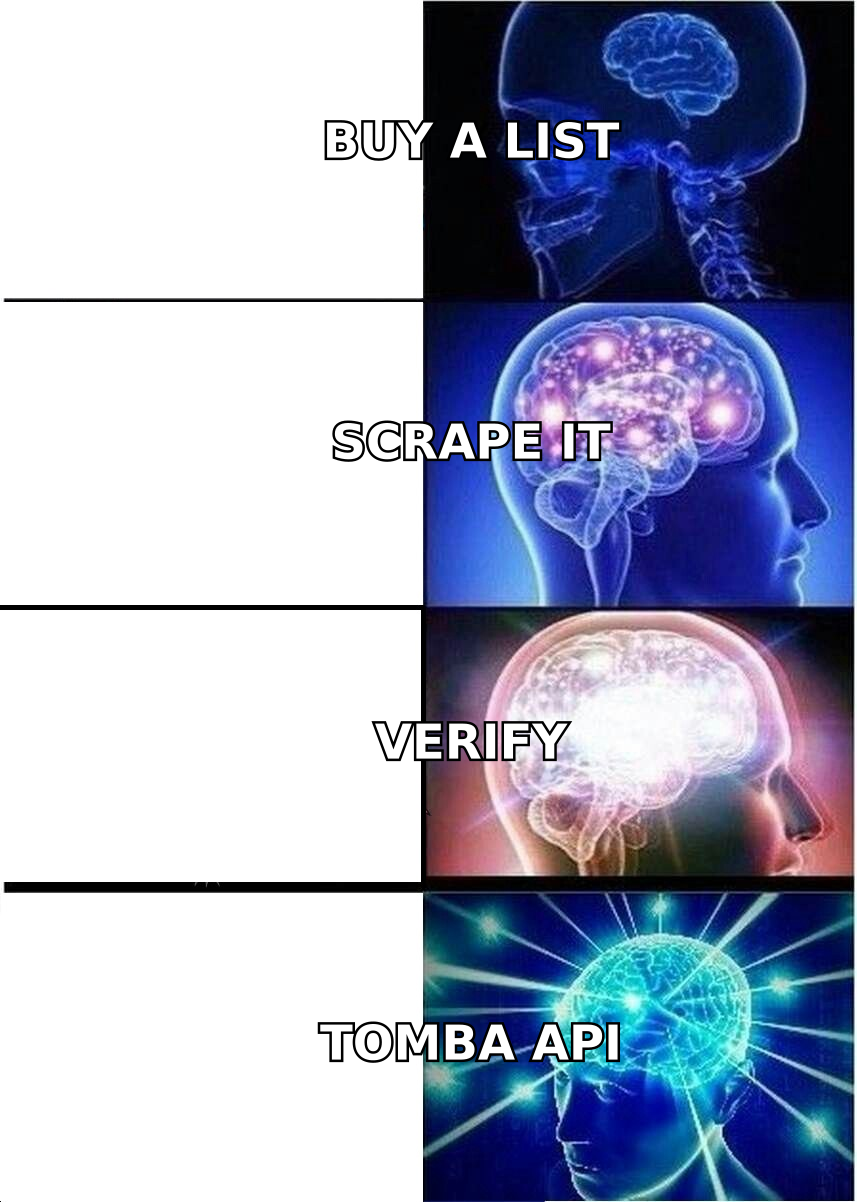
A note on list buying: purchased IT contact lists decay at roughly 25-30% per year, and faster in tech where job changes are frequent. If you do buy, treat the file as raw input, not as a list — re-verify the whole thing before your first send. A reputable provider like BookYourData sells pre-verified records, which meaningfully reduces that cleanup burden, but re-verifying at send time is still the right discipline regardless of source.
What should an IT outbound sequence actually say?#
Three rules, then the structure.
Rule 1: Lead with the problem in their language. Not "our AI-powered platform." Try "you're running Datadog and your bill jumped 40% after the last cluster migration." Specificity is credibility.
Rule 2: Reduce perceived risk in every message. Mention the compliance posture, the migration timeline, the rollback path. IT buyers are scanning for reasons to say no; remove them preemptively.
Rule 3: Never ask for 30 minutes in email one. Ask for a reaction, a document, or a referral to the right person. The interest-first ask converts 2-3x better than the calendar-first ask.
A sequence structure that holds up for technical buyers:
- Email 1 (Day 1): Observation + one-sentence relevance + soft question. Under 90 words.
- LinkedIn (Day 3): Connection request, no pitch. Reference the same observation.
- Email 2 (Day 5): A specific proof point — a number from a comparable account, not a logo wall.
- Call (Day 8): Reference the emails. "I sent you a note about the Datadog bill — bad timing or wrong person?"
- Email 3 (Day 12): The risk-reducer. Security summary, migration doc, or a "here's what implementation actually looks like" breakdown.
- Email 4 (Day 20): Permission-to-close. "Should I stop here, or is this worth revisiting at renewal?" This one pulls the most replies in almost every IT sequence we've seen.
Keep your response rate as the leading metric during week one, and pipeline created as the lagging one. If replies are healthy but meetings aren't booking, the problem is your offer. If replies are flat, it's your data or your subject line — check the data first, because it's cheaper to fix.
How do you measure IT lead generation without lying to yourself?#
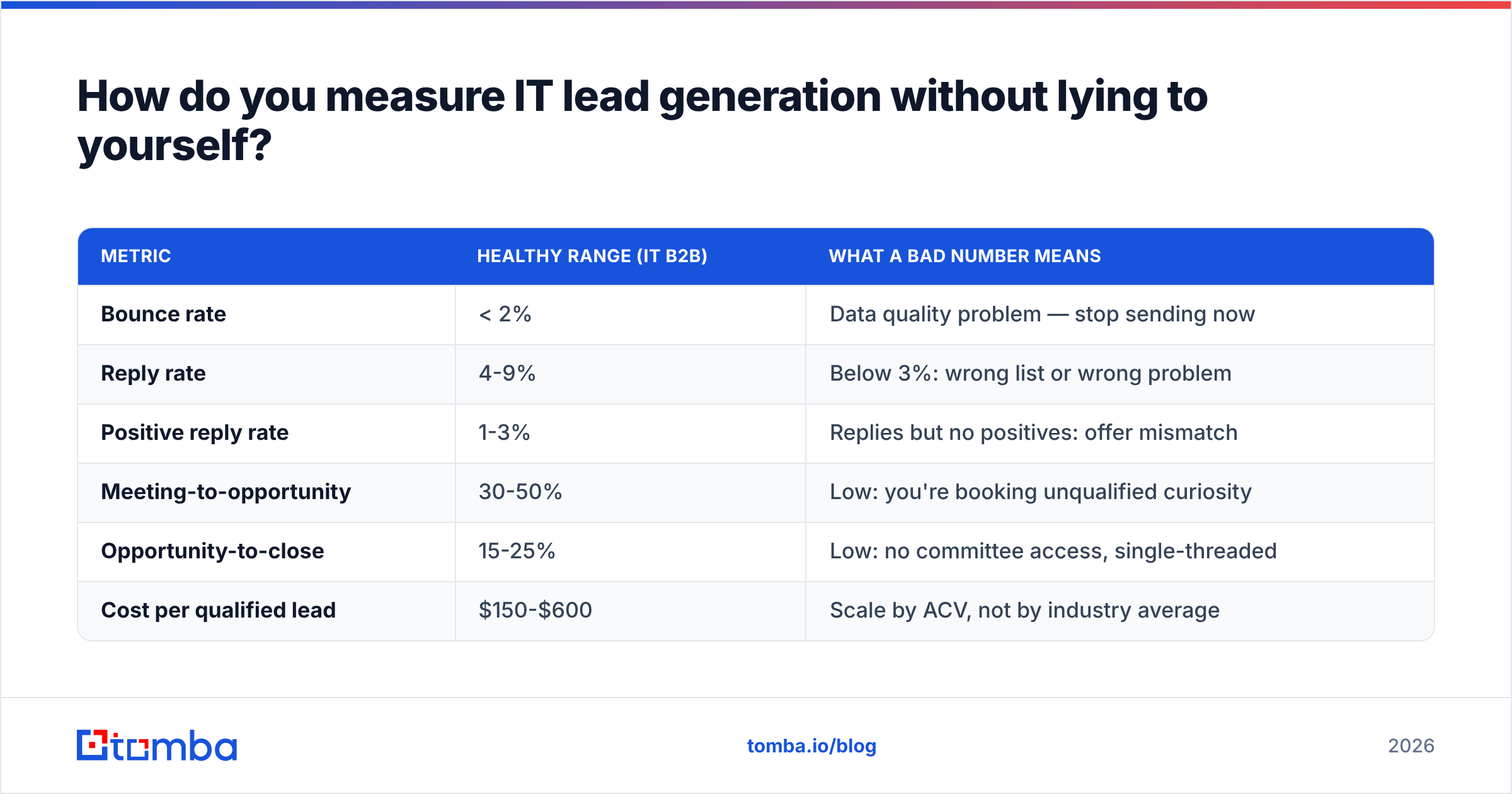
Long cycles make attribution treacherous. Track these six and ignore vanity metrics:
| Metric | Healthy range (IT B2B) | What a bad number means |
|---|---|---|
| Bounce rate | < 2% | Data quality problem — stop sending now |
| Reply rate | 4-9% | Below 3%: wrong list or wrong problem |
| Positive reply rate | 1-3% | Replies but no positives: offer mismatch |
| Meeting-to-opportunity | 30-50% | Low: you're booking unqualified curiosity |
| Opportunity-to-close | 15-25% | Low: no committee access, single-threaded |
| Cost per qualified lead | $150-$600 | Scale by ACV, not by industry average |
The metric most teams skip is pipeline velocity by source. Cold email leads and content leads can have identical CPL and wildly different close rates and cycle lengths. Measuring only CPL will push budget toward the cheaper, slower source and starve the one actually producing revenue. Forrester and Gartner both publish reasonable frameworks here; G2's buyer behavior reports are also a useful free reality check on how software buyers actually research.
One more discipline: define "qualified" in writing, get sales and marketing to sign it, and re-audit it quarterly. Most arguments about lead quality are actually arguments about an undefined word. If you don't have a shared definition of a marketing qualified lead, you don't have a funnel — you have two teams keeping separate scoreboards.
What does a practical IT lead generation stack cost?#
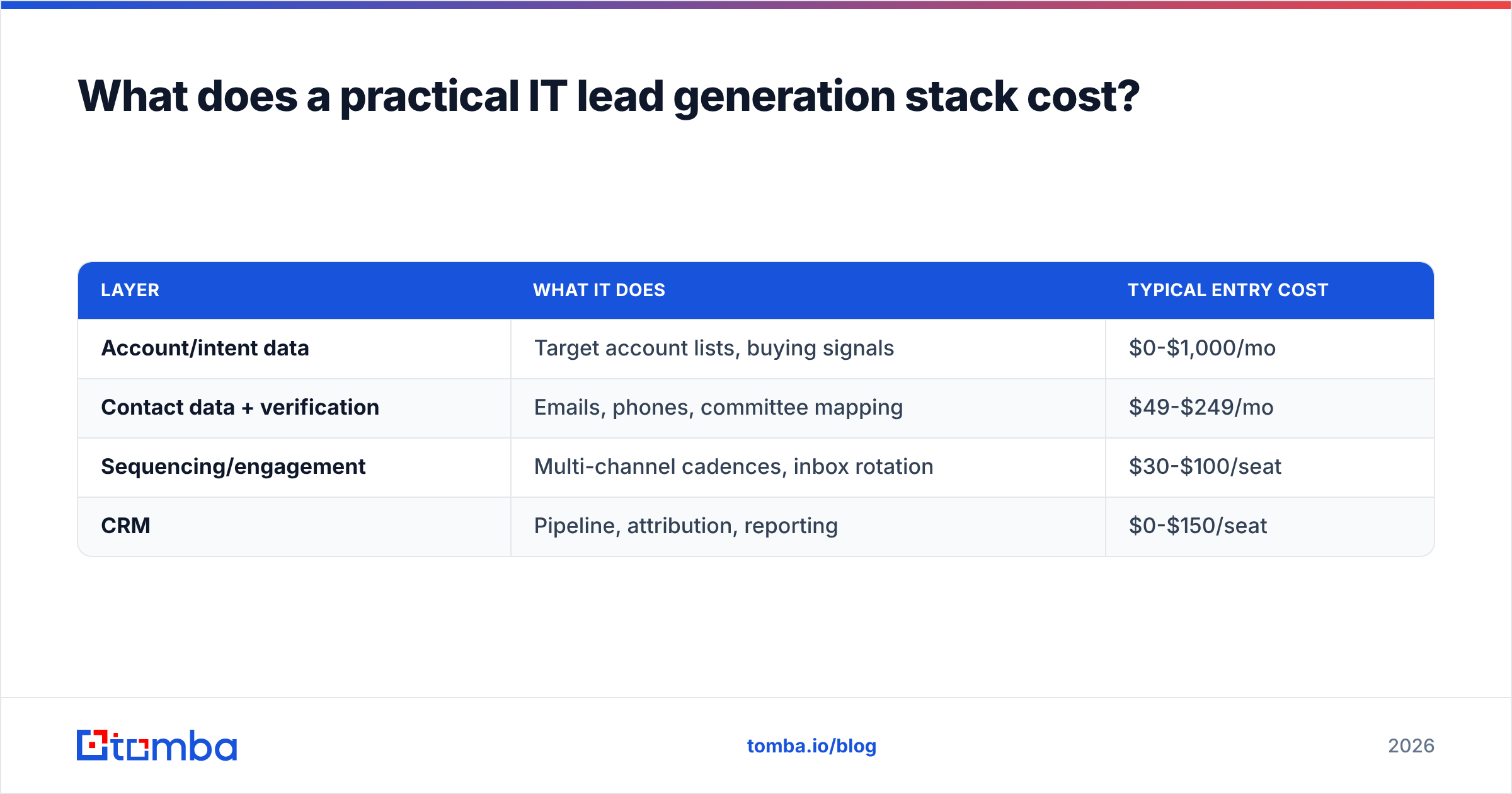
You don't need fifteen tools. You need four functions covered: account data, contact data, sequencing, and CRM.
| Layer | What it does | Typical entry cost |
|---|---|---|
| Account/intent data | Target account lists, buying signals | $0-$1,000/mo |
| Contact data + verification | Emails, phones, committee mapping | $49-$249/mo |
| Sequencing/engagement | Multi-channel cadences, inbox rotation | $30-$100/seat |
| CRM | Pipeline, attribution, reporting | $0-$150/seat |
For contact data specifically, Tomba pricing starts with a free tier at 25 searches per month, then Starter at $49/mo, Growth at $99/mo, and Pro at $249/mo, with Enterprise custom. For a two-rep IT sales team running 800-1,200 contacts a month, Growth is usually the right tier. Teams that pipe data straight into their own workflows tend to skip the UI entirely and use the Tomba API to enrich accounts as they're created in the CRM — which is how you avoid the "stale list in a spreadsheet" failure mode altogether.
If you already run HubSpot or Salesforce, wire enrichment into record creation rather than running it as a separate batch job. Data that arrives with the record gets used; data that lives in a monthly CSV does not. HubSpot's own research on sales data hygiene makes the same point from the CRM side.
Where should you start this quarter?#
If you're starting from zero, run this 30-day plan:
- Days 1-5: Write the ICP with technographic filters. Pull 300 target accounts.
- Days 6-10: Map 3-5 committee contacts per account. Find and verify every address. Expect to lose 10-20% to verification — that's the system working.
- Days 11-15: Write one sequence per persona. Three personas maximum to start.
- Days 16-25: Send at low volume (30-50/day/inbox), monitor bounce and reply rate daily.
- Days 26-30: Cut the worst-performing persona, double volume on the best, and document what the positive repliers had in common.
Then repeat with a bigger list. The teams that win at IT lead generation aren't the ones with the cleverest copy — they're the ones whose data is clean enough that the copy gets a fair test.
Accurate contact data is the cheapest leverage in this entire process. Tomba Email Finder gives you verified professional email addresses by name, domain, or company, with catch-all handling built for the technical domains where most tools return "unknown" and shrug. Start on the free tier, run your first 25 target accounts through it, and see what your bounce rate does before you commit a budget to anything else in the stack.
Related guides#
// get started
Find, verify and enrich your first contacts today
Start on the free plan with 25 searches a month, then scale when your team is ready.
Free plan · No credit card required · GDPR & CCPA
// about the author