IT Sales Presentation: How to Pitch Tech Buyers in 2026
Most IT sales decks lose the room in the first four minutes. Here is the slide-by-slide structure, the discovery prep, and the objection handling that actually moves technical buyers to a next step.
TL;DR
- An IT sales presentation fails for one of three reasons: it pitches before it diagnoses, it talks business value to engineers who want architecture, or it talks architecture to a CFO who wants payback period.
- The winning structure is nine slides, not forty: current-state diagnosis, cost of inaction, architecture fit, security posture, migration path, proof, pricing, risk reversal, next step.
- Technical buyers verify claims independently. Every number on your slide should survive a Google search by a skeptical staff engineer.
- Multi-threading matters more than slide design. The average enterprise IT purchase involves 6-10 stakeholders; a deck built for one persona dies in the group chat afterward.
- Prep beats polish. Knowing the prospect's stack, incumbent vendor, and the actual names in the buying committee is worth more than another animation.
What is an IT sales presentation, exactly?#
An IT sales presentation is the structured pitch you deliver to a technical buying committee — typically a mix of IT directors, security reviewers, platform engineers, and a finance approver — to move a deal from "interested" to "we'll pilot this."
It is not a demo. A demo shows what the product does. A presentation argues why the current state is expensive, why your approach fixes it, and why the risk of switching is lower than the risk of standing still. Most reps conflate the two, open a product tour at minute three, and lose the CTO who is silently deciding whether the integration surface will create on-call pages.
The other thing it is not: a company-overview deck. Nobody in IT cares about your funding round or your logo wall until after they believe you understand their problem. Lead with founding story and you have spent your best attention window on the least persuasive content.
Here is the core distinction most teams get wrong:
- Demo — answers "what does it do?" Best delivered after a diagnosis, ideally scoped to two or three workflows the prospect actually named.
- Presentation — answers "why change, why now, why you?" This is the deck that gets forwarded internally.
- Technical deep dive — answers "how does it work under load?" Separate meeting, separate audience, usually engineer-to-engineer.
- Business case — answers "what does this cost and return?" Often a one-page document, not slides, because finance reads documents.
- Security review — answers "will this pass our controls?" Questionnaire-driven, rarely a live meeting, but your deck must preview the answers.
Collapsing all five into one 45-minute meeting is the single most common failure mode in IT sales. Pick one job per meeting.
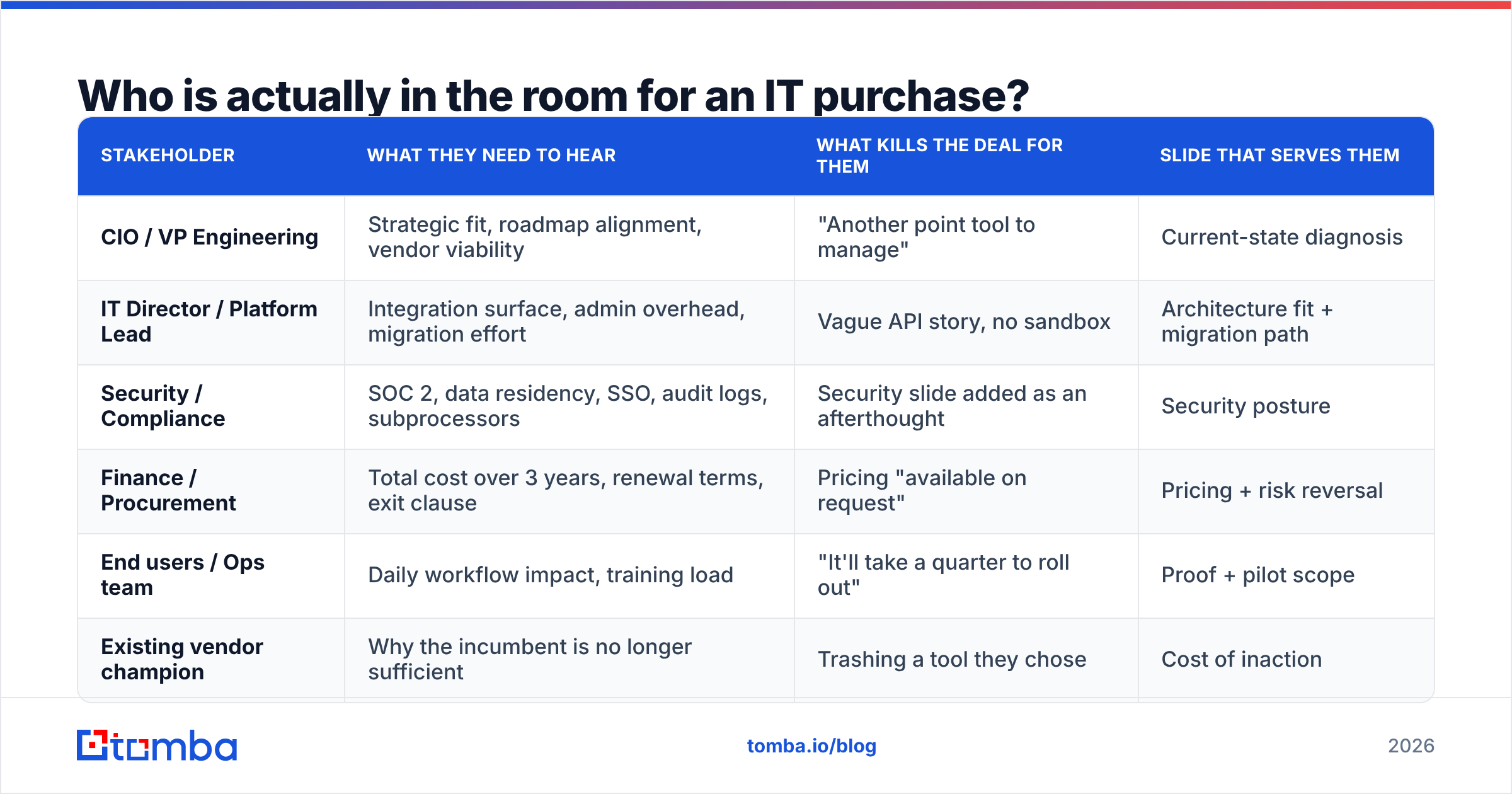
Who is actually in the room for an IT purchase?#
Assume six to ten people, and assume at least three of them are not in the meeting but will read the deck later.
Gartner's research on B2B buying has consistently found that the typical buying group for a complex solution sits around six to ten decision makers, each arriving with their own independently gathered information. In IT specifically, that group skews toward people with veto power rather than purchase power — a security architect cannot buy your product, but can absolutely kill it.
Map them before you build a single slide:
| Stakeholder | What they need to hear | What kills the deal for them | Slide that serves them |
|---|---|---|---|
| CIO / VP Engineering | Strategic fit, roadmap alignment, vendor viability | "Another point tool to manage" | Current-state diagnosis |
| IT Director / Platform Lead | Integration surface, admin overhead, migration effort | Vague API story, no sandbox | Architecture fit + migration path |
| Security / Compliance | SOC 2, data residency, SSO, audit logs, subprocessors | Security slide added as an afterthought | Security posture |
| Finance / Procurement | Total cost over 3 years, renewal terms, exit clause | Pricing "available on request" | Pricing + risk reversal |
| End users / Ops team | Daily workflow impact, training load | "It'll take a quarter to roll out" | Proof + pilot scope |
| Existing vendor champion | Why the incumbent is no longer sufficient | Trashing a tool they chose | Cost of inaction |
That last row is the one reps forget. Somebody in the room picked the incumbent. Attack the tool and you attack their judgment. Frame it as "the requirements changed," not "you bought badly."
What is the right slide structure for an IT sales presentation?#
Nine slides. Anything beyond that is appendix material you pull up on demand.
1. Current state, in their words. Open with what you learned in discovery, stated as fact, with their terminology. "You're running three separate enrichment vendors, your SDRs re-key data into Salesforce manually, and your ops lead estimated 11 hours a week on list hygiene." If they nod, you have earned the next eight slides. If they correct you, that correction is the most valuable thing in the meeting — take it.
2. Cost of inaction. Quantify the current state. Hours, error rates, bounce rates, missed SLAs, headcount. Use their numbers from discovery wherever possible; use benchmarks only to fill gaps, and label them as benchmarks.
3. Architecture fit. One diagram. Where you sit in their stack, what you read, what you write, what you never touch. Technical buyers relax visibly when they can see the data flow. If your product touches a CRM, show the CRM. If it calls an API, name the endpoints.
4. Security posture. Certifications, data handling, retention, SSO/SCIM, subprocessor list, breach history. Put it in the main deck, not the appendix. Security teams read forwarded decks and decide before you meet them.
5. Migration path. Week-by-week, with named owners on both sides. The unspoken question in every IT deal is "who does the work?" Answer it before they ask.
6. Proof. A customer with a comparable stack and a comparable headcount. Not your biggest logo — your most similar logo. One quantified outcome beats five testimonials.
7. Pricing. Actual numbers. Three-year view. Include the things that usually surprise people: overage rates, seat minimums, support tiers, renewal uplift caps.
8. Risk reversal. Pilot terms, opt-out window, data export guarantee, implementation support. This slide exists to make "yes" cheaper than "let's revisit next quarter."
9. Next step. One specific ask with a date and a named person. Not "let us know your thoughts."
How do you prepare so the presentation lands?#
Spend more time on prep than on slides. A 60/40 split in favor of research is roughly right for a first enterprise pitch.
Prep has three layers:
- Stack research. What are they running? A website tech stack check tells you whether they're on HubSpot or Salesforce, what analytics they run, and which auth provider they use — all of which change your integration slide. Job postings are the second-best source; a listing for a "Snowflake data engineer" tells you more about roadmap than any discovery call.
- People research. Get the actual buying committee names, titles, and contact details. A domain search across the prospect's domain surfaces the platform leads and security folks who never show up on the calendar invite but read every forwarded deck. Verify those addresses with an email verifier before you send anything — a bounce to the CISO on day one is a bad first impression.
- Incumbent research. What are they using now, and what is publicly wrong with it? G2 and Capterra review pages for the incumbent are an underrated source of the exact language their users complain in. Search G2 for the incumbent category and read the three-star reviews; those are the honest ones.
Then write the meeting plan before the slides. What is the one decision you want made? Who has to say yes for it? What is the most likely objection, and which slide pre-empts it?
Which objections should you plan for, and how do you answer them?#
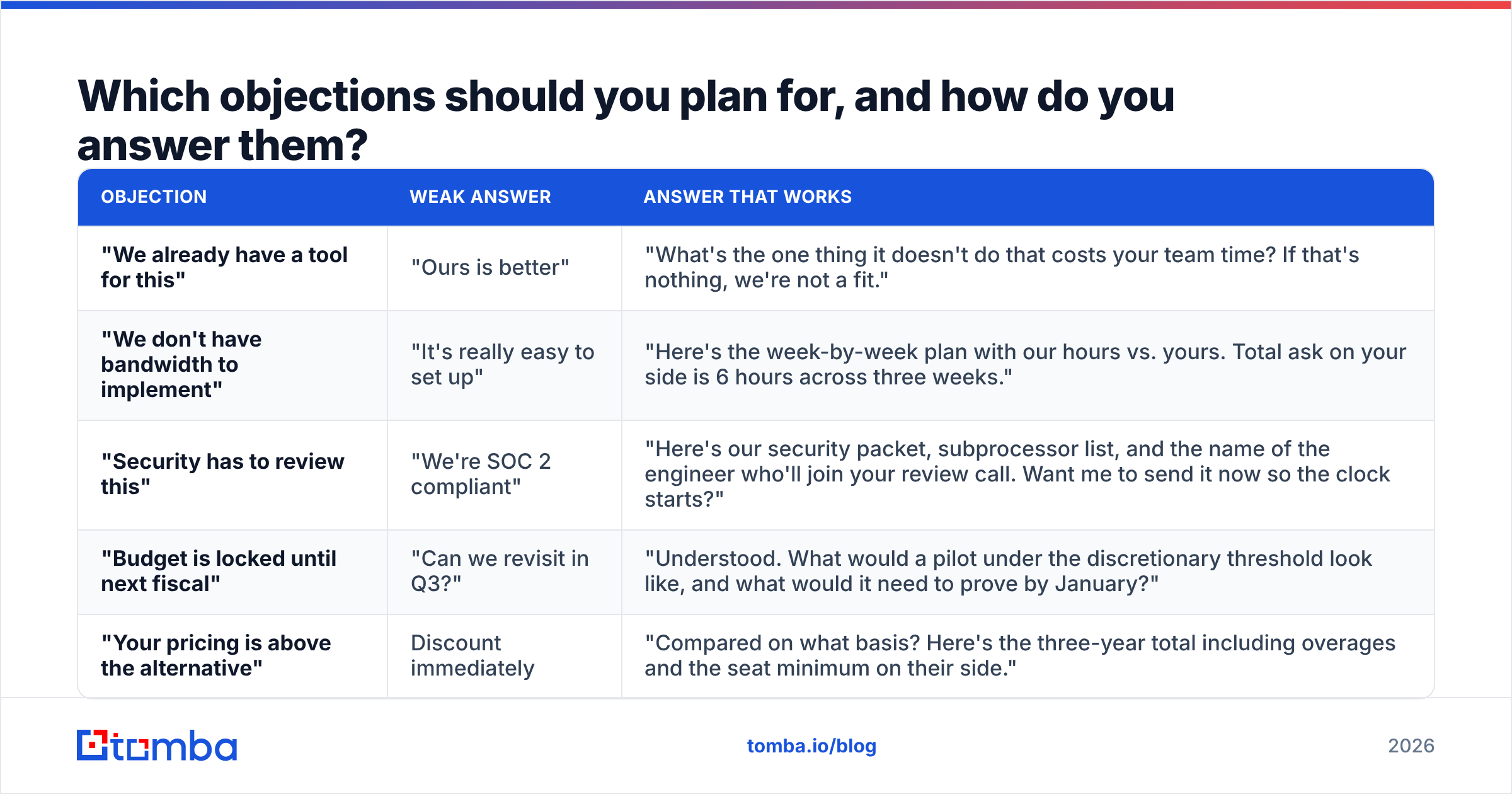
Four objections cover most of what you'll hear in an IT sales presentation. Have a slide-or-sentence answer for each, rehearsed.
| Objection | Weak answer | Answer that works |
|---|---|---|
| "We already have a tool for this" | "Ours is better" | "What's the one thing it doesn't do that costs your team time? If that's nothing, we're not a fit." |
| "We don't have bandwidth to implement" | "It's really easy to set up" | "Here's the week-by-week plan with our hours vs. yours. Total ask on your side is 6 hours across three weeks." |
| "Security has to review this" | "We're SOC 2 compliant" | "Here's our security packet, subprocessor list, and the name of the engineer who'll join your review call. Want me to send it now so the clock starts?" |
| "Budget is locked until next fiscal" | "Can we revisit in Q3?" | "Understood. What would a pilot under the discretionary threshold look like, and what would it need to prove by January?" |
| "Your pricing is above the alternative" | Discount immediately | "Compared on what basis? Here's the three-year total including overages and the seat minimum on their side." |
The pattern: never argue, always convert the objection into a scoping question. An objection is information about what the buyer needs to justify the purchase internally. Treat it as a gift and you will hear more of them, which is what you want.
How do you present technical proof without losing the non-technical people?#
Layer it. Put the headline claim on the slide, the supporting number in the speaker's mouth, and the methodology in the appendix.
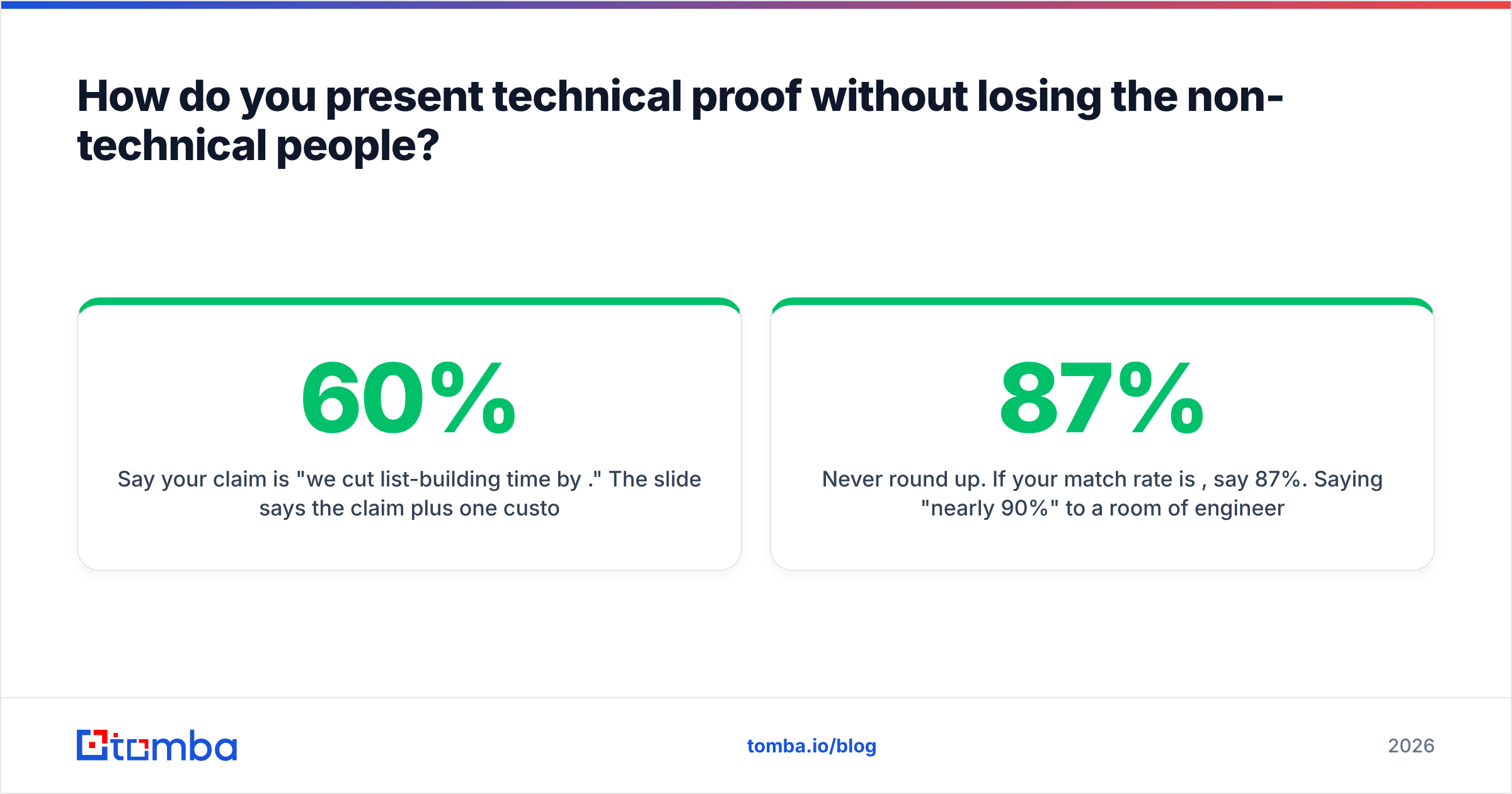
Say your claim is "we cut list-building time by 60%." The slide says the claim plus one customer name. You say: "That's from a 40-person SDR team at a company on Salesforce and Outreach — they went from 11 hours a week on list hygiene to 4." The appendix holds the case study PDF with methodology.
Non-technical stakeholders stop at the slide. Technical stakeholders will ask for the appendix, and asking is a buying signal. Do not front-load the methodology; you will bore the CFO and the engineer will ask anyway.
Three rules for technical proof:
- Cite sources your buyer can verify. If you quote an industry benchmark, name the source. HubSpot publishes sales statistics that technical buyers already know; using a stat they recognize builds credibility faster than a number they've never seen.
- Show failure modes. Telling a security architect what your product does not do earns more trust than any certification badge. "We don't write back to your CRM unless you explicitly enable it" is a sentence that ends a whole category of objection.
- Never round up. If your match rate is 87%, say 87%. Saying "nearly 90%" to a room of engineers reads as rounding-up behavior, and they will assume you rounded up elsewhere too.
How does this differ from a standard B2B sales deck?#
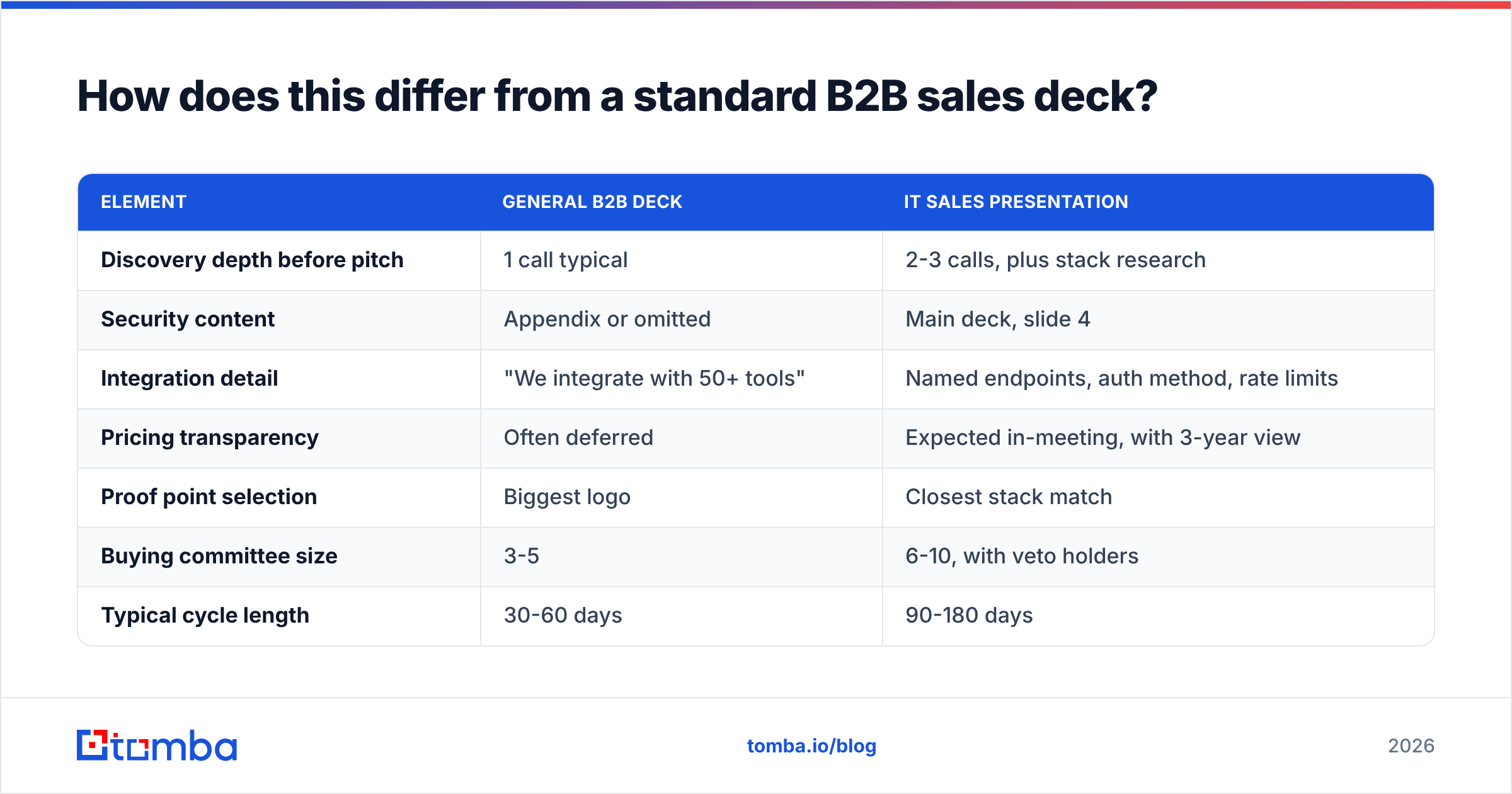
The structure is similar; the weighting is completely different.
| Element | General B2B deck | IT sales presentation |
|---|---|---|
| Discovery depth before pitch | 1 call typical | 2-3 calls, plus stack research |
| Security content | Appendix or omitted | Main deck, slide 4 |
| Integration detail | "We integrate with 50+ tools" | Named endpoints, auth method, rate limits |
| Pricing transparency | Often deferred | Expected in-meeting, with 3-year view |
| Proof point selection | Biggest logo | Closest stack match |
| Buying committee size | 3-5 | 6-10, with veto holders |
| Typical cycle length | 30-60 days | 90-180 days |
| Deck reuse | Same deck, light edits | Rebuilt per account, appendix reused |
The last row is the expensive one. Reps resist rebuilding decks per account because it feels inefficient. It is, in raw hours. It is also why win rates on tailored IT presentations run meaningfully higher — a deck that names the prospect's actual tools, actual team size, and actual pain is a deck that gets forwarded. A generic deck gets skimmed and archived.
If you want to keep the effort bounded, build a fixed appendix (security, pricing, integrations, case studies) that never changes and rebuild only slides 1, 2, 3, and 5 per account. That's four slides of real work per deal.
What should you do after the presentation ends?#
Send the follow-up within four hours, and send it to everyone — including the people who weren't in the room.
Your follow-up should contain: a three-bullet recap of what you heard (not what you said), the deck as a PDF, the security packet, and the single next step with a proposed date. Nothing else. No "just circling back." No 900-word summary.
The people who weren't in the room are the reason you did people research during prep. If the security architect and the platform lead never joined the call, they still need the packet — and they need it from you, not from a forwarded chain three weeks later with no context. Use a bulk email finder to assemble that list before the meeting, not after, so your follow-up goes out the same afternoon.
Then track the signal, not the sentiment. "Great meeting" means nothing. A forwarded deck, a security questionnaire arriving, a calendar invite from someone you never met — those are the events that predict a close.
Build the buying committee list before you build the deck#
A well-structured IT sales presentation dies anyway if it reaches the wrong four people. Before your next pitch, map the full committee: the platform lead who owns the integration, the security reviewer who owns the veto, and the finance approver who owns the number.
Tomba's Email Finder gets you verified contact details for those people from a company domain and a name, so your follow-up reaches the whole committee the same day instead of trickling out through a champion who's already moved on to the next fire. The free tier covers 25 searches a month if you want to test it on a single target account; Tomba pricing starts at $49/month for Starter when you're running this across a full territory. Map the room first — then build the nine slides.
Related guides#
// get started
Find, verify and enrich your first contacts today
Start on the free plan with 25 searches a month, then scale when your team is ready.
Free plan · No credit card required · GDPR & CCPA
// about the author