Jeeva AI Pricing in 2026: Plans, Real Costs, and Alternatives
Jeeva AI sells autonomous SDR agents, but the price list is demo-gated. Here's what the tiers actually cost, where seat and credit overages bite, and when a leaner stack wins.
TL;DR
- Jeeva AI does not publish a complete, self-serve price list. Most buyers land on a demo call and receive a per-seat quote, which makes apples-to-apples comparison hard by design.
- Reported entry pricing clusters in the low hundreds of dollars per month per AI agent "seat," with mid-market contracts commonly quoted annually and scaling into four figures monthly.
- The headline number is rarely the real number. Data credits, mailbox/inbox costs, onboarding fees, and annual commitments are where the budget actually goes.
- Jeeva AI makes sense if you want an autonomous SDR layer — sourcing, sequencing, replying — and you have the volume to justify it. It's overkill if what you actually need is accurate contact data plus a sequencer you already own.
- A finder-plus-verifier-plus-sequencer stack starting around $49/mo covers a large share of the same job for a fraction of the spend. Details and the trade-offs below.
What is Jeeva AI, and who is it actually for?#
Jeeva AI is an AI sales development platform — the category G2 calls AI sales assistants. Instead of selling you a database and a sequencer and letting you wire them together, Jeeva positions itself as a set of autonomous agents that do the SDR job end to end: identify accounts and personas, enrich contacts, write and send outbound, handle replies, and hand warm conversations to a human rep. You can see the vendor's own framing on jeeva.ai.
That positioning matters for pricing, because it changes what you're buying. A data tool is priced on records. A sequencer is priced on mailboxes or seats. An "AI SDR" is priced on the pitch that it replaces headcount — which anchors the quote against a $70K–$90K SDR salary rather than against a $99/mo tool. That anchoring is legitimate if the agents genuinely produce pipeline. It's expensive if they don't.
The honest read: Jeeva AI is built for teams with an existing, working outbound motion that they want to run at higher volume without linear headcount growth. It is not a good first purchase for a founder who has not yet proven a message-market fit by hand.
How much does Jeeva AI pricing actually cost in 2026?#
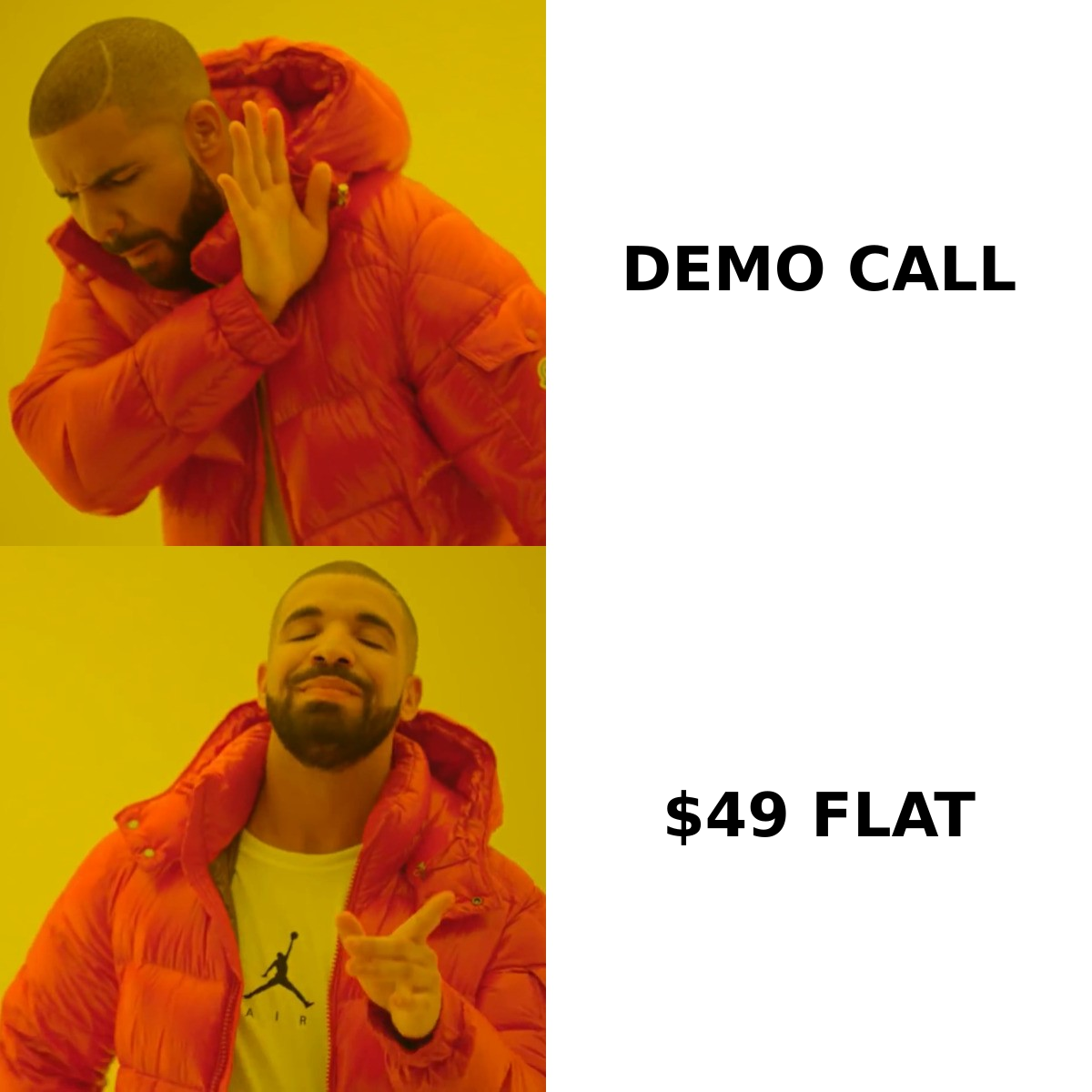
Here's the first thing to be straight about: Jeeva AI does not maintain a fully transparent public price list the way a self-serve tool does. Tiers are named, but the numbers most buyers act on come from a sales conversation, and they vary by seat count, contract length, and data volume.
What that means practically — and this is a pattern across the AI SDR category, not a Jeeva-specific flaw — is that any number you read in a blog post (including this one) is a reported range, not a quote. Treat the table below as a budgeting starting point and confirm every line on the call.
| Tier | Typical reported cost | What it's built for | Main limit to watch |
|---|---|---|---|
| Free / trial | $0, time- or credit-capped | Kicking the tires on agent output | Credit cap hits fast on real list sizes |
| Starter / entry | ~$100–$300 per month, per seat | Solo founder or one-rep team testing autonomous outbound | Per-seat math scales badly past 2–3 users |
| Growth / Scale | ~$500–$1,500+ per month | Teams running multi-persona, multi-mailbox outbound | Usually annual commitment; credits metered separately |
| Enterprise | Custom, typically annual | CRM-integrated, multi-region, security review required | Onboarding/implementation fee often added |
| Add-ons | Variable | Extra data credits, extra mailboxes, premium support | This is where quotes quietly inflate |
The pattern to notice: cost scales on two axes at once — seats and usage. Most buyers model one axis and get surprised by the other.
What's actually included at each tier?#
Rather than trusting tier names, evaluate any AI SDR quote against these six line items. This is the checklist I'd bring to the call:
- Agent seats vs. human seats. Ask explicitly whether pricing counts AI agents, human logins, or both. Some vendors charge for a human viewer seat on top of the agent. That doubles a small team's cost without adding output.
- Contact credits and enrichment depth. Find out how many contacts you can source and enrich per month, whether a failed lookup burns a credit, and whether phone numbers cost extra. A "10,000 credits" allowance means very different things depending on that answer.
- Mailboxes, domains, and warmup. Autonomous outbound needs sending infrastructure. Confirm whether mailboxes, secondary domains, and warmup are bundled or billed separately — this is frequently a separate line and frequently the one that breaks the budget model.
- Reply handling and meeting booking. The headline value prop of an AI SDR is that it answers replies. Verify which tier unlocks it, how much human review is required, and what happens when the agent misreads intent on a live deal.
- CRM write-back. One-way export is not integration. Ask for bidirectional sync with your CRM, field mapping control, and dedupe behavior against existing records.
- Contract term and exit. Monthly vs. annual changes the effective price by 15–25% in most quotes. Also ask what happens to your enriched data if you churn — some contracts restrict export.
If a vendor can't answer all six in writing, you don't have a price yet. You have a number.
Where do the hidden costs show up?#
Three places, consistently.
Credit burn on bad data. Every AI SDR platform sources contacts from a blend of proprietary and licensed data. When the underlying record is stale, the agent still spends a credit, still sends, and still bounces. You pay twice — once for the credit, once in sender reputation. This is why teams that run a dedicated email verifier before send see materially lower effective cost per meeting, regardless of which agent platform sits on top.
Seat creep. The entry price looks reasonable for one seat. Add a second rep, a sales manager who wants visibility, and a marketer who wants to pull a list, and you're at 4x the modeled cost for maybe 1.5x the output.
Implementation time. Autonomous agents need context: ICP definition, messaging guardrails, objection handling, CRM field mapping. Budget two to four weeks of someone's real attention. That's not on the invoice, but it's on the P&L.

Is Jeeva AI worth it compared to the alternatives?#
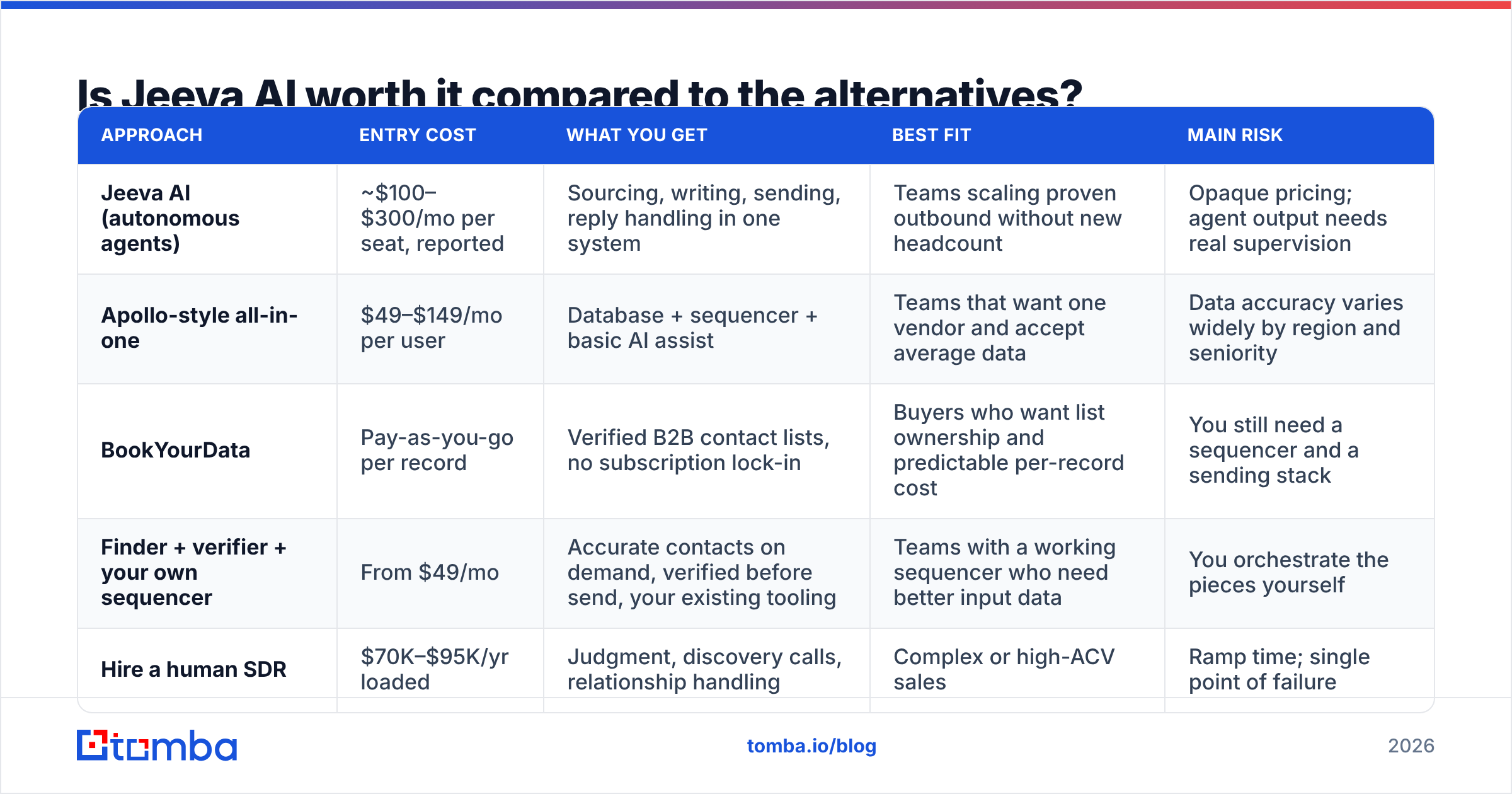
Depends entirely on whether you're buying labor replacement or data plus tooling. Those are different purchases at wildly different price points.
| Approach | Entry cost | What you get | Best fit | Main risk |
|---|---|---|---|---|
| Jeeva AI (autonomous agents) | ~$100–$300/mo per seat, reported | Sourcing, writing, sending, reply handling in one system | Teams scaling proven outbound without new headcount | Opaque pricing; agent output needs real supervision |
| Apollo-style all-in-one | $49–$149/mo per user | Database + sequencer + basic AI assist | Teams that want one vendor and accept average data | Data accuracy varies widely by region and seniority |
| BookYourData | Pay-as-you-go per record | Verified B2B contact lists, no subscription lock-in | Buyers who want list ownership and predictable per-record cost | You still need a sequencer and a sending stack |
| Finder + verifier + your own sequencer | From $49/mo | Accurate contacts on demand, verified before send, your existing tooling | Teams with a working sequencer who need better input data | You orchestrate the pieces yourself |
| Hire a human SDR | $70K–$95K/yr loaded | Judgment, discovery calls, relationship handling | Complex or high-ACV sales | Ramp time; single point of failure |
The uncomfortable finding when you lay it out: most teams evaluating an AI SDR platform have a data problem, not an agent problem. Their sequences don't fail because no AI wrote them. They fail because 30% of the addresses were wrong, the personalization referenced a job the prospect left in 2024, and the domain wasn't warmed. An agent layer built on that same bad input produces bad output faster.
HubSpot's sales research has been consistent on this for years: prospecting outcomes track data quality and relevance far more than volume. Automation multiplies whatever you feed it, in both directions.
What does a cheaper stack look like in practice?#
If you strip the AI SDR category down to its components, you get four jobs: find the right people, confirm the addresses are real, send from healthy infrastructure, and follow up. Here's how that maps to a lean stack.
- Find the right people. A domain-level email finder pulls contacts by company and role, so you build lists around accounts you actually want rather than whatever the agent's ICP model surfaced. Tomba's free tier gives you 25 searches/mo to test accuracy on your own target accounts before paying anything — which is the only benchmark that matters.
- Confirm before you send. Verification catches the stale records that would otherwise burn credits and bounce. Catch-all domains get their own handling instead of being blindly assumed valid.
- Enrich what you keep. Data enrichment fills in titles, company size, and social profiles on records you already own, so your sequencer has something real to personalize against.
- Send from your existing tooling. If you already pay for a sequencer, you don't need to rent a second one inside an agent platform. Keep your deliverability setup, your warmed domains, your reporting.
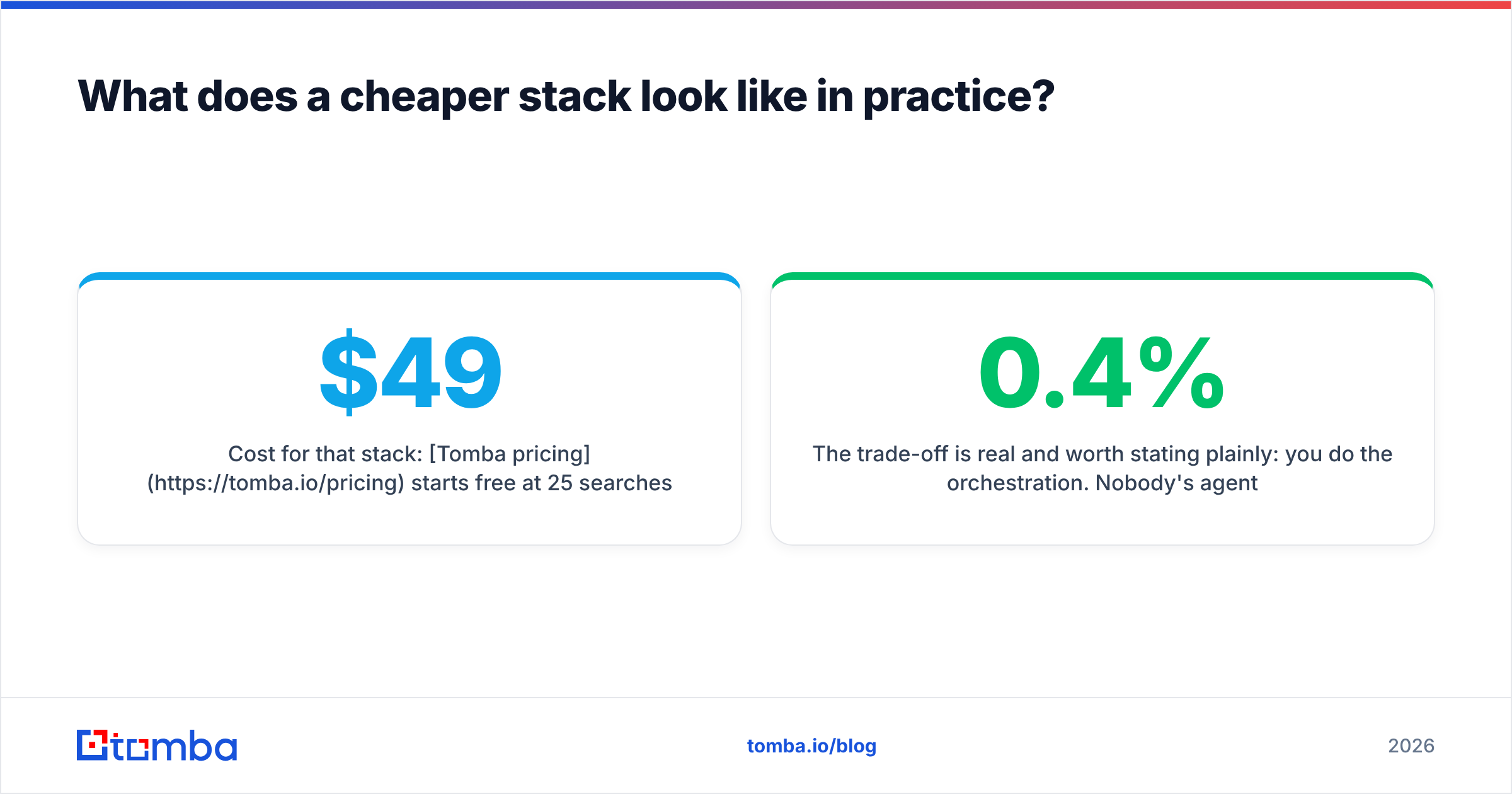
Cost for that stack: Tomba pricing starts free at 25 searches/mo, with Starter at $49/mo, Growth at $99/mo, and Pro at $249/mo. Add your existing sequencer and you're typically under $200/mo all-in for a two-person outbound team — roughly the entry seat price of an AI SDR platform, for the whole stack.
The trade-off is real and worth stating plainly: you do the orchestration. Nobody's agent decides which accounts to prioritize this week. If your constraint is genuinely "we have more target accounts than human hours," the agent layer earns its price. If your constraint is "our reply rate is 0.4% and we don't know why," it won't.
Who should buy Jeeva AI — and who shouldn't?#
Buy it if: you have a documented ICP, a message that already books meetings when a human sends it, 5,000+ viable accounts to work, and a manager who will actually review agent output weekly. Under those conditions, the per-seat math beats hiring, and the sales automation leverage is real.
Skip it if: you're pre-product-market-fit, your list is under a few thousand accounts, your ACV is high enough that every touch should be human, or you haven't yet fixed deliverability. Buying agents to scale an unproven motion just industrializes the failure — and you'll be locked into an annual contract while you figure that out.
Negotiate hard if you do buy. Ask for month-to-month on the first term even at a premium, get credit rollover in writing, and cap the onboarding fee. Vendors in this category are competing aggressively in 2026 and the list price is rarely the floor.
Frequently asked questions about Jeeva AI pricing#
Does Jeeva AI have a free plan? There's a trial/free entry path, but it's capped tightly enough that you'll exhaust it on a single real list. Use it to judge output quality, not capacity.
Is Jeeva AI pricing per user or per usage? Both, effectively. Seats set the base; credits and mailboxes set the variable. Model both before signing.
Can I get a monthly plan? Often yes at the entry tier, less often at Growth and above, where annual commitments are standard. Expect a 15–25% premium for monthly flexibility.
What's the cheapest way to replace it? A verified contact source plus your existing sequencer. You lose autonomous reply handling; you keep 80% of the pipeline value at a fraction of the cost.
The bottom line#
Jeeva AI pricing is best understood as headcount-replacement pricing, not tool pricing — which is fine if you're genuinely replacing headcount, and expensive if you're just trying to send better email. The demo gate isn't a scam, but it does mean you have to do the modeling work yourself: seats, credits, mailboxes, term, and onboarding, all in one spreadsheet, before the call.
If your honest diagnosis is that the outbound isn't working because the contact data isn't good enough, fix that layer first — it's cheaper, faster to validate, and it makes every downstream tool (including an AI SDR, if you buy one later) perform better. Start with the Tomba Email Finder on 25 free searches against your real target accounts, check the hit rate yourself, and make the agent decision with actual numbers instead of a quote.
Related guides#
// get started
Find, verify and enrich your first contacts today
Start on the free plan with 25 searches a month, then scale when your team is ready.
Free plan · No credit card required · GDPR & CCPA
// about the author