Jet Leads Pro Alternatives: 9 Better Lead Data Tools (2026)
Jet Leads Pro gets you a list. It does not always get you a deliverable list. Here are nine alternatives compared on data accuracy, verification, credit rules and real 2026 pricing.

TL;DR
- Most teams leave Jet Leads Pro for one of three reasons: bounce rates they can't explain, credits that burn on unverified rows, or no usable API for their workflow.
- The right replacement depends on what you actually buy: raw volume, verified deliverability, or enrichment inside an existing CRM.
- For email-first outbound, the cheapest honest stack is a finder plus a verifier in the same tool — that's where Tomba (free tier, then $49/mo) and Hunter sit.
- For pre-verified contact lists you can download and own outright, BookYourData is the more direct fit. For all-in-one prospecting plus sequencing, Apollo.
- Verify every list before it touches your sending domain, no matter which tool you pick. That single habit fixes more deliverability problems than switching vendors does.
What is Jet Leads Pro, and why do people look for alternatives?#
Jet Leads Pro sits in the crowded "list building and lead data" category: you give it a company, a domain, or a filter set, and it hands back contact records you can push into outreach. That category is now dozens of tools deep, and the differences between them are rarely in the marketing copy — they're in the invoice and the bounce report.
Search interest in Jet Leads Pro alternatives usually traces back to the same four complaints, and they're worth naming plainly because they're the criteria you should shop on:
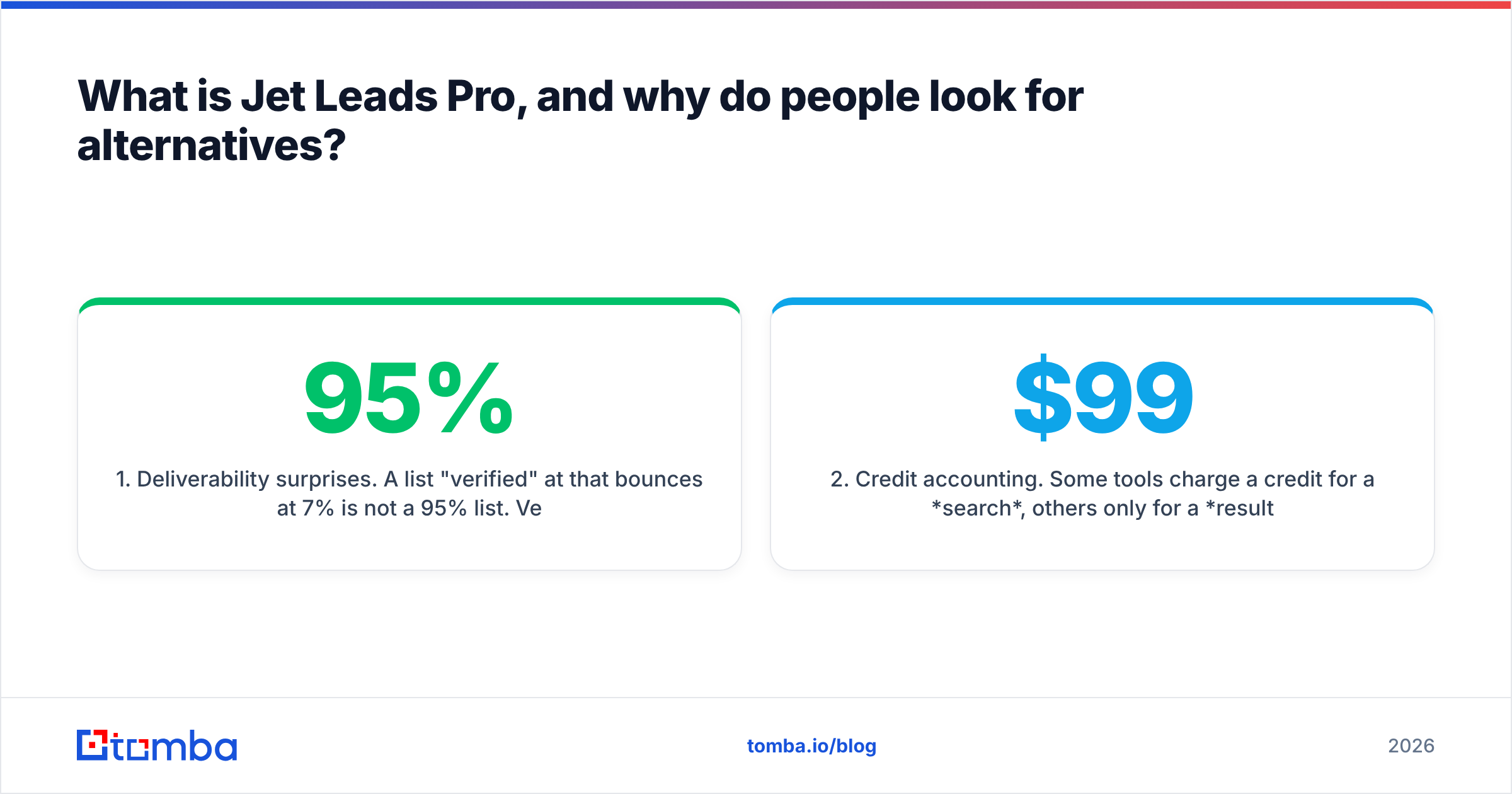
- Deliverability surprises. A list "verified" at 95% that bounces at 7% is not a 95% list. Vendors define "valid" differently, and catch-all domains are where the definitions diverge hardest.
- Credit accounting. Some tools charge a credit for a search, others only for a result, others for each enrichment field. The same $99 buys wildly different amounts of usable data depending on which model you're on.
- No API or a thin one. If your RevOps workflow is Sheets → CRM → sequencer, a tool that only exports CSVs from a dashboard becomes a person's part-time job.
- Coverage gaps outside the US. EMEA and APAC coverage is the most common place a lead database quietly falls over, and it rarely shows up in a 14-day trial of US accounts.
None of that makes Jet Leads Pro a bad tool. It makes it a tool with a shape — and your job is to find the one whose shape matches your motion.

What should a Jet Leads Pro alternative actually do?#
Before comparing logos, lock the requirements. These five criteria separate tools that look similar on a pricing page:
- Find and verify in the same place. A finder that returns an address without an SMTP-level check is handing you a guess. Look for a bundled email verifier rather than a second subscription.
- Tell you the truth about catch-all domains. Roughly a fifth of B2B domains accept everything at the gateway. A tool that marks those "valid" is inflating its accuracy number. A tool with a dedicated catch-all verifier is at least being honest about the hard case.
- Charge only for results. "No result, no credit" is the single best line item in any lead-data contract. Ask for it explicitly.
- Expose an API and a bulk path. You want both: an email finder API for the automated workflow and a bulk email finder for the Monday-morning list of 4,000 rows.
- Show its sources. GDPR/CCPA exposure is real. Any vendor should be able to explain where a record came from and how a contact opts out.
If an alternative fails three of those five, the price doesn't matter.
How do the top Jet Leads Pro alternatives compare?#
Here's the practical comparison. Prices reflect publicly listed entry tiers as of September 2026 and are marked ~ where vendors run frequent promotions or per-seat pricing — always confirm on the vendor's own pricing page before you buy.
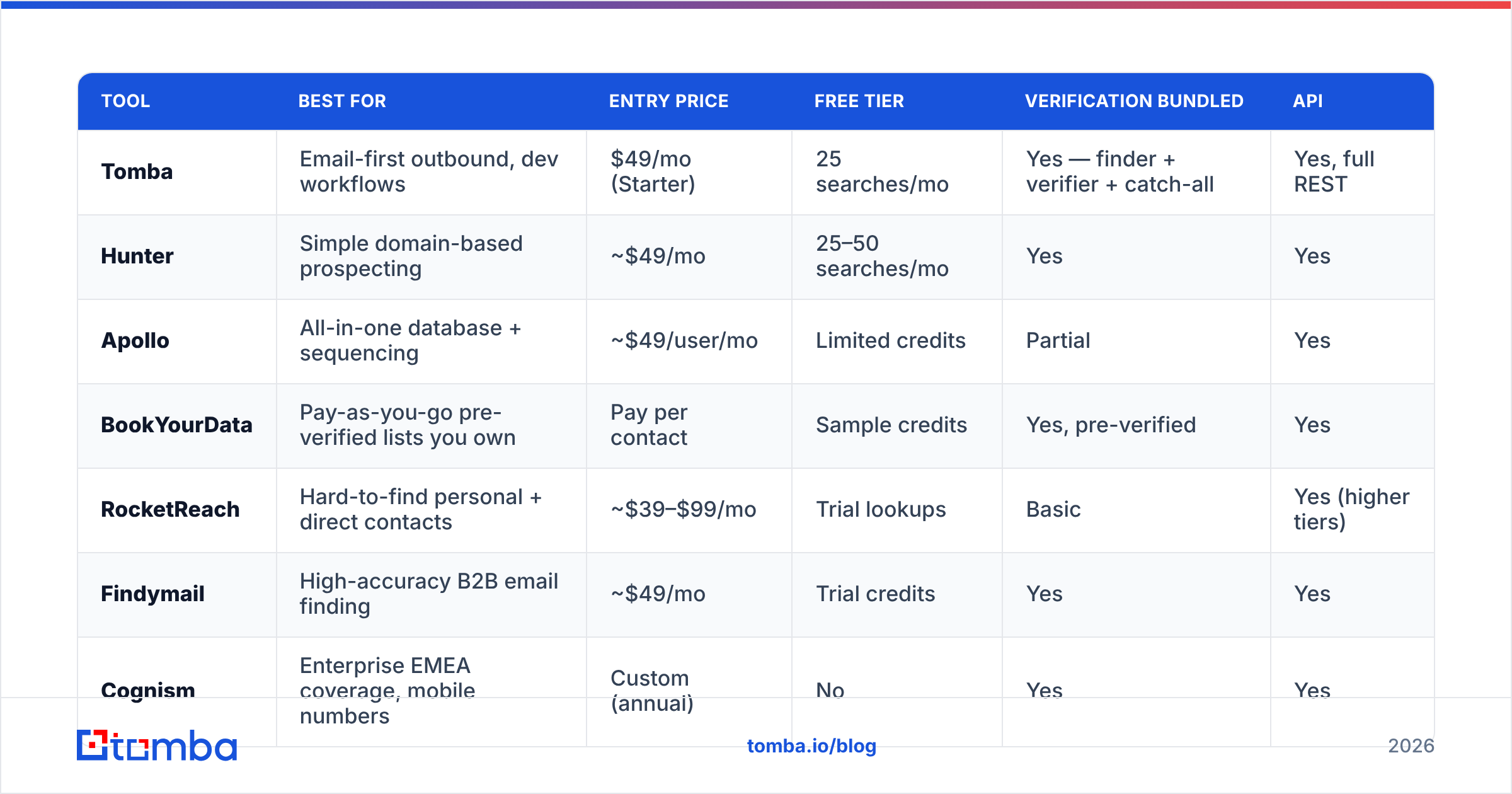
| Tool | Best for | Entry price | Free tier | Verification bundled | API |
|---|---|---|---|---|---|
| Tomba | Email-first outbound, dev workflows | $49/mo (Starter) | 25 searches/mo | Yes — finder + verifier + catch-all | Yes, full REST |
| Hunter | Simple domain-based prospecting | ~$49/mo | 25–50 searches/mo | Yes | Yes |
| Apollo | All-in-one database + sequencing | ~$49/user/mo | Limited credits | Partial | Yes |
| BookYourData | Pay-as-you-go pre-verified lists you own | Pay per contact | Sample credits | Yes, pre-verified | Yes |
| RocketReach | Hard-to-find personal + direct contacts | ~$39–$99/mo | Trial lookups | Basic | Yes (higher tiers) |
| Findymail | High-accuracy B2B email finding | ~$49/mo | Trial credits | Yes | Yes |
| Cognism | Enterprise EMEA coverage, mobile numbers | Custom (annual) | No | Yes | Yes |
| Lusha | Chrome-extension prospecting on LinkedIn | ~$36–$79/user/mo | Limited free credits | Partial | Yes (paid tiers) |
| ZoomInfo | Enterprise intent + org charts | Custom (annual) | No | Yes | Yes |

Two patterns fall out of that table.
First, the mid-market price floor is remarkably flat. Almost everything credible starts near $49/mo. So entry price is not a differentiator — credit rules and accuracy are. A $49 plan with 500 result-only credits beats a $49 plan with 2,000 search credits that miss half the time.
First-party, seat-based pricing (Apollo, Lusha) versus workspace pricing (Tomba, Hunter) matters more than the headline number too. Three SDRs on a seat-priced tool is three times the invoice; on a workspace plan it's one.
Second, enterprise tools are a different purchase entirely. ZoomInfo and Cognism are annual contracts with procurement, onboarding and a floor that typically starts in five figures. If you left Jet Leads Pro because it was too expensive, those are not your alternatives — they're your 2028 problem.
Which Jet Leads Pro alternative fits which team?#
If you send cold email and care most about bounce rate#
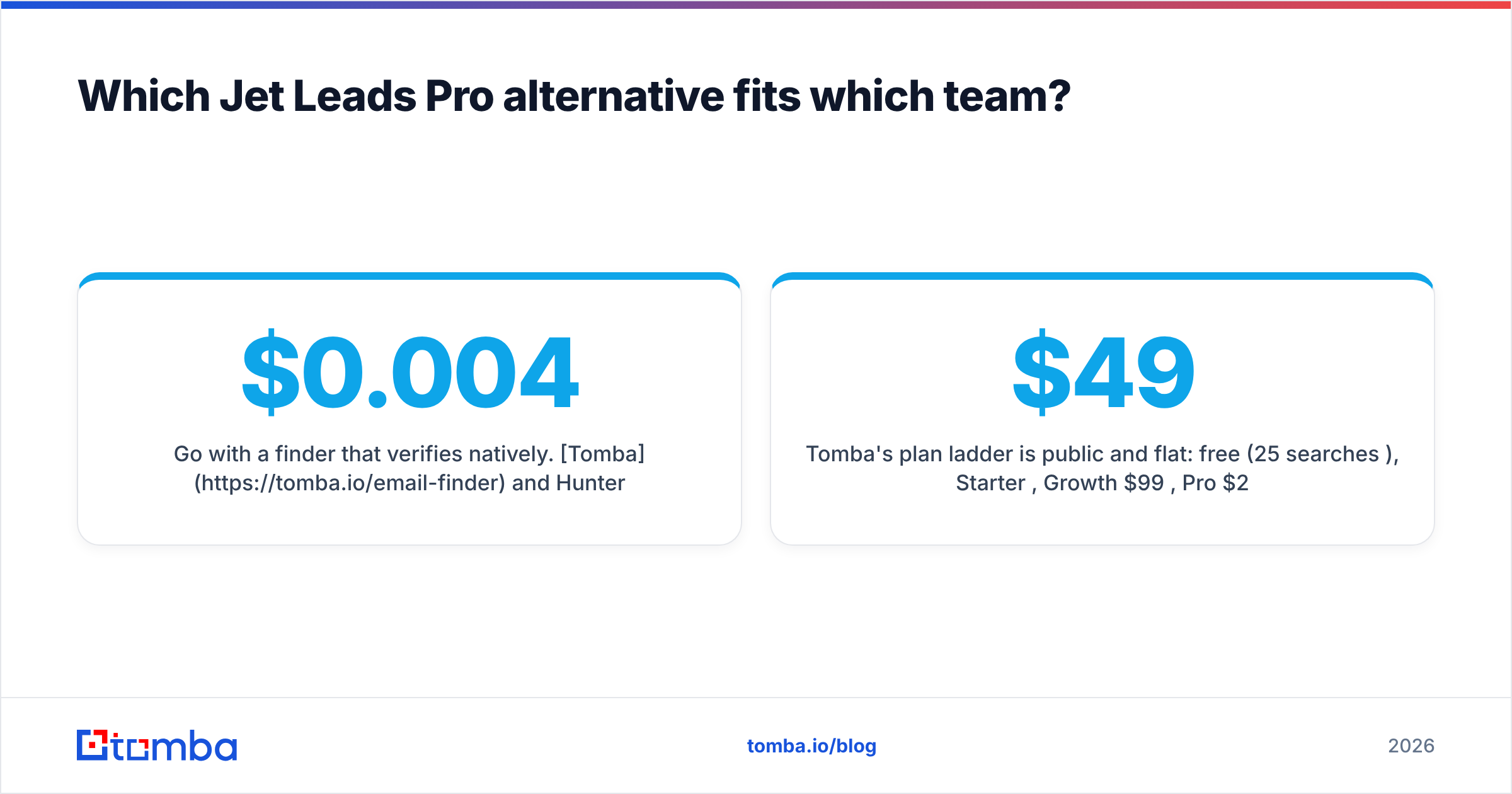
Go with a finder that verifies natively. Tomba and Hunter both do this; Findymail is strong here too. The workflow is one step — search, get a confidence score and an SMTP status, export. You're not paying a second vendor $0.004 per verification on top of your finder bill.
Tomba's plan ladder is public and flat: free (25 searches/mo), Starter $49/mo, Growth $99/mo, Pro $249/mo, Enterprise custom — full Tomba pricing on the site. Hunter's tiers land in the same range; see hunter.io for current numbers.
If you want a list you own outright, not a subscription#
BookYourData is the cleanest answer here. It's a pay-as-you-go model: filter, preview, buy the records, keep them. There's no meter running when you don't prospect, and the contacts are verified before purchase rather than after. For agencies running campaigns in bursts — three heavy months, then quiet — that economics is simply better than a monthly seat you forget to cancel. It's also the right shape if your legal team prefers a one-time data purchase with a clear provenance trail over an ongoing platform license.
If you want prospecting and sending in one login#
Apollo remains the default. You get a large database, sequences, dialer and CRM sync in one product. The trade-off is that generalist tools are rarely best-in-class at any single job, and per-seat pricing scales linearly with headcount. Teams that outgrow it usually split the stack back apart — a dedicated data source plus a dedicated sequencer — which is exactly what an Apollo alternative evaluation looks like.
If you need mobile numbers and EMEA coverage#
Cognism is the specialist. Its mobile-number coverage and European compliance posture are the reasons enterprises pay for it. Below that budget, pair an email finder with a dedicated phone finder rather than assuming your list tool has phone data — most don't, and the ones that do often resell the same upstream feed.
If you live in LinkedIn#
Lusha and similar extensions reveal contact data on the profile you're already looking at. It's the lowest-friction motion for AE-led prospecting. Just be aware that extension-sourced data still needs verification before bulk sending — a revealed address is not a validated one.
How accurate is the data, really?#
Accuracy claims in this category are close to meaningless without a definition attached. "98% accurate" usually means "98% of the addresses we returned passed our own syntax and MX check" — which excludes the two failure modes that actually hurt you: role accounts and catch-all domains that accept then silently drop.

Run your own test before committing. It takes an hour:
- Pull 100 contacts you already know are good — current customers, past demos, people who've replied.
- Strip the emails, keep name + domain.
- Run the same 100 through each tool's free tier or trial.
- Score three things: hit rate (how many returned anything), match rate (how many matched the address you already had), and credit burn (how many credits it cost to get there).
A tool with a 60% hit rate and a 98% match rate beats a tool with a 90% hit rate and an 80% match rate for cold email — because the second one is spending your domain reputation to find out.

What does switching actually cost you?#
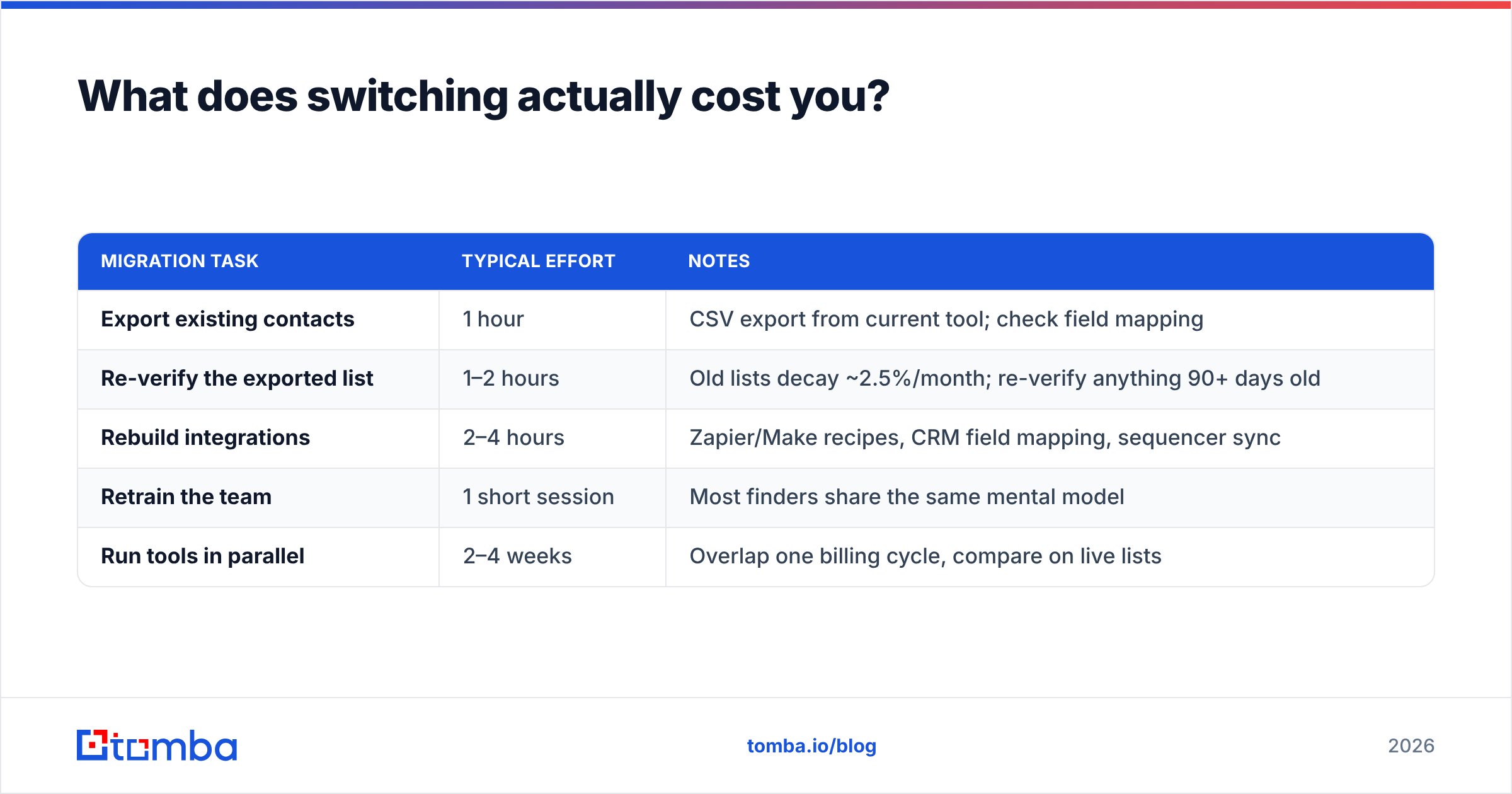
Migration friction is the real reason teams stay on a tool they've outgrown. Here's the honest accounting:
| Migration task | Typical effort | Notes |
|---|---|---|
| Export existing contacts | 1 hour | CSV export from current tool; check field mapping |
| Re-verify the exported list | 1–2 hours | Old lists decay ~2.5%/month; re-verify anything 90+ days old |
| Rebuild integrations | 2–4 hours | Zapier/Make recipes, CRM field mapping, sequencer sync |
| Retrain the team | 1 short session | Most finders share the same mental model |
| Run tools in parallel | 2–4 weeks | Overlap one billing cycle, compare on live lists |
That last row is the one people skip and regret. Overlap one month. Run the same ICP query through both tools weekly, compare reply rates rather than hit rates, and only then cancel. Data quality differences don't show up in the dashboard — they show up in the inbox three weeks later.
If your stack is CRM-centric, confirm the native path exists before you sign: a HubSpot integration or a Salesforce connector that writes back enrichment fields beats a nightly CSV import every time.
What about free Jet Leads Pro alternatives?#
There are genuine free tiers, and they're useful for exactly one thing: testing before you buy.
- Tomba free — 25 searches/month, no card required. Enough to run the 100-contact accuracy test described above across a couple of weeks.
- Hunter free — similar shape, monthly search allowance.
- Standalone free utilities — a free email checker or an email permutator will get you unstuck on a single high-value prospect without any subscription at all.
What doesn't work is trying to run an outbound program on stitched-together free tiers. You'll spend more hours on list hygiene than the $49 plan costs, and you'll do it with worse data. Free tiers are for evaluation; paid tiers are for volume.
Cross-check whatever you shortlist against third-party review volume on G2 — not the star rating, which is gameable, but the recency and detail of the reviews. A tool with 40 detailed reviews from the last six months tells you more than one with 400 reviews from 2023.
So which one should you pick?#
Pick on your constraint, not on the feature list:
- Bounce rate is your problem → a finder with native verification (Tomba, Hunter, Findymail).
- Budget predictability is your problem → pay-as-you-go records you own (BookYourData).
- Tool sprawl is your problem → all-in-one (Apollo).
- Coverage outside North America is your problem → the enterprise specialists (Cognism), or pair a finder with a regional data source.
- Engineering wants it automated → whichever vendor's API docs you can read in ten minutes and get a 200 back from.
The tools converge more than the marketing suggests. The teams that win at outbound aren't the ones with the exotic data vendor — they're the ones who verify before sending, keep lists under 90 days old, and match their ICP query to a message worth reading.
Ready to test the accuracy claim yourself? Start with the Tomba Email Finder free tier — 25 searches a month, no card — and run your own 100-contact benchmark against whatever you're using today. Find and verify in one step, export clean, and only pay when you know the data holds up. If it doesn't beat your current tool, you've lost an hour and learned something useful.
Related guides#
// get started
Find, verify and enrich your first contacts today
Start on the free plan with 25 searches a month, then scale when your team is ready.
Free plan · No credit card required · GDPR & CCPA
// about the author