Jet Leads Pro vs LeadRocks: Which B2B Lead Tool Wins in 2026?
Jet Leads Pro and LeadRocks both promise cheap B2B contacts, but they buy their data very differently. Here is how they compare on accuracy, pricing, exports and bounce risk — plus when neither is the right call.
Jet Leads Pro vs LeadRocks is a cheap-list versus cheap-list fight. Both sell B2B contacts at budget prices. Both buy their data in very different ways, and that difference shows up in your bounce rate. Here is how they compare on accuracy, pricing, exports and bounce risk.
TL;DR#
- LeadRocks is a static B2B contact database. You search a pre-scraped index of LinkedIn profiles, filter, and export. It is cheap and fast. Its weakness is data age.
- Jet Leads Pro is a lower-cost lead-list and enrichment tool in the same bracket. It is a smaller, less-reviewed vendor, so treat its published accuracy claims as unverified until you run your own test.
- Neither tool is a real-time email finder. Both hand you records collected at some point in the past. That is why bounce rates on lifetime-deal databases often land in the 8–20% range.
Two more things to know before you pick:
- If your outbound depends on inbox placement, pair either tool with independent verification. Or skip the database model and use live domain-based lookup instead.
- Verdict: In the Jet Leads Pro vs LeadRocks matchup, LeadRocks wins on transparency and review volume. Jet Leads Pro wins on price, if its claims hold up for your ICP. For email-first outbound in 2026, a verification-native finder beats both.
What are Jet Leads Pro and LeadRocks?#
They solve the same job from two angles: give a small sales team a list of B2B contacts without paying enterprise-database prices.
LeadRocks (leadrocks.io) is a B2B contact database built on LinkedIn profile data. You search by job title, company, location, industry or headcount. You get back names with emails, and sometimes direct phone numbers. Then you save them to lists and export to CSV or push into a CRM. It grew up on lifetime-deal marketplaces. That is its strength, because the cost per contact is very low. It is also its weakness, because a one-time payment does not fund constant re-crawling.
Jet Leads Pro sits in the same category. It is a lead-list and enrichment product for freelancers, agencies and small sales teams who want bulk records at a low price. It is also a newer entrant with far fewer public reviews. That is not a mark against it by itself, but it does change how you evaluate it. With a mature vendor you can read a hundred G2 reviews and average them out. With a newer one, your own 200-contact test is the review.
Here is the mental model that matters. Both products are photo albums, not live video feeds. Someone pointed a camera at the web, saved the frames, and now sells you prints. The question is not how big the album is. It is when the last photo was taken, and whether the person still works there.
Jet Leads Pro vs LeadRocks: head-to-head comparison#
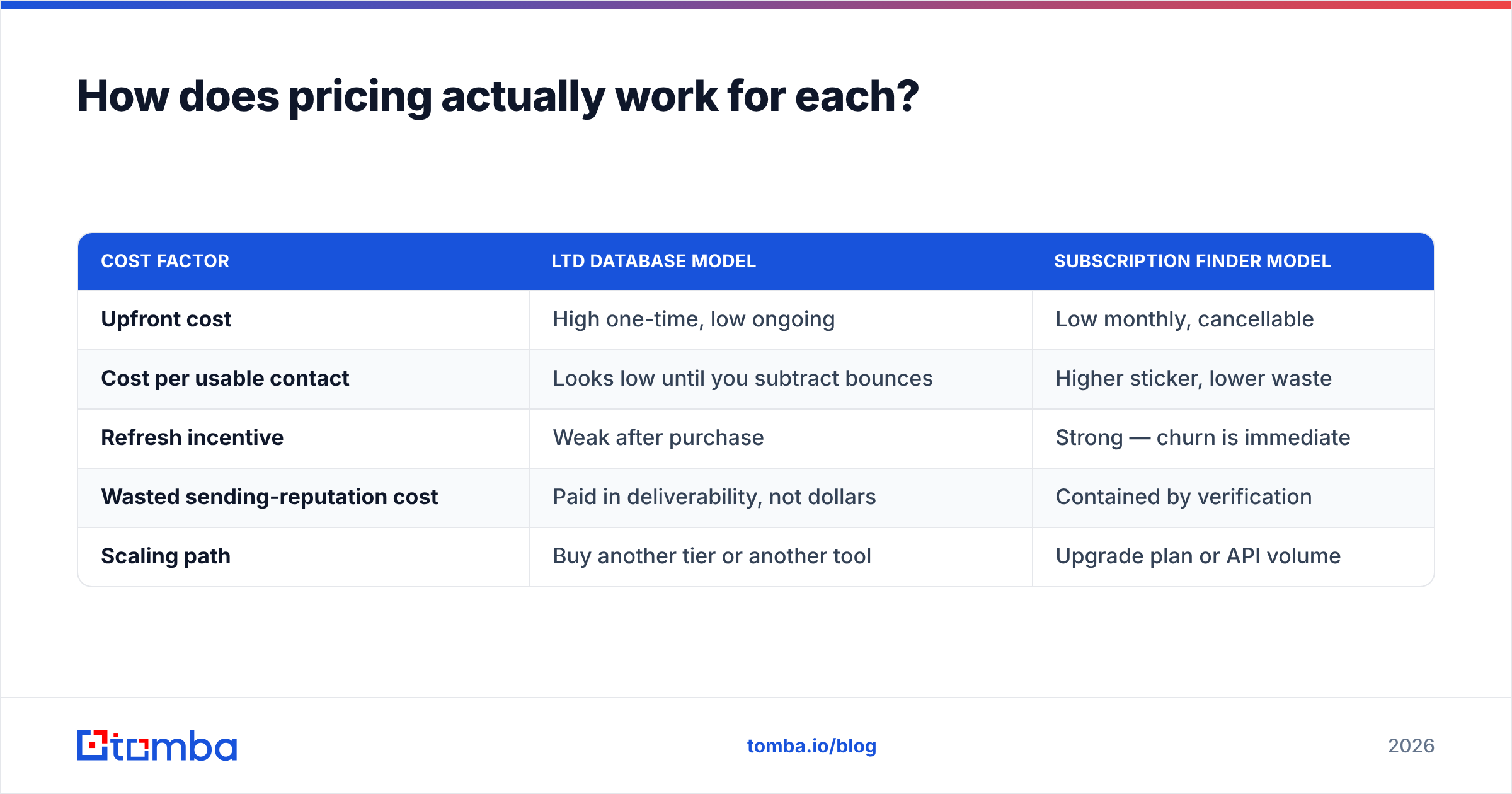
Here is the practical comparison, with Tomba added as a live-lookup reference point. Where a vendor's figure is self-reported and not audited, treat it as a claim rather than a fact. That includes the numbers in this table.
| Attribute | Jet Leads Pro | LeadRocks | Tomba |
|---|---|---|---|
| Core model | Static lead list + enrichment | Static contact database (LinkedIn-sourced) | Live lookup + verification |
| Typical entry price | Low-cost / one-time tiers | LTD tiers, low monthly on subscription | Free tier (25 searches/mo), $49/mo Starter |
| Free trial | Limited / signup-gated | Limited credits on signup | Yes — 25 searches/mo, no card |
| Built-in email verification | Unclear — test before you buy | Basic status flags | Dedicated verifier + catch-all handling |
| Direct dial phone numbers | Claimed on higher tiers | Yes, coverage varies by geo | Yes, via phone finder |
| Bulk CSV enrichment | Yes | Yes | Yes |
| Native API | Limited / not documented publicly | Limited | Full REST API, CLI, MCP, Sheets, Excel |
| Data freshness | Snapshot-based | Snapshot-based, periodic refresh | Queried at request time |
| Best for | Cheap volume lists | Cheap volume lists with LinkedIn filters | Deliverability-sensitive outbound |
| Worst for | Regulated / high-value ABM | Fresh-hire and job-change targeting | Browsing a database with no target domains |
The row that decides most purchases is data freshness. A snapshot database works well when you prospect into stable, slow-churn roles: operations managers at manufacturers, practice owners, franchise operators. It degrades fast when you target roles with 18-month average tenure, such as SDR leaders, growth marketers, or anyone at a Series-A startup.

Which one has better data accuracy?#
Accuracy is where Jet Leads Pro vs LeadRocks gets decided, and neither vendor publishes an audited accuracy figure. So the honest answer is simple. Run the same 200 contacts through both tools and count the bounces yourself.
Here is the test protocol that separates them. It takes about an hour.
- Build one target list of 200 contacts you can identify on your own: companies you already know, roles you can confirm on the public web. Do not let either tool pick the list, or you are testing their filter UI instead of their data.
- Pull the same records from both tools and record coverage. How many of the 200 came back with an email at all? Coverage and accuracy are different metrics, and vendors love to blur them.
- Run every returned address through a neutral third-party verifier, not the vendor's own. Self-graded homework is not evidence. An independent email verifier gives you valid, invalid, catch-all and unknown buckets.
The last two steps are the ones most evaluations skip:
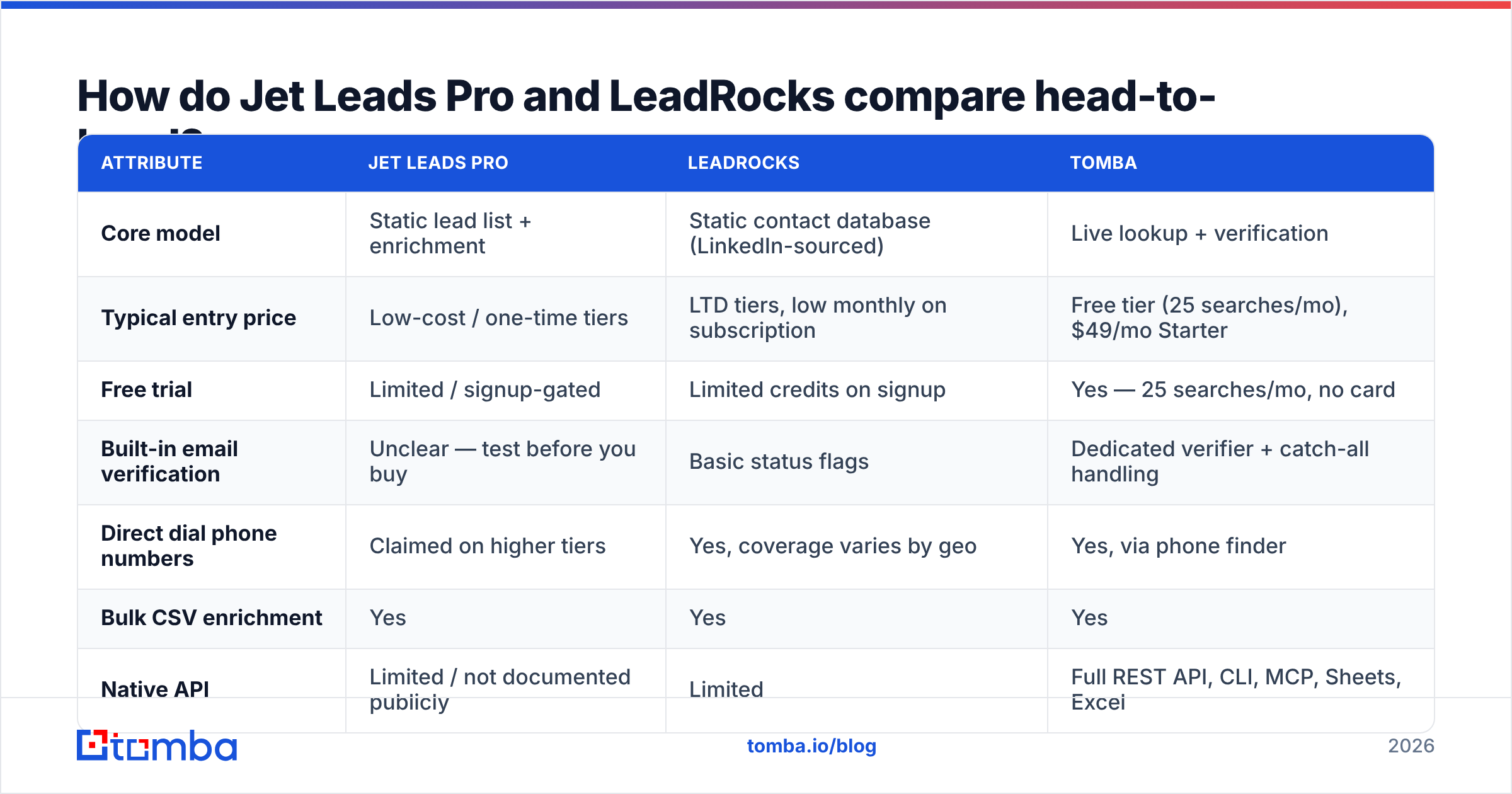
- Count catch-alls separately. A catch-all domain accepts everything at the SMTP layer, so "deliverable" there means almost nothing. On some databases, catch-alls make up 25–35% of the returned volume, and vendors quietly count them as valid.
- Send a small real campaign. Use 100 addresses, a warmed domain and plain text. Measure the hard-bounce rate after 48 hours. That number is the only one that matters.

In practice, databases built on periodic scraping land between 80% and 92% on bounce-free delivery once catch-alls are excluded. Live-lookup finders that verify at query time land higher. They check the address the moment you ask, instead of replaying a record from an old crawl. The gap is not marketing spin. It is a direct result of when the check happened.
One accuracy trap is specific to LinkedIn-derived data. The profile is real. The company is real. The email pattern is a guess. If the person changed jobs and the tool still lists the old employer, you get a clean-looking address at a company where they no longer work. It will not bounce. It will simply never reply, and it will drag your reply rate down while you blame your copy.
How does pricing actually work for each?#
Lifetime deals are why both tools show up in "cheap lead database" searches. Lifetime pricing also has a specific failure mode, and you should price it in.
A one-time payment funds a one-time dataset. Re-crawling, SMTP validation and proxy servers are recurring costs. When the revenue arrives once and the costs repeat forever, refresh cadence is the first thing to get cut. That is not cynicism about any vendor. It is arithmetic, and it is why LTD databases that were sharp at launch feel stale 18 months later.
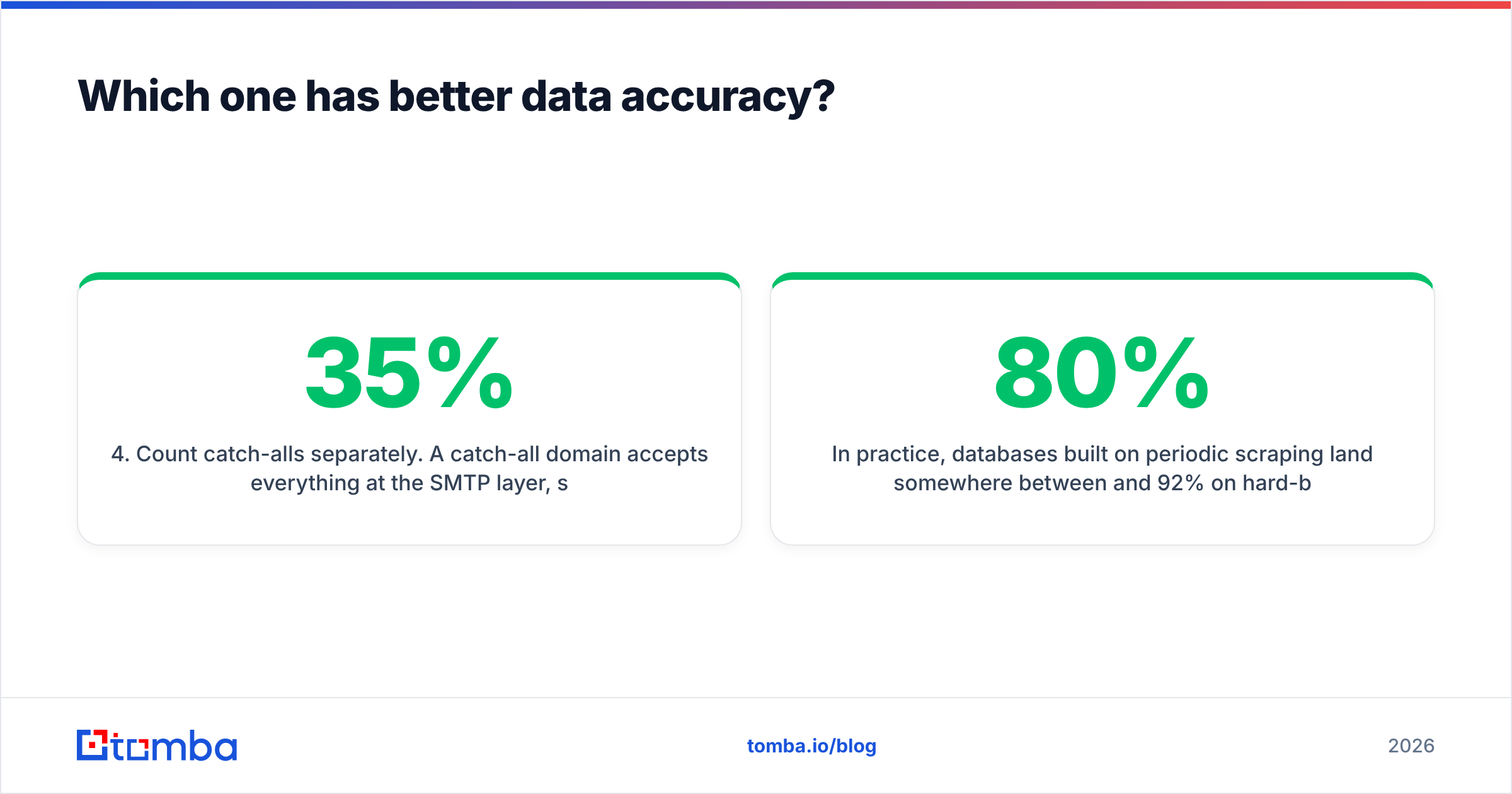
Compare the cost structures honestly:
| Cost factor | LTD database model | Subscription finder model |
|---|---|---|
| Upfront cost | High one-time, low ongoing | Low monthly, cancellable |
| Cost per usable contact | Looks low until you subtract bounces | Higher sticker, lower waste |
| Refresh incentive | Weak after purchase | Strong — churn is immediate |
| Wasted sending-reputation cost | Paid in deliverability, not dollars | Contained by verification |
| Scaling path | Buy another tier or another tool | Upgrade plan or API volume |
The cost that never shows up on the invoice is sender reputation. A 12% hard-bounce rate on a 5,000-contact send does not cost you 600 credits. It can cost you the domain. Mailbox providers read bounce rate as a spam signal, and recovering a burned sending domain takes weeks of warmup. That is time you could have spent booking meetings. HubSpot's email deliverability guidance is blunt about it: list hygiene is the highest-leverage input to inbox placement.
On the subscription side, Tomba pricing runs a free tier at 25 searches per month, Starter at $49/mo, Growth at $99/mo and Pro at $249/mo. Verification and catch-all handling are included rather than sold as an add-on. The point is not that one number is smaller. It is that the two models fail in different ways.

Who should pick Jet Leads Pro?#
Pick Jet Leads Pro if all of these are true:
- You are price-constrained before you are accuracy-constrained. Early-stage agencies testing three verticals at once need volume more than precision. They can absorb bounce noise on a throwaway subdomain.
- Your ICP is stable. Owner-operators, long-tenure roles, regional businesses. Low churn means a snapshot stays useful longer.
- You will verify externally anyway. If verification is already in your stack, the source database matters less. You are buying raw material, not a finished product.
- You ran the 200-contact test and it passed. For a vendor with thin third-party review volume, this is non-negotiable. Do not scale spend on a tool you have not bounce-tested.
Skip it if you are doing named-account ABM, selling into regulated industries, or working leads where a wrong contact costs you the relationship.
Who should pick LeadRocks?#
Pick LeadRocks if:
- You want LinkedIn-style filtering without LinkedIn-style pricing. Sales Navigator plus an extraction tool costs multiples of a LeadRocks tier for similar filter granularity.
- You value review volume and vendor track record. LeadRocks has been around long enough to collect public reviews across marketplaces. That lowers your evaluation risk versus a newer entrant.
- Phone numbers matter to your motion. If you run a call-plus-email cadence, a database that ships direct dials alongside emails saves you a second vendor. Pair it with a phone validator before your reps burn a morning on disconnected numbers.
- You accept snapshot freshness. Go in knowing you are buying a photo album. Re-verify before every campaign and it performs well for the money.

Where do both tools fall short?#
Three limits show up on both sides of the Jet Leads Pro vs LeadRocks comparison. None of them are unique to these two vendors. They are properties of the static-database category.
Job-change blindness. Roughly 20% of B2B contacts change employer each year. A database refreshed quarterly is, on average, six weeks stale at any moment. One refreshed annually is wrong about a fifth of its records. Neither tool shows a per-record "last seen" timestamp up front, and that is the field you actually need.
Catch-all ambiguity. Both will return addresses at catch-all domains and mark them optimistically. You need a dedicated catch-all verifier to separate "this mailbox exists" from "this server accepts anything." Without that split, your reported deliverability is fiction.
No live re-query. When you export a list in January and send it in March, nothing rechecks it. Live-lookup tools re-resolve the address at send-prep time. Database tools do not, and cannot, because the record is the product.
What should you check before you buy either one?#
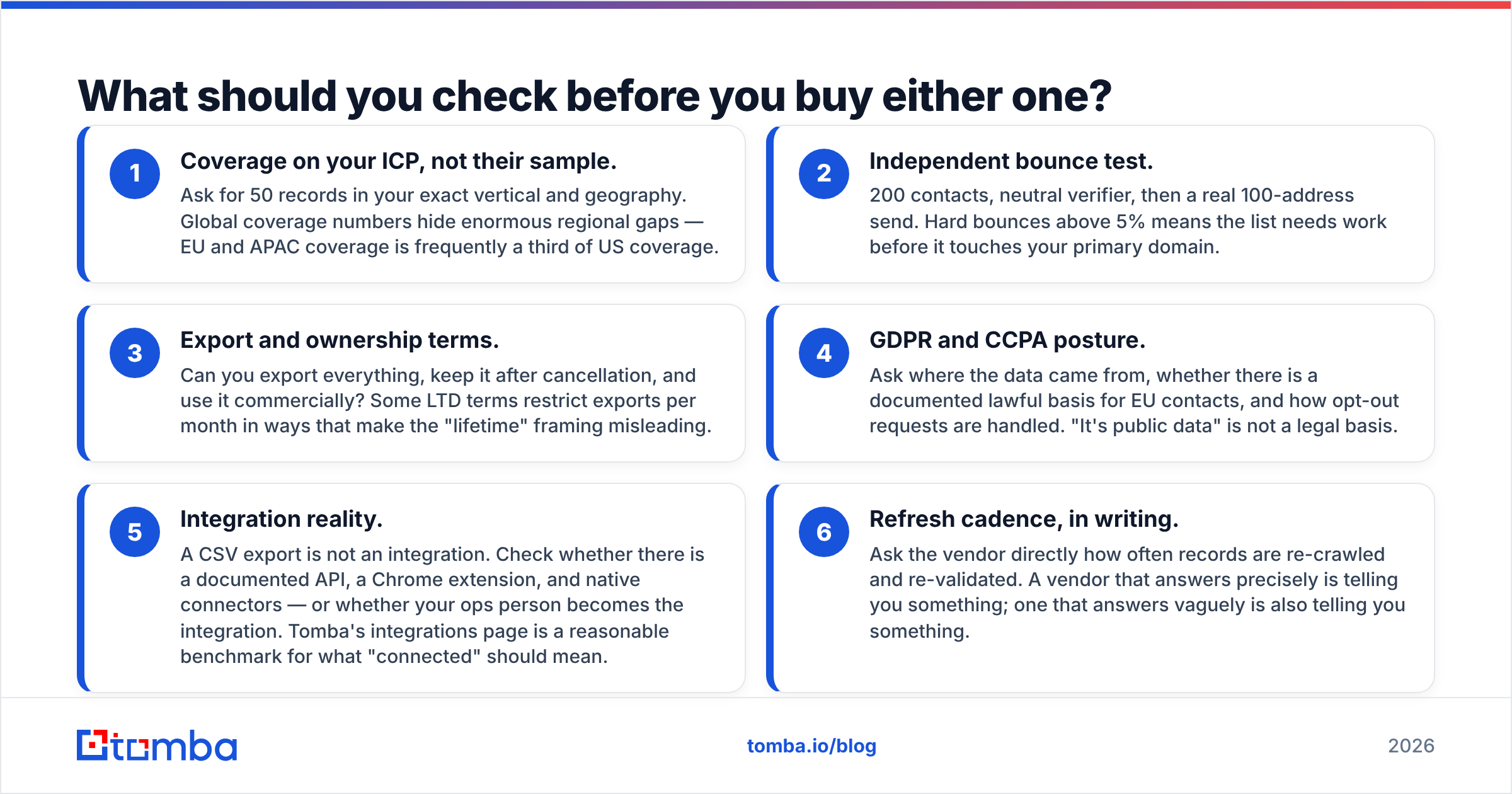
Run this checklist against any lead database, in this order:
- Coverage on your ICP, not their sample. Ask for 50 records in your exact vertical and geography. Global coverage numbers hide large regional gaps, and EU or APAC coverage is often a third of US coverage.
- Independent bounce test. Use 200 contacts, a neutral verifier, then a real 100-address send. Hard bounces above 5% mean the list needs work before it touches your primary domain.
- Export and ownership terms. Can you export everything, keep it after cancellation, and use it commercially? Some LTD terms cap exports per month, which makes the "lifetime" framing misleading.
The next three questions are the ones vendors hope you skip:
- GDPR and CCPA posture. Ask where the data came from, whether there is a documented lawful basis for EU contacts, and how opt-out requests are handled. "It's public data" is not a legal basis.
- Integration reality. A CSV export is not an integration. Check for a documented API, a Chrome extension and native connectors. Otherwise your ops person becomes the integration. Tomba's integrations page is a fair benchmark for what "connected" should mean.
- Refresh cadence, in writing. Ask how often records are re-crawled and re-validated. A vendor that answers precisely is telling you something. One that answers vaguely is also telling you something.
Is there a better option for email-first outbound?#
If your main motion is cold email, the database model is the wrong shape for the job. That is a statement about the category, not a knock on either vendor.
Cold email fails on bad addresses before it fails on bad copy. The fix is not a bigger list. It is a list where every address was resolved and verified close to send time. That is what a live finder does. You give it a domain, or a name plus a company. It resolves the pattern, checks the mailbox, and returns a status now, not last quarter.
The workflow that beats a raw database export looks like this. Build the account list from your own research or a database. Run domain search against each company to pull current contacts. Verify in bulk, then load into your sequencer. You end up with a smaller list and much better numbers, because 400 verified contacts outsell 4,000 guesses.
Use the database tools for what they are genuinely good at: discovery and account mapping. Use a live finder for the last mile.
The verdict: Jet Leads Pro vs LeadRocks#
LeadRocks is the safer pick of the two today. It has a longer track record, more public reviews, credible LinkedIn-based filtering, and phone coverage that justifies its tier pricing. Treat every export as unverified until proven otherwise.
Jet Leads Pro is the cheaper bet, and a fair option if your 200-contact test clears. Do not scale spend on it before that test, and do not point it at your primary sending domain on day one.
Neither is a substitute for verification. If cold email is your revenue channel, the finder is the infrastructure and the database is the raw material.
Ready to stop guessing at addresses? Start with the Tomba Email Finder. You get 25 free searches a month, no card required, with verification and catch-all detection built in. Run your existing LeadRocks or Jet Leads Pro export through it, compare the bounce rates side by side, and let the numbers pick your stack.
Related guides#
// get started
Find, verify and enrich your first contacts today
Start on the free plan with 25 searches a month, then scale when your team is ready.
Free plan · No credit card required · GDPR & CCPA
// about the author