Jet Leads Pro vs Salesripe (2026): Which Data Tool Wins?
Both promise verified B2B contacts at a startup-friendly price. We break down coverage, verification depth, export limits and real cost per usable lead, then name the setup we would actually buy in 2026.
TL;DR
- Jet Leads Pro and Salesripe sell the same promise — a big B2B contact database with "verified" emails — but they compete on different axes: Jet Leads Pro leans toward volume list-building, Salesripe leans toward enriched, filtered account lists.
- Neither vendor publishes a third-party-audited bounce rate. Treat every "98% accurate" claim as marketing until you run your own 500-contact test.
- The number that decides this comparison is not list price. It is cost per usable contact after bounces, duplicates, and role-based addresses are stripped out.
- If you already own a sequencer and a CRM, a focused finder + verifier stack (Tomba at $49/mo, BookYourData for pre-built lists) usually beats an all-in-one database on cost per reply.
- Run the same 200-domain test against both trials before you sign anything annual. The whole test costs you an afternoon and saves four figures.
What Are Jet Leads Pro and Salesripe?#
Both tools sit in the same category: B2B contact data platforms. You search by company attributes (industry, headcount, location, tech stack), get back a list of people, and export their work emails — sometimes phone numbers too. That category is crowded; G2's lead intelligence listings run to hundreds of vendors, most of which license overlapping data from the same upstream brokers.
Jet Leads Pro positions itself as a high-volume prospecting tool. The pitch is breadth: large record counts, bulk export, and a low entry price aimed at agencies and solo founders who need lists fast.
Salesripe positions itself further up the funnel. The pitch is filtering and enrichment quality — fewer records, but tighter targeting, firmographic depth, and CRM push.
That difference in positioning matters more than any feature checkbox. One optimizes for rows, the other for relevance. Buying the wrong one for your motion is the actual failure mode, not a missing integration.
A caution before the tables: neither vendor publishes independently audited accuracy data, and both change pricing without notice. Everything below reflects publicly available positioning at the time of writing. Verify current numbers on each vendor's own site and in your own trial before committing budget.
How Do Jet Leads Pro and Salesripe Compare Head-to-Head?#
Here is the honest scorecard — including the cells where the answer is "they don't say."
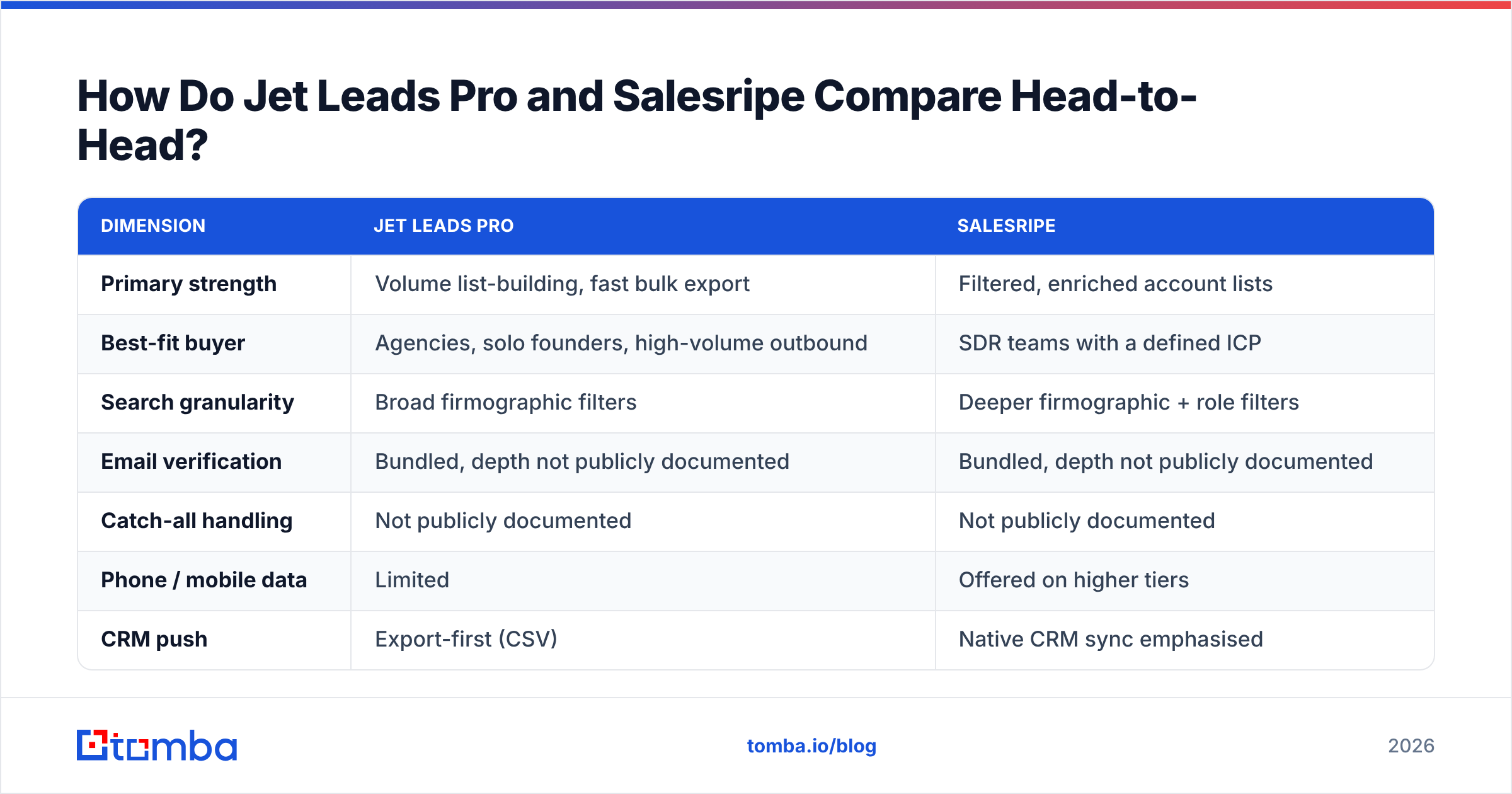
| Dimension | Jet Leads Pro | Salesripe |
|---|---|---|
| Primary strength | Volume list-building, fast bulk export | Filtered, enriched account lists |
| Best-fit buyer | Agencies, solo founders, high-volume outbound | SDR teams with a defined ICP |
| Search granularity | Broad firmographic filters | Deeper firmographic + role filters |
| Email verification | Bundled, depth not publicly documented | Bundled, depth not publicly documented |
| Catch-all handling | Not publicly documented | Not publicly documented |
| Phone / mobile data | Limited | Offered on higher tiers |
| CRM push | Export-first (CSV) | Native CRM sync emphasised |
| API access | Higher tiers | Higher tiers |
| Credit rollover | Not publicly documented | Not publicly documented |
| Published accuracy audit | None found | None found |
Those "not publicly documented" rows are not padding. They are the rows that cost you money later. Credit rollover alone can swing effective annual cost by 30% if your outbound volume is seasonal — which, for most B2B teams, it is.

The four questions to ask both sales reps#
- What is your measured hard-bounce rate on exported emails, and how was it measured? If the answer is a marketing number without a methodology, discount it.
- Do you charge a credit for a failed lookup? Some vendors do. Over 10,000 lookups that is a material cost difference.
- How do you classify catch-all domains? Vendors that count catch-alls as "valid" inflate their accuracy stats dramatically. A real catch-all verifier treats them as a separate risk class rather than quietly marking them deliverable.
- What happens to my data and my exports if I downgrade? Some platforms revoke access to previously exported records.
Which One Has Better Data Accuracy?#
Neither, verifiably — and that is the honest answer.
Here is what actually drives accuracy in this category, regardless of logo:
- Recency of the underlying source. B2B contact data decays fast because people change jobs. Industry estimates put annual decay somewhere between 22% and 30%. A database refreshed quarterly is meaningfully worse than one refreshed continuously.
- Whether verification happens at export time or at ingest time. Verifying when the record entered the database six months ago tells you nothing about today.
- How catch-all domains are counted. This is the single biggest source of inflated accuracy claims.
- Whether role-based addresses (info@, sales@) are counted as wins. They technically deliver. They rarely reply.

Screenshot placeholder: side-by-side export from both trials, same 200 domains, bounce column visible.
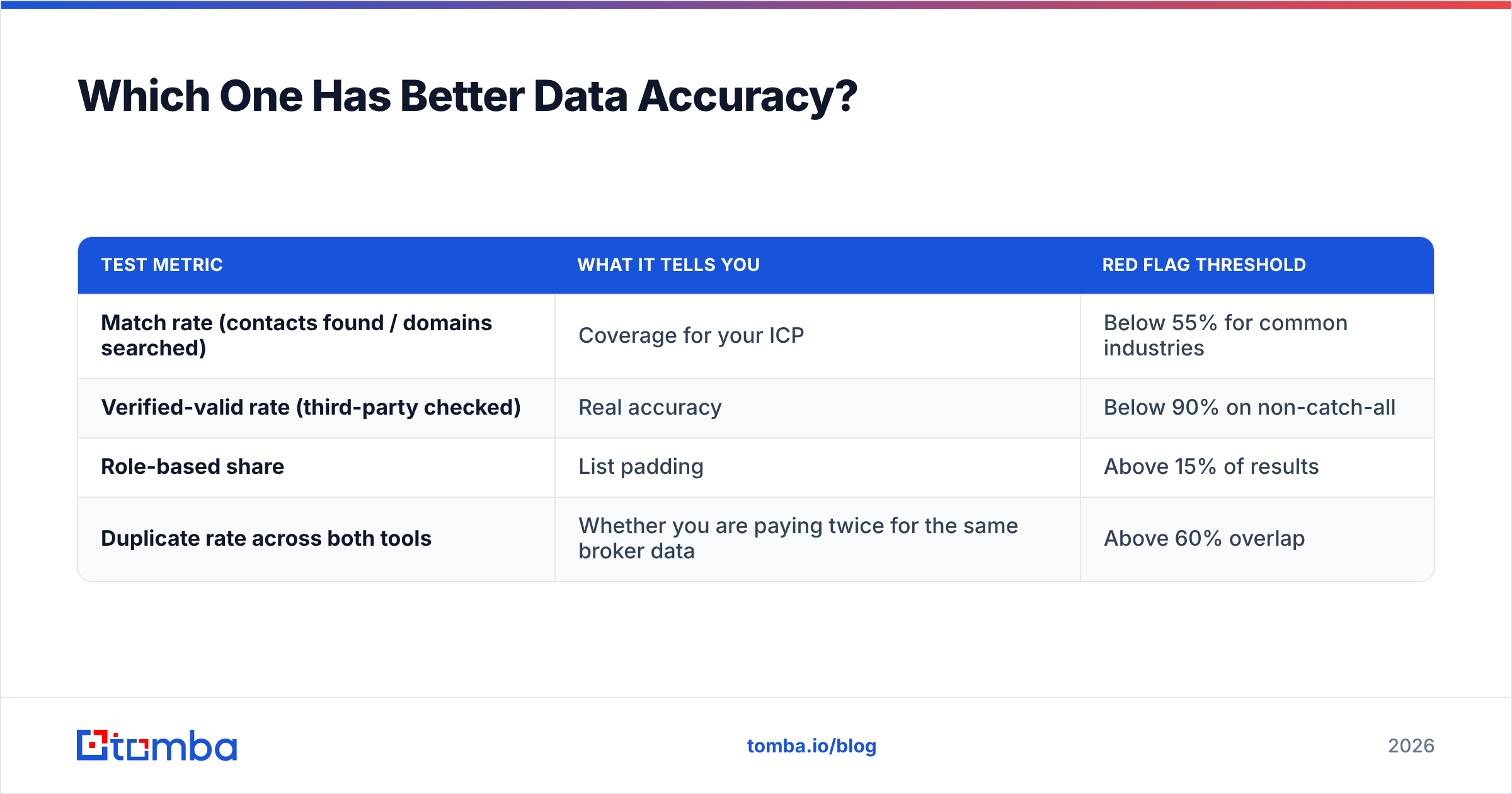
The only credible test is the one you run. Take 200 domains you actually care about. Pull contacts from both trials. Run every result through a neutral email verifier that you do not buy from either vendor — otherwise you are asking the seller to grade its own homework. Then compare three numbers:
| Test metric | What it tells you | Red flag threshold |
|---|---|---|
| Match rate (contacts found / domains searched) | Coverage for your ICP | Below 55% for common industries |
| Verified-valid rate (third-party checked) | Real accuracy | Below 90% on non-catch-all |
| Role-based share | List padding | Above 15% of results |
| Duplicate rate across both tools | Whether you are paying twice for the same broker data | Above 60% overlap |
That last row surprises people. When two mid-market databases overlap 70%+, the differentiator collapses to price and UX, not data.
How Does Pricing Actually Work for Each?#
Both vendors use the standard credit model: a monthly allocation, tier-gated features, an annual discount, and overage pricing. The list price on the pricing page is rarely what you pay.
The cost you should model is this:
Cost per usable contact =
  (monthly fee + overage) / (exported contacts × verified-valid rate × non-role rate)
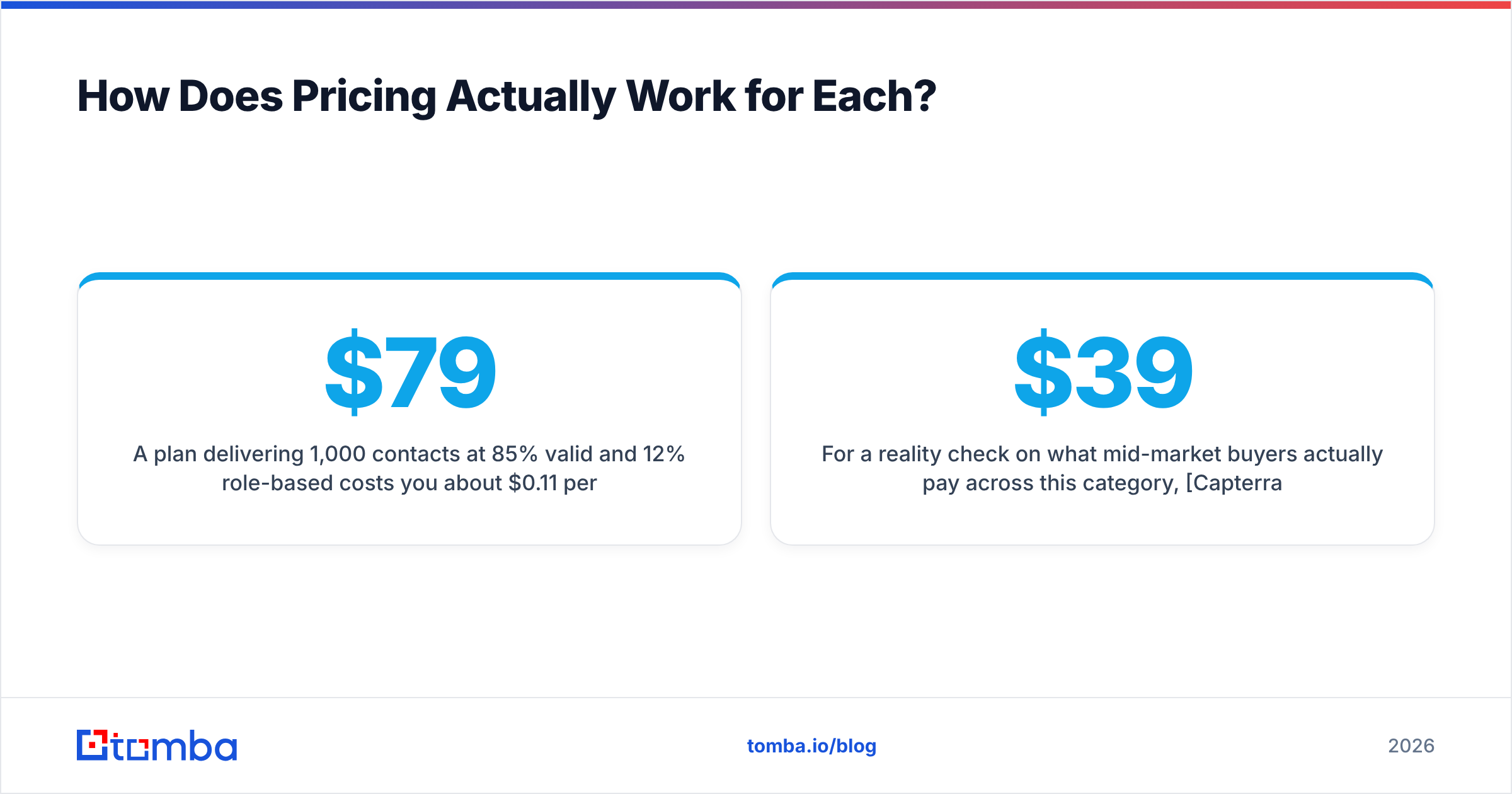
A $79/mo plan delivering 1,000 contacts at 85% valid and 12% role-based costs you about $0.11 per usable contact. A $49/mo plan delivering 500 contacts at 96% valid and 4% role-based costs about $0.11 too — identical, despite a 60% list-price gap. That is why list price comparisons between Jet Leads Pro and Salesripe are close to meaningless without your own test data.
Three cost traps specific to this category:
- Seat-based pricing on top of credit pricing. Two SDRs can double your bill without doubling your data.
- Annual-only discounts on the tier you actually need. The monthly option often sits one tier below the feature you came for (usually API or CRM sync).
- Failed-lookup charging. Ask explicitly. It is rarely on the pricing page.
For a reality check on what mid-market buyers actually pay across this category, Capterra's lead generation software listings show a wide spread — entry plans cluster in the $39–$99 range, and almost every vendor gates API access above $150/mo.
Is a Focused Stack Better Than an All-in-One Database?#
Often, yes — if you already own a sequencer and a CRM.
The all-in-one database pitch is convenience: search, enrich, sequence, sync, one bill. The cost is that you pay database prices for a sequencer you already have, and sequencer prices for data you could source cheaper. If your stack already includes an outbound tool, you are buying overlap.
The alternative is a three-part stack you assemble yourself:
- A finder for targeted, on-demand lookups when you know the company and the person. This is where an email finder or domain search earns its keep — you pay per contact you actually want, not for a database subscription.
- A verifier run as a separate gate before every send, ideally in bulk so you catch decay between list build and send date.
- A list source for cold, volume plays where you need pre-built segments rather than one-by-one lookups. BookYourData is a solid option here and has a reputation for clean B2B segments; it is a legitimate choice if buying a list outright suits your motion better than searching.

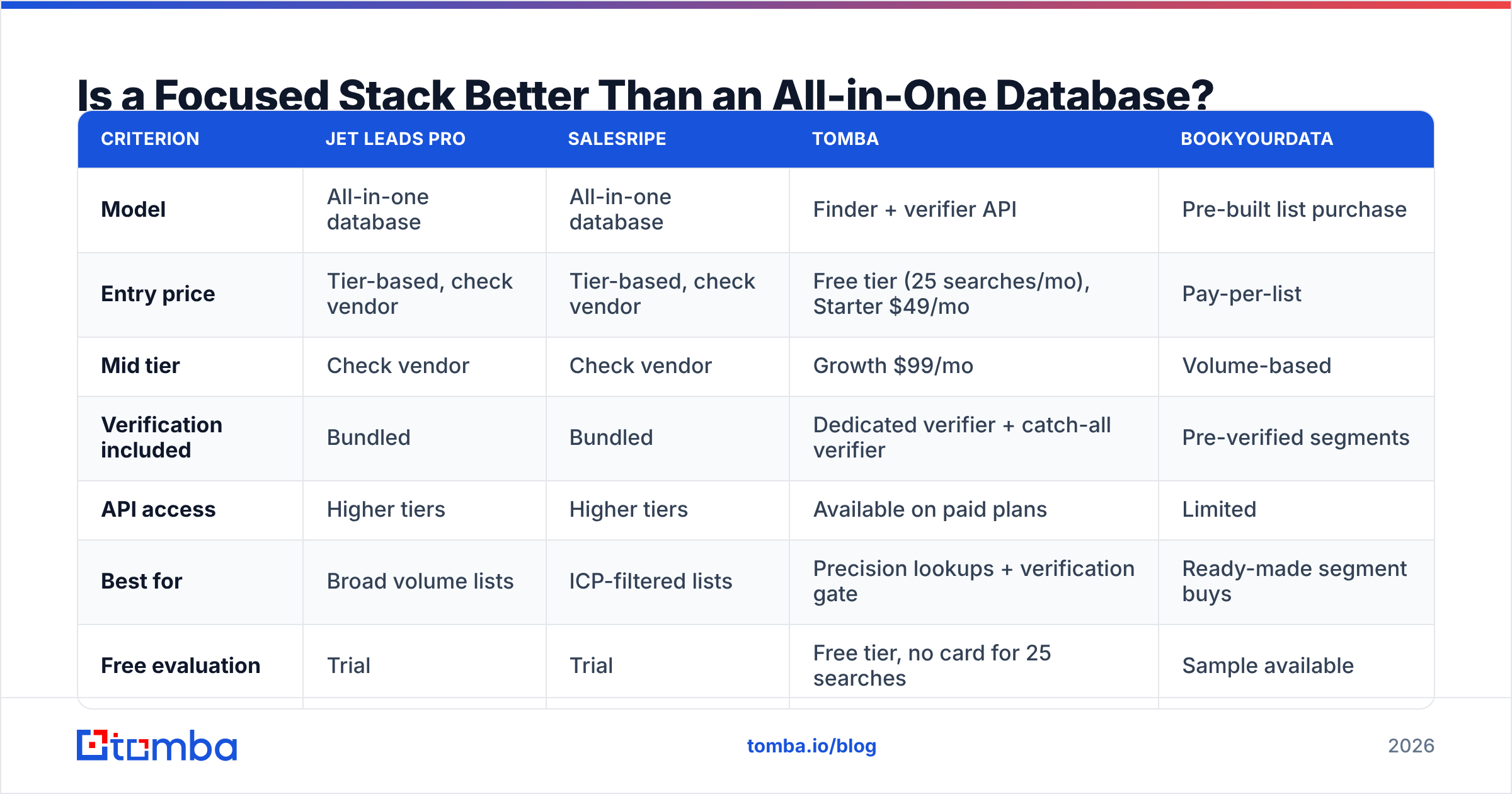
Jet Leads Pro vs Salesripe vs the focused stack#
| Criterion | Jet Leads Pro | Salesripe | Tomba | BookYourData |
|---|---|---|---|---|
| Model | All-in-one database | All-in-one database | Finder + verifier API | Pre-built list purchase |
| Entry price | Tier-based, check vendor | Tier-based, check vendor | Free tier (25 searches/mo), Starter $49/mo | Pay-per-list |
| Mid tier | Check vendor | Check vendor | Growth $99/mo | Volume-based |
| Verification included | Bundled | Bundled | Dedicated verifier + catch-all verifier | Pre-verified segments |
| API access | Higher tiers | Higher tiers | Available on paid plans | Limited |
| Best for | Broad volume lists | ICP-filtered lists | Precision lookups + verification gate | Ready-made segment buys |
| Free evaluation | Trial | Trial | Free tier, no card for 25 searches | Sample available |

Screenshot placeholder: Tomba domain search results for a target company, showing confidence scores and source attribution.
The practical read: if your outbound is account-based and you need 50 right people rather than 5,000 plausible ones, the finder-plus-verifier stack wins on cost per reply almost every time. If you genuinely need volume — recruiting agencies, event marketers, high-velocity SaaS — a database subscription or a purchased list makes more sense. Tomba's pricing is public and flat, which makes the cost-per-usable-contact math above trivially easy to run; database vendors with custom quotes make it deliberately hard.
What Should You Check Before You Buy Either One?#
Run this checklist against both trials in the same afternoon:
- Same-input test. Identical 200 domains into both. Compare match rate, not total rows returned.
- Neutral verification. Third-party verify every exported address. Never accept the seller's own valid/invalid flag as evidence.
- Freshness probe. Pick 20 contacts you can confirm on LinkedIn. How many have changed jobs? That is your real decay exposure.
- Export friction test. Try to get the data out as CSV and into your CRM. Note every field that gets mangled.
- Compliance review. Ask where the data was sourced and what the lawful basis is for EU and UK contacts. If the answer is vague, that is your answer. GDPR obligations follow the data into your CRM, not just the vendor's.
- Downgrade test. Read the terms on what happens to exported records if you cancel.
Teams that run this checklist almost always change their initial pick. The tool that demos best is rarely the tool that tests best.
Frequently Asked Questions#
Is Jet Leads Pro or Salesripe better for a two-person startup? Neither, usually. At that size, a free tier plus targeted lookups beats a database subscription. You do not have the send volume to amortise a monthly database fee, and you will burn credits exploring rather than prospecting.
Do I still need a separate verifier if verification is bundled? Yes, for anything above a few hundred sends per month. Bundled verification tells you the address was valid when the record was built. A verification pass immediately before send is what protects your sender reputation.
Which one has better phone data? Salesripe emphasises phone coverage on higher tiers more visibly than Jet Leads Pro. If dialling is core to your motion, test mobile-number connect rates specifically — landline-heavy databases look great on coverage stats and fail in practice.
Can I use both? Some teams do: one as the primary database, one as a fallback for misses. Before you commit, measure the overlap. If 70% of records are duplicates, the second subscription is buying you 30% incremental coverage at 100% incremental cost.
How often should I re-verify an existing list? Every 60–90 days for active segments, and always before a campaign that has been sitting in a draft folder. Decay is the silent killer of otherwise well-targeted outbound.
The Verdict#
Jet Leads Pro wins if you need volume and a simple export workflow. Salesripe wins if your ICP is narrow and you want the filtering to do more of the qualification work. Neither has demonstrated an accuracy edge that survives a neutral third-party test, so choose on workflow fit and run the numbers on cost per usable contact rather than list price.
If your outbound is precision-led — named accounts, specific roles, quality over quantity — start with a finder instead of a database. The Tomba Email Finder gives you 25 free searches a month with no card, $49/mo on Starter, and a dedicated verifier and catch-all check alongside it, so you can test the exact cost-per-usable-contact math in this article against your own domain list before you sign anything annual. Run the 200-domain test, compare the three numbers, and let the data pick the winner.
Related guides#
// get started
Find, verify and enrich your first contacts today
Start on the free plan with 25 searches a month, then scale when your team is ready.
Free plan · No credit card required · GDPR & CCPA
// about the author