Jet Leads Pro vs Sendigram: Full 2026 Comparison Guide
Jet Leads Pro and Sendigram get pitched as rivals, but they solve different halves of the outbound problem. Here is an honest breakdown of data quality, sending limits, pricing, and which one your team actually needs in 2026.
TL;DR
- The Jet Leads Pro vs Sendigram debate frames the two as rivals. They are not. One sources leads, the other sends email. They sit at opposite ends of the same chain, and buying one while expecting the other's job is the most common mistake.
- Public documentation for both is thin. Pricing pages change, and neither vendor publishes an audited accuracy benchmark. Treat every self-reported number, including the ones in this post, as a claim to test on a trial.
- Diagnose the bottleneck before you buy. "I don't have enough good contacts" calls for a sourcing and verification layer. "My emails land in spam" calls for a sending layer.
Two more things worth knowing before you spend anything:
- The cheapest stack is rarely the cheapest outcome. A $30/mo tool that returns 40% invalid addresses burns more domain reputation than a $99/mo tool that returns 95% deliverable ones.
- Most teams end up with a dedicated data provider feeding a dedicated sender. That is the setup this post argues for, and it is why a neutral email finder plus a verification layer keeps showing up under both tools.
What are Jet Leads Pro and Sendigram?#
Short version: they are two different products. They got lumped into one comparison because both market to the same buyer, the founder or SDR lead building a cold outbound motion on a budget.
Jet Leads Pro is a lead generation and contact sourcing product. You describe an ideal customer profile. It returns matching companies and people with contact details attached, and you push those into your outreach tool. Tools in this shape live or die on one thing: how fresh and how accurate the underlying contact data is.
Sendigram is an outreach and sequencing product. You connect mailboxes, build multi-step campaigns, warm up your domains, and track replies. Tools in this shape live or die on something else: inbox placement, mailbox rotation, and how much sending infrastructure they hide from you.
That difference matters more than any feature grid. Comparing them directly is like comparing a supplier to a delivery van. You can argue about which one matters more, but you cannot swap one for the other.
One caveat before we go further. Neither vendor has the kind of public paper trail that lets an outside reviewer check claims line by line. Neither shows up in the analyst coverage you would lean on for a Salesforce or HubSpot evaluation. Cross-check what you read here against current listings on G2's lead intelligence category and Capterra's lead generation directory, and against whatever the vendors publish today. Both categories reprice often.
Jet Leads Pro vs Sendigram: how do they compare on paper?#
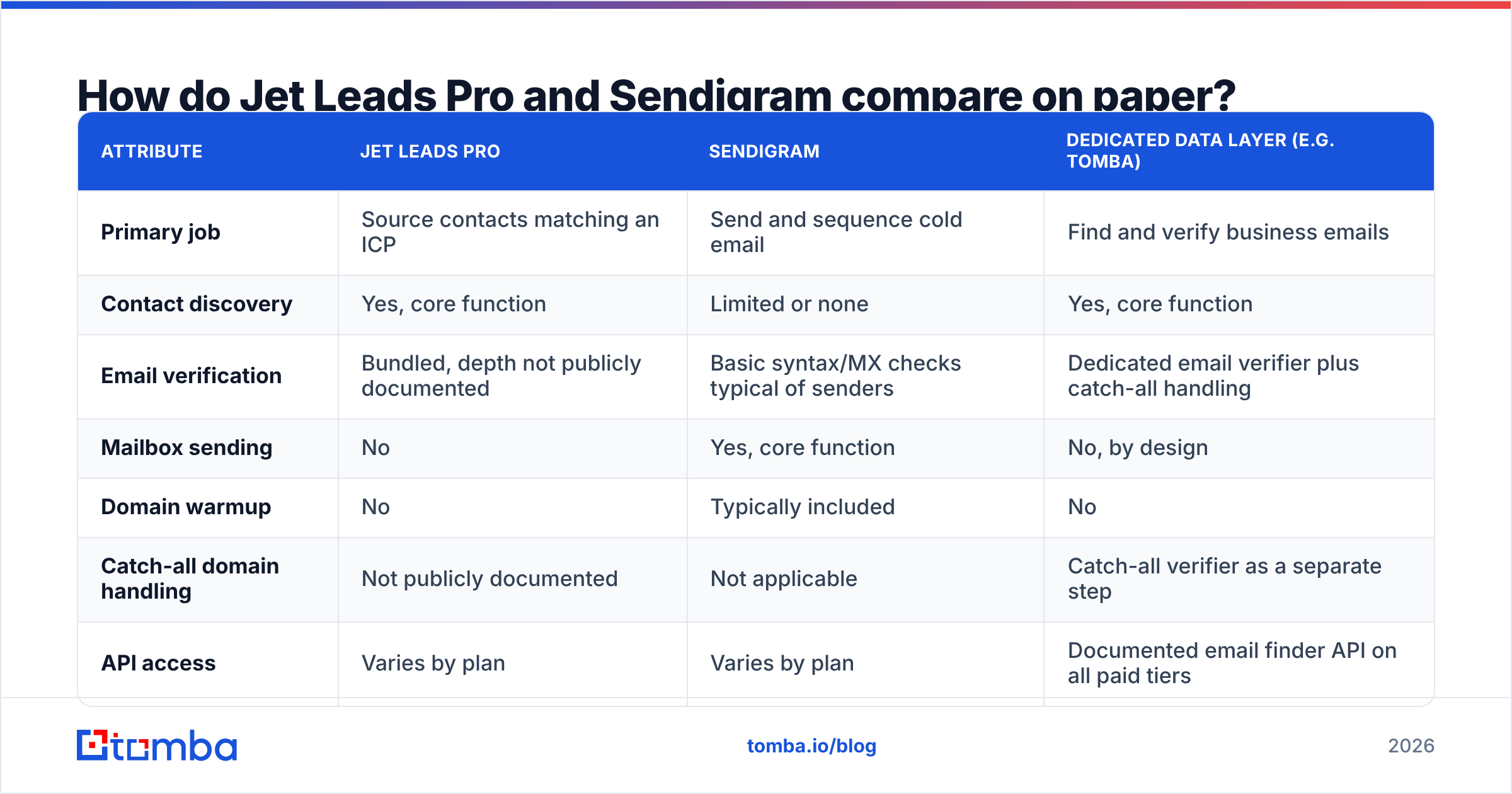
Here is the structural comparison. The third column is a dedicated data layer, so you can see where the overlap actually sits.
| Attribute | Jet Leads Pro | Sendigram | Dedicated data layer (e.g. Tomba) |
|---|---|---|---|
| Primary job | Source contacts matching an ICP | Send and sequence cold email | Find and verify business emails |
| Contact discovery | Yes, core function | Limited or none | Yes, core function |
| Email verification | Bundled, depth not publicly documented | Basic syntax/MX checks typical of senders | Dedicated email verifier plus catch-all handling |
| Mailbox sending | No | Yes, core function | No, by design |
| Domain warmup | No | Typically included | No |
| Catch-all domain handling | Not publicly documented | Not applicable | Catch-all verifier as a separate step |
| API access | Varies by plan | Varies by plan | Documented email finder API on all paid tiers |
| Published entry price | Self-reported, verify on vendor site | Self-reported, verify on vendor site | Free tier at 25 searches/mo, Starter $49/mo |
| Bulk processing | List export | List import | Bulk email finder and bulk verify |
| Best for | Filling an empty pipeline | Getting messages delivered | Accuracy and coverage under both |
Two things jump out. First, the feature overlap between the two tools is smaller than the marketing suggests. Second, the row that decides your results is verification depth, and that is the row where both tools say the least.
Which tool gives you better contact data?#
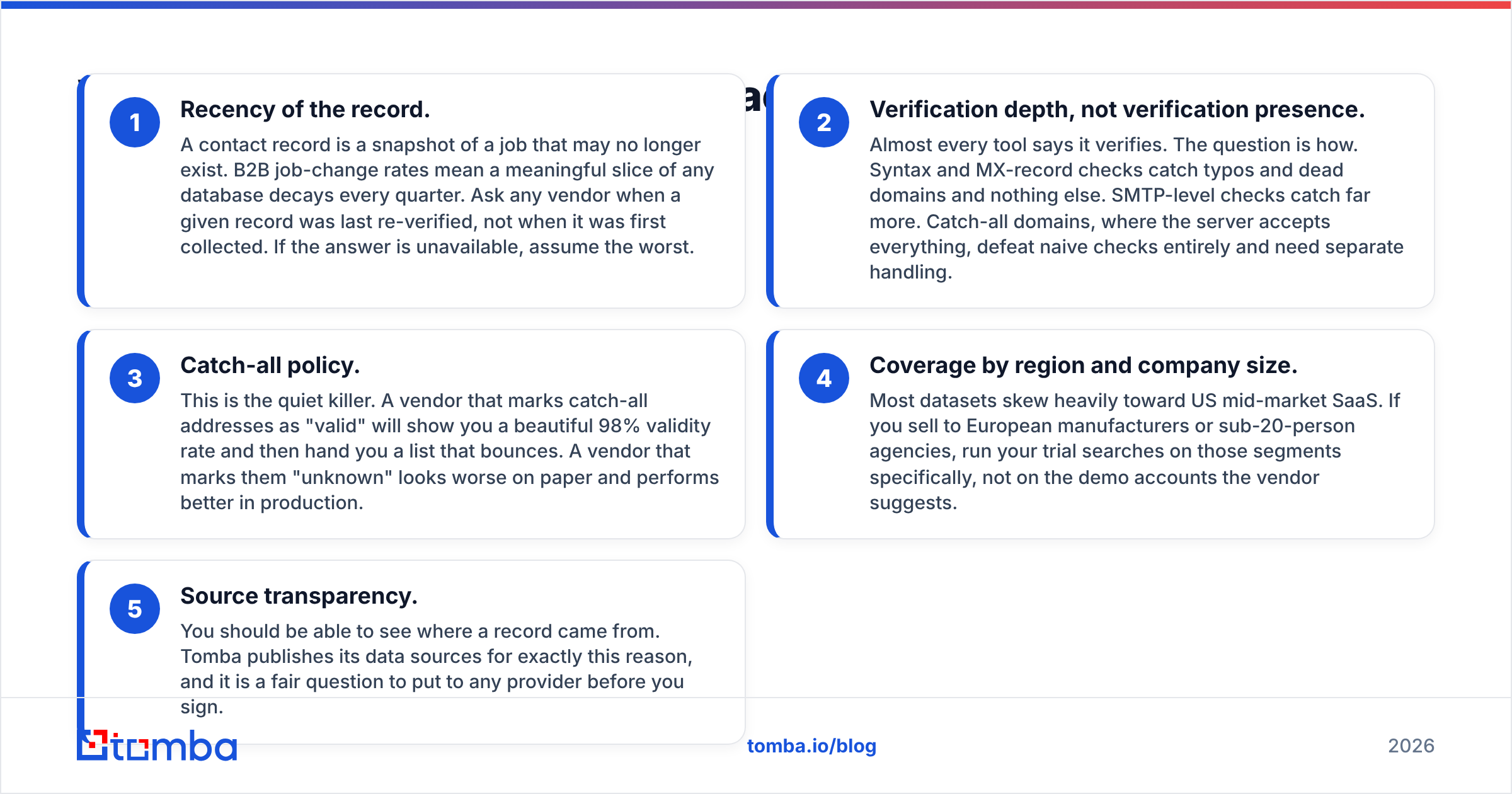
If sourcing is the question, Jet Leads Pro is the one built for it. But "built for it" is not the same as "good at it." Five things separate a usable B2B dataset from an expensive spreadsheet.
- Recency of the record. A contact record is a snapshot of a job that may no longer exist. Job-change rates mean a slice of any database decays every quarter. Ask when a given record was last re-verified, not when it was first collected. If the vendor cannot answer, assume the worst.
- Verification depth, not verification presence. Almost every tool says it verifies. The question is how. Syntax and MX-record checks catch typos and dead domains, and nothing else. SMTP-level checks catch far more. Catch-all domains accept everything, so they defeat naive checks and need separate handling.
- Catch-all policy. This is the quiet killer. A vendor that marks catch-all addresses "valid" will show you a 98% validity rate and hand you a list that bounces. A vendor that marks them "unknown" looks worse on paper and performs better in production.
The last two points are where most Jet Leads Pro vs Sendigram trials go wrong, because teams test on the wrong segment.
- Coverage by region and company size. Most datasets skew toward US mid-market SaaS. If you sell to European manufacturers or 20-person agencies, run your trial searches on those segments. Skip the demo accounts the vendor suggests.
- Source transparency. You should be able to see where a record came from. Tomba publishes its data sources for exactly this reason, and it is a fair question to put to any provider before you sign.

Run the same test on every candidate. Take 100 contacts you already know are correct, hide them from the tool, then ask it to find them. Measure hit rate and error rate separately. A tool that returns 90 addresses with 20 wrong is worse than one that returns 70 with 2 wrong, because the wrong ones cost you domain reputation.
Which tool actually gets your email delivered?#
Here Sendigram is the relevant product, and the contest is not really with Jet Leads Pro at all. It is with the sending fundamentals you control yourself.
A sequencer does four useful things. It rotates sending across mailboxes so no single inbox exceeds safe volume, warms domains gradually, throttles daily sends, and detects replies so you stop sequencing someone who already answered. Those are real and worth paying for.
What a sequencer cannot do is rescue a bad list. Mailbox providers judge you on complaint rate, spam-trap hits, and bounce rate. Google's bulk sender guidelines are explicit: senders need to keep spam complaint rates low and keep proper authentication in place. No amount of warmup fixes a 15% bounce rate on send one.
This is the part of the email deliverability conversation that gets skipped. Teams buy a sender, see poor open rates, buy a better sender, and see the same result. The variable they never changed was the list. Sending infrastructure sets your ceiling. List quality decides whether you get near it.
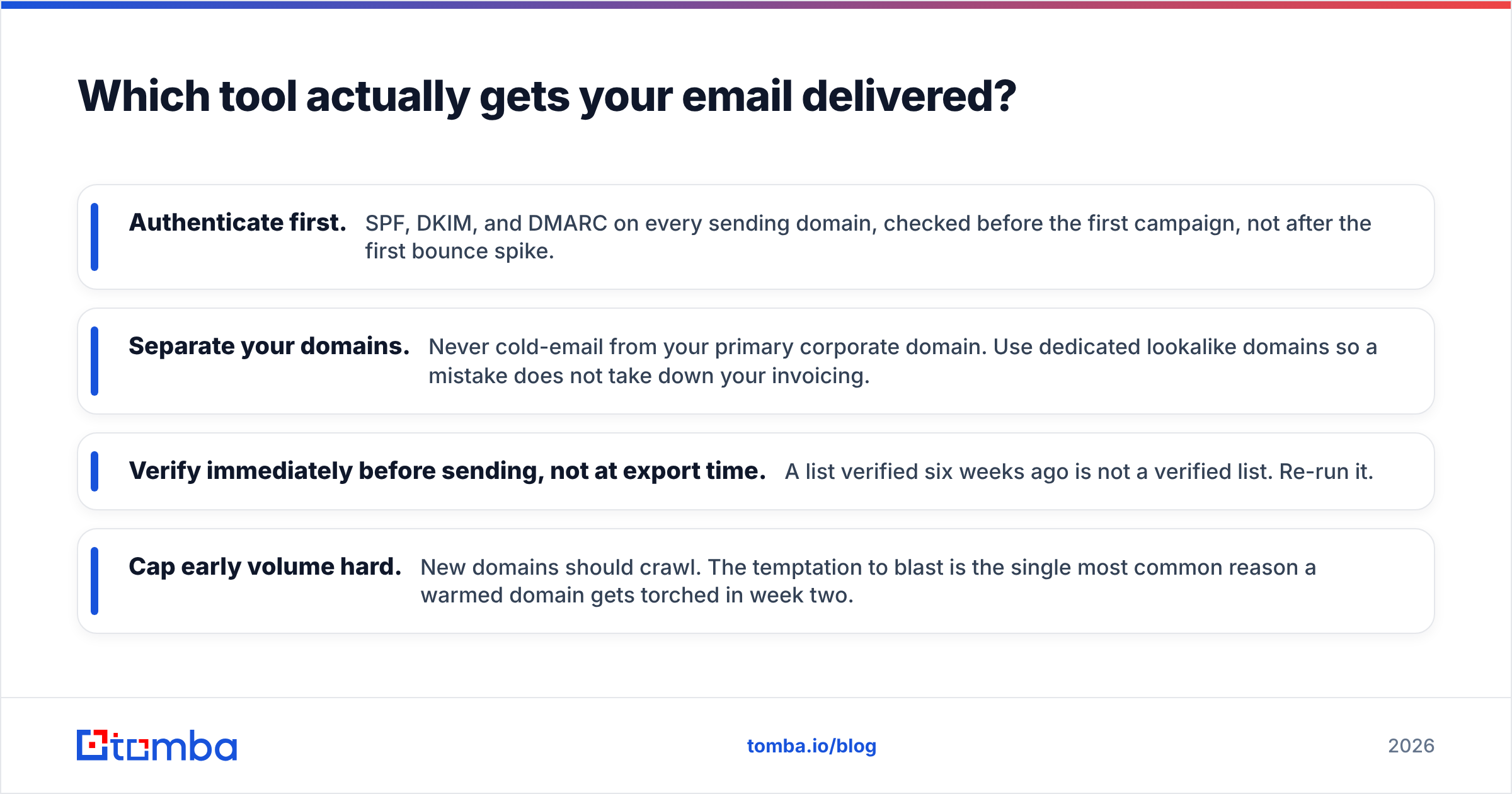
Here is a practical sequence that works with any sender you pick:
- Authenticate first. Set up SPF, DKIM, and DMARC on every sending domain. Check them before the first campaign, not after the first bounce spike.
- Separate your domains. Never cold-email from your primary corporate domain. Use dedicated lookalike domains so one mistake does not take down your invoicing.
- Verify right before sending, not at export time. A list verified six weeks ago is not a verified list. Run it again.
- Cap early volume hard. New domains should crawl. The urge to blast is the top reason a warmed domain gets torched in week two.
Jet Leads Pro vs Sendigram pricing: what does each cost?#
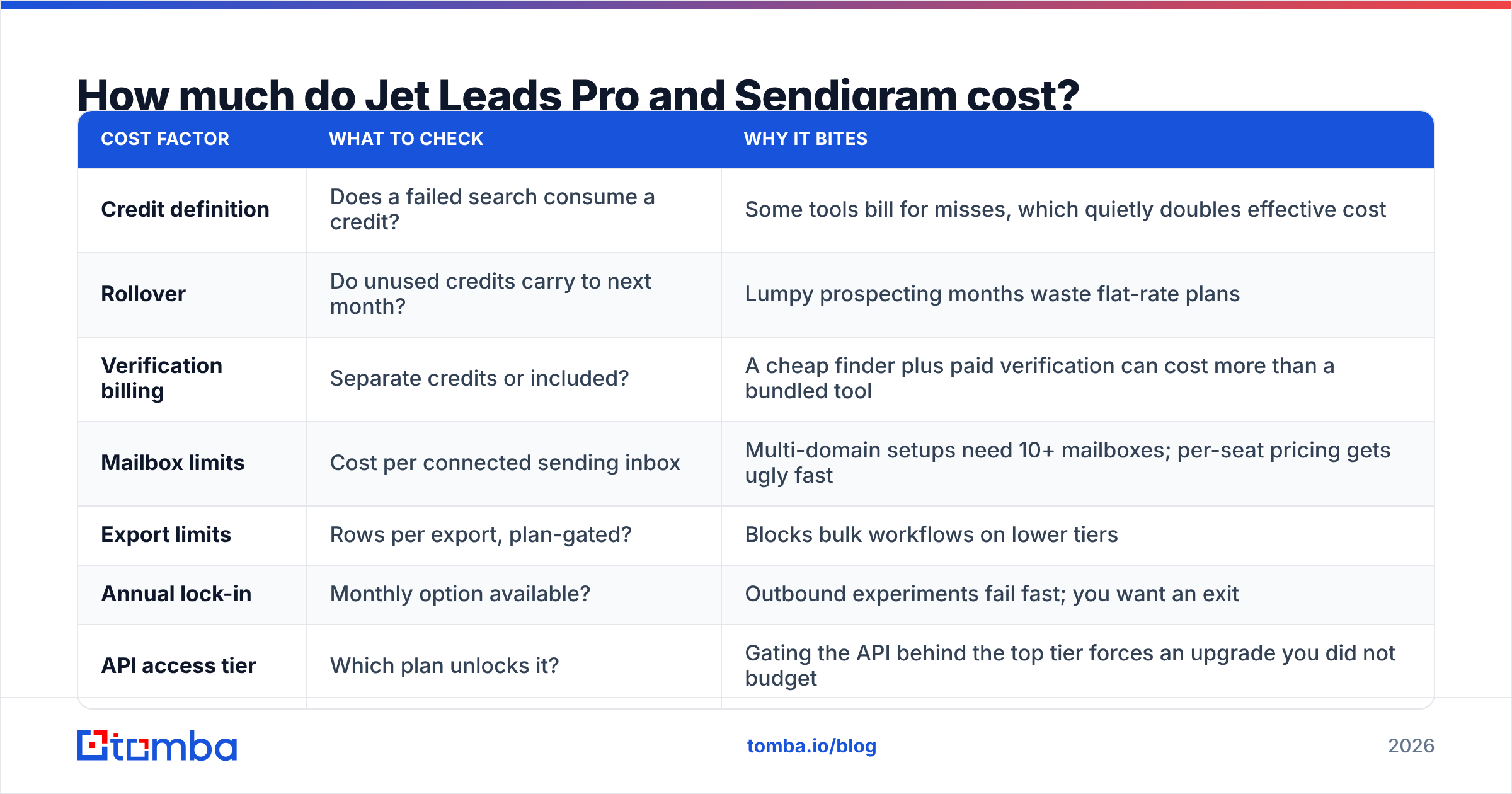
Both vendors price in the same band as the rest of the SMB outbound market, and both have repriced since launch. Rather than quote numbers that will be stale by the time you read this, here is the cost model that decides your real spend.
| Cost factor | What to check | Why it bites |
|---|---|---|
| Credit definition | Does a failed search consume a credit? | Some tools bill for misses, which quietly doubles effective cost |
| Rollover | Do unused credits carry to next month? | Lumpy prospecting months waste flat-rate plans |
| Verification billing | Separate credits or included? | A cheap finder plus paid verification can cost more than a bundled tool |
| Mailbox limits | Cost per connected sending inbox | Multi-domain setups need 10+ mailboxes; per-seat pricing gets ugly fast |
| Export limits | Rows per export, plan-gated? | Blocks bulk workflows on lower tiers |
| Annual lock-in | Monthly option available? | Outbound experiments fail fast; you want an exit |
| API access tier | Which plan unlocks it? | Gating the API behind the top tier forces an upgrade you did not budget |
For a concrete reference point on the data side, Tomba pricing runs a free tier at 25 searches per month, Starter at $49/mo, Growth at $99/mo, and Pro at $249/mo. API access is included rather than sold as an upsell. Use that as a benchmark when you weigh what Jet Leads Pro or any other sourcing tool quotes you. Be skeptical of anything far cheaper with no clear story about where the data comes from.
Is one better than the other for cold outbound?#
No, and the framing is the problem. For most teams running outbound in 2026, the honest answer is a three-part stack:
- A data layer that finds and verifies contacts, with catch-all handling and a real API so it runs inside your workflow instead of beside it.
- A sending layer that rotates mailboxes, warms domains, and sequences follow-ups. This is Sendigram's lane, and the competitive set includes a dozen credible alternatives.
- A system of record where replies, stages, and outcomes live, so you can attribute revenue instead of guessing. Your CRM, whatever it is.
Jet Leads Pro tries to own layer one. Sendigram owns layer two. All-in-one tools get into trouble when they do a competent job on one layer and a thin job on the other. You find out which is which three weeks into a campaign.

You have a data problem if your bounce rate is above 3%, or if your reply rate is fine but your meetings are with the wrong titles. You have a sending problem if your bounce rate is clean, your list is right, and your open rate still sits under 20%.
What should you actually buy in 2026?#
Decide by bottleneck, not by brand.
- Empty pipeline, no list. Prioritize the data layer. Start on a free tier, run the 100-known-contacts test above, and only then commit budget. A domain search across your target accounts tells you within an afternoon whether coverage is there.
- Good list, poor delivery. Prioritize the sending layer. Fix authentication first, because it costs nothing. Then judge senders on mailbox rotation and warmup controls rather than on template libraries.
- Both broken. Fix data first. A better sender amplifies whatever list you feed it, including a bad one.
If you already have a motion running, the calculus shifts:
- Scaling an existing motion. Prioritize API and bulk throughput on the data side. Manual exports stop scaling somewhere around 2,000 contacts a month.
- Tight budget. Run free tiers on both sides in parallel for two weeks before paying for either. A free tier tells you more about real coverage than any demo.
And a note on neutrality: plenty of solid players occupy these categories, including established providers like BookYourData on the data side. The right answer depends on your segment and geography far more than on any leaderboard.
Where does Tomba fit into this comparison?#
The Jet Leads Pro vs Sendigram question usually hides a data question. Tomba is not a sequencer and does not pretend to be one. It sits in layer one, which is exactly the layer users of both tools tend to underinvest in.
If you run Sendigram or any other sender and your bounce rate is embarrassing you, the fix is upstream. Point the Tomba Email Finder at your target accounts, run the results through verification including catch-all checks, and push clean contacts into the sequencer you already pay for. Start on the free tier at 25 searches a month, run the accuracy test on your own known contacts, and upgrade only when the numbers justify it.
The stack beats the all-in-one. Pick the best sourcing layer, pick the best sending layer, and stop asking one product to be both.
Related guides#
// get started
Find, verify and enrich your first contacts today
Start on the free plan with 25 searches a month, then scale when your team is ready.
Free plan · No credit card required · GDPR & CCPA
// about the author