Jet Leads Pro vs Smartlead: Which Outbound Tool Wins in 2026?
One tool builds your prospect list. The other sends the emails. Here is where Jet Leads Pro and Smartlead actually overlap, where they do not, and what most teams get wrong when they buy only one.
TL;DR#
- They are not really competitors. Jet Leads Pro sits on the data side of outbound (finding and exporting contacts). Smartlead sits on the sending side (inbox rotation, warmup, sequences, reply handling). Comparing them head-to-head is like comparing a quarry to a cement mixer.
- If your problem is "I don't have enough good contacts," a sending tool won't fix it. No amount of inbox rotation rescues a list with a 22% bounce rate.
- If your problem is "my emails land in spam," a lead database won't fix it. You need warmup, domain rotation, and volume throttling.
- Smartlead's published entry pricing starts in the ~$39/mo range and scales with active leads and mailbox count; Jet Leads Pro prices on credits/exports. Always confirm current numbers on the vendor page — both change tiers frequently.
- Most teams that succeed run a three-layer stack: a verified data source, a sending platform, and a verification pass between them. Skipping the middle layer is the single most common reason outbound campaigns stall.
What are Jet Leads Pro and Smartlead, exactly?#
Start with categories, because the category determines the buying decision.
Smartlead is a cold email infrastructure and sequencing platform. Its core value proposition is sending volume without burning domains: unlimited mailbox connections on most plans, automatic warmup, rotation across sending accounts, a unified master inbox for replies, and sub-accounts for agencies running many clients. It competes with Instantly, Lemlist, Saleshandy, and Reply.io. You can see the current feature set on the official Smartlead site, and the category it competes in on G2's sales engagement listings.
Jet Leads Pro is positioned as a lead sourcing and contact export tool — you search for companies or roles, pull contact records, and download them as CSV or push them into your outreach tool. Tools in this bucket live or die on two numbers: how many records they actually return for your ICP, and what percentage of those records are still deliverable.
That difference matters more than any feature checklist. One tool produces rows. The other consumes rows. If you buy the wrong one for the problem you actually have, you will spend three months blaming the software.

How do Jet Leads Pro and Smartlead compare head-to-head?#
Here is the honest side-by-side. Where a vendor does not publish a hard number, the table says so rather than inventing one.
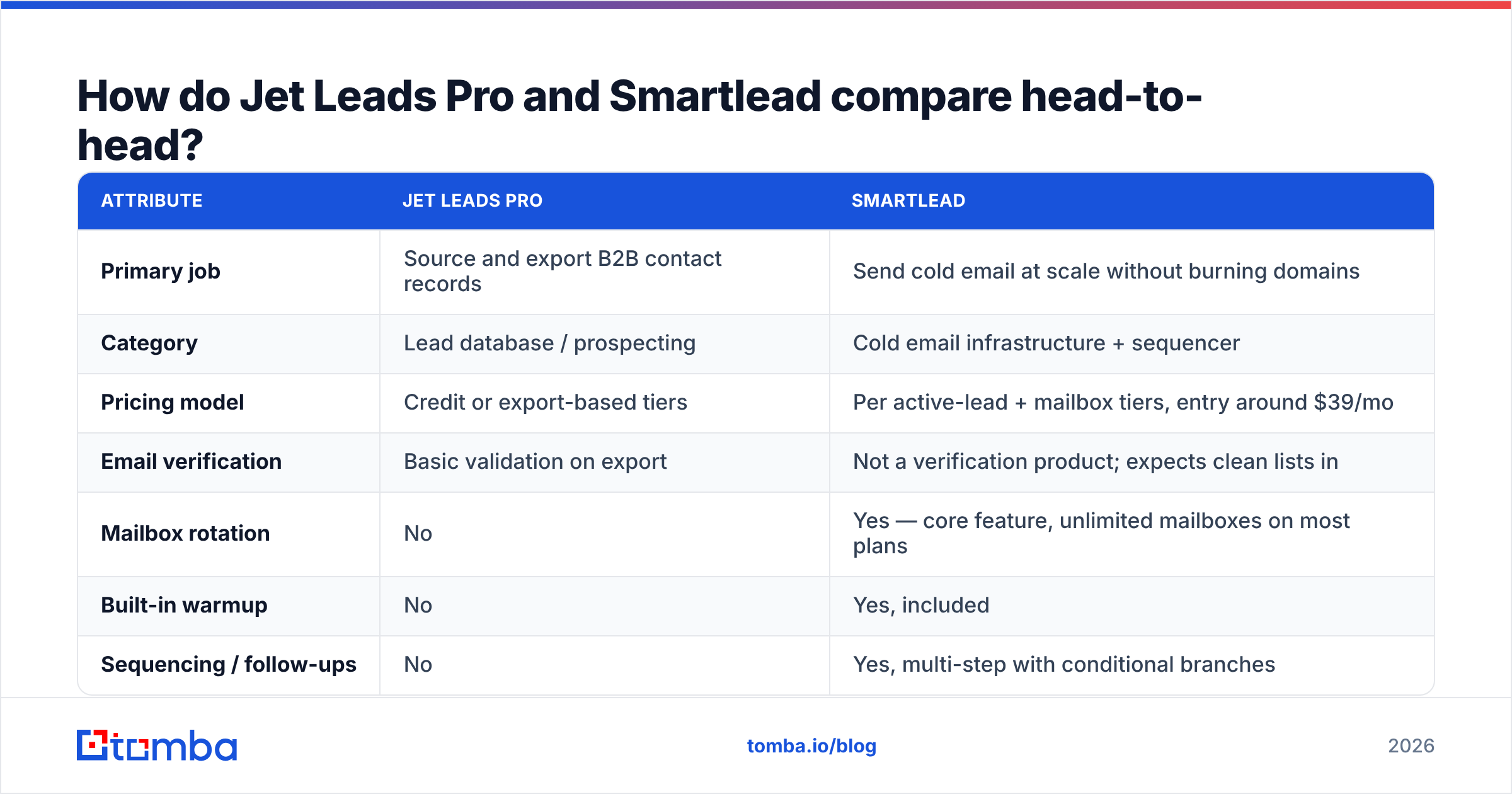
| Attribute | Jet Leads Pro | Smartlead |
|---|---|---|
| Primary job | Source and export B2B contact records | Send cold email at scale without burning domains |
| Category | Lead database / prospecting | Cold email infrastructure + sequencer |
| Pricing model | Credit or export-based tiers | Per active-lead + mailbox tiers, entry around $39/mo |
| Email verification | Basic validation on export | Not a verification product; expects clean lists in |
| Mailbox rotation | No | Yes — core feature, unlimited mailboxes on most plans |
| Built-in warmup | No | Yes, included |
| Sequencing / follow-ups | No | Yes, multi-step with conditional branches |
| Unified reply inbox | No | Yes (master inbox) |
| Agency sub-accounts | Limited | Yes — a major reason agencies pick it |
| API access | Yes, on paid tiers | Yes, plus webhooks and native CRM syncs |
| Best for | Building the list | Working the list |
Read that table again and notice how few rows overlap. The "versus" framing that drives the search query is mostly a symptom of buyers not yet knowing which layer of the stack is broken.
Which one actually finds you contacts?#
Jet Leads Pro, by design. Smartlead does not meaningfully source contacts — it ingests them.
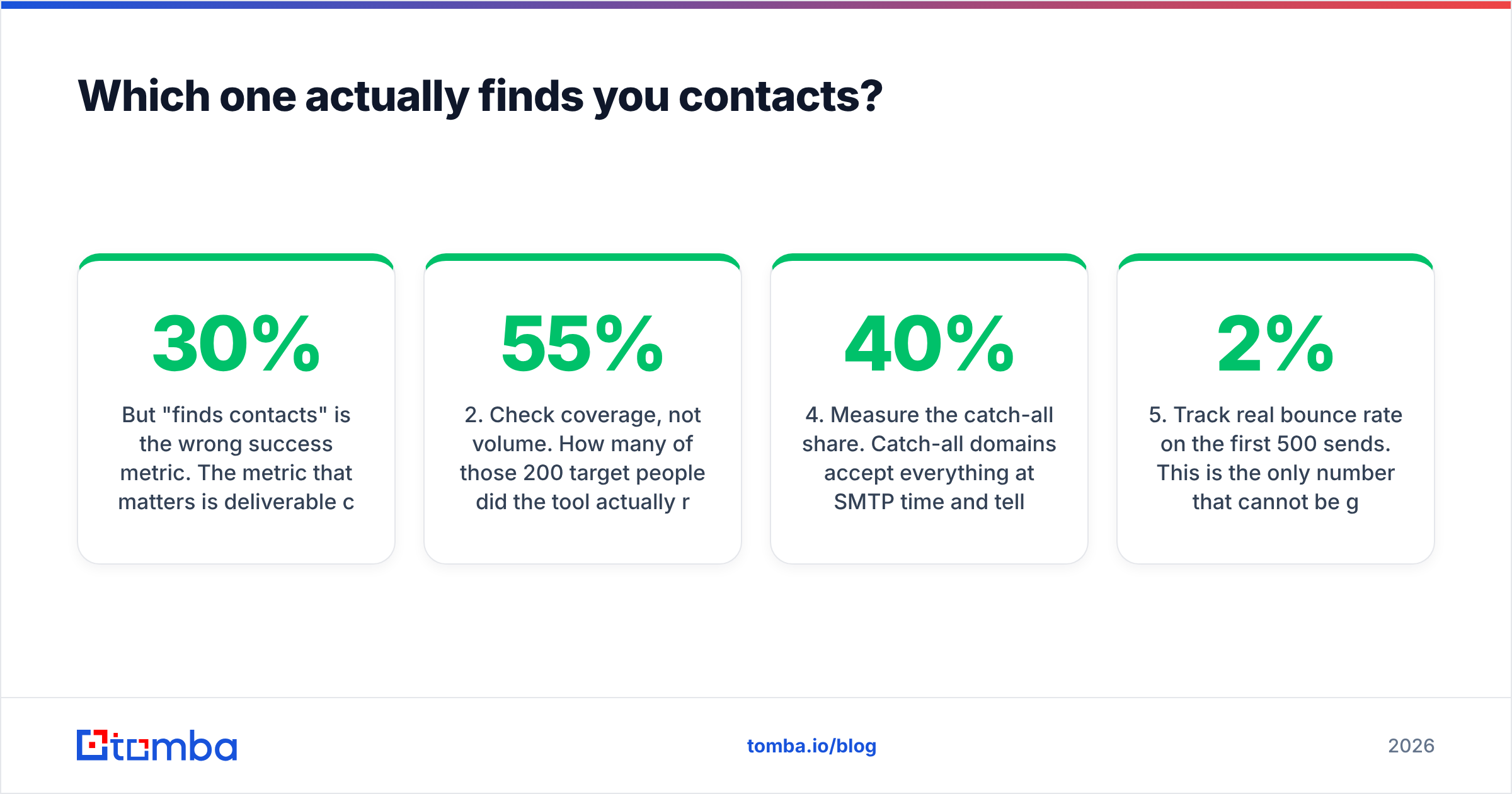
But "finds contacts" is the wrong success metric. The metric that matters is deliverable contacts per dollar. A tool that returns 10,000 records where 30% bounce has effectively sold you 7,000 records at a 43% markup, plus a damaged sending domain you cannot buy back.
When you evaluate any data source — Jet Leads Pro, Apollo, a scraped list, or a purchased CSV — test it the same way:
- Pull 200 records for a narrow, real ICP. Not "all SaaS companies." Something like "Head of RevOps at 50–200 employee fintech in the EU."
- Check coverage, not volume. How many of those 200 target people did the tool actually return an email for? Anything under 55% coverage on a well-defined ICP is weak.
- Run every record through an independent email verifier. Do not trust the source tool's own validation flag — vendors grade their own homework.
- Measure the catch-all share. Catch-all domains accept everything at SMTP time and tell you nothing. A list that is 40% catch-all is not a 95%-valid list, no matter what the export says.
- Track real bounce rate on the first 500 sends. This is the only number that cannot be gamed. Under 2% is healthy, over 5% is a problem, over 8% is domain damage in progress.
Run that on any two data vendors and the winner becomes obvious in an afternoon. It is a far better use of your evaluation time than reading feature lists.
If you want a second source to benchmark against, a straightforward email finder with domain-level search lets you spot-check the same 200 people and compare coverage directly. Cross-referencing two independent sources is also how you catch stale records — if one vendor has someone at a company they left 14 months ago and the other does not, you have your answer.
Which one sends better cold email?#
Smartlead, unambiguously. This is not a close call, because Jet Leads Pro is not trying to win it.
The things that determine whether your cold email reaches an inbox in 2026 are mostly infrastructure decisions, not copy decisions:
- Authentication. SPF, DKIM, and DMARC correctly configured on every sending domain. Google and Microsoft both enforce this for bulk senders now — Google's sender guidelines spell out the current requirements, and they are not optional.
- Warmup. New domains and mailboxes need weeks of gradually escalating, reciprocated sending before they can carry real volume. Smartlead automates this; doing it manually is a part-time job.
- Rotation. Splitting volume across many mailboxes and domains so no single sender exceeds a safe daily ceiling. This is Smartlead's headline capability.
- Throttling and randomization. Human-looking send intervals instead of 400 messages fired in eight minutes.
- List hygiene. The one Smartlead cannot do for you.
That last point is where the two tools collide. Smartlead's rotation protects you from volume-based flags. It does not protect you from reputation damage caused by a bad list. Bounces and spam complaints are scored against the sending domain regardless of how elegantly you rotate. If you want the mechanics of why, the email deliverability fundamentals haven't changed much — mailbox providers weight recipient engagement and bounce history heavily, and both are functions of who you send to.

What does each one cost in 2026?#
Pricing on both sides moves, so treat the shape of the model as more durable than the specific dollar figure.
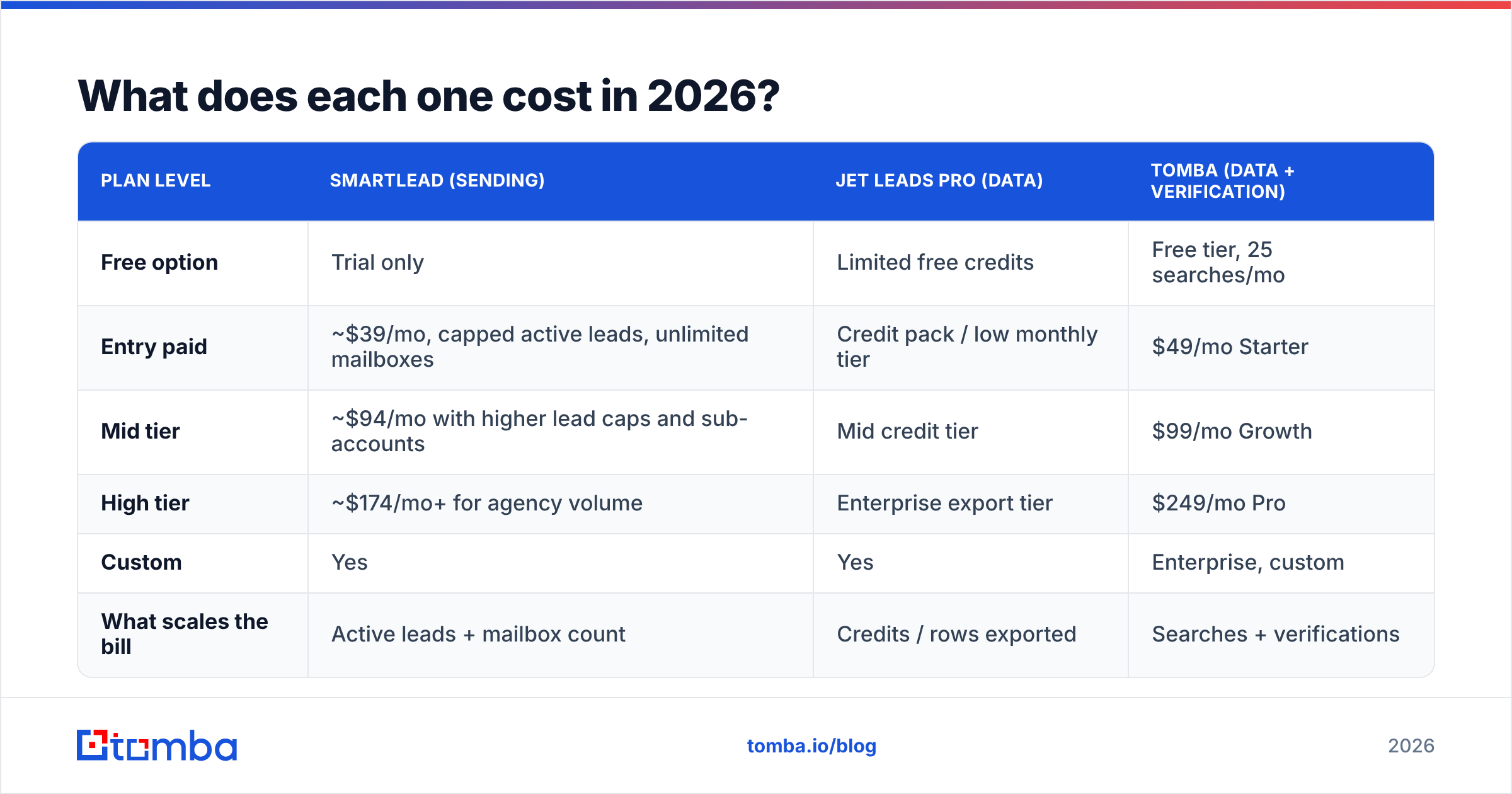
| Plan level | Smartlead (sending) | Jet Leads Pro (data) | Tomba (data + verification) |
|---|---|---|---|
| Free option | Trial only | Limited free credits | Free tier, 25 searches/mo |
| Entry paid | ~$39/mo, capped active leads, unlimited mailboxes | Credit pack / low monthly tier | $49/mo Starter |
| Mid tier | ~$94/mo with higher lead caps and sub-accounts | Mid credit tier | $99/mo Growth |
| High tier | ~$174/mo+ for agency volume | Enterprise export tier | $249/mo Pro |
| Custom | Yes | Yes | Enterprise, custom |
| What scales the bill | Active leads + mailbox count | Credits / rows exported | Searches + verifications |
The important structural point: these bills stack, they do not substitute. A realistic outbound budget is one data line plus one sending line. Teams that try to collapse it into a single tool usually end up with an all-in-one that does both jobs adequately and neither well. You can see how the data-side tiers break down on the Tomba pricing page if you want a concrete comparison point for cost-per-verified-contact.
Also watch the hidden costs on the sending side. Mailbox rotation implies you are buying mailboxes — Google Workspace or Microsoft 365 seats, plus domains, plus DNS setup time. A 20-mailbox setup can easily add $120–$200/mo on top of your Smartlead subscription. That is not a knock on Smartlead; it is the cost of the architecture.
Who should pick Jet Leads Pro, and who should pick Smartlead?#
Pick Jet Leads Pro (or another data tool) if:
- You already have a sending platform you like and it is sitting half-idle for lack of contacts.
- Your SDRs spend more than an hour a day manually hunting for email addresses.
- Your ICP is well-defined and you need volume against it.
- Your current bounce rate is fine but your pipeline coverage is not.
Pick Smartlead if:
- You have a list — bought, scraped, or built — and open rates are collapsing.
- You are an agency running outbound for multiple clients and need sub-accounts with isolated sending reputations.
- You are sending over ~2,000 emails/month and managing it in a single mailbox or a basic sequencer.
- Replies are scattered across six inboxes and your team is losing threads.
Pick both if you are running outbound seriously. That is the normal configuration, not the luxury one.
Do you actually need a third tool between them?#
Yes, and this is the part most "X vs Y" comparisons skip.
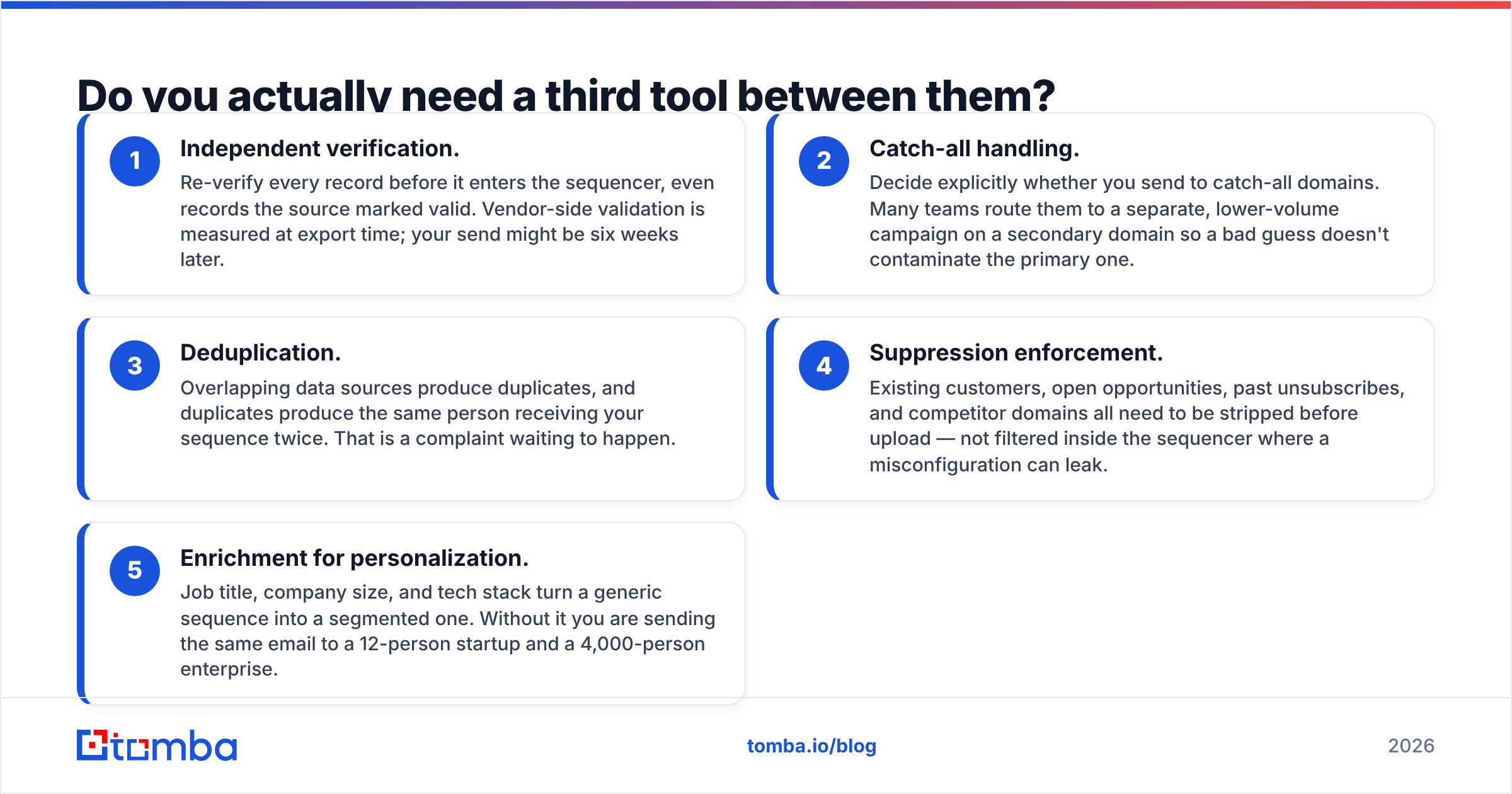
The handoff between a data tool and a sending tool is where campaigns break. Here's what belongs in that middle layer:
- Independent verification. Re-verify every record before it enters the sequencer, even records the source marked valid. Vendor-side validation is measured at export time; your send might be six weeks later.
- Catch-all handling. Decide explicitly whether you send to catch-all domains. Many teams route them to a separate, lower-volume campaign on a secondary domain so a bad guess doesn't contaminate the primary one.
- Deduplication. Overlapping data sources produce duplicates, and duplicates produce the same person receiving your sequence twice. That is a complaint waiting to happen.
- Suppression enforcement. Existing customers, open opportunities, past unsubscribes, and competitor domains all need to be stripped before upload — not filtered inside the sequencer where a misconfiguration can leak.
- Enrichment for personalization. Job title, company size, and tech stack turn a generic sequence into a segmented one. Without it you are sending the same email to a 12-person startup and a 4,000-person enterprise.
Running a bulk email finder pass with verification built in handles steps 1 through 3 in one motion, which is usually cheaper than buying a standalone verification subscription on top of everything else.
What about accuracy claims — can you trust the marketing numbers?#
Treat every "98% accurate" claim as a hypothesis, not a fact. Accuracy claims are measured differently by every vendor: some count syntactically valid addresses, some count SMTP-accepted addresses, some exclude catch-alls from the denominator entirely, which inflates the figure dramatically.
The only accuracy number that matters is the one you measure on your own ICP. Vendors that are strong in US mid-market SaaS are often weak in EU manufacturing or APAC logistics. There is no universally best data source — there is a best source for your segment, and the only way to find it is a 200-record bake-off.
Ask any vendor, including Tomba, where the data comes from and how often it refreshes. A vendor that can answer clearly about its data sources is telling you something a vendor that deflects is also telling you.
The verdict#
If you can only buy one this quarter, buy for the bottleneck you can measure.
Open rate under 20% with a clean list? That is a deliverability problem — Smartlead earns the budget. Reps idle because there is nothing to send? That is a data problem — a lead source earns the budget. Bounce rate above 5%? That is neither; that is a verification problem, and it is the cheapest of the three to fix.
Both tools are legitimate in their lanes, and the search for "Jet Leads Pro vs Smartlead" usually resolves into "I need one of each, plus something to clean the handoff."
Start with the layer that costs least to fix. Tomba's Email Finder gives you verified, source-attributed contacts you can push straight into Smartlead — with a free tier of 25 searches per month to run your own 200-record bake-off before you commit a dollar. Test it against whatever data source you are using now, compare real bounce rates after 500 sends, and let the numbers pick the winner.
Related guides#
// get started
Find, verify and enrich your first contacts today
Start on the free plan with 25 searches a month, then scale when your team is ready.
Free plan · No credit card required · GDPR & CCPA
// about the author