Jet Leads Pro vs Tailormails: Which Outbound Tool Wins?
Jet Leads Pro and Tailormails get compared constantly, but they solve different halves of outbound. Here is what each actually does, where the costs hide, and which one belongs in your stack in 2026.
TL;DR
- Jet Leads Pro vs Tailormails is not a like-for-like fight. Jet Leads Pro sits on the sourcing side of outbound (finding and exporting contacts). Tailormails sits on the messaging side (writing and personalizing what you send).
- If your reply rate is low because nobody is reading you, Tailormails-style tooling helps. If your bounce rate is above 5% and your domain is getting throttled, no amount of AI copy will save you — you have a data problem.
- Both are small, fast-moving vendors. Pricing pages and feature lists change month to month. Verify current tiers on each vendor's own site before you commit; treat every third-party comparison (including this one) as a starting point, not a contract.
- Most teams end up buying two things anyway: a verified contact source and a sending/personalization layer. The real question is which half you are weakest at right now.
- Our pick depends on your bottleneck. Sourcing problem → a verified data provider. Copy problem → a personalization layer. Both broken → fix data first, because it is cheaper and the effect is measurable within a week.
What are Jet Leads Pro and Tailormails?#
The short version: Jet Leads Pro is a lead-sourcing tool and Tailormails is a personalization-and-sending tool. People search "jet leads pro vs tailormails" because both show up in the same "cold outbound software" round-ups, but they occupy different slots in the pipeline.
Jet Leads Pro markets itself around list building — you define a target (industry, role, geography, company size), it returns contacts, you export them into a sequencer or CRM. That is the same job description as dozens of other lead-intelligence products in the G2 sales intelligence category. The variables that actually matter in that category are always the same three: where the data comes from, how fresh it is, and whether the email addresses survive verification.
Tailormails leans the other way. Its pitch is about the message: research-driven personalization, first-line generation, variant testing, and getting a sequence out the door without a human writing 200 unique intros. The value promise is reply rate, not contact volume.
Neither product replaces the other. If you buy Jet Leads Pro you still need something to send with. If you buy Tailormails you still need a list of humans to send to. Any comparison that declares a single winner without asking what you already own is selling you something.
Why do people compare Jet Leads Pro vs Tailormails at all?#
Because budget is finite and both get pitched as "the thing that fixes cold email."
That framing is the problem. Cold email fails for three distinct reasons, and they need three distinct fixes:
- Wrong people. Your ICP filter is too loose, so you are emailing the right title at the wrong company. This is a targeting problem — better filters, better firmographics, intent signals.
- Wrong addresses. The contacts are correct but the emails are stale, guessed, or sitting behind a catch-all. This is a data-quality problem, and it shows up as bounces, spam-trap hits, and sender reputation damage.
- Wrong message. The right person opens it and the copy is generic. This is a copy problem — and the only one Tailormails-class tools directly address.
Buyers conflate 2 and 3 constantly. They see a 2% reply rate, assume the copy is weak, and buy an AI writing layer. Then the reply rate goes to 2.3% because half the list never delivered in the first place.

Google's own sender guidelines are blunt about this: bulk senders who exceed low spam-complaint thresholds and send to invalid addresses get filtered, full stop. Personalization does not exempt you.
How do Jet Leads Pro and Tailormails differ in practice?#
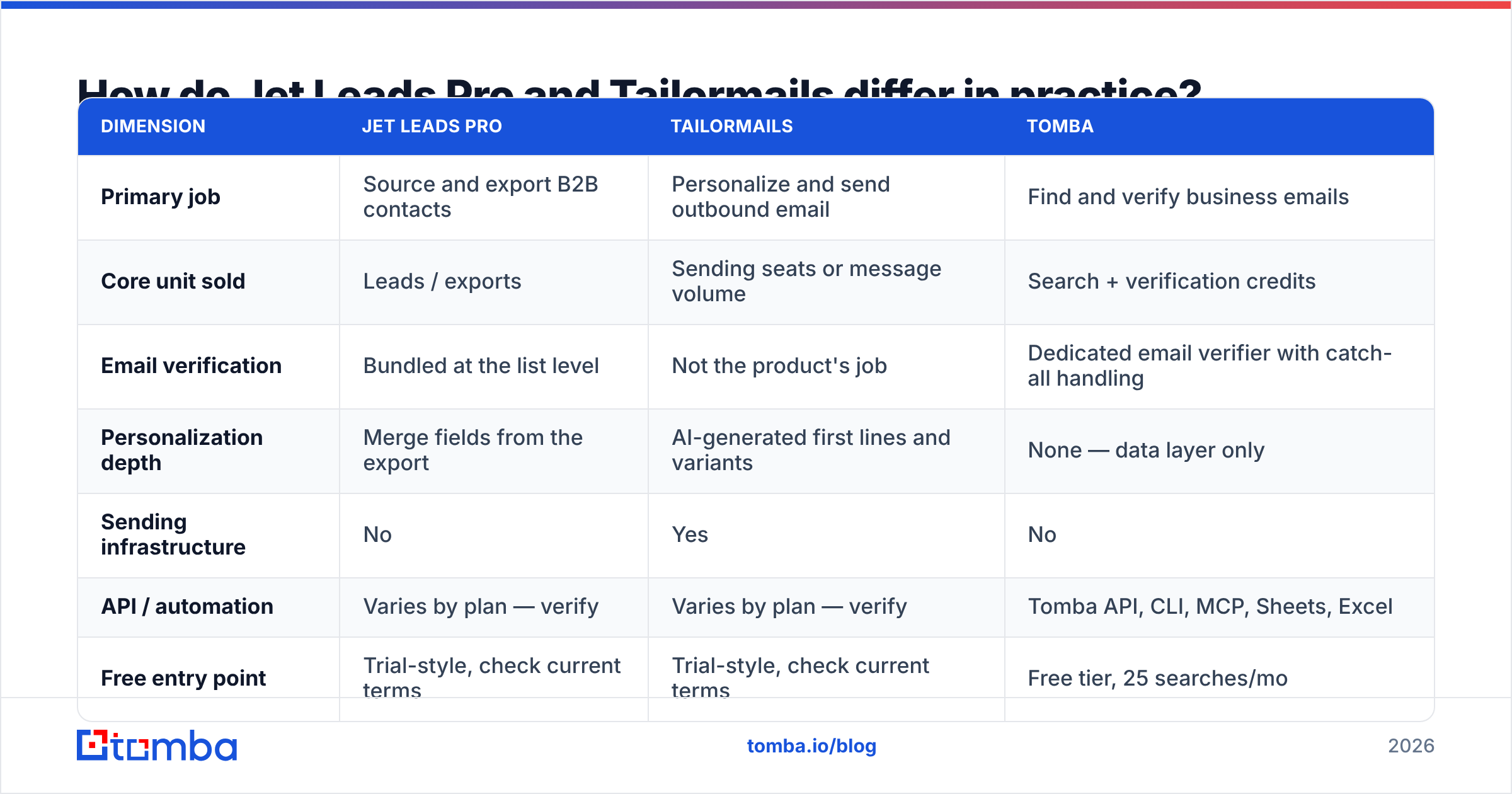
Here is the honest side-by-side. Capability rows reflect how each product positions itself; pricing rows are deliberately non-specific because both vendors adjust tiers frequently — check their live pricing pages before you buy.
| Dimension | Jet Leads Pro | Tailormails | Tomba |
|---|---|---|---|
| Primary job | Source and export B2B contacts | Personalize and send outbound email | Find and verify business emails |
| Core unit sold | Leads / exports | Sending seats or message volume | Search + verification credits |
| Email verification | Bundled at the list level | Not the product's job | Dedicated email verifier with catch-all handling |
| Personalization depth | Merge fields from the export | AI-generated first lines and variants | None — data layer only |
| Sending infrastructure | No | Yes | No |
| API / automation | Varies by plan — verify | Varies by plan — verify | Tomba API, CLI, MCP, Sheets, Excel |
| Free entry point | Trial-style, check current terms | Trial-style, check current terms | Free tier, 25 searches/mo |
| Published entry price | See vendor pricing page | See vendor pricing page | $49/mo Starter (Tomba pricing) |
| Best for | Teams with no list | Teams with a list and weak copy | Teams whose list bounces |
The row that decides most purchases is "email verification." A lead export that has not been SMTP-validated is a hypothesis, not a list. Some sourcing tools verify at export time; others hand you whatever their database last recorded, which may be 18 months old.
What actually decides data quality in a lead tool?#
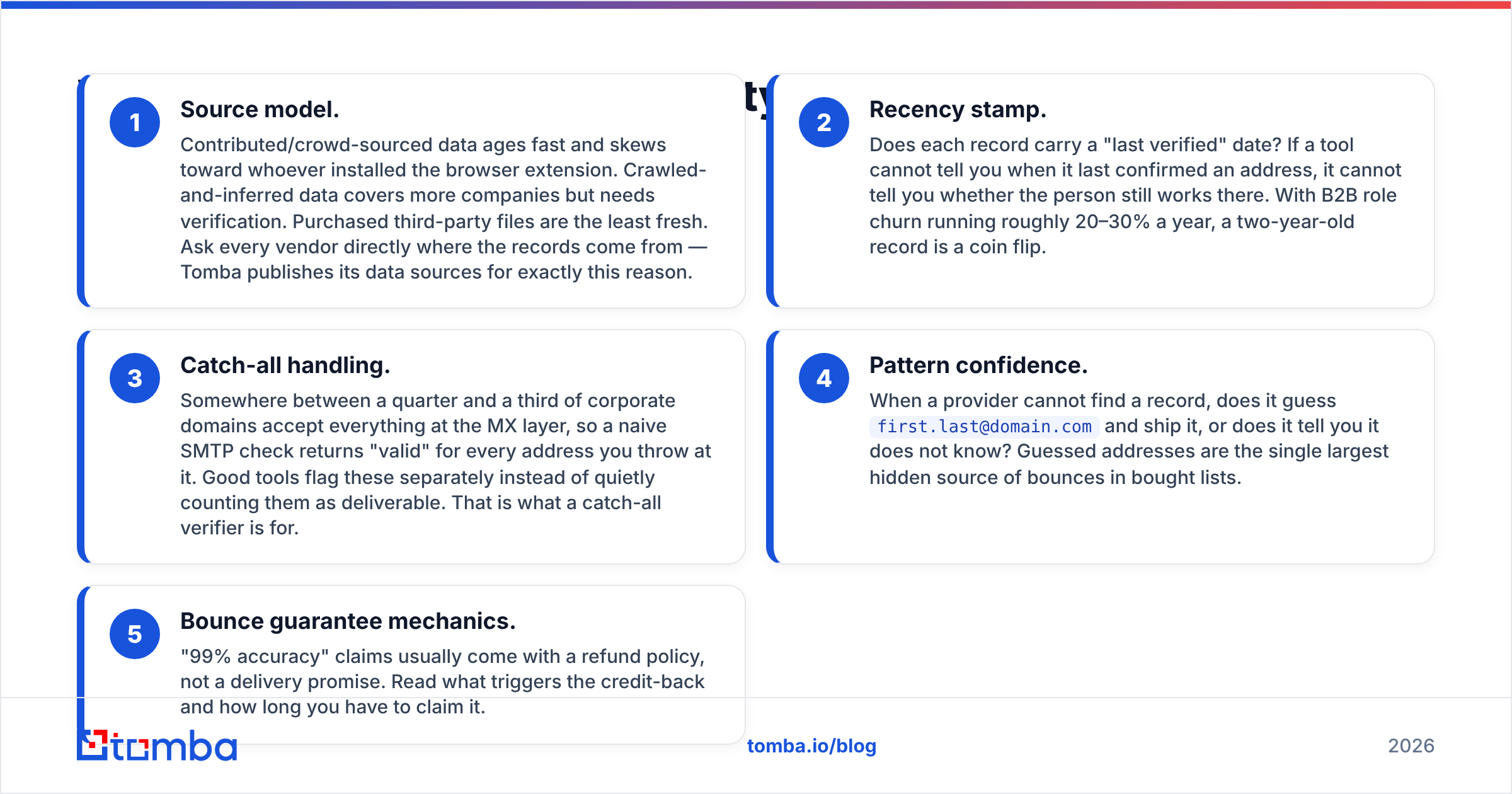
If you only audit one thing during a trial, audit this. Five factors separate a usable list from an expensive bounce generator:
- Source model. Contributed/crowd-sourced data ages fast and skews toward whoever installed the browser extension. Crawled-and-inferred data covers more companies but needs verification. Purchased third-party files are the least fresh. Ask every vendor directly where the records come from — Tomba publishes its data sources for exactly this reason.
- Recency stamp. Does each record carry a "last verified" date? If a tool cannot tell you when it last confirmed an address, it cannot tell you whether the person still works there. With B2B role churn running roughly 20–30% a year, a two-year-old record is a coin flip.
- Catch-all handling. Somewhere between a quarter and a third of corporate domains accept everything at the MX layer, so a naive SMTP check returns "valid" for every address you throw at it. Good tools flag these separately instead of quietly counting them as deliverable. That is what a catch-all verifier is for.
- Pattern confidence. When a provider cannot find a record, does it guess
first.last@domain.comand ship it, or does it tell you it does not know? Guessed addresses are the single largest hidden source of bounces in bought lists. - Bounce guarantee mechanics. "99% accuracy" claims usually come with a refund policy, not a delivery promise. Read what triggers the credit-back and how long you have to claim it.
Run the same 200-contact sample through any two tools and verify the output independently. The spread is usually wider than either vendor's marketing suggests.
Does personalization or data accuracy move reply rate more?#
Data accuracy, and it is not close — until your data is clean, at which point personalization takes over.
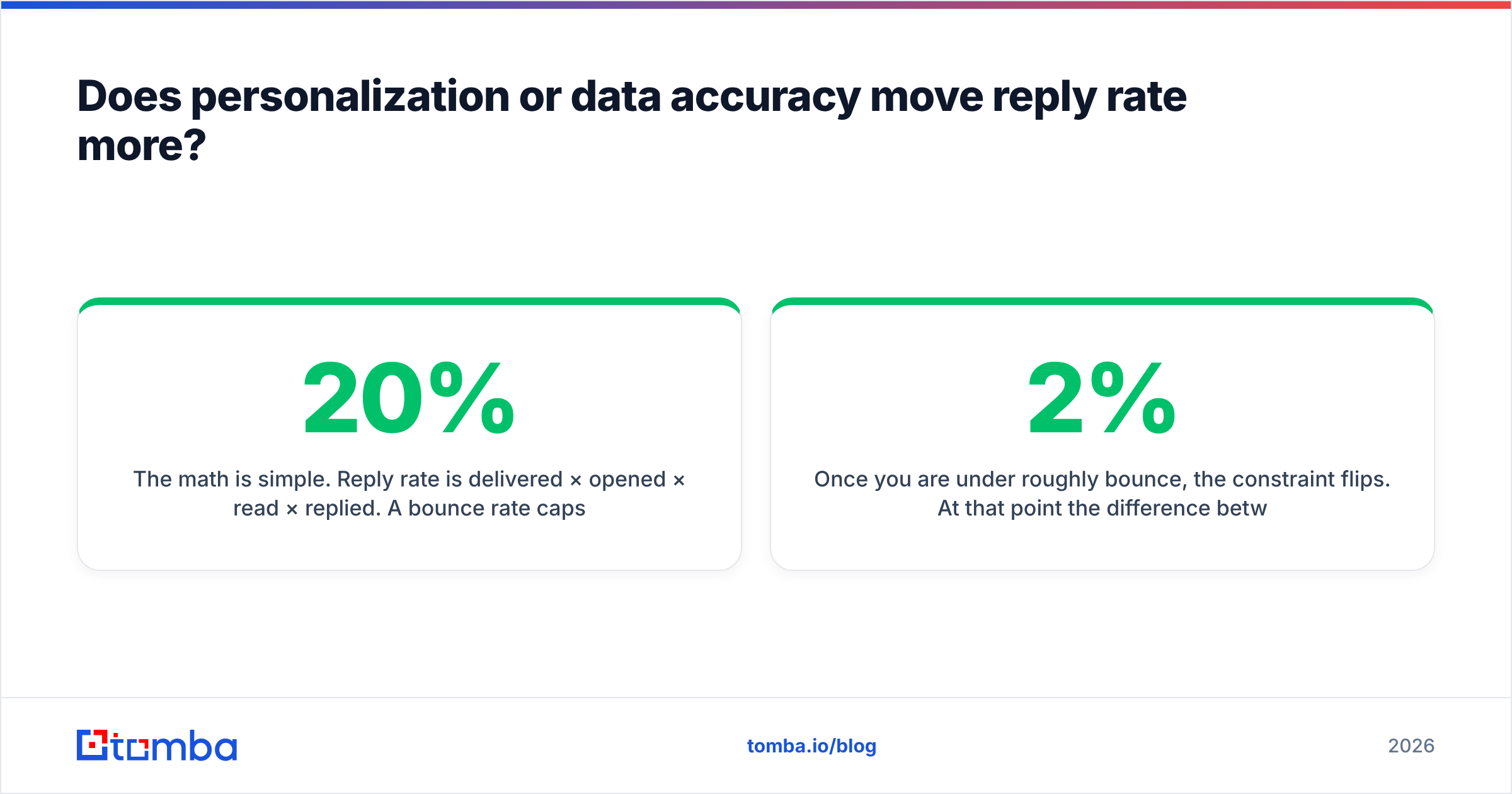
The math is simple. Reply rate is delivered × opened × read × replied. A 20% bounce rate caps your ceiling at 80% of whatever the rest of the funnel produces, and it simultaneously degrades the inbox placement of the 80% that did deliver, because mailbox providers score you on the whole send. Fixing bounces is multiplicative; improving copy is additive.
Once you are under roughly 2% bounce, the constraint flips. At that point the difference between a generic template and a genuinely researched first line is large and well documented across HubSpot's sales research. This is where a Tailormails-style layer earns its money.
So the sequencing is: clean the list, then invest in the message. Teams that do it in the other order pay twice.
What will each one actually cost you?#
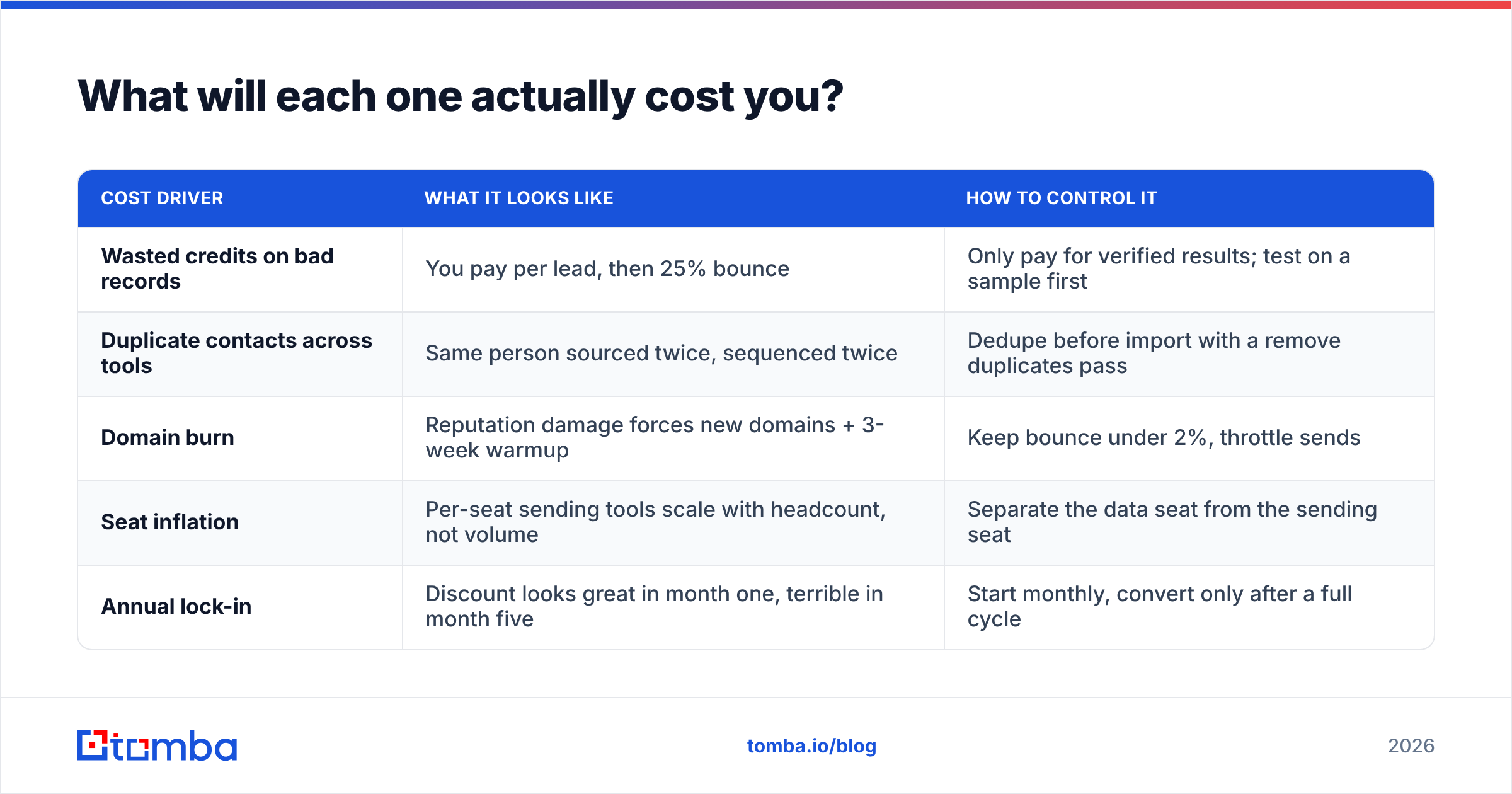
Sticker price is the least interesting number. Here is where outbound budgets actually leak:
| Cost driver | What it looks like | How to control it |
|---|---|---|
| Wasted credits on bad records | You pay per lead, then 25% bounce | Only pay for verified results; test on a sample first |
| Duplicate contacts across tools | Same person sourced twice, sequenced twice | Dedupe before import with a remove duplicates pass |
| Domain burn | Reputation damage forces new domains + 3-week warmup | Keep bounce under 2%, throttle sends |
| Seat inflation | Per-seat sending tools scale with headcount, not volume | Separate the data seat from the sending seat |
| Annual lock-in | Discount looks great in month one, terrible in month five | Start monthly, convert only after a full cycle |
For reference on the data side, Tomba's published tiers are a Free plan at 25 searches/month, Starter at $49/mo, Growth at $99/mo, Pro at $249/mo, and custom Enterprise pricing. That gives you a fixed anchor to compare any per-lead pricing against: divide the vendor's quoted cost-per-lead by your realistic usable-rate (post-verification) to get the true number.
Where does Tomba fit in the Jet Leads Pro vs Tailormails comparison?#
Tomba is not a sequencer and does not write your emails. It is the data layer underneath both — which is why it is a complement to Tailormails rather than a competitor, and a direct alternative to the sourcing half of Jet Leads Pro.
Practically, that means:
- Domain search to pull every discoverable address at a target company, with roles and confidence scores attached.
- Email finder when you already have a name and a company and need the one address.
- Verification and catch-all checks before anything enters a sequence, so your bounce rate never becomes a deliverability problem.
- Bulk email finder plus API/Sheets/Excel access when you are enriching thousands of rows rather than dozens.
If what you actually want is a pre-built static list you pay for once — rather than a search-and-verify workflow — BookYourData is a reasonable option in that model, and a lot of teams run a hybrid: a purchased base file, re-verified before every send.
Which should you choose for your team?#
Match the tool to your bottleneck, not to the louder ad:
- You have no list at all. Start with a sourcing layer. Trial Jet Leads Pro alongside a verification-first provider on the same 200-contact sample and compare usable output, not raw output.
- You have a list that bounces. Do not buy a copywriting tool. Run the list through verification, quarantine the catch-alls, and re-measure. This is usually a one-week fix.
- You have clean data and flat replies. This is Tailormails' actual use case. Personalization at scale is a real lever once delivery is solved.
- You are a one-person GTM team. Pick one sourcing tool with an API and one sending tool. Three overlapping subscriptions is the most common early mistake.
- You are running multi-channel. Add phone numbers and LinkedIn to the same records rather than buying a separate database per channel.
What else do buyers ask about Jet Leads Pro vs Tailormails?#
Can I use both together? Yes, and it is the most common setup: source with one, personalize and send with the other. Just make sure verification happens between the two steps, not after.
Is one cheaper? They price on different units — leads versus sending capacity — so a raw price comparison is meaningless. Compare cost per delivered, correctly targeted email instead.
Do I still need a separate verifier? If your sourcing tool verifies at export and flags catch-alls explicitly, no. If it does not say, assume no and add one. A free email checker will tell you in five minutes whether a sample list is clean.
Which has better support for EU data? Ask both vendors for their lawful-basis documentation in writing before you buy. Do not rely on a comparison post — including this one — for a compliance decision.
Ready to fix the data half first?#
Whichever side of the Jet Leads Pro vs Tailormails decision you land on, the contacts underneath have to be real. Start with the Tomba Email Finder — 25 free searches a month, no card, with verification and catch-all detection built into the same workflow. Run your next 200 prospects through it, compare the bounce rate against your current list, and let the numbers decide which tool you actually need next.
Related guides#
// get started
Find, verify and enrich your first contacts today
Start on the free plan with 25 searches a month, then scale when your team is ready.
Free plan · No credit card required · GDPR & CCPA
// about the author