Jet Leads Pro vs The Data City: Which B2B Data Tool Wins
One sells ready-made contact lists, the other sells a live map of what companies actually do. Here is how Jet Leads Pro and The Data City really compare — and which one belongs in your outbound stack in 2026.
TL;DR — Jet Leads Pro vs The Data City in 30 seconds
- They are not the same kind of tool. Jet Leads Pro sells contact lists and lead exports. The Data City sells company data — a live read of what firms actually do, weighted heavily toward the UK.
- Pick The Data City if your problem is "who should we target?" It is built for market sizing, sector maps, and finding firms that no SIC code describes well.
- Pick Jet Leads Pro if your problem is "give me rows I can email today." It is a volume play: names, titles, emails, export, send.
- Neither one is a safety net. Company data tools rarely promise an email will land. List vendors rarely re-check an address at export. That gap is where bounces come from.
- The 2026 stack is two tools, not one. Use one source to pick the accounts. Then use a finder like Tomba to get and check the real email address before you send.
What are Jet Leads Pro and The Data City?#
Start with the honest framing. Most "X vs Y" pages blur it. These two products solve different halves of one problem.
The Data City (thedatacity.com) is a UK-founded company data platform. Its core idea is simple. Old industry codes are too slow and too broad to describe modern firms. A carbon-accounting startup and a boiler parts seller can sit under near-identical legacy codes.
Its fix is Real-Time Industrial Classification. The system reads company websites and public records. Then it sorts firms into new sectors — net zero, agritech, creative industries, advanced manufacturing — that old code lists miss. Its heaviest users are councils, growth agencies, investors, and research teams. They need market maps they can defend.
Jet Leads Pro sits at the other end. It is a B2B lead list product. You filter by industry, place, company size and job title. Then you export a CSV of prospects with emails, and sometimes phone numbers. It is a familiar shape. Dozens of database-and-export tools sold to SDR teams and agencies look just like it. Public docs are thin. Pricing is not always published. That is a data point in itself.
Here is the one-sentence version. The Data City tells you which firms matter. Jet Leads Pro tells you which mailboxes to hit. Mix the two up and you get one of two bad outcomes: a clean target list you cannot contact, or a 40,000-row CSV of the wrong people.

Jet Leads Pro vs The Data City: how do they compare head to head?#
Here is the side-by-side on what actually changes your workflow. Where a vendor does not publish a figure, this table says so rather than inventing one.
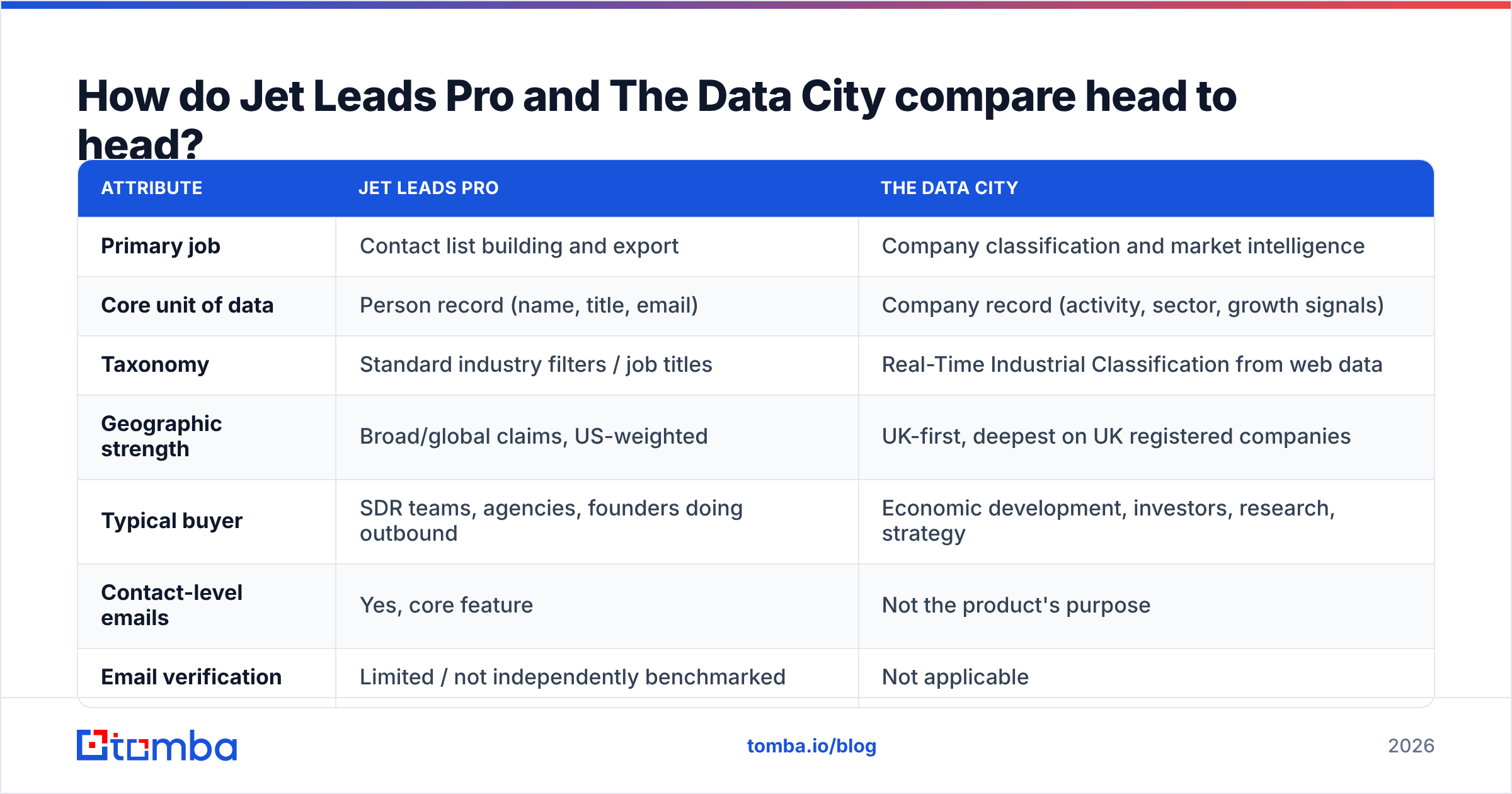
| Attribute | Jet Leads Pro | The Data City |
|---|---|---|
| Primary job | Contact list building and export | Company classification and market intelligence |
| Core unit of data | Person record (name, title, email) | Company record (activity, sector, growth signals) |
| Taxonomy | Standard industry filters / job titles | Real-Time Industrial Classification from web data |
| Geographic strength | Broad/global claims, US-weighted | UK-first, deepest on UK registered companies |
| Typical buyer | SDR teams, agencies, founders doing outbound | Economic development, investors, research, strategy |
| Contact-level emails | Yes, core feature | Not the product's purpose |
| Email verification | Limited / not independently benchmarked | Not applicable |
| Pricing transparency | Not consistently published | Quote-based subscription |
| API access | Varies by plan | Yes, on higher tiers |
| Best for | Volume outbound | Defensible targeting and TAM work |
Two things jump out of that table.
First, there is almost no feature overlap. You are not picking between them on a feature checklist. You are picking which problem you have this quarter.
Second, both leave the same hole. Neither is built to protect your send. The Data City never claims to be. List vendors often imply it without showing how they check. That version is the more dangerous one.
Which tool gives you better targeting?#
The Data City, by a wide margin — as long as your market is the UK.
Old code systems like SIC codes were built decades ago for stats, not for finding buyers. A firm picks a code when it registers. Most never update it. The Data City argues that a website is a fresher description than a code chosen at sign-up. In practice, that holds up. You can build a list of firms whose sites show live heat-pump work in Yorkshire. The old way meant three overlapping codes and hours of cleanup.
That precision matters more than most outbound teams admit. A 2,000-account list where 80% fit beats a 20,000-account list where 15% fit. Fewer sends. Higher response rate. Less domain damage from blasts nobody wanted.
Where The Data City gets weaker:
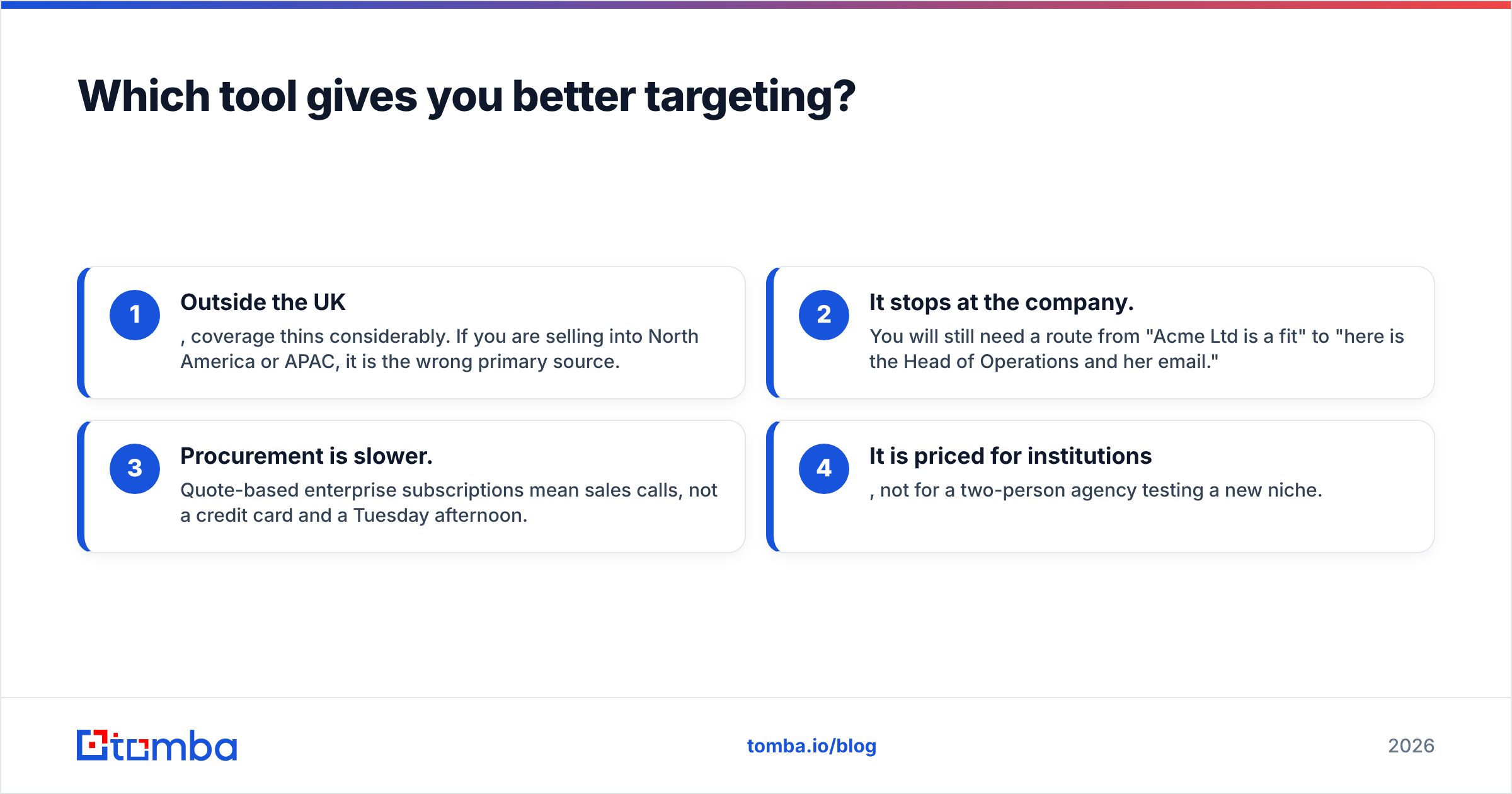
- Outside the UK, coverage thins fast. Selling into North America or APAC? It is the wrong primary source.
- It stops at the company. You still need a path from "Acme Ltd fits" to "here is the Head of Operations and her email."
- Buying is slower. Quoted yearly deals mean sales calls, not a credit card and a spare hour.
- It is priced for institutions, not for a two-person agency testing a new niche.
Jet Leads Pro flips all four. You filter, you export, you are sending within the hour. The cost of that speed is precision. Standard filters return standard results. Every rival in your category pulls from a similar well.
How does pricing compare?#
Here an honest comparison has to admit its limits. The Data City sells quoted yearly deals. Public list pricing is not the model. Jet Leads Pro has not published stable prices either. Pricing pages that move or vanish are worth noting before you sign up for a year.
What you can compare is the pricing model. Models predict your real cost better than headline numbers do.
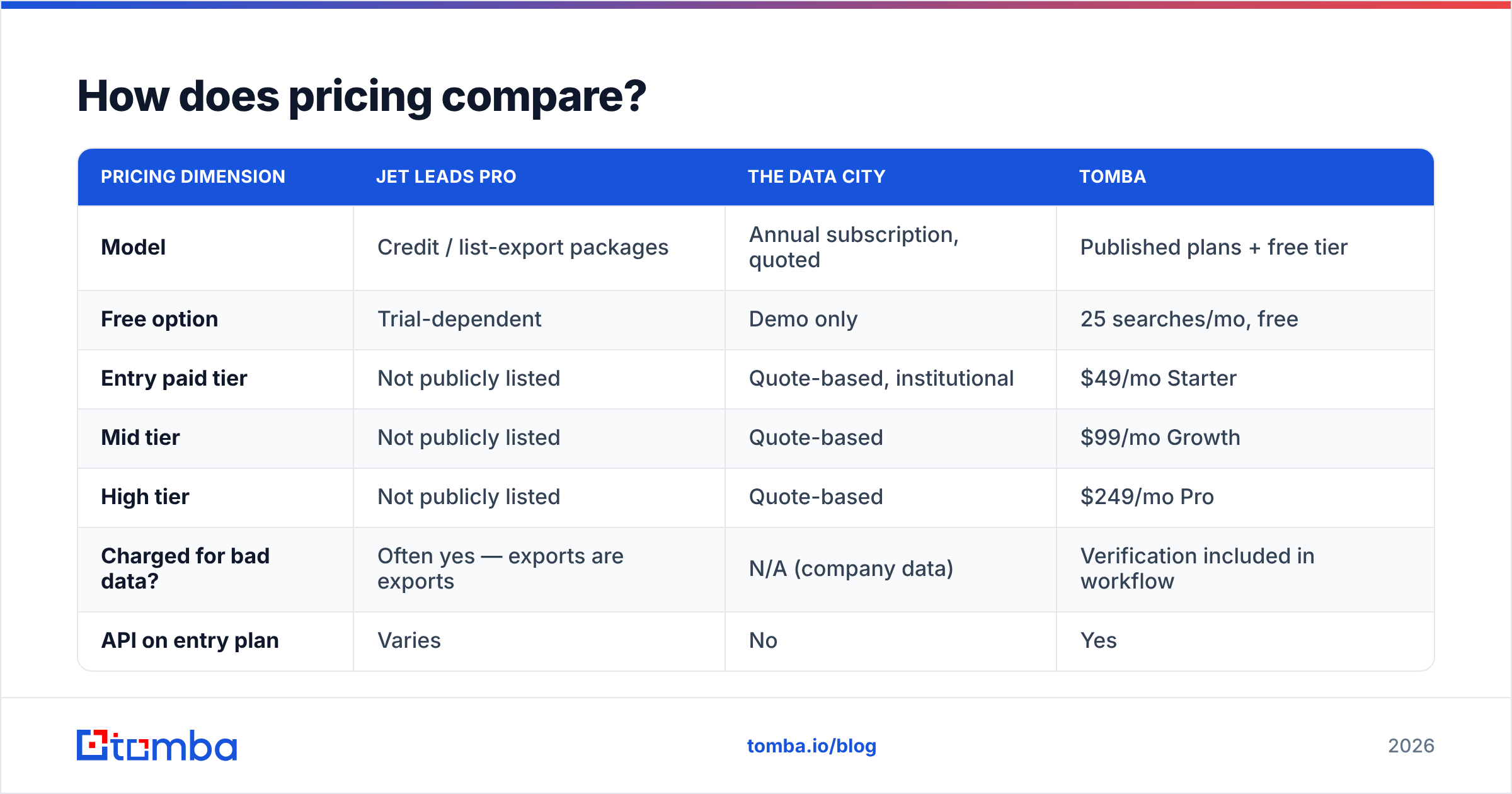
| Pricing dimension | Jet Leads Pro | The Data City | Tomba |
|---|---|---|---|
| Model | Credit / list-export packages | Annual subscription, quoted | Published plans + free tier |
| Free option | Trial-dependent | Demo only | 25 searches/mo, free |
| Entry paid tier | Not publicly listed | Quote-based, institutional | $49/mo Starter |
| Mid tier | Not publicly listed | Quote-based | $99/mo Growth |
| High tier | Not publicly listed | Quote-based | $249/mo Pro |
| Charged for bad data? | Often yes — exports are exports | N/A (company data) | Verification included in workflow |
| API on entry plan | Varies | No | Yes |
The line that costs teams the most money is second from the bottom. When you buy a list, you pay for every row. That includes the 15–25% that will bounce.
Do the math on your own numbers. A 10,000-row export with a 20% bad rate is 2,000 rows of pure waste. Then add the harm those sends do to your sending name. You can check your own lists with a free email checker before you renew anything. Tomba's published pricing is there so you can run that math up front, not after the invoice.
What about data accuracy and bounce rates?#
Accuracy means two different things here. Vendors use that gap.
Label accuracy — is this firm described right? That is The Data City's strength and its whole reason to exist. Its RTIC method is open enough for a research team to defend it to a board. That is exactly why public bodies and investors buy it.
Contact accuracy — will this email reach a human? That is a separate craft. It rests on MX checks, SMTP checks, catch-all handling, role-account flags, and how fresh the source is. A database that was right eighteen months ago is not right today. B2B contact data decays about 2–3% a month. Over a year, that is a third of your list.
This is the trap in any static list, whoever sells it. The CSV does not know your prospect left in March. Three defences actually work:
- Check at send time, not at buy time. Run the list through an email verifier right before the campaign, not when you bought it.
- Rebuild rather than inherit. Do not trust a stored address. Re-derive it from the company domain with domain search so you work from current patterns.
- Treat catch-all domains as their own bucket. They accept everything and tell you nothing. Segment them and send at lower volume.
Skip all three and you learn the hard way. The signal arrives through your sender reputation rather than through a report.

Is one a replacement for the other?#
No. The vendors would mostly agree.
A 2026 go-to-market stack has three layers. These two products sit in different ones.
- Layer 1 — Targeting. Define the account universe. The Data City is excellent here for UK markets. Other databases cover other regions.
- Layer 2 — Contact resolution. Turn accounts into named people with working email addresses. That is a specialist job, and it is where dedicated finders live.
- Layer 3 — Execution. Sequencing, sending, reply handling, CRM sync.
Jet Leads Pro folds layers 1 and 2 into one export. That is genuinely handy. For a founder testing a niche with 300 emails, it may be enough.
It breaks at scale. The targeting is only as good as the generic filters. The contact data is only as fresh as the last refresh. You get no view into either one.
A cleaner split looks like this. Use whichever source gives you the best account list for your market. Then resolve the contacts yourself. With bulk email finding, you upload the domains and roles you care about. You get back current, checked addresses. You pay for contacts you actually want, not for a list someone else assembled. Need headcount or tech stack on those records? Data enrichment fills the gaps without a second subscription.
Which should you choose?#
Run the Jet Leads Pro vs The Data City decision as a tree, not a scorecard.
- Choose The Data City if your market is UK-focused and your real question is which firms exist in this new sector. Research teams, growth bodies, investors and strategy functions get value that no contact database matches. Budget for a yearly deal and a buying process.
- Choose Jet Leads Pro if you need rows today, your ICP is broad, and your market is US-weighted. Expect cleanup. Ask for a sample export before you pay. Then check that sample yourself. A vendor sure of its data will not object.
- Choose neither on its own if bounce rate is a number you are judged on. Both leave the checking to you.
- Choose a hybrid — most strong teams do. One source for accounts. One finder for contacts. One tool to send. Three tools that each do one job well beat one tool that does three jobs adequately.
Before you sign, read recent reviews on G2 for both vendors. Weight new reviews far above old ones. Data quality in this category moves fast. A five-star review from three refresh cycles ago tells you little about the database you would buy today.
Where does Tomba fit in this comparison?#
In one layer, on purpose.
Tomba is not trying to be a market data platform. The Data City does that job better, and pretending otherwise would be dishonest. Tomba covers the layer both of these tools leave open. Give it a company domain and a person's name. Get back a current, checked email address. The check is built into the same flow, not sold as an add-on.
So you keep your targeting source, whatever it is. Export the account list from The Data City, or from any other tool. Then run it through the Tomba Email Finder to resolve real contacts at those domains. The free tier gives you 25 searches a month, so you can test accuracy on your own accounts first. Starter is $49/mo, Growth $99/mo, and Pro $249/mo when you scale. API access starts on the entry plan, so you can wire resolution straight into your CRM.
The one action worth taking today: take twenty accounts from your current list provider. Run them through Tomba. Compare what comes back with what you were sold. If the addresses match, your vendor is doing its job. If they do not, you just found your bounce rate. The fix costs less than the wasted sends. Start with the free tier and find out.
Related guides#
// get started
Find, verify and enrich your first contacts today
Start on the free plan with 25 searches a month, then scale when your team is ready.
Free plan · No credit card required · GDPR & CCPA
// about the author