Job Change Outreach Email: Templates and Timing That Work
A contact who just changed jobs is the warmest lead in your CRM — for about 90 days. Here's the timing window, the data problem nobody talks about, and five job change outreach email templates that actually get replies.
TL;DR
- A job change outreach email is a message you send when a known contact — a past champion, buyer, user, or evaluator — moves to a new company or a new role. It is the highest-intent trigger most teams already own and never use.
- The window is real but short. Days 15–45 in the new role is the sweet spot: past onboarding chaos, before the budget and vendor stack are locked.
- The reason most teams skip it isn't strategy, it's data. Your CRM holds the old address at the old domain, and that address is dead the day they leave.
- Five templates below cover the two plays that matter: following the person to their new company, and working the seat they vacated.
- The fix for the data half is mechanical: detect the move, resolve the new company's email pattern, find the new address, verify it before you send.
What is a job change outreach email?#
A job change outreach email is a message triggered by a person moving — not by a list, a webinar, or a scraped ICP filter. Someone in your database changes employers or gets promoted, and you reach out on the back of that event.
Think of it like a moving van parked outside a house. The people inside just threw out half their furniture and have a budget to replace it, and for a few weeks they're actively shopping. Three months later the rooms are full and nobody's buying a couch. Job changes work the same way: new executives arrive with a mandate, a discretionary budget, and a short honeymoon period where changing vendors is expected rather than political.
There are three distinct flavors, and conflating them is the most common mistake:
- The champion who left. Someone who used, loved, or bought your product has landed somewhere new. They already know your value. This is warm outbound dressed as a congratulations note, and it converts unlike anything else in your pipeline.
- The vacant seat. Your champion left, which means an account you already serve now has a stranger in the buying chair. This is a retention play disguised as prospecting — and ignoring it is how healthy accounts churn at renewal.
- The cold prospect who just got promoted. No prior relationship, but a legitimate reason to reach out now instead of at a random Tuesday in Q3. Weakest of the three, still better than a cold sequence with no trigger.
Each one needs a different email. The congratulations-template-for-everyone approach is why most job change outreach reads like an automated LinkedIn notification.
Why does a job change beat almost every other trigger?#
Because it resets three things at once: budget authority, vendor loyalty, and the cost of saying yes.
A new VP of Marketing inherits a stack they did not choose. Half of it annoys them. They are explicitly hired to change things, and for roughly one quarter nobody questions why they're taking vendor calls. Compare that to the same person eighteen months in, when swapping tools means admitting a mistake and renegotiating a contract they signed.
There's a second, quieter reason: your champion carries your product in their head. Enterprise sales research from firms like Gartner consistently shows that the bulk of a B2B buying cycle happens before a vendor is ever contacted — buyers form a shortlist from memory and peer recommendation. A former user arriving at a new company is that shortlist. You're not creating demand; you're being remembered.
The catch is that this only works if you catch the move. Job-change signals decay faster than almost any other buying signal, which is why the trigger is worth so much less at month six than at week three.

When should you send the job change outreach email?#
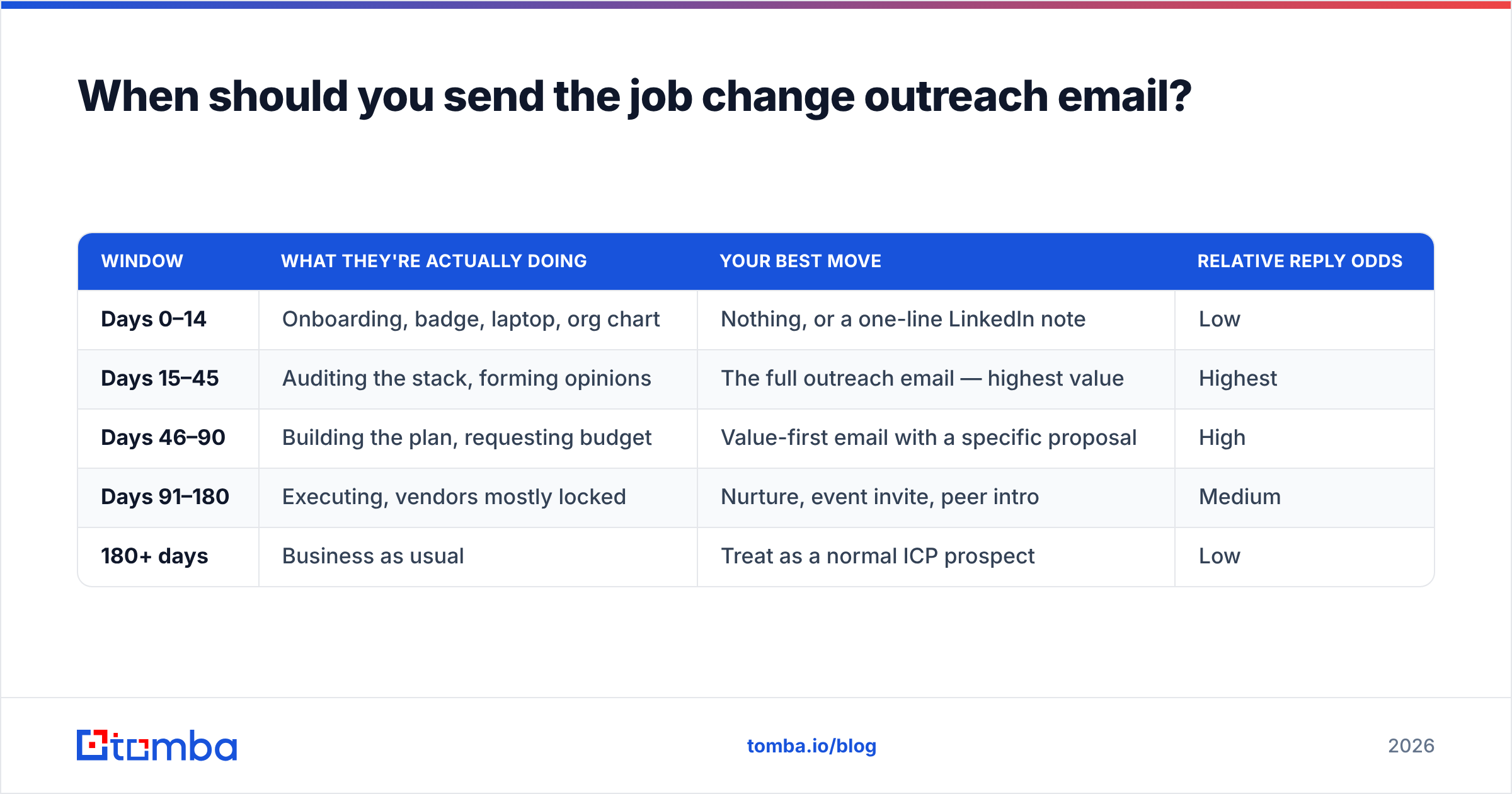
Not on day one. A congratulations email that lands on someone's first morning gets buried under IT tickets, benefits enrollment, and forty other congratulation notes.
| Window | What they're actually doing | Your best move | Relative reply odds |
|---|---|---|---|
| Days 0–14 | Onboarding, badge, laptop, org chart | Nothing, or a one-line LinkedIn note | Low |
| Days 15–45 | Auditing the stack, forming opinions | The full outreach email — highest value | Highest |
| Days 46–90 | Building the plan, requesting budget | Value-first email with a specific proposal | High |
| Days 91–180 | Executing, vendors mostly locked | Nurture, event invite, peer intro | Medium |
| 180+ days | Business as usual | Treat as a normal ICP prospect | Low |
Two notes on this table. First, the 15–45 day window assumes a mid-market or enterprise role; at a 20-person startup the whole cycle compresses to about half that. Second, "relative reply odds" means relative to your own baseline, not an industry benchmark — measure it against your current cold sequence rather than against someone's blog post.
If you are tracking job changes at scale, front-load the calendar. A move detected in week six is worth several times a move detected in month five, so the detection layer matters as much as the copy.
How do you find the new email address after someone changes jobs?#
This is where most job change programs quietly die. You detect the move, you write a good email — and you send it to sarah@oldcompany.com, which now bounces into a disabled mailbox, or worse, sits in an unmonitored alias while your sender reputation takes the hit.
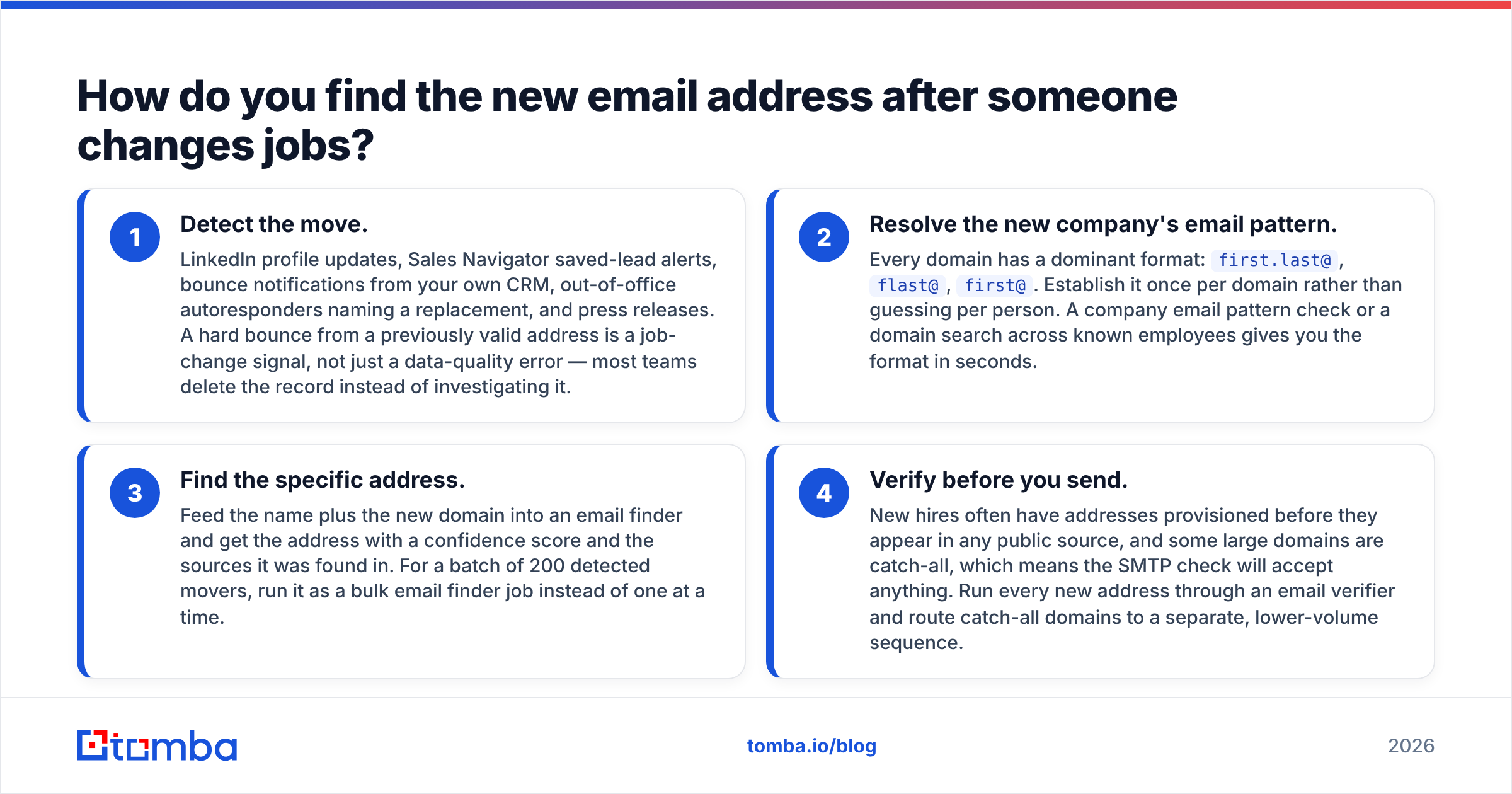
The mechanical fix is a four-step chain:
- Detect the move. LinkedIn profile updates, Sales Navigator saved-lead alerts, bounce notifications from your own CRM, out-of-office autoresponders naming a replacement, and press releases. A hard bounce from a previously valid address is a job-change signal, not just a data-quality error — most teams delete the record instead of investigating it.
- Resolve the new company's email pattern. Every domain has a dominant format:
first.last@,flast@,first@. Establish it once per domain rather than guessing per person. A company email pattern check or a domain search across known employees gives you the format in seconds. - Find the specific address. Feed the name plus the new domain into an email finder and get the address with a confidence score and the sources it was found in. For a batch of 200 detected movers, run it as a bulk email finder job instead of one at a time.
- Verify before you send. New hires often have addresses provisioned before they appear in any public source, and some large domains are catch-all, which means the SMTP check will accept anything. Run every new address through an email verifier and route catch-all domains to a separate, lower-volume sequence.
Skipping step four is the expensive mistake. Job-change lists are, by definition, full of brand-new mailboxes — exactly the population where verification matters most. A batch of unverified movers can push a healthy sending domain into spam-folder territory in a single afternoon, and the email deliverability damage takes weeks to undo.

Which job-change tracking setup should you use?#
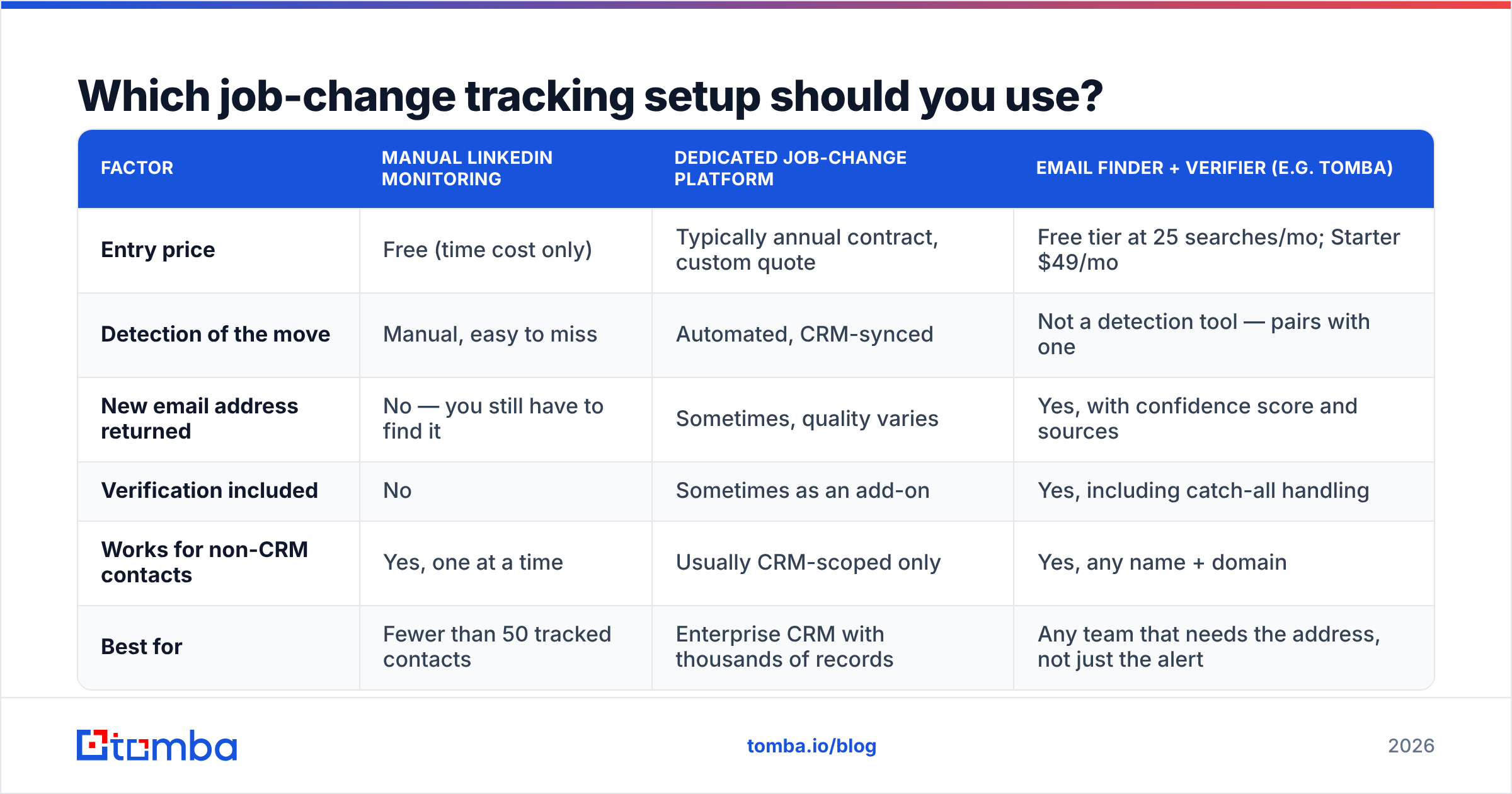
You have three realistic options, and they are not mutually exclusive. Most teams end up combining a detection source with a resolution layer.
| Factor | Manual LinkedIn monitoring | Dedicated job-change platform | Email finder + verifier (e.g. Tomba) |
|---|---|---|---|
| Entry price | Free (time cost only) | Typically annual contract, custom quote | Free tier at 25 searches/mo; Starter $49/mo |
| Detection of the move | Manual, easy to miss | Automated, CRM-synced | Not a detection tool — pairs with one |
| New email address returned | No — you still have to find it | Sometimes, quality varies | Yes, with confidence score and sources |
| Verification included | No | Sometimes as an add-on | Yes, including catch-all handling |
| Works for non-CRM contacts | Yes, one at a time | Usually CRM-scoped only | Yes, any name + domain |
| Best for | Fewer than 50 tracked contacts | Enterprise CRM with thousands of records | Any team that needs the address, not just the alert |
The honest read: dedicated job-change platforms are excellent at the detection half and priced accordingly. If your CRM has 40,000 contacts and you need automated alerts wired into HubSpot or Salesforce, that category earns its cost. If you're a smaller team that already sees moves in LinkedIn or via bounces, the gap you're actually paying to close is the address itself — and that's a much cheaper problem. You can compare the broader category on G2's sales intelligence listings before committing to an annual contract. Tomba's pricing runs Free (25 searches/mo), Starter $49/mo, Growth $99/mo, and Pro $249/mo, with an API if you want the resolution step running inside your own workflow.
What should the job change outreach email actually say?#
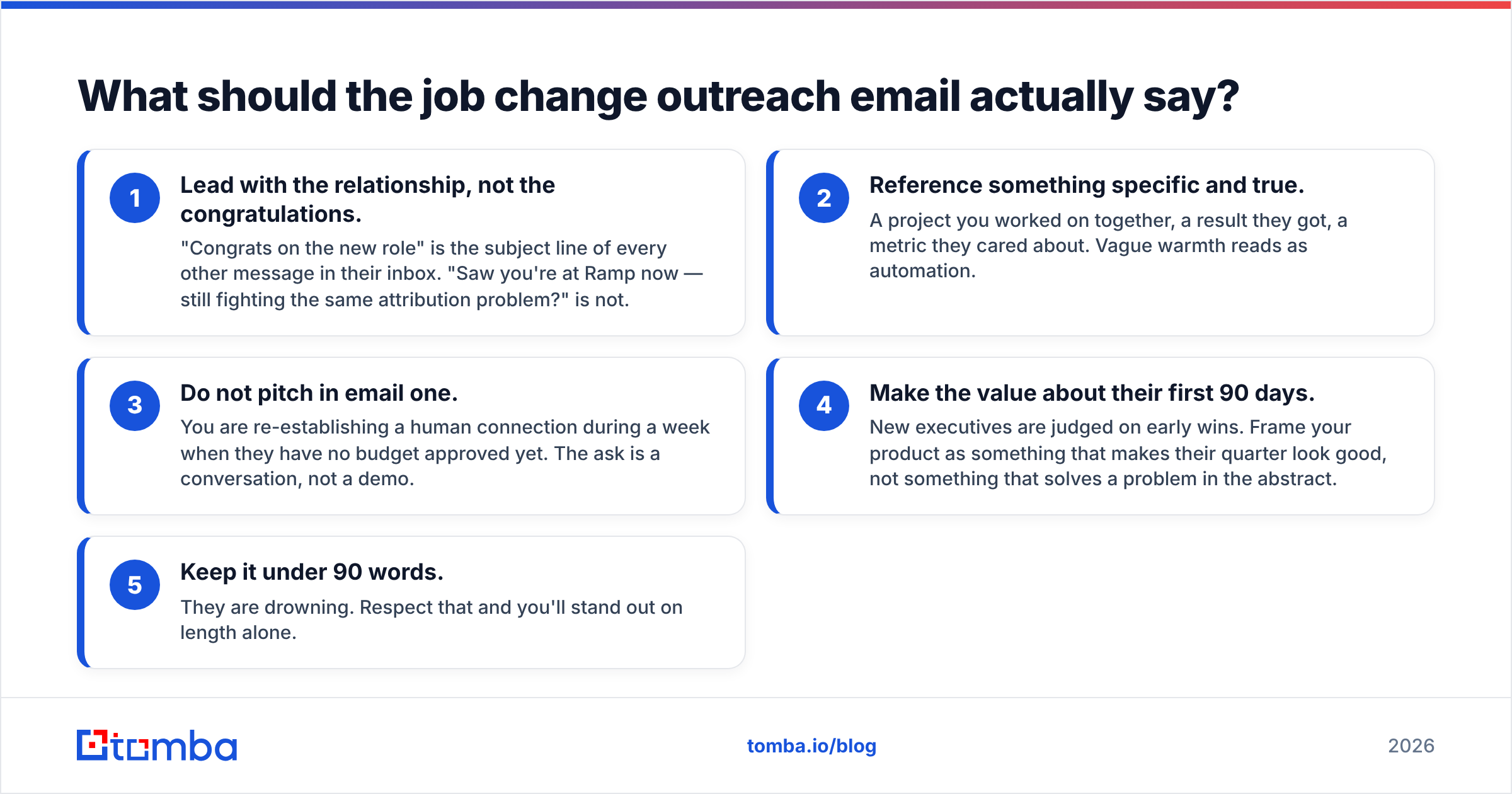
Five rules, then the templates.
- Lead with the relationship, not the congratulations. "Congrats on the new role" is the subject line of every other message in their inbox. "Saw you're at Ramp now — still fighting the same attribution problem?" is not.
- Reference something specific and true. A project you worked on together, a result they got, a metric they cared about. Vague warmth reads as automation.
- Do not pitch in email one. You are re-establishing a human connection during a week when they have no budget approved yet. The ask is a conversation, not a demo.
- Make the value about their first 90 days. New executives are judged on early wins. Frame your product as something that makes their quarter look good, not something that solves a problem in the abstract.
- Keep it under 90 words. They are drowning. Respect that and you'll stand out on length alone.
Template 1 — the champion who moved (warmest)
Subject: Ramp → congrats, and a question
Sarah — saw the move to Ramp. Congrats.
When we worked together at Notion you cut lead-response time from 14 hours to under 2. Curious whether Ramp has that problem yet, or whether it's further down your list this quarter.
Happy to share what the rollout looked like on your side, purely so you don't have to rebuild it from scratch. No pitch — I know you've got a month of onboarding ahead.
— Marcus
Template 2 — the vacant seat (retention play)
Subject: Picking up where Sarah left off
Hi David — I worked with Sarah on the demand-gen side before she left for Ramp. Congrats on stepping into the role.
Rather than a status call, I put together a one-page summary of what's live, what's mid-rollout, and the two things Sarah flagged as unfinished. Want me to send it over?
If you'd rather rip it all out and start clean, that's a fair conversation too.
Template 3 — the promotion (no prior relationship)
Subject: new title, same 40 reps?
Hi Priya — saw you moved from Director to VP of Sales at Clearco.
Most people making that jump tell us the first thing that breaks is pipeline visibility across a team that suddenly doubled. If that's on your list for Q4, I can show you how three companies your size handled it — 12 minutes, no deck.
If it isn't on your list, tell me what is and I'll stop guessing.
Template 4 — the follow-up (day 5, no reply)
Subject: re: Ramp → congrats, and a question
Sarah — assuming your first weeks are exactly as loud as mine were. Bumping this once in case it's useful.
One line back — "not now" or "ping me in March" — and I'll work around your calendar instead of your inbox.
Template 5 — the referral ask (when they say not now)
Subject: quick one
Totally understood — March it is.
One thing before I disappear: is anyone on your new team already looking at this? If there's a better person to talk to now, I'd rather not sit on it for four months.
What kills reply rates on job change outreach?#
Sending to the guessed address without verifying it. Permutation guessing gets you a plausible address, not a deliverable one. Guessing at scale is how a warm-trigger campaign becomes a sender reputation problem.
Sending on day one. You look like a bot with a LinkedIn webhook, because you are.
Congratulating them on the wrong job. Profile updates lag reality in both directions. Confirm the company from a second source — the new domain's team page, a press release, or the address itself resolving at the new domain — before you name the role.
Treating the vacant seat as dead. When a champion leaves, most reps mark the account "at risk" and do nothing. The new occupant is the single most winnable conversation in your territory that month, and they're currently being courted by three competitors who did notice.
One email and out. Job-change outreach converts on the second and third touch far more than the first. Their inbox during week three is not a fair test of your message.
No CRM write-back. If the new address, new company, and move date never make it back into the record, you'll repeat the same lookup next quarter. Push it through data enrichment so the contact object stays current instead of decaying.
How do you operationalize this without a full-time researcher?#
Run it as a weekly 30-minute ritual, not a project:
- Monday: export every hard bounce and every LinkedIn alert from the past seven days. Both are job-change signals.
- Monday +10 min: resolve the new domains and find the new addresses in one batch run.
- Monday +20 min: verify the batch, drop the invalids, split catch-alls into a low-volume lane.
- Tuesday: send. Personalize the first line by hand — that's the part that actually earns the reply, and it takes about 40 seconds per contact.
- Friday: log outcomes, update the CRM, and note anyone who said "ping me in March" so the calendar reminder exists.
Thirty people a week is 1,500 a year of the warmest outbound available to you, built entirely from contacts you already earned.
Ready to stop losing contacts when they change jobs? Tomba's Email Finder resolves a name plus a new company domain into a verified, deliverable address — with a confidence score and the sources behind it — so your job change outreach email reaches the person instead of a disabled mailbox. Start on the free tier at 25 searches a month, and move to Starter at $49/mo when the weekly ritual sticks.
Related guides#
// get started
Find, verify and enrich your first contacts today
Start on the free plan with 25 searches a month, then scale when your team is ready.
Free plan · No credit card required · GDPR & CCPA
// about the author