Job Change Sales Outreach: The 2026 Playbook for New-Role Triggers
New-hire job changes are the highest-converting trigger in B2B — but most teams email the wrong week, with the wrong message, at a bounced address. Here's the timing, data, and scripts that actually work.

TL;DR
- Job change outreach works because a new executive has budget authority, a mandate to change things, and no loyalty to the incumbent vendor. Reply rates routinely land 2-3x above generic cold email.
- The window that matters is roughly day 14 to day 90. Before day 14 they're drowning in onboarding; after day 90 they've already picked their stack.
- The single biggest failure point isn't the copy — it's the data. A job change means a new email address on a new domain, and stale CRM records bounce hard enough to damage your sending reputation.
- Two trigger types are worth chasing: your champions who moved (warm, personal) and net-new buyers who just took a relevant title (cold, but well-timed).
- Build the workflow as: detect the move → re-find the email on the new domain → verify → personalize on the mandate, not the congratulations.
What is job change sales outreach?#
Job change sales outreach is prospecting triggered by someone starting a new role — either a past customer or champion who landed somewhere new, or a net-new prospect who just stepped into a title that owns your problem.
The everyday version: it's the difference between knocking on a stranger's door to sell kitchen renovations, and knocking on a door the week someone moved into the house. Same pitch, wildly different receptivity. The person who just moved in is actively making decisions about everything — the old owner's choices are all up for review.
Technically, it's a buying-signal play. B2B buying committees are usually frozen by inertia: there's an incumbent vendor, a sunk-cost contract, and nobody wants to own the risk of switching. A leadership change breaks that freeze. The new hire was often hired specifically to change something, and they typically have a 90-day honeymoon in which changing things is expected rather than punished.
Three structural reasons it converts:
- No incumbent loyalty. The new VP didn't sign the contract with your competitor. They inherited it. Criticizing it costs them nothing.
- A visible mandate. New leaders need early wins they can point to in their first quarterly review. A tool that shows results in six weeks is politically valuable to them.
- Budget reset. New leaders frequently get a budget review, headcount request, or tooling audit in their first quarter. You want to be in the consideration set while that's open.
- Warm history (for champions). If someone already bought from you and liked it, their new company is the lowest-friction deal in your pipeline. They don't need to be educated — they need a procurement path.
Why does the timing window matter so much?#
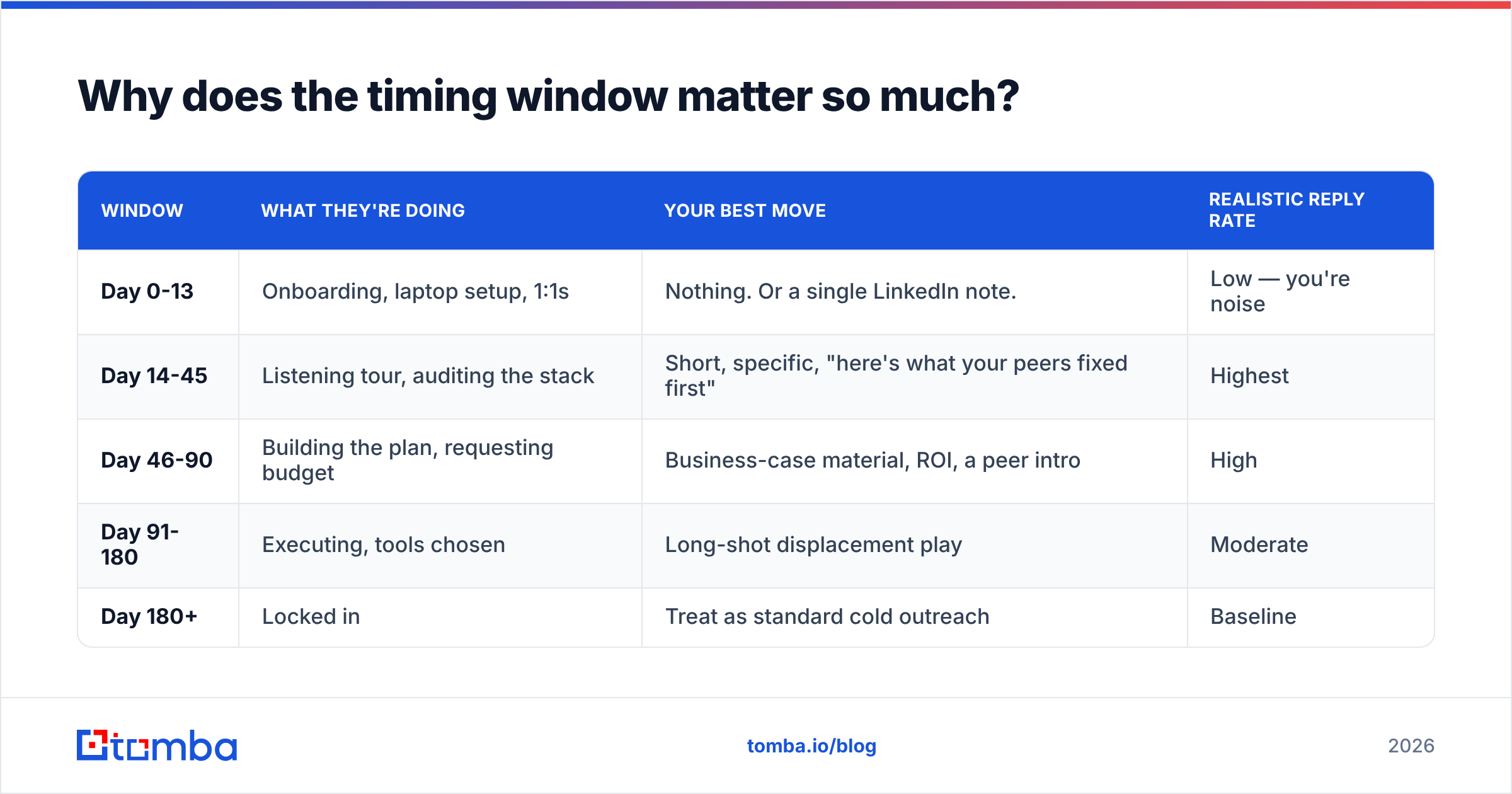
Because the same email sends three different messages depending on when it lands.
| Window | What they're doing | Your best move | Realistic reply rate |
|---|---|---|---|
| Day 0-13 | Onboarding, laptop setup, 1:1s | Nothing. Or a single LinkedIn note. | Low — you're noise |
| Day 14-45 | Listening tour, auditing the stack | Short, specific, "here's what your peers fixed first" | Highest |
| Day 46-90 | Building the plan, requesting budget | Business-case material, ROI, a peer intro | High |
| Day 91-180 | Executing, tools chosen | Long-shot displacement play | Moderate |
| Day 180+ | Locked in | Treat as standard cold outreach | Baseline |
The day 0-13 dead zone is where most automated "congrats on the new role!" sequences fire, because that's when the LinkedIn update is freshest and the data vendor flags it. That's the worst possible timing. The person has 400 unread emails, no context, and no authority yet. Your message is competing with HR paperwork.
Wait two weeks. By day 14 they've had enough 1:1s to know what's broken, and they're starting to form opinions. That's when a message that names a specific problem lands as useful rather than as spam.
One caveat on the table above: these are directional ranges from outbound teams running this play, not a controlled study. Your own numbers will shift by industry and deal size — enterprise cycles stretch every window, PLG motions compress them. Measure your own and adjust.
Which job changes should you actually track?#
Not all of them. Tracking every job change in your TAM produces noise you'll never action. Filter on three dimensions:
- Title relevance — did they take a role that owns your problem? A new VP of Sales matters to a sales tool. A new VP of Engineering at the same company probably doesn't.
- Company fit — is the new company in your ICP? Plenty of great champions move to companies you can't sell to. Log it, don't sequence it.
- Relationship history — did they ever touch your product, your content, a demo, a trial, or a closed-lost deal? This flips the message from cold to warm.
- Seniority delta — a lateral move is different from a promotion into budget authority. Someone who went from Director to VP just gained the ability to sign.
- Company-side vacancy — when your champion leaves an account you sell to, that's also a signal. Their replacement is a new relationship you need to build before renewal.
That last one gets missed constantly. Champion turnover is one of the most reliable predictors of churn — when the person who championed your tool leaves, the renewal is suddenly owned by someone with no context and no attachment. The same trigger that creates an opportunity at company B creates a risk at company A. Track both directions.
How do you find the new email address?#
This is the part that quietly kills most job-change programs.
Here's the problem in plain terms: your CRM has sarah@oldcompany.com. Sarah now works at newcompany.io. Your CRM has no idea. If your sequence fires at the old address, one of three things happens — it hard bounces, it sits in an abandoned inbox forever, or worse, it forwards to a shared team alias where a stranger reads your pitch.
Hard bounces are the expensive outcome. A batch of job-change emails hitting dead addresses pushes your bounce rate past the threshold where mailbox providers start throttling you, and that damages deliverability for every campaign you run, not just this one. Google and Yahoo both formalized bulk-sender requirements that make bounce hygiene non-optional — their published guidance treats repeated invalid sends as an abuse signal.
The fix is a three-step data flow:
- Detect the move. LinkedIn updates, news mentions, press releases, or a job-change feed from a data vendor. Free-tier version: a saved LinkedIn search plus Sales Navigator alerts on your champion list.
- Resolve the new company's email pattern. Every company has a dominant format —
first.last@,flast@,first@. Run a domain search on the new domain to see which pattern actually dominates, rather than guessing from one data point. - Find and verify the specific address. Use an email finder to resolve the person's address on the new domain, then push it through an email verifier before it ever touches a sequence. Never sequence an unverified job-change address — this is precisely the scenario where your data is guaranteed to be stale.
If you're processing moves in batches — say, a monthly sweep of your closed-lost list — a bulk email finder run is dramatically cheaper in time than one-by-one lookups. And if the new domain turns out to be catch-all (accepts everything, confirms nothing), a catch-all verifier is the difference between "probably fine" and a documented risk score you can decide on.
A practical note on catch-alls: roughly a fifth of B2B domains are configured this way, and they're overrepresented among the fast-growing startups your champions tend to join. Don't treat "catch-all" as "valid." Treat it as unknown, and either use a lower-volume sending domain for those or find a second channel.
What does a job change outreach tool stack cost?#
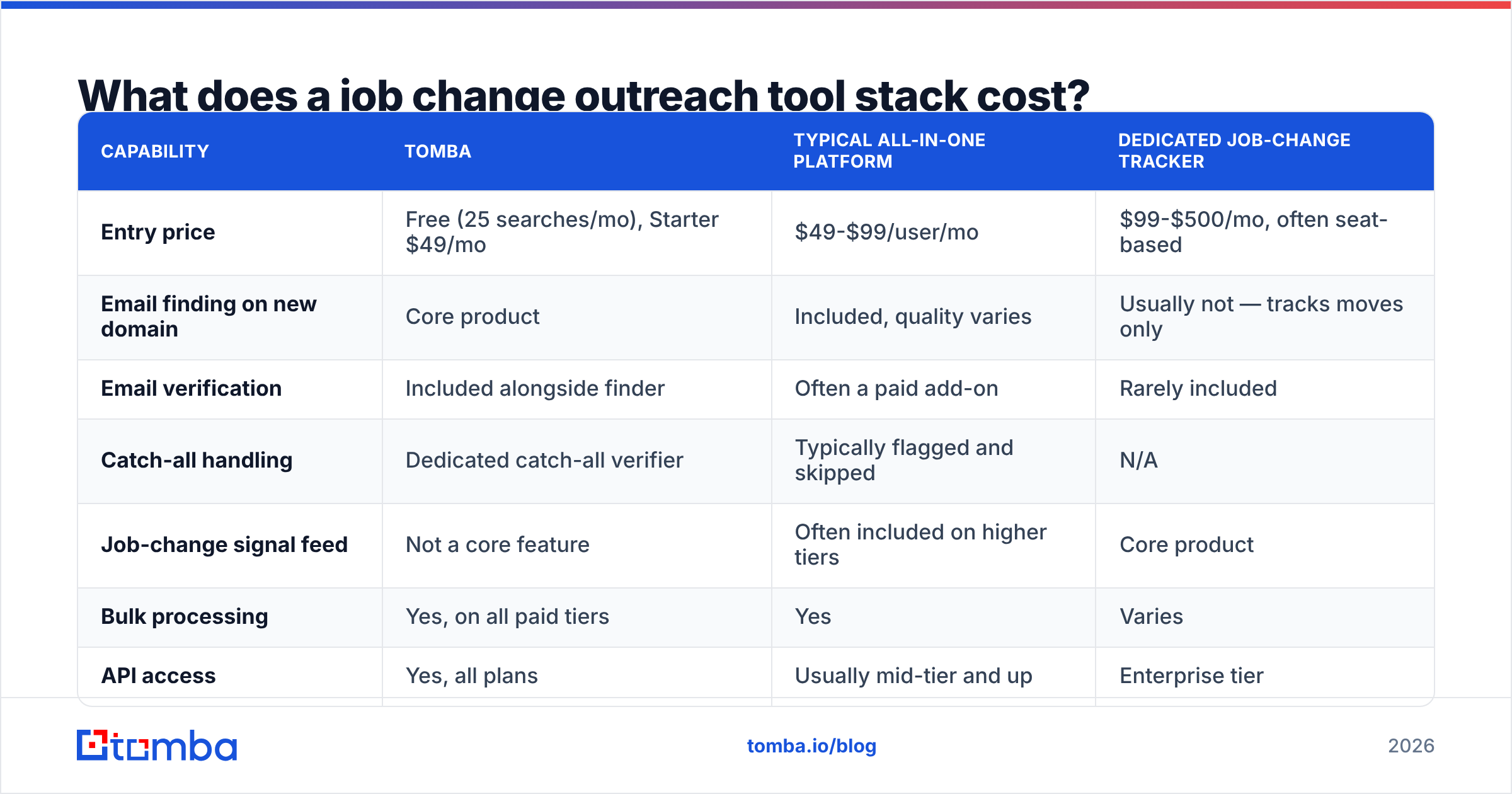
You need three capabilities: signal detection, contact resolution, and verification. Some platforms bundle all three; most teams assemble two or three tools.
| Capability | Tomba | Typical all-in-one platform | Dedicated job-change tracker |
|---|---|---|---|
| Entry price | Free (25 searches/mo), Starter $49/mo | $49-$99/user/mo | $99-$500/mo, often seat-based |
| Email finding on new domain | Core product | Included, quality varies | Usually not — tracks moves only |
| Email verification | Included alongside finder | Often a paid add-on | Rarely included |
| Catch-all handling | Dedicated catch-all verifier | Typically flagged and skipped | N/A |
| Job-change signal feed | Not a core feature | Often included on higher tiers | Core product |
| Bulk processing | Yes, on all paid tiers | Yes | Varies |
| API access | Yes, all plans | Usually mid-tier and up | Enterprise tier |
| Best for | Resolving and verifying the new address | Teams wanting one bill | Teams with a large champion base to monitor |
The honest read: no single tool does all three well and cheaply. Job-change detection is genuinely hard — it depends on scraping or licensing profile data at scale, and that's what the dedicated trackers charge for. Contact resolution and verification are a different discipline, closer to infrastructure.
A common and sensible split: use a signal source you already pay for (Sales Navigator alerts, your CRM's enrichment, or a dedicated tracker if your champion list is big enough to justify it), then run resolution and verification through a finder priced per lookup rather than per seat. Tomba's pricing runs Free (25 searches/mo), Starter $49/mo, Growth $99/mo, Pro $249/mo, with Enterprise custom — which means a 200-move-per-month program sits comfortably in the middle tier rather than needing a per-seat contract.
If you're evaluating bundled platforms, G2's sales intelligence category is a reasonable place to compare what's actually included per tier, since vendor pricing pages tend to bury the add-ons. Peers like BookYourData take a different angle — prepaid, pay-as-you-go B2B contact data rather than a subscription — which suits teams running job-change sweeps in occasional bursts rather than continuously.
What should the email actually say?#
Not "congratulations on the new role." That phrase is now a spam signal. Every automated sequence opens with it, and experienced buyers pattern-match it in half a second.
Write to the mandate, not the milestone.
Structure that works:
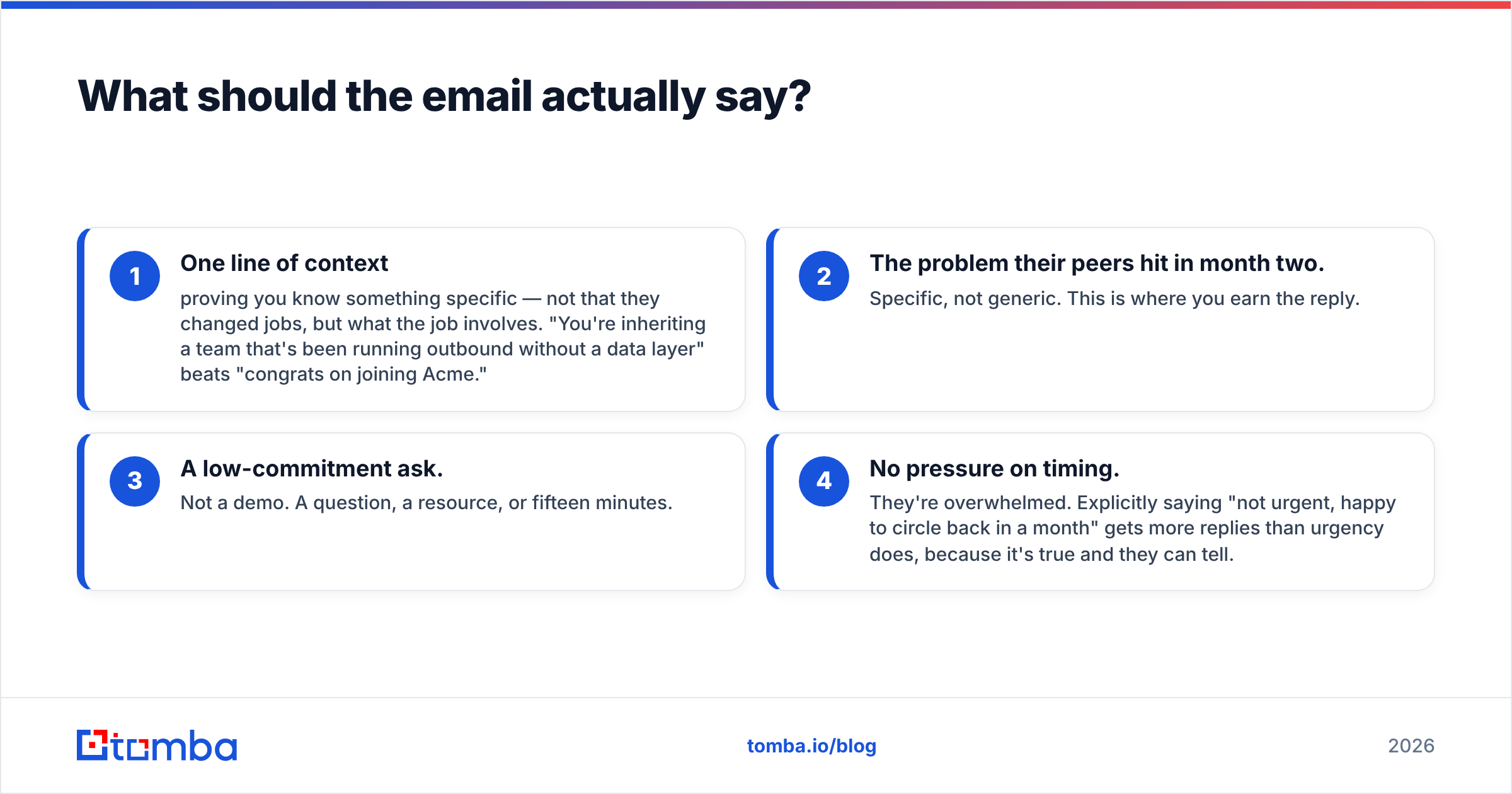
- One line of context proving you know something specific — not that they changed jobs, but what the job involves. "You're inheriting a team that's been running outbound without a data layer" beats "congrats on joining Acme."
- The problem their peers hit in month two. Specific, not generic. This is where you earn the reply.
- A low-commitment ask. Not a demo. A question, a resource, or fifteen minutes.
- No pressure on timing. They're overwhelmed. Explicitly saying "not urgent, happy to circle back in a month" gets more replies than urgency does, because it's true and they can tell.
For a champion who moved — a different email entirely:
Lead with the relationship, not the pitch. "You ran [tool] at [old company] — curious whether you've got the same setup at [new company], or whether you're rebuilding from scratch." Then get out of the way. This person already knows if they want your product. Your only job is to make it easy for them to raise their hand and to give them the procurement details when they do.
Do not send a champion the same nurture sequence you'd send a stranger. It's insulting and it burns the relationship. One email, personal, from a real person they recognize.
What to avoid:
- Referencing their LinkedIn update explicitly ("I saw you updated your profile") — it reads as surveillance.
- Sending on day 2. See the timing table.
- Multi-touch sequences of seven emails. Two or three, spaced wide, is right for this play.
- Attaching a one-pager to a first email. Nobody opens it.
If you want a starting point rather than a blank page, Tomba's library of cold email templates covers trigger-based openers you can adapt, and HubSpot publishes a well-tested set of sales email templates worth stealing structure from.
How do you measure whether it's working?#
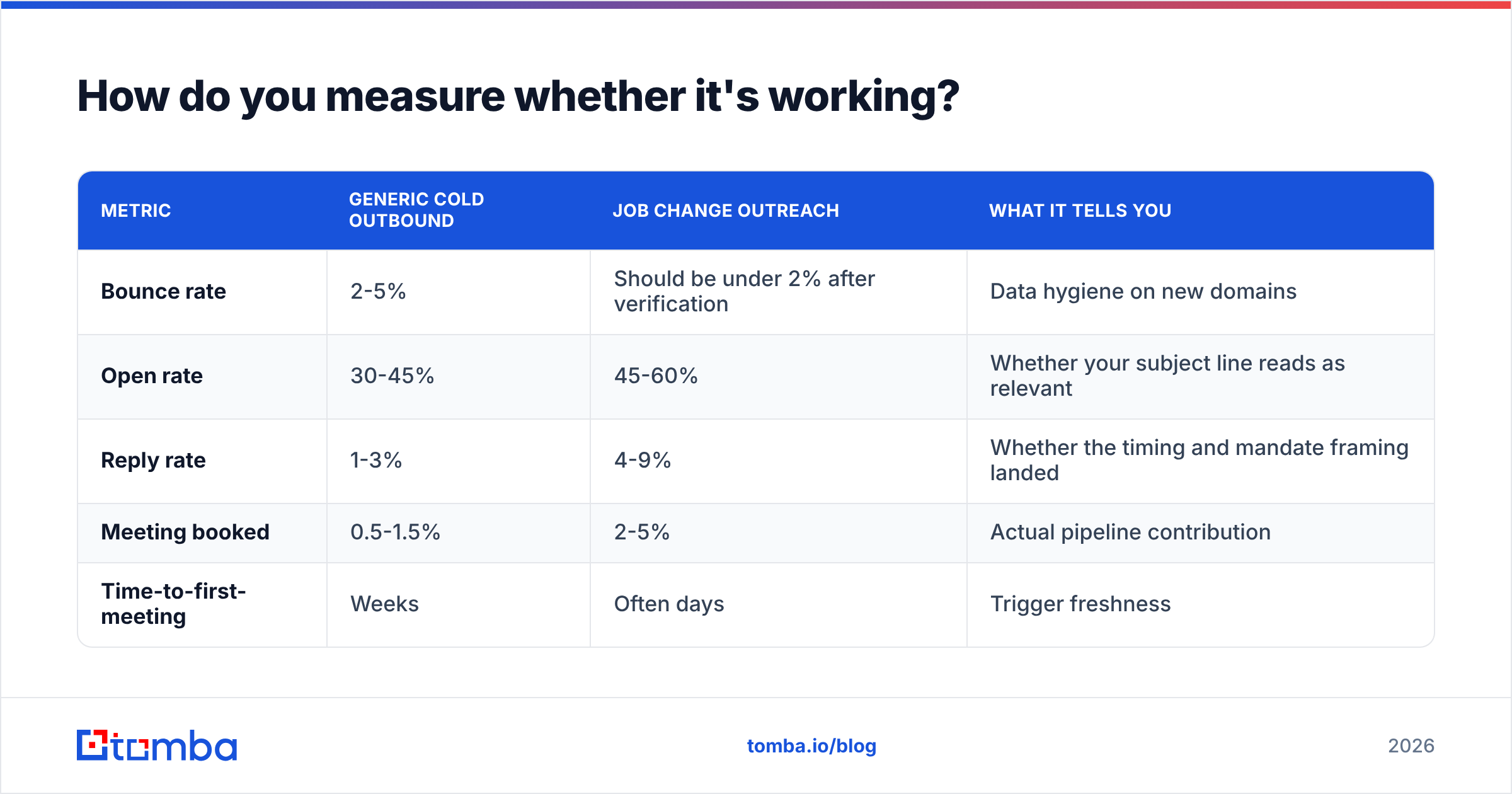
Track these separately from your general outbound numbers, or the job-change lift will be invisible inside the average.
| Metric | Generic cold outbound | Job change outreach | What it tells you |
|---|---|---|---|
| Bounce rate | 2-5% | Should be under 2% after verification | Data hygiene on new domains |
| Open rate | 30-45% | 45-60% | Whether your subject line reads as relevant |
| Reply rate | 1-3% | 4-9% | Whether the timing and mandate framing landed |
| Meeting booked | 0.5-1.5% | 2-5% | Actual pipeline contribution |
| Time-to-first-meeting | Weeks | Often days | Trigger freshness |
If your job-change bounce rate is above your general outbound bounce rate, stop the program and fix the data step. That's the signal that you're firing at old addresses — and it's the fastest way to wreck your email deliverability across every campaign.
If your reply rate on job-change outreach is no better than your cold baseline, the problem is almost always one of two things: you're sending too early, or you're congratulating instead of diagnosing.
Is job change outreach worth building as a system?#
It depends on your motion.
Build it if: you sell to a specific title, your ACV justifies per-account effort, and you have a meaningful base of past champions and closed-lost contacts. The champion-moved play alone frequently pays for the whole program.
Skip the automation, keep the manual version, if: you're early-stage with fewer than a few hundred past contacts. Just put your champions in a spreadsheet, check LinkedIn monthly, and handle moves personally. The automation overhead isn't worth it yet, and the manual version converts better anyway.
Don't bother if: you sell to a title with extremely low turnover, or your buyer isn't an individual with budget authority (procurement-led, committee-heavy, RFP-driven markets don't respond to individual triggers the same way).
One more structural point: this play compounds with time. Every customer you close today is a potential job-change trigger in eighteen months. Treating departing champions as relationships to maintain rather than contacts to archive is the cheapest pipeline investment most teams never make. Analysts covering revenue operations have made this point repeatedly — Gartner's sales research consistently highlights buying-group turnover as a driver of both churn and opportunity, and the teams who instrument for it are the ones who catch both sides.
Getting the data layer right#
Everything above collapses if the email address is wrong. You can nail the timing window, write a genuinely useful email, and pick the perfect trigger — and it lands nowhere because your contact record points at a domain the person left four months ago.
That's the one step you shouldn't improvise. When a champion moves, resolve their address on the new domain with the Tomba Email Finder, verify it before it enters a sequence, and only then worry about the copy. Start on the free tier — 25 searches a month is enough to run your champion list through a first pass and see whether the trigger is worth systematizing at your company. If it is, Starter at $49/mo covers a steady monthly sweep without a per-seat commitment.
Get the address right, wait two weeks, and write to the mandate. That's the whole play.
Related guides#
// get started
Find, verify and enrich your first contacts today
Start on the free plan with 25 searches a month, then scale when your team is ready.
Free plan · No credit card required · GDPR & CCPA
// about the author