Job Change Signals: How to Turn Job Moves Into Pipeline
Buyers who just changed jobs are 3-5x more likely to buy in their first 90 days. Here's how to source, verify, and act on job change signals before your competitors notice the move.
TL;DR
- A job change signal is a notification that someone in your ICP started a new role, got promoted, or moved companies — and it is the single highest-intent trigger available to outbound teams that has nothing to do with your product.
- New executives make the bulk of their vendor decisions in their first 90-100 days. Miss that window and you are selling against inertia again.
- Two distinct plays: champion tracking (a happy user moves to a new company — warm re-sell) and new-buyer tracking (a stranger takes a role you sell into — cold but timed).
- The bottleneck is never the signal; it is the contact data. A LinkedIn alert tells you someone moved. It does not give you their new work email, and their old one is now bouncing.
- Budget reality: dedicated signal platforms run $500-$2,000+/mo. A LinkedIn Sales Navigator seat plus an email finder covers 80% of the value for under $150/mo.
What are job change signals?#
A job change signal is a data event indicating that a person in your target market has started a new role. That's it. The magic is not in the data — it's in what a job change does to a buyer's psychology and budget authority.
When someone starts a new job, three things happen at once. They inherit a tech stack they didn't choose and have no emotional attachment to. They are explicitly expected to change things — nobody gets hired into a VP role to keep everything the same. And they have a grace period where spending money looks like decisiveness rather than recklessness.
That combination does not exist at any other point in a buyer's tenure. Eighteen months in, the same person will defend the stack they built. In month two, they're actively looking for reasons to rip it out.
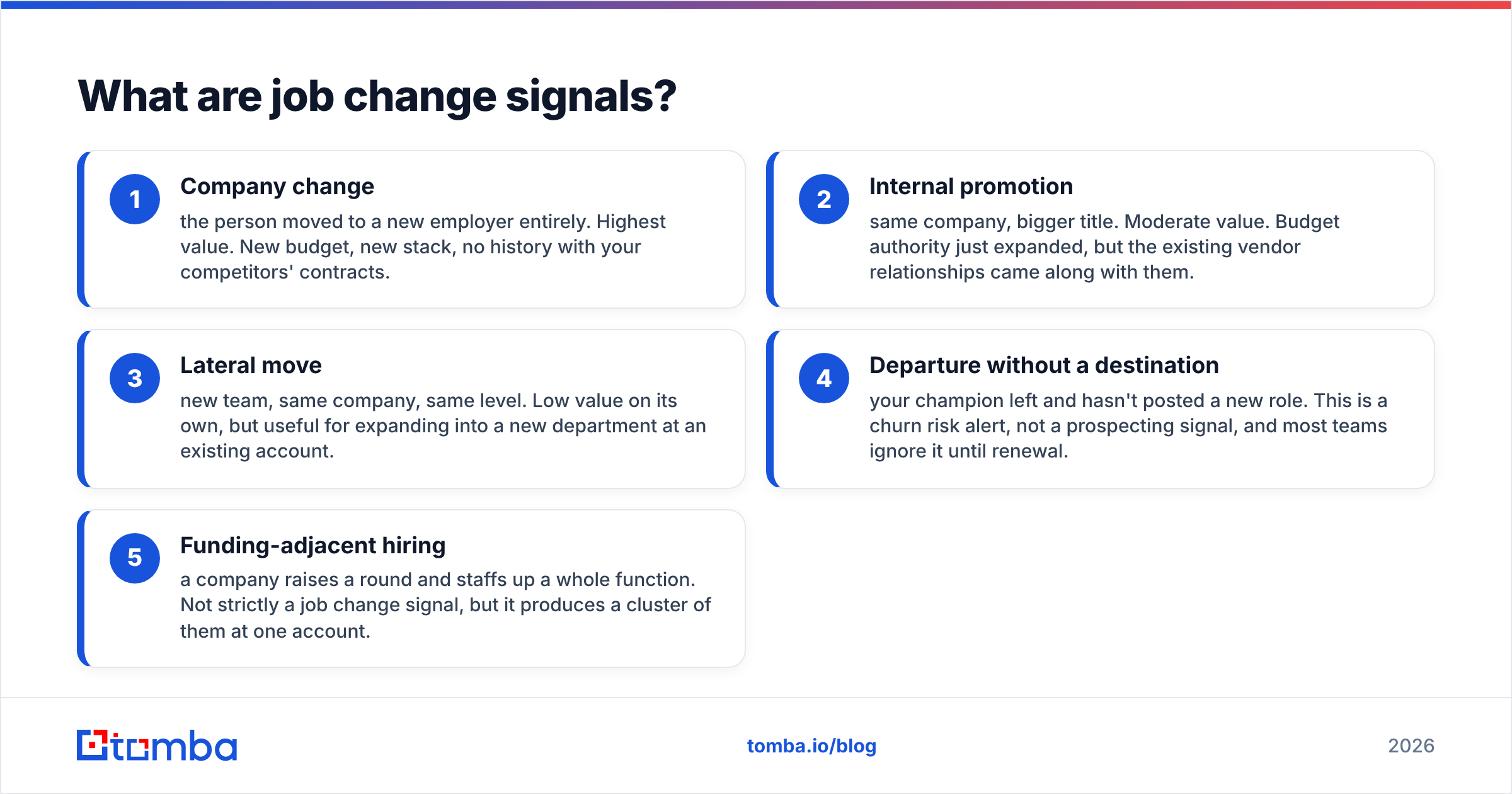
Signals come in a few flavors, and they are not equally valuable:
- Company change — the person moved to a new employer entirely. Highest value. New budget, new stack, no history with your competitors' contracts.
- Internal promotion — same company, bigger title. Moderate value. Budget authority just expanded, but the existing vendor relationships came along with them.
- Lateral move — new team, same company, same level. Low value on its own, but useful for expanding into a new department at an existing account.
- Departure without a destination — your champion left and hasn't posted a new role. This is a churn risk alert, not a prospecting signal, and most teams ignore it until renewal.
- Funding-adjacent hiring — a company raises a round and staffs up a whole function. Not strictly a job change signal, but it produces a cluster of them at one account.
Sorry — that image renders as:

Why do job change signals convert better than cold outreach?#
Because you are not creating urgency — you are catching it.
Standard cold outreach fights a simple problem: the person you emailed has no reason to do anything today. Job change outreach removes that. Gartner's research on buying behavior consistently shows that B2B purchase decisions cluster around organizational change events — new leadership, restructuring, and budget resets. A job change is all three compressed into one person.
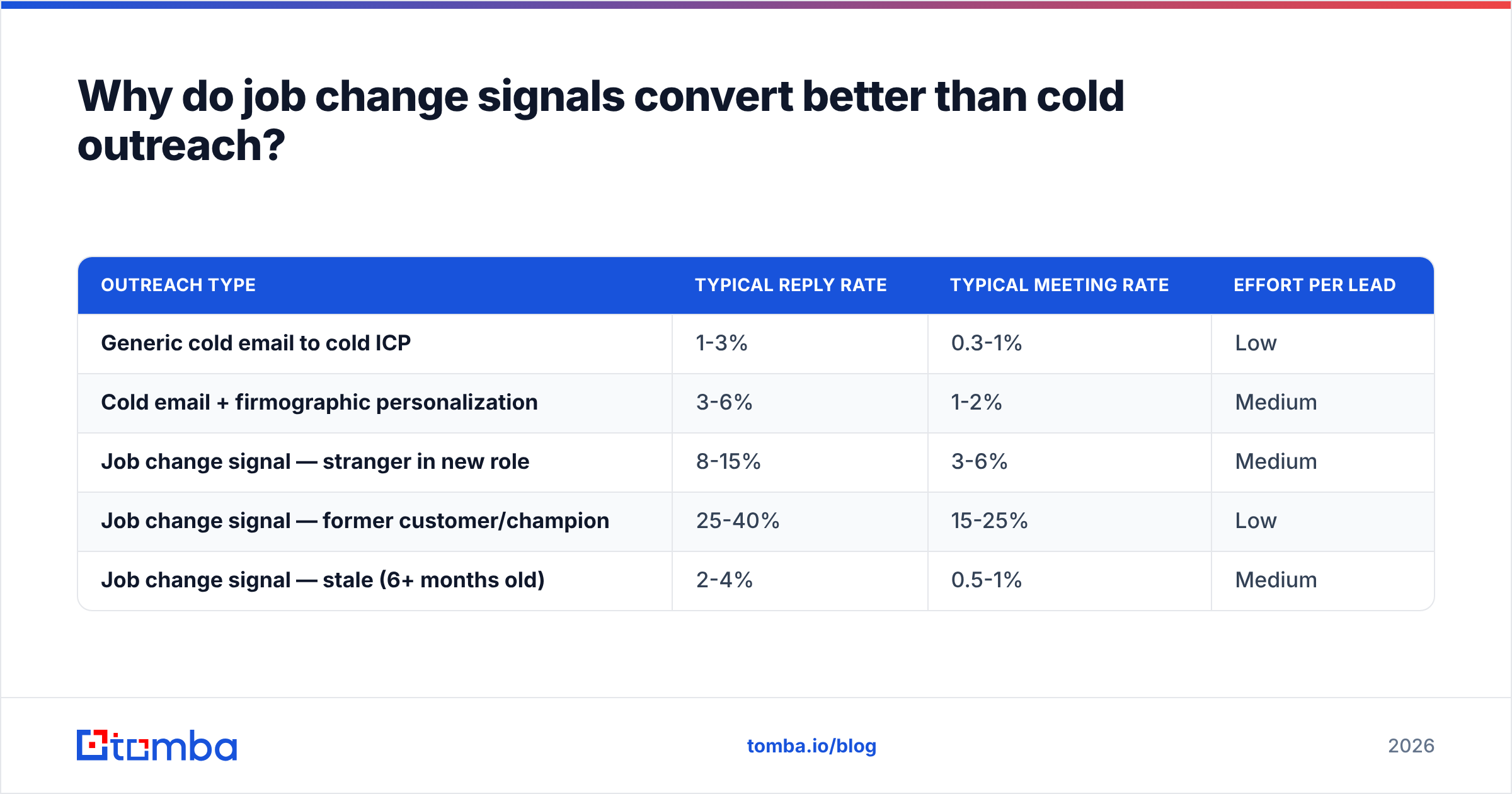
The practical numbers teams report vary, but the shape is consistent:
| Outreach type | Typical reply rate | Typical meeting rate | Effort per lead |
|---|---|---|---|
| Generic cold email to cold ICP | 1-3% | 0.3-1% | Low |
| Cold email + firmographic personalization | 3-6% | 1-2% | Medium |
| Job change signal — stranger in new role | 8-15% | 3-6% | Medium |
| Job change signal — former customer/champion | 25-40% | 15-25% | Low |
| Job change signal — stale (6+ months old) | 2-4% | 0.5-1% | Medium |
Note the last row. A job change signal decays fast. At six months, the person has already picked their vendors and your "congrats on the new role" email reads as a bot that scraped LinkedIn a season late. Freshness is the entire product.
The champion-tracking row is the one most teams under-invest in. If someone used your product at Company A, loved it, and just became Director of Ops at Company B, you have a warm inbound lead who happens to not know they're a lead yet. They already know your onboarding, your support quality, and your pricing. The sales cycle on these is routinely half the length of a net-new deal.
How do you actually source job change signals?#
Four sources, roughly in order of cost:
LinkedIn Sales Navigator. Built-in. Save a lead list, and Navigator surfaces "changed jobs in the last 90 days" as a native filter and alert. This is the cheapest credible source and most teams already pay for it. The limitation is that it is a walled garden — you get a notification in an interface, not a row in your CRM, and getting data out at volume violates LinkedIn's user agreement.
CRM contact monitoring. Your own database is the best signal source you already own and ignore. Every closed-lost contact, every churned admin, every former champion sitting in a stale record. Run them through an enrichment pass on a schedule and diff the results — when someone's company field changes, that's a signal you generated internally for pennies.
Dedicated signal platforms. UserGems, Champify, Common Room and similar tools monitor a contact list and push alerts into Slack or your CRM. They work well and cost accordingly. The pitch is automation, not data you couldn't otherwise get.
Enrichment + verification on a loop. The DIY version: maintain your tracked-contact list, run it through a data enrichment pass monthly, and flag any record where the employer changed. Cheaper than a dedicated platform, more work than Sales Navigator, and it lands the data directly where you need it.
Whichever you use, the signal is only half the job.
Why does the contact data break the moment someone changes jobs?#
Here is the part nobody warns you about. The instant your champion changes jobs, every piece of contact data you have on them is wrong.
Their work email is dead — often bouncing, sometimes worse, silently forwarding to whoever replaced them. Their direct line is reassigned. Their calendar link is gone. The signal tells you who and when. It tells you nothing about how to reach them, and the "how" just got deleted.
So the job change workflow is really a two-step problem:
- Detect the move.
- Rebuild the contact record at the new company.
Step two is where most teams stall out. They get a beautiful Slack alert saying "Sarah Chen is now VP Marketing at Acme Corp" and then spend eleven minutes guessing at s.chen@acme.com versus sarah@acme.com versus schen@acme.com.
That guessing is a solved problem. A domain search against the new employer returns the company's actual email pattern plus verified contacts already on file. Feed in the name and the new domain and an email finder returns the specific address with a confidence score. Then verify emails before you send, because a brand-new hire's mailbox is sometimes provisioned days after their LinkedIn update — and hitting a not-yet-live address is exactly the kind of hard bounce that damages your sender reputation right when you need deliverability most.

For teams running this at volume — say, re-enriching a 5,000-contact champion list every month — a bulk email finder or a direct email finder API call in a scheduled job is the difference between a workflow and a chore.
What does a job change signal stack cost?#
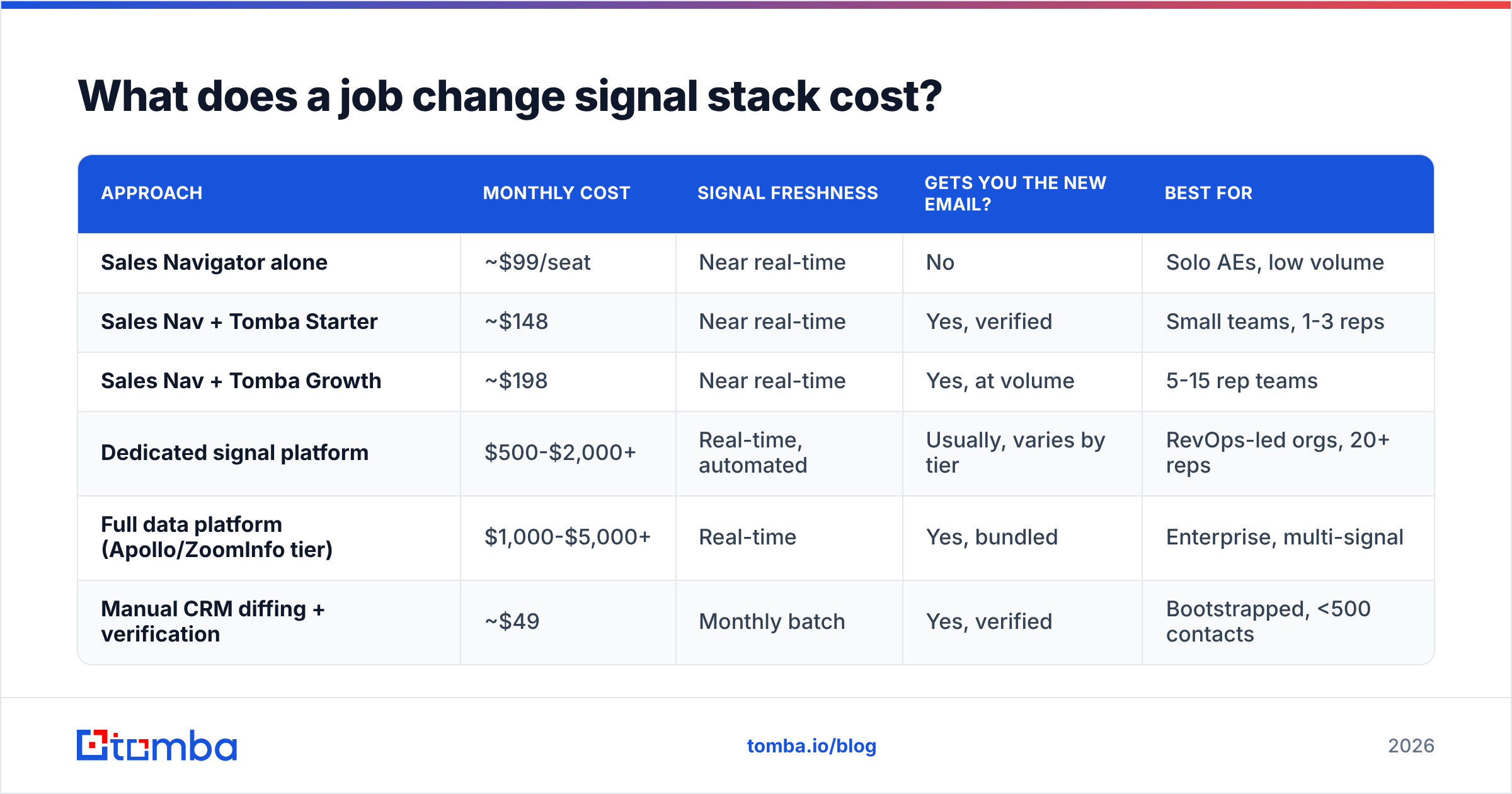
Depends entirely on whether you want the alerts automated or you're willing to run the loop yourself.
| Approach | Monthly cost | Signal freshness | Gets you the new email? | Best for |
|---|---|---|---|---|
| Sales Navigator alone | ~$99/seat | Near real-time | No | Solo AEs, low volume |
| Sales Nav + Tomba Starter | ~$148 | Near real-time | Yes, verified | Small teams, 1-3 reps |
| Sales Nav + Tomba Growth | ~$198 | Near real-time | Yes, at volume | 5-15 rep teams |
| Dedicated signal platform | $500-$2,000+ | Real-time, automated | Usually, varies by tier | RevOps-led orgs, 20+ reps |
| Full data platform (Apollo/ZoomInfo tier) | $1,000-$5,000+ | Real-time | Yes, bundled | Enterprise, multi-signal |
| Manual CRM diffing + verification | ~$49 | Monthly batch | Yes, verified | Bootstrapped, <500 contacts |
Tomba pricing runs a free tier at 25 searches/month, Starter at $49/mo, Growth at $99/mo, and Pro at $249/mo — which is why the middle rows land where they do. The point of the table isn't that cheaper wins; it's that the expensive tiers are buying you automation and coverage breadth, not fundamentally better signals. If you have 300 tracked champions and a rep with a spreadsheet habit, the $148 row genuinely works.
One honest caveat on the enterprise rows: platforms like BookYourData and the larger data vendors bundle job change tracking into a broader database subscription, which makes sense if you also need firmographic filtering, intent data, and prebuilt lists in the same place. Buying a signal tool and a database and a finder separately gets expensive fast — consolidation is a legitimate reason to pay more.
If you're evaluating the bigger suites specifically for this, it's worth reading up on Apollo alternatives before you commit to an annual contract, since job change tracking is usually a mid-tier feature rather than a starter one.
How do you write the outreach without sounding like a bot?#
The "Congrats on the new role!" opener is dead. It was killed by every sequencing tool shipping it as a default template. Assume your prospect got nine of them this week.
What works instead:
- Lead with the problem, not the congratulations. "Most new [title]s at [company stage] inherit a reporting setup they can't trust for the first quarter. Is that where you are?" This says you understand the role transition without performing enthusiasm about it.
- Reference the specific mandate, not the title. If they were hired after a funding round, the mandate is scale. If they replaced someone who was there eight years, the mandate is modernization. These require different emails.
- For former champions, be direct about the history. "You ran [product] at [old company] — figured I'd check whether Acme has anything similar in place." No pretending you don't know each other. The whole value is that you do.
- Time it to 2-6 weeks in, not day one. Day one, they're in HR onboarding and don't have opinions yet. Week three, they've found the broken thing. Month six, they've already bought a solution to it.
- Never send to an unverified address in this window. A bounce on a brand-new domain relationship is a bad first impression with that company's mail server, and you will likely want to email their colleagues later.

If you're building these sequences from scratch, our cold email templates library has starting points you can strip down — though the job-change variants always need more customization than a generic prospecting email, because the whole premise is that you noticed something specific.
What mistakes kill job change plays?#
Tracking too many people. If your monitored list is 40,000 contacts, you get 600 alerts a month and nobody actions any of them. Track the 200-2,000 people who actually matter: former users, closed-lost decision makers, and titles you sell to at named accounts.
Letting alerts rot in Slack. A signal that arrives in a channel nobody owns is a signal you paid for and threw away. Assign ownership at the alert level — route by territory, and set an SLA measured in days, not weeks.
Ignoring the churn side. When your champion leaves an account, that account's renewal risk just spiked. The same alert that creates a new opportunity should create a CS task. Most teams wire up half the workflow.
Emailing the old address. Obvious, but it happens constantly, because CRMs don't auto-expire contact data. Any job change signal should immediately mark the old email as invalid in your system, not just add a new one alongside it.
Treating promotions like moves. An internal promotion means budget authority changed, not that the stack is up for grabs. Different email, softer ask, longer runway.
Skipping verification to save a step. Catch-all domains make this worse — plenty of new employers run catch-all mail servers that accept everything and tell you nothing. A catch-all verifier is the difference between "this address exists" and "this address accepted my SMTP handshake the way it accepts every address."
How do you build the workflow end to end?#
Here's the minimum viable version, which you can stand up in an afternoon:
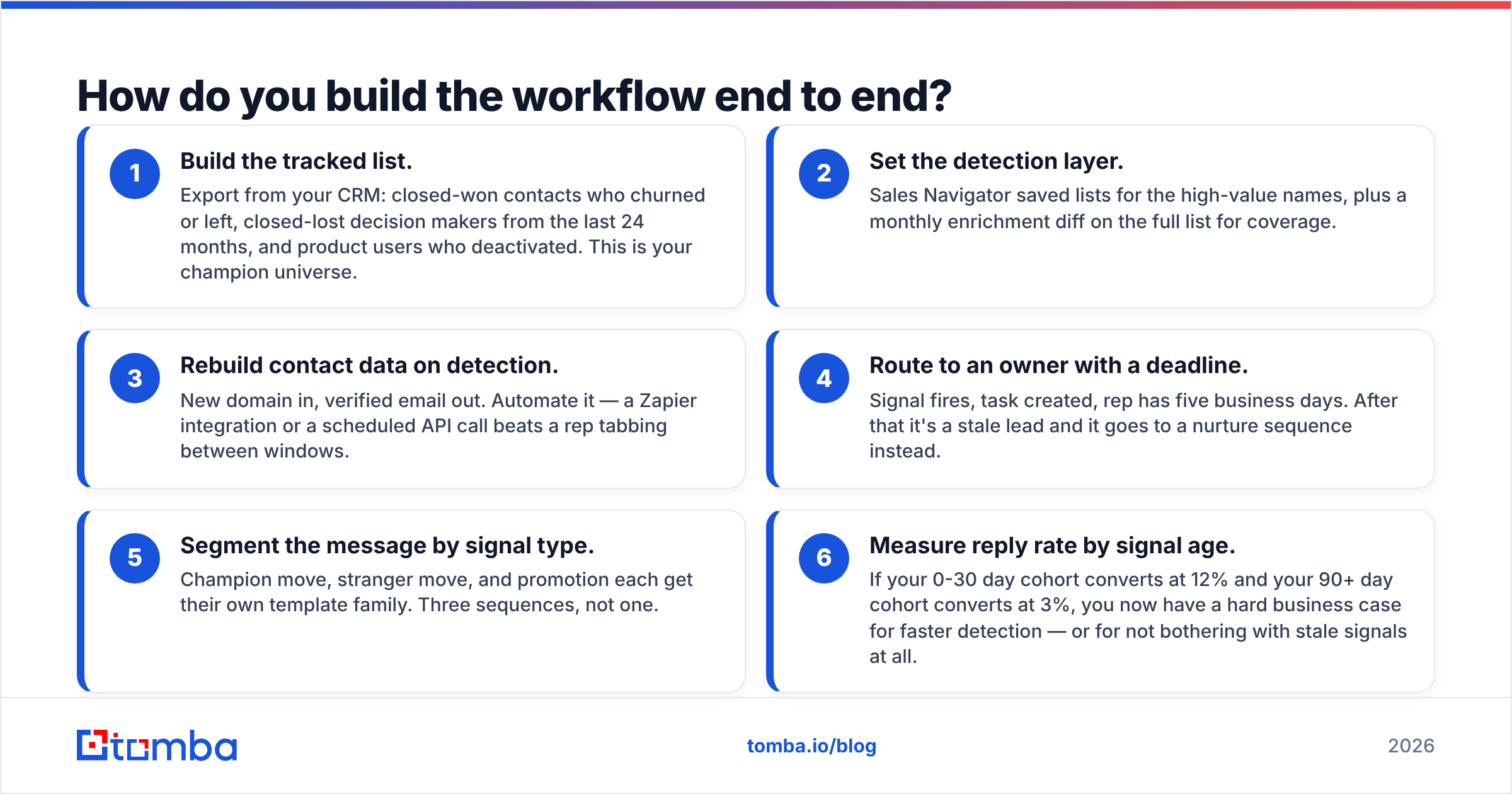
- Build the tracked list. Export from your CRM: closed-won contacts who churned or left, closed-lost decision makers from the last 24 months, and product users who deactivated. This is your champion universe.
- Set the detection layer. Sales Navigator saved lists for the high-value names, plus a monthly enrichment diff on the full list for coverage.
- Rebuild contact data on detection. New domain in, verified email out. Automate it — a Zapier integration or a scheduled API call beats a rep tabbing between windows.
- Route to an owner with a deadline. Signal fires, task created, rep has five business days. After that it's a stale lead and it goes to a nurture sequence instead.
- Segment the message by signal type. Champion move, stranger move, and promotion each get their own template family. Three sequences, not one.
- Measure reply rate by signal age. If your 0-30 day cohort converts at 12% and your 90+ day cohort converts at 3%, you now have a hard business case for faster detection — or for not bothering with stale signals at all.
That last step is what separates teams who run this well from teams who bought a tool. The signal has a half-life. Instrument it, and the whole program gets easier to defend at budget time.
For the broader picture on where this fits, HubSpot's sales research has good baseline data on trigger-event selling, and G2's category pages are useful for scoping the signal-platform vendor landscape without reading twelve pricing pages.
Getting started#
Job change signals are cheap to test and expensive to ignore. Start with your own CRM — pull the 200 contacts who mattered most and check which ones have already moved. You will almost certainly find a handful of people who changed jobs in the last quarter and are sitting in a perfect buying window right now, with a dead email address attached to their record.
Fixing that last part is the whole unlock. Tomba Email Finder turns a name and a new company domain into a verified, deliverable address in seconds — with the free tier covering 25 searches a month if you just want to test the play before you build the machine around it. Run your list, find the moves, and email the people who are already looking for a reason to change something.
Related guides#
// get started
Find, verify and enrich your first contacts today
Start on the free plan with 25 searches a month, then scale when your team is ready.
Free plan · No credit card required · GDPR & CCPA
// about the author