JobNimbus Pricing Reviews, Pros and Cons: A 2026 Breakdown
JobNimbus hides its prices behind a sales call. Here's what contractors actually pay, what reviewers praise and complain about, and when a cheaper stack wins.
JobNimbus pricing reviews all start at the same wall: there is no public price list. You get a number on a sales call. This guide covers the tiers, the fees, what real users say, and who the tool fits.
TL;DR
- JobNimbus is a contractor CRM and project-management platform. It is built mostly for roofing, siding, and exterior remodeling firms — not for general B2B sales teams.
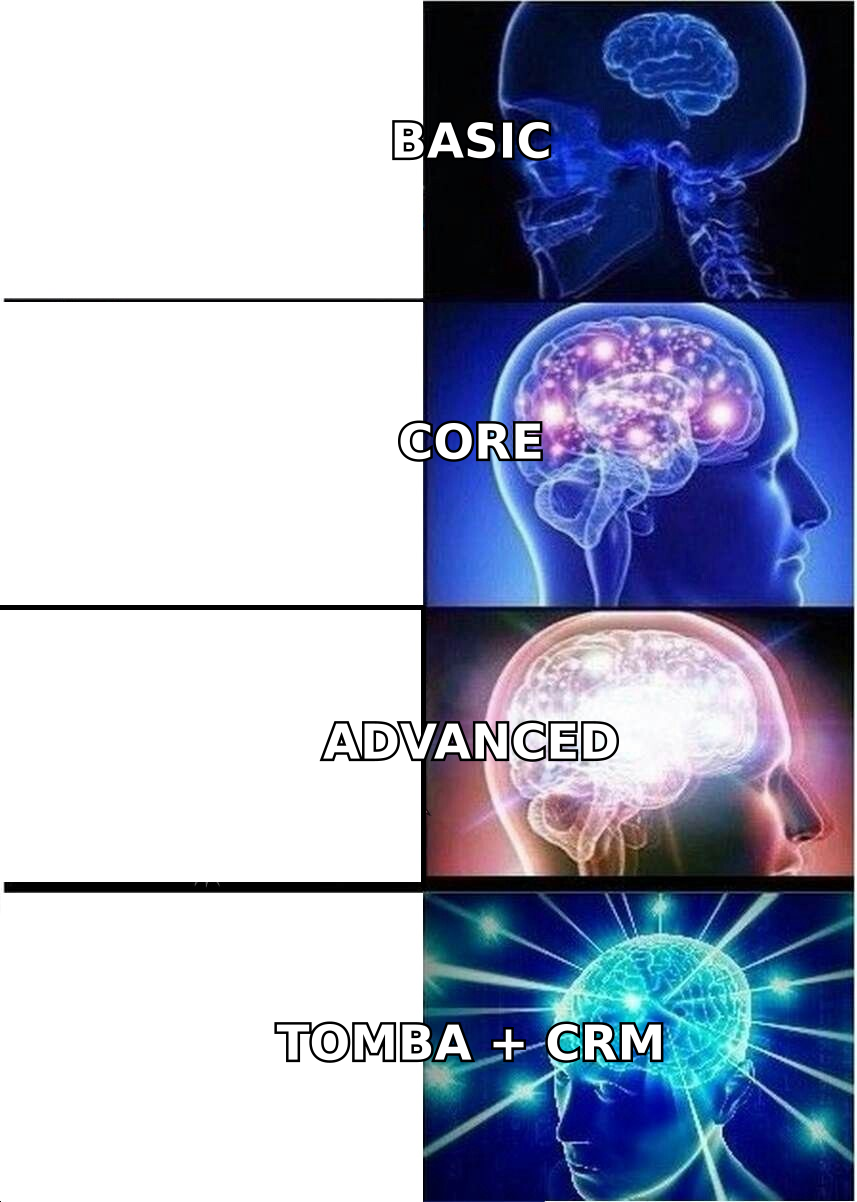
- As of 2026, JobNimbus does not publish prices. Sales quotes the plans (commonly Basic, Core, and Advanced). Expect per-user rates, an annual term, and a separate onboarding fee.
- Reviewers praise the production workflow, photo and document handling, and measurement tools. The common gripes: rigid contracts, slow support, and thin reporting.
- It is strong at running jobs you already won. It is weak at filling the pipeline. You still need a separate prospecting and contact-data layer.
- Best fit: 5–50 seat exterior-trade contractors who want sales and production in one system. Poor fit: solo operators, non-trade sales teams, and anyone who needs clear month-to-month pricing.
What is JobNimbus, and who actually uses it?#
JobNimbus is a vertical CRM. Think of it less like Salesforce and more like a job site trailer with a sales pipeline bolted to the front. Leads, estimates, contracts, work orders, photos, material orders, crew scheduling, and invoicing all live in one record. That record is tied to a physical address.
That vertical focus is the whole product thesis. A generic CRM tracks deals and contacts. JobNimbus tracks jobs. And a job has a roof, a homeowner, an insurance adjuster, a supplier order, a crew, and 200 photos attached to it. The supplier integrations, aerial-measurement tools, and payments module exist because roofing companies asked for them.
Typical users:
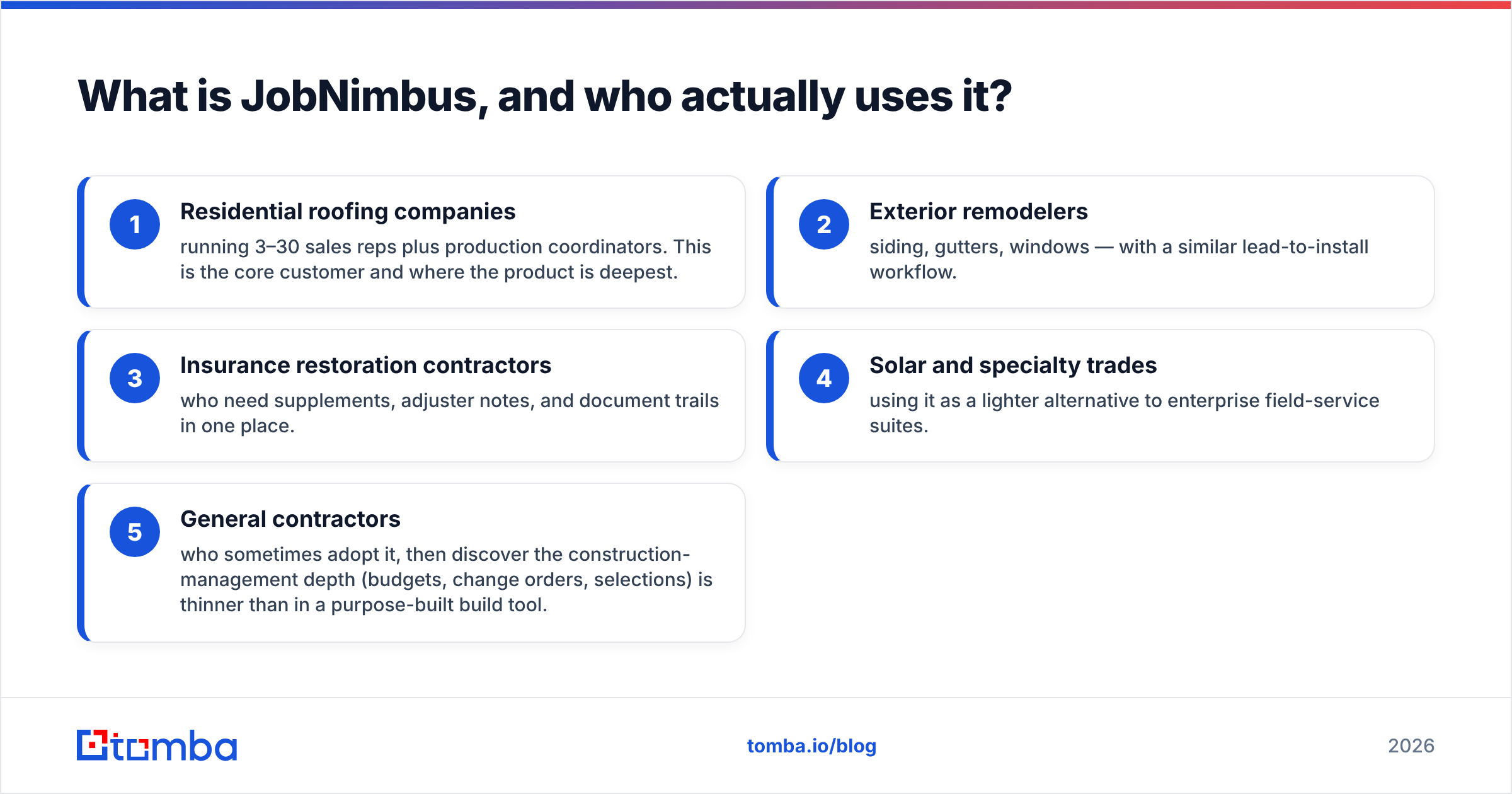
- Residential roofing companies with 3–30 sales reps plus production staff. This is the core customer, and the product is deepest here.
- Exterior remodelers — siding, gutters, windows — with a similar lead-to-install flow.
- Insurance restoration contractors who need supplements, adjuster notes, and paper trails in one place.
- Solar and specialty trades using it as a lighter option than enterprise field-service suites.
- General contractors who adopt it, then find the build-management depth (budgets, change orders, selections) is thin.
If you sell software, services, or anything that doesn't get installed at an address, JobNimbus is the wrong shape of tool. That sounds obvious. But a good share of one-star reviews come from teams that bought a trade CRM for a non-trade motion.
How does JobNimbus pricing work in 2026?#
Short answer: it's a sales-led quote, not a price tag. JobNimbus dropped its public rate card years ago. Today the official pricing page sends you to a demo request, not a checkout. Your number depends on seat count, plan tier, contract length, and add-ons like payments, Engage marketing, and advanced automation.
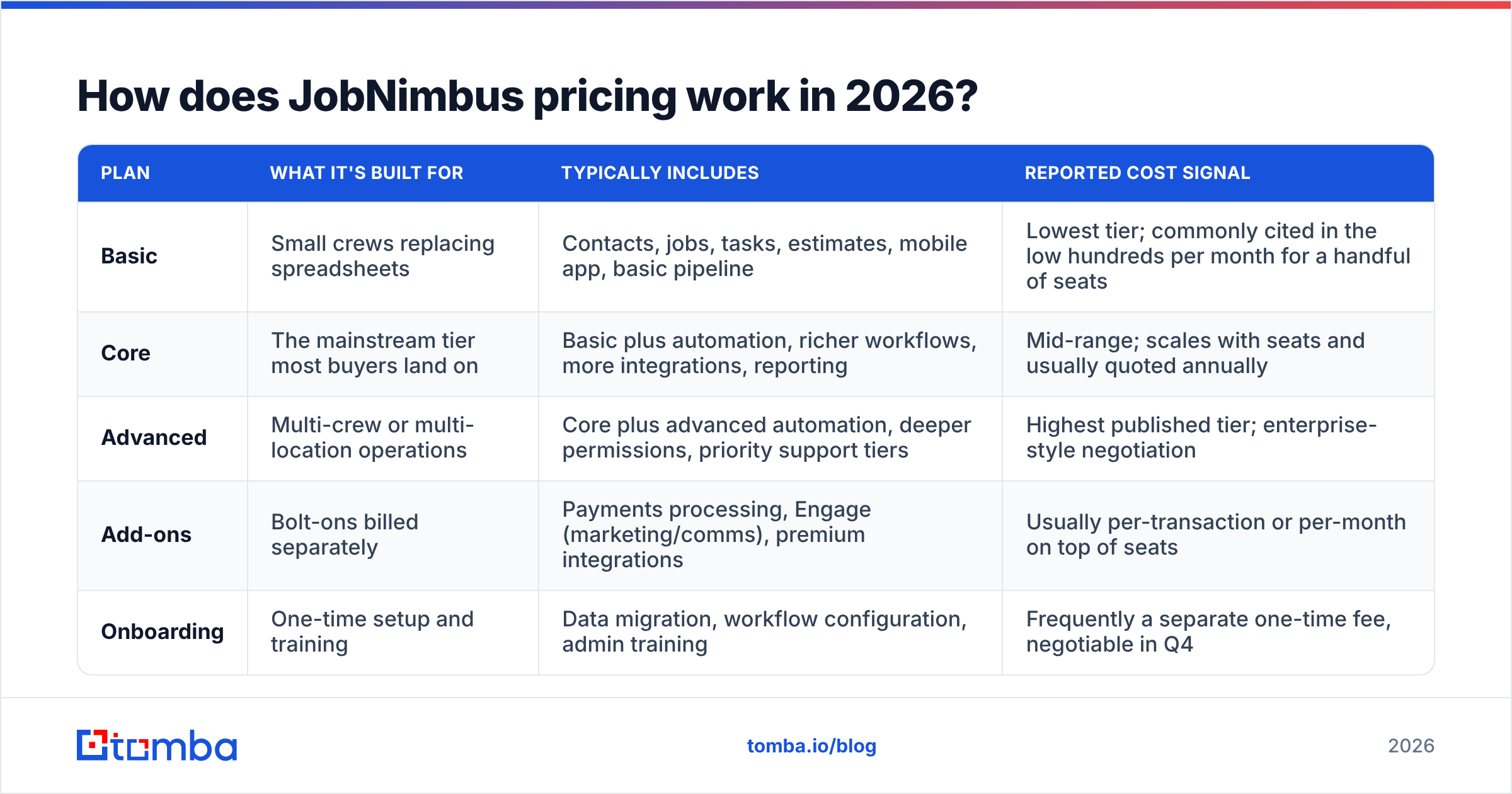
Here's how the structure works. The plan names come from JobNimbus. The cost signals come from what contractors report on review sites and trade forums. Treat that last column as direction, not a quote:
| Plan | What it's built for | Typically includes | Reported cost signal |
|---|---|---|---|
| Basic | Small crews replacing spreadsheets | Contacts, jobs, tasks, estimates, mobile app, basic pipeline | Lowest tier; commonly cited in the low hundreds per month for a handful of seats |
| Core | The mainstream tier most buyers land on | Basic plus automation, richer workflows, more integrations, reporting | Mid-range; scales with seats and usually quoted annually |
| Advanced | Multi-crew or multi-location operations | Core plus advanced automation, deeper permissions, priority support tiers | Highest published tier; enterprise-style negotiation |
| Add-ons | Bolt-ons billed separately | Payments processing, Engage (marketing/comms), premium integrations | Usually per-transaction or per-month on top of seats |
| Onboarding | One-time setup and training | Data migration, workflow configuration, admin training | Frequently a separate one-time fee, negotiable in Q4 |
Four things to nail down before you sign:
- Per-user vs. package. Ask who needs a paid seat: office staff, production coordinators, subs. Seat creep is the biggest driver of renewal shock.
- Annual commitment. Monthly billing, when offered, costs more. Most quotes assume a 12-month term. You can add seats any time, but you rarely drop them until renewal.
- The onboarding line item. It's a real number, and it's the most negotiable part of the deal.
- Payments. If you run homeowner payments through the platform, the processing rate matters more than the subscription over a full year.

That quote-only model is the top complaint in JobNimbus pricing reviews. It's worth being fair about why it exists. Vertical software with setup services really does cost different amounts for a 4-person crew and a 40-person branch operation. The trade-off: you can't budget without a call, and you can't compare line by line against a rival who posts rates.
What do JobNimbus pricing reviews actually say?#
Sentiment on G2 and similar review platforms is solidly positive. Scores sit in the low-to-mid 4-star range across hundreds of reviews. The split between what people love and what they gripe about is very consistent.
What reviewers praise:
- Photo and document handling. Crews upload from the app. Everything attaches to the job. The office can build an insurance packet without chasing texts. This shows up in more positive reviews than any other feature.
- One record, whole lifecycle. Lead → estimate → signed contract → material order → production → invoice, with no re-keying the homeowner's address four times.
- Measurement and supplier integrations. Pulling aerial measurements and pushing material orders saves real hours per job.
- Mobile usability. Reps and crews actually use it. That's the bar most CRMs fail in the trades.
- Board/pipeline views. Simple, visual, and easy to teach to a sales team that has never used software.
What reviewers complain about:
- Contract rigidity. Annual terms, hard seat reductions mid-term, and auto-renewal surprises drive the angriest reviews.
- Support wait times. Fine for routine questions. Slow when a case needs to escalate. Better on higher tiers.
- Reporting depth. Fine for pipeline and revenue basics. Thin if you want cohort views, multi-touch attribution, or custom cross-object reports without an export.
- Automation learning curve. The engine is powerful once set up, but most teams need help to get past simple triggers.
- Price transparency. Not just the cost — the opacity. Buyers hate finding out a peer got a different quote for the same seat count.
A pattern worth noting: bad reviews cluster around the sales relationship, good reviews cluster around daily use. That's a decent signal. The software works. The buying experience is where the friction lives, and you can blunt that by negotiating harder up front.
What are the real pros and cons of JobNimbus?#
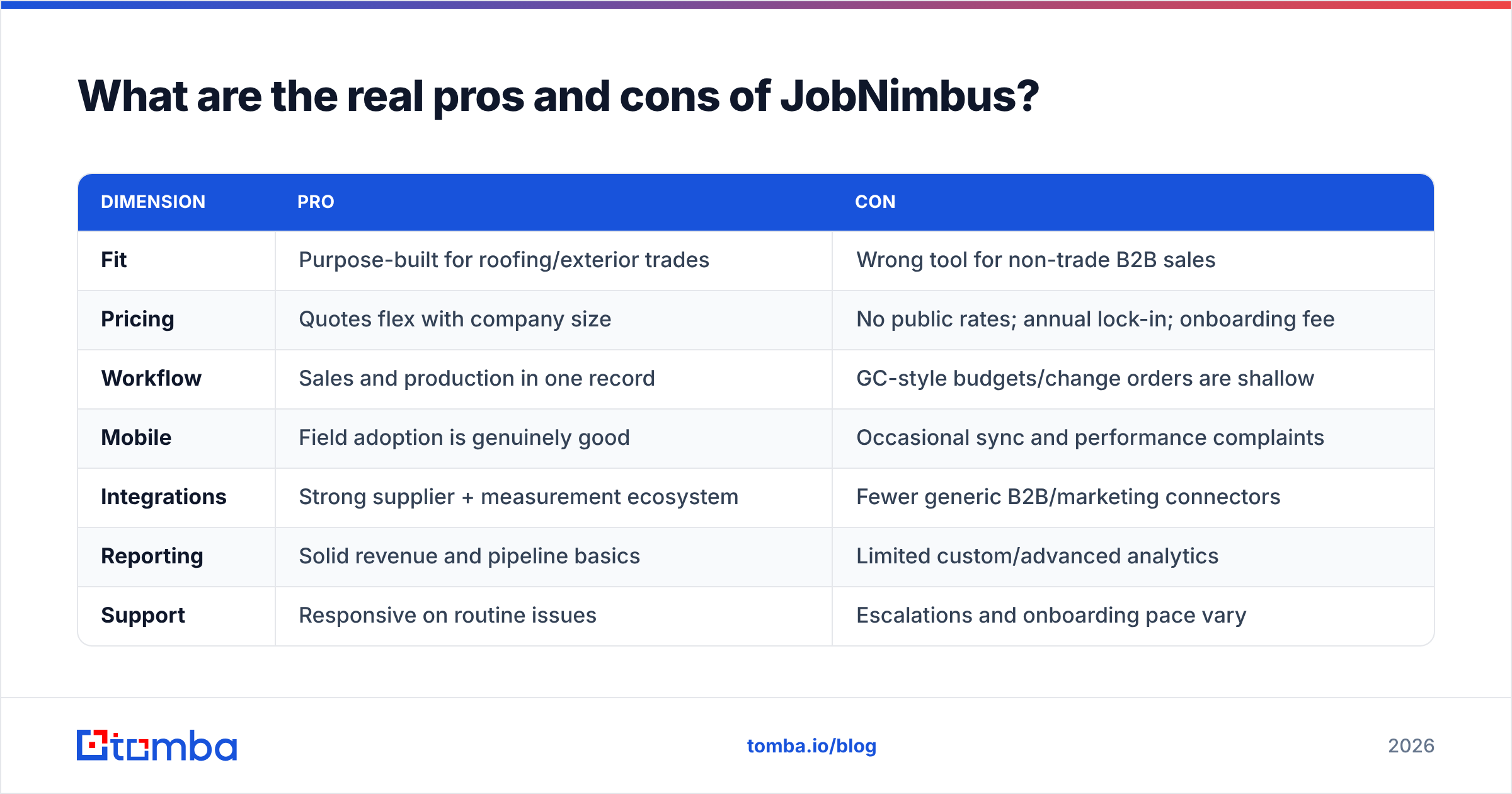
| Dimension | Pro | Con |
|---|---|---|
| Fit | Purpose-built for roofing/exterior trades | Wrong tool for non-trade B2B sales |
| Pricing | Quotes flex with company size | No public rates; annual lock-in; onboarding fee |
| Workflow | Sales and production in one record | GC-style budgets/change orders are shallow |
| Mobile | Field adoption is genuinely good | Occasional sync and performance complaints |
| Integrations | Strong supplier + measurement ecosystem | Fewer generic B2B/marketing connectors |
| Reporting | Solid revenue and pipeline basics | Limited custom/advanced analytics |
| Support | Responsive on routine issues | Escalations and onboarding pace vary |
| Lead gen | Manages leads well once they exist | Does not source or enrich new contacts |
That last row is the one most buyers underestimate. JobNimbus is a system of record for demand you already created. It won't find commercial property managers for you. It won't tell you which builders pulled permits in your county last quarter. And it won't verify the email of the facilities director you want to reach. If half your growth plan is outbound to commercial accounts, budget for a prospecting layer too.
How does JobNimbus compare to AccuLynx, Jobber, and Buildertrend?#
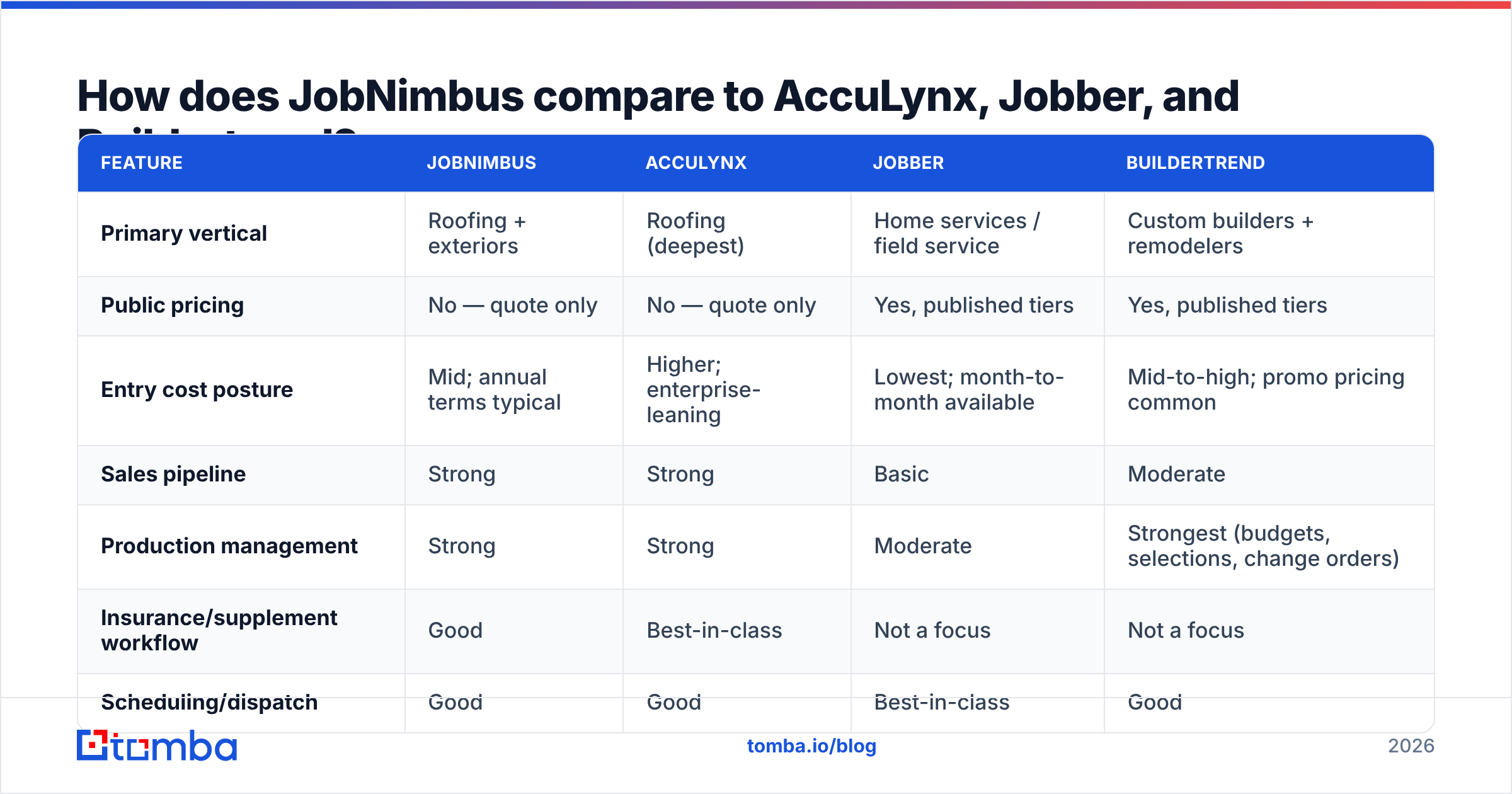
The honest comparison depends on what you sell and how you get paid.
| Feature | JobNimbus | AccuLynx | Jobber | Buildertrend |
|---|---|---|---|---|
| Primary vertical | Roofing + exteriors | Roofing (deepest) | Home services / field service | Custom builders + remodelers |
| Public pricing | No — quote only | No — quote only | Yes, published tiers | Yes, published tiers |
| Entry cost posture | Mid; annual terms typical | Higher; enterprise-leaning | Lowest; month-to-month available | Mid-to-high; promo pricing common |
| Sales pipeline | Strong | Strong | Basic | Moderate |
| Production management | Strong | Strong | Moderate | Strongest (budgets, selections, change orders) |
| Insurance/supplement workflow | Good | Best-in-class | Not a focus | Not a focus |
| Scheduling/dispatch | Good | Good | Best-in-class | Good |
| Client portal | Available | Available | Strong | Strong |
| Best for | 5–50 seat exterior contractors | Volume roofing + restoration | Small service businesses wanting clear pricing | Builders running long projects |
Rules of thumb from that table:
- If you are a high-volume insurance roofer, AccuLynx's supplement tooling usually wins the bake-off.
- If you are a small service business that wants to swipe a card and start today, Jobber's published pricing removes the whole procurement problem.
- If you run long builds with selections and change orders, Buildertrend is the right shape.
- If you sit in the middle — real sales team, real production team, exteriors work, 5 to 50 seats — JobNimbus is the most balanced of the four.
Is JobNimbus worth it for your team?#
Run this five-question test before the demo:
- Do you install at an address? If no, stop here and buy a general CRM.
- Do sales and production fight over information? If yes, the single-record model alone can justify the cost.
- Can you commit for 12 months? If cash flow is seasonal and tight, month-to-month tools with posted rates are safer.
- Who needs a seat? Count office, field, and part-time users honestly. Then quote at that number, not at your rep count.
- Where does your next $1M come from? If the answer is "more leads," a CRM is not the purchase that gets you there.
On question five: this is where most contractor software budgets go wrong. Teams spend big on the system that organizes jobs and nothing on the system that creates chances to sell. If you sell commercial roofing, property-management contracts, or multi-site facilities work, your bottleneck is contact data, not job tracking.
That's a separate, much cheaper line item. A bulk email finder turns a list of target companies — property managers, GCs, facilities groups, HOA boards — into verified contacts you can reach. It plugs into whatever CRM you land on. Tomba pricing starts free with 25 searches a month, and Starter is $49/mo. That's rounding error next to a JobNimbus annual deal.
What questions should you ask on the JobNimbus sales call?#
Bring these verbatim:
- What is the total year-one cost including onboarding, at exactly N seats?
- Which of my staff types require a paid seat, and which are free?
- What is the renewal price, and what is the cap on the annual increase?
- Can I reduce seats at renewal without penalty, and what's the notice window?
- What are the payment processing rates if I use your payments module?
- What does support response time look like on this tier, in writing?
- What happens to my data — photos included — if I leave?
The last one matters more than people expect. Years of job photos and signed documents are the real switching cost in a contractor CRM. That cost dwarfs the subscription. Ask about export format before you depend on it. (For background on why lock-in is structural in CRM, this overview of customer relationship management is a fair primer.)
The verdict#
JobNimbus earns its reviews. For exterior-trade contractors in the 5–50 seat range, it does the hard thing well. Sales and production look at the same record, and field crews actually use it. Most JobNimbus pricing reviews that turn negative are about the deal, not the software: quote-only rates, annual terms, and uneven support.
Price it against AccuLynx and Jobber. Negotiate the onboarding fee. Quote at your true seat count. Then treat the CRM as what it is: the place your pipeline lives, not the place it comes from.
For that second half — filling the pipeline — start with the Tomba Email Finder. Give it a company domain and a name. Get back a verified work email with a confidence score. Push it into whichever CRM you signed with. Your job software should manage the work you won. Your data layer should keep finding the next one.
Related guides#
// get started
Find, verify and enrich your first contacts today
Start on the free plan with 25 searches a month, then scale when your team is ready.
Free plan · No credit card required · GDPR & CCPA
// about the author