Just a Follow Up Email: Why It Fails and What to Send
"Just a follow up email" is the most common opening line in B2B outbound and one of the weakest. Here is what it signals to a buyer, what to send instead, and seven follow-ups that earn replies.
TL;DR
- "Just a follow up email" is a status update about your pipeline, not a reason for the buyer to reply. It adds zero new information to the thread.
- Follow-ups that work do one of three things: add a new angle, add proof, or make it cheap to say no. Bumping does none of them.
- Sequence length matters less than sequence variety. Four differentiated touches beat eight identical bumps.
- A large share of "no reply" is not rejection at all. It is bad data, spam placement, or the wrong contact — fix that before you rewrite copy.
- Seven templates below, each with the specific trigger that should fire it.
Almost every rep has sent this email: "Hi Sarah, just a follow up email on my note from last week — did you get a chance to look?" It feels polite. It feels low-risk. It is also the single most skippable message in a B2B inbox, and the data in your own sequence reporting probably already says so.
This guide breaks down why that phrasing fails, what replaces it, how many touches a sequence actually needs in 2026, and how to tell the difference between a copy problem and a data problem.
What does "just a follow up email" actually signal?#
It signals that you have nothing new to say.
Read the sentence from the buyer's chair. "Just a follow up email" translates to: I am checking whether my previous message moved my number. There is no new fact, no new angle, no new reason to spend the ninety seconds a reply costs. The word "just" even pre-apologizes for the interruption, which tells the reader the message is low priority before they reach the ask.
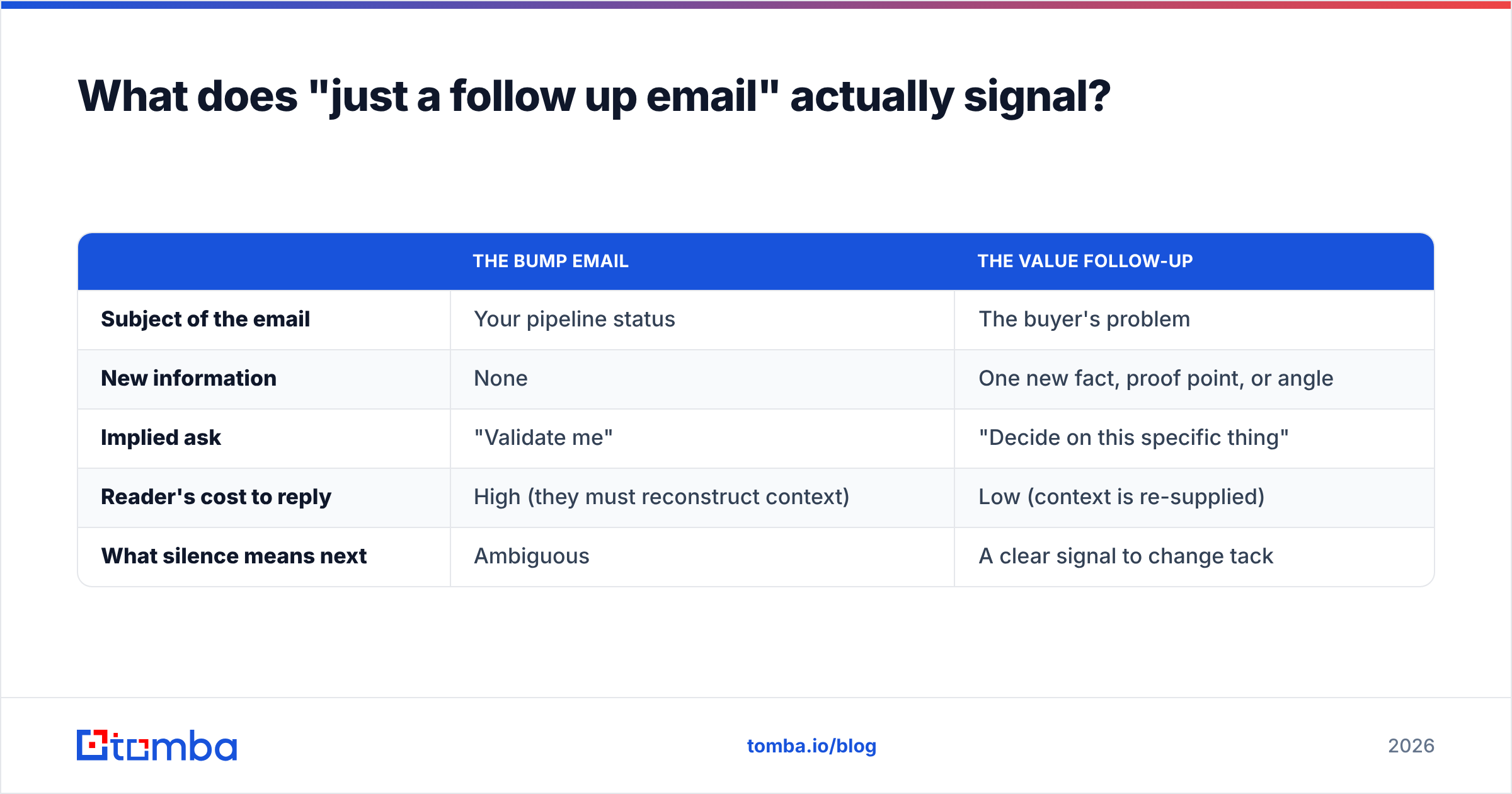
Compare the two mental models:
| The bump email | The value follow-up | |
|---|---|---|
| Subject of the email | Your pipeline status | The buyer's problem |
| New information | None | One new fact, proof point, or angle |
| Implied ask | "Validate me" | "Decide on this specific thing" |
| Reader's cost to reply | High (they must reconstruct context) | Low (context is re-supplied) |
| What silence means next | Ambiguous | A clear signal to change tack |
The practical problem is that bumps stack. Send four of them and the thread becomes a visible record of you asking the same question four times, which is a worse impression than never following up at all. Buyers do not punish persistence. They punish repetition.
There is also a psychological cost you are wasting. The Zeigarnik effect — the tendency to remember unfinished tasks more than completed ones — is the reason an open loop pulls attention. "Just following up" closes nothing and opens nothing. It leaves the reader exactly where they were.
Why do "just following up" emails get ignored?#
Five mechanical reasons, in rough order of how often they show up when you audit a real sequence:
- No new input. The reader already decided not to act on message one. Repeating message one gives them nothing to re-decide with.
- Ask fatigue. Every touch that requests time ("15 minutes?", "worth a chat?") without offering anything raises the perceived cost of engaging. Three consecutive asks read as pressure.
- Thread burial. Replying in the same thread with a two-line bump means the subject line never changes, so the message inherits whatever indifference the first one earned.
- Deliverability decay. Low-engagement sends teach mailbox providers that your mail is ignorable. Bumps are the lowest-engagement message type you send, so they actively degrade your sender reputation.
- Wrong person entirely. If the contact left, changed roles, or never owned the problem, no amount of copy fixes it. The follow-up is a data problem wearing a copywriting costume.
Reasons 1 through 3 are writing problems. Reasons 4 and 5 are infrastructure problems, and they are the ones teams misdiagnose most often. A 0.4% reply rate across a 2,000-contact sequence is rarely a subject-line issue.

What should you send instead of "just a follow up email"?#
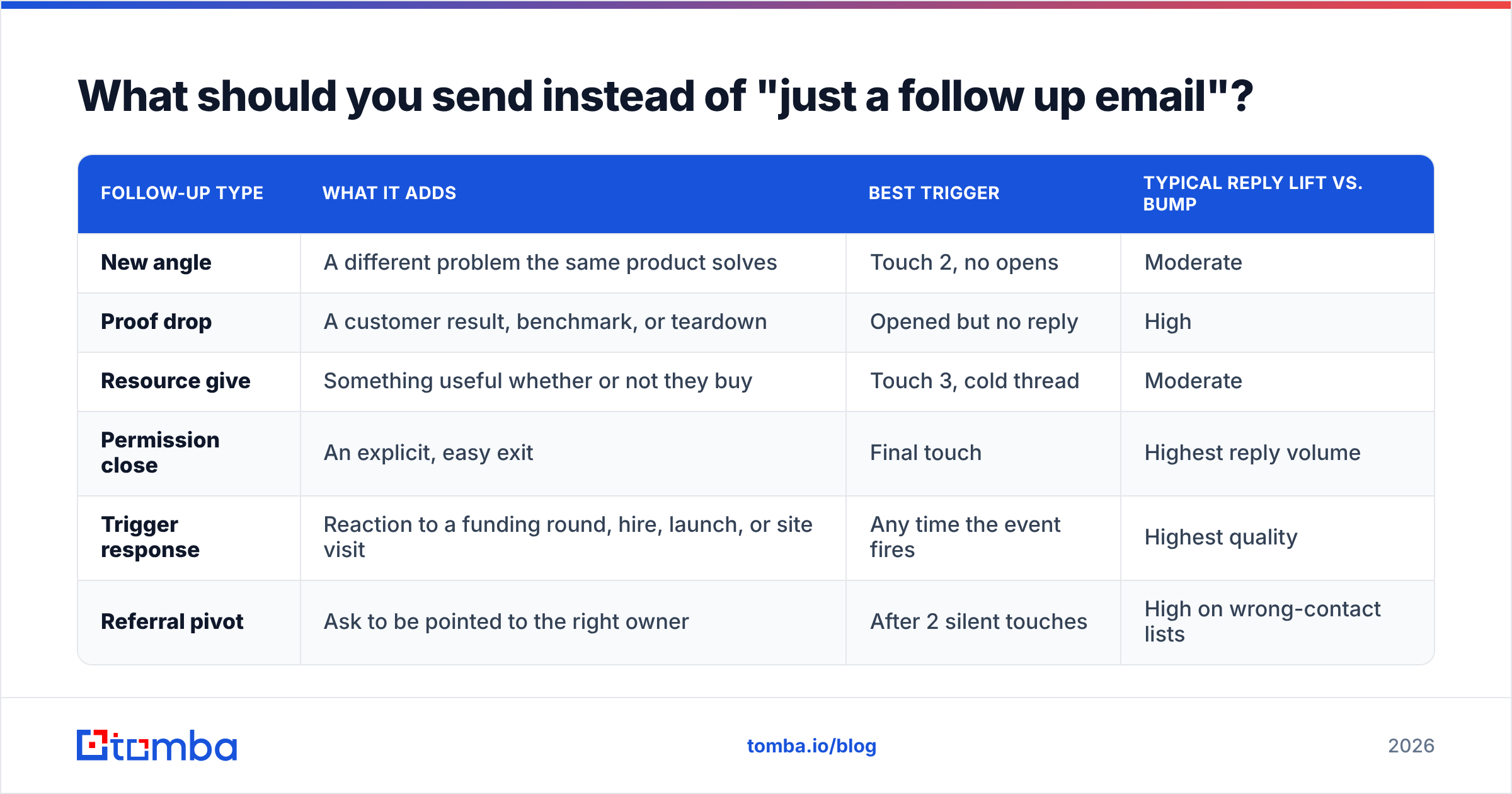
Every follow-up should carry one of four payloads. Pick the payload first, then write the sentence.
| Follow-up type | What it adds | Best trigger | Typical reply lift vs. bump |
|---|---|---|---|
| New angle | A different problem the same product solves | Touch 2, no opens | Moderate |
| Proof drop | A customer result, benchmark, or teardown | Opened but no reply | High |
| Resource give | Something useful whether or not they buy | Touch 3, cold thread | Moderate |
| Permission close | An explicit, easy exit | Final touch | Highest reply volume |
| Trigger response | Reaction to a funding round, hire, launch, or site visit | Any time the event fires | Highest quality |
| Referral pivot | Ask to be pointed to the right owner | After 2 silent touches | High on wrong-contact lists |
Two notes on this table. The permission close reliably produces the most replies — not the most meetings. That is fine; a clean "not now, ask me in Q2" is worth more than a contact rotting in a sequence. And the trigger response wins on quality because the relevance is externally verifiable: the buyer can see why you emailed today.
The three-sentence structure that replaces the bump#
Sentence one — re-anchor. One clause reminding them what this is about, written so the email stands alone without scrolling. "You mentioned in your Q3 update that onboarding time was the bottleneck."
Sentence two — the new thing. The payload from the table above. "We cut that from 11 days to 3 for a team your size; here's the two-paragraph version."
Sentence three — a single, small ask. One question with a binary or near-binary answer. "Worth me sending it over?" beats "Do you have 30 minutes Thursday or Friday?"
That is it. Under 70 words. If your follow-up needs a fourth sentence, the payload is probably weak.
How many follow-ups should a sequence have in 2026?#
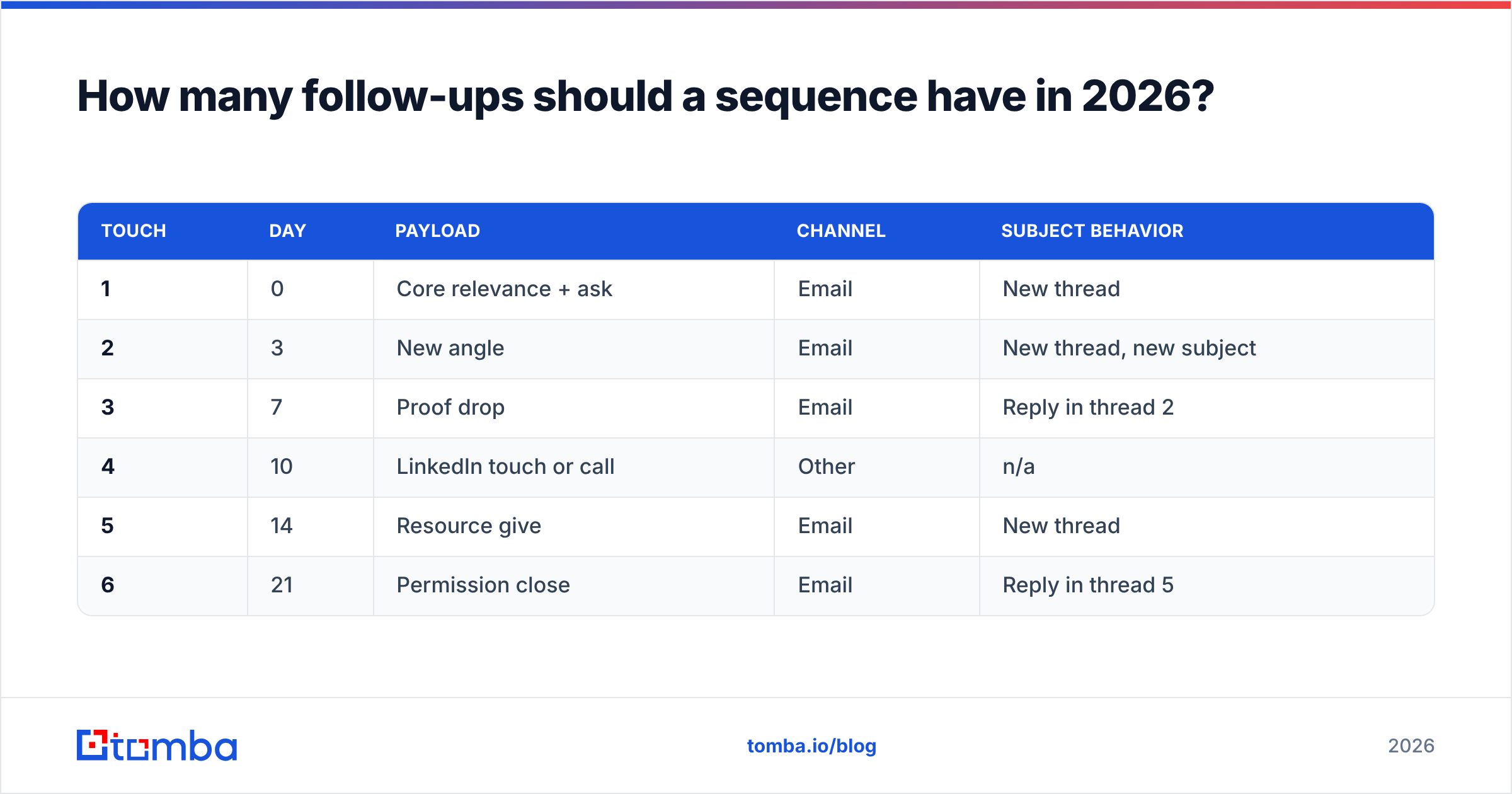
Four to six touches, spread across 14 to 21 days, with at least two different payload types and at least one channel switch. More than that and marginal reply rate falls below the deliverability cost.
| Touch | Day | Payload | Channel | Subject behavior |
|---|---|---|---|---|
| 1 | 0 | Core relevance + ask | New thread | |
| 2 | 3 | New angle | New thread, new subject | |
| 3 | 7 | Proof drop | Reply in thread 2 | |
| 4 | 10 | LinkedIn touch or call | Other | n/a |
| 5 | 14 | Resource give | New thread | |
| 6 | 21 | Permission close | Reply in thread 5 |
Three design choices in that grid are worth copying. First, new subject lines on touches 2 and 5 give the sequence two fresh chances at the inbox instead of one. Test them before you send with a subject line tester rather than guessing. Second, the channel switch at touch 4 breaks the pattern without adding another email to a thread the buyer is already ignoring. Third, the permission close is last, never earlier — it is a closing device, not a mid-sequence tactic.
If your current sequence is eight or nine emails, the fix is almost never to cut to four. It is to make touches 2 through 8 carry different payloads. Length is not the problem; sameness is.
What are the best follow-up email templates?#
Seven templates, each tied to the trigger that should fire it. Adapt the specifics; the structure is the reusable part.
1. No open after 3 days (new angle)
Subject: onboarding time, not seat count
Different angle than my last note. Most {{role}} teams I talk to are not short on licenses, they are short on ramp time. If that's not your bottleneck, ignore this. If it is, I have a 90-second breakdown of how {{customer}} cut theirs. Want it?
2. Opened twice, no reply (proof drop)
Subject: the {{customer}} numbers
You looked but didn't reply, which usually means "maybe, prove it." So: {{customer}}, same headcount as you, went from {{before}} to {{after}} in {{timeframe}}. Two-paragraph writeup, no deck. Say "send" and it's in your inbox in a minute.
3. Trigger fired — funding, hire, or launch
Subject: congrats on the {{event}}
Saw the {{event}}. The teams that scale fastest after one usually hit the same wall around {{specific problem}} within two quarters. Here's how three of them handled it. Worth a look, or is this already solved on your side?
4. Wrong contact (referral pivot)
Subject: pointing me in the right direction
I may have the wrong person — if {{topic}} isn't yours, who owns it? Happy to stop emailing you either way, just don't want to keep guessing.
5. Gatekeeper-friendly resource give
Subject: the benchmark, no strings
No ask this time. We pulled {{data}} across {{n}} companies in {{industry}}; the median was {{number}}, which surprised us. Link below. Useful or not, that's the last you'll hear from me this month.
6. Post-demo silence
Subject: where did this land internally?
After the demo, these usually go one of three ways: budget moved, priorities moved, or someone internally had an objection I didn't handle. Which one is it? I can help with the third and stop bothering you about the first two.
7. Permission close (final touch)
Subject: closing the loop
I'll stop here. If this is a "not now," tell me the month and I'll come back then. If it's a "never," say the word and I'll delete the thread — genuinely no hard feelings.
Template seven does the heavy lifting on reply volume. It works because it hands the buyer a way to end the discomfort, and ending discomfort is a stronger motivator than evaluating a product. If you want more starting points before you customize, the cold email templates library covers the first-touch variants these follow from.
Is your follow-up problem actually a data problem?#
Run this check before you rewrite a single line.
Pull your last 500-contact sequence and sort the non-responders into four buckets:
- Hard bounced — the address was wrong or dead. Copy is irrelevant.
- Delivered, never opened — likely spam placement or a dead mailbox, not disinterest.
- Opened, never replied — a real copy and relevance problem. This is the bucket your templates fix.
- Replied "wrong person" — a targeting problem. Fix the list, not the email.
If bucket one and bucket two together exceed roughly 15% of the send, stop editing copy. You are optimizing a message that large chunks of your audience never saw. Run the list through an email verifier first, drop the undeliverables, and re-measure. Teams routinely find their "bad follow-up copy" was a 22% invalid-address rate.
The same applies to response rate benchmarking. A 1.2% reply rate on a list that is 80% deliverable is a very different diagnosis than 1.2% on a list that is 55% deliverable, and only one of those is solved by better writing. Vendor-agnostic benchmarks from sources like G2's sales engagement category and practitioner data published on HubSpot's sales blog are useful for sanity-checking your numbers, but your own segmented buckets beat any industry average.
How do you measure whether follow-ups are working?#
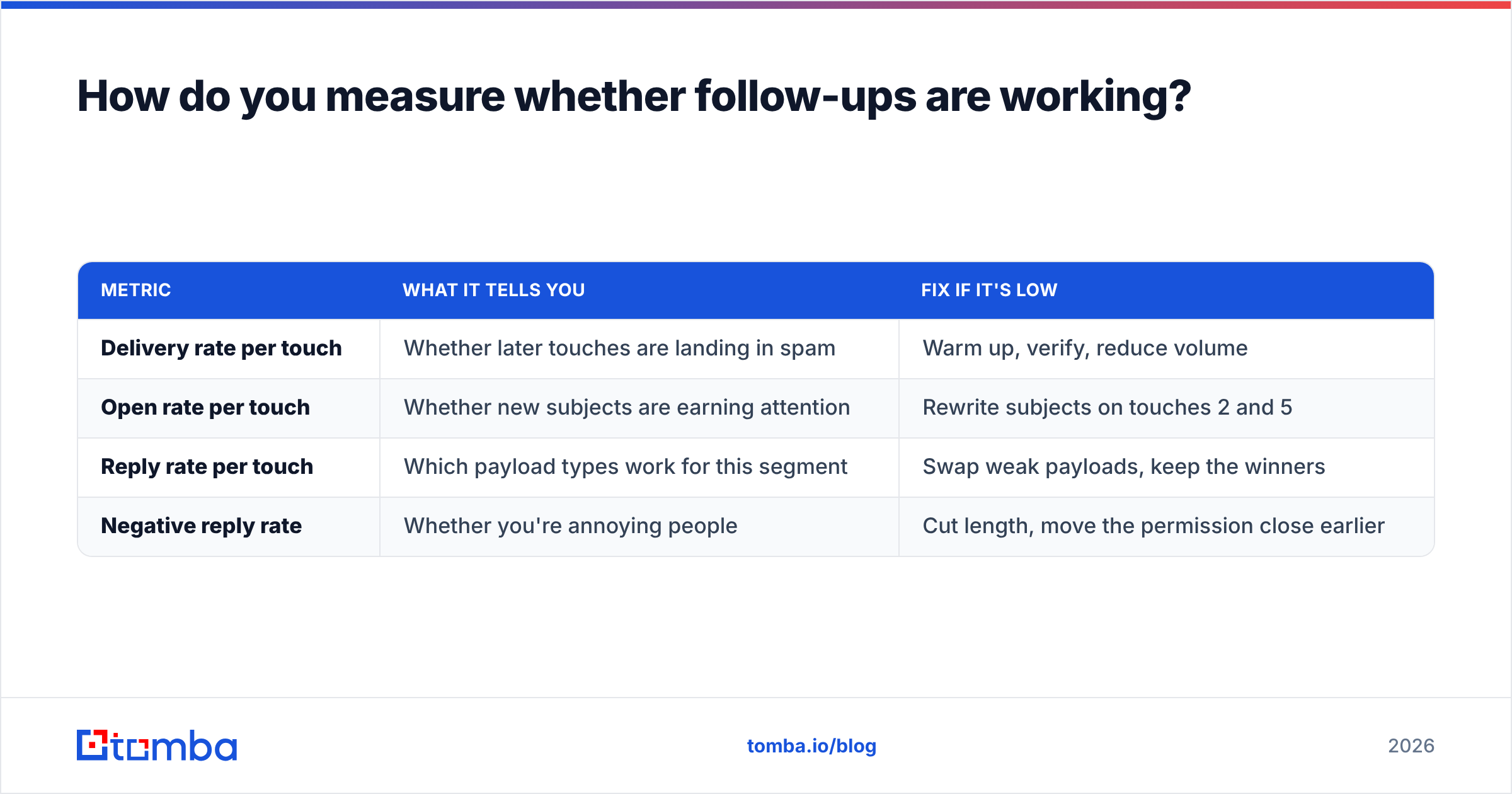
Track four numbers per touch, not per sequence:
| Metric | What it tells you | Fix if it's low |
|---|---|---|
| Delivery rate per touch | Whether later touches are landing in spam | Warm up, verify, reduce volume |
| Open rate per touch | Whether new subjects are earning attention | Rewrite subjects on touches 2 and 5 |
| Reply rate per touch | Which payload types work for this segment | Swap weak payloads, keep the winners |
| Negative reply rate | Whether you're annoying people | Cut length, move the permission close earlier |
The fourth metric is the one most teams skip and the one that protects your domain. A rising "stop emailing me" rate is an early warning that shows up weeks before deliverability damage does. Treat it as a leading indicator, not a nuisance.
Also measure touch-level reply distribution. If 80% of replies come from touch 1 and touch 6, your middle touches are pure cost — they burn reputation and contribute nothing. Cut or redesign them rather than adding a touch 7.
What should you stop writing immediately?#
Four phrases to strike from every template you own:
- "Just following up" — announces you have nothing new.
- "Checking in" — same problem, softer packaging.
- "Bumping this to the top of your inbox" — narrates your tactic out loud.
- "Did you get a chance to review?" — makes the buyer's inaction the topic of the email.
Replace each one with the payload. If you cannot name the payload, do not send the touch. An unsent email costs you nothing. A payload-free email costs you reputation, list health, and the option to email that person again in three months when the timing is actually right.
Where to start#
Fix the list, then fix the copy, in that order. Verify your contacts, split the non-responders into the four buckets above, and rebuild your sequence around six differentiated payloads instead of six bumps. That change alone typically moves reply rate more than any subject-line test you will run this quarter.
If bucket one and bucket two are where your losses actually live, start upstream: Tomba Email Finder gives you verified, source-attributed business addresses so your follow-ups reach a real person in a real mailbox — and your templates get judged on their merits instead of on a bad list. Start free with 25 searches a month, or move to the Starter plan at $49/mo when your sequences are running at volume; full Tomba pricing is public.
Related guides#
// get started
Find, verify and enrich your first contacts today
Start on the free plan with 25 searches a month, then scale when your team is ready.
Free plan · No credit card required · GDPR & CCPA
// about the author