Just a Heads Up Email: When to Send It and What to Say
"Just a heads up" is the most overused opener in B2B email. Here's when a heads-up email earns a reply, when it quietly kills your credibility, and 12 sharper lines to send instead.
TL;DR
- A "just a heads up" email is a low-pressure notification: you're telling someone something they need to know before it affects them, without demanding an immediate decision.
- It works brilliantly for warnings, schedule changes, and internal context. It works badly as a cold-email opener, where it reads as filler before an ask you're too nervous to make.
- The word "just" is the problem. It shrinks your message before the reader has decided whether it matters.
- Best structure: one sentence of news, one sentence of impact, one optional ask, and a date. Under 90 words.
- A heads-up only counts if it arrives. Verify the address before you send — a bounced warning is the same as no warning at all.
What is a "just a heads up" email?#
A just a heads up email is a short message whose whole job is to transfer information early, before that information becomes someone else's problem. You're not asking for approval. You're not opening a negotiation. You're handing over a fact with enough lead time that the recipient can adjust.
Think of it like a road sign two miles before the exit. The sign doesn't force you to turn. It just makes sure that if you wanted the exit, you still have time to get to the right lane. A good heads-up email does exactly that: it buys the reader time.
Three things separate a real heads-up from a generic update:
- It is early. If the event already happened, it's a status report, not a heads-up.
- It is relevant to the reader specifically. "The API changes Thursday" is news. "The API changes Thursday and your Zapier sync uses the v1 endpoint" is a heads-up.
- It is cheap to read. No agenda, no deck, no "circling back." The reader should get it in one pass on a phone screen.
The phrase itself is what linguists call a hedge — a softener that lowers the social cost of delivering information (see the Wikipedia entry on hedging). Hedges are useful when the news is unwelcome. They're expensive when the news is the entire point of your email.
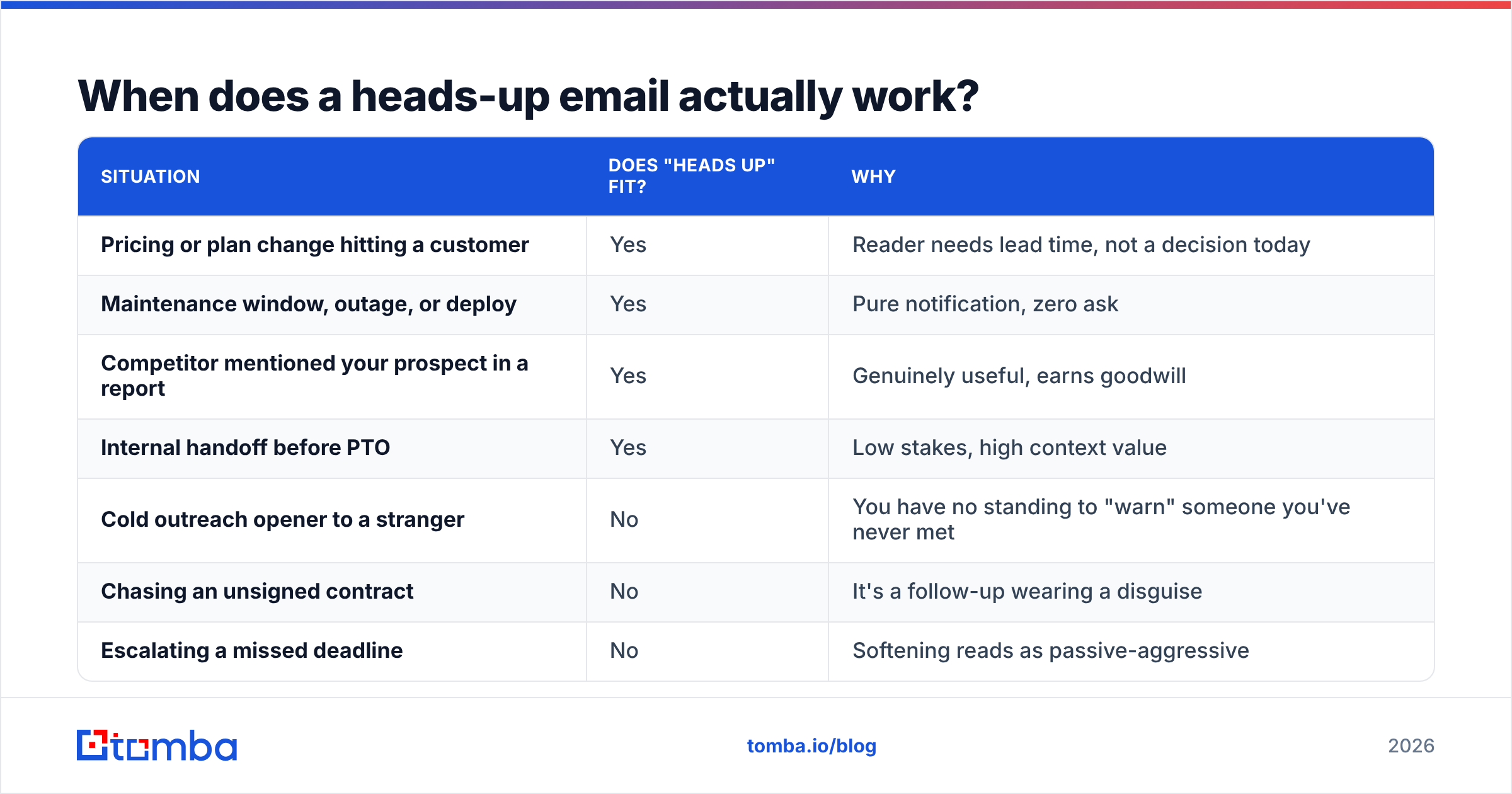
When does a heads-up email actually work?#
| Situation | Does "heads up" fit? | Why |
|---|---|---|
| Pricing or plan change hitting a customer | Yes | Reader needs lead time, not a decision today |
| Maintenance window, outage, or deploy | Yes | Pure notification, zero ask |
| Competitor mentioned your prospect in a report | Yes | Genuinely useful, earns goodwill |
| Internal handoff before PTO | Yes | Low stakes, high context value |
| Cold outreach opener to a stranger | No | You have no standing to "warn" someone you've never met |
| Chasing an unsigned contract | No | It's a follow-up wearing a disguise |
| Escalating a missed deadline | No | Softening reads as passive-aggressive |
The pattern is simple: the phrase earns its place when you're doing the reader a favor, and it costs you when you're actually asking for something. In the second case, the hedge signals that you know your ask is unwelcome — and now the reader knows it too.
Why does "just a heads up" weaken so many emails?#
Because "just" is a discount code applied to your own message.
Compare these two openers sent to the same VP of Ops:
Just a heads up, we're deprecating the v1 export on March 3.
The v1 export stops working on March 3. Your nightly finance sync uses it.
The first is a sentence the reader can defer. The second is a sentence with a consequence attached to their name. Nothing about the underlying facts changed — only the framing did.
Three specific failure modes show up constantly in B2B inboxes:
- The buried ask. Writers use "heads up" as a runway, then drop a real request in paragraph three. The reader skims the soft opener, decides it's FYI, and never reaches the ask. Your response rate drops, and you blame the subject line.
- The false warning. Cold emails that open "just a heads up — your competitors are using AI SDRs" aren't warnings. They're pitches with a costume on. Buyers recognize this instantly, and HubSpot's sales team has written at length about how manufactured urgency erodes trust in outbound.
- The apology reflex. "Just wanted to give you a quick heads up, sorry to bother you" stacks three hedges before a single fact. Each one tells the reader this probably isn't worth their attention.
Strip the hedges and the email gets shorter, clearer, and easier to act on. That's not a style preference — shorter, single-ask emails consistently outperform multi-paragraph ones in every outbound benchmark worth reading, and Gartner's sales research has tracked the same pattern in buyer-side survey data: information that reduces decision effort wins.
What should you write instead of "just a heads up"?#
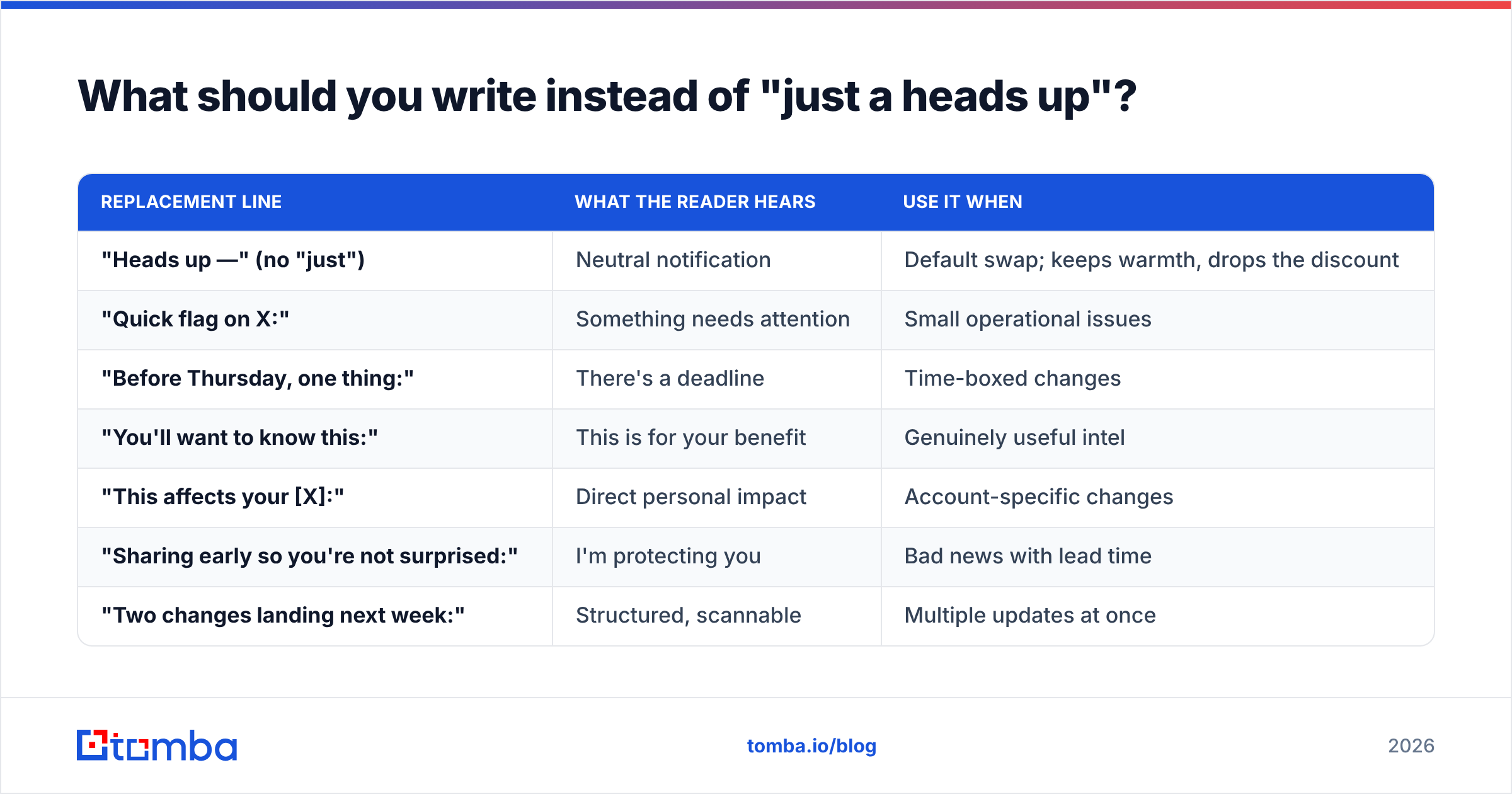
You don't need to delete the phrase from your vocabulary. You need alternatives sized to the stakes. Here are twelve, sorted by how much pressure they apply:
| Replacement line | What the reader hears | Use it when |
|---|---|---|
| "Heads up —" (no "just") | Neutral notification | Default swap; keeps warmth, drops the discount |
| "Quick flag on X:" | Something needs attention | Small operational issues |
| "Before Thursday, one thing:" | There's a deadline | Time-boxed changes |
| "You'll want to know this:" | This is for your benefit | Genuinely useful intel |
| "This affects your [X]:" | Direct personal impact | Account-specific changes |
| "Sharing early so you're not surprised:" | I'm protecting you | Bad news with lead time |
| "Two changes landing next week:" | Structured, scannable | Multiple updates at once |
| "No action needed, but —" | Truly zero ask | Pure FYI, keeps inbox load low |
| "One decision needed by Friday:" | There is an ask | When you actually want a reply |
| "Correcting something I sent earlier:" | Accountability | Fixing your own mistake |
| "Context for your Monday meeting:" | Timed usefulness | Internal enablement |
| "I'd rather you hear this from me:" | High trust, serious news | Churn risk, pricing increases |
Notice that most of these are shorter than "just a heads up." That's not a coincidence. Clarity almost always compresses.
What does a good heads-up email look like?#
Four templates you can lift directly. Each one follows the same skeleton: news, impact, optional ask, date.
1. Product or API change (customer-facing)
Subject: v1 export retires March 3 — your sync uses it
Heads up: we're retiring the v1 export endpoint on March 3.
Your nightly finance sync still points at it, so it will stop returning data that morning unless it's switched to v2.
Swap takes about ten minutes — docs are here. If you'd rather we do it, reply and I'll book 15 minutes this week.
2. Pricing change (existing account)
Subject: Your renewal price changes April 1
I'd rather you hear this from me than from an invoice. Your plan moves from $99 to $119/mo on April 1.
Your current usage still fits comfortably inside the plan, so nothing changes functionally. If you'd like to lock the current rate for twelve months, that option's open until March 20.
3. Competitive or market intel (prospect, warm)
Subject: Your name came up in the Q1 category report
You'll want to know this: the Q1 category report lists your team in the "fast follower" tier, and the methodology footnote shows why — they pulled headcount data from a source that's eleven months stale.
No ask here. Thought you'd want it before your board deck.
4. Internal handoff
Subject: Acme account — I'm out Thu/Fri
Heads up: I'm out Thursday and Friday. Acme's security review lands Thursday afternoon.
Priya has the questionnaire and the previous answers. Only escalation worth waking me for is if they push back on the SOC 2 scope.
Four rules that hold across all of them: the subject line carries the news (not the hedge), the first line is a complete fact, the impact is specific to the reader, and the total length stays under 90 words. If you want help stress-testing the opening line, run it through a subject line tester before you send at scale — heads-up emails live or die on whether the subject survives a phone-screen skim.
Heads-up vs FYI vs follow-up: which one are you actually writing?#
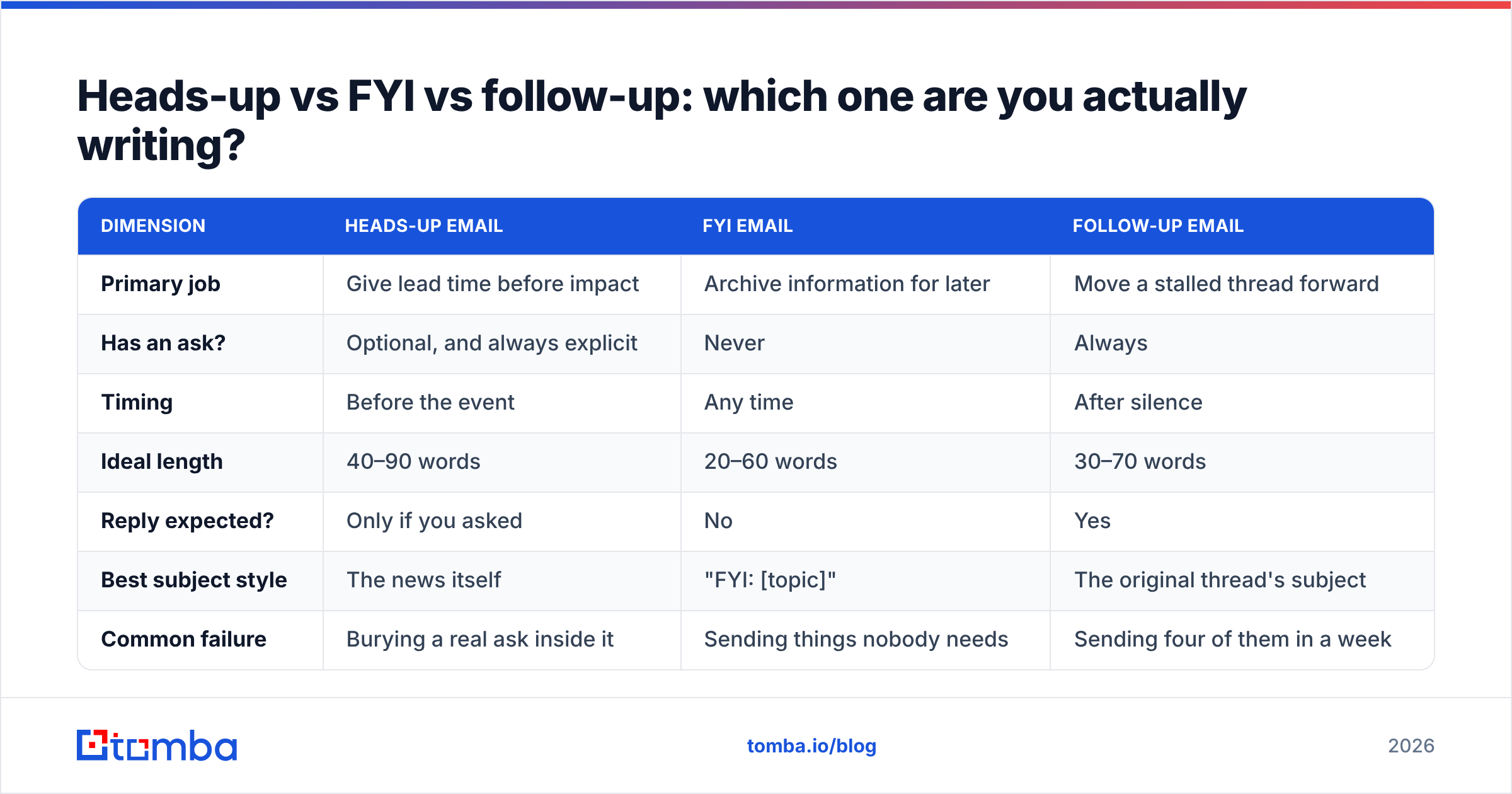
Most misfires come from writers choosing the wrong genre. These three look similar and behave completely differently.
| Dimension | Heads-up email | FYI email | Follow-up email |
|---|---|---|---|
| Primary job | Give lead time before impact | Archive information for later | Move a stalled thread forward |
| Has an ask? | Optional, and always explicit | Never | Always |
| Timing | Before the event | Any time | After silence |
| Ideal length | 40–90 words | 20–60 words | 30–70 words |
| Reply expected? | Only if you asked | No | Yes |
| Best subject style | The news itself | "FYI: [topic]" | The original thread's subject |
| Common failure | Burying a real ask inside it | Sending things nobody needs | Sending four of them in a week |
If your draft has an ask, it is not a heads-up. Rename it in your own head, rewrite the subject line, and put the ask in the first two lines. The single most common fix in B2B email review is moving a request from the bottom of a "heads up" note to the top of a follow-up.
How do you make sure the heads-up actually reaches someone?#
A warning that bounces is worse than no warning, because you now believe the person was told. This is where most heads-up workflows quietly break — especially when you're notifying a list rather than one person.
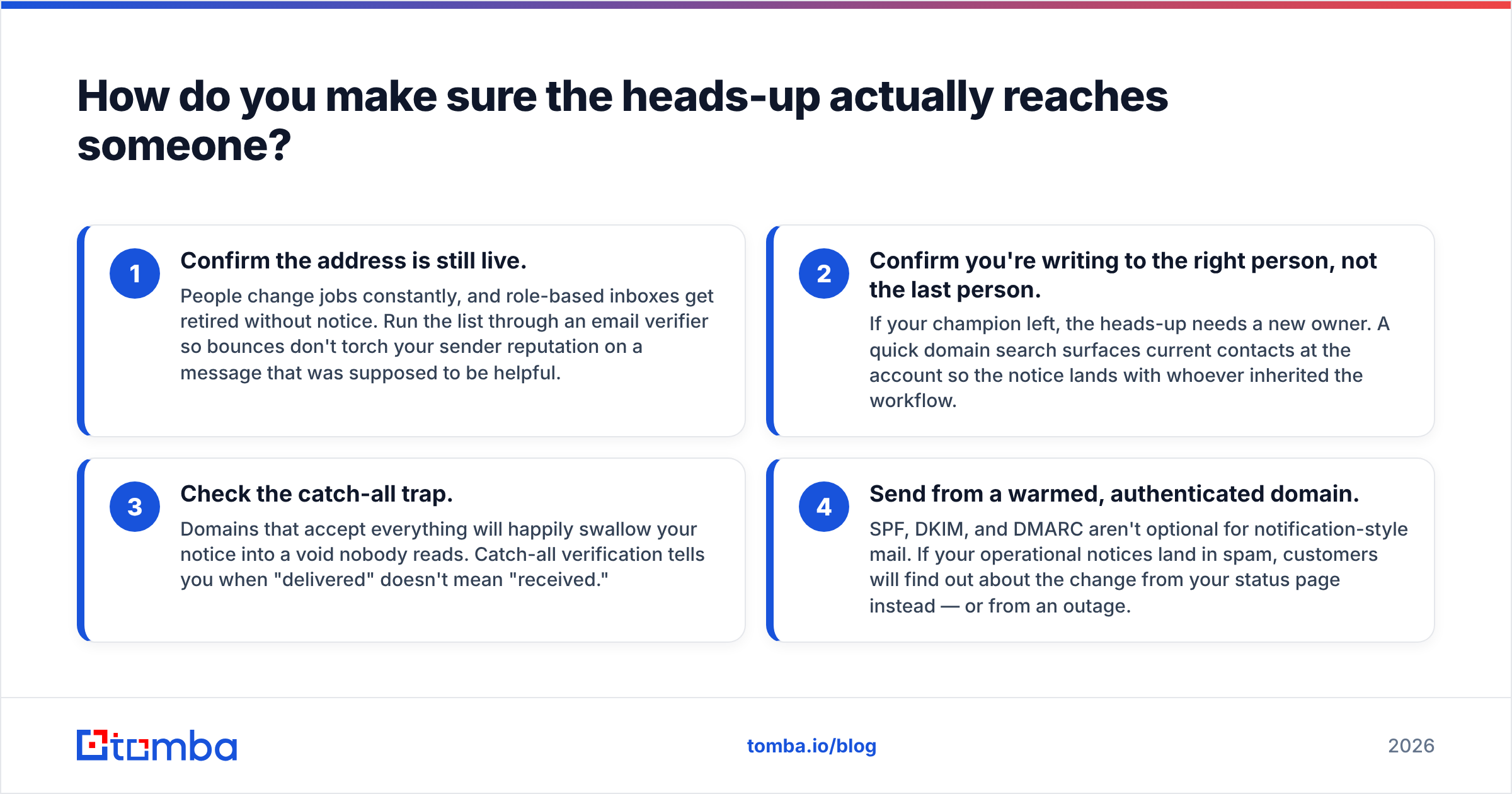
Four checks before any batch heads-up goes out:
- Confirm the address is still live. People change jobs constantly, and role-based inboxes get retired without notice. Run the list through an email verifier so bounces don't torch your sender reputation on a message that was supposed to be helpful.
- Confirm you're writing to the right person, not the last person. If your champion left, the heads-up needs a new owner. A quick domain search surfaces current contacts at the account so the notice lands with whoever inherited the workflow.
- Check the catch-all trap. Domains that accept everything will happily swallow your notice into a void nobody reads. Catch-all verification tells you when "delivered" doesn't mean "received."
- Send from a warmed, authenticated domain. SPF, DKIM, and DMARC aren't optional for notification-style mail. If your operational notices land in spam, customers will find out about the change from your status page instead — or from an outage.
Most teams treat step one as optional because heads-up emails feel low-stakes. They aren't. Deprecation notices, pricing changes, and security disclosures are exactly the messages where a silent bounce turns into an escalation three weeks later.
What are the most common heads-up email mistakes?#
- Stacking hedges. "Just wanted to quickly give you a small heads up" — four softeners, zero information. Cut to the fact.
- No date. A heads-up without a date is gossip. Every one of these emails should contain a specific day.
- Vague impact. "This may affect some workflows" tells nobody anything. Name the workflow.
- Using it to avoid a hard conversation. If you're softening because the news is bad, say the news plainly and then add the softener. Order matters.
- Sending it to a distribution list. Heads-ups are personal by nature. Blasting one to
team@guarantees diffusion of responsibility and zero action. - Forgetting the follow-through. If the change lands and nobody acted, that's on the sender. Schedule a second, shorter note two days before the date.
How should you scale heads-up emails without sounding robotic?#
The trick is to template the structure and personalize the impact line only. News and date stay fixed. The middle sentence — the one that says what this means for this account — is the only part you vary.
That's a one-field merge, not a rewrite, and it's the difference between a notice that gets ignored and one that gets forwarded internally. If you're building the recipient list from scratch, pull contacts with a proper email finder rather than guessing patterns, then verify before send. Guessed addresses are the number-one source of "we never got that email" conversations.
For recurring notices — deprecations, billing cycles, renewal windows — keep a small library of the four templates above and treat them like infrastructure. Plenty of teams keep theirs in a shared email template library so support, CS, and product all send the same shape of message. Consistency is what makes readers start trusting your notices instead of skimming past them.
The bottom line#
"Just a heads up" is not a banned phrase. It's a tool with a narrow range: genuine, early, low-ask notifications to people who already know you. Outside that range — cold outreach, follow-ups, escalations — it costs you clarity and hands the reader a reason to defer.
Write the news first. Attach the impact. Add a date. Drop the word "just."
And before any of it goes out, make sure the address is real. Tomba's Email Finder pulls verified, current professional addresses by name, company, or domain, so your heads-up reaches the person who actually needs it — not a mailbox that stopped existing two quarters ago. The free tier covers 25 searches a month; paid plans start at $49/mo if you're notifying at scale.
Related guides#
// get started
Find, verify and enrich your first contacts today
Start on the free plan with 25 searches a month, then scale when your team is ready.
Free plan · No credit card required · GDPR & CCPA
// about the author