Just Checking In Email: 12 Better Follow-Ups That Get Replies
"Just checking in" is the laziest line in B2B follow-up — it asks for a reply while giving nothing. Here are 12 replacements, a decision table, and the data behind why they work.
TL;DR
- "Just checking in" is a status request disguised as an email. It asks the prospect to do the work of restarting the conversation, which is why it gets ignored.
- The fix isn't a cleverer phrase. It's adding one new unit of information — a trigger event, a resource, a number, or a clear close — to every follow-up.
- Follow-ups outperform first touches more often than people expect: most replies to a cold sequence arrive on touch two through four, not touch one.
- Below: 12 field-tested replacements grouped by scenario, a cadence table, and a decision framework for picking the right one.
- If your follow-ups are bouncing instead of being ignored, the problem is your data, not your copy. Verify before you blame the copy.
Why does the "just checking in" email fail so consistently?#
Because it transfers work to the person who owes you nothing.
Think of it like knocking on a neighbor's door and saying "hey." They now have to figure out why you're there, whether they care, and what you want — all while holding the door open. Most people just say "sorry, busy right now."
A "just checking in" email does the same thing. It contains zero new information. The prospect has to reconstruct the entire thread from memory, decide whether the original offer still matters, and compose a reply that moves something forward. That's three cognitive tasks for an email that gave them nothing.
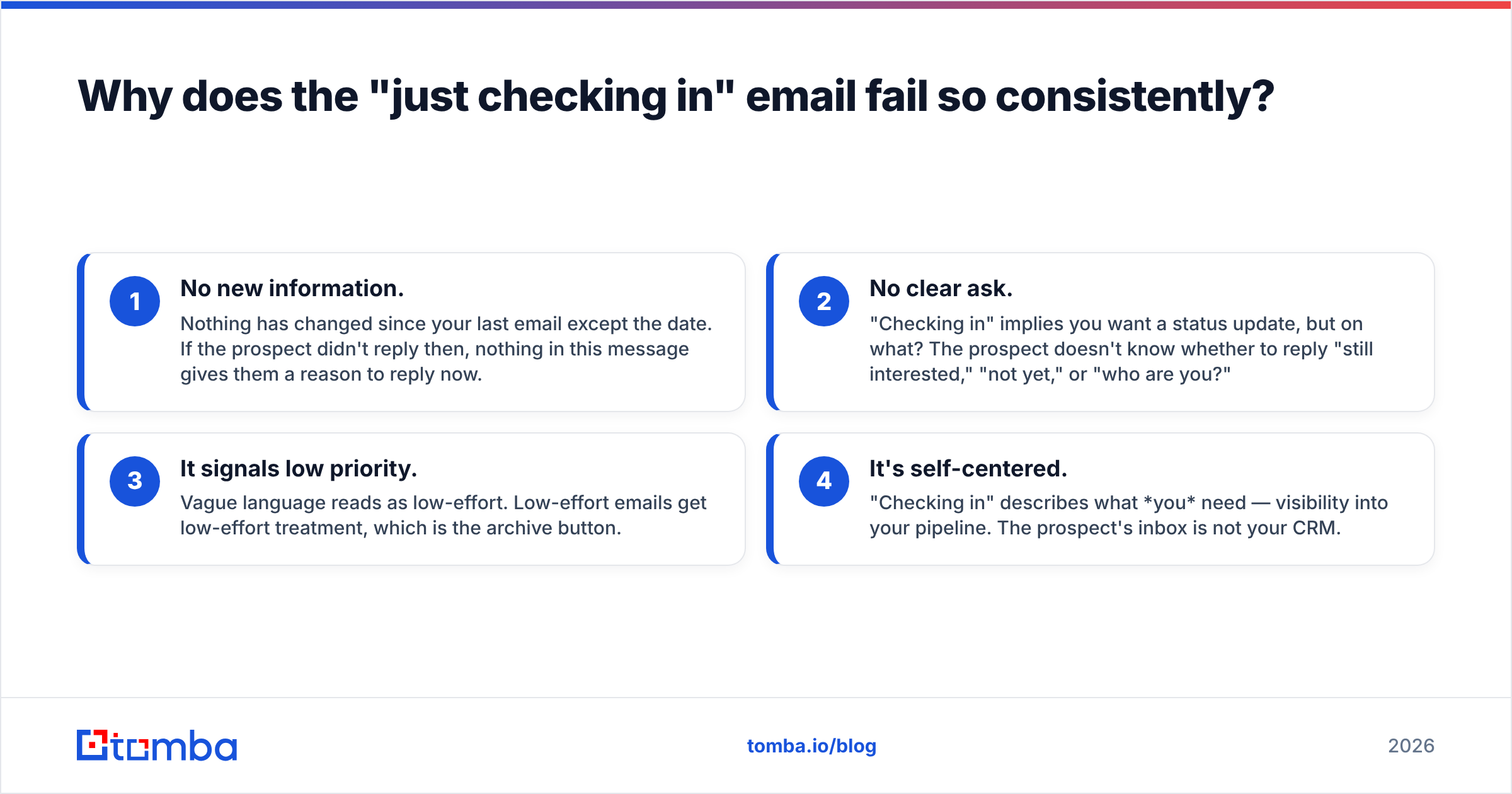
There are four specific failure modes:
- No new information. Nothing has changed since your last email except the date. If the prospect didn't reply then, nothing in this message gives them a reason to reply now.
- No clear ask. "Checking in" implies you want a status update, but on what? The prospect doesn't know whether to reply "still interested," "not yet," or "who are you?"
- It signals low priority. Vague language reads as low-effort. Low-effort emails get low-effort treatment, which is the archive button.
- It's self-centered. "Checking in" describes what you need — visibility into your pipeline. The prospect's inbox is not your CRM.
The seller's version of this email feels polite. The buyer's version feels like a nudge for a favor. That gap is the entire problem.
What should replace "just checking in"?#
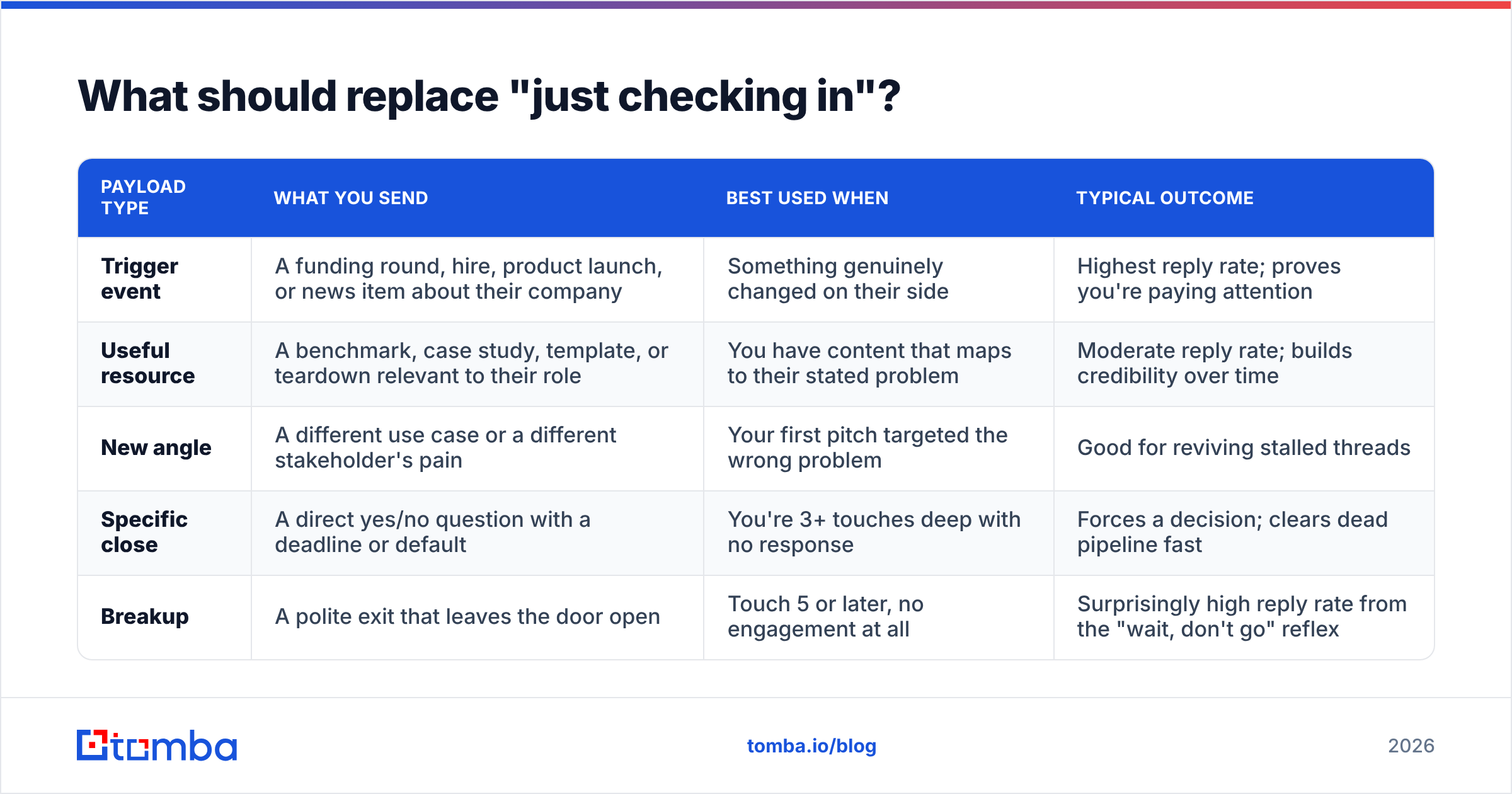
Every good follow-up delivers at least one of five payloads. Pick the payload first, then write the sentence.
| Payload type | What you send | Best used when | Typical outcome |
|---|---|---|---|
| Trigger event | A funding round, hire, product launch, or news item about their company | Something genuinely changed on their side | Highest reply rate; proves you're paying attention |
| Useful resource | A benchmark, case study, template, or teardown relevant to their role | You have content that maps to their stated problem | Moderate reply rate; builds credibility over time |
| New angle | A different use case or a different stakeholder's pain | Your first pitch targeted the wrong problem | Good for reviving stalled threads |
| Specific close | A direct yes/no question with a deadline or default | You're 3+ touches deep with no response | Forces a decision; clears dead pipeline fast |
| Breakup | A polite exit that leaves the door open | Touch 5 or later, no engagement at all | Surprisingly high reply rate from the "wait, don't go" reflex |
The rule underneath all five: your follow-up must be worth opening even if the recipient never buys. If it fails that test, don't send it.
What are the 12 best "just checking in" alternatives?#
Grouped by the situation you're actually in.
After a demo or discovery call#
1. The recap-plus-one.
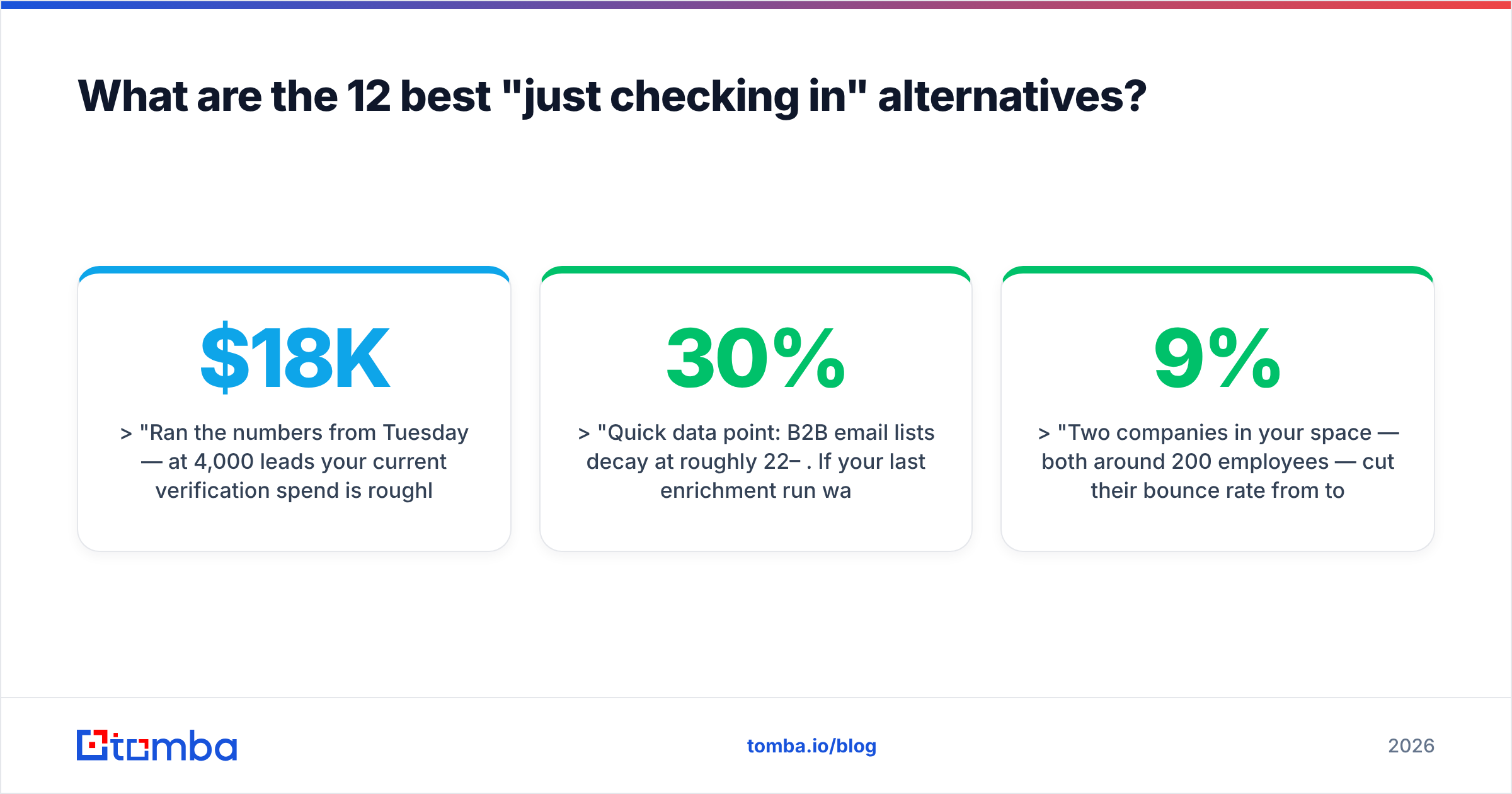
"Ran the numbers from Tuesday — at 4,000 leads/month your current verification spend is roughly $18K/year. Attached a one-page breakdown. Worth 10 minutes to walk through it?"
You're not checking in; you're delivering the homework you promised.
2. The stakeholder bridge.
"You mentioned Priya owns the budget line. Happy to put together a 5-slide version she can read without you having to re-explain it. Want me to send it over?"
Removes internal friction, which is the real reason most deals stall.
3. The objection callback.
"You flagged the CRM sync as the risk. We shipped native two-way sync in August — here's the doc. Does that change the math for you?"
Reference a specific concern, then show it's resolved.
After silence on a cold sequence#
4. The trigger event.
"Saw the Series B announcement — congrats. Teams at that stage usually double outbound headcount within two quarters, which is when list quality starts to hurt. Is that on your roadmap?"
5. The one-line value drop.
"Quick data point: B2B email lists decay at roughly 22–30% per year. If your last enrichment run was over six months ago, a third of it is dead. Want the audit checklist we use?"
6. The wrong-person reroute.
"I may have aimed this at the wrong desk. Is demand gen or RevOps the right owner for outbound data at Acme?"
This one works because it's easy to answer. A name is less effort than a decision.
7. The peer proof.
"Two companies in your space — both around 200 employees — cut their bounce rate from 9% to under 2% last quarter. Same playbook, 40 minutes to implement. Interested in the write-up?"
When you need a decision#
8. The permission-to-close.
"Should I close this out on my end? No hard feelings — I'd rather clear it than keep landing in your inbox."
9. The default-yes.
"Planning my Q4 list. Unless I hear otherwise, I'll assume this isn't a priority until January and check back then. Reply 'sooner' if that's wrong."
10. The binary question.
"One question: is the blocker budget, timing, or fit? Any of the three is a useful answer."
Multiple choice beats open-ended. Always.
Long-dormant leads#
11. The relevant-change email.
"You passed in March because we didn't support HubSpot natively. That shipped. Not asking for a meeting — just wanted you to have the update."
12. The genuine breakup.
"I've sent a few notes and haven't heard back, which usually means the timing is off. I'll stop here. If outbound data becomes a priority, my door's open."
How many follow-ups should you actually send?#
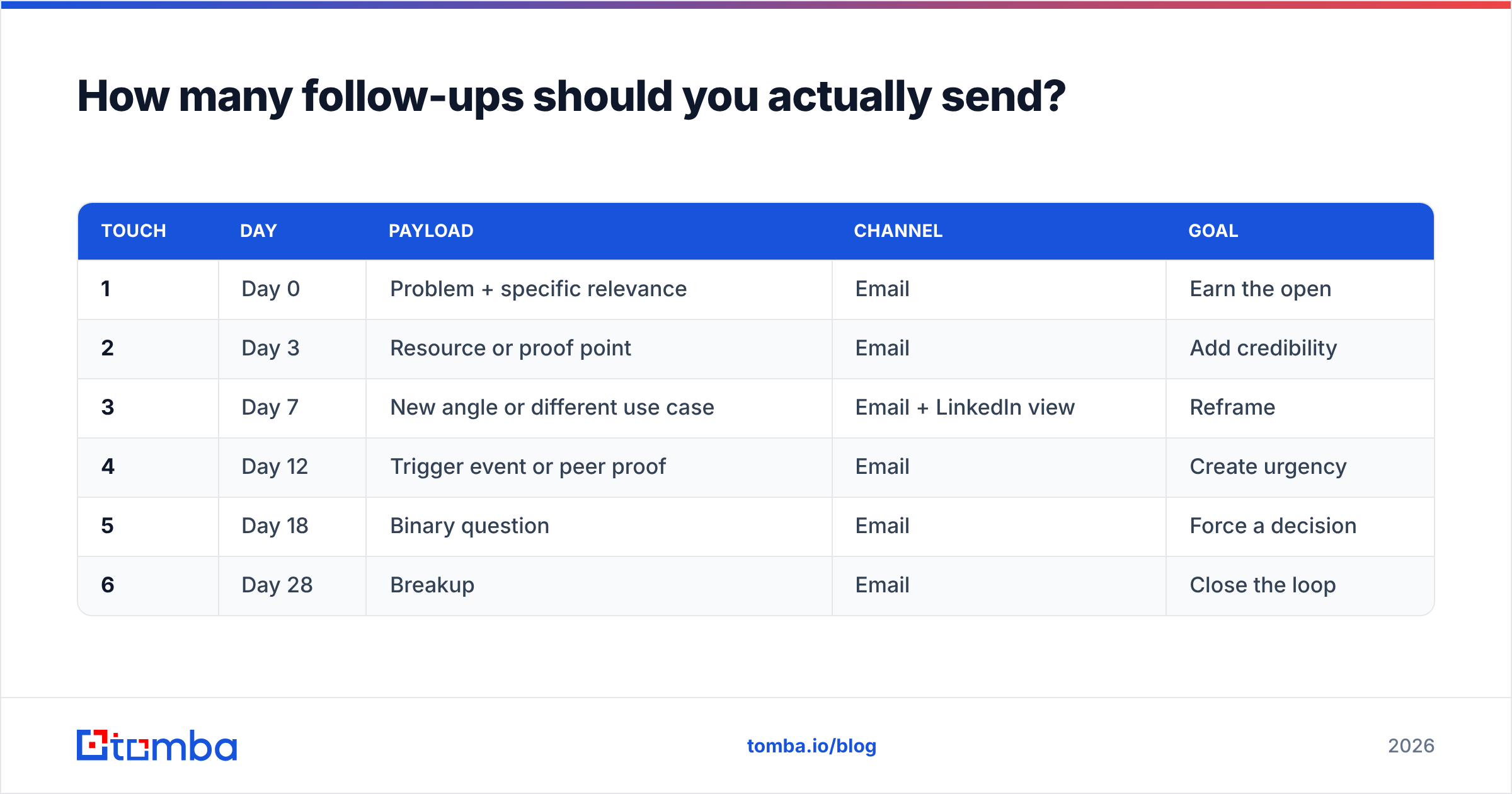
More than one, fewer than ten. The cadence matters more than the count.
| Touch | Day | Payload | Channel | Goal |
|---|---|---|---|---|
| 1 | Day 0 | Problem + specific relevance | Earn the open | |
| 2 | Day 3 | Resource or proof point | Add credibility | |
| 3 | Day 7 | New angle or different use case | Email + LinkedIn view | Reframe |
| 4 | Day 12 | Trigger event or peer proof | Create urgency | |
| 5 | Day 18 | Binary question | Force a decision | |
| 6 | Day 28 | Breakup | Close the loop |
Two things this table encodes that most cadences get wrong:
- Spacing widens over time. Days 0, 3, 7, 12, 18, 28. Tight early spacing keeps the thread warm; wider later spacing keeps you from looking desperate.
- Each touch has a distinct job. If two touches in your sequence could be swapped without anyone noticing, you have a "just checking in" problem even if you never use the phrase.
For context on what to expect, industry benchmarks compiled by HubSpot and vendor reports on G2 consistently show cold sequences landing in the 1–5% reply range, with well-targeted, small-volume campaigns reaching double digits. Wide range — which tells you targeting and data quality move the number far more than the words do.
Is your follow-up problem actually a deliverability problem?#
Check this before rewriting a single line.
If a prospect never received touch one, your beautifully rewritten touch three is irrelevant. Silence has three causes and only one of them is copy:
- The address is wrong or dead. Contact data decays constantly — people change jobs, companies rebrand domains, and role-based addresses get retired. Run your list through an email verifier before you assume the copy failed.
- You're landing in spam. Missing or broken authentication puts you in the junk folder regardless of content. Check your SPF record and confirm your domain isn't flagged.
- Your copy genuinely didn't land. Only after ruling out the first two is this the answer.
Reps skip straight to step three because rewriting copy feels productive. It isn't, if the underlying email deliverability is broken. A 12% bounce rate will damage your sender reputation faster than any subject line can repair it.
Google and Yahoo's bulk sender requirements, documented in Google's Postmaster guidelines, set a hard spam-complaint threshold. Sending more follow-ups to unverified addresses is the fastest way to trip it.
What does a good follow-up look like structurally?#
Four lines. That's the whole template.
- Context line — one clause that reminds them who you are, without a paragraph of recap. "Following up on the bounce-rate thread —"
- New information — the actual reason this email exists. A number, a change, a resource, a name.
- Relevance bridge — one sentence connecting that information to their situation. Not your product. Their situation.
- Single ask — one question, answerable in under ten words.
Put together:
Following up on the bounce-rate thread —
We pulled data across 400 outbound teams: lists older than 90 days bounce at roughly 4x the rate of freshly verified ones.
Given your team's 2,000-contact monthly volume, that's the difference between a healthy domain and a throttled one.
Worth a look at your last export?
Forty-eight words. Every one of them earns its place. Compare that to "Hi — just checking in on my last email, let me know if you'd like to chat!" and the difference isn't tone. It's whether the email contains anything at all.
Keep subject lines short and specific. If you're stuck, a subject line generator will give you starting points faster than staring at a blank field — but test them, don't trust them.
How do you personalize follow-ups at scale without sounding like a robot?#
Personalize the trigger, not the greeting.
Inserting {{first_name}} and {{company}} isn't personalization; every prospect has seen that trick ten thousand times. Real personalization means the email couldn't have been sent to anyone else. That requires data:
- Role and seniority — a VP of Sales and an SDR manager care about different numbers. Same company, different email.
- Tech stack — knowing they run HubSpot versus Salesforce changes the integration objection entirely.
- Recent activity — hiring, funding, product launches, conference appearances. All public, all usable.
- Company size and shape — a 40-person team and a 400-person team have completely different bottlenecks.
The workable pattern: build tight segments of 20–50 contacts that share a trigger, then write one genuinely specific sequence per segment. That's how you get personalization economics that work — a handful of custom sequences covering hundreds of prospects, each of which reads as though it was written for that reader.
Getting there needs accurate contact data underneath. A domain search pulls every reachable address at a target company so you can route the right message to the right role instead of guessing at info@. Layer data enrichment on top and your trigger fields — headcount, stack, seniority — populate automatically rather than through manual LinkedIn archaeology.
For teams running higher volume, tools like BookYourData offer prebuilt verified lists, which is a reasonable route when you need coverage in a segment you haven't prospected before. Pair either approach with verification and your cadence stops being a numbers game and starts being a targeting one.
What should you never do in a follow-up?#
A short list of things that reliably cost you replies:
- "Bumping this to the top of your inbox." You didn't bump anything. You sent another email. Everyone knows.
- "Did you see my last email?" Yes. They saw it. Asking makes it awkward for both of you.
- Guilt framing. "I've reached out three times now" makes their non-reply your grievance. Never a good look.
- Fake urgency. "This offer expires Friday" when it doesn't. One discovered bluff kills every future email from your domain.
- Long recaps. If your follow-up re-explains the original pitch in full, you've written a worse version of the first email.
- Multiple asks. "Let me know your thoughts, and also whether Thursday works, and if you want the deck." Pick one.
Putting it together#
The "just checking in" email isn't bad because the phrase is tired. It's bad because it's a request with no offer attached. Fix the structure — one new piece of information, one clear ask, one distinct job per touch — and the phrase disappears on its own.
Then make sure the emails arrive. Rewriting copy for addresses that bounce is the most expensive kind of busywork in outbound.
Start with the contact layer: Tomba Email Finder locates verified professional addresses by name, domain, or company, so your carefully written follow-up reaches an inbox that actually exists. The free tier covers 25 searches a month for testing the workflow; paid plans start at $49/mo on Starter, with Growth at $99/mo — full details on the Tomba pricing page. Verify the list, tighten the cadence, and delete "just checking in" from your snippets folder permanently.
Related guides#
// get started
Find, verify and enrich your first contacts today
Start on the free plan with 25 searches a month, then scale when your team is ready.
Free plan · No credit card required · GDPR & CCPA
// about the author