Kapta Pricing Reviews Pros and Cons: A 2026 Buyer's Guide
Kapta sells key account management software on a quote-only model, and the sticker shock is real. Here is what buyers actually report paying, where the platform earns its keep, and when a lighter stack beats it.
Kapta pricing reviews pros and cons come down to one trade-off: a five-figure yearly bill for software that forces account planning to happen. There is no public price list, so most buyers budget blind. This guide collects what teams report paying, what reviewers praise, and where the platform falls short.
TL;DR
- Kapta is key account management (KAM) software: account plans, org charts, voice-of-customer surveys, and QBR workflows for teams that grow enterprise accounts instead of hunting new ones.
- There is no public price list. Buyers report entry points near $1,000/month, with per-seat rates of $85–$125 per user per month on annual contracts. Treat every figure here as reported, not quoted.
- Reviews are positive on structure and coaching value. The common gripes: onboarding effort, a UI that feels dated, and the need for managers to enforce the process.
- Kapta is not a prospecting or contact-data tool. If you need to find and verify contacts inside accounts, this is the wrong category — at 20x the price.
- Best fit: 10+ strategic accounts worth six figures each, a named CSM/AM team, and an exec sponsor who will read the plans.
What is Kapta and who is it actually for?#
Kapta is account-growth software. Think of it as a flight plan system for your biggest customers: a CRM tells you where the plane is right now, while Kapta forces you to write down where it is going, who is flying it, what the weather looks like, and what happens if the co-pilot quits.
Technically, Kapta sits in the key account management category alongside DemandFarm, Prolifiq, ARPEDIO, and the account-planning modules bolted onto Gainsight or Salesforce. It centers on a repeatable KAM methodology. The vendor's own framework leans on a set process: understand customer objectives, map stakeholders, and run structured business reviews.
The core objects you work with are consistent across every review and demo:
- Account plans — structured templates that force reps to record customer objectives, success metrics, risks, and a dated action plan, instead of a Google Doc that goes stale in six weeks.
- Relationship and org mapping — visual stakeholder maps showing who the champion is, who the economic buyer is, and where you have no coverage at all. This is the feature reviewers cite most.
- Voice-of-customer surveys — structured check-ins with the customer so your health score reflects what the buyer says, not what the AM hopes.
- QBR and business-review builders — templated exports so every review meeting looks the same and executives can compare accounts side by side.
- Growth and risk dashboards — roll-ups that let a VP see which accounts have no plan, no exec relationship, or no next action.
- CRM sync — bidirectional integration with Salesforce and HubSpot so plans reference live opportunity and contact data.
The audience is narrow on purpose. Kapta is built for companies where a handful of accounts carry most of the revenue: managed services, enterprise SaaS with land-and-expand motions, logistics, staffing, industrial suppliers. If your average contract is $4,000 a year and you have 3,000 customers, this is the wrong shape of tool entirely.
How much does Kapta cost in 2026?#
Short answer: expect a five-figure annual commitment, and expect to ask for it by name.
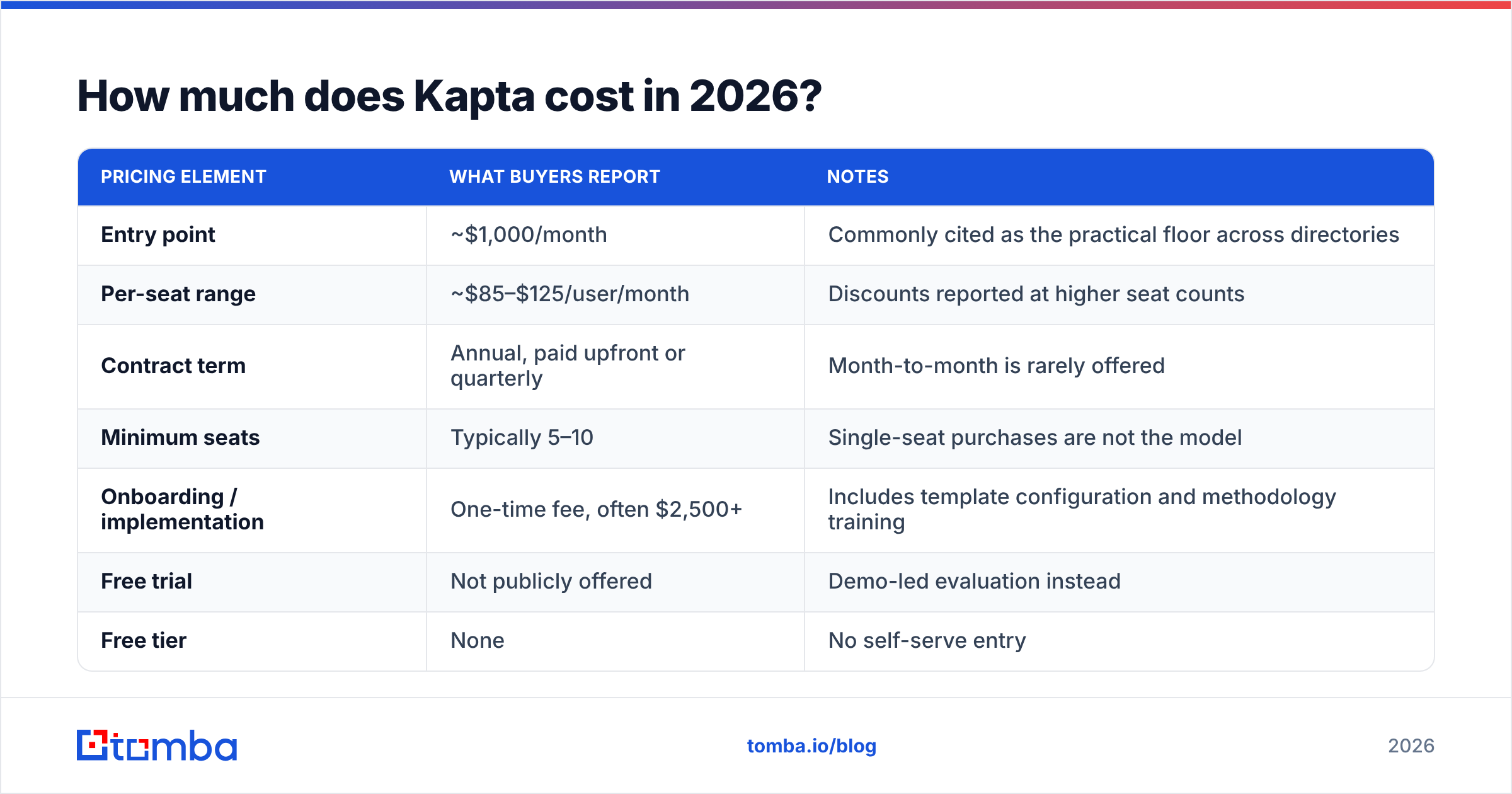
Kapta does not publish a pricing page with tiers and buttons. Everything runs through a demo and a custom quote. That is standard for KAM platforms. It is still a pain if you have to build a budget before you have permission to talk to a rep. What follows comes from public software directories such as Capterra and G2, buyer discussions, and vendor comparison pages. None of it is a quote sheet, so verify every figure with the vendor before you plan around it.
| Pricing element | What buyers report | Notes |
|---|---|---|
| Entry point | ~$1,000/month | Commonly cited as the practical floor across directories |
| Per-seat range | ~$85–$125/user/month | Discounts reported at higher seat counts |
| Contract term | Annual, paid upfront or quarterly | Month-to-month is rarely offered |
| Minimum seats | Typically 5–10 | Single-seat purchases are not the model |
| Onboarding / implementation | One-time fee, often $2,500+ | Includes template configuration and methodology training |
| Free trial | Not publicly offered | Demo-led evaluation instead |
| Free tier | None | No self-serve entry |
The practical translation: a 10-person account management team is realistically looking at $12,000–$18,000 per year plus implementation. A 25-seat deployment can clear $30,000 without anyone doing anything unusual. That is normal for the category. DemandFarm and ARPEDIO land in similar territory, and Gainsight's full platform usually costs more. But it is a real budget line, not a tool you expense quietly.
Three cost factors reviewers flag that never show up in the headline number:
- Implementation time, not just fees. Multiple reviews mention a setup period measured in weeks. Someone internal owns template design, field mapping, and CRM sync. That person's time is part of the price.
- Seat creep. Once execs want visibility, you buy read-only or manager seats. Ask explicitly whether view-only users are billed.
- The methodology commitment. Kapta is sold with a process. If you buy the software and skip the process, you have bought an expensive template library. Several negative reviews are really reports of this failure mode.
What do Kapta reviews actually say?#
Aggregate ratings on the major directories sit in the strong range — generally 4.4 to 4.6 out of 5 across a modest review volume. Small review counts mean you should read the text, not the stars.
What reviewers consistently praise:
- Forced structure. The most repeated positive is that Kapta makes account planning happen at all. Reps who never wrote a plan now write one because the system asks for it and a manager can see the gap.
- Org charts and relationship maps. Reviewers describe these as the feature that changes conversations — the moment a VP sees that a $2M account has exactly one contact, the renewal risk stops being theoretical.
- Voice-of-customer capture. Getting the customer's stated objectives in writing, in the same place as the plan, is repeatedly called out as the difference between a health score and a guess.
- Responsive support and onboarding staff. Service quality scores tend to run higher than feature scores, which is a good sign for a smaller vendor.
What reviewers consistently criticize:
- The interface feels dated in places. Not broken — but reviewers coming from modern SaaS tools mention clunky navigation and too many clicks to update a plan.
- Reporting flexibility. Custom reporting and export options are the most common feature request. Teams that want to slice data their own way often end up pulling it into a BI tool.
- Adoption is the hard part. The honest summary in many reviews: the tool works if leadership inspects it weekly, and collects dust if they don't. That is true of most enterprise process software, but it is especially true here because the value is entirely in the discipline.
- Overkill for small teams. Reviewers with fewer than five account managers frequently say a well-built CRM stage plus a shared template would have done the job.
Is Kapta worth it compared to the alternatives?#
It depends on which problem you are actually solving. Here is where Kapta sits against the tools it most often gets compared to.
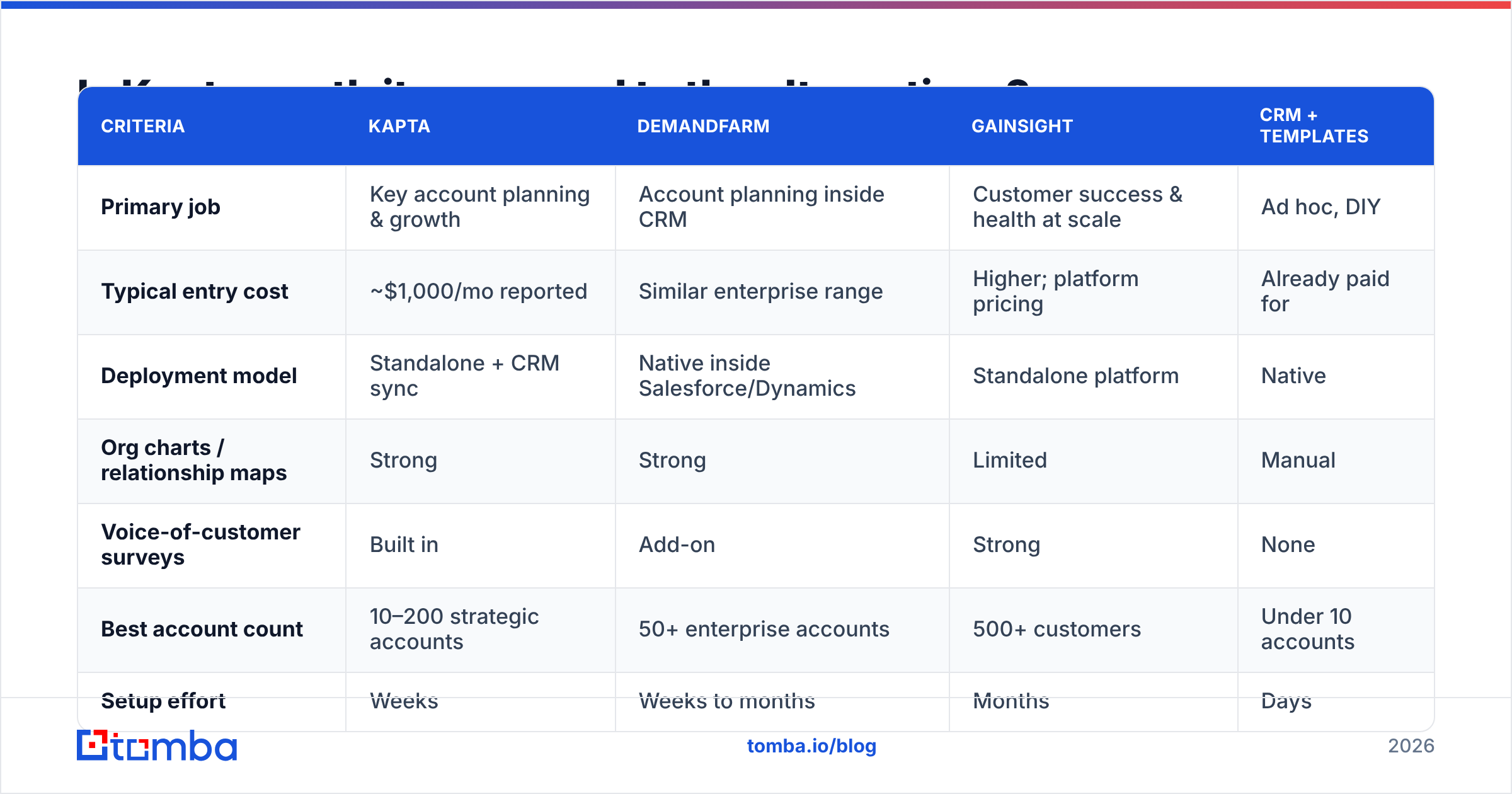
| Criteria | Kapta | DemandFarm | Gainsight | CRM + templates |
|---|---|---|---|---|
| Primary job | Key account planning & growth | Account planning inside CRM | Customer success & health at scale | Ad hoc, DIY |
| Typical entry cost | ~$1,000/mo reported | Similar enterprise range | Higher; platform pricing | Already paid for |
| Deployment model | Standalone + CRM sync | Native inside Salesforce/Dynamics | Standalone platform | Native |
| Org charts / relationship maps | Strong | Strong | Limited | Manual |
| Voice-of-customer surveys | Built in | Add-on | Strong | None |
| Best account count | 10–200 strategic accounts | 50+ enterprise accounts | 500+ customers | Under 10 accounts |
| Setup effort | Weeks | Weeks to months | Months | Days |
| Free trial | Not offered | Not offered | Not offered | N/A |
Reading the table honestly:
Choose Kapta when you have a defined set of strategic accounts, a named AM or CSM team, and a leader who will run plan reviews. The methodology-plus-software packaging is the actual product, and it is good at it.
Choose DemandFarm when your team lives inside Salesforce or Dynamics and will not tolerate a second login. Native-in-CRM is a real adoption advantage.
Choose Gainsight when the problem is scale — hundreds or thousands of customers, health scoring, and automated playbooks — rather than depth on a few dozen relationships.
Choose your existing CRM plus a disciplined template when you have fewer than ten accounts or no one to enforce the process. Honestly: a well-structured CRM stage model plus a shared plan doc costs nothing and gets you 60% of the benefit. If you cannot make that work, software will not rescue you.
What Kapta does not do — and where teams overspend#
This is the section most comparison posts skip, and it is where buyers waste the most money.
Kapta is a planning and relationship layer. It is not a contact database, it is not a prospecting engine, and it does not find or verify email addresses for the stakeholders it asks you to map. When Kapta's org chart shows a blank box next to "VP of Operations — no relationship," Kapta will not fill that box for you. You still need a way to identify that person and reach them.
Teams routinely conflate these two problems and buy the expensive tool for the cheap job. A quick separation:
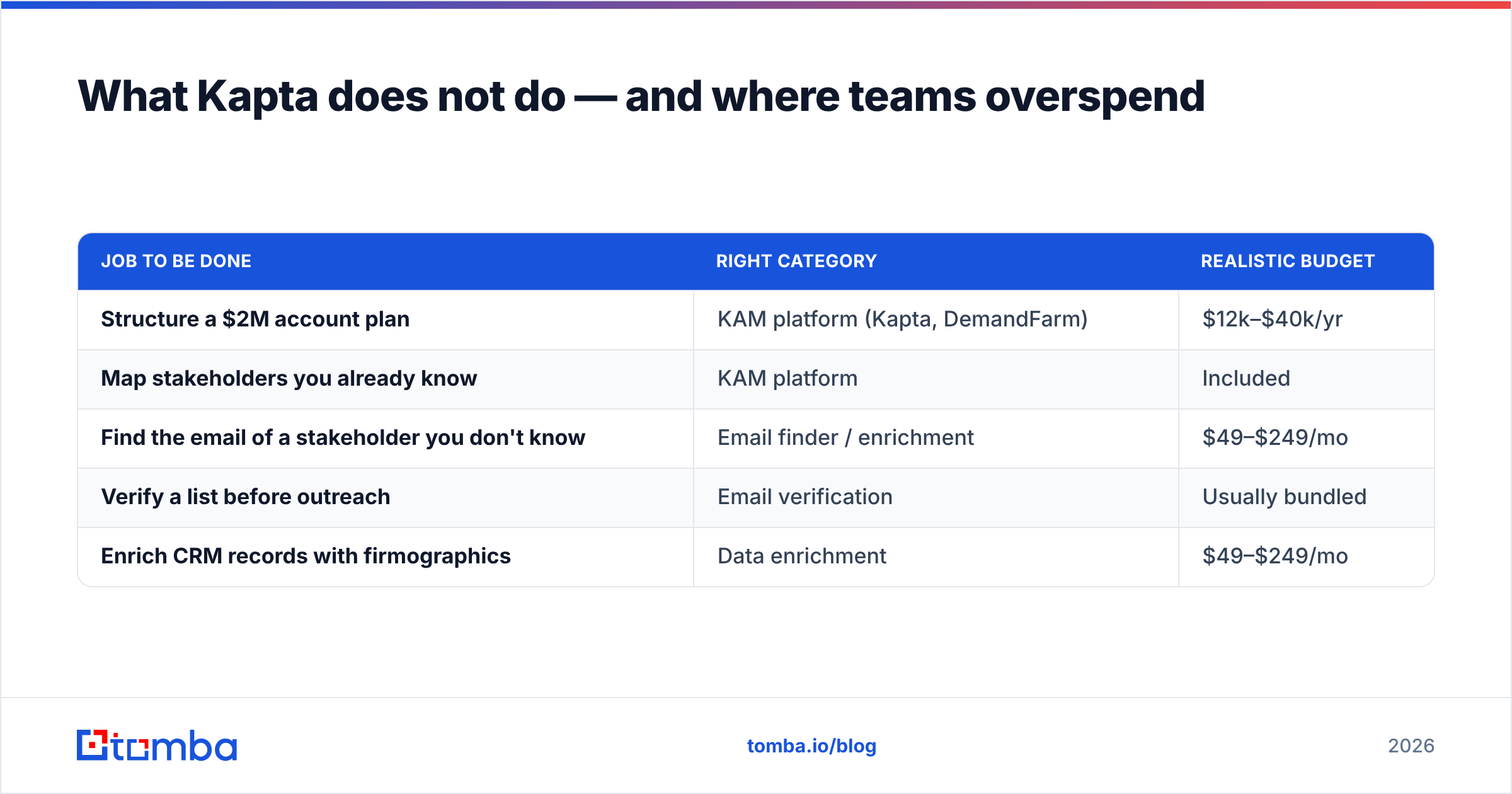
| Job to be done | Right category | Realistic budget |
|---|---|---|
| Structure a $2M account plan | KAM platform (Kapta, DemandFarm) | $12k–$40k/yr |
| Map stakeholders you already know | KAM platform | Included |
| Find the email of a stakeholder you don't know | Email finder / enrichment | $49–$249/mo |
| Verify a list before outreach | Email verification | Usually bundled |
| Enrich CRM records with firmographics | Data enrichment | $49–$249/mo |
That second half of the table is a different budget entirely. A tool like the Tomba Email Finder covers finding and verifying business contacts for $49/month on the Starter plan, with a free tier at 25 searches a month to test accuracy before committing — see the full Tomba pricing breakdown for tier details. Pair that with contact enrichment to fill in titles and company data on records already sitting in your CRM, and you have solved the "blank box in the org chart" problem for roughly 3% of a Kapta contract.
If you run Salesforce, both layers can live in the same workflow — Kapta syncs plans, and a Salesforce integration keeps contact records populated. They are complements, not substitutes.
How should you evaluate Kapta before signing?#
Most Kapta pricing reviews pros and cons write-ups stop at the feature list. Run the demo as an interrogation, not a presentation. Six questions change the outcome:
- "What is the total first-year cost including implementation, at our exact seat count?" Get it in writing. Separate recurring from one-time.
- "Are view-only executive seats billed?" This single answer can swing the contract 20%.
- "Show me a plan being updated by a rep, not a pre-built demo account." You are buying the update workflow, not the finished screenshot.
- "What happens to our data if we leave?" Export format and completeness. Account plans are institutional knowledge.
- "Which of your customers our size churned, and why?" A vendor that answers this honestly is a vendor worth buying from.
- "What does month one look like if our managers don't inspect plans?" Listen for whether they push back. A good KAM vendor will tell you the tool fails without leadership involvement — that honesty predicts a better implementation.
Then do the internal check that matters more than any of the above. Pick your three largest accounts and try to write a complete plan today, in a doc. If your team can't answer "what are this customer's stated objectives for the next 12 months and who owns them," the gap is process. Kapta will expose that gap rather than fix it. The exposure is valuable — but only if you are prepared to act on it.
Kapta pricing reviews pros and cons: the verdict#
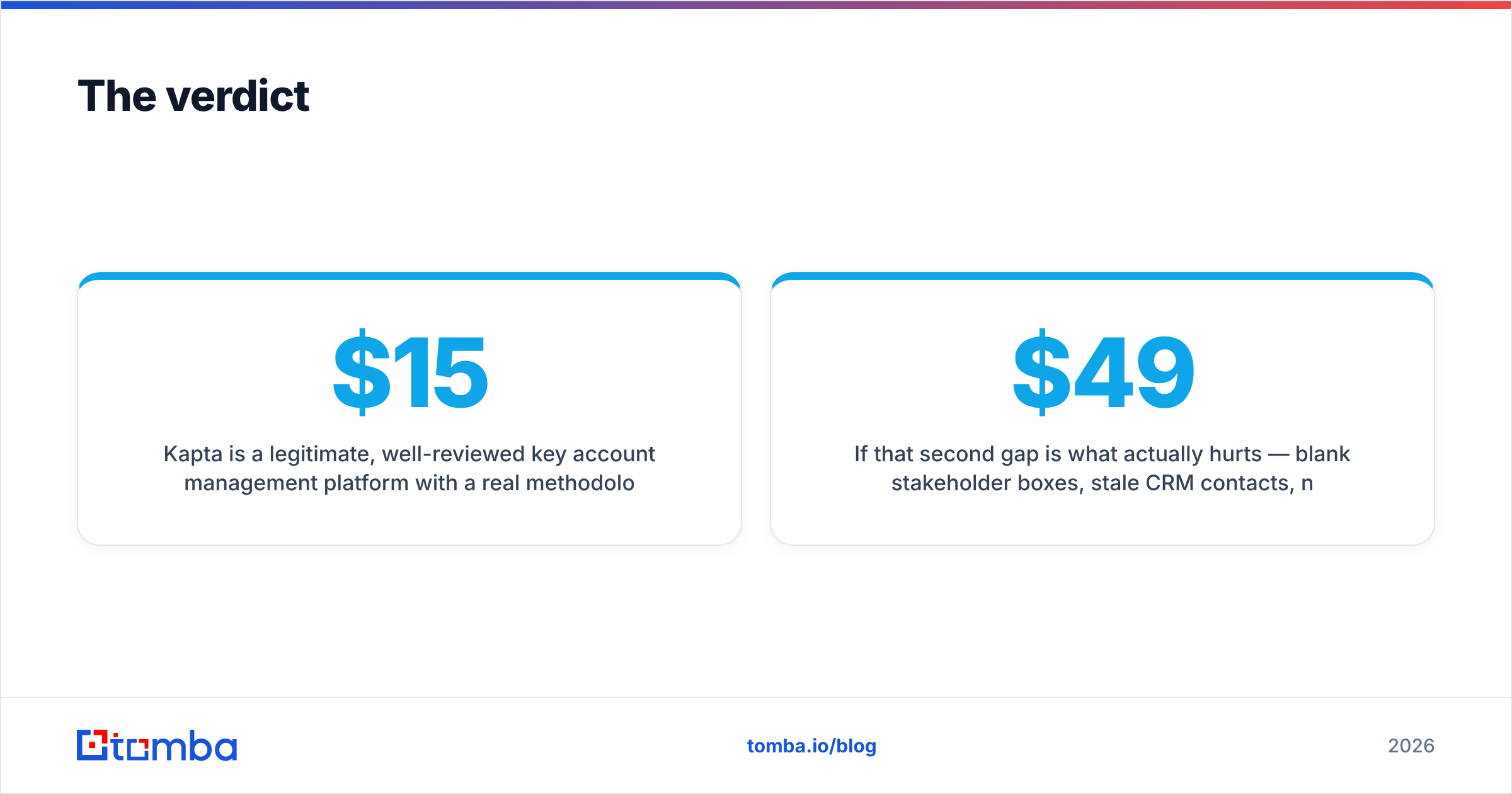
Weigh the Kapta pricing reviews pros and cons together and the picture is clear. Kapta is a legitimate, well-reviewed key account management platform with a real methodology behind it and a price tag that assumes your accounts are worth protecting. For a team of 10–50 account managers guarding seven-figure relationships, a $15,000–$30,000 annual spend that prevents one churned enterprise logo pays for itself several times over. The pros — structure, relationship visibility, customer-voice capture — are consistently confirmed by reviewers. The cons — dated UI in places, rigid reporting, and total dependence on management discipline — are just as consistent.
The mistake to avoid is buying it for the wrong job. Kapta deepens relationships you already have. It does not create new ones, and it does not find the people you have not met yet.
If that second gap is what actually hurts — blank stakeholder boxes, stale CRM contacts, no verified way to reach the new VP who just replaced your champion — start with the Tomba Email Finder. Free tier at 25 searches a month, $49/month Starter when you scale, and verified business emails feeding straight into the account plans you are already paying to maintain. Fill the org chart first; then decide whether you need a five-figure platform to manage it.
Related guides#
// get started
Find, verify and enrich your first contacts today
Start on the free plan with 25 searches a month, then scale when your team is ready.
Free plan · No credit card required · GDPR & CCPA
// about the author