Kaspr vs FindEmails.com (Toofr): Which Wins in 2026?
Kaspr reveals phone numbers on LinkedIn. FindEmails.com (formerly Toofr) does cheap bulk email lookups from a CSV. They solve different problems — here is which one actually fits your outbound motion, with pricing, accuracy and workflow compared.
Kaspr vs FindEmails comes down to one question: do you need mobile numbers pulled off LinkedIn, or cheap bulk emails pulled out of a CSV?
TL;DR
- Kaspr is a LinkedIn-first contact revealer built for SDRs who live inside Sales Navigator. Its differentiator is mobile phone numbers, not email volume.
- FindEmails.com (the product formerly known as Toofr) is a cheap, no-frills bulk email lookup service built around CSV uploads and a simple credit meter. No LinkedIn extension, no phone data.
- If your sequence is call-first, Kaspr wins. If you need a few thousand work emails out of a spreadsheet for under $50, FindEmails wins on cost per row.
- Neither ships a verification layer you'd trust on its own — budget for a separate verifier, or pick a tool that bundles finding and verifying on one credit pool.
- Tomba sits between the two: domain search, email finder, verifier and API share one pool, with a free tier (25 searches/mo) and Starter at $49/mo.
What are Kaspr and FindEmails.com (Toofr)?#
They're not really the same category of product, which is the first thing most comparison pages get wrong.
Kaspr is a Paris-built prospecting tool, acquired by Cognism in 2022. Its core surface is a Chrome extension that overlays LinkedIn, Sales Navigator and Recruiter. You open a profile, click the widget, and it returns a work email plus — the actual selling point — a direct mobile number. It also has a lightweight web app with lists, tasks and basic LinkedIn automation (connection requests, follow-up messages). A solo SDR can run a whole motion inside it. See kaspr.io for the current feature set.
FindEmails.com started life in 2013 as Toofr, a scrappy indie email-guessing service built by Ryan Buckley. It was later rebranded and folded into the Kickstart Side Hustle / SaaS portfolio. The product barely changed shape. You give it a name and a domain, or a CSV of them. It applies pattern inference plus a verification pass, then returns an address with a confidence score. There's a web UI, a bulk uploader, and an API. That's it. See findemails.com.
So the real question isn't "which is better" — it's which failure mode can you live with. Kaspr fails when you need volume and don't have a LinkedIn list. FindEmails fails when you need anything other than an email address.
Kaspr vs FindEmails: how do they compare at a glance?#
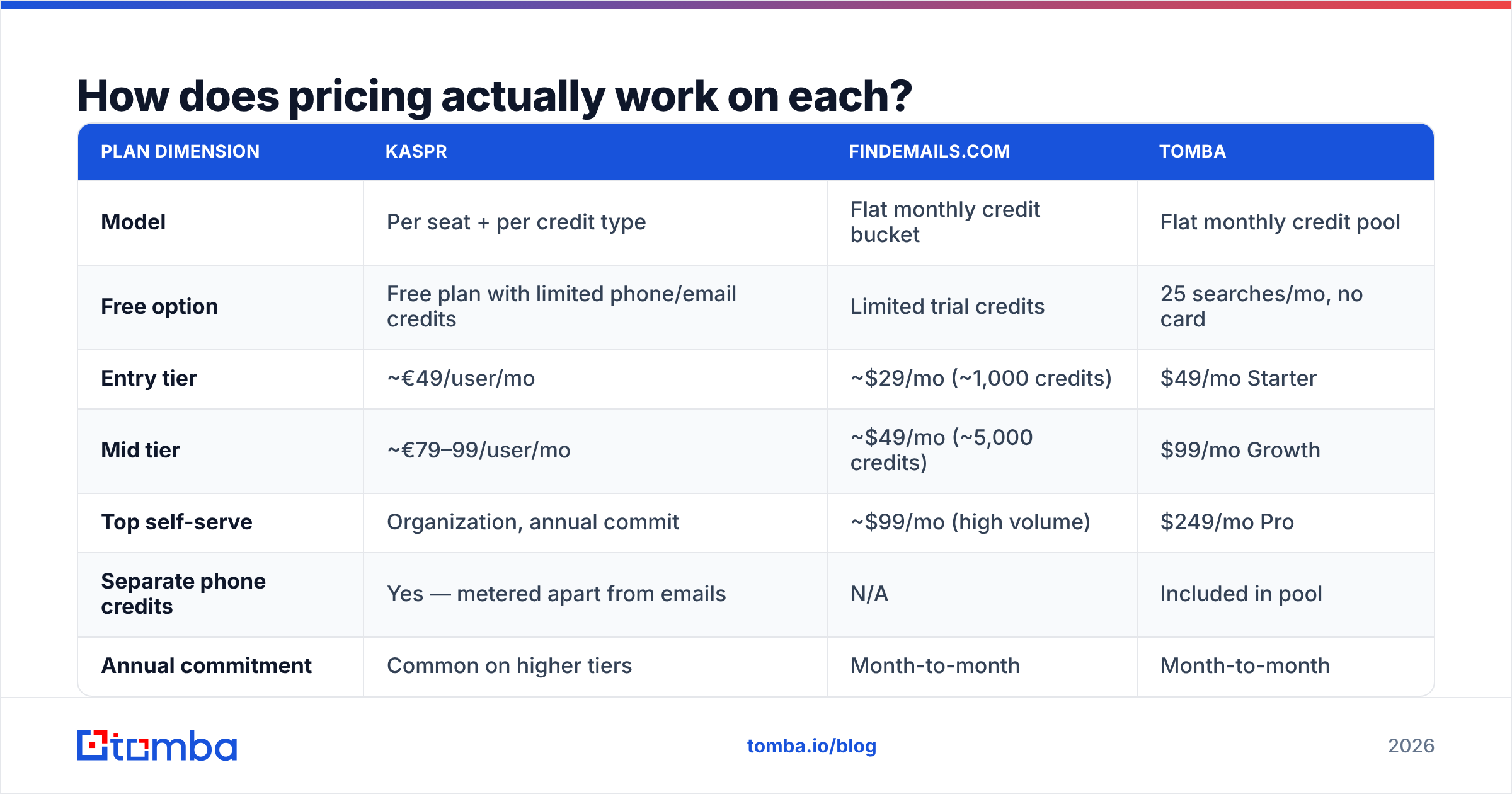
| Attribute | Kaspr | FindEmails.com (Toofr) | Tomba |
|---|---|---|---|
| Primary input | LinkedIn profile / Sales Nav list | Name + domain, or CSV | Domain, name, LinkedIn URL, CSV |
| Phone numbers | Yes — the main draw | No | Yes (phone finder) |
| Chrome extension | Yes (LinkedIn-native) | No | Yes |
| Bulk CSV enrichment | Limited, list-based | Yes — core workflow | Yes |
| Built-in verification | Basic | Yes, confidence scored | Yes, dedicated verifier + catch-all |
| Domain-wide search | No | Partial | Yes |
| API access | Higher tiers | Yes | All paid tiers |
| Entry paid price | ~€49/user/mo (listed) | ~$29/mo (listed) | $49/mo |
| Free tier | Yes, capped credits | Trial credits | 25 searches/mo |
| Best for | Call-first SDRs on LinkedIn | Cheap bulk email backfill | Mixed email + domain + API workflows |
Pricing above reflects each vendor's public page at the time of writing — both change tiers without much notice, so confirm before you buy.
Which tool actually finds more valid emails?#
Directionally: FindEmails returns more rows, Kaspr returns fewer rows with better metadata.
That's not a knock on either. They're sourcing differently. Kaspr resolves a specific human you already identified on LinkedIn, then attaches contact data from its contributor network and partners. FindEmails leans heavily on pattern inference — it knows that acme.com uses first.last@, so it constructs and tests the address. Pattern inference scales well and degrades badly. It is excellent on a 4,000-person company with a published format. It is close to useless on a 12-person agency that uses nicknames.

Here's how to read any accuracy claim you see, including the ones on those vendor sites:
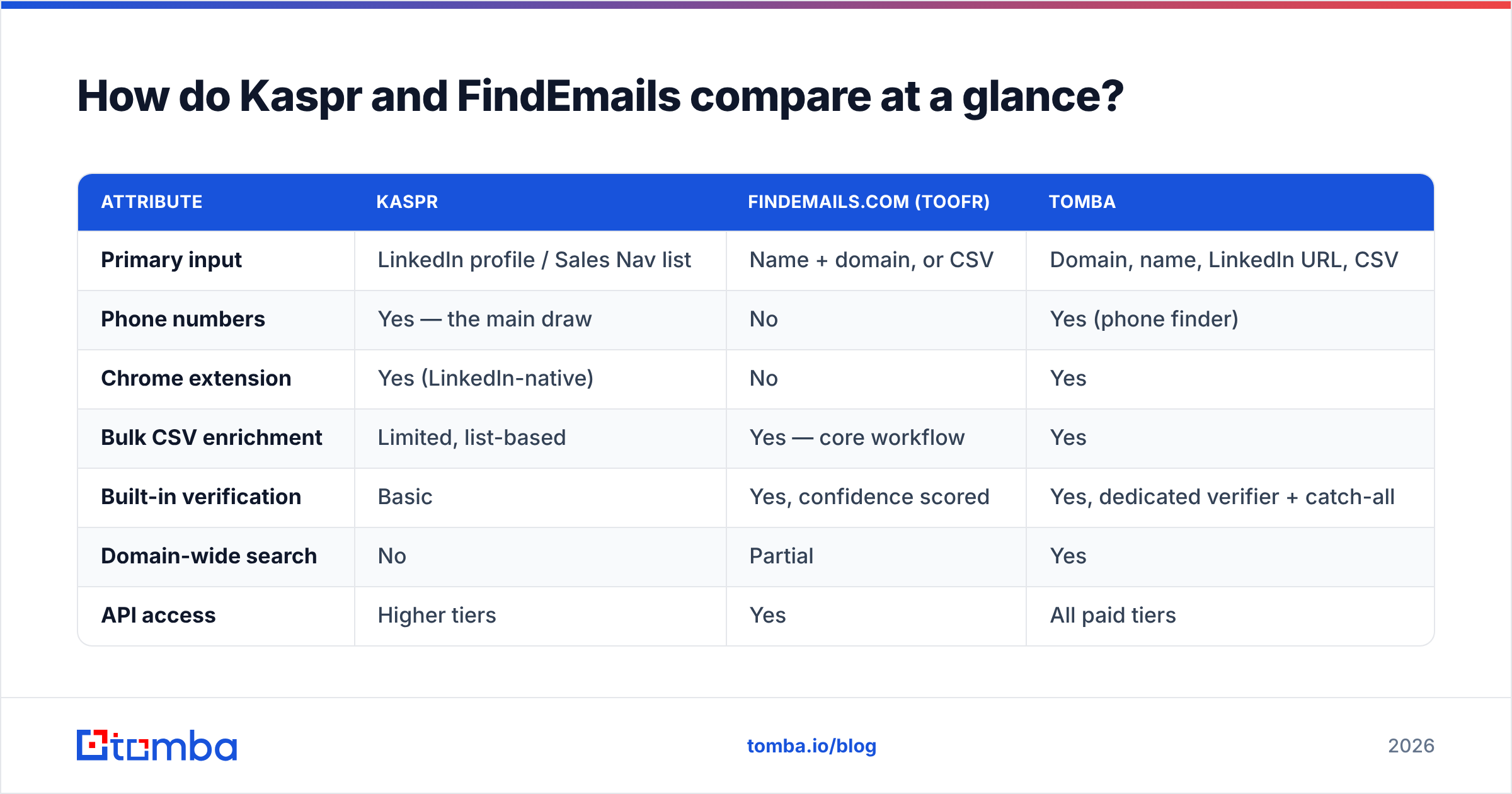
- Separate hit rate from accuracy. Hit rate is how often you got an address. Accuracy is how often it was real. A tool can post a 90% hit rate with 60% accuracy.
- Check what counts as a credit. Some tools charge for a guess. Others charge only for a verified result. That one policy can double your real cost per contact.
- Test on your ICP, not theirs. Run the same 200 contacts through both. A Europe-heavy database flatters the vendor's sample and fails on yours.
- Watch catch-all handling. About a fifth of B2B domains accept every address at SMTP. Tools that mark those "valid" inflate their numbers. Your bounce rate pays for it six weeks later.
- Re-test quarterly. B2B contact data decays 25–30% a year. A 2024 benchmark says nothing about 2026.
Whichever you pick, run the output through an email verifier before it touches a sequence. Both Kaspr and FindEmails will hand you addresses that pass their internal check and still bounce, and your sender reputation eats the difference.

How does pricing actually work on each?#
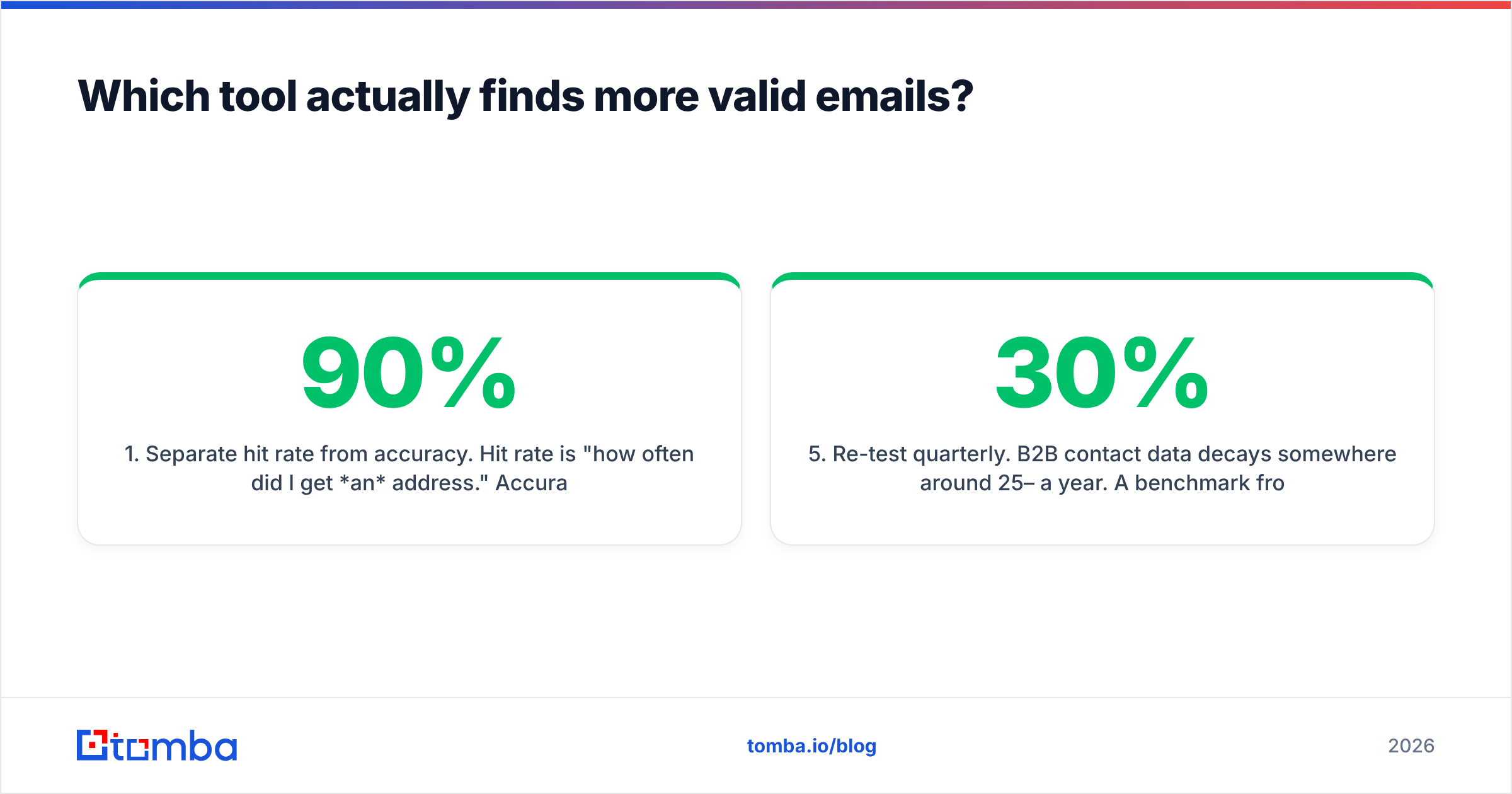
This is where the two diverge hardest, because they meter completely different things.
| Plan dimension | Kaspr | FindEmails.com | Tomba |
|---|---|---|---|
| Model | Per seat + per credit type | Flat monthly credit bucket | Flat monthly credit pool |
| Free option | Free plan with limited phone/email credits | Limited trial credits | 25 searches/mo, no card |
| Entry tier | ~€49/user/mo | ~$29/mo (~1,000 credits) | $49/mo Starter |
| Mid tier | ~€79–99/user/mo | ~$49/mo (~5,000 credits) | $99/mo Growth |
| Top self-serve | Organization, annual commit | ~$99/mo (high volume) | $249/mo Pro |
| Separate phone credits | Yes — metered apart from emails | N/A | Included in pool |
| Annual commitment | Common on higher tiers | Month-to-month | Month-to-month |
| Team seats | Charged per user | Account-level | Account-level |
Two traps worth naming.
Kaspr's trap is the seat multiplier. A five-person SDR pod at €79/user/mo is €395/mo before you've counted a single extra phone credit. Phone credits are metered separately from email credits, so the team that actually uses the differentiator burns through the expensive bucket first. It's fine economics if those mobiles convert — a connected dial is worth a lot more than an unopened email — but it's a real number, not a rounding error.
FindEmails' trap is that cheap credits aren't cheap if half of them miss. At $49 for 5,000 credits you pay about a cent a row. That looks unbeatable until you add the miss rate on small domains and the verification pass you'll run anyway. Effective cost per usable, verified, deliverable contact is the only number that matters, and it is always higher than the sticker.
Tomba's pricing is structured as a single shared pool — finder, verifier, domain search and enrichment all draw from the same credits — which mostly exists to avoid the "I have 4,000 email credits and zero phone credits" problem.
Is Kaspr worth it just for the phone numbers?#
Yes, if you actually dial. No, if you tell yourself you will.
Kaspr's mobile coverage is genuinely strong in Western Europe — France, UK, Benelux, DACH — and respectable in North America. For a team running a call-first or call-plus-email cadence, the widget is fast: profile open, one click, number in the dialer. The LinkedIn automation add-ons (connection requests, drip messages) are handy if you don't already pay for a sequencer. They are still thinner than a purpose-built LinkedIn outreach tool.
The honest limitations:
- You need a LinkedIn list to start. Kaspr is a revealer, not a discovery engine. If your motion starts from a domain list, a conference exhibitor page, or a customer lookalike export, you're doing the sourcing elsewhere.
- No real domain-wide search. You can't say "give me everyone in marketing at acme.com" and get a roster.
- Compliance posture matters. Contributor-network phone data and GDPR are an ongoing conversation. Kaspr publishes its notification process; make sure your legal team has read it before you deploy across an EU-facing team.
- Per-seat cost scales linearly. There's no volume-discounted single-account option for a five-person team.
If your ICP is US SaaS and your team sends 3,000 emails a month with maybe 40 dials, you are paying a premium for a capability you're not using.
Where does FindEmails.com still make sense?#
FindEmails is the right answer more often than its 2013-era interface suggests.
It's the cheapest defensible way to backfill a list you already have. You exported 3,000 companies from a trade association directory, you scraped the leadership pages, you have names and domains, and you need addresses. That is a one-click CSV job and it will cost you tens of dollars, not hundreds. Its API is straightforward enough to drop into a script without reading documentation for an hour.
What you give up:
- No phones, no LinkedIn surface, no visitor identification. It does one thing.
- Thin enrichment. You get an address and a score. Not a title, not a company size, not a tech stack.
- The UI feels its age. Fine for a batch job, rough as a daily driver for a team.
- Support and roadmap velocity are limited compared to venture-backed competitors — worth weighing if you're building a critical workflow on it.
If you want the same bulk-CSV economics with a verifier and domain search attached, a bulk email finder that shares one credit pool removes the "upload here, verify there, merge in Sheets" tax.

Which one should you pick?#
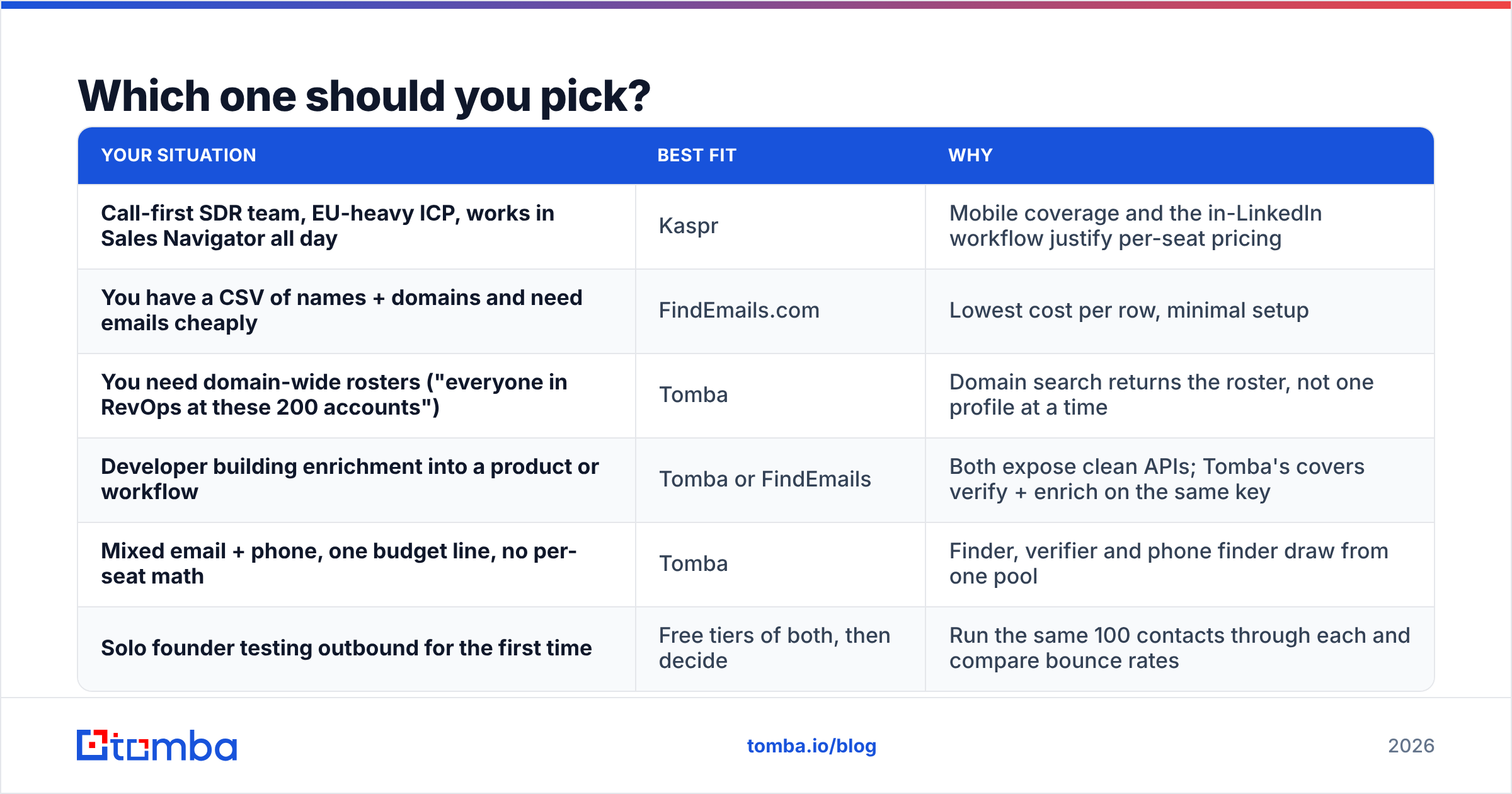
Kaspr vs FindEmails is a choice about motion, not about feature count.

| Your situation | Best fit | Why |
|---|---|---|
| Call-first SDR team, EU-heavy ICP, works in Sales Navigator all day | Kaspr | Mobile coverage and the in-LinkedIn workflow justify per-seat pricing |
| You have a CSV of names + domains and need emails cheaply | FindEmails.com | Lowest cost per row, minimal setup |
| You need domain-wide rosters ("everyone in RevOps at these 200 accounts") | Tomba | Domain search returns the roster, not one profile at a time |
| Developer building enrichment into a product or workflow | Tomba or FindEmails | Both expose clean APIs; Tomba's covers verify + enrich on the same key |
| Mixed email + phone, one budget line, no per-seat math | Tomba | Finder, verifier and phone finder draw from one pool |
| Solo founder testing outbound for the first time | Free tiers of both, then decide | Run the same 100 contacts through each and compare bounce rates |
The decision rule most teams land on: if a connected phone call is worth more to you than 50 extra emails, buy Kaspr. If it isn't, don't pay for phone infrastructure you won't dial.
And if you're evaluating both because your current stack is three tools duct-taped together, that's a signal to consolidate rather than add a fourth. Check the category pages on G2 for peer reviews at your company size before committing to an annual contract — the experience at 5 seats and 50 seats diverges sharply.
What should you test before you commit?#
Run a 48-hour bake-off. It costs nothing on free tiers and it beats any review, including this one.
- Build one test list of 150 contacts from your actual ICP — mix company sizes deliberately, including at least 30 companies under 50 employees.
- Run it through both tools and record hit rate, credits consumed, and time spent.
- Verify every returned address with a third-party verifier so neither vendor grades its own homework. Flag catch-alls separately with a catch-all verifier.
- Calculate cost per verified contact, not cost per credit. Divide total spend by the count that survived step 3.
- Send to 50 of them and watch the bounce rate for 72 hours. Anything over 3% means the data source is not safe for your domain.
Most teams are surprised by step 4. The "cheap" tool frequently isn't, and the "expensive" one occasionally is — once you price in the rows you had to throw away.
The bottom line#
Kaspr vs FindEmails is not a true head-to-head. They are two answers to one question: how do I contact this person? Kaspr buys you a phone number and a fast LinkedIn workflow at a per-seat price. FindEmails buys you volume email lookups at close to a penny a row with no frills attached. Both are reasonable purchases for the team they were built for, and both will frustrate the team they weren't.
If what you actually need is one tool that starts from a domain or a name or a LinkedIn URL, verifies its own output, handles catch-alls honestly, and exposes all of it through a single API key without per-seat math — start with the Tomba Email Finder. The free tier gives you 25 searches a month with no card, which is enough to run the bake-off above against whatever you're using today. Bring your worst 100 contacts, not your best ones, and let the bounce rate decide.
Related guides#
// get started
Find, verify and enrich your first contacts today
Start on the free plan with 25 searches a month, then scale when your team is ready.
Free plan · No credit card required · GDPR & CCPA
// about the author