Kaspr vs Kipplo (2026): Which B2B Contact Data Tool Wins?
Kaspr sells LinkedIn phone numbers on split credits. Kipplo sells cheaper email-first lookups with a no-charge-for-bad-data policy. Here is how they compare on coverage, cost per usable contact, and workflow fit.
TL;DR
- Kaspr is a LinkedIn-first contact revealer built around mobile phone numbers, with a split credit system (phone credits and direct-email credits are separate pools) and paid plans starting around $49/mo.
- Kipplo is a cheaper B2B contact intelligence platform that leads with email lookups, free daily tools, and a "we don't charge for inaccurate data" credit policy. Entry pricing sits near $27/mo on annual billing.
- If your motion is cold calling from LinkedIn, Kaspr's phone coverage in Europe is the stronger asset. If your motion is high-volume cold email, Kipplo gets you more usable rows per dollar.
- Neither is a great fit if you need bulk domain-level enumeration or API-first enrichment at scale. That is where a dedicated email-finding stack earns its keep.
- Whichever you pick, verify before you send. Both tools return catch-all and role addresses that will quietly erode your sender reputation.
What are Kaspr and Kipplo?#
Both tools solve the same annoying problem: you found the right person on LinkedIn, and LinkedIn will not give you their email or phone number.
Think of it like a phone book that was shredded in 2010. Kaspr and Kipplo are both rebuilding it from scraps, but they are picking through different piles of scraps and charging you differently for each page.
Here is the practical breakdown:
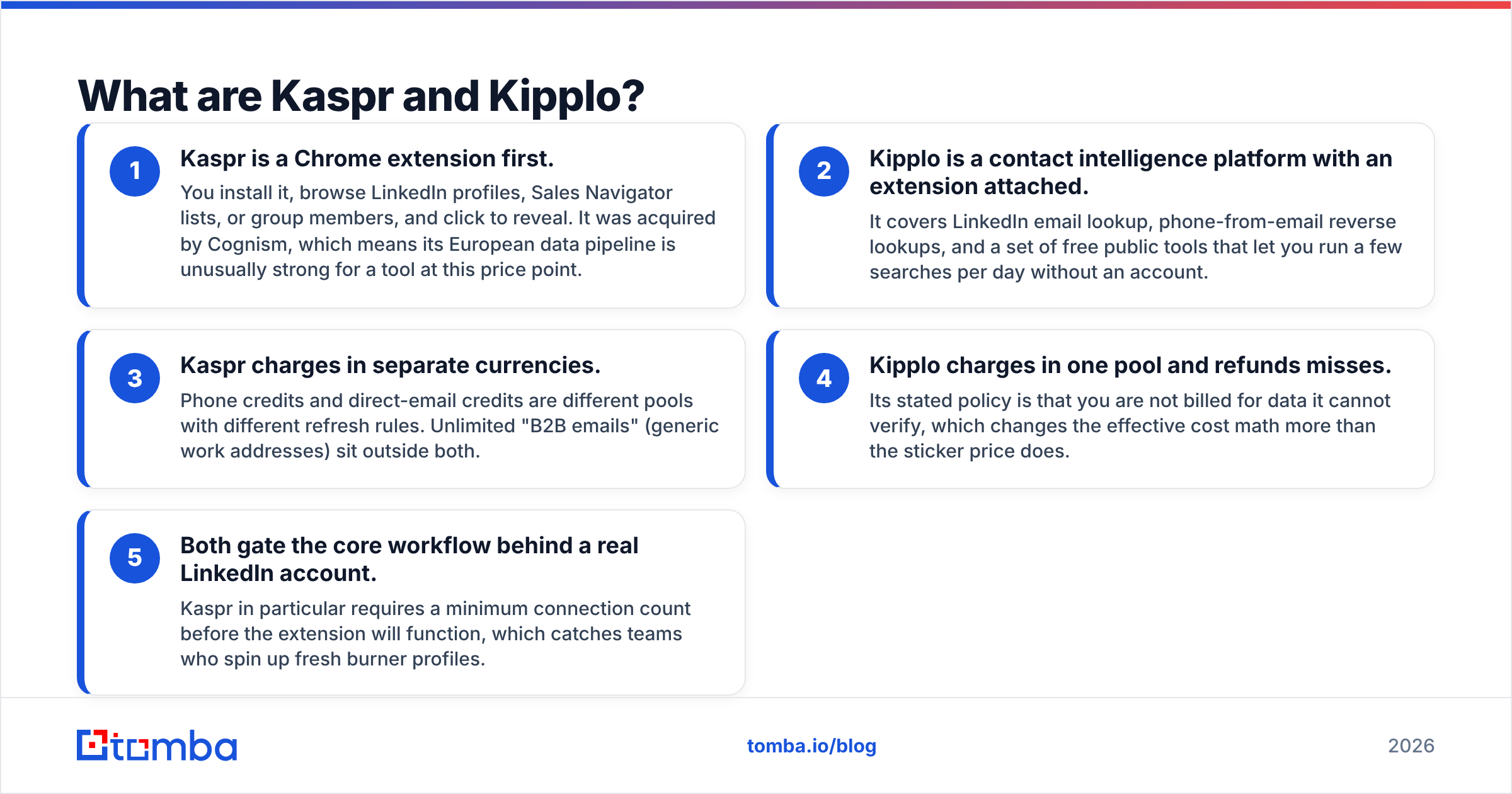
- Kaspr is a Chrome extension first. You install it, browse LinkedIn profiles, Sales Navigator lists, or group members, and click to reveal. It was acquired by Cognism, which means its European data pipeline is unusually strong for a tool at this price point.
- Kipplo is a contact intelligence platform with an extension attached. It covers LinkedIn email lookup, phone-from-email reverse lookups, and a set of free public tools that let you run a few searches per day without an account.
- Kaspr charges in separate currencies. Phone credits and direct-email credits are different pools with different refresh rules. Unlimited "B2B emails" (generic work addresses) sit outside both.
- Kipplo charges in one pool and refunds misses. Its stated policy is that you are not billed for data it cannot verify, which changes the effective cost math more than the sticker price does.
- Both gate the core workflow behind a real LinkedIn account. Kaspr in particular requires a minimum connection count before the extension will function, which catches teams who spin up fresh burner profiles.
That last point matters more than most comparison posts admit. If your SDRs work from brand-new LinkedIn accounts, Kaspr will simply refuse to run.

How accurate is the data from each tool?#
Accuracy claims in this category are marketing numbers, not audited numbers. Every vendor quotes something in the 90s. What actually differs is where the accuracy holds.
Kaspr's strength is European mobile numbers. Its pool is built partly from community contribution and partly from the Cognism data estate, and it shows: French, UK, and DACH mobiles land at a noticeably better rate than what generic US-centric databases return. Its weakness is the inverse. US mobile coverage is thinner, and non-tech industries (manufacturing, logistics, local services) drop off fast.
Kipplo's strength is email pattern resolution. It leans on domain pattern inference plus verification, which works well for companies with a clean, consistent format and a live SMTP endpoint. Its weakness is catch-all domains, where pattern inference produces a plausible-looking address that no verification step can confirm.

The honest framing: run both against 100 of your own accounts before committing. Vendor benchmarks are run against lists the vendor chose. Your ICP is not that list.
One practical guardrail regardless of which you pick. Route the output through an independent email verifier before it enters a sequencer. A tool that finds an address has an incentive to call it valid. A tool that verifies addresses has an incentive to be right.
Kaspr vs Kipplo: how do the plans compare?#
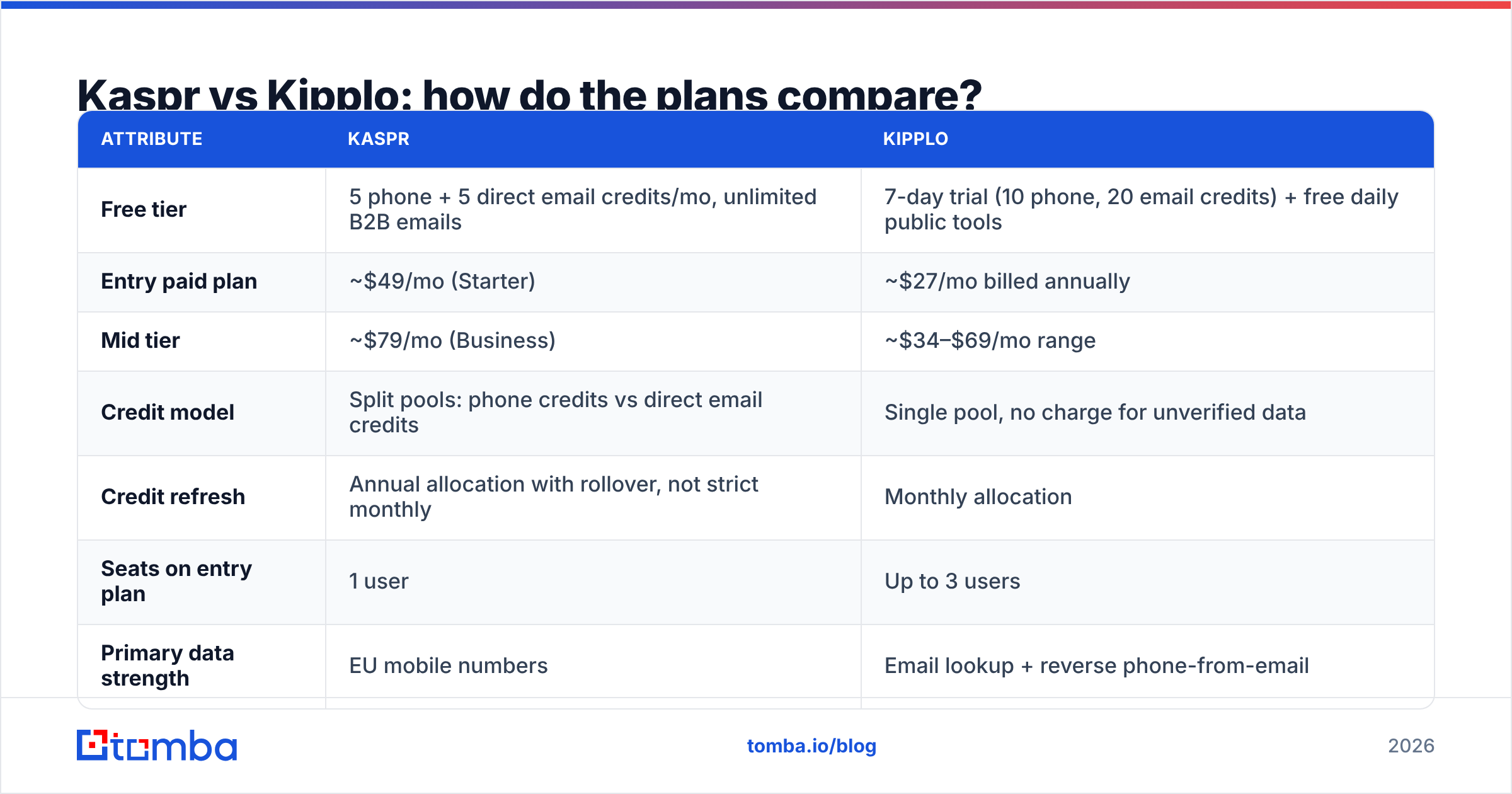
Pricing for both moves, and both publish annual-billing numbers in big type with monthly numbers in small type. Check the live pages before you buy. Here is the shape of it as of writing:
| Attribute | Kaspr | Kipplo |
|---|---|---|
| Free tier | 5 phone + 5 direct email credits/mo, unlimited B2B emails | 7-day trial (10 phone, 20 email credits) + free daily public tools |
| Entry paid plan | ~$49/mo (Starter) | ~$27/mo billed annually |
| Mid tier | ~$79/mo (Business) | ~$34–$69/mo range |
| Credit model | Split pools: phone credits vs direct email credits | Single pool, no charge for unverified data |
| Credit refresh | Annual allocation with rollover, not strict monthly | Monthly allocation |
| Seats on entry plan | 1 user | Up to 3 users |
| Primary data strength | EU mobile numbers | Email lookup + reverse phone-from-email |
| Account requirement | LinkedIn account with 20+ connections | LinkedIn account for extension features |
| Core delivery | Chrome extension + dashboard | Chrome extension + web platform + free tools |

Two details in that table do most of the work.
Kaspr's credits are annualised. A plan advertising 1,200 phone credits is roughly 100 per month averaged out, with rollover across the year. That is genuinely useful if your prospecting is lumpy (quarter-end pushes, event follow-ups). It is misleading if you read "1,200 credits" and plan a 1,200-contact campaign for next Tuesday.
Kipplo's entry plan includes three seats. At $27/mo annually, that is under $10 per seat. For a three-person founding sales team, the per-seat math is not close. Kaspr's Starter is single-user, so a three-person team is looking at roughly $147/mo for the same headcount.

Which tool wins for cold calling?#
Kaspr, and it is not particularly close in Europe.
Phone data is the hardest category in B2B contact intelligence because mobile numbers are not published anywhere. They come from contributed address books, opt-in networks, and licensed datasets. Kaspr sits inside a larger data organisation, and the phone hit rate reflects that.
Practical test to run during a trial: pull 50 profiles from your actual target list, not a demo list, and record three numbers.
- Reveal rate — how many returned any phone number at all
- Mobile rate — how many returned a mobile rather than a switchboard
- Connect rate — how many actually reached the person
That third number is the only one that pays. A tool can post a 70% reveal rate that resolves to a 12% connect rate if half the "mobiles" are five-year-old numbers from a previous job. Validate a sample with a phone validator before your reps burn a morning on dead dials.
Kipplo's phone offering is real but narrower. Its reverse phone-from-email path is useful when you already have an email and need a number, which is a different starting point than "I am looking at a LinkedIn profile and want to call this person right now."
Which tool wins for cold email volume?#
Kipplo, on cost per usable row.
The logic is straightforward. Cold email is a volume game where you need hundreds of verified addresses per campaign. Kaspr's model treats direct emails as a scarce, metered resource (its "unlimited" tier is generic B2B addresses, which are lower-intent). Kipplo's single-pool model with a no-charge-for-misses policy is friendlier to the "enrich 500 rows, keep the 380 that verify" workflow.
But there is a ceiling on both. Extension-driven tools are inherently one-profile-at-a-time or one-list-at-a-time. When your requirement becomes "give me every reachable contact at these 200 companies," you are no longer shopping for a LinkedIn extension. You want domain search and a bulk email finder that processes a CSV without anyone clicking anything.
A rough decision line:
- Under ~200 contacts/month, LinkedIn-sourced → either tool works, pick on phone vs email need
- 200–2,000 contacts/month, account-list-driven → a domain-search-based workflow beats both
- 2,000+ or programmatic → API-first enrichment, not an extension
Where do Kaspr and Kipplo fall short?#
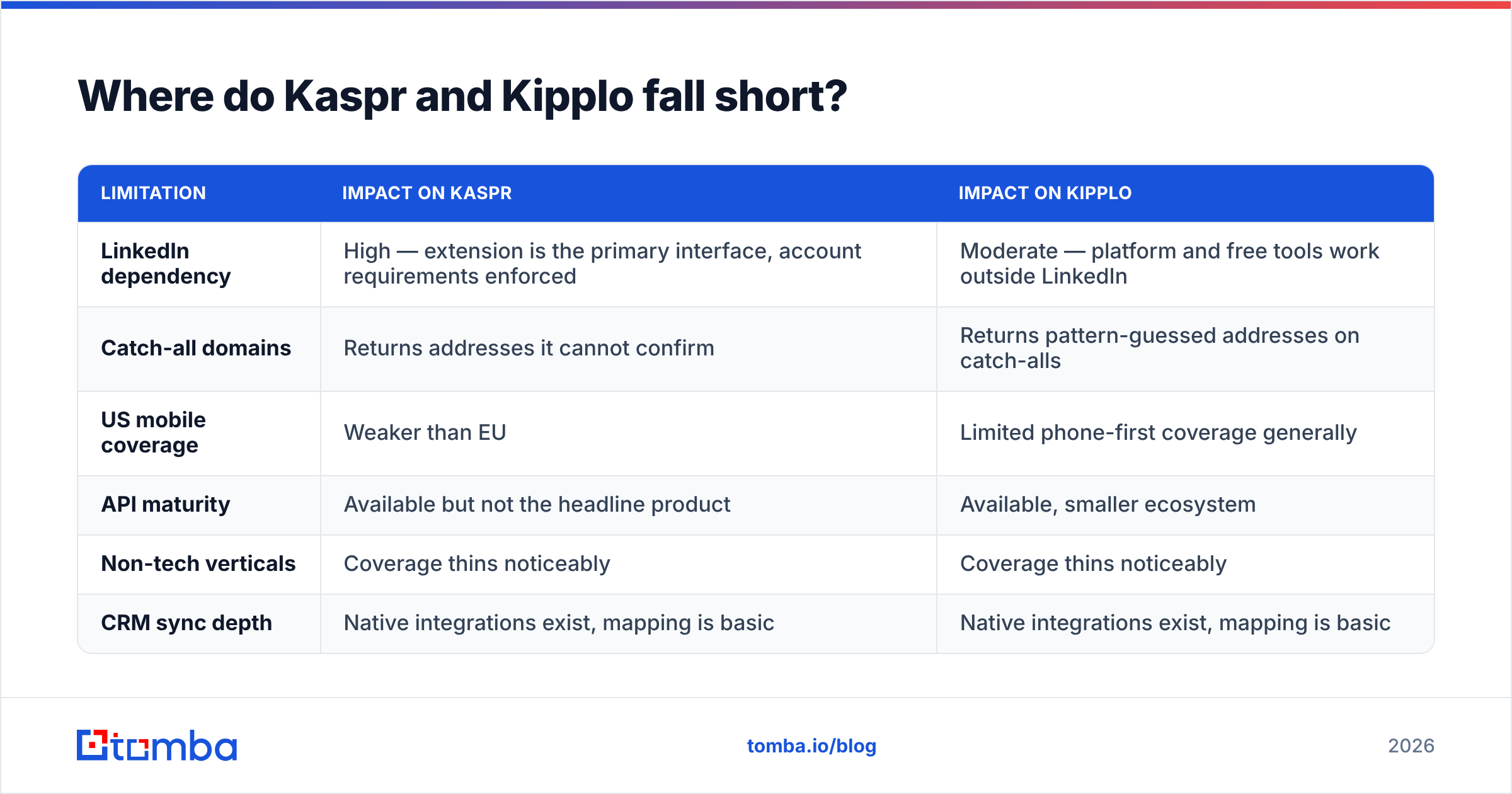
Both tools share the structural limitations of the category, and it is worth naming them plainly.
| Limitation | Impact on Kaspr | Impact on Kipplo |
|---|---|---|
| LinkedIn dependency | High — extension is the primary interface, account requirements enforced | Moderate — platform and free tools work outside LinkedIn |
| Catch-all domains | Returns addresses it cannot confirm | Returns pattern-guessed addresses on catch-alls |
| US mobile coverage | Weaker than EU | Limited phone-first coverage generally |
| API maturity | Available but not the headline product | Available, smaller ecosystem |
| Non-tech verticals | Coverage thins noticeably | Coverage thins noticeably |
| CRM sync depth | Native integrations exist, mapping is basic | Native integrations exist, mapping is basic |
Catch-all handling deserves its own sentence. A catch-all domain accepts every address at the SMTP layer, so anything@company.com returns "valid" to a naive verifier. Neither Kaspr nor Kipplo solves this fully, and neither is unusual in that. If a meaningful share of your target accounts run catch-all (common in enterprise and in Microsoft 365 estates), you need a dedicated catch-all verifier sitting between the finder and the sequencer, or you will be sending into a black hole and calling it deliverability.
Should you choose Kaspr, Kipplo, or something else?#
Here is the verdict, stated without hedging.
Choose Kaspr if your reps live in LinkedIn Sales Navigator, you sell into Europe, and the phone is your primary channel. The split credit model is annoying to reason about, but the mobile data is what you are paying for and it delivers. Budget realistically: a three-person team on Starter is around $147/mo, not $49.
Choose Kipplo if you are an early-stage team running cold email, you have three or fewer people who need access, and you want the lowest defensible cost per verified contact. The no-charge-for-misses policy is a genuine differentiator, and the free daily tools let you sanity-check quality before paying anything.
Choose neither if your prospecting is list-driven rather than profile-driven. If the input to your process is a spreadsheet of company domains and target job titles, an extension is the wrong shape of tool entirely. You want domain-level enumeration, bulk processing, and an API you can put behind your own workflow.
That third case is more common than vendors like to acknowledge. Most teams start with an extension because it is the easiest thing to install, then discover twelve months later that their actual bottleneck was never "how do I get this one person's email" — it was "how do I get 4,000 verified contacts into HubSpot without hiring someone to click." Independent review data on G2 shows the same pattern in written reviews across the category: teams praise ease of setup, then churn on scale.
Worth reading the source material directly rather than trusting any comparison post, including this one. Kaspr's pricing page and Kipplo's tools overview both changed materially in the last year.
What does a scalable alternative look like?#
If you outgrow the extension model, the stack you want has four parts, and most teams assemble it badly.
- Discovery — find contacts by company domain and role, not by browsing profiles one at a time
- Verification — an independent check that is not the same vendor that made the guess
- Enrichment — fill in firmographics, phone, and social so routing and scoring actually work
- Delivery — an API or native integration that puts the row in your CRM without a CSV round trip
Tomba is built around that shape. Pricing runs from a free tier at 25 searches/month through Starter at $49/mo, Growth at $99/mo, and Pro at $249/mo, with Enterprise on request. Full Tomba pricing is public, and the same credit pool covers finding, verifying, and enriching rather than splitting them into competing currencies you have to budget separately.
The practical difference from both Kaspr and Kipplo: you can hit it from a spreadsheet, a CLI, or an API and process thousands of rows without a browser open.
Start with the finder, not the sequencer. If your current bottleneck is contact data rather than copy, run your next account list through the Tomba Email Finder on the free tier and compare the verified-row count against whatever Kaspr or Kipplo returned for the same accounts. Twenty-five searches is enough to answer the question honestly, and you will know within an afternoon whether an extension is the right shape of tool for how you actually prospect.
Related guides#
// get started
Find, verify and enrich your first contacts today
Start on the free plan with 25 searches a month, then scale when your team is ready.
Free plan · No credit card required · GDPR & CCPA
// about the author