Kaspr vs LeadGibbon: Which B2B Contact Tool Wins in 2026?
Kaspr pulls phone numbers off LinkedIn. LeadGibbon exports verified B2B lists. They solve different problems — here's the honest breakdown of pricing, data accuracy, and which one your team should actually buy in 2026.
TL;DR
- Kaspr is a LinkedIn-first contact revealer. You install a Chrome extension, open a profile, and it surfaces mobile numbers and emails. Strongest for SDRs who live in Sales Navigator and cold call.
- LeadGibbon is a list-building and email-export tool. You filter a B2B database, verify, and push CSVs or sync to your CRM. Strongest for building bulk prospect lists you email, not call.
- They are not really substitutes. Kaspr wins on phone coverage per profile; LeadGibbon wins on list throughput and cost per verified email.
- Both get expensive fast at team scale, and neither gives you a serious API-first path for enrichment inside your own product or workflow.
- If your bottleneck is verified work emails at volume with an API and transparent credits, an email-finder-first platform like Tomba (free tier, then $49/mo) covers that lane more cheaply than either.
What are Kaspr and LeadGibbon, exactly?#
Start with the honest framing: these two tools get compared constantly because they both promise "B2B contact data," but they attack the problem from opposite ends.
Kaspr is a browser-extension product. Its center of gravity is LinkedIn — you're on a profile or a Sales Navigator search, you hit the Kaspr panel, and it returns phone numbers, emails, and company details for that person. Kaspr was acquired by Cognism in 2022, which matters: a chunk of its data quality (especially mobile numbers in EMEA) rides on Cognism's infrastructure. It also bundles lightweight sequencing — LinkedIn invites, follow-up tasks, basic email steps — so a solo SDR can prospect and outreach without leaving the tab.
LeadGibbon is a list export product. You search a B2B contact database by title, industry, company size, and location, get back a table of matching people, and export verified emails to CSV or straight into your outreach tool. There's a LinkedIn extension too, but the product's identity is bulk: build a list of 500 CMOs at Series B SaaS companies, verify, export, done.
That difference drives everything else. Kaspr optimizes for depth on one contact at a time. LeadGibbon optimizes for breadth across many contacts at once.

How do Kaspr and LeadGibbon compare head to head?#
Here's the practical comparison most buyers actually need. Note that both vendors change packaging often — always confirm current numbers on their own pricing pages before you sign.
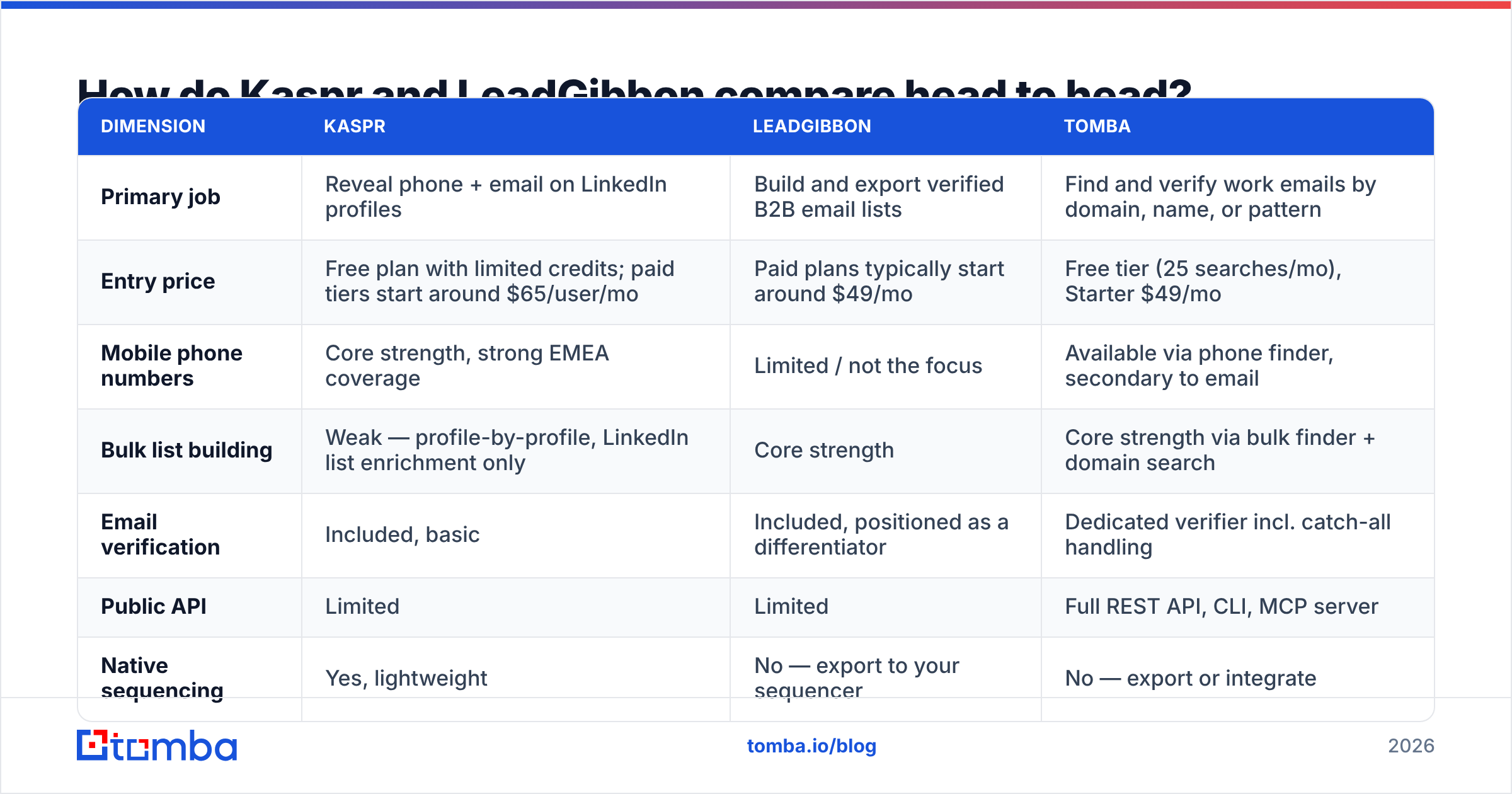
| Dimension | Kaspr | LeadGibbon | Tomba |
|---|---|---|---|
| Primary job | Reveal phone + email on LinkedIn profiles | Build and export verified B2B email lists | Find and verify work emails by domain, name, or pattern |
| Entry price | Free plan with limited credits; paid tiers start around $65/user/mo | Paid plans typically start around $49/mo | Free tier (25 searches/mo), Starter $49/mo |
| Mobile phone numbers | Core strength, strong EMEA coverage | Limited / not the focus | Available via phone finder, secondary to email |
| Bulk list building | Weak — profile-by-profile, LinkedIn list enrichment only | Core strength | Core strength via bulk finder + domain search |
| Email verification | Included, basic | Included, positioned as a differentiator | Dedicated verifier incl. catch-all handling |
| Public API | Limited | Limited | Full REST API, CLI, MCP server |
| Native sequencing | Yes, lightweight | No — export to your sequencer | No — export or integrate |
| GDPR posture | EU-focused, notification workflow | US-centric data emphasis | EU-based, documented sourcing |
| Best fit | Cold-calling SDRs in EU/UK | List builders running volume email | Email-first outbound + engineering workflows |
Two things jump out. First, the "winner" depends entirely on your channel. If your team dials, Kaspr's mobile coverage is the whole ballgame and LeadGibbon barely competes. If your team emails, LeadGibbon's export throughput makes Kaspr feel like using tweezers to move gravel.
Second, neither is built for engineers. If you want contact enrichment running inside your signup flow, your CRM automation, or a nightly job, both tools push you toward manual UI work. That's where a Tomba API or similar developer-first option changes the shape of the problem.
Which one has better data accuracy?#
Nobody should take a vendor's accuracy claim at face value, including Tomba's. Every provider quotes a number measured on a sample that flatters them. Here's how to think about it instead.
Kaspr's accuracy profile: strong on mobile numbers for European contacts, weaker outside that footprint. Because it draws from a community/contributed model plus Cognism assets, coverage is uneven by geography. A UK VP of Sales? Very likely a direct dial. A mid-market ops manager in Brazil? Coin flip. Emails are solid but not its differentiator.
LeadGibbon's accuracy profile: email-centric and US-weighted. Its verification step catches most hard bounces before export, which is the main reason people pick it over raw scraped lists. Job-change decay is the recurring complaint — contacts that were valid when the database was built but stale by the time you email them.
The failure mode both share is stale records. Roughly a fifth of B2B contacts change jobs annually, and G2 reviews for nearly every provider in this category mention the same thing: the list was accurate at export time and less accurate a quarter later.
Three things actually protect you here:
- Verify at send time, not at export time. A list verified 60 days ago is a different list today. Run it through an email verifier immediately before the campaign loads.
- Treat catch-all domains as a separate bucket. Most tools mark catch-alls "unknown" and you either send blind or drop them. A catch-all verifier recovers a meaningful slice of those addresses instead of throwing them away.
- Cross-check the pattern, not just the address. If a company's format is
first.last@, and your tool returnsflast@, that's a signal worth checking before you burn a send.
Is Kaspr worth the price for cold calling?#
Yes, if calling is genuinely a primary channel and your market is Europe or the UK. No, if you're buying it "in case we start calling."
Kaspr's pricing sits per-user, which is the right model for a rep-tool and the wrong model for a data-tool. Five SDRs at roughly $65/month each is about $325/month for what is essentially profile-by-profile lookups. That math works when each rep is making 60+ dials a day and one connected conversation pays for the seat. It falls apart the moment reps use it as a slow email-finder.
The bundled sequencing is genuinely useful for small teams — a two-person SDR pod can run LinkedIn touches and email follow-ups without a separate Outreach or Salesloft contract. But it's a simplified sequencer. If you already run a dedicated cadence tool, you're paying for overlap.
Watch for these friction points:
- Credit systems are split. Phone credits, email credits, and export credits often deplete at different rates, and running out of one mid-sprint stalls the rep.
- LinkedIn dependency. Kaspr's value is tied to LinkedIn surface area. Account restrictions, rate limits, or a change in LinkedIn's policy hit it directly.
- Per-seat cost scales linearly. Twenty reps means twenty seats. There's no economical "one data license, many consumers" path.
If you're evaluating this class of tool broadly, it's worth also reading how Kaspr stacks against the LinkedIn-scraping cohort — a ContactOut alternative comparison covers the same buyer question from a different angle.
Is LeadGibbon worth it for list building?#
LeadGibbon earns its keep when the job is "give me 2,000 verified emails matching this ICP by Friday." Its search-filter-verify-export loop is fast, and the verification step meaningfully reduces bounce risk compared to scraping raw.
Where it disappoints:
- Filter depth. Compared to Apollo or ZoomInfo, the filter set is thinner. Technographics, intent signals, and funding filters are limited or absent, so you're mostly slicing on firmographics and title.
- No real API story. You export, then you import. That's fine for a marketing manager building a quarterly list; it's painful for anyone trying to automate.
- Coverage skews US. European and APAC coverage is noticeably thinner, and GDPR-conscious EU buyers should read the sourcing documentation carefully before running EU campaigns.
- Job-change decay. Same problem everyone has, but with no continuous re-verification layer, your exported CSV starts rotting the moment it downloads.
Worth noting that the "verified B2B list export" category has gotten crowded and competitive — providers like BookYourData have built strong reputations on pay-as-you-go verified lists with accuracy guarantees, and they're a legitimate peer to evaluate alongside LeadGibbon if list export is your core need. Don't shortlist one vendor in this lane; run the same test list through three.

How should you actually choose between them?#
Run this decision sequence rather than comparing feature grids.
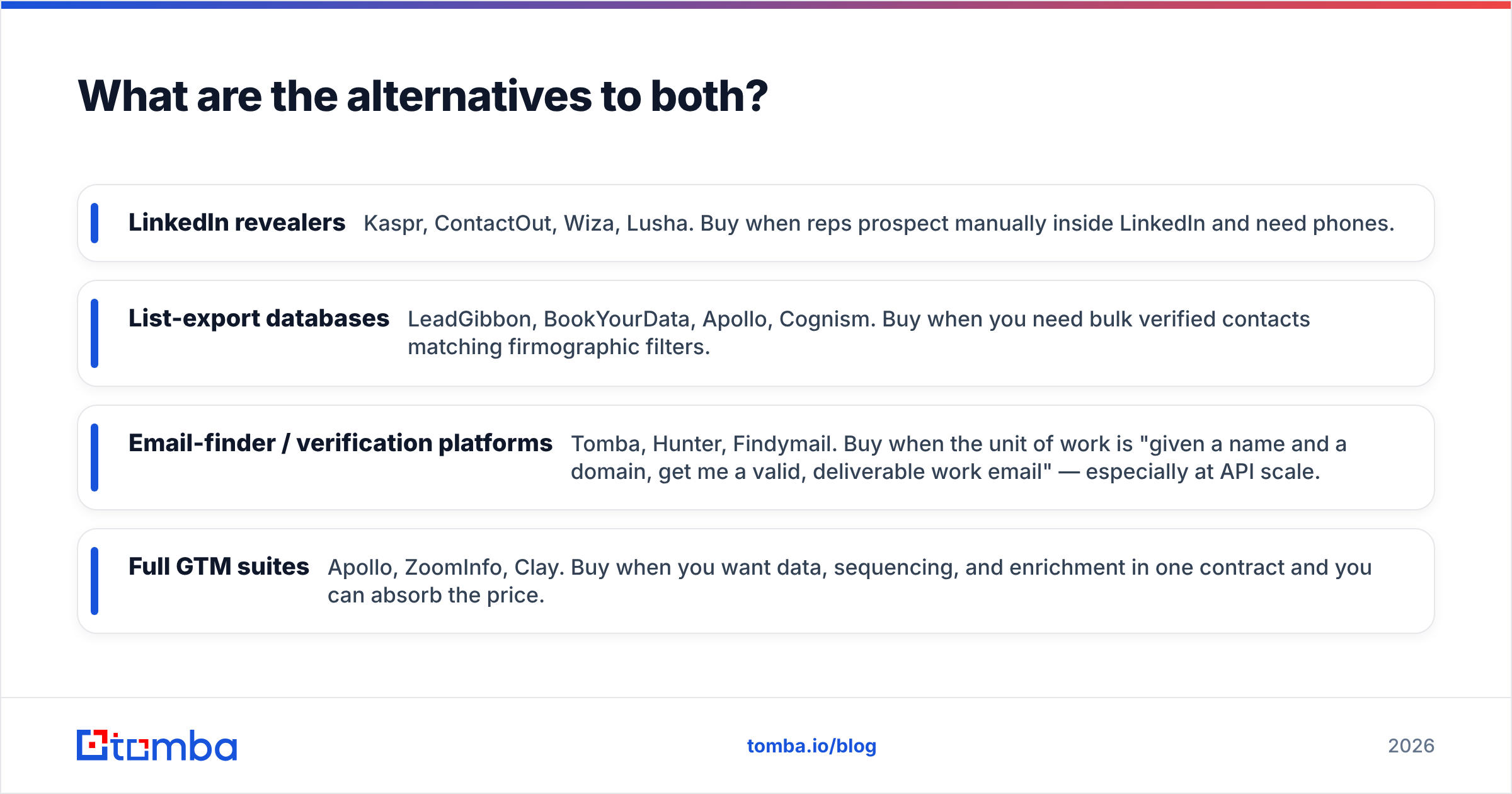
- Name your primary channel. Phone-first → Kaspr. Email-first → LeadGibbon or an email-finder platform. Both → you need two tools, and you should budget for that honestly rather than hoping one covers both badly.
- Count your consumers, not your reps. If one ops person builds lists for the whole team, per-seat pricing (Kaspr) is wasteful. If every rep does their own prospecting, per-seat can be fine.
- Check your geography. EU/UK mobile numbers → Kaspr has a real edge. US email at volume → LeadGibbon and the list-export cohort.
- Decide if you need automation. Any answer involving "and then it should automatically..." rules out both. You want an email finder API or a platform with native integrations into HubSpot, Salesforce, or your warehouse.
- Run a paid bake-off on the same 100 contacts. Not their sample data — yours. Take 100 real target accounts, run them through each tool, then hand-verify 20 at random. The tool with fewer bad records on your ICP wins, regardless of marketing claims.
- Model the 12-month cost, not the monthly price. Include credit overages, seats you'll add, and the cost of a separate verifier if the built-in one isn't good enough.
Most teams that do step 5 honestly discover their real problem wasn't the tool — it was that they were buying phone numbers for an email motion, or bulk lists for an account-based motion that needed 40 great contacts, not 4,000 mediocre ones.
What are the alternatives to both?#
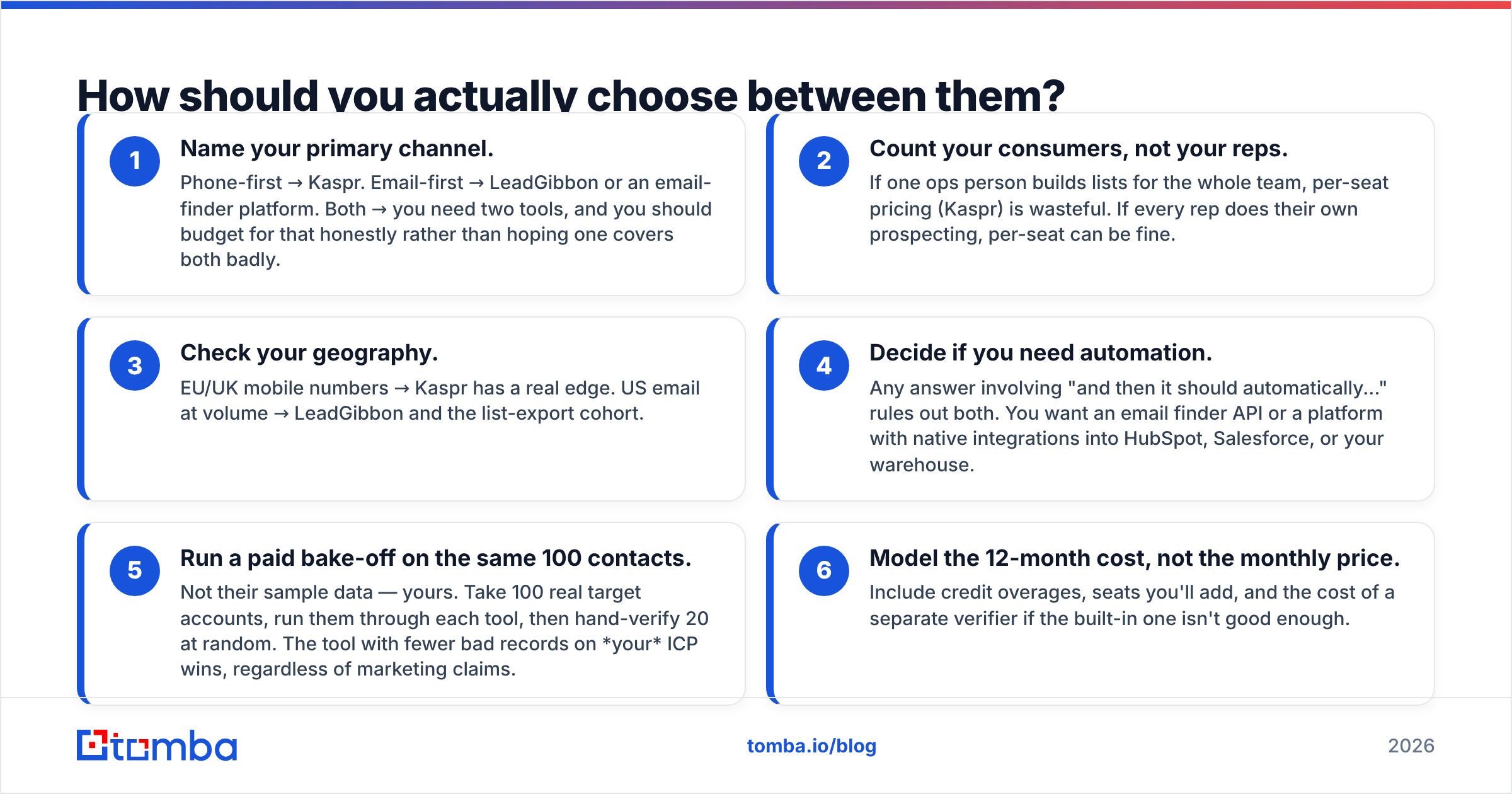
The honest answer is that "Kaspr vs LeadGibbon" is a false binary. The category splits into four lanes, and you should shop within the lane that matches your motion:
- LinkedIn revealers — Kaspr, ContactOut, Wiza, Lusha. Buy when reps prospect manually inside LinkedIn and need phones.
- List-export databases — LeadGibbon, BookYourData, Apollo, Cognism. Buy when you need bulk verified contacts matching firmographic filters.
- Email-finder / verification platforms — Tomba, Hunter, Findymail. Buy when the unit of work is "given a name and a domain, get me a valid, deliverable work email" — especially at API scale.
- Full GTM suites — Apollo, ZoomInfo, Clay. Buy when you want data, sequencing, and enrichment in one contract and you can absorb the price.
The lane most teams underbuy is the third. A dedicated finder-plus-verifier is usually the cheapest reliable input into every other system — your sequencer, your CRM, your ads audiences. It's also the one that benefits most from clean plumbing: a domain search to map every contactable person at a target account, a bulk email finder for list runs, and verification that actually handles catch-alls instead of shrugging at them.
For teams comparing costs, look at what you pay per verified, deliverable email rather than per lookup. A tool that's cheap per credit but returns 25% unusable addresses is more expensive than it looks, because the bounces damage your sender reputation and that cost doesn't show up on any invoice.
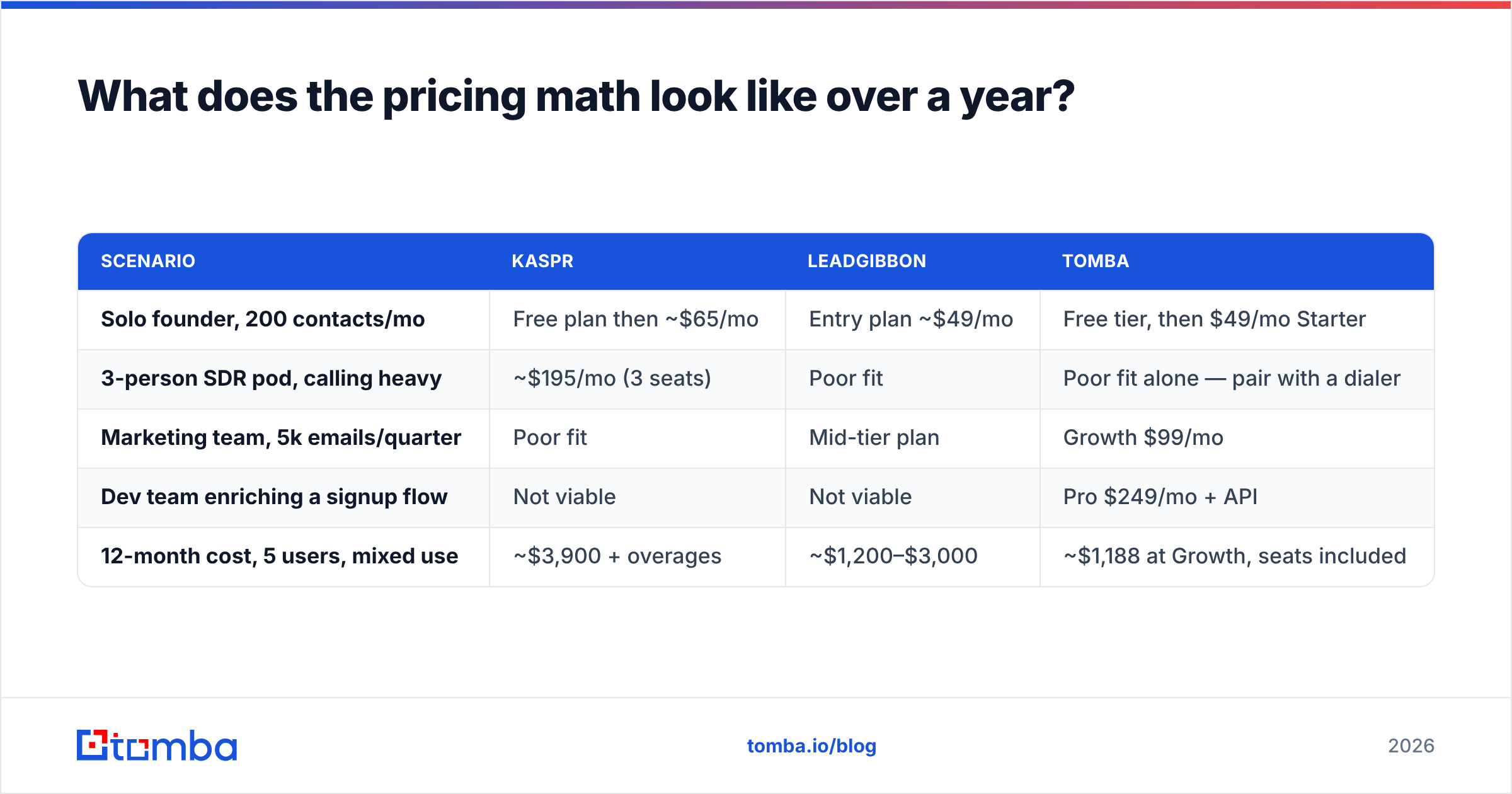
What does the pricing math look like over a year?#
| Scenario | Kaspr | LeadGibbon | Tomba |
|---|---|---|---|
| Solo founder, 200 contacts/mo | Free plan then ~$65/mo | Entry plan ~$49/mo | Free tier, then $49/mo Starter |
| 3-person SDR pod, calling heavy | ~$195/mo (3 seats) | Poor fit | Poor fit alone — pair with a dialer |
| Marketing team, 5k emails/quarter | Poor fit | Mid-tier plan | Growth $99/mo |
| Dev team enriching a signup flow | Not viable | Not viable | Pro $249/mo + API |
| 12-month cost, 5 users, mixed use | ~$3,900 + overages | ~$1,200–$3,000 | ~$1,188 at Growth, seats included |
Read that last row carefully. The per-seat model is what drives Kaspr's annual number up — it's not that Kaspr is overpriced for what it does, it's that "what it does" is priced per human. Check current Tomba pricing and both vendors' own pages before budgeting; every provider in this space repackages at least annually.
One more cost nobody includes: integration labor. If your tool can't push into your CRM natively, someone is maintaining a CSV ritual forever. Both Kaspr and LeadGibbon support common destinations, but check your specific stack — a native HubSpot integration or Salesforce sync saves more hours than a 10% credit discount does. HubSpot's own data quality documentation is a useful reference for what "clean sync" should actually mean.
The verdict: which should you buy?#
Buy Kaspr if you are a European or UK sales team where cold calling is a real, measured channel, your reps prospect inside LinkedIn daily, and you value bundled lightweight sequencing. Accept the per-seat cost as the price of rep-level convenience.
Buy LeadGibbon if your motion is volume email to US-heavy firmographic segments, you build lists centrally rather than per-rep, and you're comfortable exporting into a separate sequencer. Run a sample list against a competitor before committing — this lane is competitive and the differences are real.
Buy neither if your actual bottleneck is "I have company domains and names, I need valid work emails, and I need this inside my systems, not a browser tab." That's a different product category, and paying calling-tool prices for it is a common, expensive mistake.
Whatever you pick: verify before you send, re-verify quarterly, and never trust an exported CSV older than 30 days.
Getting the email layer right first? Tomba's Email Finder does one job well — turn a name and a domain into a verified, deliverable work email, via UI, bulk upload, Chrome extension, or API. Start on the free tier with 25 searches a month, move to Starter at $49/mo when it's working, and keep your calling and list tools for what they're genuinely good at. No per-seat tax on the data layer.
Related guides#
// get started
Find, verify and enrich your first contacts today
Start on the free plan with 25 searches a month, then scale when your team is ready.
Free plan · No credit card required · GDPR & CCPA
// about the author