Kaspr vs LeadIQ (2026): Which B2B Contact Data Tool Wins?
Kaspr and LeadIQ both promise verified mobiles and emails pulled from LinkedIn, but they solve different problems. Here is the honest head-to-head on data quality, credits, pricing, workflow fit, and when a cheaper tool beats both.
TL;DR
- Kaspr is phone-first and cheap to start. It lives in a LinkedIn Chrome extension, leans hard on mobile numbers, and is strongest on European contacts. Best for SDRs who dial.
- LeadIQ is workflow-first and team-priced. It captures contacts into Salesforce/HubSpot cleanly, flags job changes, and pushes straight into Outreach or Salesloft sequences. Best for managed outbound teams in the US.
- Neither is a bulk data engine. Both are seat-based, credit-metered, and tied to a browser session. If you need thousands of verified emails per month via API or CSV, you are paying the wrong tool.
- Verification is on you either way. Treat every exported address as unverified until an independent email verifier says otherwise, especially on catch-all domains.
- Our pick: Kaspr if dialling European mobiles is the job; LeadIQ if CRM hygiene and sequence handoff matter more than cost per contact; a dedicated finder like Tomba if volume email discovery is the actual bottleneck.
What are Kaspr and LeadIQ, exactly?#
Both tools answer the same question — "what is this person's email and phone number?" — but they were built for different buyers.
Kaspr is a contact-enrichment tool, acquired by Cognism in 2022, that operates mainly as a LinkedIn browser extension. You open a profile, the sidebar shows email addresses and mobile numbers, and you save them into lists or push them onward. Its reputation rests on mobile-number density in EMEA, inherited partly from Cognism's Diamond Data pipeline.
LeadIQ is a prospecting platform built around capture-and-sync. Same LinkedIn extension pattern, but the emphasis is on what happens after the click: writing clean records into your CRM without creating duplicates, tracking when a contact changes jobs, and firing them into a sequence with AI-drafted copy.
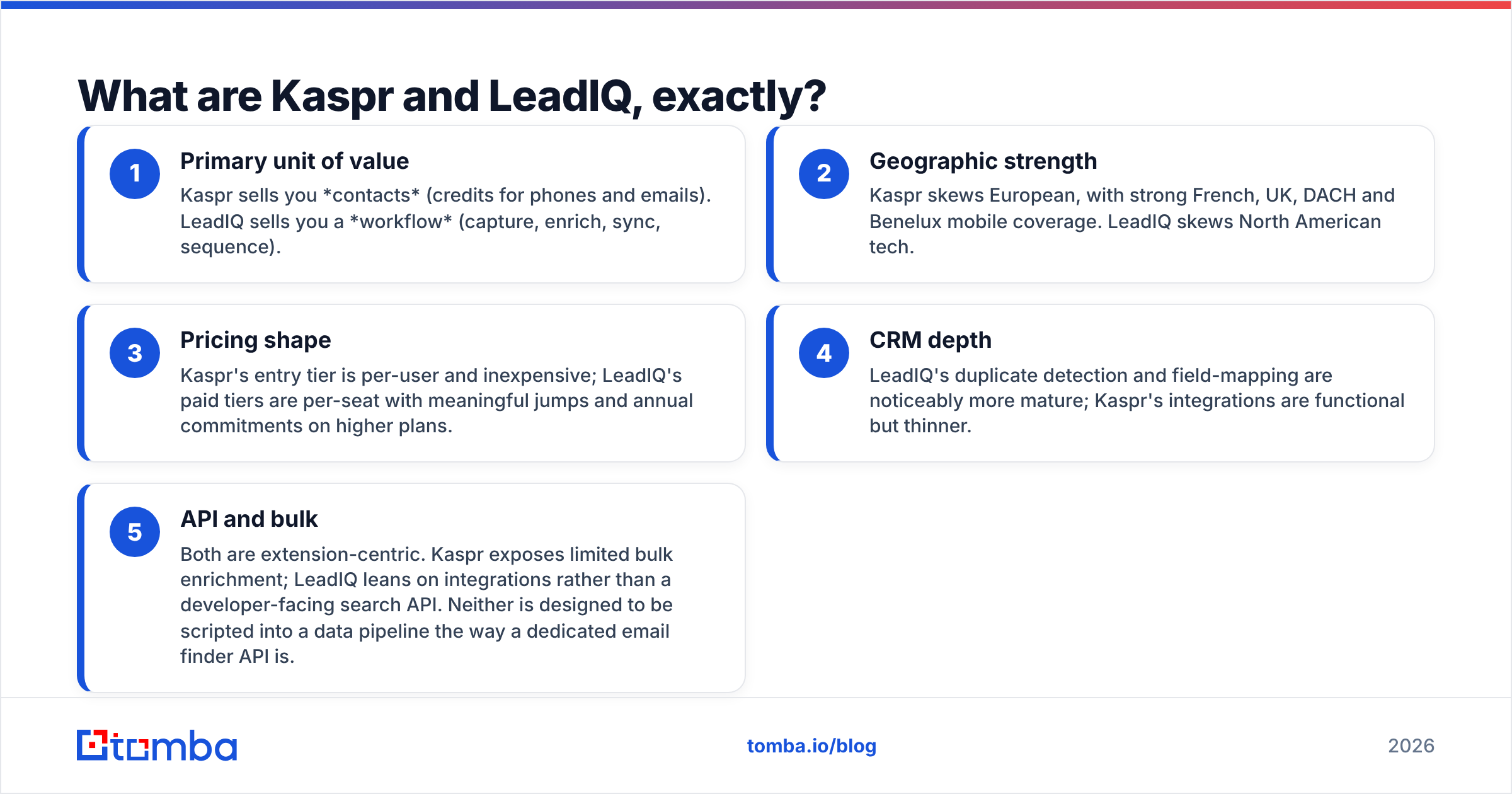
Here is the practical difference in five points:
- Primary unit of value — Kaspr sells you contacts (credits for phones and emails). LeadIQ sells you a workflow (capture, enrich, sync, sequence).
- Geographic strength — Kaspr skews European, with strong French, UK, DACH and Benelux mobile coverage. LeadIQ skews North American tech.
- Pricing shape — Kaspr's entry tier is per-user and inexpensive; LeadIQ's paid tiers are per-seat with meaningful jumps and annual commitments on higher plans.
- CRM depth — LeadIQ's duplicate detection and field-mapping are noticeably more mature; Kaspr's integrations are functional but thinner.
- API and bulk — Both are extension-centric. Kaspr exposes limited bulk enrichment; LeadIQ leans on integrations rather than a developer-facing search API. Neither is designed to be scripted into a data pipeline the way a dedicated email finder API is.
If you remember one thing: Kaspr optimises for the dial, LeadIQ optimises for the pipeline record.

How do Kaspr and LeadIQ compare head-to-head?#
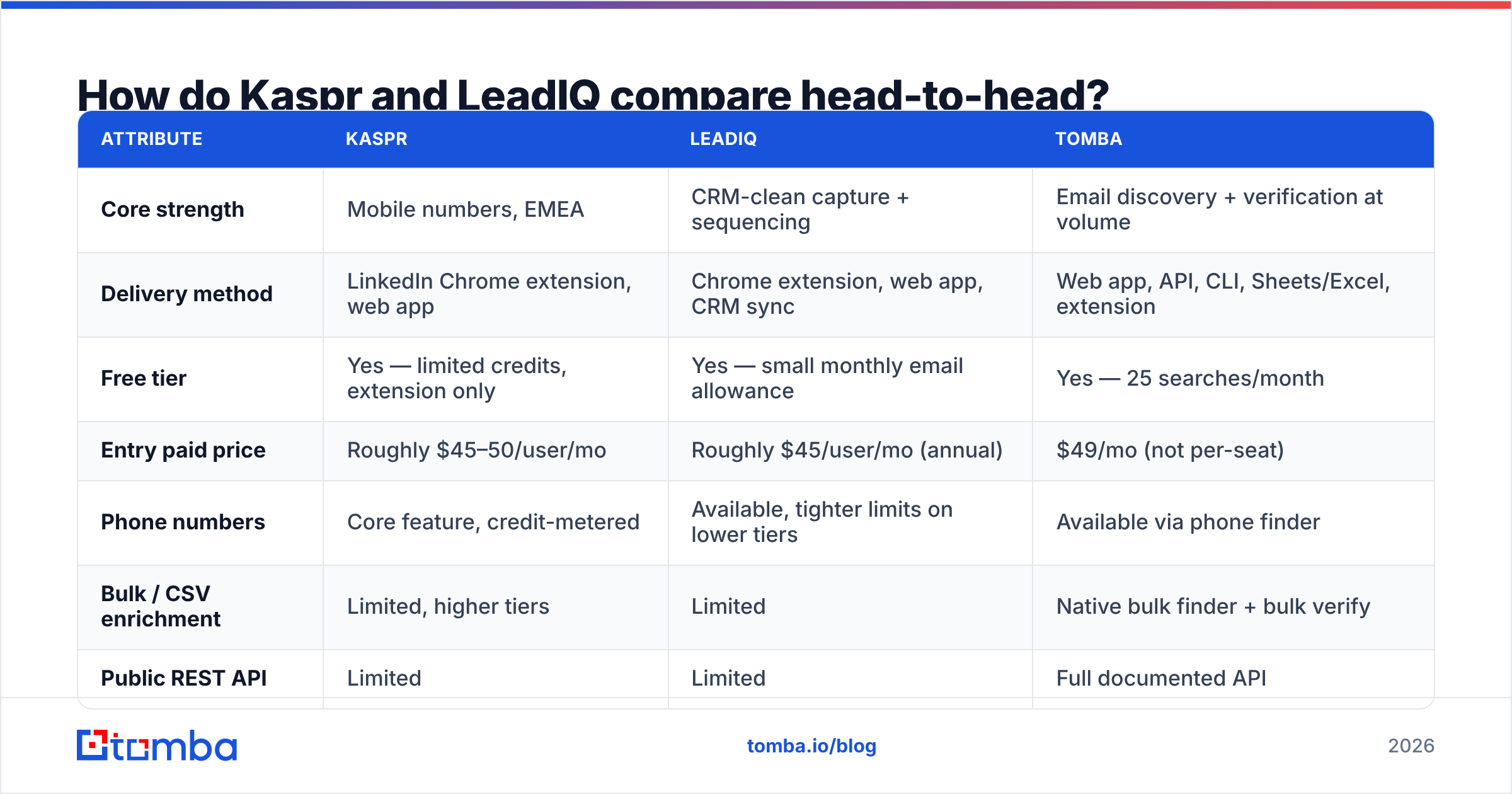
| Attribute | Kaspr | LeadIQ | Tomba |
|---|---|---|---|
| Core strength | Mobile numbers, EMEA | CRM-clean capture + sequencing | Email discovery + verification at volume |
| Delivery method | LinkedIn Chrome extension, web app | Chrome extension, web app, CRM sync | Web app, API, CLI, Sheets/Excel, extension |
| Free tier | Yes — limited credits, extension only | Yes — small monthly email allowance | Yes — 25 searches/month |
| Entry paid price | Roughly $45–50/user/mo | Roughly $45/user/mo (annual) | $49/mo (not per-seat) |
| Phone numbers | Core feature, credit-metered | Available, tighter limits on lower tiers | Available via phone finder |
| Bulk / CSV enrichment | Limited, higher tiers | Limited | Native bulk finder + bulk verify |
| Public REST API | Limited | Limited | Full documented API |
| Job-change tracking | No | Yes | No |
| Sequence push (Outreach/Salesloft) | Basic | Yes, a headline feature | Via integrations |
| Catch-all handling | Marked, not resolved | Marked, not resolved | Dedicated catch-all verifier |
| Best-fit buyer | European SDR teams that cold call | US mid-market sales orgs with strict CRM process | Growth, agency and dev teams needing volume + API |
Pricing above reflects publicly listed plans at the time of writing; both vendors negotiate annual deals and change tiers often, so confirm on their own pricing pages before you budget.

Which one has better data accuracy?#
Neither vendor will hand you a number you can audit, so judge them on mechanism and region rather than on marketing claims.
Kaspr's accuracy pattern. Mobile numbers are the standout. In European markets, Kaspr frequently returns a direct mobile where US-centric databases return a switchboard. Email accuracy is decent for business addresses at mid-size and large companies, weaker at sub-20-employee firms and at companies with unusual domain setups. Because a chunk of its data is community-contributed, freshness varies by market: hot markets refresh often, thin markets go stale.
LeadIQ's accuracy pattern. Emails are generally reliable across US tech, and the job-change signal is the real accuracy feature — a correct address on a person who left the company six weeks ago is still a bounce. LeadIQ catching that move is worth more than a marginally higher raw match rate. Phone coverage outside North America is the weak spot; European mobiles come back thin compared with Kaspr.
What both leave to you. Neither tool resolves catch-all domains, and catch-alls are now a large share of B2B mail servers. Both will hand you an address flagged "accept-all" or "unverifiable" and let you decide. That decision is where campaigns get wrecked: send 2,000 unresolved catch-alls in a week and your bounce rate does the damage, not your copy. Run every export through a catch-all verifier before it touches a sequence, regardless of which tool sourced it.

A sane workflow, whichever tool you pick: source in the extension, export to CSV, verify independently, then import to the sequencer. The extra ten minutes protects your sender reputation, which is the only asset in outbound you cannot buy back.

How does Kaspr vs LeadIQ pricing actually work?#
Both are per-seat with credits on top, which is where budgets get surprising.
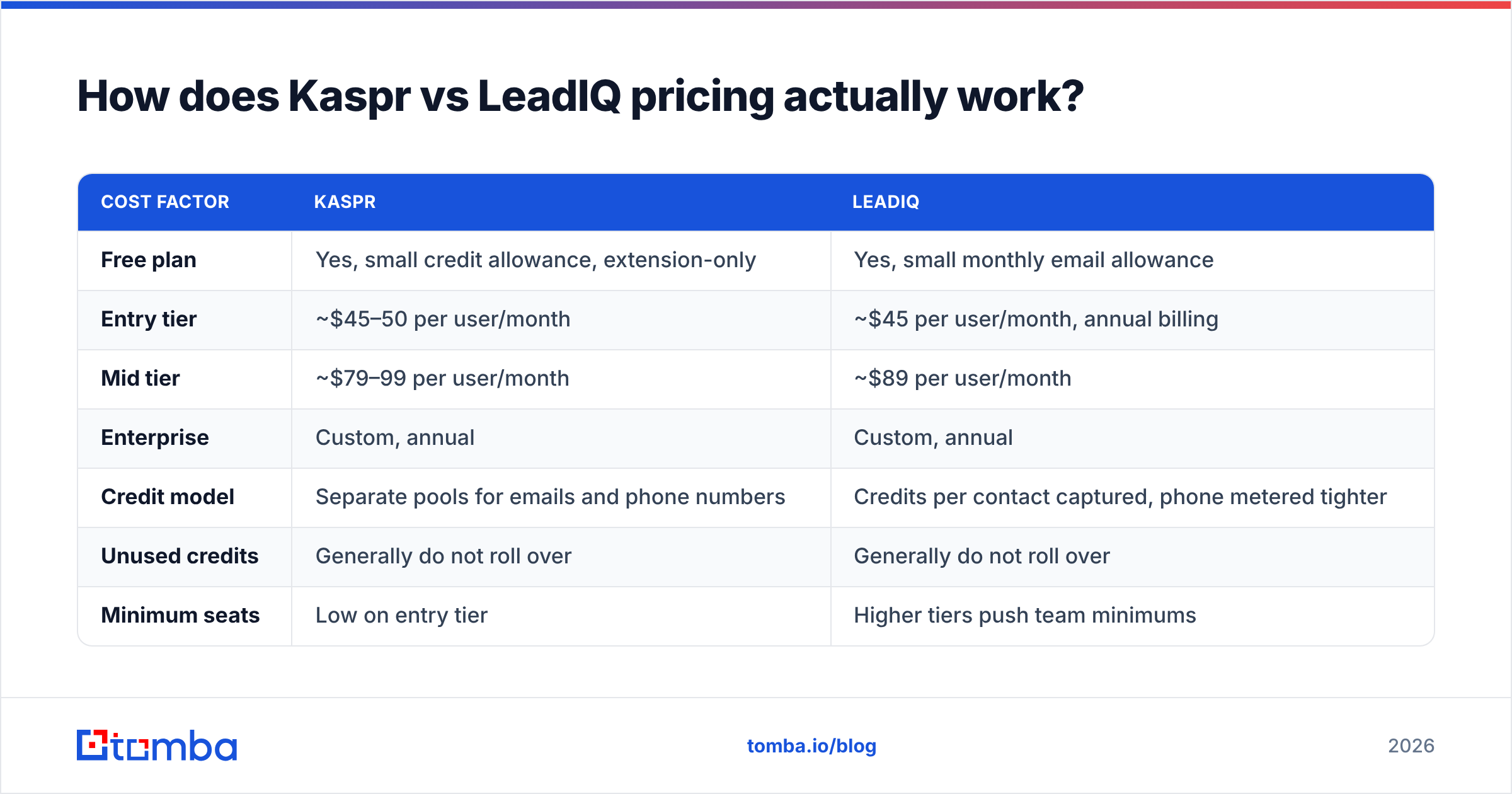
| Cost factor | Kaspr | LeadIQ |
|---|---|---|
| Free plan | Yes, small credit allowance, extension-only | Yes, small monthly email allowance |
| Entry tier | ~$45–50 per user/month | ~$45 per user/month, annual billing |
| Mid tier | ~$79–99 per user/month | ~$89 per user/month |
| Enterprise | Custom, annual | Custom, annual |
| Credit model | Separate pools for emails and phone numbers | Credits per contact captured, phone metered tighter |
| Unused credits | Generally do not roll over | Generally do not roll over |
| Minimum seats | Low on entry tier | Higher tiers push team minimums |
| Hidden cost | Phone credits burn far faster than email credits | Per-seat cost multiplies across a team of 8+ |
The trap is identical in both cases: you pay per person, not per record. A five-rep team on a $79 plan is spending roughly $4,700 a year before a single contact is verified. If four of those reps are researching rather than dialling, you are funding seats to do work a bulk job could do overnight.
Run the maths on your own volume. If your team collectively needs 3,000 contacts a month, price that against a flat plan — Tomba pricing starts at $49/mo for the Starter tier with Growth at $99/mo and Pro at $249/mo, and seats are not the metering unit. Whether that comparison favours a finder or a platform depends entirely on whether your reps need the LinkedIn sidebar in their hands all day.
Which is better for LinkedIn prospecting?#
Both live inside LinkedIn, but they behave differently once you leave a single profile.
Kaspr is faster for one-at-a-time work. Open profile, one click, number in hand, dial. For an SDR running 60 dials a day in France or Germany, that loop is hard to beat and the entry price is defensible.
LeadIQ is better for list work. Capture from a Sales Navigator search, dedupe against the CRM as you go, and push the batch into a sequence without a CSV ever existing. For a team with a RevOps function that cares about record hygiene, that is the whole value proposition.
Neither replaces a scraped-list workflow. If your prospecting starts from a company list rather than a person list — "get me the head of marketing at these 400 SaaS companies" — both tools make you do the finding by hand, profile by profile. That is the job a domain search or a LinkedIn finder does in a single pass, and it is the single biggest reason teams end up running a finder alongside one of these platforms rather than instead of it.
What are the real limitations of each?#
Kaspr limitations
- Thin outside Europe. US and APAC mobile coverage is noticeably weaker than its EMEA numbers.
- LinkedIn dependency. Heavy extension usage sits in LinkedIn's grey zone; pace your activity.
- Credit split confusion. Email and phone credits are separate pools, and phone credits drain fast.
- Lighter CRM logic. Duplicate handling is basic compared with LeadIQ.
- Reporting is minimal. Managers get little visibility into what reps sourced.
LeadIQ limitations
- Per-seat cost scales badly. Eight seats on a mid tier is a real line item.
- Weak non-US phone data. European mobiles trail Kaspr substantially.
- Annual commitments on the plans most teams actually want.
- Credit limits bite on lower tiers, especially for phone numbers.
- Not a data source for engineers. If you want to enrich a database programmatically, it is the wrong shape of tool.
Both also share a structural limitation worth naming: they are optimised for a human sitting in a browser. Any workflow that needs contacts without a human — enriching inbound signups, backfilling a CRM, hydrating a product waitlist — is a poor fit for either, and a data enrichment endpoint does it for a fraction of the cost.
Kaspr vs LeadIQ: which should you choose?#
| Your situation | Pick |
|---|---|
| Cold calling European prospects daily | Kaspr |
| US mid-market outbound with strict CRM process | LeadIQ |
| Small team, tight budget, phone-led motion | Kaspr |
| Need job-change alerts to protect pipeline | LeadIQ |
| Already on Outreach or Salesloft | LeadIQ |
| Mostly email outbound, high volume | Neither — use a dedicated finder |
| Need contacts via API or scheduled bulk jobs | Neither — use a dedicated finder |
Read the table honestly. Roughly half the common outbound scenarios point away from both tools — not because they are bad, but because a seat-priced browser extension is an expensive way to produce a list.
Third-party review data broadly reflects this split: check current user counts and scores on G2 before committing, since both products have shifted positioning over the last two years and older reviews describe features that have since moved tiers.
Is there a cheaper alternative to both?#
Yes, and the honest framing is that alternatives replace part of what these tools do.
Tomba is the closest fit if email discovery is the actual bottleneck. It finds and verifies addresses by domain, name or company, ships a documented API, a CLI, Google Sheets and Excel add-ins, and a Chrome extension, and prices on volume rather than seats. The free tier gives 25 searches a month, Starter is $49/mo, Growth $99/mo and Pro $249/mo. Where it does not compete: it is not a sequencer, and it does not track job changes.
BookYourData is a strong option when you want pre-built, verified lists rather than one-profile-at-a-time lookups. Its pay-as-you-go model and bounce guarantee suit teams that would rather buy a clean 5,000-record list once than meter credits all quarter — a genuinely different purchasing motion from either Kaspr or LeadIQ, and a good complement to an in-session finder.
Cognism is the natural upgrade path from Kaspr (same parent company) if compliance-heavy European calling at enterprise scale is the requirement and budget is not the constraint.
A pattern that works well in practice: run a finder for list building and verification, keep one or two seats of an extension tool for the reps who genuinely live on LinkedIn, and stop paying per seat for research the whole team does not need. If you are specifically shopping away from one of these, the LeadIQ alternative breakdown covers the migration details.
Frequently asked questions#
Is Kaspr GDPR compliant? Kaspr publishes GDPR documentation and notification processes, which matters given its European focus. Compliance obligations still sit with you as the sender — legitimate interest, notification, and suppression handling are your responsibility regardless of vendor.
Does LeadIQ include phone numbers on the free plan? The free plan is email-oriented with a small monthly allowance; phone credits are effectively a paid-tier feature. Check the current plan page before assuming.
Can you use both together? Teams do, usually Kaspr for EMEA mobiles and LeadIQ for US CRM workflow. It is defensible for a large team and hard to justify below ten reps.
Which has better email accuracy? LeadIQ is generally stronger on US tech emails; Kaspr is stronger on European mobiles. Neither resolves catch-alls, so verify independently either way.
Start with the data problem, not the tool#
If your reps are losing hours hunting for addresses one LinkedIn profile at a time, the fix is not a better extension — it is finding the emails in bulk and verifying them before anyone sequences a single message. Tomba's Email Finder does exactly that: search by domain, name or company, get verified professional addresses back through the web app, the API, Sheets or a CSV, and pay on volume rather than per seat. Start on the free tier with 25 searches, run it against a list you already tried in Kaspr or LeadIQ, and compare the match rate yourself. That is a better test than any comparison table, including this one.
Related guides#
// get started
Find, verify and enrich your first contacts today
Start on the free plan with 25 searches a month, then scale when your team is ready.
Free plan · No credit card required · GDPR & CCPA
// about the author