Kaspr vs LeadLeaper: Which Email Finder Wins in 2026?
Kaspr sells phone numbers. LeadLeaper sells cheap LinkedIn volume. Here is how the two stack up on accuracy, pricing, seat fees and exports in 2026, plus where a pure email finder beats both.
TL;DR
- Kaspr is the phone-number tool. Its main reason to exist is mobile numbers pulled from a community-contributed European database, with email as a secondary output. Best for SDR teams that cold call.
- LeadLeaper is the cheap volume tool. A lightweight Chrome extension that scrapes LinkedIn search and Sales Navigator results into a list, with a genuinely usable free tier. Best for solo founders and one-off list builds.
- Neither is a great verification engine. Both hand you addresses; neither gives you deep catch-all handling or SMTP-level confidence scoring before you send.
- Seat pricing is the hidden cost with Kaspr. It bills per user per month, so a five-person team pays five times the sticker price. LeadLeaper bills on lead volume instead.
- If email is your main channel, a dedicated finder with an API and bulk verification (Tomba, for example) usually costs less per usable contact than either one.
What are Kaspr and LeadLeaper?#
Both tools solve the same first-mile problem: you are looking at a LinkedIn profile, and you want a way to contact that person outside LinkedIn. They solve it very differently.
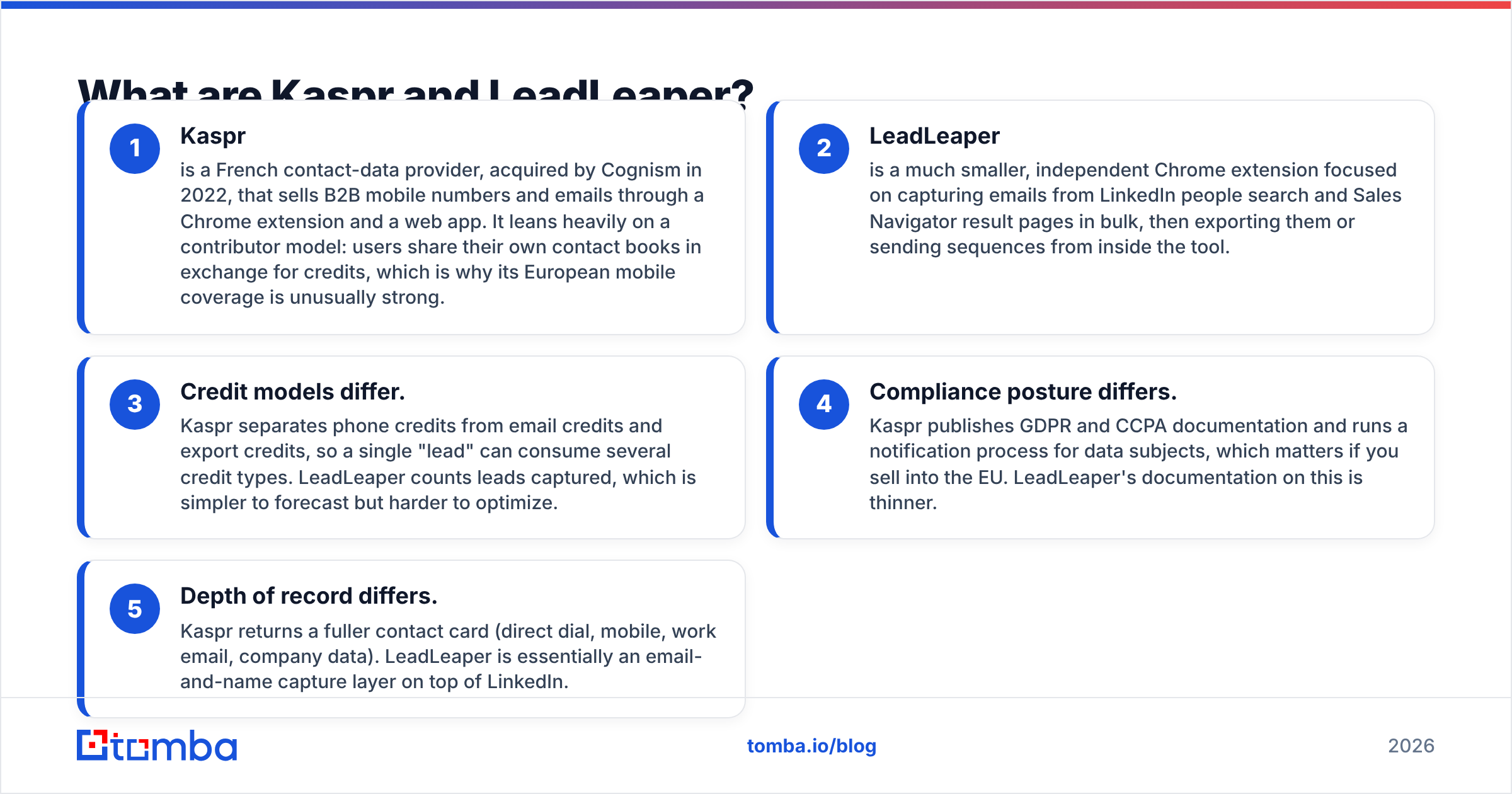
- Kaspr is a French contact-data provider, acquired by Cognism in 2022, that sells B2B mobile numbers and emails through a Chrome extension and a web app. It leans heavily on a contributor model: users share their own contact books in exchange for credits, which is why its European mobile coverage is unusually strong.
- LeadLeaper is a much smaller, independent Chrome extension focused on capturing emails from LinkedIn people search and Sales Navigator result pages in bulk, then exporting them or sending sequences from inside the tool.
- Credit models differ. Kaspr separates phone credits from email credits and export credits, so a single "lead" can consume several credit types. LeadLeaper counts leads captured, which is simpler to forecast but harder to optimize.
- Compliance posture differs. Kaspr publishes GDPR and CCPA documentation and runs a notification process for data subjects, which matters if you sell into the EU. LeadLeaper's documentation on this is thinner.
- Depth of record differs. Kaspr returns a fuller contact card (direct dial, mobile, work email, company data). LeadLeaper is essentially an email-and-name capture layer on top of LinkedIn.
The practical split: Kaspr is a data vendor with an extension attached. LeadLeaper is an extension with a data lookup attached.
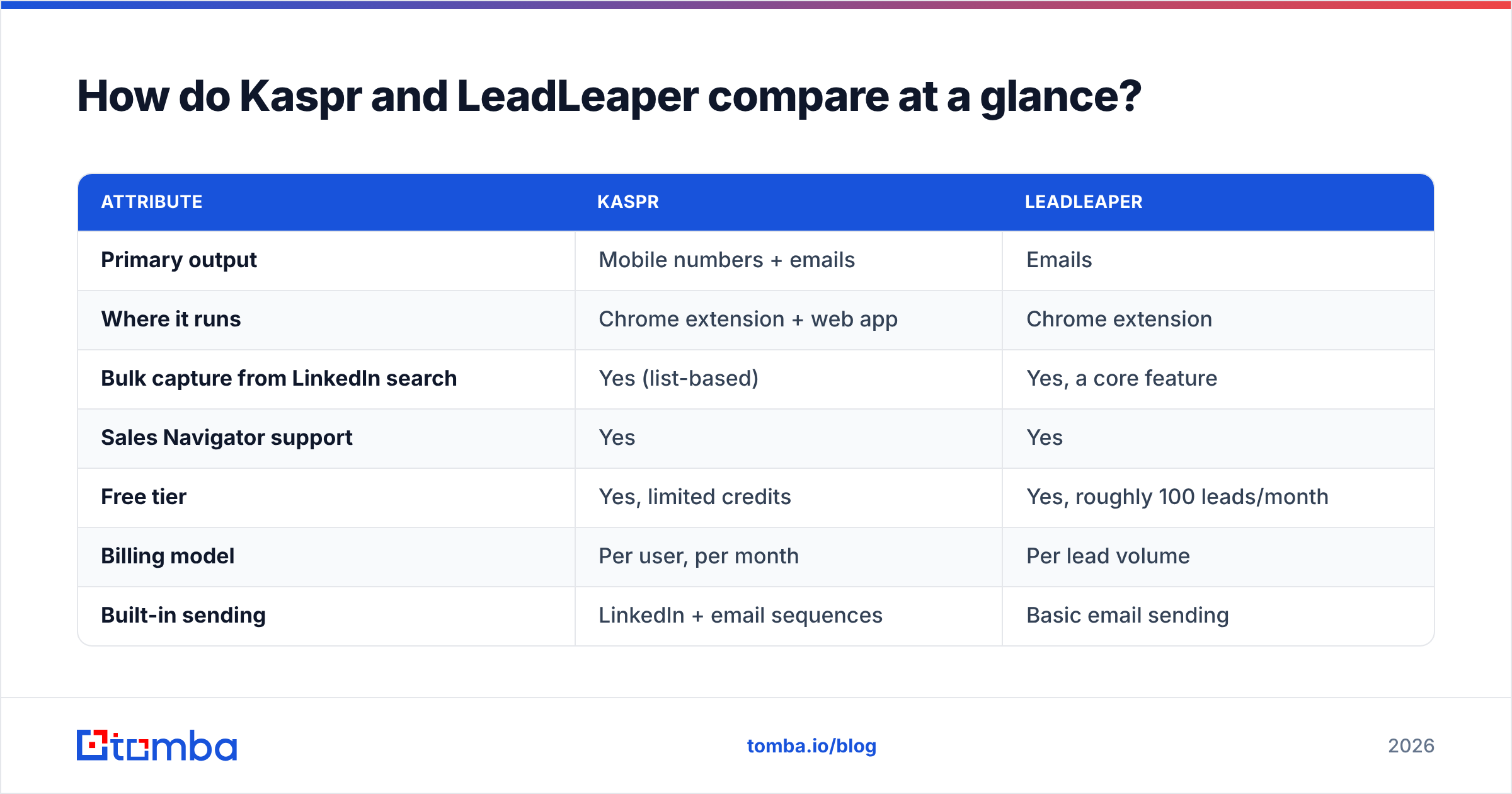
How do Kaspr and LeadLeaper compare at a glance?#
| Attribute | Kaspr | LeadLeaper |
|---|---|---|
| Primary output | Mobile numbers + emails | Emails |
| Where it runs | Chrome extension + web app | Chrome extension |
| Bulk capture from LinkedIn search | Yes (list-based) | Yes, a core feature |
| Sales Navigator support | Yes | Yes |
| Free tier | Yes, limited credits | Yes, roughly 100 leads/month |
| Billing model | Per user, per month | Per lead volume |
| Built-in sending | LinkedIn + email sequences | Basic email sending |
| CRM integrations | HubSpot, Salesforce, Pipedrive, Lemlist, Zapier | Limited; CSV export is the main path |
| API access | Available on higher tiers | Minimal |
| Strongest region | Europe (EMEA mobiles) | North America emails |
| Email verification depth | Basic validity flag | Basic validity flag |

The table hides one thing worth calling out: these tools do not actually compete for the same buyer as often as the search volume suggests. If you need mobiles, LeadLeaper is not in the conversation. If you need 3,000 emails this week on a $30 budget, Kaspr is not in the conversation.
Which one returns more accurate data?#
Accuracy is where every contact-data comparison gets slippery, because vendors quote their own numbers against their own samples. Treat any published "98% accurate" claim, from anyone, as marketing until you run your own test.
Here is what holds up across independent testing patterns and user reviews on G2:
- Kaspr's mobile hit rate in Europe is genuinely good and is the reason people pay for it. On North American mobiles it is weaker than US-native providers.
- Kaspr's email accuracy is mid-pack. It is fine for well-known companies, thinner for sub-50-employee firms and non-English domains.
- LeadLeaper's email accuracy depends heavily on pattern guessing. For companies with a predictable format (first.last@), it performs well. For catch-all domains and unusual formats, bounce risk rises sharply.
- Neither tool tells you much about why an address is valid. You get a green flag, not an SMTP response, a catch-all determination, or a role-account warning.

That last point is the one that costs money. A 6% bounce rate on a 5,000-address send does more damage to your domain than the price difference between any two tools on this page. Whatever you pick, run the output through a real email verifier before it touches your sending domain, and use a catch-all verifier for the domains that come back ambiguous.

How does the pricing compare?#
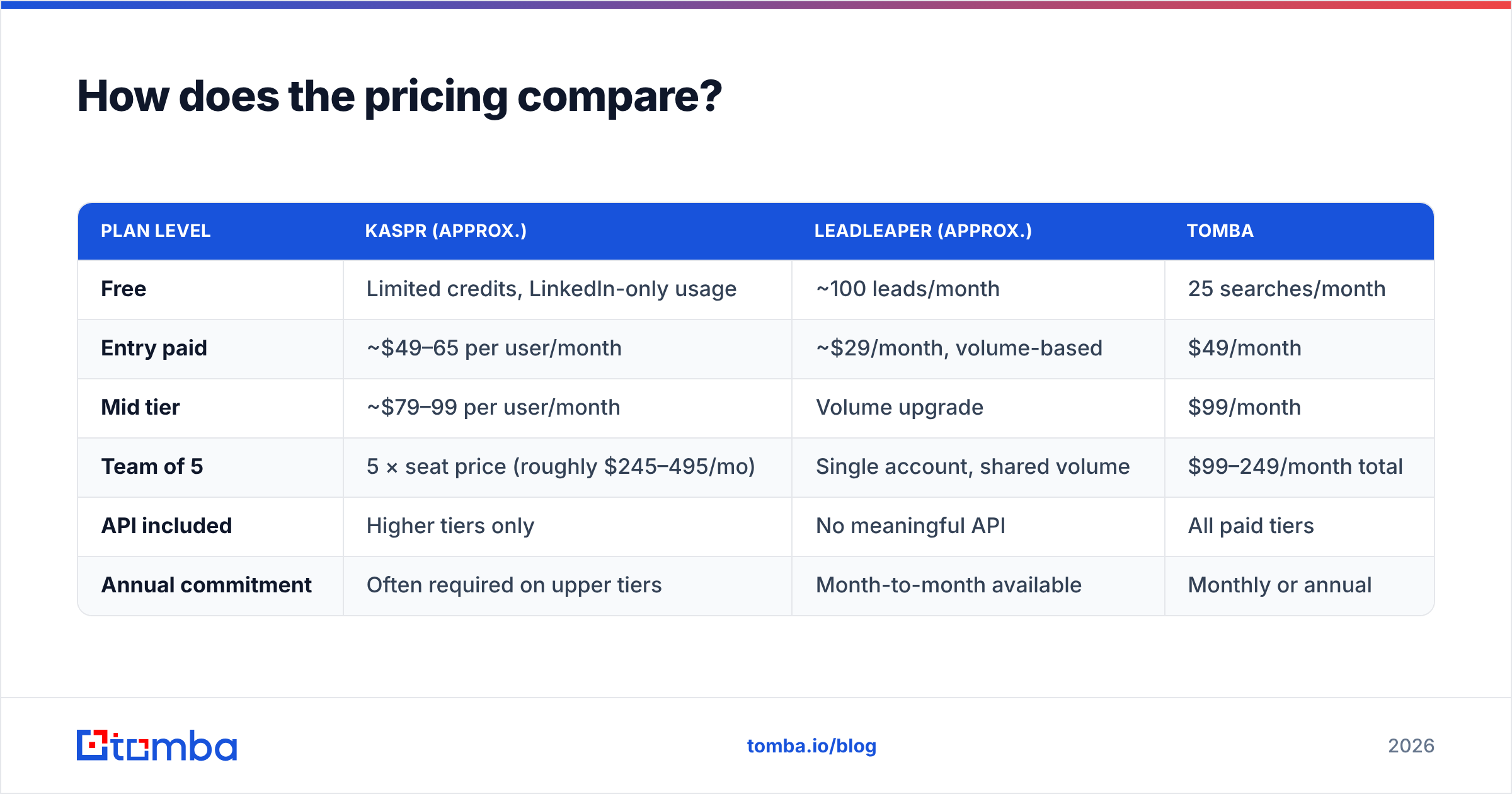
Prices change, and both vendors run promotions, so check the live pages before you commit. The shape of the pricing, though, is stable and it is the shape that should drive your decision.
| Plan level | Kaspr (approx.) | LeadLeaper (approx.) | Tomba |
|---|---|---|---|
| Free | Limited credits, LinkedIn-only usage | ~100 leads/month | 25 searches/month |
| Entry paid | ~$49–65 per user/month | ~$29/month, volume-based | $49/month |
| Mid tier | ~$79–99 per user/month | Volume upgrade | $99/month |
| Team of 5 | 5 × seat price (roughly $245–495/mo) | Single account, shared volume | $99–249/month total |
| API included | Higher tiers only | No meaningful API | All paid tiers |
| Annual commitment | Often required on upper tiers | Month-to-month available | Monthly or annual |
The per-seat trap. Kaspr's model makes sense if each rep genuinely prospects independently and needs their own extension. It stops making sense the moment you centralize list building with one or two ops people, because you are still paying per seat for occasional users. LeadLeaper and volume-priced tools let you concentrate spend where the work happens.
The volume trap. LeadLeaper's cheapness is real, but low unit cost on unverified addresses is not a saving. If 15% of a 2,000-lead batch bounces, you paid for 2,000 and can safely mail 1,700, and you burned sender reputation getting there. Compare cost per deliverable contact, not cost per row. Full Tomba pricing is public if you want a third reference point for that math.
Which tool fits your workflow better?#
Work backwards from your channel mix.
Pick Kaspr if:
- Cold calling is a real part of your motion, not an afterthought.
- You sell into France, Benelux, DACH, the UK or Southern Europe.
- Your reps live inside LinkedIn and Sales Navigator all day.
- You need CRM sync more than you need CSV control.
- You have budget approval for per-seat SaaS.
Pick LeadLeaper if:
- You are one person, or a very small team, building lists sporadically.
- Email is the only channel you run.
- You want to test a market before committing to a contract.
- CSV export into your own stack is your preferred workflow.
- Your targets are mostly North American and mid-to-large companies.
Pick a dedicated email-finding platform if:
- You need the same lookup available in the browser, in a spreadsheet, and in code.
- You are enriching an existing database, not just prospecting from LinkedIn.
- Deliverability is a KPI someone measures you on.
That third case is where extensions hit their ceiling. An extension can only see what is on screen. If your source of truth is a CRM export with 40,000 half-complete rows, you need a bulk email finder and an API, not a browser button. Tools like the LinkedIn finder cover the profile-level use case while the API handles the rest of the pipeline.
Where do both tools fall short?#
Honest weaknesses, because every comparison that says "both are great" is useless.
Kaspr's weak spots:
- Credit accounting is confusing. Phone, email and export credits deplete at different rates, and teams routinely run out mid-month without understanding why.
- North American phone coverage lags the US-native vendors it is priced against.
- Per-seat billing punishes centralized RevOps teams.
- The workflow/sequencing features are serviceable but will not replace a real sequencer.
LeadLeaper's weak spots:
- Thin verification. You get an address and a guess, not a confidence model.
- No phone numbers at all.
- Integration story is basically "export a CSV."
- Support and release cadence reflect a small team; it is not an enterprise procurement candidate.
- LinkedIn UI changes occasionally break scraping extensions, and recovery time matters more when the vendor is small.
Shared weak spot: both are LinkedIn-shaped. If a prospect is not on LinkedIn, or has a locked-down profile, you are stuck. A domain search that starts from a company URL rather than a profile covers exactly the accounts these tools miss.

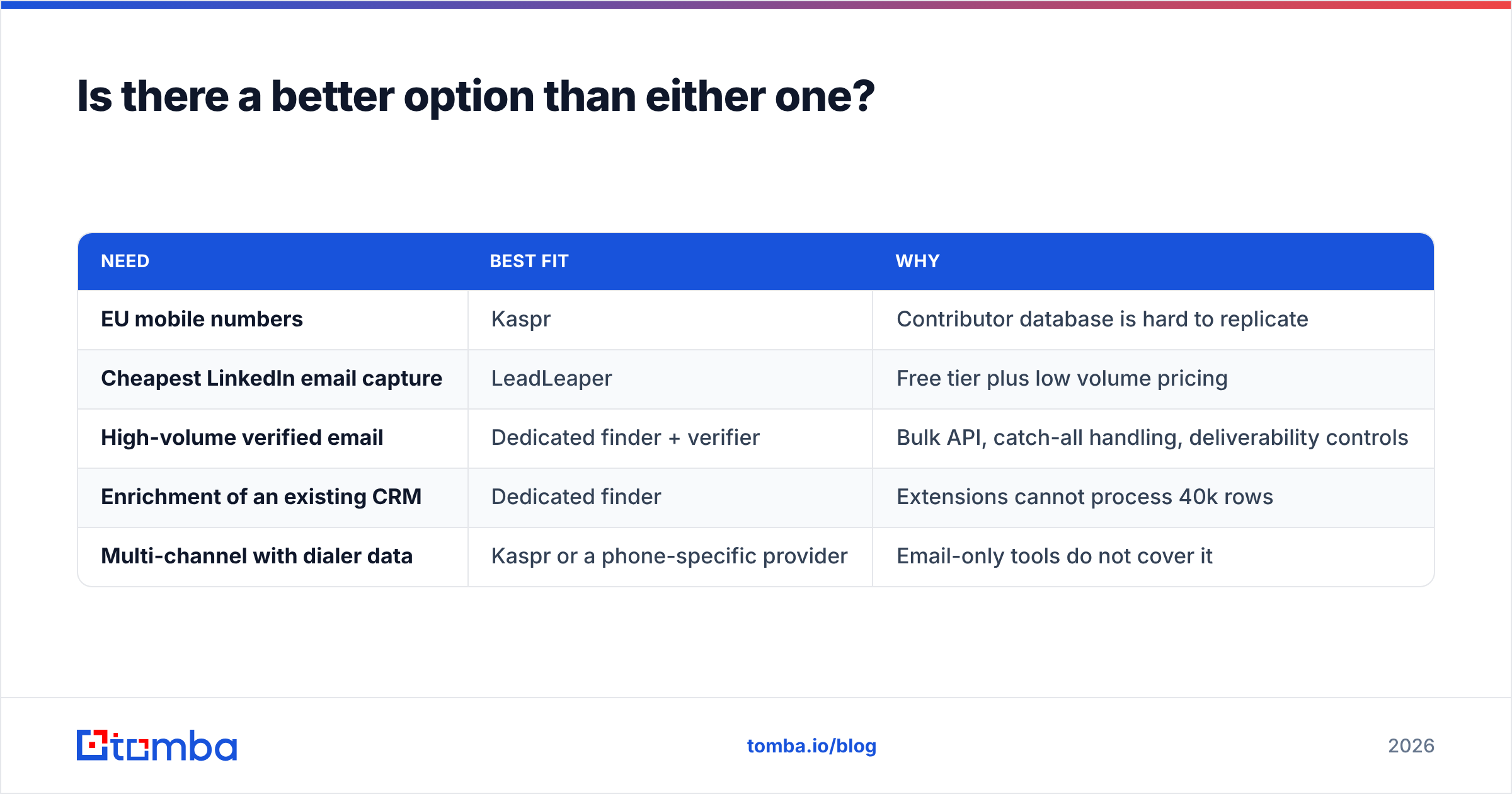
Is there a better option than either one?#
Depends on what "better" means for your stack, and it is worth being blunt about the trade-offs rather than pretending one tool dominates.
| Need | Best fit | Why |
|---|---|---|
| EU mobile numbers | Kaspr | Contributor database is hard to replicate |
| Cheapest LinkedIn email capture | LeadLeaper | Free tier plus low volume pricing |
| High-volume verified email | Dedicated finder + verifier | Bulk API, catch-all handling, deliverability controls |
| Enrichment of an existing CRM | Dedicated finder | Extensions cannot process 40k rows |
| Multi-channel with dialer data | Kaspr or a phone-specific provider | Email-only tools do not cover it |
If email is your primary channel, the case for a purpose-built finder is straightforward: you get a browser extension and a Tomba API, spreadsheet add-ins, bulk processing, and verification in one credit pool, at flat pricing instead of per-seat. If phone is your primary channel, Kaspr stays on the shortlist regardless of what any email-finder blog tells you, including this one.
A common setup that works well in practice: use one tool for phone data where you genuinely need dials, and one email platform for everything else, rather than paying a premium multi-data vendor for capabilities half your team never touches.
Kaspr vs LeadLeaper: what is the verdict for 2026?#
Kaspr wins on data depth and team infrastructure. LeadLeaper wins on price and simplicity. Neither wins on email verification, which is the part that actually determines whether your campaign lands.
Run this test before you buy either. Take 100 contacts you already have verified emails for. Look them up in each tool's free tier. Count three things: how many were found at all, how many matched your known-good address, and how many came back with a format the tool guessed rather than confirmed. That 30-minute exercise beats every review page, including this one, because it runs on your ICP rather than someone else's sample.
Then check the cost per contact that survived verification. That number, not the sticker price, is what you are actually buying.
Quick FAQ#
Is Kaspr GDPR compliant? Kaspr publishes GDPR documentation and operates a data-subject notification process, which is one of its stronger selling points for EU-focused teams. Review its current policy yourself rather than taking any third party's word for it.
Does LeadLeaper have a free plan? Yes, with a monthly lead allowance in the region of 100 captures. It is the most generous free entry point of the two for pure email work.
Can I use both? Yes, and some teams do: LeadLeaper or a cheap finder for volume list building, Kaspr for the accounts where a rep needs a mobile number. Watch the combined spend, though, because two half-used subscriptions often cost more than one platform that covers both jobs.
Do these tools replace verification? No. Both flag obvious invalid addresses. Neither gives you catch-all resolution, role-account detection, or the kind of confidence scoring that keeps a bounce rate under 2%.
Start with the addresses you can actually send to#
If your growth depends on email landing in an inbox, begin with the finder and stop paying for capabilities you do not use. The Tomba Email Finder searches by name, company or domain, returns a confidence score with the source of every address, and shares one credit pool across the extension, spreadsheets, bulk uploads and the API. The free tier gives you 25 searches a month, enough to run the 100-contact bake-off above against Kaspr and LeadLeaper and let the results decide instead of the landing pages.
Related guides#
// get started
Find, verify and enrich your first contacts today
Start on the free plan with 25 searches a month, then scale when your team is ready.
Free plan · No credit card required · GDPR & CCPA
// about the author