Kaspr vs LetsExtract (2026): Which B2B Email Finder Wins?
Kaspr pulls mobile numbers and emails off LinkedIn profiles. LetsExtract is Windows software that scrapes addresses off web pages. They solve different problems, and only one of them is safe to build a 2026 outbound motion on.
Kaspr vs LetsExtract is an odd matchup. One is a LinkedIn contact database. The other is Windows scraping software. This guide compares price, data quality, and legal risk so you can pick in one read.
TL;DR
- Kaspr is a LinkedIn-first contact database, now owned by Cognism. It reveals mobile numbers and work emails from profiles you view. You pay per seat, with monthly credit buckets.
- LetsExtract is Windows desktop software sold on a one-time license. It harvests email addresses from web pages, search results, and local files. It is a scraper, not a verified database.
- They barely compete. Kaspr sells phone numbers. LetsExtract sells volume at a low price. Pick Kaspr if you sell to people. Pick LetsExtract only for bulk harvesting, and only if you accept the risk.
- Data quality is the real gap. Kaspr's emails come from a verified pool. LetsExtract's come from raw HTML, so bounce rates run high unless you verify every address.
- Want verified work emails at API speed, with no desktop app? A dedicated email finder with built-in SMTP verification is the cheaper third option.
What is Kaspr and who actually uses it?#
Kaspr is a Chrome extension plus web app that sits on top of LinkedIn. You open a profile, a Sales Navigator list, or a group. Kaspr then surfaces the person's mobile number, direct email, and company email. It was founded in Paris and bought by Cognism in 2022. That is why its European coverage and GDPR posture beat most US-built tools.
The core use case is SDR-led outbound where phone matters. If your motion is "find the VP Engineering on LinkedIn, get their mobile, call them, then follow up by email," Kaspr is built for that loop. Everything is credit-metered. Phone credits, direct-email credits, and export credits are tracked separately. That catches teams out when they burn a month of phone credits in a week.
What Kaspr is not: a bulk data warehouse. You are not going to pull 200,000 contacts out of it for a mass send. Its ceiling is per-seat, per-workflow enrichment. Check kaspr.io for current plan limits. The credit allocations have changed more than once.
What is LetsExtract and how is it different?#
LetsExtract is a different species of product. It is an installed Windows app, usually sold as the "Email Studio" bundle. That bundle combines an email extractor, an email verifier, and a bulk mailer. You point it at search results, a list of URLs, a site to crawl, local files, or a mailbox. It then pulls out every string that looks like an email address.
There is no LinkedIn integration, no person-level record, no job title, no company firmographics. You get addresses. Sometimes you get a name if it sat next to the address in the HTML. The pricing model is old-school too. You buy a one-time or lifetime license per module instead of a monthly SaaS seat. That is genuinely attractive if you have a repeatable harvesting task and no budget for recurring spend. Confirm current tiers at letsextract.com, because the module bundling changes.
The trade-off shows up fast. A scraped address pool holds role accounts (info@, sales@, webmaster@), dead addresses from 2014 blog footers, spam traps, and honeypots planted to catch harvesters. None of that is LetsExtract's fault. It is the nature of harvesting. It is still your deliverability problem.

Kaspr vs LetsExtract: how do they compare head to head?#
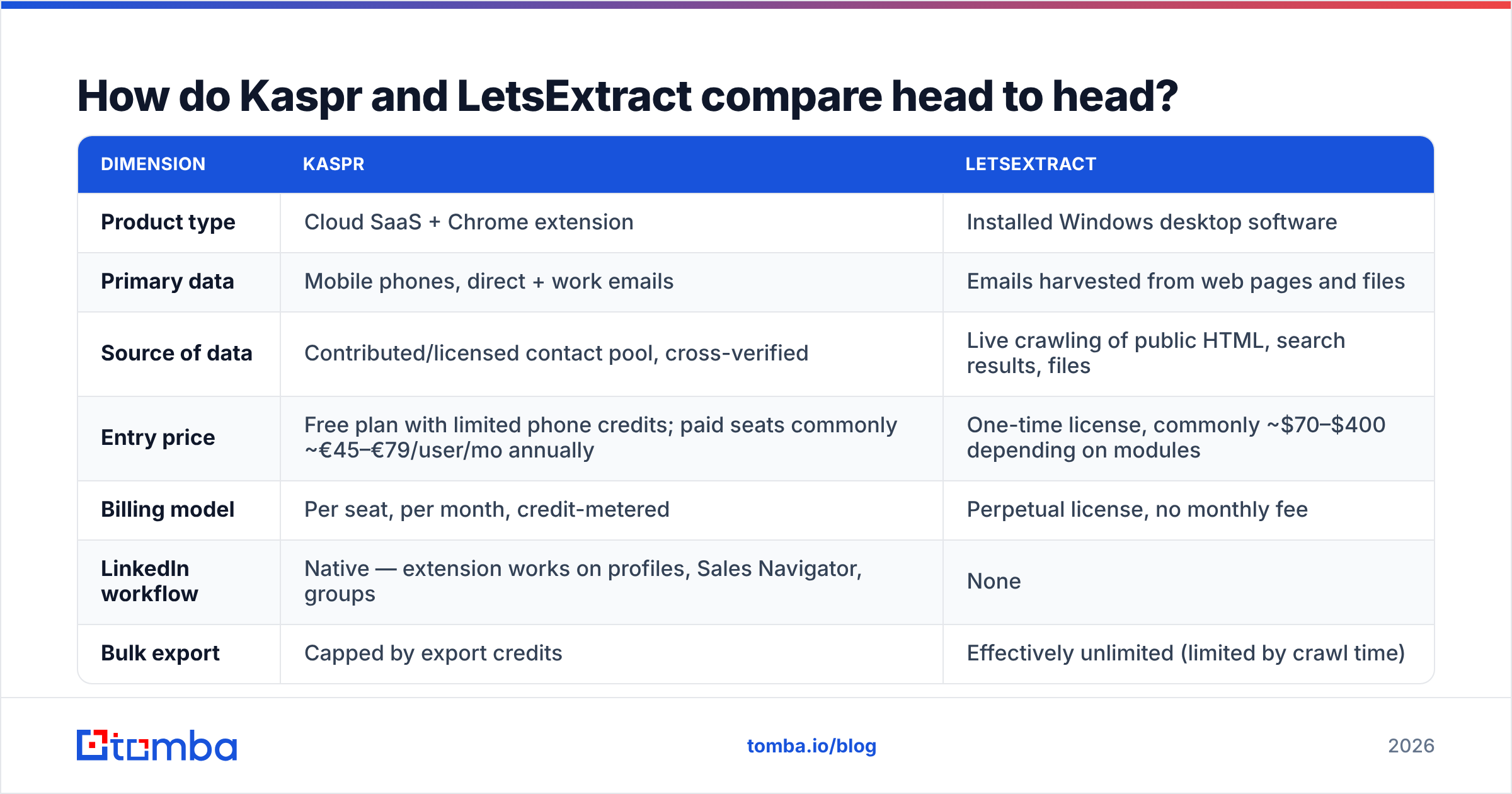
Here is the honest Kaspr vs LetsExtract side-by-side. Treat prices as directional. Both vendors adjust them, and Kaspr quotes in euros with annual-billing discounts.
| Dimension | Kaspr | LetsExtract |
|---|---|---|
| Product type | Cloud SaaS + Chrome extension | Installed Windows desktop software |
| Primary data | Mobile phones, direct + work emails | Emails harvested from web pages and files |
| Source of data | Contributed/licensed contact pool, cross-verified | Live crawling of public HTML, search results, files |
| Entry price | Free plan with limited phone credits; paid seats commonly ~€45–€79/user/mo annually | One-time license, commonly ~$70–$400 depending on modules |
| Billing model | Per seat, per month, credit-metered | Perpetual license, no monthly fee |
| LinkedIn workflow | Native — extension works on profiles, Sales Navigator, groups | None |
| Bulk export | Capped by export credits | Effectively unlimited (limited by crawl time) |
| Built-in verification | Emails pre-verified on the vendor side | Separate verifier module in the bundle |
| Firmographic/title data | Yes | No |
| CRM integrations | HubSpot, Pipedrive, Salesforce, Lemlist and similar | Manual CSV export |
| Best for | SDRs doing phone-led outbound in EMEA/NA | Bulk address harvesting, research, list building on a budget |
| Main risk | Credit burn, per-seat cost scaling | Spam traps, GDPR exposure, unknown data provenance |
Read that table one way and Kaspr looks expensive. Read it the other way and LetsExtract looks cheap. It is cheap because it never pays for the thing that costs money: verification, refresh, and provenance.
Which one gives you more accurate email data?#
Kaspr, comfortably — but with a caveat.
Kaspr's emails come from a maintained pool. Each record is cross-checked before it is served to you, so a revealed address is usually deliverable that day. Reviews on G2 praise its phone coverage in Europe and flag gaps in some verticals and regions. That is the normal shape of a contributed database. It is excellent where its contributor base is dense and thin where it is not.
LetsExtract's accuracy question is different. It does not have accurate or inaccurate data. It has whatever was on the page. If the page is a 2019 conference attendee list, you get 2019 addresses. The bundled verifier helps, but desktop SMTP checks from an office or home IP are unreliable. Many mail servers throttle or blackhole probes from unknown IPs. Catch-all domains return "accept" for everything. That is why a scraped list can still bounce at 20–40% on the first send.

Two practical rules if you use either tool:
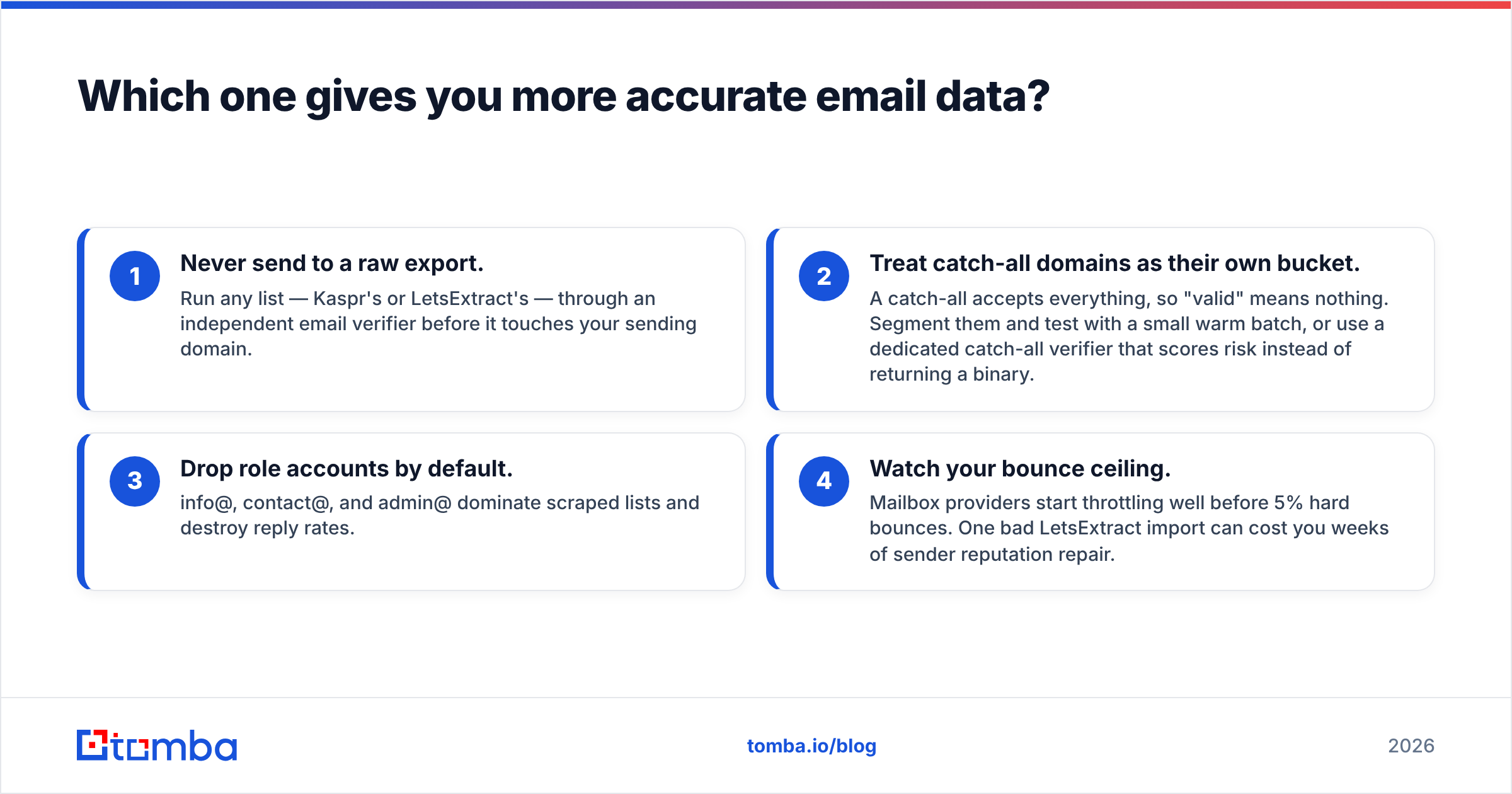
- Never send to a raw export. Run any list — Kaspr's or LetsExtract's — through an independent email verifier before it touches your sending domain.
- Treat catch-all domains as their own bucket. A catch-all accepts everything, so "valid" means nothing. Segment them and test with a small warm batch. Or use a dedicated catch-all verifier that scores risk instead of returning a binary.
- Drop role accounts by default. info@, contact@, and admin@ dominate scraped lists and destroy reply rates.
- Watch your bounce ceiling. Mailbox providers start throttling well before 5% hard bounces. One bad LetsExtract import can cost you weeks of sender reputation repair.
Is LetsExtract legal to use for B2B outbound?#
The software is legal. What you do with it may not be.
Scrape public addresses, then email them unsolicited, and you run straight into GDPR's legitimate-interest test in the EU and UK. In Canada you run into CASL's express-consent rules. The GDPR does not ban B2B outbound. It does require you to document a lawful basis, tell the recipient where you got their data, and honor deletion requests. "We crawled your website footer" is a weak answer to a data subject access request. You also have no audit trail to hand a regulator.
Kaspr's position is stronger here. It is a European vendor with a documented data-processing posture, notification workflows, and opt-out handling. If your buyers are in the EU and your legal team asks where a contact came from, Kaspr can answer. A desktop scraper cannot.
This is not a theoretical concern in 2026. Gmail and Yahoo now enforce bulk-sender rules, and Microsoft has tightened its thresholds. List provenance now moves inbox placement, not just legal risk. Harvested addresses generate spam complaints. Complaints wreck your sender reputation. Reputation decides whether your legitimate mail lands at all.
When should you choose each tool?#
Straight answers, no fence-sitting:
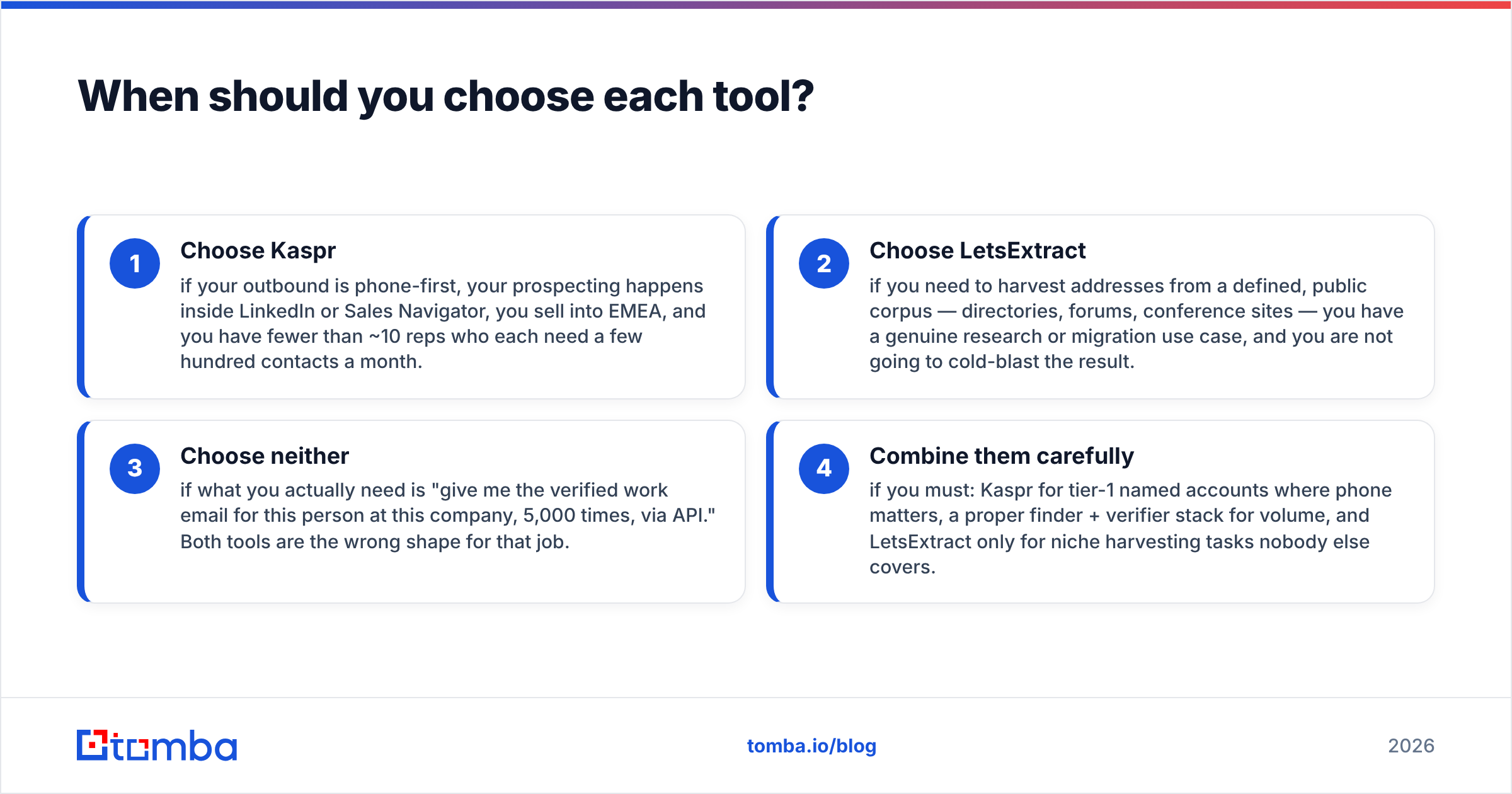
- Choose Kaspr if your outbound is phone-first and your prospecting happens inside LinkedIn or Sales Navigator. It fits EMEA sellers with fewer than ~10 reps, each needing a few hundred contacts a month.
- Choose LetsExtract only to harvest addresses from a defined public corpus — directories, forums, conference sites. You need a real research or migration use case, and you must not cold-blast the result.
- Choose neither if what you actually need is "give me the verified work email for this person at this company, 5,000 times, via API." Both tools are the wrong shape for that job.
- Combine them carefully if you must. Use Kaspr for tier-1 named accounts where phone matters, a proper finder plus verifier stack for volume, and LetsExtract only for niche harvesting nobody else covers.

How does Tomba compare to Kaspr and LetsExtract?#
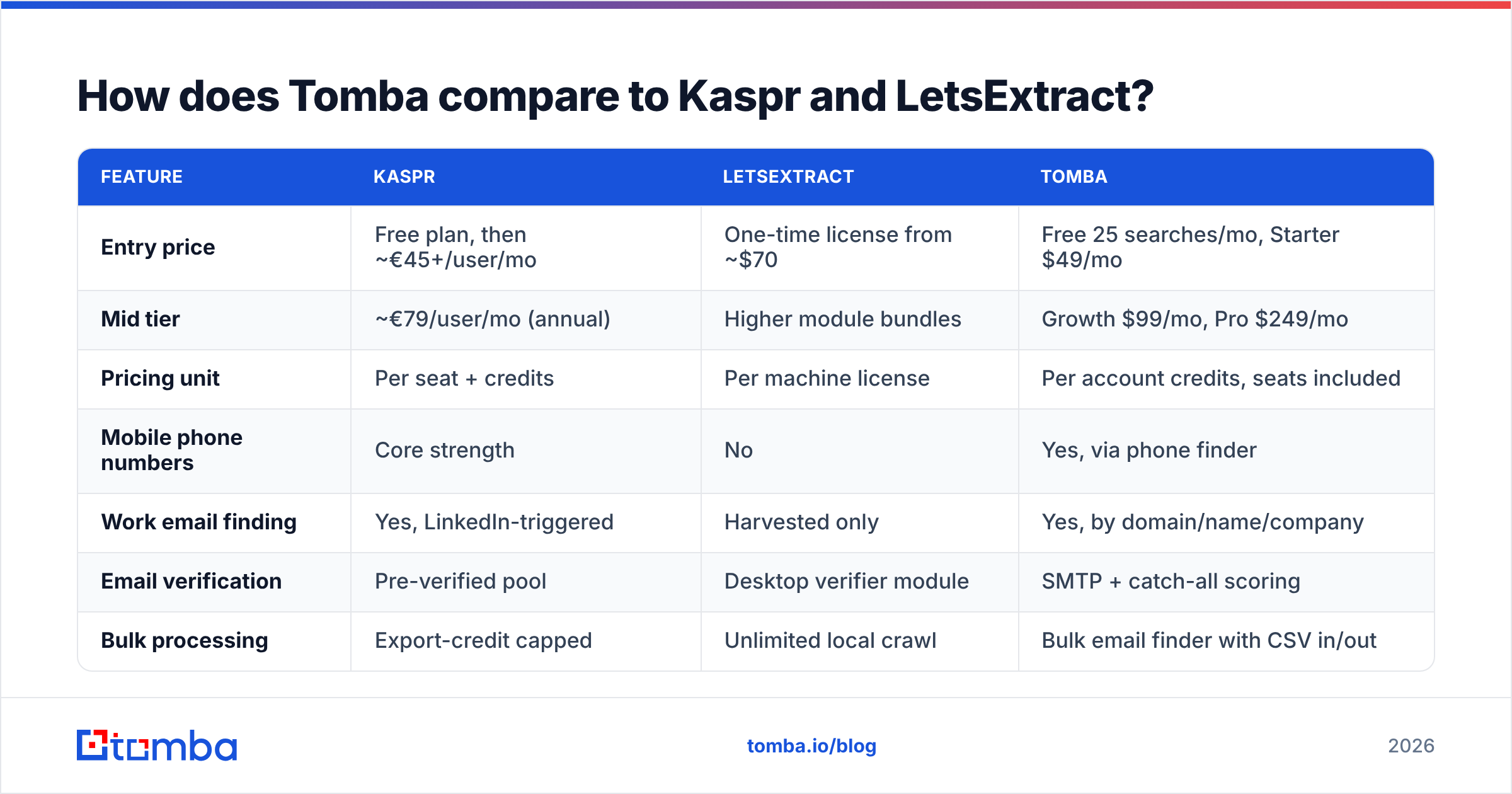
Different design goal, so here is the fair framing rather than a victory lap. Tomba is an email-finding and verification layer. It is not a phone dialer and not a web harvester. It finds work emails by domain, name, or company. It verifies them with SMTP plus pattern confidence scoring. You reach all of it through an API, a browser extension, Sheets, Excel, and bulk upload.

| Feature | Kaspr | LetsExtract | Tomba |
|---|---|---|---|
| Entry price | Free plan, then ~€45+/user/mo | One-time license from ~$70 | Free 25 searches/mo, Starter $49/mo |
| Mid tier | ~€79/user/mo (annual) | Higher module bundles | Growth $99/mo, Pro $249/mo |
| Pricing unit | Per seat + credits | Per machine license | Per account credits, seats included |
| Mobile phone numbers | Core strength | No | Yes, via phone finder |
| Work email finding | Yes, LinkedIn-triggered | Harvested only | Yes, by domain/name/company |
| Email verification | Pre-verified pool | Desktop verifier module | SMTP + catch-all scoring |
| Bulk processing | Export-credit capped | Unlimited local crawl | Bulk email finder with CSV in/out |
| Public API | Limited | No | Full REST API, CLI, and MCP server |
| LinkedIn workflow | Native extension | No | LinkedIn finder + extension |
| Runs on | Any browser | Windows only | Any browser, any language via API |
| Data provenance | Documented | Unknown by design | Documented sources |
The honest read: if phone dials are 70% of your pipeline, Kaspr earns its seat price and no email finder replaces it. If you need 50,000 addresses from public web pages for a research project, LetsExtract does something no SaaS will do for that money. But one job is far more common: turning a list of companies or names into verified, deliverable work emails at predictable cost. A purpose-built finder beats both on price per usable contact.
Cost math matters here. Kaspr's per-seat model means five reps cost five subscriptions, even if three of them prospect twice a month. Account-level credit pools do not work that way. Compare the numbers yourself on Tomba pricing against a five-seat Kaspr quote before you sign anything annual.
What does a sane 2026 stack actually look like?#
Most teams over-buy. A workable, boring stack:
- Targeting layer — Sales Navigator or your CRM's ICP filters. This is where the thinking happens.
- Contact layer — one finder for emails at volume, plus a phone source for accounts that justify a dial. Do not pay per seat for both.
- Verification layer — mandatory, independent of the finder, run right before send rather than at import. Addresses decay roughly 2–3% a month.
- Sending layer — warmed domains, sub-domain separation from your transactional mail, and hard caps per mailbox.
- Feedback layer — bounce and complaint data flowing back into list hygiene, not just into a dashboard nobody opens.
Notice that "which vendor" is one decision inside five. Teams that get outbound right usually have mediocre tools and excellent hygiene. Teams that get it wrong usually have premium tools and a 38% bounce rate.
Frequently asked questions#
Does Kaspr have a free plan? Yes, with a small monthly allocation of phone credits and limited exports. It is enough to evaluate coverage in your vertical, which is the only test that matters.
Is LetsExtract a subscription? Historically it is sold as a perpetual license per module, with optional paid upgrades. Total cost of ownership is low. You are also buying software that only updates when the vendor ships a new build.
Can I use LetsExtract output in a cold email sequence? Technically yes. Advisably, only after aggressive verification, role-account stripping, and a legal review of your jurisdiction. Expect much worse reply rates than a verified, targeted list.
Which has better European coverage? Kaspr, by a wide margin, on phone numbers specifically. That is its home market and its strongest differentiator.
Do I need both? Almost never. Pick the one that matches your dominant channel. Spend the saved budget on verification and warmup instead.
Start with verified emails, not a bigger list#
The Kaspr vs LetsExtract decision comes down to one question: are you buying access to people or volume of strings? Kaspr sells the first. LetsExtract sells the second. Most bad outbound happens when a team buys the second while believing it bought the first.
Is your bottleneck finding accurate, deliverable work emails for accounts you already want? Then start with the Tomba Email Finder. The free tier gives you 25 searches a month to test coverage against your own target list. Verification is built in rather than bolted on. If it works, you can move the whole workflow to the API without changing tools. Run your next 50 target accounts through all three and compare usable contacts per dollar. That number, not a feature grid, should decide this.
Related guides#
// get started
Find, verify and enrich your first contacts today
Start on the free plan with 25 searches a month, then scale when your team is ready.
Free plan · No credit card required · GDPR & CCPA
// about the author