Kaspr vs Nymeria: Which B2B Contact Finder Wins in 2026?
Kaspr sells LinkedIn-native phone numbers. Nymeria sells bulk profile enrichment. They solve different problems — and picking wrong costs you a quarter of pipeline. Here's the honest breakdown.
TL;DR
- Kaspr is a phone-number tool wearing an email tool's clothes. Its strength is mobile numbers pulled while you browse LinkedIn. Its email coverage is thinner and its free plan is deliberately narrow.
- Nymeria is a bulk enrichment engine. It shines when you already have a list of profile URLs or domains and want emails plus social handles appended at volume. It is weaker as a real-time, in-browser prospecting sidekick.
- They barely compete head-to-head. Kaspr wins the "I'm on a LinkedIn profile right now and need a mobile" job. Nymeria wins the "I have 8,000 rows and a deadline" job.
- Both make you pay in credits for data you cannot verify before spending. Neither runs a serious catch-all verification layer, which is where most bounce damage actually originates.
- If email accuracy is the deciding factor, a dedicated finder-plus-verifier stack — Tomba at $49/mo, or a similar setup — usually beats bolting verification onto either tool after the fact.
What Are Kaspr and Nymeria, Actually?#
Start with the honest framing: these two tools get compared constantly, and they shouldn't be. They overlap on one attribute — both return contact data for B2B people — and diverge on almost everything else.
Kaspr is a Chrome extension first and a database second. You install it, open a LinkedIn profile or a Sales Navigator list, and it surfaces phone numbers and emails inline. Kaspr was acquired by Cognism in 2022, which matters: its phone data inherits some of Cognism's European coverage and its compliance posture (GDPR-focused, with notification workflows for EU contacts). If your ICP sits in France, Germany, the Nordics, or the UK, that lineage is a real advantage.
Nymeria comes from the opposite direction. It grew out of large-scale people-data aggregation — think profile records assembled from public web sources, then keyed to emails, phone numbers, and social profiles. It has a browser extension too, but the product's center of gravity is bulk: upload a CSV of LinkedIn URLs or domains, get enriched rows back. There's an API, and the pricing has historically been generous on volume relative to the enterprise-priced incumbents.
So: Kaspr is a rep's tool. Nymeria is an operator's tool. That single sentence resolves about 70% of the "which should I buy" question before you look at a single pricing page.

How Do Kaspr and Nymeria Compare Head-to-Head?#
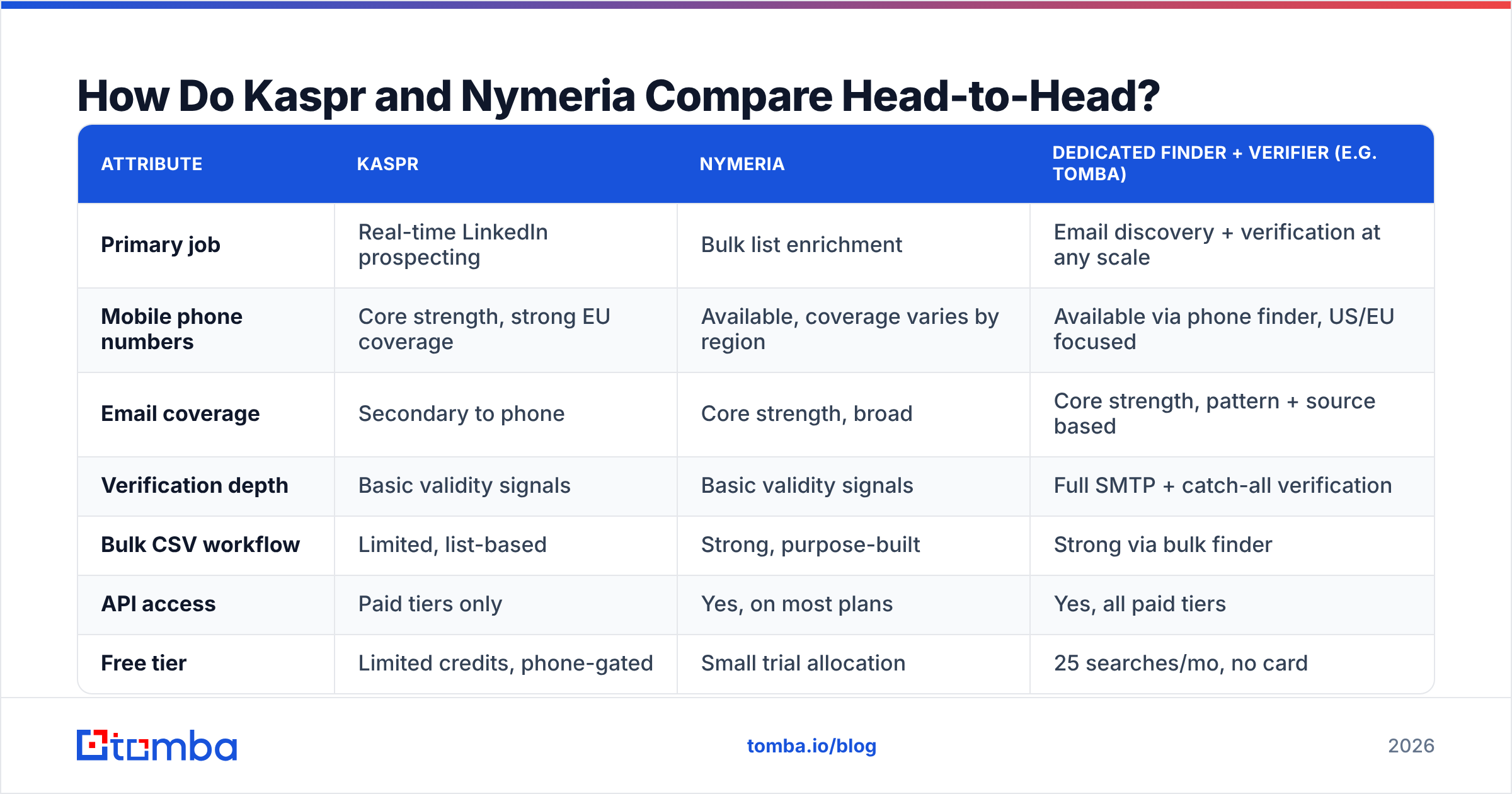
Here is the side-by-side, with a third column for the dedicated email-finder approach so you can see where each tool's data model actually costs you.
| Attribute | Kaspr | Nymeria | Dedicated finder + verifier (e.g. Tomba) |
|---|---|---|---|
| Primary job | Real-time LinkedIn prospecting | Bulk list enrichment | Email discovery + verification at any scale |
| Mobile phone numbers | Core strength, strong EU coverage | Available, coverage varies by region | Available via phone finder, US/EU focused |
| Email coverage | Secondary to phone | Core strength, broad | Core strength, pattern + source based |
| Verification depth | Basic validity signals | Basic validity signals | Full SMTP + catch-all verification |
| Bulk CSV workflow | Limited, list-based | Strong, purpose-built | Strong via bulk finder |
| API access | Paid tiers only | Yes, on most plans | Yes, all paid tiers |
| Free tier | Limited credits, phone-gated | Small trial allocation | 25 searches/mo, no card |
| Entry paid price | Roughly $65/mo per user | Roughly $39-$49/mo | $49/mo Starter |
| Best for | AE/SDR calling motion | RevOps, growth engineers | Outbound teams that email at volume |
| Weakest at | Non-LinkedIn sourcing | Live, one-at-a-time lookups | Phone-first calling motions |
Two rows deserve unpacking.
Verification depth. Both Kaspr and Nymeria return an email and a confidence label. Neither runs the kind of deep catch-all interrogation that separates "this domain accepts everything" from "this specific mailbox exists." On catch-all domains — which now cover a large share of mid-market and enterprise companies — a green checkmark from either tool means "we found a plausible address," not "this will land." That gap is why teams end up buying a separate email verifier regardless of which of these two they picked. Run your exports through a catch-all verifier before they touch a sequence, or budget for the bounce rate.
Credit mechanics. Kaspr charges phone credits and email credits from separate buckets, which sounds fair until you realize you can burn your phone allocation in a week and be stuck with useless email credits. Nymeria's model is simpler — one credit pool — but it charges on rows attempted in some bulk flows, not rows successfully enriched. Read the current terms before you commit annually; both vendors have adjusted these mechanics more than once.
Is Kaspr's Phone Data Actually Better?#
Yes, in Europe. Probably not in North America.
Kaspr's differentiator is that it surfaces mobile numbers — not switchboard lines — for people you're already looking at. In practice, reps report connect-rate improvements versus generic databases on Western European contacts specifically, which tracks with the Cognism data lineage. On US contacts, the coverage flattens out to roughly parity with the broader market, where RocketReach, Lusha, and Apollo all pull from overlapping aggregation sources.
There's a compliance wrinkle worth knowing. Kaspr operates a notification workflow for EU data subjects, which is the correct posture under GDPR but occasionally means a contact learns they were added to your list. That is not a bug — it's the law working. If your legal team is strict, this is a point in Kaspr's favor, not against it. Verify the current data-handling terms on Kaspr's own site rather than trusting a blog post, including this one.
What Kaspr does not do well: sourcing outside LinkedIn. If your ICP lives in company directories, conference attendee lists, GitHub, or trade association rosters, Kaspr has no answer. You'd pair it with a domain search tool to sweep company-level contacts, or an author finder if you're prospecting content publishers.
Is Nymeria Better for Bulk Enrichment?#
For raw throughput at low cost, yes — with caveats about what you get back.
Nymeria's bulk flow is genuinely good. Drop in a column of LinkedIn URLs, get back emails, personal emails, phone numbers where available, and social handles. The per-record cost at volume undercuts most enterprise data vendors by a wide margin. For a growth engineer building a list of 20,000 profiles, that arithmetic matters more than any feature comparison.
The caveats:
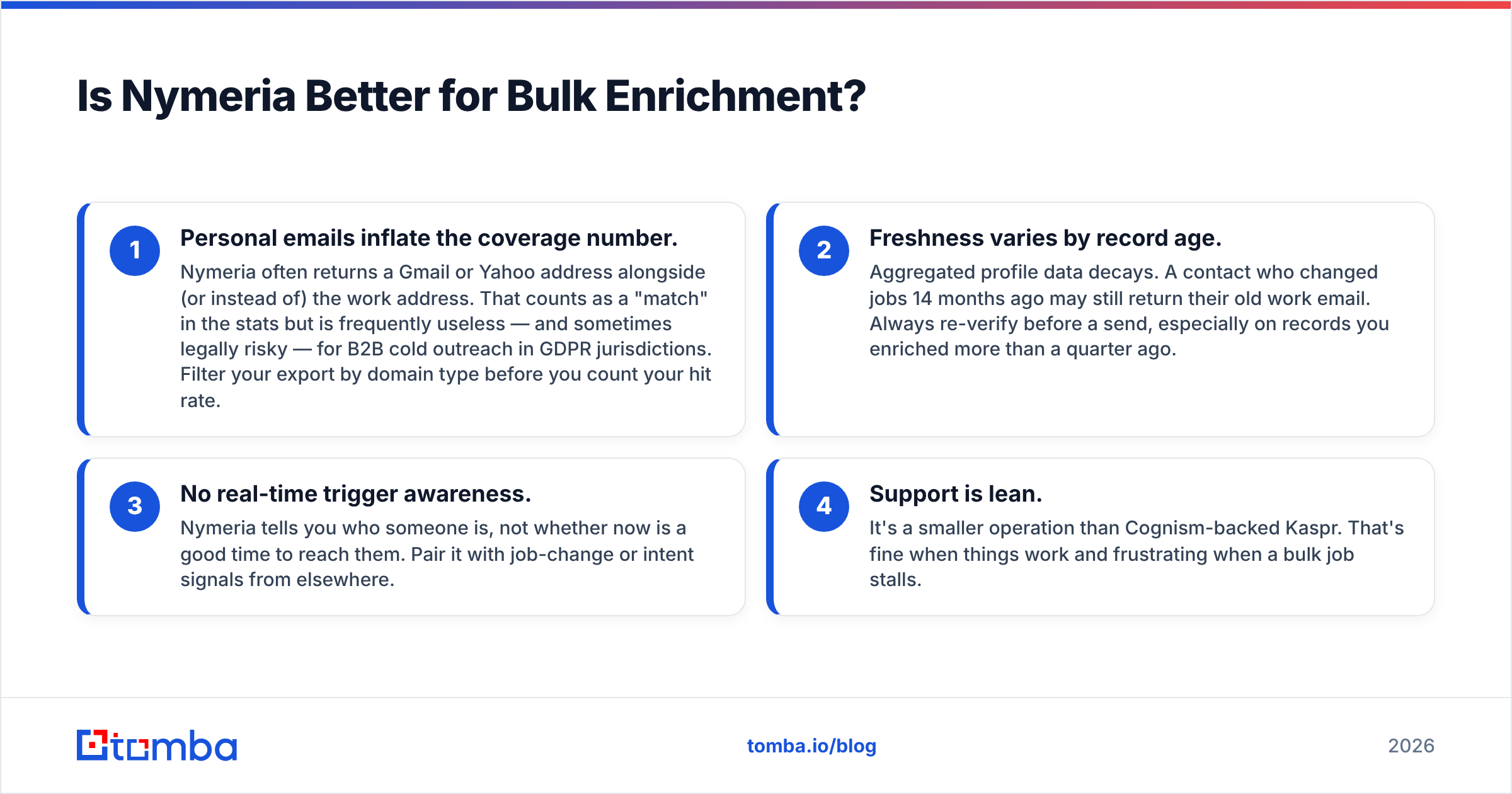
- Personal emails inflate the coverage number. Nymeria often returns a Gmail or Yahoo address alongside (or instead of) the work address. That counts as a "match" in the stats but is frequently useless — and sometimes legally risky — for B2B cold outreach in GDPR jurisdictions. Filter your export by domain type before you count your hit rate.
- Freshness varies by record age. Aggregated profile data decays. A contact who changed jobs 14 months ago may still return their old work email. Always re-verify before a send, especially on records you enriched more than a quarter ago.
- No real-time trigger awareness. Nymeria tells you who someone is, not whether now is a good time to reach them. Pair it with job-change or intent signals from elsewhere.
- Support is lean. It's a smaller operation than Cognism-backed Kaspr. That's fine when things work and frustrating when a bulk job stalls.
For teams running this motion, the practical stack is: Nymeria (or any bulk enricher) for the first pass, then a verification layer, then upload. Tomba's bulk email finder collapses those first two steps, which is the main argument for consolidating rather than chaining tools.
What Does Each One Cost in 2026?#
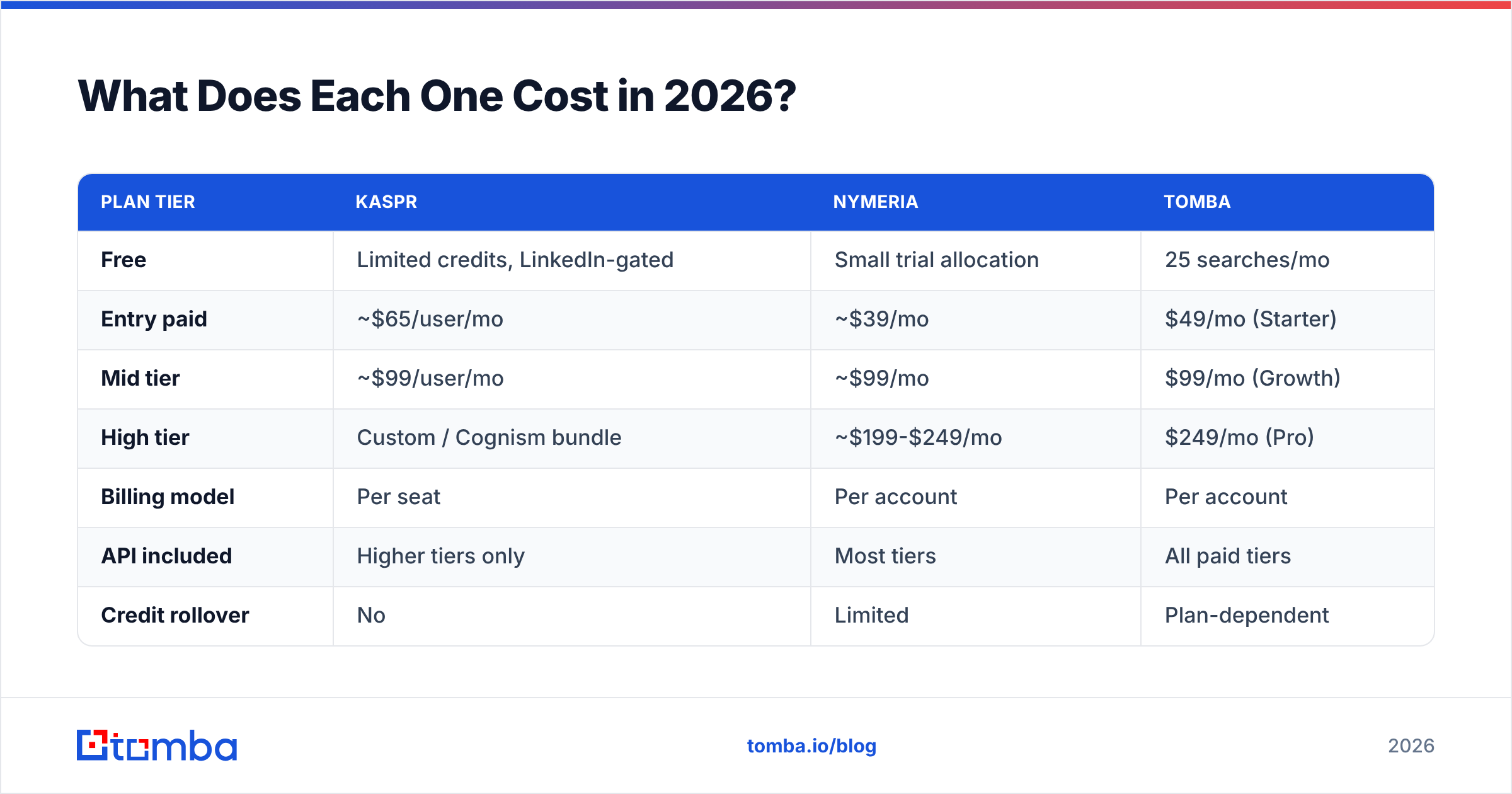
Published pricing moves, so treat these as directional and check the vendor pages before you buy.
| Plan tier | Kaspr | Nymeria | Tomba |
|---|---|---|---|
| Free | Limited credits, LinkedIn-gated | Small trial allocation | 25 searches/mo |
| Entry paid | ~$65/user/mo | ~$39/mo | $49/mo (Starter) |
| Mid tier | ~$99/user/mo | ~$99/mo | $99/mo (Growth) |
| High tier | Custom / Cognism bundle | ~$199-$249/mo | $249/mo (Pro) |
| Billing model | Per seat | Per account | Per account |
| API included | Higher tiers only | Most tiers | All paid tiers |
| Credit rollover | No | Limited | Plan-dependent |
The per-seat versus per-account distinction is the expensive detail. Kaspr charges per user. A six-rep team on the mid tier is looking at roughly $600/month before anyone touches the API. Nymeria and Tomba price per account, so the same six reps share one pool. If your team is larger than three people, run that math before you get attached to Kaspr's UI. Full Tomba pricing is public if you want to compare line by line.

Which Should You Pick for Your Motion?#
Match the tool to the job, not to the feature list.
- You're an SDR making 60 dials a day into European accounts. Kaspr. The in-browser mobile lookup is the whole product, and it's good at it. Accept that you'll need something else for email.
- You're a RevOps lead enriching a 15,000-row account list quarterly. Nymeria. The bulk economics are hard to beat, and you have the technical chops to filter and verify the output yourself.
- You're running email-first outbound at volume and bounce rate is your KPI. Neither, alone. Both will hand you addresses you can't trust on catch-all domains. Build around a finder with real verification — see where Tomba gets data for how source-backed discovery differs from pure pattern-guessing — and add phone data as a separate line item.
- You're a solo founder doing everything. Start free on all three. Test the same 25 target contacts through each and count how many emails actually land. Vendor-published accuracy stats are marketing; your own 25-contact test is data.
- You need contact data inside a CRM workflow, not a browser tab. Check the API and integrations coverage first. Kaspr's API gating on lower tiers is a genuine blocker for automated enrichment.
One more consideration that people skip: exit cost. Kaspr's data lives inside Kaspr's lists until you export. Nymeria's lives in whatever CSV you downloaded. Neither is a system of record. Whatever you pick, pipe results into your CRM or warehouse on day one, or you'll be re-buying the same contacts in eight months. Standard practice is a HubSpot integration or equivalent sync so enrichment lands where reps actually work.
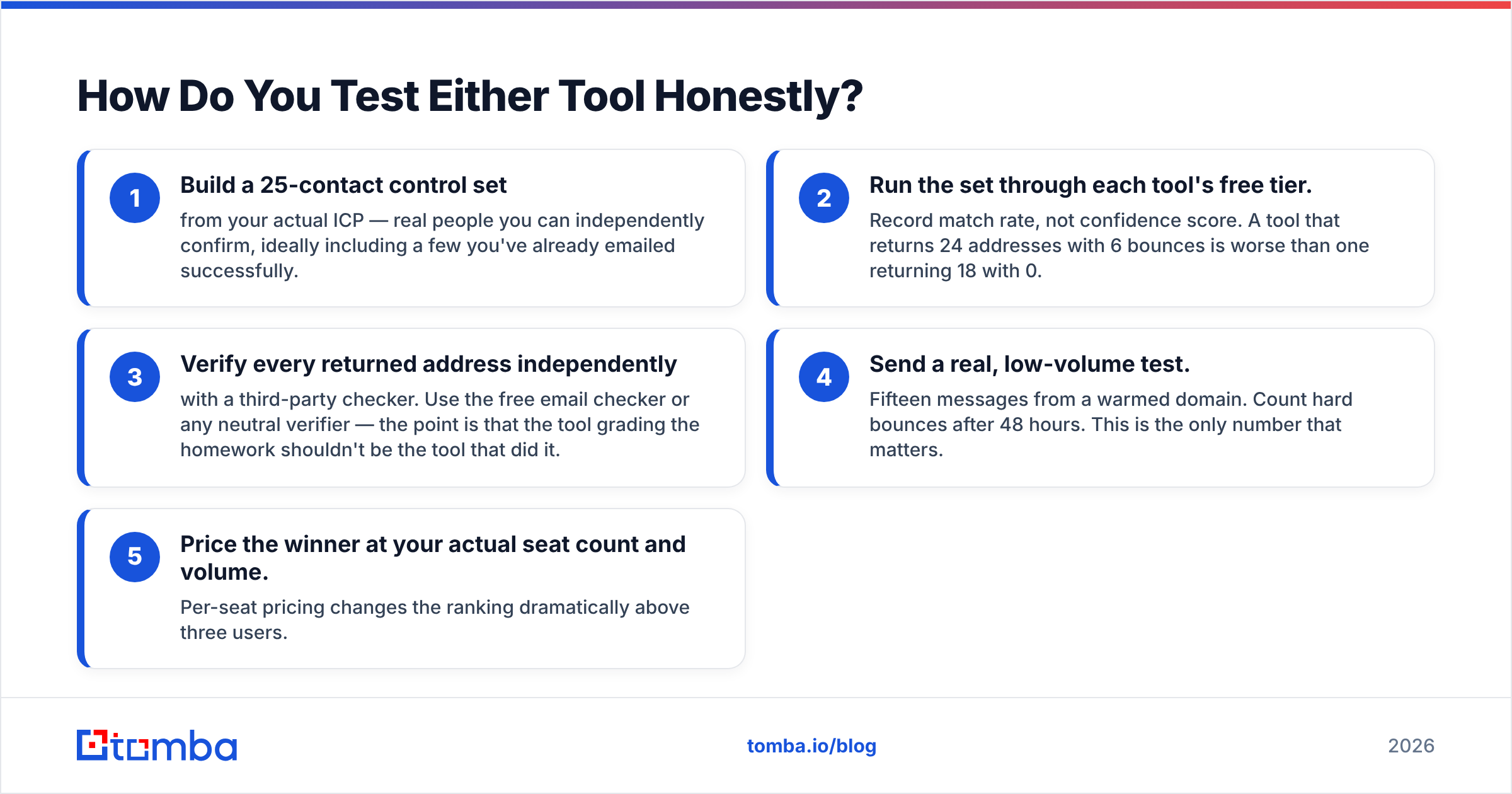
How Do You Test Either Tool Honestly?#
Do not trust the demo. Run this in an afternoon:
- Build a 25-contact control set from your actual ICP — real people you can independently confirm, ideally including a few you've already emailed successfully.
- Run the set through each tool's free tier. Record match rate, not confidence score. A tool that returns 24 addresses with 6 bounces is worse than one returning 18 with 0.
- Verify every returned address independently with a third-party checker. Use the free email checker or any neutral verifier — the point is that the tool grading the homework shouldn't be the tool that did it.
- Send a real, low-volume test. Fifteen messages from a warmed domain. Count hard bounces after 48 hours. This is the only number that matters.
- Price the winner at your actual seat count and volume. Per-seat pricing changes the ranking dramatically above three users.
Teams that skip step 4 end up explaining a damaged sender reputation to their CMO a month later. Bounce damage compounds; a 6% hard-bounce rate does not stay a 6% problem.
If you want an outside reference point on how buyers actually rate these categories, the review volume on G2 is more useful than any vendor's case study page — filter by company size, because a 12-person startup and a 2,000-person enterprise have completely different experiences with the same tool.
The Honest Verdict#
Kaspr and Nymeria are both reasonable purchases for the job each was built to do, and both are bad purchases for the other one's job. That's the whole comparison. Kaspr is a calling tool with email as a bonus. Nymeria is an enrichment API with a browser extension as a bonus. Buying either expecting a complete contact-data platform will disappoint you.
The category gap both leave open is verification. Neither treats "will this email actually deliver" as a first-class problem, and in 2026 — with catch-all configurations widespread and inbox providers tightening authentication requirements — that's the expensive gap. Tools like BookYourData have gone a different route with verified-at-purchase B2B lists, which is a legitimate alternative model if you'd rather buy a clean list than build one.
If your outbound is email-led and you want discovery and verification handled in one place, start with the Tomba Email Finder. The free tier gives you 25 searches a month with no card, which is enough to run the 25-contact control test described above and compare the results against whatever Kaspr or Nymeria returns for the same list. Paid plans start at $49/mo with the API, bulk processing, and catch-all verification included rather than bolted on. Run the test, count the bounces, and let your own data pick the winner.
Related guides#
// get started
Find, verify and enrich your first contacts today
Start on the free plan with 25 searches a month, then scale when your team is ready.
Free plan · No credit card required · GDPR & CCPA
// about the author