Kaspr vs Power Almanac: Which B2B Data Tool Wins in 2026?
Kaspr pulls direct dials off LinkedIn. Power Almanac sells verified lists of US local-government officials. They barely overlap — this breakdown shows which one actually fits your pipeline, and what to use when neither does.
Kaspr vs Power Almanac is an odd matchup. One tool pulls phone numbers off LinkedIn. The other sells checked lists of US local-government staff. Both sell B2B contacts. Almost nothing else lines up.
TL;DR
- Kaspr vs Power Almanac is not a close race. Kaspr reveals phones and emails from LinkedIn, and Cognism owns it. Power Almanac is a fixed, hand-checked list of US local-government staff.
- Pick Kaspr if your buyers use LinkedIn and you sell to small or mid-size firms. It wins when you cold call.
- Pick Power Almanac if you sell to city and county offices. Think GovTech, public works, and city software. Many of those buyers never show up on LinkedIn.
- Neither one does domain-first search. If you start from a list of company sites, a pattern-based email finder fills that gap.
- Best first step: test 50 real leads on both free tiers. Do that before you buy a seat for a year.
Kaspr vs Power Almanac: what each tool really is#
People compare them because both sell B2B contact data. That is where the match ends.
Kaspr is a Chrome add-on for LinkedIn. You open a profile, a Sales Navigator list, an event, or a group. Kaspr then shows direct dials, mobile numbers, and work emails. Cognism bought it in 2022. It now runs as their self-serve tool for reps. The pitch is speed. You are on LinkedIn already, so the data comes to you.
Power Almanac works a whole different way. It is a fixed list of elected and hired staff at US local governments. That covers about 40,000 cities, towns, and counties. It holds roughly 350,000 named people across about 30 job titles. Mayor, city manager, clerk, police chief, public works head, finance head, IT head, and more. People check each record by hand. The file is refreshed on a set cycle. You buy it as a filtered download, not one profile at a time.
Put it simply. Kaspr finds a person you already picked out. Power Almanac hands you every person in a role you care about. And it does that in a market where LinkedIn is thin.

Where the data comes from#
Where data comes from tells you where each tool breaks.
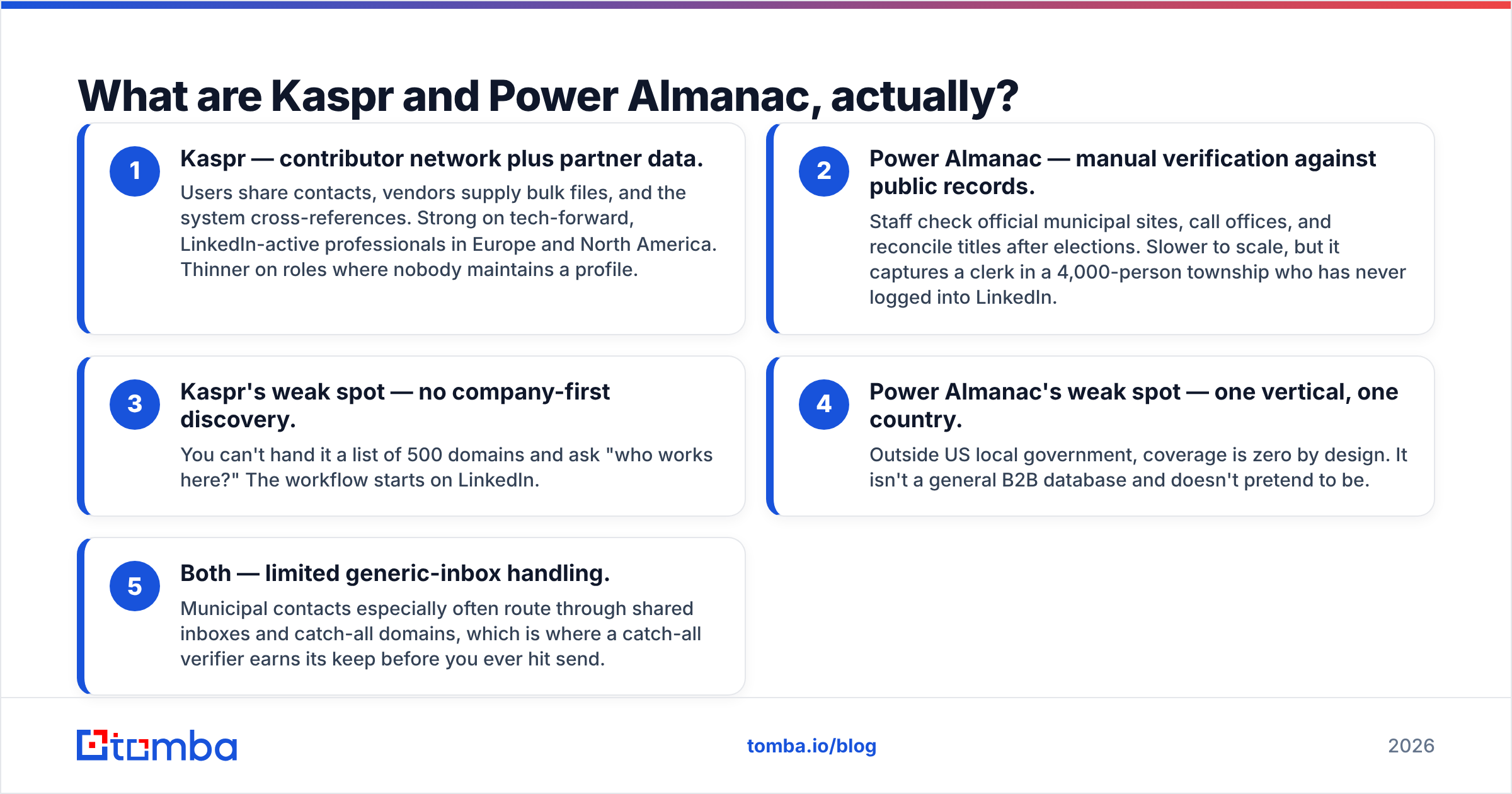
- Kaspr — user network plus vendor files. Users share contacts. Vendors send bulk files. The system checks one against the other. It is strong on tech-savvy people in Europe and North America. It is weak where nobody keeps a profile.
- Power Almanac — hand checks against public records. Staff read city websites. They call offices. They fix job titles after each election. That is slow work. But it catches a clerk in a town of 4,000 who has never used LinkedIn.
- Kaspr's weak spot — no company-first search. You cannot hand it 500 domains and ask who works there. The job starts on LinkedIn.
- Power Almanac's weak spot — one market, one country. Outside US local government it holds nothing. That is by design. It is not a general B2B database.
- Both — shared inboxes are a problem. City contacts often sit behind a shared or catch-all address. Run them through a catch-all verifier before you send.
Kaspr vs Power Almanac: head-to-head comparison#

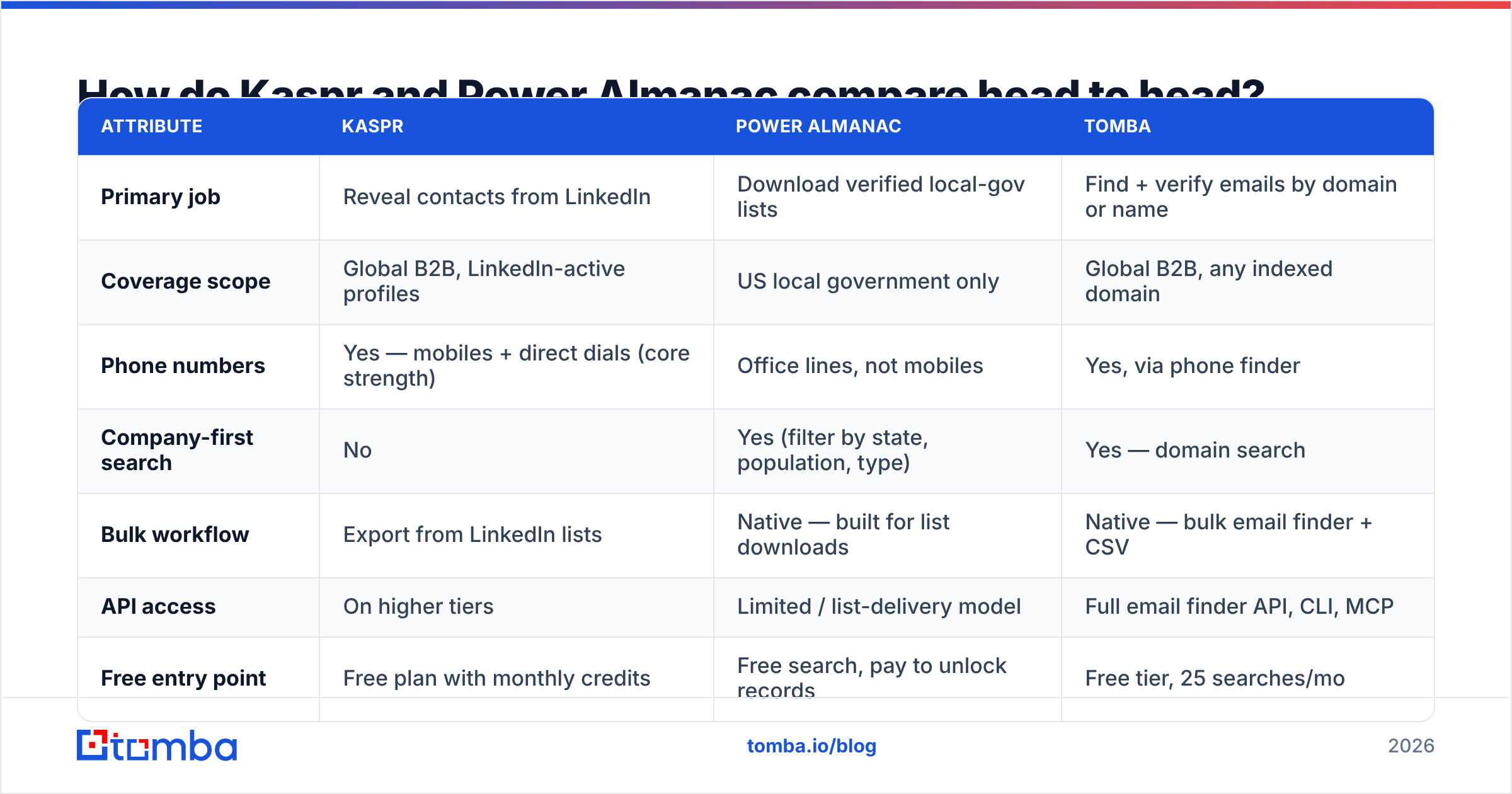
| Attribute | Kaspr | Power Almanac | Tomba |
|---|---|---|---|
| Primary job | Reveal contacts from LinkedIn | Download verified local-gov lists | Find + verify emails by domain or name |
| Coverage scope | Global B2B, LinkedIn-active profiles | US local government only | Global B2B, any indexed domain |
| Phone numbers | Yes — mobiles + direct dials (core strength) | Office lines, not mobiles | Yes, via phone finder |
| Company-first search | No | Yes (filter by state, population, type) | Yes — domain search |
| Bulk workflow | Export from LinkedIn lists | Native — built for list downloads | Native — bulk email finder + CSV |
| API access | On higher tiers | Limited / list-delivery model | Full email finder API, CLI, MCP |
| Free entry point | Free plan with monthly credits | Free search, pay to unlock records | Free tier, 25 searches/mo |
| Entry paid price | ~$49–65/user/mo (listed, annual) | Credit/record-based, quote-driven | $49/mo Starter |
| Best fit | SDRs cold calling commercial accounts | GovTech and municipal vendors | Teams enriching domain lists at scale |
Prices here are what each vendor listed in public when we wrote this. Both change tiers now and then. Check their own pages before you set a budget.
Two rows in this Kaspr vs Power Almanac table stand out. First, the phone row is Kaspr's core case. If your team dials, that edge is real. Second, the company-first row is where Kaspr sits out. Say your list arrives as domains from a CRM export, an event page, or a funding site. Kaspr wants you to find each of those people on LinkedIn first, one by one.
Kaspr vs Power Almanac: which data is more accurate?#
An accuracy claim needs a scope. "97% accurate" means little until you know on which group.

Kaspr is accurate where LinkedIn is busy. Take a VP of Engineering at a 200-person software firm who updated her headline last month. Hit rates are strong. The mobile number is often right. Now take a 55-year-old plant manager who last used LinkedIn in 2017. You get an old title, an old company, or nothing. That is not a Kaspr flaw. It is the ceiling of any LinkedIn-based data set.
Power Almanac is accurate where public records are kept up. The list is finite and checked by hand, so record quality on covered titles runs high. The risk here is different: turnover after an election. A council seat flips in November. The file catches up on its next cycle, not that week. If you email mayors early in an election year, plan for some bounces.
The fix is the same for both. Check the list before you send. Run any bought or revealed file through an email verifier and drop what is not deliverable. A 4% bounce rate on 3,000 city records will cost you more sender reputation than the check costs in cash.
Kaspr vs Power Almanac: how much do they cost?#
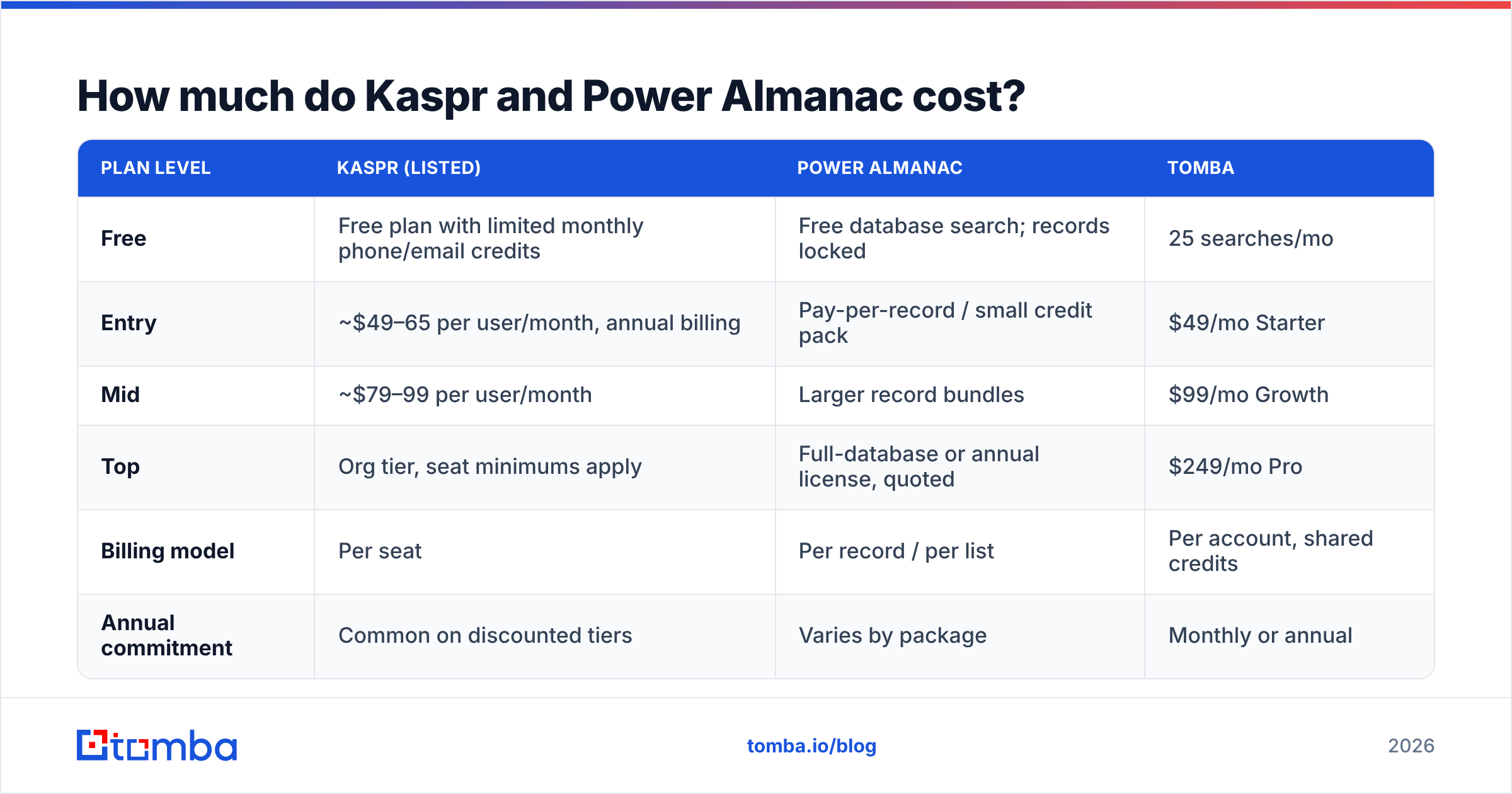
| Plan level | Kaspr (listed) | Power Almanac | Tomba |
|---|---|---|---|
| Free | Free plan with limited monthly phone/email credits | Free database search; records locked | 25 searches/mo |
| Entry | ~$49–65 per user/month, annual billing | Pay-per-record / small credit pack | $49/mo Starter |
| Mid | ~$79–99 per user/month | Larger record bundles | $99/mo Growth |
| Top | Org tier, seat minimums apply | Full-database or annual license, quoted | $249/mo Pro |
| Billing model | Per seat | Per record / per list | Per account, shared credits |
| Annual commitment | Common on discounted tiers | Varies by package | Monthly or annual |
How each one charges matters more than the headline price:
- Kaspr charges per seat. Five reps means five seats. That holds even if two of them prospect twice a week. Credits rarely pool.
- Power Almanac charges per record. That is fine for 1,200 contacts once. It gets costly if you want fresh data feeding a CRM all year.
- Tomba charges per account. Tomba pricing starts at $49/mo. Credits are shared across the team and the API. That shape is cheaper when three people share one list.

Do not compare plan prices. Compare cost per usable, verified, in-ICP contact. A $0.30 record you can really email beats a $0.08 record that bounces or hits the wrong title.
Who should choose Kaspr?#
Choose Kaspr if most of these ring true:
- Your buyers use LinkedIn and keep their profiles current.
- You cold call for real. Mobile numbers are the point.
- Reps work account by account from Sales Navigator, not from bulk domain lists.
- You sell in Europe or North America, to firms rather than government.
- You want GDPR-aware sourcing with a clear notice process. Kaspr spells that out on kaspr.io.
Skip it if you start from a sheet of company websites. Skip it too if you need thousands of contacts by morning, with no one clicking through profiles.
Who should choose Power Almanac?#
Choose Power Almanac if:
- You sell to US cities, counties, or towns. Think permits, fleets, public safety, and city services.
- You need every person in a role, not the 40% who keep a LinkedIn page.
- Your campaigns run in batches, such as a quarterly push to 2,000 public works heads.
- You want to filter by town size, government type, or region. No general B2B tool does that well.
Skip it if any part of your market sits outside US local government. There is no way to widen the coverage. It is a one-market list by design, and that focus is why it is good. For wider or global lists, look at general vendors. BookYourData sells pay-as-you-go B2B lists, for one.
What do both tools miss?#
Here is the gap that sends most teams past Kaspr vs Power Almanac to a third tool: domain-first search.
Say you pull 800 accounts from your CRM. Or you grab a trade group's member page. Or you take the exhibitor list from a show. You have company names and websites. You have no people. And you will not open 800 LinkedIn tabs.
A pattern-based finder works the other way round:
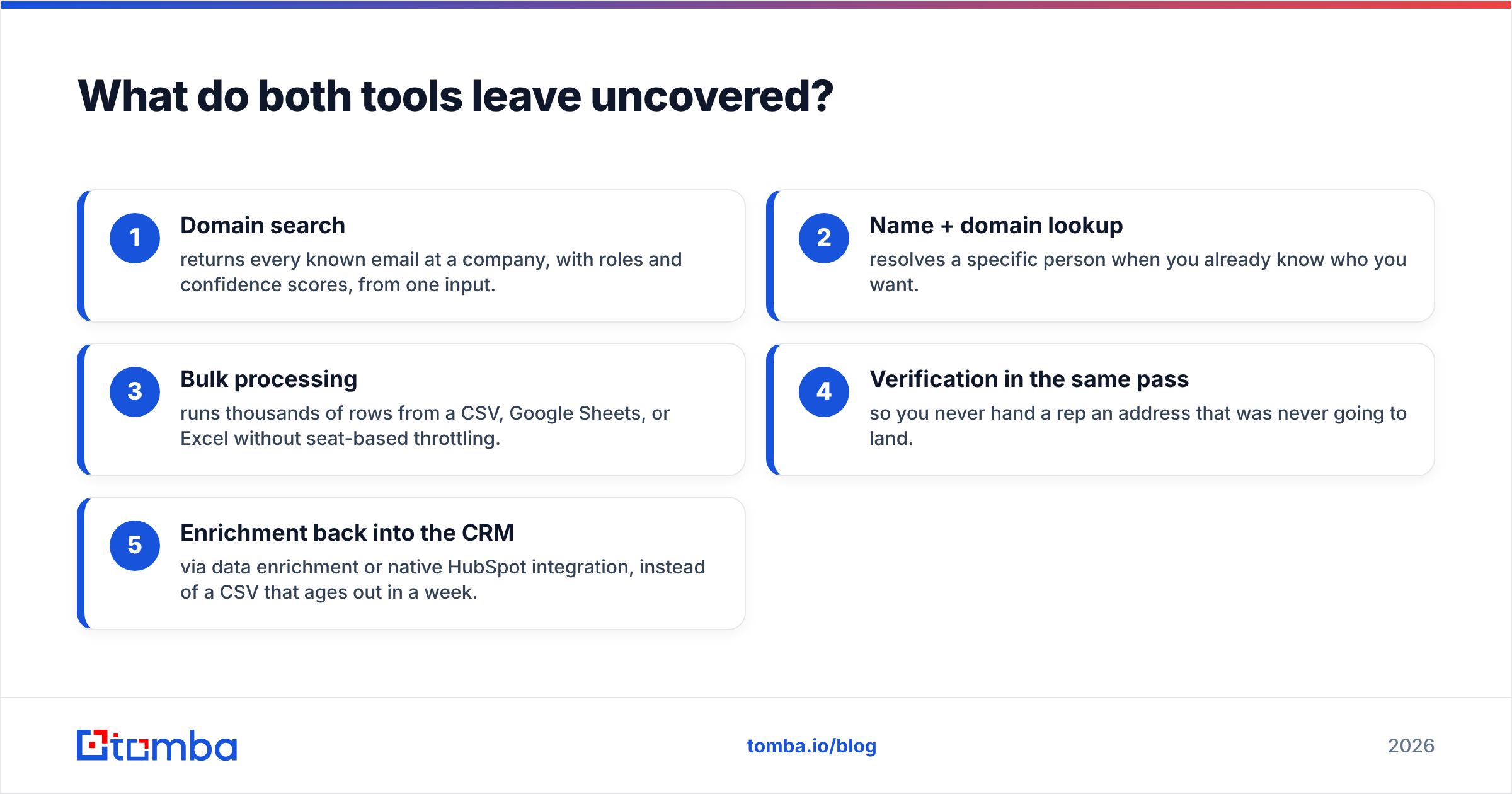
- Domain search returns every known email at a firm from one input, with roles and confidence scores.
- Name plus domain finds one person when you already know who you want.
- Bulk runs handle thousands of rows from a CSV, Google Sheets, or Excel. No seat limits.
- Checks in the same pass, so no rep gets an address that was never going to land.
- Sync back to the CRM with data enrichment or the HubSpot integration. No CSV that ages out in a week.
None of that replaces Kaspr's mobile numbers or Power Almanac's city depth. It covers the third slice of your pipeline that neither one touches.
How should you test them?#
Do not settle for Kaspr vs Power Almanac review roundups on G2. Those scores blend markets that are not yours. Run this test instead:
- Build a 50-record list from accounts you know well, so you can check each answer yourself.
- Run every tool on those same 50 records. Same names, same firms, same day.
- Score three things: hit rate, accuracy, and how current the title is.
- Send a 200-email pilot from a warm domain. Watch the bounce rate, not the open rate.
- Work out cost per verified contact. Compare that number, not the plan price.
Most teams end this test with two sources, not one. A reveal tool for LinkedIn users, and a search tool for everyone else.
Frequently asked questions#
Is Kaspr the same as Cognism? No. Cognism owns Kaspr, but they stay separate products with separate prices. Cognism is the big platform with intent data and larger deals. Kaspr is the self-serve, extension-first tool.
Does Power Almanac list mobile numbers? As a rule, no. You get office contacts: direct office lines, work emails, and mailing addresses. Personal mobiles for public staff are not part of it. That fits the market.
Can I run big email campaigns from either one? Yes, but verify first and warm your domain. City and large-firm inboxes filter hard. Run a free email checker pass. Check your email deliverability setup before you scale.
Kaspr vs Power Almanac: which is better for GovTech? Power Almanac, and it is not close. LinkedIn use among small-city staff is too thin for a reveal tool to work.
The bottom line#
Kaspr vs Power Almanac is not a fight. It is a fork in the road. If your buyers are firms that live on LinkedIn and you dial them, pick Kaspr. If your buyers run US cities and counties, pick Power Almanac. Pick wrong and you do not just overpay. Your rep opens the tool and finds no one.
And if your list starts with company domains, neither one was built for you. That is the case for the Tomba Email Finder. Hand it a domain or a name. Get verified work emails back. Run it through the API, the CLI, or a sheet. Pay per account, not per seat. Start free with 25 searches. Test it on the same 50 records as the rest, and let the hit rate decide.
Related guides#
// get started
Find, verify and enrich your first contacts today
Start on the free plan with 25 searches a month, then scale when your team is ready.
Free plan · No credit card required · GDPR & CCPA
// about the author