Kaspr vs QuickenRich (2026): Which Contact Finder Wins?
One is a Cognism-owned LinkedIn extension with strong EU mobile data. The other is a low-profile enrichment tool with almost no public documentation. Here is how Kaspr and QuickenRich actually compare — and when neither is the right buy.
TL;DR
- Kaspr is the known quantity. It is a LinkedIn Chrome extension owned by Cognism, priced per user, and its real strength is European mobile phone numbers — not bulk email discovery.
- QuickenRich is the unknown quantity. Public documentation, pricing pages, and independent reviews are thin. Treat every claim you read about it as unverified until you run your own test.
- They are not really the same product. Kaspr is a per-seat, per-profile prospecting tool. QuickenRich positions itself as a bulk enrichment layer. Buying one expecting the other is the most common mistake here.
- Per-user pricing punishes small teams. Kaspr's seat model means a 5-person SDR team pays 5× before anyone finds a single contact. Credit-pooled tools do not work that way.
- If your workflow is domain-first or API-first, neither wins. A dedicated email finder with pooled credits and a documented API is a cheaper, more predictable fit.
What is Kaspr and who actually uses it?#
Kaspr is a Paris-based contact data tool that was acquired by Cognism in 2022. Its primary interface is a Chrome extension that overlays LinkedIn: you open a profile, click the Kaspr widget, and it returns mobile numbers, direct dials, and email addresses for that person.
Think of it like a valet standing next to LinkedIn. You point at a person, it hands you their contact card. That interaction model shapes everything about the product — it is fast for one-off prospecting and awkward for anything at volume.
The user base skews toward European SDR teams. Kaspr's data advantage is concentrated in EU mobile numbers, which is genuinely hard data to source and is where Cognism's broader reputation comes from. If you sell into France, Benelux, DACH, or the UK and you cold call, Kaspr is a real contender.
What it is not: a domain-first research tool. You cannot hand Kaspr a list of 400 company websites and ask it to map out who works there. That is a different job, and it is the job most outbound teams actually need done.
What is QuickenRich and why is it hard to evaluate?#
QuickenRich markets itself as a lead enrichment and email-finding service — the category where you upload a list of names and companies and get back verified contact details.
Here is the honest problem: compared to Kaspr, there is very little independently verifiable information about QuickenRich. No substantial G2 review corpus, limited public pricing history, no widely cited accuracy benchmarks, and no detailed API documentation that has been picked apart by developers.
That is not automatically a red flag — every tool starts somewhere, and plenty of good products are under-reviewed. But it does change how you should buy. With Kaspr you can read hundreds of reviews and calibrate expectations before you spend a euro. With QuickenRich you are the benchmark. Budget time for that.
Practical rule: when a vendor's accuracy claims cannot be cross-checked against any third party, treat the claim as a hypothesis and design a test that can disprove it. More on how to run that test below.

How do Kaspr and QuickenRich compare head to head?#
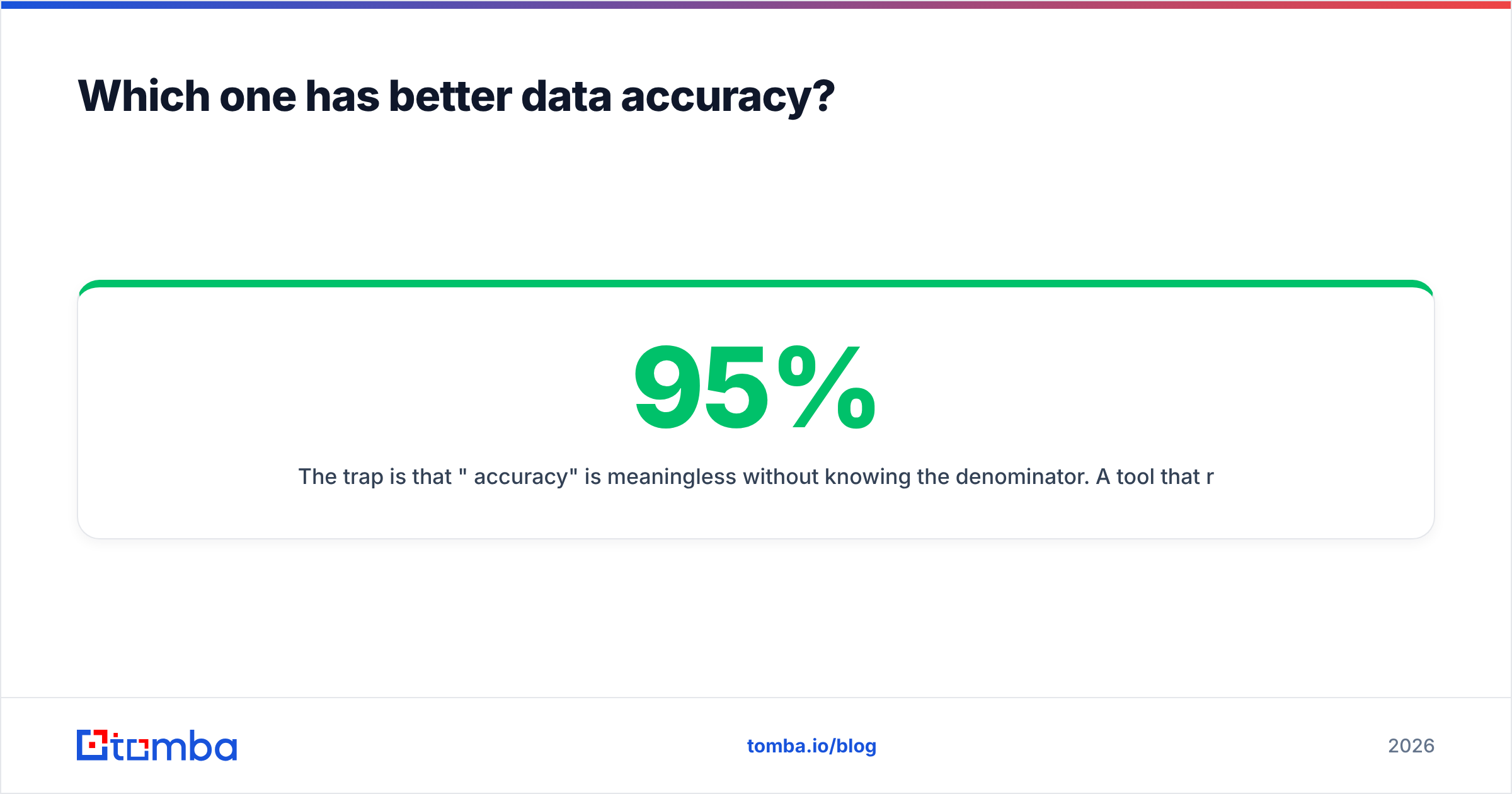
Here is the side-by-side. Where a cell says "not publicly documented," that is the accurate answer — not an oversight. Verify anything marked that way directly with the vendor before you commit budget.
| Attribute | Kaspr | QuickenRich | Tomba |
|---|---|---|---|
| Primary interface | LinkedIn Chrome extension | Web app / list upload | Web app, API, extension, Sheets, Excel |
| Core strength | EU mobile + direct dial numbers | Bulk email enrichment | Domain search + email finding & verification |
| Pricing model | Per user, per month (seat-based) | Not publicly documented | Credit-based, pooled across team |
| Entry paid tier | ~€49/user/mo (annual, check current) | Not publicly documented | $49/mo Starter |
| Free tier | Limited free credits | Not publicly documented | 25 searches/mo |
| Documented public API | Limited | Not publicly documented | Yes — full REST API |
| Bulk CSV processing | Constrained by plan + seat | Positioned as core use case | Yes, bulk finder + verifier |
| Independent review volume | High (Cognism-owned, widely reviewed) | Very low | Moderate |
| Phone number coverage | Strong in Europe | Unclear | Available via phone finder |
| Best fit | EU cold callers working LinkedIn | Unverified — pilot first | Domain-first and API-first teams |
Two things jump out of that table.
First, the pricing models are structurally different animals. Seat-based pricing means your cost scales with headcount whether or not those seats are active. Credit-based pricing means your cost scales with actual usage. A five-person team with two heavy users wastes a lot of money on the first model.
Second, transparency is itself a feature. You can read Kaspr's site and know roughly what you are getting. That is worth something at purchase time, even if the product turns out to be a partial fit.
Which one has better data accuracy?#
Accuracy is the only metric that matters, and it is the one every vendor inflates.
The trap is that "95% accuracy" is meaningless without knowing the denominator. A tool that returns a result for 20% of your list and is right 95% of the time on those is worse than a tool that returns 70% coverage at 88% accuracy — even though the first number looks better on a landing page.

For Kaspr specifically, the pattern reported by users is reasonably consistent: strong on European mobile numbers, weaker and more variable on North American emails. That is what you would expect from a dataset built around EU professional networks and contributed contact data.
For QuickenRich, there is no reliable public accuracy signal. Do not fill that gap with vendor marketing. Fill it with a test.
Here is the accuracy test that actually settles the argument:
- Build a 100-row control list. Pull real accounts from your ICP — same industry, same company size band, same geography you actually sell into. Not a random sample of Fortune 500 logos.
- Include 20 rows you already know the answer to. Contacts from closed-won deals, past customers, or people who have replied to you. These are your ground truth.
- Run the same list through both tools on the same day. Data freshness shifts week to week. Same-day runs are the only fair comparison.
- Measure coverage and accuracy separately. Coverage = rows returned ÷ rows submitted. Accuracy = correct results ÷ rows returned. Write both numbers down. Never average them into one score.
- Verify with a neutral third party. Run every returned address through an independent email verifier so the tool that found the address is not also the tool grading it.
- Price it per usable contact. Divide monthly cost by verified-correct results. That single number ends most tool debates faster than any feature comparison.
Step 6 is where seat-based pricing usually loses. If only two of your five Kaspr seats are active, you are paying for five and getting the output of two.
Is Kaspr worth it for your team?#
Kaspr is worth it under fairly specific conditions:
- You sell into Europe and cold calling is a real channel, not a checkbox.
- Your reps prospect inside LinkedIn, one profile at a time, as their default motion.
- You have enough active seats that per-user pricing is not dead weight.
- You already use Cognism or are evaluating it, and want data consistency across the stack.
Kaspr is a poor fit when:
- Your motion is domain-first — you start with a company website and need to map the org.
- You need bulk throughput: thousands of contacts per month, not dozens per day.
- You need an API to push enrichment into your own systems automatically.
- Your team is small and credit pooling matters more than per-seat guarantees.
That last point is underrated. Prospecting volume is never evenly distributed across a team. One rep does 60% of the research; another does 5%. Seat pricing charges you the same for both.

Is QuickenRich worth the risk?#
Maybe — but structure the risk so a bad outcome costs you a week, not a quarter.
Before you sign anything, get written answers to these:
- What is the actual price, in writing, including overages? If pricing is only available on a call, that is a signal about how the contract will be structured.
- What happens to unused credits? Rollover, expiry, or forfeiture changes effective cost substantially.
- Is there a real free or trial tier? A vendor confident in its data lets you test before paying.
- Is there a documented API with public reference docs? "We have an API" and "here are the docs" are very different claims.
- What is the data source and the compliance posture? For EU contacts this is not optional — GDPR obligations follow the data, not the vendor. Understand where contact data comes from for any tool you buy.
- What is the refund and cancellation policy? Annual prepay with no exit is how a two-week disappointment becomes a twelve-month line item.
If a vendor cannot answer six questions in writing, you have learned what you needed to know.
What's the better alternative for most outbound teams?#
Most teams comparing Kaspr vs QuickenRich are actually asking a simpler question: how do I reliably get correct work emails for a list of companies, without paying per seat and without guessing?
That is a domain-first problem, and it is a different tool category from a LinkedIn overlay.
Tomba approaches it from the domain side. You give it a company website and it returns the email patterns and named contacts at that domain via domain search. You give it a name plus a company and it returns the address. You give it a LinkedIn URL and the LinkedIn finder handles it. Every address can be run through verification before it touches your sequence.

The practical differences that matter at buying time:
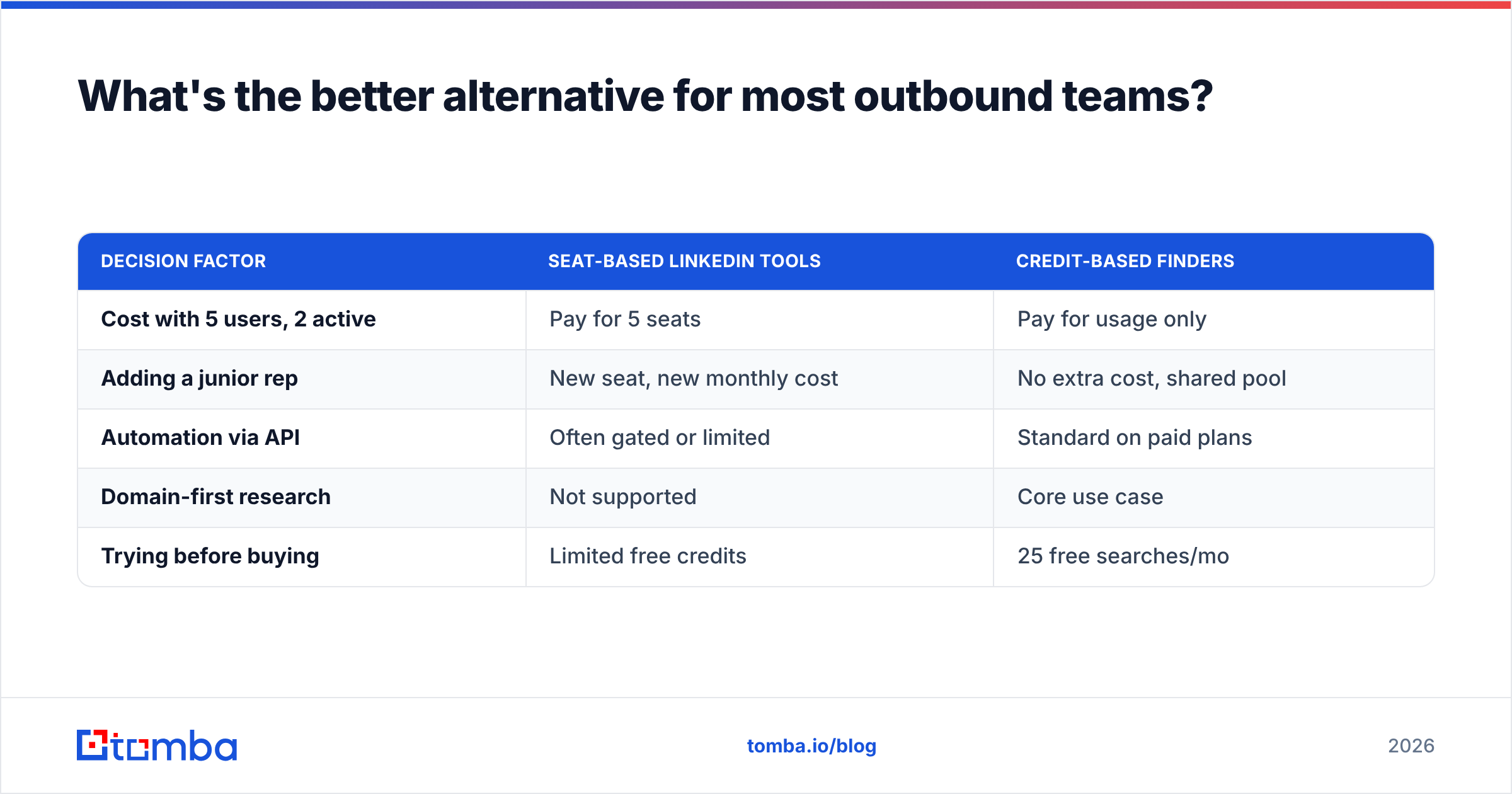
| Decision factor | Seat-based LinkedIn tools | Credit-based finders |
|---|---|---|
| Cost with 5 users, 2 active | Pay for 5 seats | Pay for usage only |
| Adding a junior rep | New seat, new monthly cost | No extra cost, shared pool |
| Automation via API | Often gated or limited | Standard on paid plans |
| Domain-first research | Not supported | Core use case |
| Trying before buying | Limited free credits | 25 free searches/mo |
Tomba's published tiers are Free (25 searches/mo), Starter at $49/mo, Growth at $99/mo, and Pro at $249/mo, with Enterprise custom — full details on the Tomba pricing page. If you need mobile and direct dial numbers alongside email, the phone finder covers that without a second vendor contract.
None of this makes Kaspr a bad product. If you are an EU-focused caller living inside LinkedIn all day, Kaspr's phone data may genuinely be the best thing available to you, and no amount of API elegance replaces a correct mobile number. The point is that "which of these two" is often the wrong frame. The right frame is "which motion am I actually running."
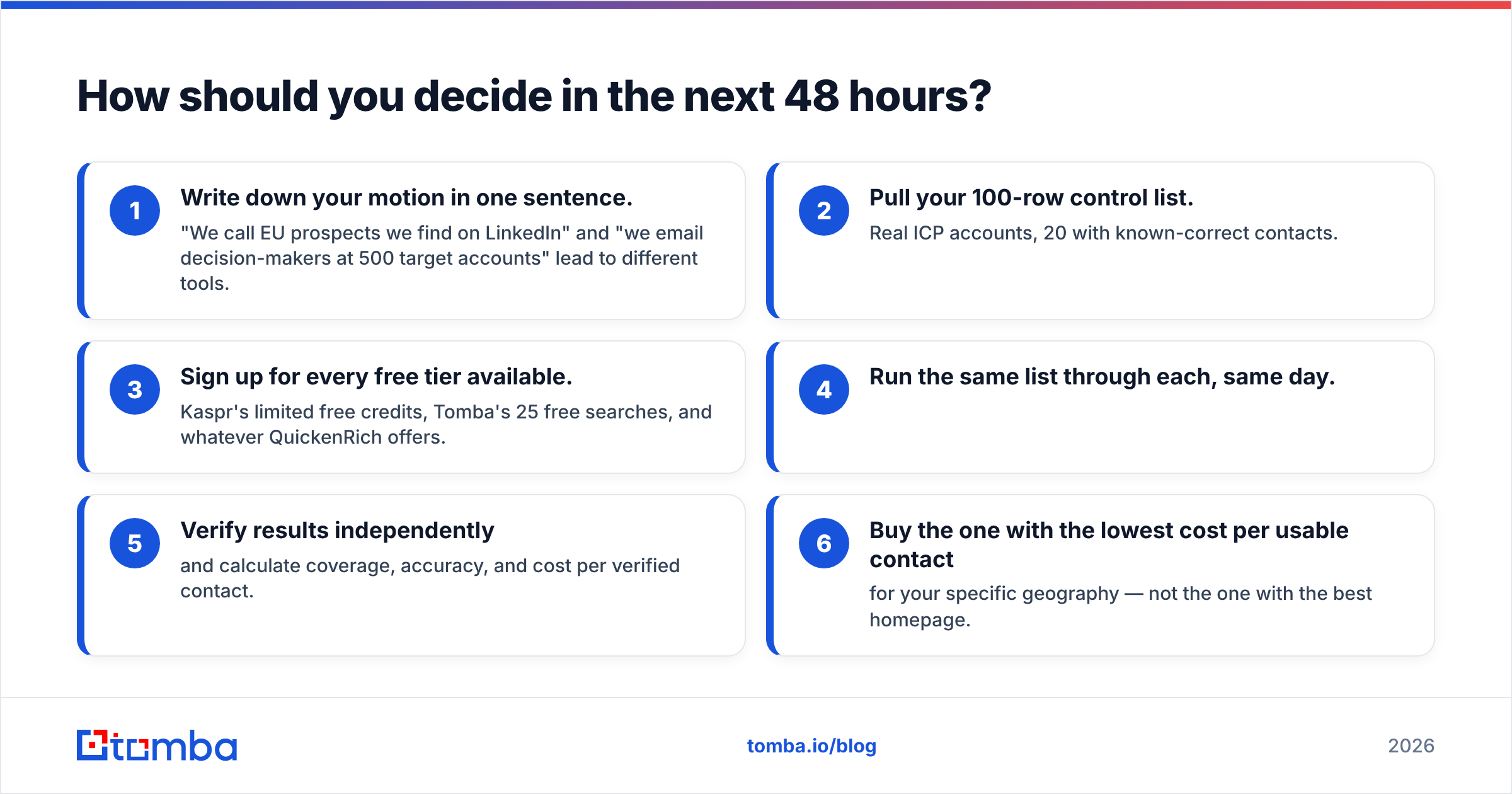
How should you decide in the next 48 hours?#
Run this sequence and you will have an answer before the week ends:
- Write down your motion in one sentence. "We call EU prospects we find on LinkedIn" and "we email decision-makers at 500 target accounts" lead to different tools.
- Pull your 100-row control list. Real ICP accounts, 20 with known-correct contacts.
- Sign up for every free tier available. Kaspr's limited free credits, Tomba's 25 free searches, and whatever QuickenRich offers.
- Run the same list through each, same day.
- Verify results independently and calculate coverage, accuracy, and cost per verified contact.
- Buy the one with the lowest cost per usable contact for your specific geography — not the one with the best homepage.
Any tool that cannot survive a 100-row test will not survive your quarter.
Ready to test the domain-first approach?#
If your outbound starts with a list of companies rather than a list of LinkedIn profiles, start with the Tomba Email Finder. The free tier gives you 25 searches a month — enough to run a real control-list test against whatever else you are evaluating, without a call, a contract, or a per-seat commitment. Run the same 100 rows through it that you run through Kaspr and QuickenRich, verify the output, and compare cost per correct contact. That number will tell you more than any comparison post, including this one.
Related guides#
// get started
Find, verify and enrich your first contacts today
Start on the free plan with 25 searches a month, then scale when your team is ready.
Free plan · No credit card required · GDPR & CCPA
// about the author