Kaspr vs Soleadify (2026): Which B2B Data Tool Wins?
Kaspr pulls direct dials off LinkedIn profiles. Soleadify maps millions of small businesses from their websites. Here is which one actually fits your outbound motion, and where both leave gaps.
TL;DR
- Kaspr is a LinkedIn-first contact extractor. You browse a profile or a Sales Navigator list, click the extension, and get mobile numbers and work emails for people you already identified.
- Soleadify is a company-first database of small and local businesses. You search by business type, location, and website signals, then export companies you never would have found on LinkedIn.
- They are not really competitors. Kaspr answers "how do I reach this person?" Soleadify answers "which companies even exist in this niche?"
- Kaspr wins for SDRs calling mid-market and enterprise contacts in Europe. Soleadify wins for agencies, SaaS, and marketplaces selling to dentists, plumbers, restaurants, and other long-tail SMBs.
- Both leave the same gap: neither is a general-purpose, API-first email finder with verification built in. That is where a tool like Tomba Email Finder slots in underneath either one.
What is Kaspr and who actually uses it?#
Kaspr is a browser extension and web app that surfaces contact details — primarily mobile phone numbers, plus work and personal emails — for LinkedIn profiles. It was founded in Paris, acquired by Cognism in 2022, and now sits in that group as the self-serve, SDR-friendly product while Cognism handles enterprise data contracts. You can see the current product on the official Kaspr site.
The workflow is deliberately narrow:
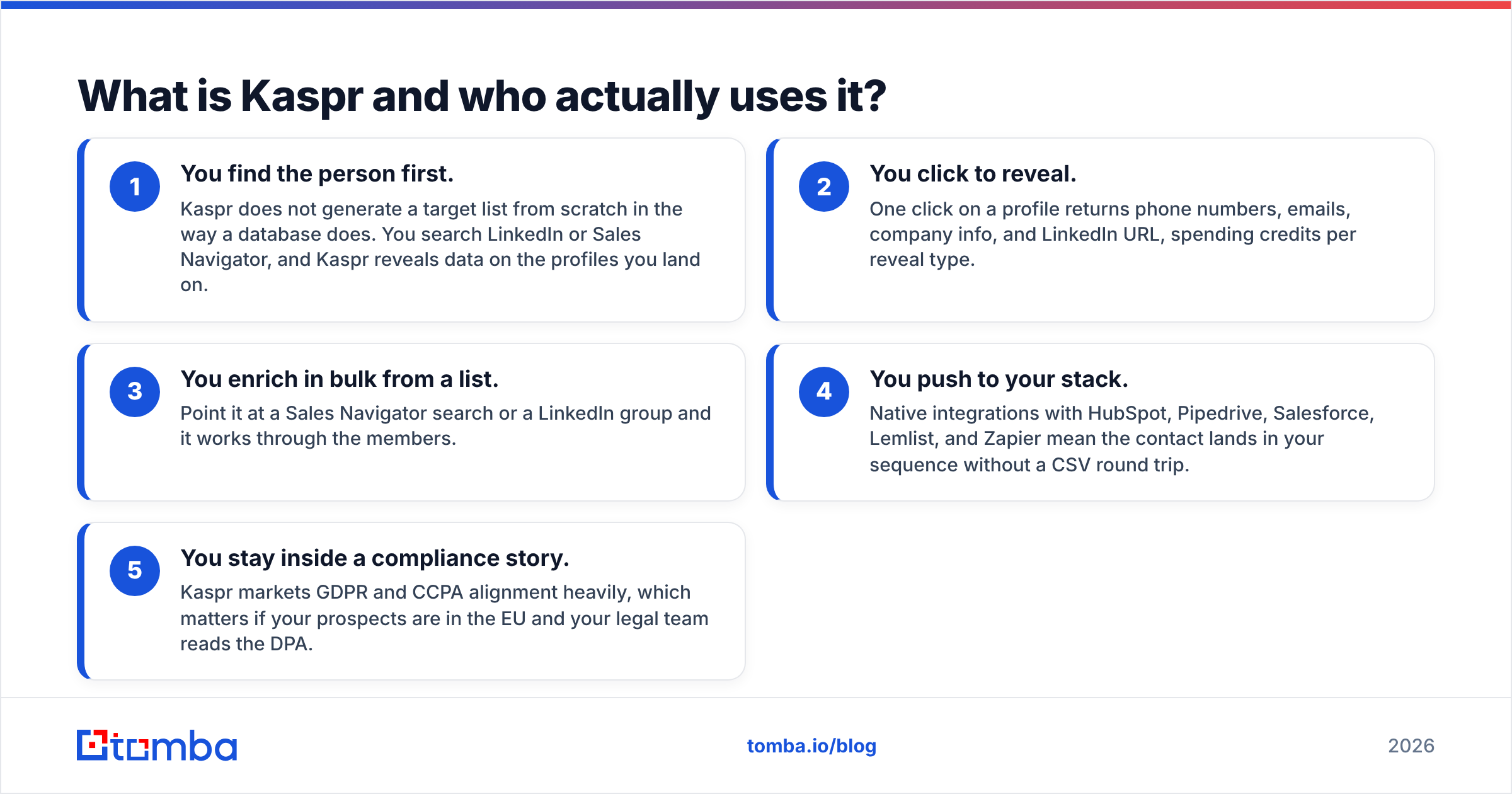
- You find the person first. Kaspr does not generate a target list from scratch in the way a database does. You search LinkedIn or Sales Navigator, and Kaspr reveals data on the profiles you land on.
- You click to reveal. One click on a profile returns phone numbers, emails, company info, and LinkedIn URL, spending credits per reveal type.
- You enrich in bulk from a list. Point it at a Sales Navigator search or a LinkedIn group and it works through the members.
- You push to your stack. Native integrations with HubSpot, Pipedrive, Salesforce, Lemlist, and Zapier mean the contact lands in your sequence without a CSV round trip.
- You stay inside a compliance story. Kaspr markets GDPR and CCPA alignment heavily, which matters if your prospects are in the EU and your legal team reads the DPA.
The honest strength: phone numbers. Kaspr's reputation is built on mobile coverage in France, Benelux, DACH, and the UK, where most US-built databases thin out badly. If your motion is cold calling European buyers, that is a real differentiator, not marketing copy.
The honest weakness: it is chained to LinkedIn. No LinkedIn presence, no Kaspr record. That rules out the majority of owner-operated small businesses on earth.
What is Soleadify and what problem does it solve?#
Soleadify built a company database by crawling and interpreting business websites rather than by aggregating professional profiles. The result is coverage of tens of millions of businesses — including the plumbing company with a four-page site and no LinkedIn page at all. The Soleadify homepage frames it as data on small and local businesses at scale.
What that changes in practice:
- You search by business type, not job title. "Dental clinics in Ontario with online booking" is a native query. On LinkedIn-derived tools, it is a guess.
- Website signals become filters. Technologies in use, whether they run e-commerce, whether they list a menu, whether they accept appointments, number of locations.
- The contact you get is often the business, not a named individual. Generic role inboxes, owner emails where discoverable, and business phone lines.
- Volume is the point. Soleadify is built for exporting thousands of qualifying companies, not for hand-picking twelve accounts.
- Verticalized go-to-market gets easy. If you sell scheduling software to salons, this is the shape of tool that finds you 30,000 salons with a website and a phone number.
The honest weakness: person-level precision. If your ICP is "VP of Engineering at a 500-person fintech," Soleadify is the wrong instrument, and using it that way will make it look worse than it is.
Kaspr vs Soleadify: how do they compare feature by feature?#
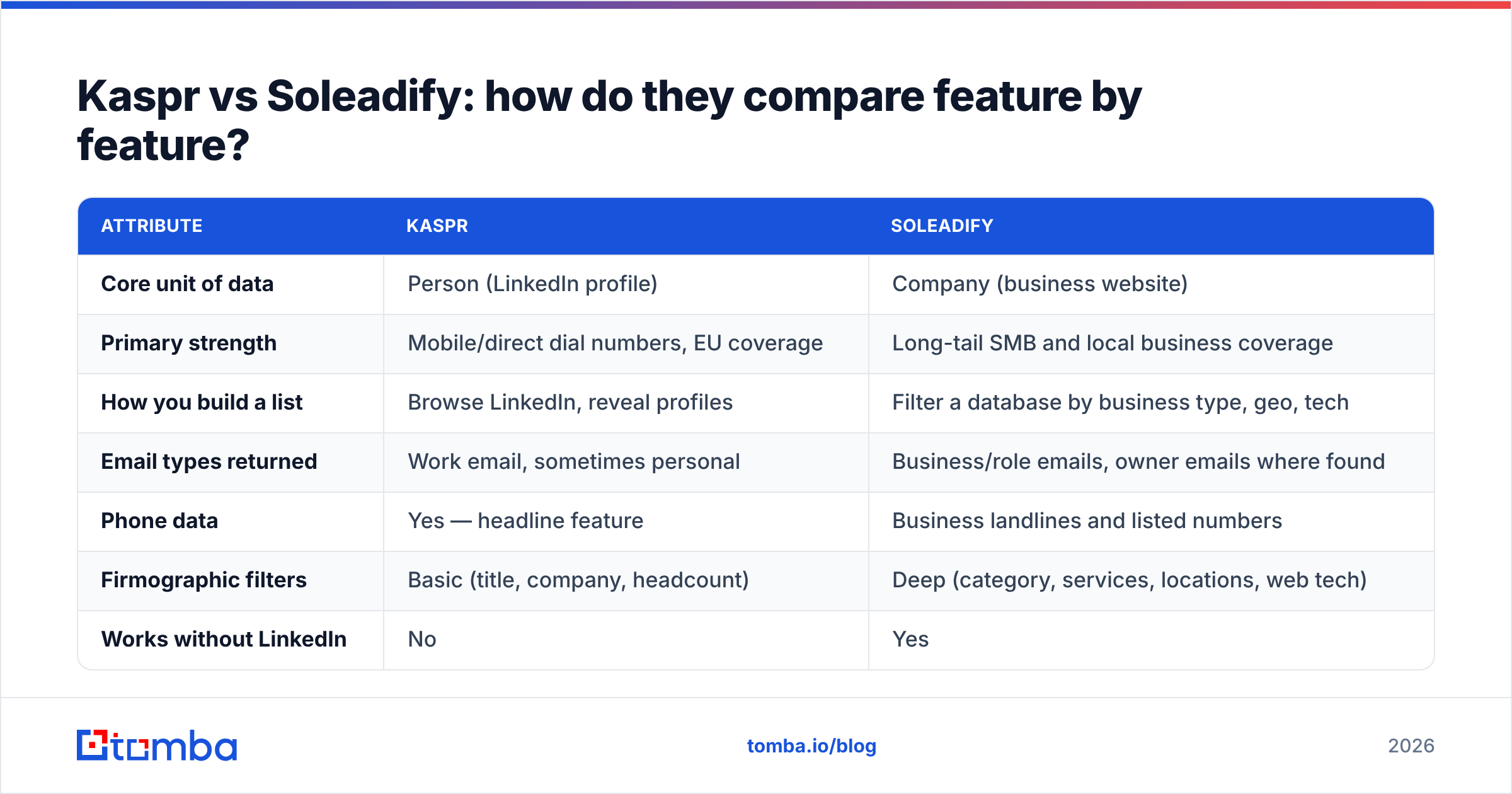
Here is the head-to-head on the attributes that actually change your pipeline. Figures reflect publicly listed information at the time of writing — always confirm on the vendor's own pricing page before buying, because credit policies on both products change.
| Attribute | Kaspr | Soleadify |
|---|---|---|
| Core unit of data | Person (LinkedIn profile) | Company (business website) |
| Primary strength | Mobile/direct dial numbers, EU coverage | Long-tail SMB and local business coverage |
| How you build a list | Browse LinkedIn, reveal profiles | Filter a database by business type, geo, tech |
| Email types returned | Work email, sometimes personal | Business/role emails, owner emails where found |
| Phone data | Yes — headline feature | Business landlines and listed numbers |
| Firmographic filters | Basic (title, company, headcount) | Deep (category, services, locations, web tech) |
| Works without LinkedIn | No | Yes |
| Entry price | Free tier, then roughly $49–$65 per user/mo | Paid plans from roughly $99/mo, quote-based at volume |
| Credit model | Per-reveal credits, split by phone vs email | Export/record credits |
| Best fit | SDR teams cold calling EU mid-market | Agencies and SaaS selling to local SMBs |
| Weakest for | SMBs with no LinkedIn footprint | Named-contact enterprise prospecting |
| API access | Limited, integration-led | Available on higher tiers |

Where a per-seat LinkedIn extension and a bulk company database land relative to API-first email finders.
The table makes the real conclusion obvious: this is not a either/or decision for most teams, it is a "which ICP am I selling to" decision. A cybersecurity vendor chasing CISOs should never evaluate Soleadify. A POS company chasing independent coffee shops should never lean on Kaspr.
Which one has better data accuracy?#
Accuracy means different things for each tool, so comparing a single percentage is misleading.
For Kaspr, accuracy means: is this mobile number still the prospect's, and does this work email route to an active mailbox? Phone data ages fast. People change jobs, and a direct dial that was correct 14 months ago now reaches someone who left. Kaspr's numbers are strong on connect rate in Western Europe by most user reports on G2, weaker in North America and APAC, and inconsistent for very small companies.
For Soleadify, accuracy means: does this business still exist, is the category correct, and is the listed inbox monitored? Website-derived data has a specific failure mode — the site is stale. A restaurant that closed in 2024 may still have a live domain and a contact form. Category inference is generally good but can misfire on multi-service businesses.

Accuracy benchmarks across contact data providers, 2026.
The practical takeaway is the same for both: whatever email addresses come out, run them through a verifier before they touch your sending domain. Role inboxes and catch-all domains are exactly where SMB data gets you into trouble — a catch-all accepts everything at SMTP time and then silently discards, which inflates your apparent deliverability while your replies stay at zero. A dedicated email verifier plus a catch-all verifier pass costs cents per thousand and protects the sender reputation you spent months building.
How does pricing compare in practice?#
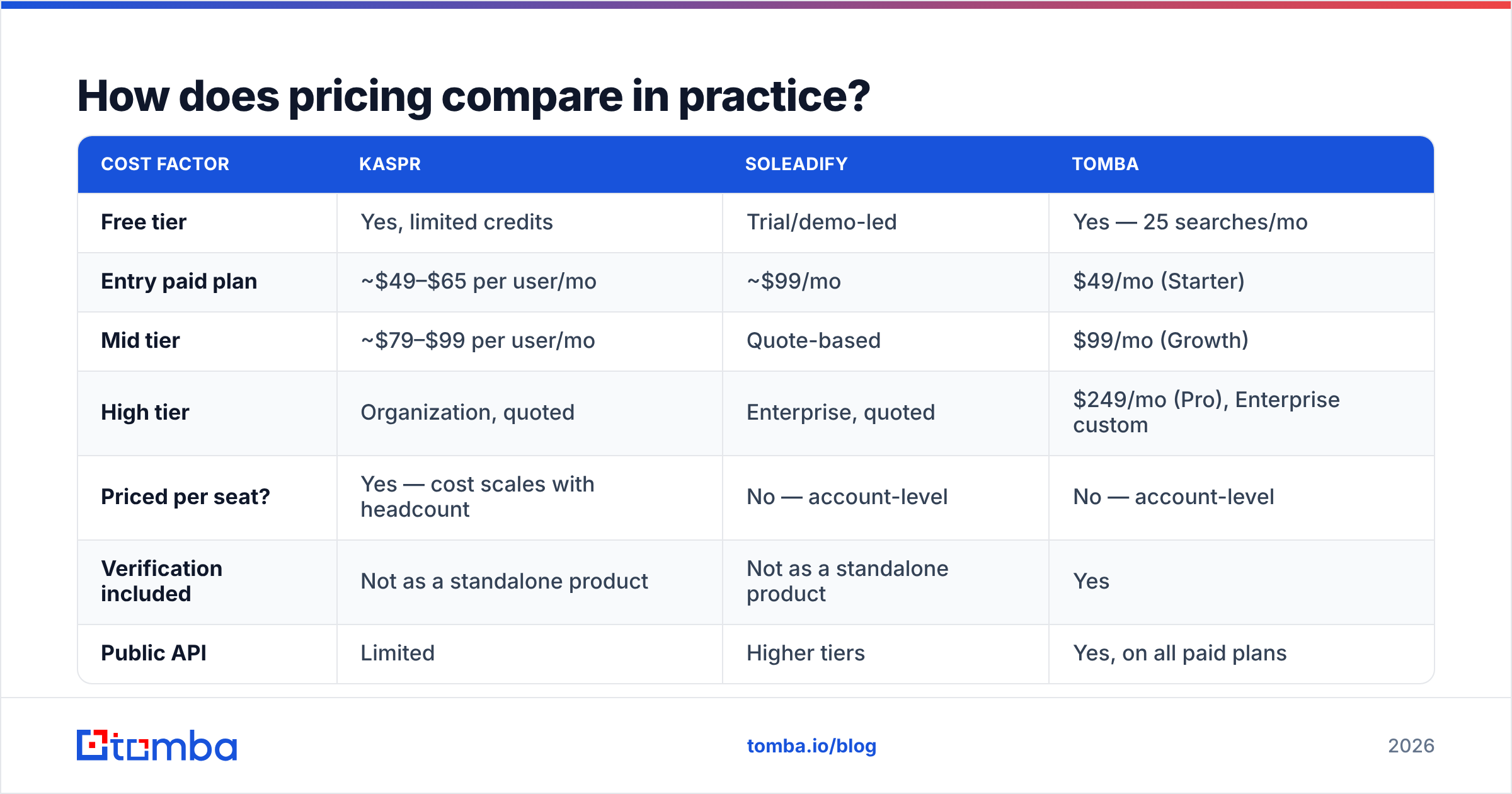
Both vendors publish enough to plan around, but the effective cost per usable contact diverges sharply.
| Cost factor | Kaspr | Soleadify | Tomba |
|---|---|---|---|
| Free tier | Yes, limited credits | Trial/demo-led | Yes — 25 searches/mo |
| Entry paid plan | ~$49–$65 per user/mo | ~$99/mo | $49/mo (Starter) |
| Mid tier | ~$79–$99 per user/mo | Quote-based | $99/mo (Growth) |
| High tier | Organization, quoted | Enterprise, quoted | $249/mo (Pro), Enterprise custom |
| Priced per seat? | Yes — cost scales with headcount | No — account-level | No — account-level |
| Verification included | Not as a standalone product | Not as a standalone product | Yes |
| Public API | Limited | Higher tiers | Yes, on all paid plans |
Two things to watch:
- Kaspr's per-seat model punishes team growth. Five SDRs on a mid tier is a very different annual number than one power user. Compare that against account-level pricing like Tomba pricing, where the plan covers the workspace rather than each rep.
- Soleadify's value depends entirely on export volume. If you pull 50,000 qualifying local businesses once and work them for six months, the cost per record is excellent. If you need 500 records a month, you are overpaying for a database engine you barely touch.
When should you pick Kaspr over Soleadify?#
Pick Kaspr when all of these are true:
- Your buyers are findable on LinkedIn and hold identifiable job titles.
- Phone is a primary channel. If you are not dialing, you are paying for Kaspr's best feature and not using it.
- Your territory is Europe, where Kaspr's mobile coverage is strongest.
- Your reps prospect manually, profile by profile, rather than pulling 10,000-row lists.
- Compliance review is part of the purchase and a documented GDPR posture shortens the procurement cycle.
Pick Soleadify when:
- Your ICP is a business category, not a job title — clinics, gyms, contractors, retailers, restaurants.
- Your buyers have no meaningful LinkedIn presence, which is the reality for most owner-operated businesses.
- You need geographic saturation — every qualifying business in a metro, not the ten that happen to show up in a Sales Navigator filter.
- Website-level signals qualify the lead (they run Shopify, they have no booking system, they have three locations).
If you need both motions at once, you are probably better served by a stack: a company-discovery layer, a contact-finding layer, and a verification layer, wired together over APIs rather than three separate seat licenses.
Where does Tomba fit alongside either tool?#
Neither Kaspr nor Soleadify is trying to be a general-purpose email-finding infrastructure, and it is fair to both to say so. Kaspr is an extension-led enrichment layer; Soleadify is a vertical company database. Once you have a domain or a name, you still need a reliable way to resolve, verify, and enrich contacts at scale.
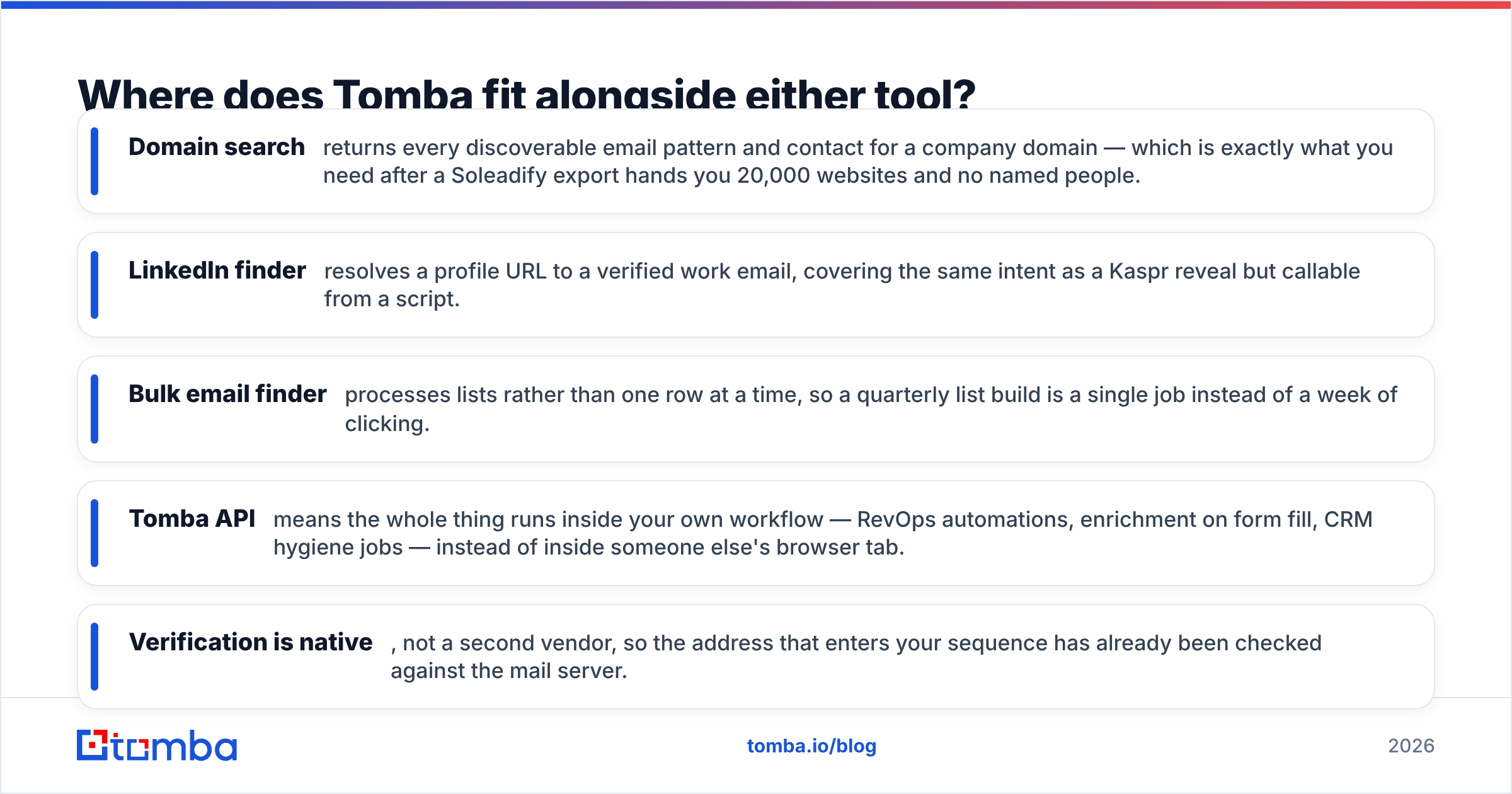
That is the job Tomba does:
- Domain search returns every discoverable email pattern and contact for a company domain — which is exactly what you need after a Soleadify export hands you 20,000 websites and no named people.
- LinkedIn finder resolves a profile URL to a verified work email, covering the same intent as a Kaspr reveal but callable from a script.
- Bulk email finder processes lists rather than one row at a time, so a quarterly list build is a single job instead of a week of clicking.
- Tomba API means the whole thing runs inside your own workflow — RevOps automations, enrichment on form fill, CRM hygiene jobs — instead of inside someone else's browser tab.
- Verification is native, not a second vendor, so the address that enters your sequence has already been checked against the mail server.
Honest framing: if your entire job is dialing European mid-market prospects you found on LinkedIn, Kaspr's phone data is worth paying for and Tomba is not a phone-first product. If your entire job is mapping every orthodontist in three states, Soleadify's category depth is genuinely hard to replicate. The overlap is the email layer — and that is the layer where cost per verified contact, API access, and account-level pricing decide the winner.
What is the verdict on Kaspr vs Soleadify?#
There is no universal winner, and any post that declares one is selling you something. Kaspr wins the person-level, phone-first, LinkedIn-native use case, especially in Europe. Soleadify wins the company-level, long-tail SMB use case that LinkedIn structurally cannot serve. Choosing between them is really choosing which half of the B2B world you sell into.
What both leave on the table is the unglamorous middle: turning a domain or a name into a verified, deliverable email, in bulk, through an API, without paying per seat. Before you commit to either annual contract, run your real ICP list — 50 companies you actually want — through all three and measure two numbers: coverage rate and bounce rate. That thirty-minute test will tell you more than any comparison table, including this one.
Start with the email layer. Run your target domains through Tomba Email Finder on the free tier — 25 searches a month, no card — and see what coverage looks like on your own list before you decide whether you need Kaspr's dials, Soleadify's business categories, or just a cleaner, verified list and a better sequence.
Related guides#
// get started
Find, verify and enrich your first contacts today
Start on the free plan with 25 searches a month, then scale when your team is ready.
Free plan · No credit card required · GDPR & CCPA
// about the author