Kaspr vs The Data City: Which B2B Data Tool Fits Your GTM?
Kaspr finds phone numbers and emails on LinkedIn. The Data City maps entire UK industries. They get compared constantly — and they solve completely different problems. Here's the honest breakdown.
TL;DR
- These tools are not substitutes. Kaspr is a contact-data extension that pulls phone numbers and emails off LinkedIn profiles. The Data City is a market-intelligence platform that classifies and maps companies (heavily UK-weighted) using real-time web data.
- Pick Kaspr if your bottleneck is "I know who to call, I just need their mobile number."
- Pick The Data City if your bottleneck is "I don't actually know which companies exist in this emerging sector."
- Neither one is a good bulk email engine. Kaspr is credit- and seat-gated per user; The Data City gives you company records, not verified inboxes.
- The realistic stack is a market-mapping layer (The Data City, or a good ICP list), plus a contact-resolution layer you can call programmatically — that's where an API-first email finder sits.
What are Kaspr and The Data City, actually?#
They get put in the same "B2B data" bucket by procurement teams, and that's where the confusion starts.
Kaspr is a prospecting tool owned by Cognism. It lives as a Chrome extension on top of LinkedIn, LinkedIn Sales Navigator, and LinkedIn Recruiter. You open a profile, click the widget, and it returns that person's mobile number, direct dial, and email addresses from a pooled contact database. It also does light sequencing — you can add contacts to a list, trigger a LinkedIn connection request, and fire a basic email follow-up. It's a rep tool. One person, one browser, one profile at a time.
The Data City is something else entirely. It's a UK-founded data company that scrapes and classifies company websites to build Real-Time Industrial Classifications (RTICs) — a living alternative to the SIC codes that everyone agrees are hopelessly out of date. If you want to know how many "green hydrogen" or "agritech" or "quantum computing" companies exist in the West Midlands, along with headcount, turnover, funding, and growth signals, that's the product. Its customers skew toward economic development agencies, investors, universities, consultancies, and corporate strategy teams — not SDRs.
So the honest framing of Kaspr vs The Data City is not "which is better." It's "which layer of the funnel are you short on."
Who is each tool actually built for?#
Here's the split that matters:
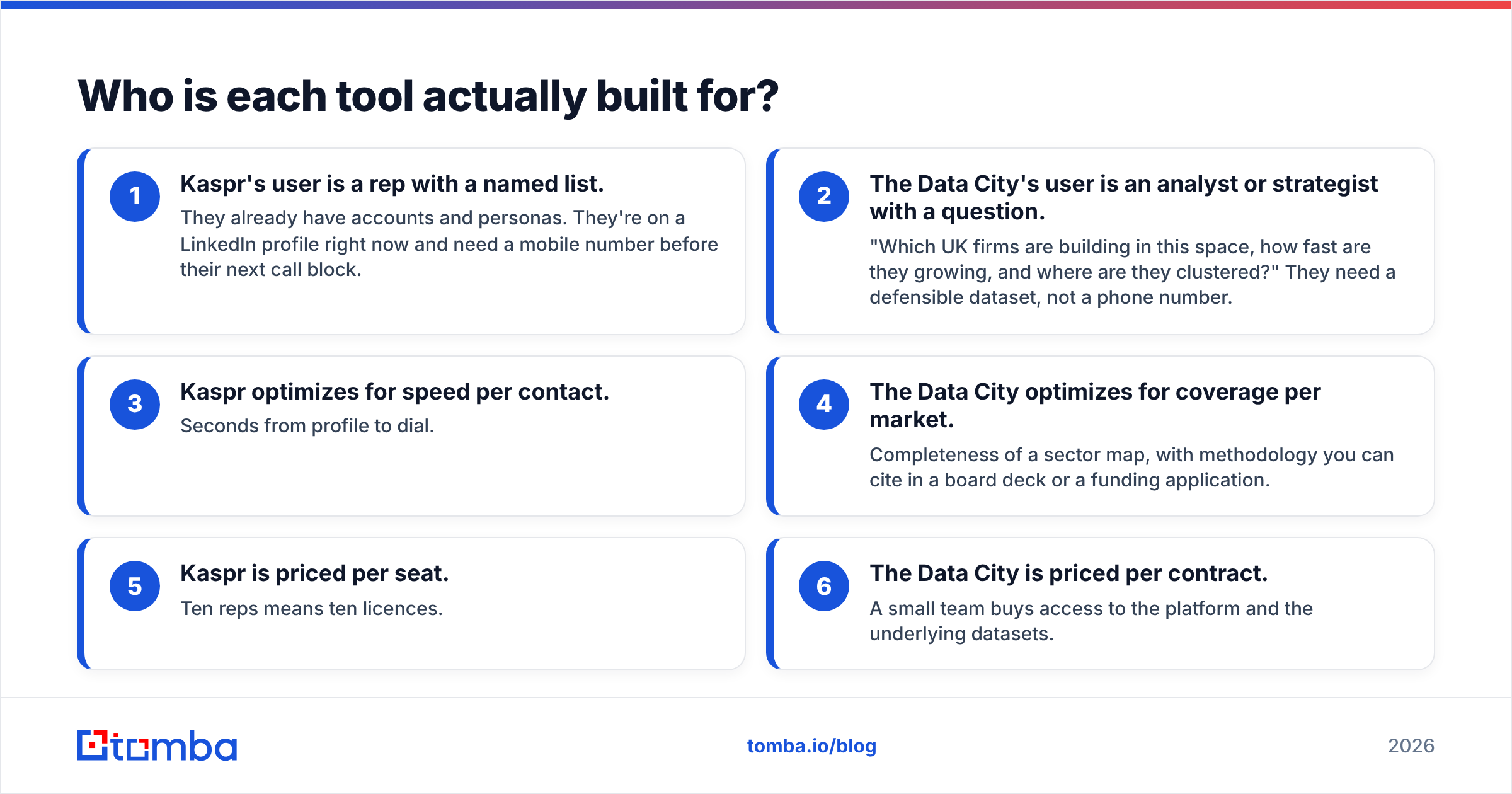
- Kaspr's user is a rep with a named list. They already have accounts and personas. They're on a LinkedIn profile right now and need a mobile number before their next call block.
- The Data City's user is an analyst or strategist with a question. "Which UK firms are building in this space, how fast are they growing, and where are they clustered?" They need a defensible dataset, not a phone number.
- Kaspr optimizes for speed per contact. Seconds from profile to dial.
- The Data City optimizes for coverage per market. Completeness of a sector map, with methodology you can cite in a board deck or a funding application.
- Kaspr is priced per seat. Ten reps means ten licences.
- The Data City is priced per contract. A small team buys access to the platform and the underlying datasets.
If you're an outbound team trying to decide between them, you probably don't have a market-mapping problem — you have a contact-data problem, and The Data City won't solve it. If you're a strategy or policy team, Kaspr will feel bafflingly narrow.

How do Kaspr and The Data City compare feature by feature?#
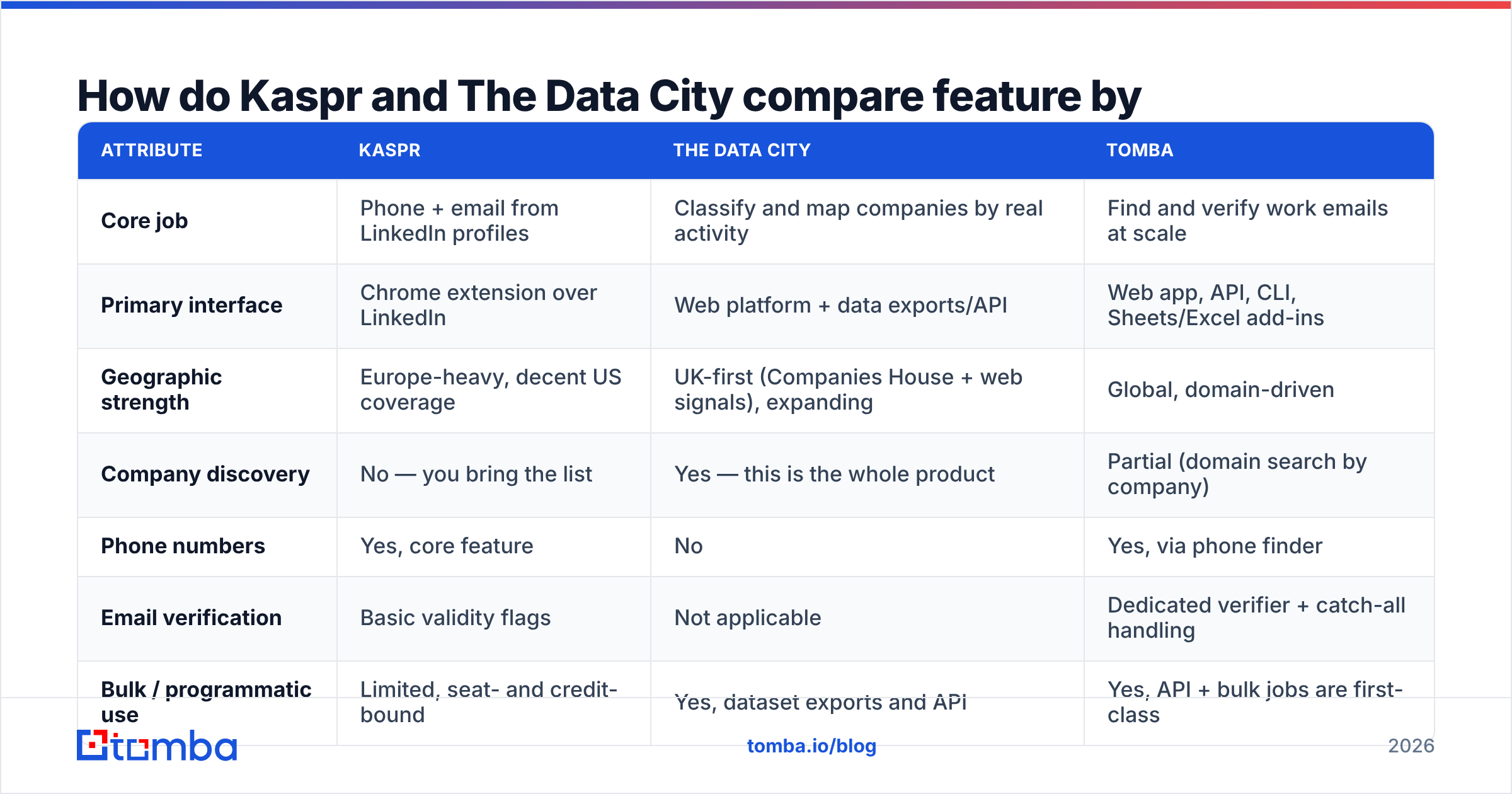
| Attribute | Kaspr | The Data City | Tomba |
|---|---|---|---|
| Core job | Phone + email from LinkedIn profiles | Classify and map companies by real activity | Find and verify work emails at scale |
| Primary interface | Chrome extension over LinkedIn | Web platform + data exports/API | Web app, API, CLI, Sheets/Excel add-ins |
| Geographic strength | Europe-heavy, decent US coverage | UK-first (Companies House + web signals), expanding | Global, domain-driven |
| Company discovery | No — you bring the list | Yes — this is the whole product | Partial (domain search by company) |
| Phone numbers | Yes, core feature | No | Yes, via phone finder |
| Email verification | Basic validity flags | Not applicable | Dedicated verifier + catch-all handling |
| Bulk / programmatic use | Limited, seat- and credit-bound | Yes, dataset exports and API | Yes, API + bulk jobs are first-class |
| Pricing model | Free tier + per-user monthly plans | Quote-based annual contract | Free tier, then $49 / $99 / $249 per month |
| Typical buyer | SDR, recruiter, founder-led sales | Analyst, investor, econ-dev body, consultancy | RevOps, growth, agencies, developers |
The row that decides most evaluations is company discovery. Kaspr assumes the list already exists. The Data City exists to build the list. If you buy the wrong one, you've bought a solution to a problem you don't have.
What does each one cost in 2026?#
Pricing here is asymmetric, and you should treat both vendors' published numbers as a starting point rather than gospel — check their live pages before you budget.
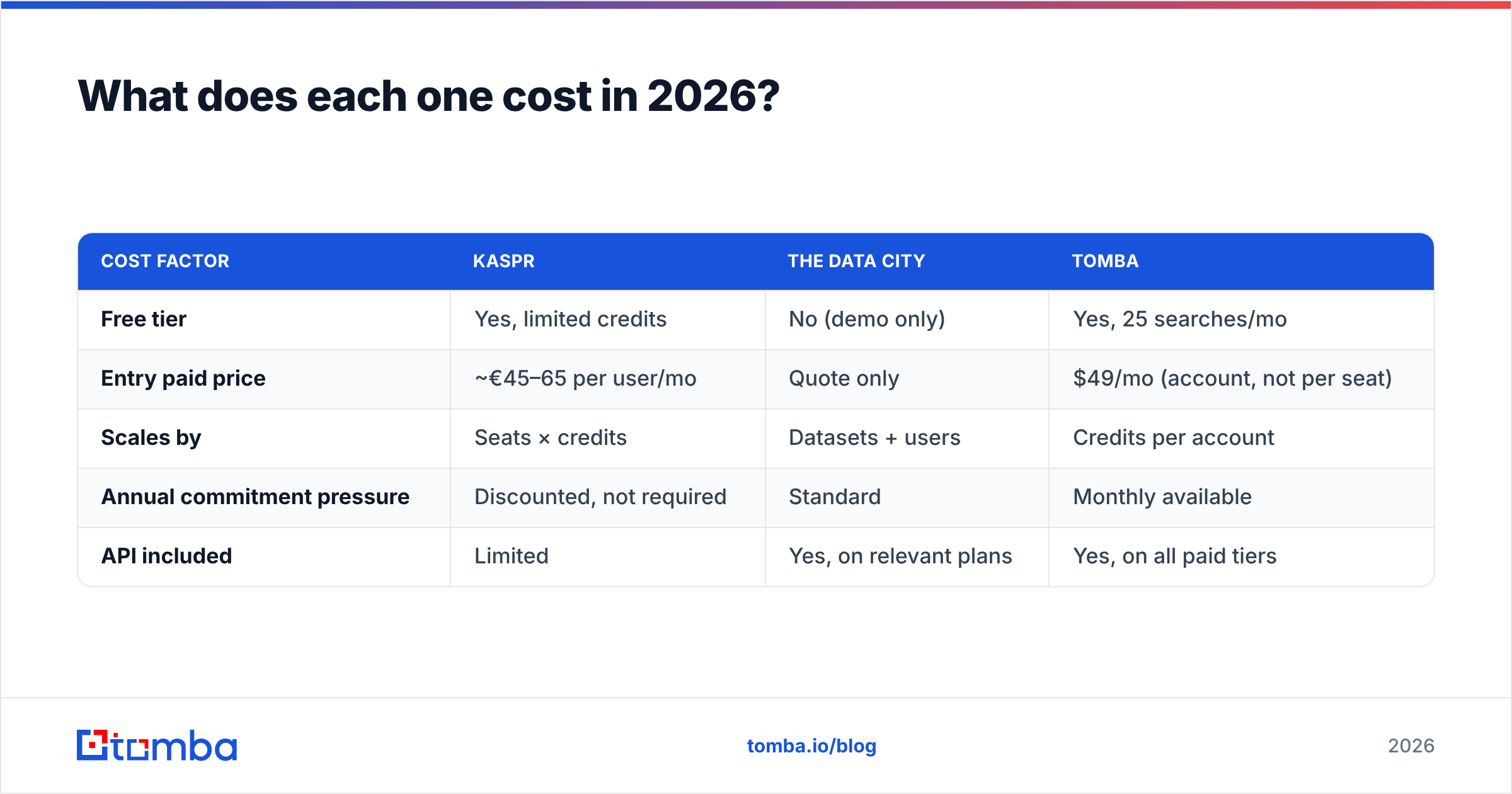
Kaspr publishes a freemium structure. There's a free tier with a small monthly allowance of credits (enough to evaluate, not enough to prospect), then paid tiers in roughly the €45–€100 per user per month band depending on annual commitment and which credit types you need. The important mechanic is that phone credits, email credits, and export credits are metered separately. A team that burns through mobile numbers hits the ceiling long before a team that only pulls emails. Because it's seat-based, cost scales linearly with headcount — ten reps is ten licences, whether or not all ten are heavy users.
The Data City doesn't publish list pricing at all. It's a demo-and-quote motion, sold as an annual subscription that varies with the datasets, geographies, and number of users you need. Buyers in the economic-development and consultancy space generally report four-to-five-figure annual contracts. That's normal for market-intelligence platforms — you're buying a research capability, not a credit bucket.
For reference, Tomba's pricing sits on a third model entirely: a free tier at 25 searches a month, then Starter at $49/mo, Growth at $99/mo, Pro at $249/mo, and custom Enterprise. Credits are account-level, not seat-level, so five people sharing a Growth plan cost the same as one person on it — which is the single biggest structural difference from Kaspr's model when you scale a team.
| Cost factor | Kaspr | The Data City | Tomba |
|---|---|---|---|
| Free tier | Yes, limited credits | No (demo only) | Yes, 25 searches/mo |
| Entry paid price | ~€45–65 per user/mo | Quote only | $49/mo (account, not per seat) |
| Scales by | Seats × credits | Datasets + users | Credits per account |
| Annual commitment pressure | Discounted, not required | Standard | Monthly available |
| API included | Limited | Yes, on relevant plans | Yes, on all paid tiers |
Where does Kaspr fall short?#
Three things come up repeatedly in reviews on G2 and in teams I've watched evaluate it:
- It's tethered to LinkedIn. No profile, no data. If your ICP includes trades, manufacturing SMEs, local services, or anyone whose leadership doesn't maintain a LinkedIn presence, coverage collapses. This is the classic blind spot of every LinkedIn-native extension.
- Credits are opaque until you're inside them. The split between phone, email, and export credits means "1,000 credits" doesn't translate cleanly into "1,000 contacts."
- Mobile numbers are hit-or-miss outside Europe. European coverage is the strength — a legacy of Cognism's Diamond Data work. North American mobile hit rates are noticeably thinner, and APAC thinner still.
None of these are dealbreakers if you're a European SDR working named accounts on LinkedIn. All of them are dealbreakers if you're building an automated, geography-agnostic pipeline.
Where does The Data City fall short?#
Its limitations are equally structural, and equally fine if you bought it for the right reason:
- It is not a contact database. You'll get companies, classifications, financials, headcount, growth signals. You will not get a verified email for the Head of Procurement. That's an explicit product boundary, not an oversight.
- UK gravity. The RTIC methodology is anchored in UK company data. International expansion exists, but a US-focused sales team will find the coverage uneven compared to what they're used to.
- Analyst-shaped, not rep-shaped. There's a learning curve. It rewards someone who wants to interrogate a dataset, not someone who wants a phone number in two clicks.
Can you actually use both together?#
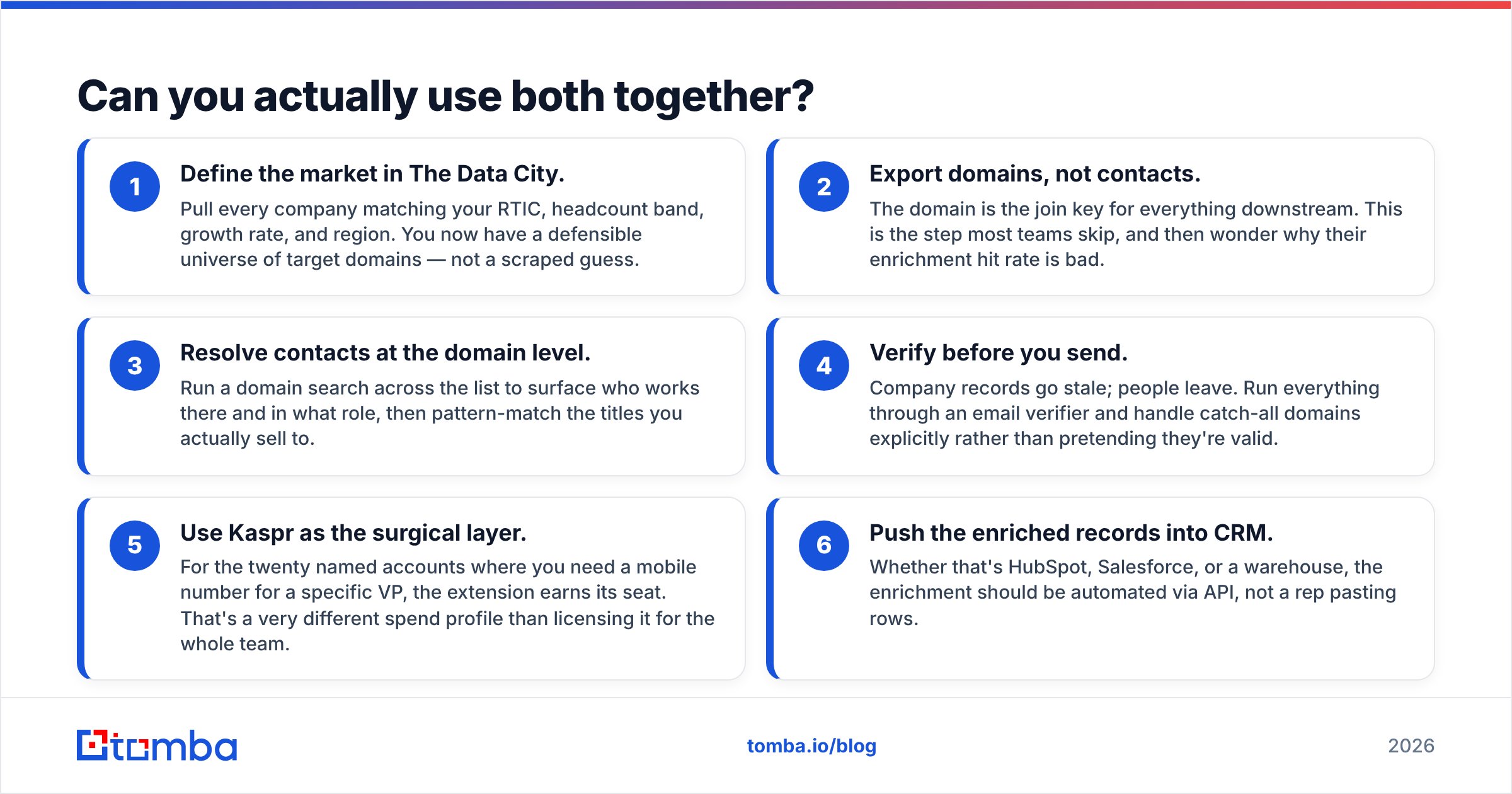
Yes, and it's the most sensible answer for anyone whose evaluation started with "Kaspr vs The Data City" in the first place. The workflow looks like this:
- Define the market in The Data City. Pull every company matching your RTIC, headcount band, growth rate, and region. You now have a defensible universe of target domains — not a scraped guess.
- Export domains, not contacts. The domain is the join key for everything downstream. This is the step most teams skip, and then wonder why their enrichment hit rate is bad.
- Resolve contacts at the domain level. Run a domain search across the list to surface who works there and in what role, then pattern-match the titles you actually sell to.
- Verify before you send. Company records go stale; people leave. Run everything through an email verifier and handle catch-all domains explicitly rather than pretending they're valid.
- Use Kaspr as the surgical layer. For the twenty named accounts where you need a mobile number for a specific VP, the extension earns its seat. That's a very different spend profile than licensing it for the whole team.
- Push the enriched records into CRM. Whether that's HubSpot, Salesforce, or a warehouse, the enrichment should be automated via API, not a rep pasting rows.
Step 3 is where per-seat tools break down. You can't ask a browser extension to resolve 4,000 domains overnight. You need something that runs headless — which is why Tomba's API tends to end up in this slot even for teams who keep Kaspr for individual reps.
What about data accuracy and coverage?#
Accuracy claims in this category are close to meaningless without context, so here's how to read them:
- Kaspr's accuracy question is "is this person's mobile still theirs?" Phone data decays slowly but silently — a wrong number costs you a dial, not a bounce. Test it on 50 contacts you can verify independently before you buy seats.
- The Data City's accuracy question is "is this classification right?" RTICs are derived from website content, which means a company that rebranded its homepage six months ago may be classified on the new language. That's usually a feature — it's the whole point of "real time" — but it means you should spot-check edge cases in niche sectors.
- Email accuracy is a third discipline entirely. A 95% deliverability claim means nothing unless the vendor tells you how it treats catch-all domains, role accounts, and unverifiable results. Vendors that count "accept-all" as valid are inflating their number. Read the data sources page of any provider you're considering and see whether they describe their method or just quote a percentage.
- Run the same 100-contact test set through every tool you're evaluating. Not the vendor's sample. Yours. This single step kills more bad purchases than any review site.
For more background on how deliverability interacts with data quality, the email deliverability fundamentals are worth a read before you blame a list for poor results that were actually an infrastructure problem.
So which should you choose?#
Choose Kaspr if: you're a European-focused SDR team or recruiter, LinkedIn is where your prospects live, phone-first outreach is part of your motion, and you have fewer than about ten seats to license. It's genuinely good at the narrow thing it does.
Choose The Data City if: your organisation needs to understand a market rather than sell into a known list — economic development, investment scouting, sector research, M&A screening, or corporate strategy in a UK-weighted context. Nothing on the contact-data side substitutes for it.
Choose neither as your primary tool if: you're building an automated outbound engine that needs verified emails at volume, across geographies, on a predictable budget. That's a different product category — one where per-seat licensing and quote-based annual contracts both work against you.
If you're in that third bucket, start with the Tomba Email Finder. Feed it a domain and a name, or a whole company list, and get verified work emails back through the web app, the API, or a spreadsheet add-in — on account-level credits that don't multiply with every new hire. The free tier gives you 25 searches a month, which is enough to run the 100-contact bake-off described above against whatever else is on your shortlist. Run the test, then decide.
Related guides#
// get started
Find, verify and enrich your first contacts today
Start on the free plan with 25 searches a month, then scale when your team is ready.
Free plan · No credit card required · GDPR & CCPA
// about the author