Kaspr vs VerifyEmailAddress.com: Which One Should You Use?
One tool pulls mobile numbers off LinkedIn profiles. The other tells you whether a single address exists. Here is where each one earns its keep, where both fall short, and what to run instead.
TL;DR
- These two tools do not compete. Kaspr is a LinkedIn-first contact finder that surfaces emails and mobile numbers. VerifyEmailAddress.com is a free, one-at-a-time syntax/MX/SMTP checker with no discovery layer at all.
- Kaspr is priced per seat and credits reset monthly, which punishes teams that share a list-building workload across reps. VerifyEmailAddress.com is free but caps you at a single lookup per query with no API, no bulk, and no catch-all logic.
- If your bottleneck is finding contacts, Kaspr is the more serious tool. If your bottleneck is confirming one address before a hand-typed email, the free checker is fine.
- Neither one covers the full loop: find → verify → enrich → export. Running both still leaves you exporting CSVs by hand.
- A combined finder-plus-verifier stack (Tomba's free tier starts at 25 searches/mo, Starter at $49/mo) closes that loop for less than one Kaspr seat plus a paid verifier.
What are Kaspr and VerifyEmailAddress.com, really?#
They solve opposite halves of the same problem, which is why the comparison confuses people.
Kaspr is a Chrome extension and web app built around LinkedIn. You open a profile, a Sales Navigator list, or a LinkedIn group, click the extension, and Kaspr returns whatever contact data it holds for that person: work email, sometimes a personal email, and its headline feature, direct mobile numbers. It was acquired by Cognism and now sits inside that broader data ecosystem. Its centre of gravity is European mobile data, where it genuinely outperforms most US-centric providers.
VerifyEmailAddress.com is a browser-based checker. You paste in one address, it runs the standard validation chain — syntax, domain, MX record, SMTP handshake — and tells you whether the mailbox looks deliverable. No account required in most cases, no credits, no list upload, no integration.
So the honest framing of Kaspr vs VerifyEmailAddress.com is not "which is better." It is: which half of your pipeline is actually broken?
How does each tool actually work under the hood?#
Understanding the mechanics explains every pricing and accuracy difference that follows.
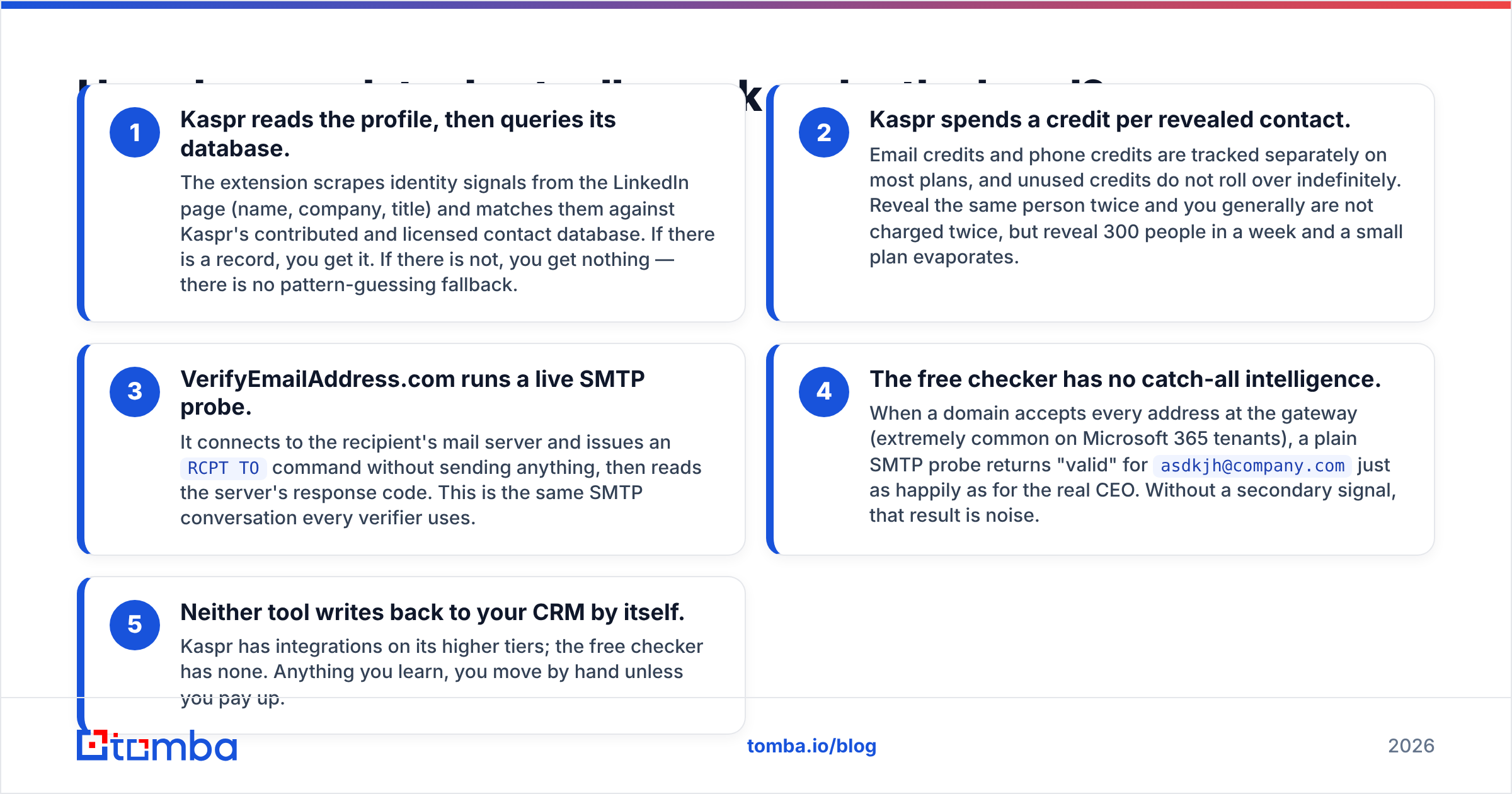
- Kaspr reads the profile, then queries its database. The extension scrapes identity signals from the LinkedIn page (name, company, title) and matches them against Kaspr's contributed and licensed contact database. If there is a record, you get it. If there is not, you get nothing — there is no pattern-guessing fallback.
- Kaspr spends a credit per revealed contact. Email credits and phone credits are tracked separately on most plans, and unused credits do not roll over indefinitely. Reveal the same person twice and you generally are not charged twice, but reveal 300 people in a week and a small plan evaporates.
- VerifyEmailAddress.com runs a live SMTP probe. It connects to the recipient's mail server and issues an
RCPT TOcommand without sending anything, then reads the server's response code. This is the same SMTP conversation every verifier uses. - The free checker has no catch-all intelligence. When a domain accepts every address at the gateway (extremely common on Microsoft 365 tenants), a plain SMTP probe returns "valid" for
asdkjh@company.comjust as happily as for the real CEO. Without a secondary signal, that result is noise. - Neither tool writes back to your CRM by itself. Kaspr has integrations on its higher tiers; the free checker has none. Anything you learn, you move by hand unless you pay up.
That fifth point is where most teams lose hours they never budget for.

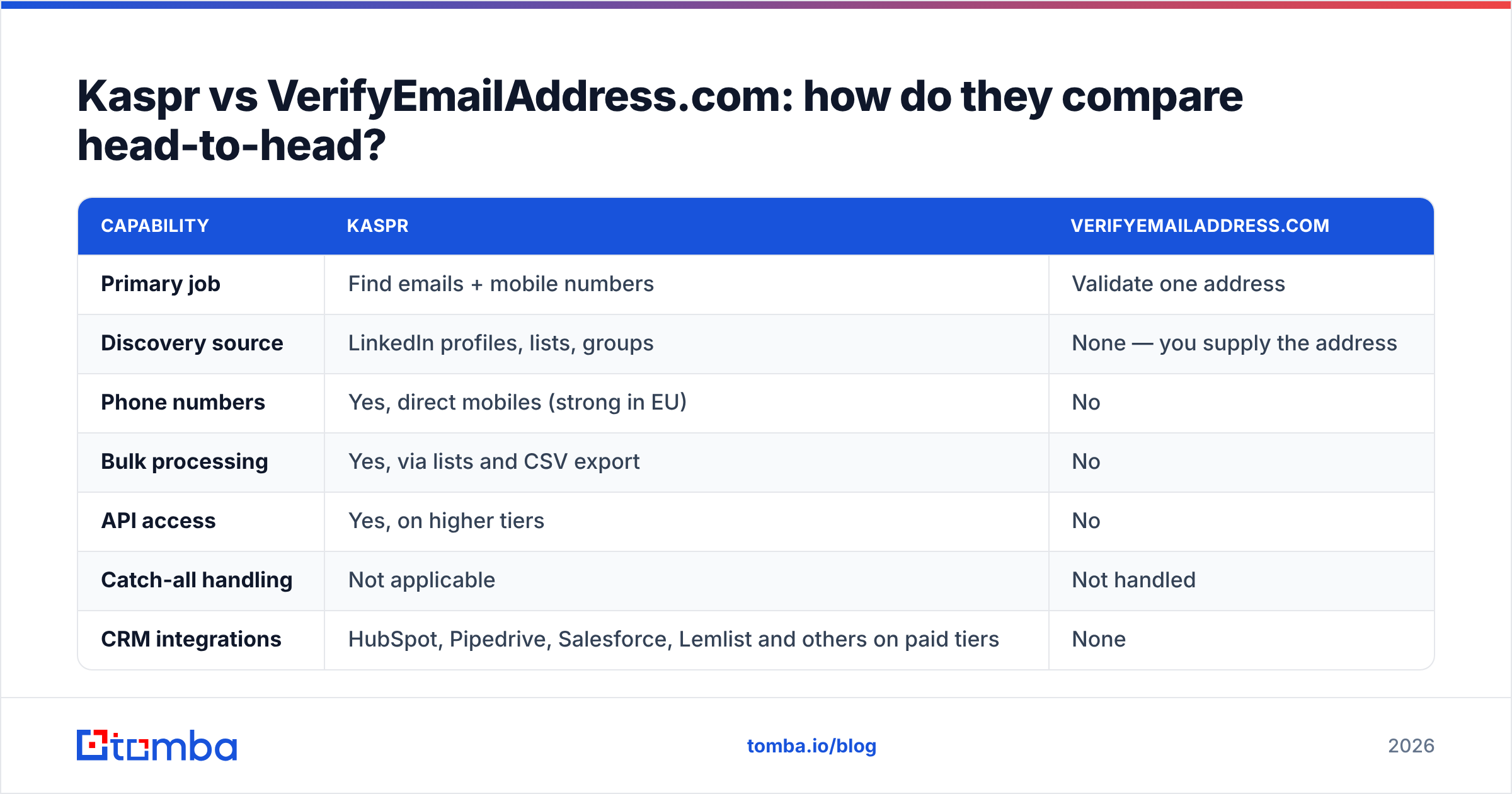
Kaspr vs VerifyEmailAddress.com: how do they compare head-to-head?#
| Capability | Kaspr | VerifyEmailAddress.com |
|---|---|---|
| Primary job | Find emails + mobile numbers | Validate one address |
| Discovery source | LinkedIn profiles, lists, groups | None — you supply the address |
| Phone numbers | Yes, direct mobiles (strong in EU) | No |
| Bulk processing | Yes, via lists and CSV export | No |
| API access | Yes, on higher tiers | No |
| Catch-all handling | Not applicable | Not handled |
| CRM integrations | HubSpot, Pipedrive, Salesforce, Lemlist and others on paid tiers | None |
| Free option | Limited free credits | Fully free, rate-limited |
| Best for | SDRs prospecting on LinkedIn | Spot-checking a single address |
| Weakest at | Cost per seat as the team grows | Anything at volume |
Read that table honestly and the verdict writes itself: if you put these two in a head-to-head bake-off, they never touch. Kaspr has no verification depth worth relying on for a cold list, and VerifyEmailAddress.com has no contacts at all.
Which tool is more accurate — and does the question even make sense?#
Accuracy means different things here, so split it.
Kaspr's accuracy is coverage-dependent. When Kaspr has a record, the phone number is often excellent, particularly for French, UK, and DACH prospects. When it does not have a record, you get a blank, and blanks on mid-market or non-European accounts are common. Reviewers on G2 repeatedly describe the same pattern: outstanding on European mobiles, patchy on US mid-market and on emails generally. A tool that returns nothing is not "inaccurate," but it still costs you a prospect.
VerifyEmailAddress.com's accuracy is protocol-dependent. It reports exactly what the receiving server says. The problem is that a large share of B2B domains deliberately say the same thing to everyone. Greylisting, catch-all configurations, and anti-harvesting throttles all produce results that look confident and mean nothing. There is also no retry logic you can see, so a temporary 4xx is indistinguishable from a real answer.

The practical takeaway: a single-shot SMTP check is a first filter, not a final one. Serious verification stacks add pattern confidence, historical deliverability data, and an explicit catch-all verdict. That is why a dedicated email verifier returns a status and a confidence score, and why a separate catch-all verifier exists at all — because "the server accepts everything" needs its own answer, not a green checkmark.

What does each one cost in 2026?#
Free tools are easy to price. Seat-based tools are not, and that is where Kaspr gets expensive quietly.
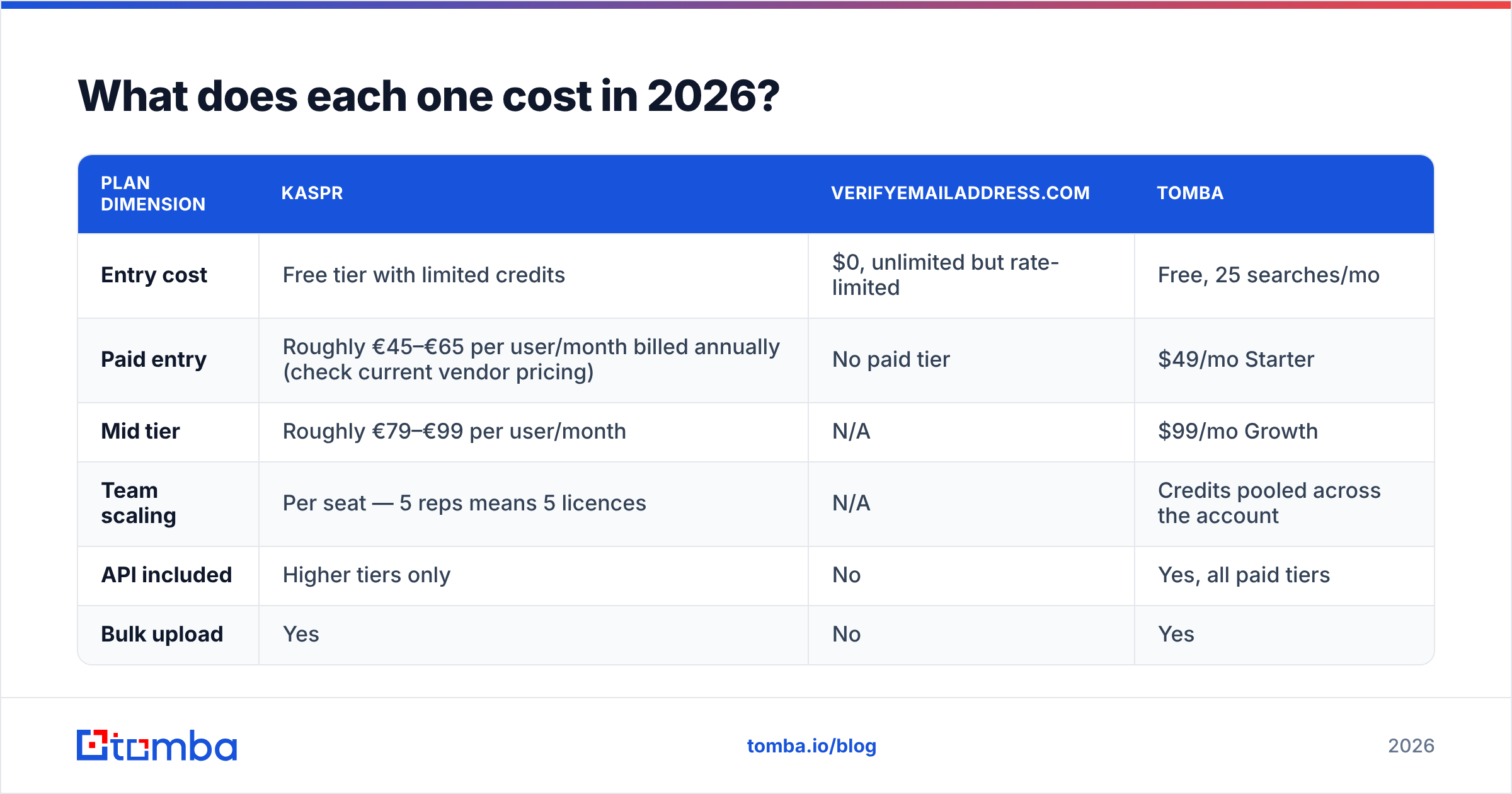
| Plan dimension | Kaspr | VerifyEmailAddress.com | Tomba |
|---|---|---|---|
| Entry cost | Free tier with limited credits | $0, unlimited but rate-limited | Free, 25 searches/mo |
| Paid entry | Roughly €45–€65 per user/month billed annually (check current vendor pricing) | No paid tier | $49/mo Starter |
| Mid tier | Roughly €79–€99 per user/month | N/A | $99/mo Growth |
| Team scaling | Per seat — 5 reps means 5 licences | N/A | Credits pooled across the account |
| API included | Higher tiers only | No | Yes, all paid tiers |
| Bulk upload | Yes | No | Yes |
Two structural details matter more than the headline numbers.
First, per-seat pricing taxes collaboration. If one ops person builds lists for four SDRs, Kaspr's model wants five licences or forces a single shared login. Credit-pooled pricing does not care who runs the search. Compare that against Tomba pricing, where the account holds the credits and seats are not the billing unit.
Second, free verifiers are free because they cannot scale. VerifyEmailAddress.com costs nothing precisely because it refuses volume. The moment you need 2,000 addresses checked before a campaign, the "free" option has a price: your afternoon.
Is Kaspr worth it for LinkedIn prospecting?#
Yes, with conditions.
Buy Kaspr if all of these are true:
- Your ICP lives on LinkedIn and you work profiles manually, one at a time.
- You actually call prospects. Mobile numbers are the feature you are paying for; if you only send email, you are funding capability you will never use.
- Your territory skews European. This is Kaspr's structural advantage over US-first databases.
- You have one to three reps. Past that, per-seat maths starts to hurt.
Skip Kaspr if you build lists from company domains rather than individual profiles, if you need coverage across regions Kaspr under-indexes, or if your workflow is bulk-first. For domain-led prospecting, a domain search that returns every discoverable address at a company in one call does in one step what 40 LinkedIn profile reveals do in an hour.
If LinkedIn is genuinely your source of truth but the seat pricing is the blocker, a LinkedIn finder covers the same profile-to-email path without the per-user licence structure.
When is VerifyEmailAddress.com actually the right call?#
More often than tool-comparison posts admit. Use it when:
- You are about to send one important email to one person and want a sanity check before hitting send.
- Someone gave you a business card or a conference badge scan and you suspect a typo.
- You are debugging why a specific message bounced and want to see the raw server response.
- You have zero budget and zero volume.
Do not use it when a campaign depends on the result. A free single-shot checker will not tell you that info@ is a role account, will not flag a disposable domain reliably, will not catch a catch-all, and will not give you a CSV. Those are not nitpicks — they are the four things that determine whether your email deliverability survives a 1,000-contact send.
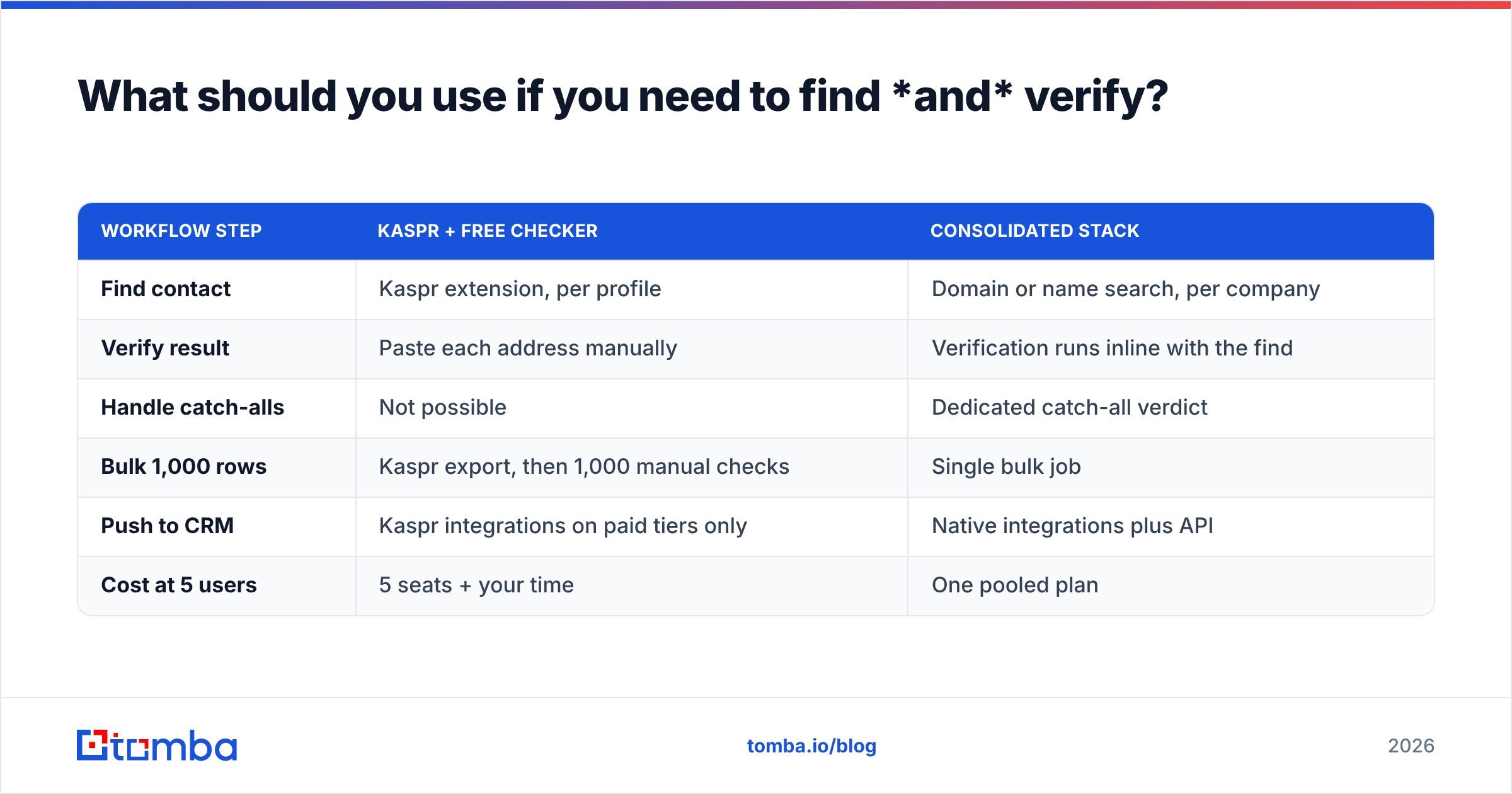
What should you use if you need to find and verify?#
This is the question most people arriving at "Kaspr vs VerifyEmailAddress.com" are really asking, because running both means stitching two tools that were never designed to talk to each other.

| Workflow step | Kaspr + free checker | Consolidated stack |
|---|---|---|
| Find contact | Kaspr extension, per profile | Domain or name search, per company |
| Verify result | Paste each address manually | Verification runs inline with the find |
| Handle catch-alls | Not possible | Dedicated catch-all verdict |
| Bulk 1,000 rows | Kaspr export, then 1,000 manual checks | Single bulk job |
| Push to CRM | Kaspr integrations on paid tiers only | Native integrations plus API |
| Cost at 5 users | 5 seats + your time | One pooled plan |
The consolidation argument is not ideological. It is arithmetic. Every handoff between two tools is a CSV export, a column mismatch, and a deduplication pass. Run that twice a week and you have spent more hours than the software costs. A bulk email finder that verifies as it resolves removes the handoff entirely.
So which one wins?#
For finding people: Kaspr. It has a real database, real mobile coverage, and a workflow built for LinkedIn-native SDRs. VerifyEmailAddress.com does not compete here because it does not try to.
For checking one address for free: VerifyEmailAddress.com. It is fast, it needs no signup, and for a single lookup it is perfectly adequate. Kaspr does not compete here because verification is not its job.
For a team running outbound at any real volume: neither, alone. Kaspr's per-seat model and regional gaps mean you will supplement it. The free checker's lack of bulk, API, and catch-all logic means you will outgrow it before your first full campaign.
The decision tree is short:
- Calling European prospects off LinkedIn, one to three reps, phone-heavy motion → Kaspr.
- Occasional one-off address checks, no budget → VerifyEmailAddress.com.
- Domain-led list building, bulk verification, API automation, shared credits → a consolidated finder plus verifier.
Ready to stop stitching two tools together?#
If you landed here comparing a LinkedIn contact finder against a free single-address checker, the real gap in your stack is the middle: a source of accurate work emails that verifies itself and exports cleanly. That is exactly what the Tomba Email Finder does — find by domain, name, or company, get a confidence score and verification status in the same response, then push to your CRM or pull it through the API. Start on the free tier at 25 searches per month, and if it earns its place, Starter is $49/mo with credits pooled across your whole team rather than locked to a seat.
Related guides#
// get started
Find, verify and enrich your first contacts today
Start on the free plan with 25 searches a month, then scale when your team is ready.
Free plan · No credit card required · GDPR & CCPA
// about the author