Kaspr vs Verifyemail.io: Which Tool Do You Actually Need?
Kaspr finds LinkedIn phone numbers and emails. Verifyemail.io checks whether emails are deliverable. They solve different halves of the same problem, and picking wrong costs you a quarter of pipeline.
Kaspr vs Verifyemail.io is not a fair fight, because the two tools do different jobs. Kaspr finds contact data. Verifyemail.io checks whether an address will bounce. Here is how each one works, what it costs, and which one your outbound stack actually needs.
TL;DR
- Kaspr and Verifyemail.io are not real competitors. Kaspr sources contact data (phone numbers and emails, mostly off LinkedIn profiles). Verifyemail.io validates email addresses you already have.
- If your problem is "I have no contacts," Kaspr is the relevant tool. If your problem is "my bounce rate is 9% and my domain is burning," a verifier is the relevant tool.
- Kaspr's pricing is per-seat and credit-capped, which punishes teams. Verifyemail.io-style verifiers price per verification, which scales linearly with list size.
- Buying both means two vendors, two credit systems, and two data models to reconcile in your CRM.
- A single platform that does discovery and verification on the same record is usually cheaper and produces cleaner data than stitching a finder to a separate verifier.
What are Kaspr and Verifyemail.io, exactly?#
Kaspr is a B2B contact-data tool built around a Chrome extension. You open a LinkedIn profile or a Sales Navigator list, click the extension, and it returns direct dials, mobile numbers, and work emails for the people on screen. Cognism acquired it. The product is aimed at SDR teams that live inside LinkedIn and care about phone coverage in Europe. The value proposition is speed of capture: see a prospect, grab their number, call them today.
Verifyemail.io sits at the opposite end of the pipeline. It is an email verification service. You hand it an address, or a CSV of 200,000 of them. It then runs syntax checks, DNS and MX lookups, disposable-domain detection, role-account detection, and an SMTP handshake. The result tells you whether that mailbox will accept mail. It does not find anything. It has no opinion about who you should contact. It answers one question: will this bounce?
That distinction matters more than any feature table, so here it is plainly:
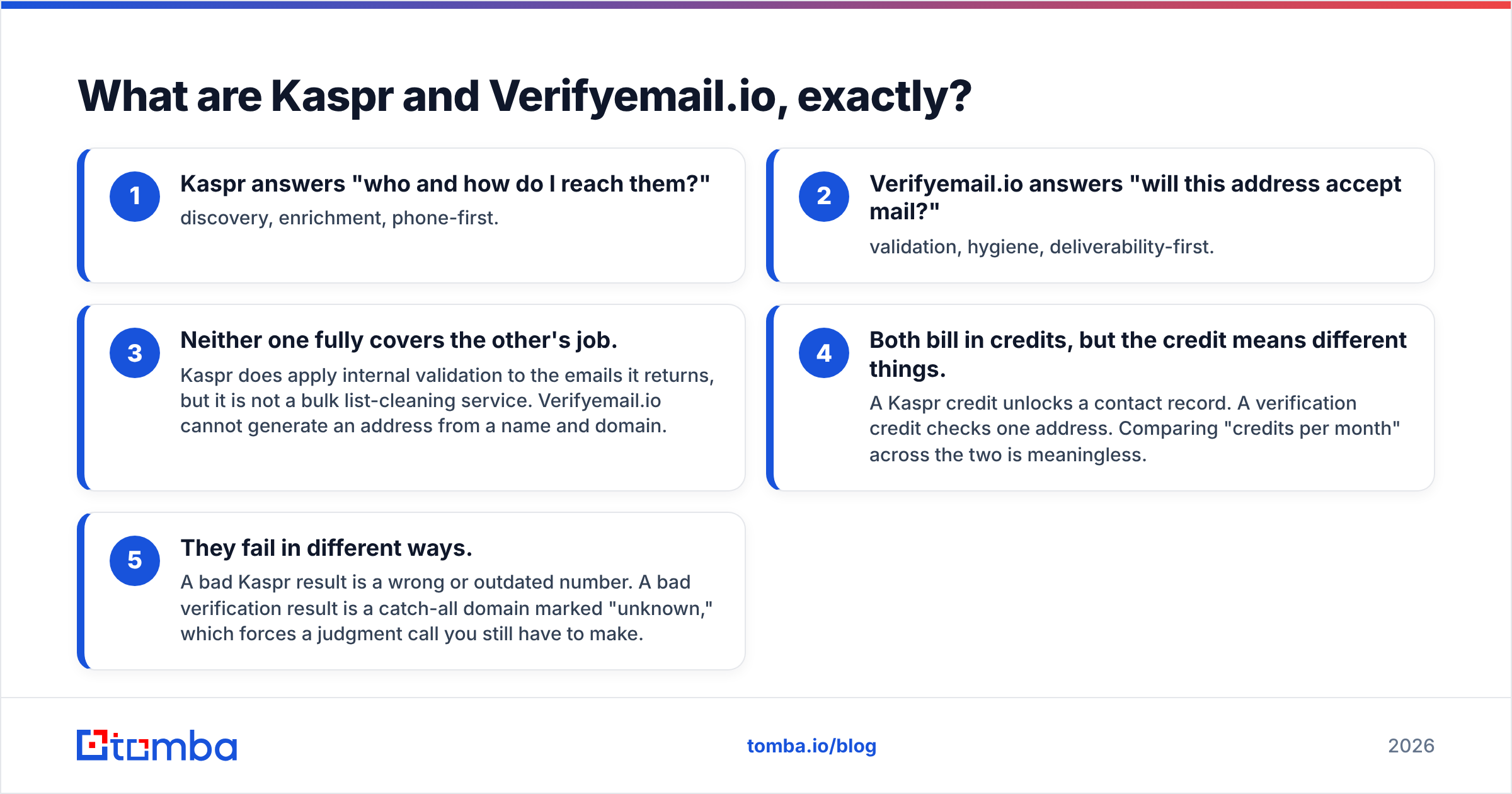
- Kaspr answers "who and how do I reach them?" — discovery, enrichment, phone-first.
- Verifyemail.io answers "will this address accept mail?" — validation, hygiene, deliverability-first.
- Neither one fully covers the other's job. Kaspr does apply internal validation to the emails it returns, but it is not a bulk list-cleaning service. Verifyemail.io cannot generate an address from a name and domain.
- Both bill in credits, but the credit means different things. A Kaspr credit unlocks a contact record. A verification credit checks one address. Comparing "credits per month" across the two is meaningless.
- They fail in different ways. A bad Kaspr result is a wrong or outdated number. A bad verification result is a catch-all domain marked "unknown," which forces a judgment call you still have to make.
Kaspr vs Verifyemail.io: do they actually compete?#
Only at the edges. The overlap is a single cell: the work email address.
Kaspr gives you an email as part of a contact record. Verifyemail.io tells you whether an email is deliverable. If you use Kaspr and trust its output blindly, you will eventually mail addresses that have gone stale since the record was last refreshed, and you will bounce. If you use a verifier alone, you have nothing to verify unless another system produced the list.
This is why most outbound teams end up running both, then discover the seams:
- Credits expire on different cycles and roll over under different rules.
- Kaspr is seat-priced, so the third SDR costs you another full license even if they only need 200 lookups a month.
- Your CRM now has two sources of truth for the same field, and no clean rule for which wins on conflict.
- Every new list means an export, an upload, a wait, a re-import. That workflow tax is real and it compounds weekly.

How do the two tools compare feature by feature?#
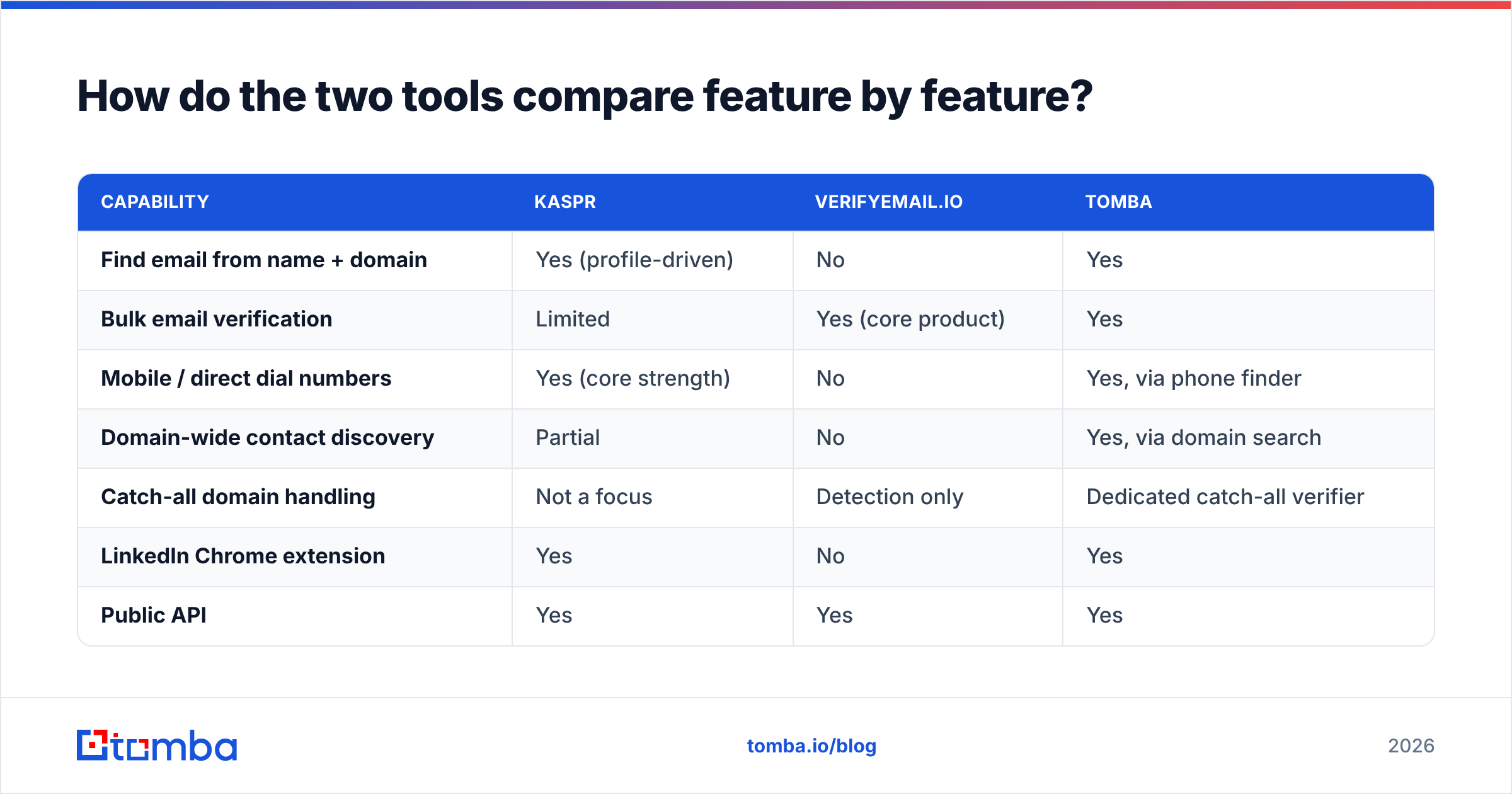
Here is the honest capability matrix, with a unified alternative in the third column for reference.
| Capability | Kaspr | Verifyemail.io | Tomba |
|---|---|---|---|
| Find email from name + domain | Yes (profile-driven) | No | Yes |
| Bulk email verification | Limited | Yes (core product) | Yes |
| Mobile / direct dial numbers | Yes (core strength) | No | Yes, via phone finder |
| Domain-wide contact discovery | Partial | No | Yes, via domain search |
| Catch-all domain handling | Not a focus | Detection only | Dedicated catch-all verifier |
| LinkedIn Chrome extension | Yes | No | Yes |
| Public API | Yes | Yes | Yes |
| Free tier | Limited free plan | Trial credits | 25 searches/month |
| Pricing model | Per seat + credits | Per verification | Per credit, seats included |
Two things stand out. First, Kaspr's phone coverage is a genuine differentiator that no verifier touches. If cold calling is a real channel for you, that column carries weight. Second, the "find" and "verify" columns are almost perfectly disjoint between the two vendors. That gap is the whole argument for consolidating.

How accurate is each tool in practice?#
Accuracy means different things on each side of the split, and vendors exploit that ambiguity.
For a finder like Kaspr, accuracy is coverage × freshness. Coverage is the share of profiles where it returns anything at all. Freshness is whether the returned email still belongs to that person at that company. Kaspr's data is strongest in Western Europe and in tech/SaaS job families. It is weaker for SMB, public sector, and non-Latin-alphabet markets. Expect a meaningful share of LinkedIn profiles to return a phone number, and a larger share to return an email. Both numbers drop sharply outside the vendor's core geographies. Run your own 200-row sample against your actual ICP before you sign an annual contract. Vendor-published accuracy percentages are measured on vendor-chosen samples.
For a verifier, accuracy is false-negative rate on catch-all and greylisted domains. Any verifier can flag bob@gmial.com as invalid. The hard case is a company running a catch-all server that accepts every address at the SMTP layer. That setup is now common among enterprises behind Microsoft 365 and security gateways. Weak verifiers return "unknown" and hand the decision back to you. Strong ones apply pattern inference and historical engagement signals to make an actual call. If you only compare headline "99% accuracy" claims, you are comparing marketing copy, not products.

A practical test protocol that takes an afternoon:
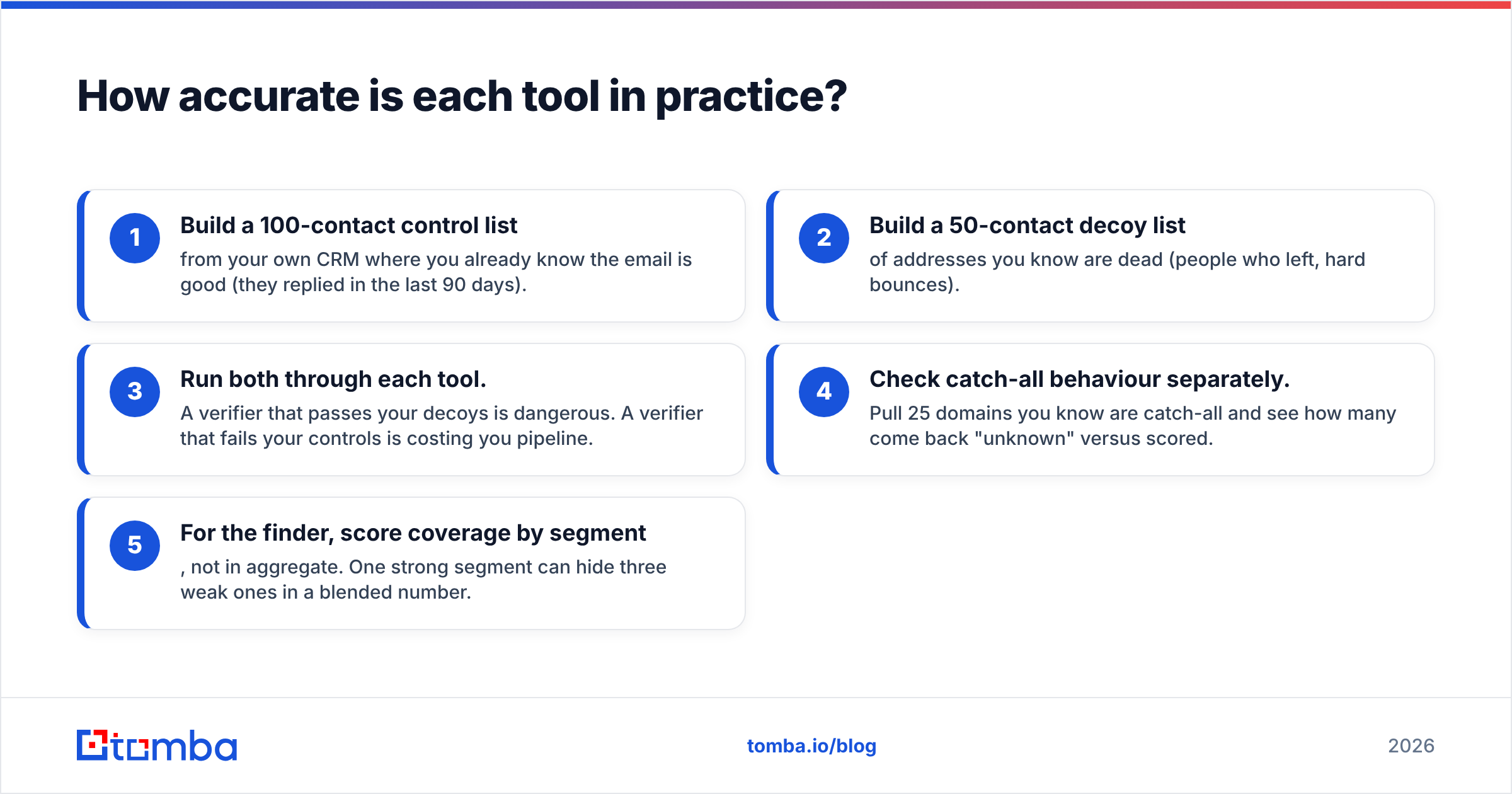
- Build a 100-contact control list from your own CRM where you already know the email is good (they replied in the last 90 days).
- Build a 50-contact decoy list of addresses you know are dead (people who left, hard bounces).
- Run both through each tool. A verifier that passes your decoys is dangerous. A verifier that fails your controls is costing you pipeline.
- Check catch-all behaviour separately. Pull 25 domains you know are catch-all and see how many come back "unknown" versus scored.
- For the finder, score coverage by segment, not in aggregate. One strong segment can hide three weak ones in a blended number.
What does each one cost?#
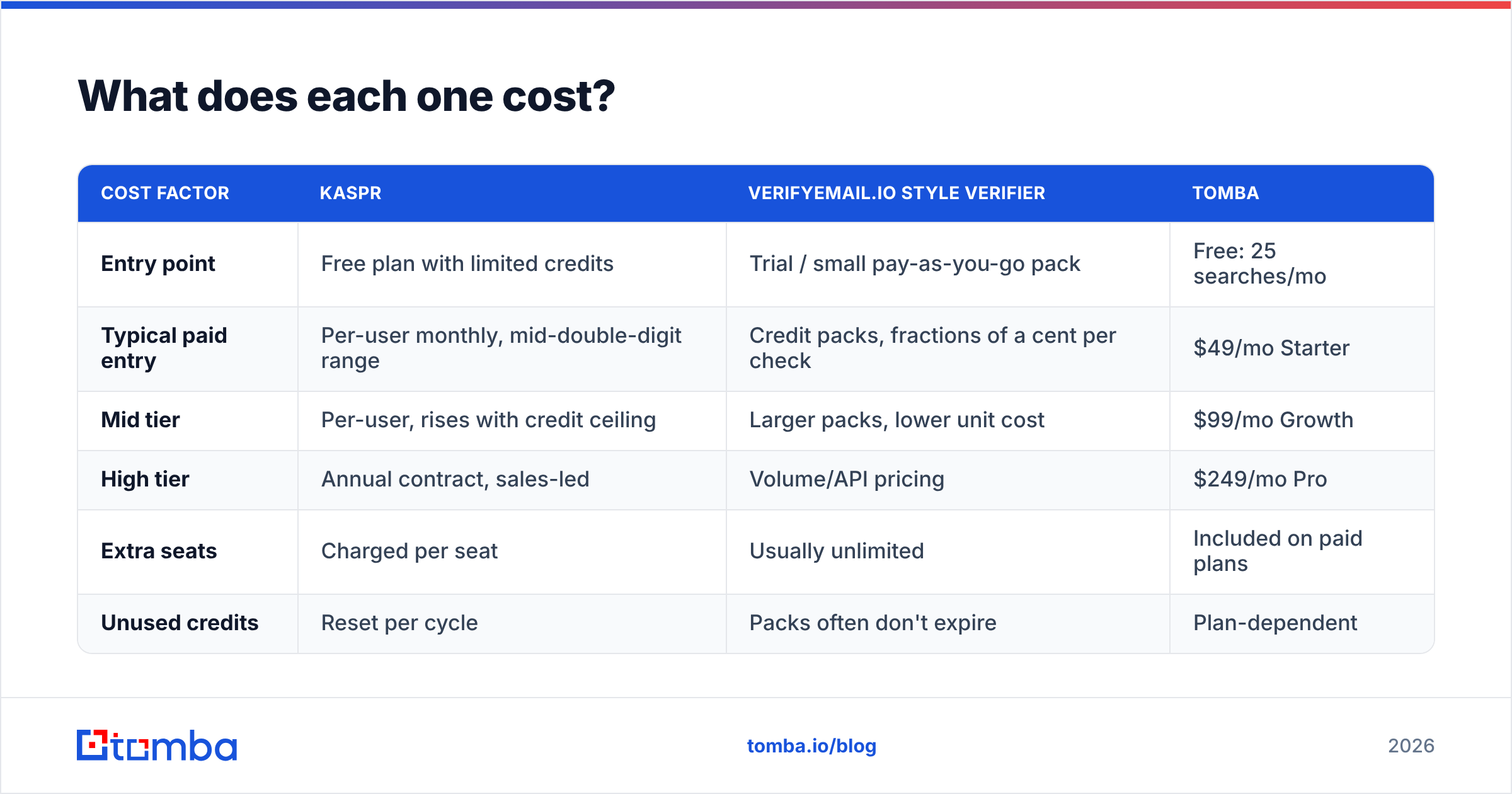
Kaspr vs Verifyemail.io pricing is uneven, because the two products bill on different axes. Always confirm current numbers on the vendor's own page before you budget. B2B data pricing changes often, and most of it sits behind a sales call.
| Cost factor | Kaspr | Verifyemail.io style verifier | Tomba |
|---|---|---|---|
| Entry point | Free plan with limited credits | Trial / small pay-as-you-go pack | Free: 25 searches/mo |
| Typical paid entry | Per-user monthly, mid-double-digit range | Credit packs, fractions of a cent per check | $49/mo Starter |
| Mid tier | Per-user, rises with credit ceiling | Larger packs, lower unit cost | $99/mo Growth |
| High tier | Annual contract, sales-led | Volume/API pricing | $249/mo Pro |
| Extra seats | Charged per seat | Usually unlimited | Included on paid plans |
| Unused credits | Reset per cycle | Packs often don't expire | Plan-dependent |
The structural trap in the Kaspr model is seat pricing. Outbound teams have spiky usage: one SDR burns 800 credits in a launch week, two others burn 60. Seat pricing charges you for the two who barely use it. Pure-verification pricing has the opposite trap. It looks cheap per unit until you realise you're verifying the same 40,000-row list every quarter, because your source data decays and nothing upstream keeps it fresh.
Compare both against consolidated Tomba pricing, where finding and verifying draw from one credit pool and seats are not a separate line item. The point is not that one number is smaller; it's that one bill is easier to forecast than two.
Which should you choose for your situation?#
Start with the motion you actually run.
- You cold call more than you cold email. Kaspr. Phone coverage is its actual moat, and no verifier replaces it. Pair it with a verifier or a platform verifier for the email side.
- You already have a large list and a bounce problem. A verifier. You do not need more contacts; you need the ones you have to be true. Start with a free email checker on a sample before paying anyone.
- You're building lists from scratch, email-first. Neither is a complete answer. You want domain-level discovery plus verification in one pass, which is what a combined email finder plus verifier workflow gives you.
Then check the constraints around that motion.
- You're a 2-5 person team watching burn. Avoid per-seat pricing. It scales against you exactly when you're growing headcount fastest.
- You need this inside an automated workflow. Check API design carefully: rate limits, batch endpoints, webhook support for long-running bulk jobs. A tool you have to click is a tool that won't scale past 50 leads a day.
- You're heavy on non-EU markets. Test coverage aggressively. European-centric datasets thin out fast in APAC, LATAM, and US SMB.
Is there a reason to replace both with one platform?#
Yes, and the reason is data integrity rather than price.
When discovery and verification live in separate systems, verification is only a snapshot taken at import time. Two months later nobody re-runs it. The record decays quietly, and your sequence mails a dead mailbox. When both happen on the same record in one platform, verification becomes a property of that record instead of a one-time batch job. The system that found the address can also re-check it, and re-find it when the person moves.
That's the design argument for consolidating into something like Tomba, where domain search pulls the contacts, the verifier scores them, the catch-all verifier handles the hard SMTP cases instead of shrugging "unknown," and the phone finder covers the dial side that a pure verifier never will. One credit pool, one API, one record.

None of this makes Kaspr a bad product. It is a good product with a narrow, well-defended specialty: LinkedIn-native phone capture for European markets. If that is your motion, buy it and be happy. The mistake is buying it as your general-purpose contact database and then bolting a second vendor onto the back end to clean up after it.
What are the real limitations to plan around?#
Kaspr: seat pricing that penalises team growth; coverage that varies sharply by geography and company size; a workflow anchored to LinkedIn, which caps your prospecting at what LinkedIn shows you and at whatever its automation policies allow this quarter; credit ceilings that reset monthly.
Verifyemail.io and verifiers generally: they are downstream of a data problem they cannot solve. They also can't beat physics. No verifier can be certain about a catch-all domain without sending real mail, so treat any vendor claiming 100% certainty there with suspicion. Check independent reviews on G2 and Capterra for recent user reports rather than trusting the accuracy figure on the pricing page, and read the vendor's own docs at verifyemail.io for how they classify results.
Both: compliance. If you operate in the EU or UK, your legal basis for processing scraped B2B contact data is your responsibility, not the vendor's. Document it before your first campaign, not after your first complaint.
Ready to stop paying two vendors for one workflow?#
If you came here comparing Kaspr vs Verifyemail.io, the honest answer is that you were comparing a hammer to a spirit level. Pick Kaspr if dialing European prospects off LinkedIn is your core motion. Pick a dedicated verifier if you inherited a list and need it clean by Friday.
If what you actually need is to build accurate, verified contact lists from a company domain — and keep them accurate — start with the Tomba Email Finder. The free tier gives you 25 searches a month with no card, paid plans start at $49/mo with seats included, and every address you find is verified inside the same system that found it. Run it against 25 accounts from your current list and compare what comes back. That test is more useful than any comparison post, including this one.
Related guides#
// get started
Find, verify and enrich your first contacts today
Start on the free plan with 25 searches a month, then scale when your team is ready.
Free plan · No credit card required · GDPR & CCPA
// about the author