Kaspr vs Xverum 2026: Which B2B Contact Data Tool Wins?
Kaspr sells live contact lookups from LinkedIn. Xverum sells bulk B2B datasets by the million. They barely compete — and picking the wrong one wastes a year of budget. Here's the honest breakdown.
TL;DR
- Kaspr vs Xverum is not a fair fight. Kaspr is a per-seat Chrome extension that reveals phones and emails as you browse LinkedIn. Xverum ships hundreds of millions of records as files or API feeds.
- Pick Kaspr if a human does the prospecting. SDRs who build lists by hand get value on day one, and the free tier makes testing easy.
- Pick Xverum if a system does the prospecting. Filling a warehouse or enriching a CRM at scale needs a bulk feed, not 500 manual reveals a month.
- Budgets sit an order of magnitude apart. Kaspr costs tens of dollars per user per month. Xverum is a custom annual contract, usually four to five figures.
- Most teams need neither extreme. A credit-based email finder covers the middle — Tomba is free for 25 searches/mo, then $49/mo.
What are Kaspr and Xverum?#
Both sell B2B contact data. That is where the similarity ends. The delivery model matters more than any feature list, so start there:
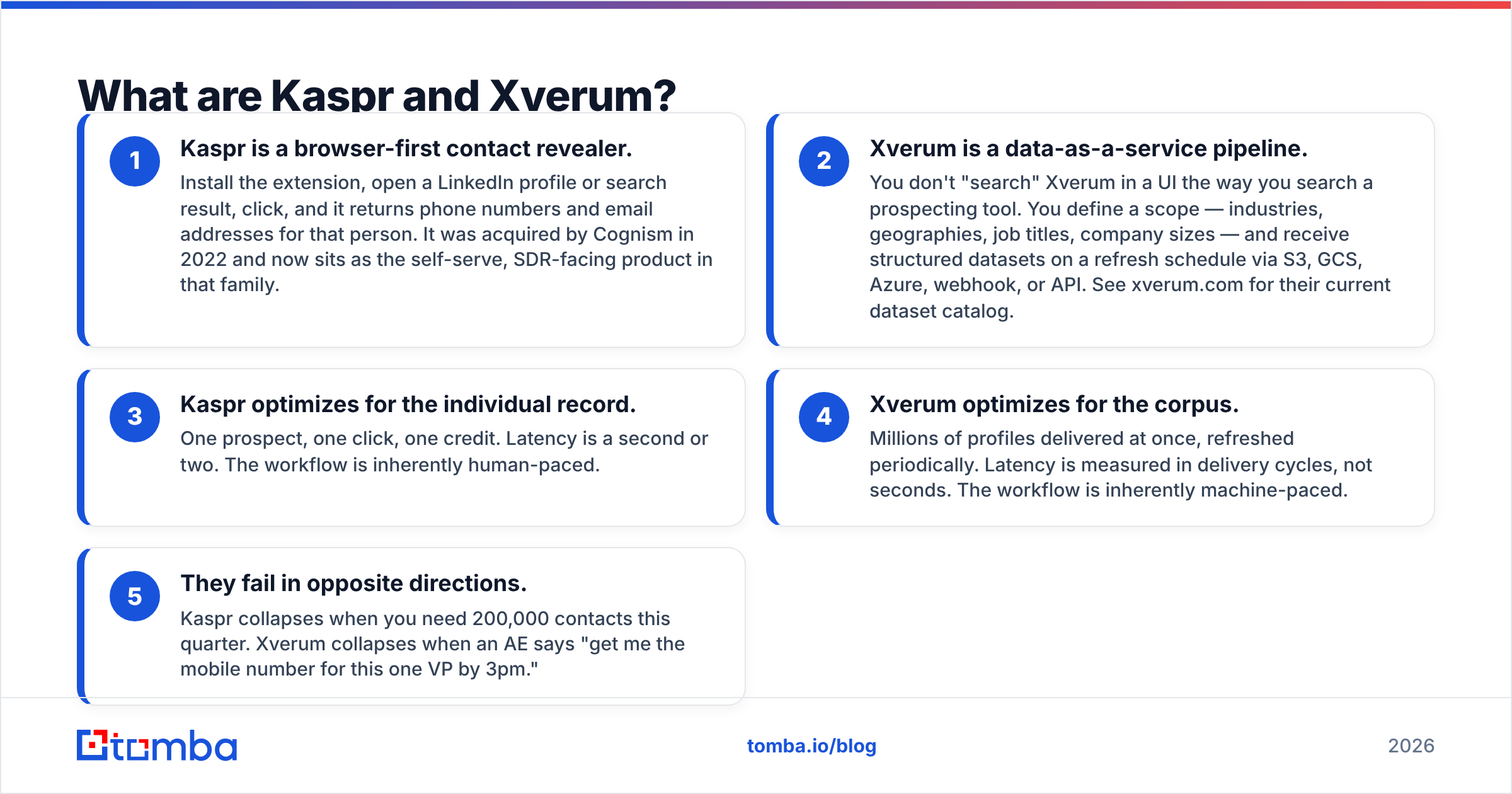
- Kaspr is a browser-first contact revealer. Install the extension, open a LinkedIn profile, and click. It returns that person's phone numbers and email addresses. Cognism bought it in 2022.
- Xverum is a data-as-a-service pipeline. You do not search Xverum in a UI. You define a scope — industries, geographies, job titles, company sizes — and get structured datasets on a refresh schedule via S3, GCS, Azure, webhook, or API. See xverum.com for the current catalog.
- Kaspr works one record at a time. One prospect, one click, one credit. The pace is human.
- Xverum works on the whole corpus. Millions of profiles arrive at once and refresh on a cycle. The pace is machine.
- They break in opposite directions. Kaspr breaks when you need 200,000 contacts this quarter. Xverum breaks when an AE wants one VP's mobile number by 3pm.
That framing answers most buying questions before you open a pricing page. If you catch yourself asking which one is better, you are asking the wrong question. Ask this instead: is my list-building done by people or by pipelines?
Kaspr vs Xverum: how do they compare head to head?#
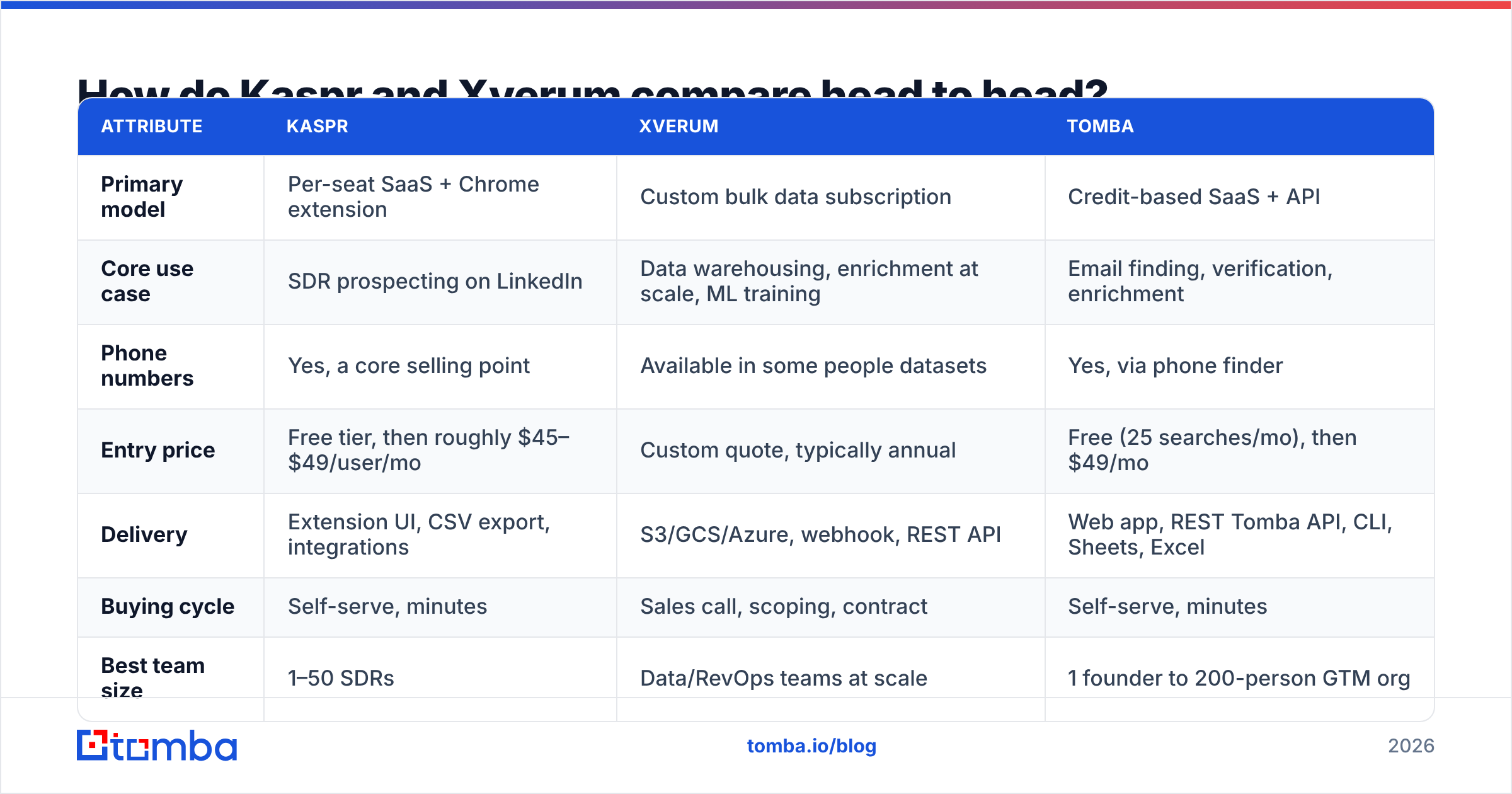
Here is the practical comparison. Tomba sits in the table as a middle-ground reference point, since most readers land here because neither extreme fits.
| Attribute | Kaspr | Xverum | Tomba |
|---|---|---|---|
| Primary model | Per-seat SaaS + Chrome extension | Custom bulk data subscription | Credit-based SaaS + API |
| Core use case | SDR prospecting on LinkedIn | Data warehousing, enrichment at scale, ML training | Email finding, verification, enrichment |
| Phone numbers | Yes, a core selling point | Available in some people datasets | Yes, via phone finder |
| Entry price | Free tier, then roughly $45–$49/user/mo | Custom quote, typically annual | Free (25 searches/mo), then $49/mo |
| Delivery | Extension UI, CSV export, integrations | S3/GCS/Azure, webhook, REST API | Web app, REST Tomba API, CLI, Sheets, Excel |
| Buying cycle | Self-serve, minutes | Sales call, scoping, contract | Self-serve, minutes |
| Best team size | 1–50 SDRs | Data/RevOps teams at scale | 1 founder to 200-person GTM org |
| Verification built in | Limited | Depends on dataset | Yes — email verifier included |

The table hides one nuance. Kaspr's per-seat price scales with headcount. Xverum's price scales with data volume. A 20-person SDR team pays 20 times over for Kaspr. A 3-person data team pays once for Xverum and serves the whole company. Model that against your org chart before you compare sticker prices.

Who should actually use Kaspr?#
Kaspr wins when prospecting is a manual, LinkedIn-shaped job.
The typical fit is an outbound SDR who lives in LinkedIn Sales Navigator, builds a list of 40 accounts a week, and needs mobile numbers to cold call. The extension sits right there in the workflow. No CSV round-trip, no waiting on a data engineer, no ticket in a queue. Reveal, push to the CRM, dial.
A few specifics worth knowing before you commit:
- The free tier is genuinely useful for testing. Kaspr has offered unlimited B2B emails on the free plan, with limited phone and export credits. Terms change, so check kaspr.io rather than trusting any blog post — including this one.
- Phone coverage is the real draw. If you only need work emails, Kaspr is an expensive way to get them. Mobile numbers justify the per-seat cost, above all in European markets.
- Per-seat costs add up fast. At roughly $49–$99 per user per month, a 15-rep team spends real money on what is, in the end, a lookup tool. Some plans carry minimum seat counts, so ask about that on the call.
- It is LinkedIn-shaped by design. Lists that start from domains, a conference PDF, or a scraped directory do not map onto Kaspr. A domain search tool handles those in one step.
Kaspr's weakness is not accuracy. Reviews on G2 are broadly positive there. The weakness is the assumption that a human is clicking. Once your motion runs on code, the per-seat model stops making sense.
Who should actually use Xverum?#
Xverum wins when a system reads the data, not a person.
Three patterns show up again and again among buyers of bulk B2B datasets:
Warehouse enrichment. You have 400,000 accounts in Snowflake with nothing but a domain. You want firmographics, employee counts, tech stack signals, and headcount trends on every row, refreshed monthly. No seat-based tool can do that at a sane price.
Product data. You are building a SaaS product that needs company or people data inside it — an ICP scoring tool, a recruiting platform, an investment screener. You need a license that allows redistribution. Most prospecting tools forbid it.
Model training and analytics. You want to train scoring models on job postings, hiring velocity, or employee movement. That takes history and volume, not lookups.
Xverum publishes coverage in the hundreds of millions of people profiles and tens of millions of company profiles. The datasets span company data, people data, job postings, and local business listings. Treat vendor coverage numbers as ceilings, not promises. The number that matters is coverage inside your ICP, and only a sample file answers that.
Three things to pin down in the sales process:
- Match rate on your list, not their list. Send 5,000 of your own domains or profiles and measure what comes back populated. Aggregate coverage stats mean nothing if your ICP is German mid-market manufacturers.
- Refresh cadence per field. Company HQ changes rarely. Job titles change constantly. Ask which fields refresh monthly and which refresh once a year.
- Compliance posture. GDPR and CCPA handling for people data is not optional. Get the DPA and the lawful-basis documentation in writing before you sign.
How accurate is the data on each side?#
In the Kaspr vs Xverum accuracy debate, both sides measure something different. Kaspr reports accuracy at the moment of reveal, against one profile. Xverum reports it across a dataset and a refresh window. Those are not the same metric, and neither one tells you whether an email will bounce tomorrow.

What protects you is verification at send time, whatever the source. Contact data decays about 25–30% a year as people change jobs, so a file delivered in January is stale by June. Serious teams treat every provider — Kaspr, Xverum, or anyone else — as a source, then run a separate verification pass before the send. Bounce rates above 3% start to damage sender reputation, and no SLA repairs a burned domain.
Practical protocol, whichever you buy:
- Sample 1,000 records from your real ICP before you sign anything.
- Verify them with an independent email verifier and count hard bounces, not valid-looking flags.
- Check catch-all domains on their own. They inflate apparent deliverability.
- Re-verify anything older than 90 days before it enters a sequence.
How does the pricing really compare?#
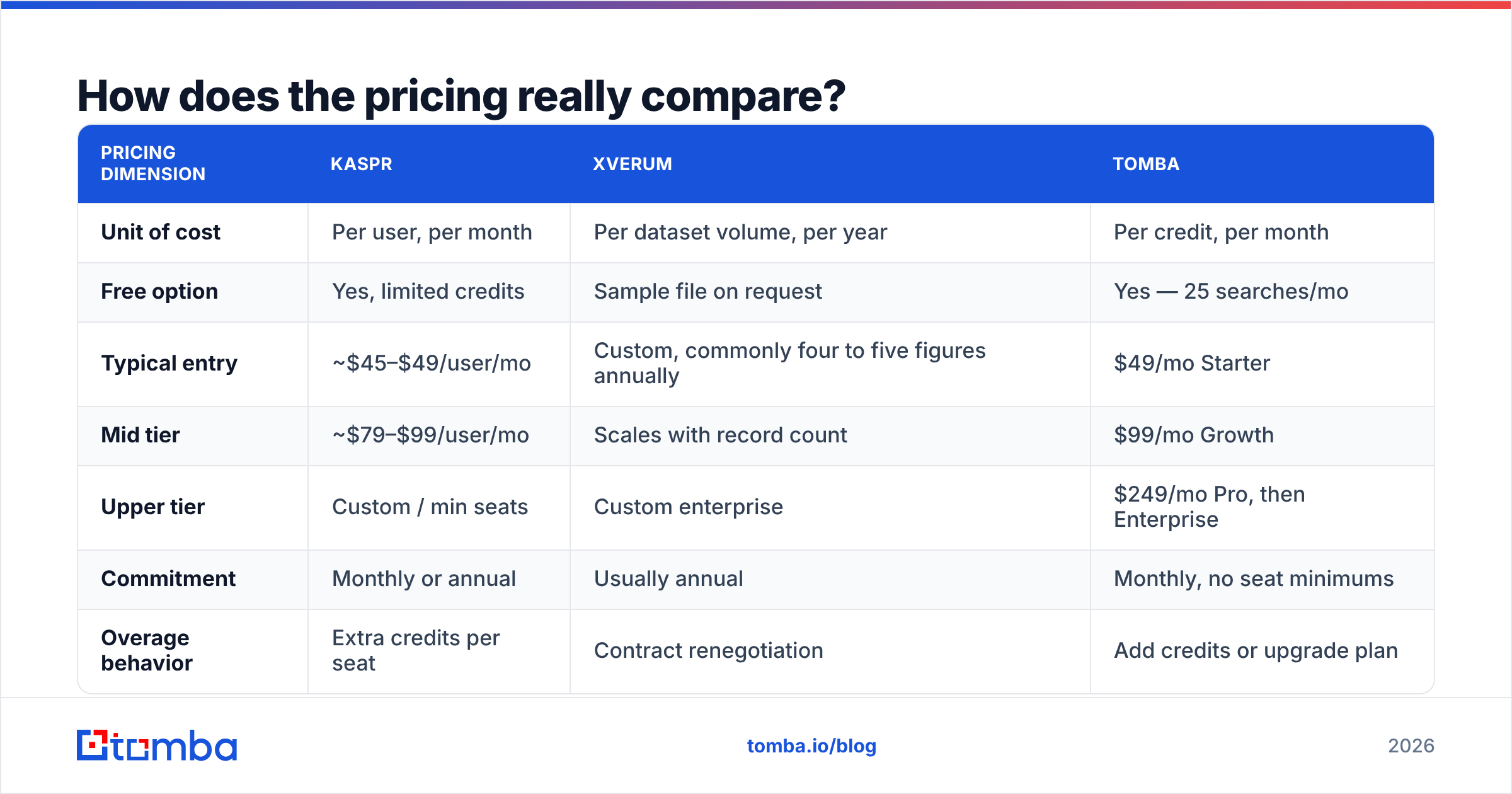
This is where most evaluations go sideways, because the two products are not priced on the same axis at all.
| Pricing dimension | Kaspr | Xverum | Tomba |
|---|---|---|---|
| Unit of cost | Per user, per month | Per dataset volume, per year | Per credit, per month |
| Free option | Yes, limited credits | Sample file on request | Yes — 25 searches/mo |
| Typical entry | ~$45–$49/user/mo | Custom, commonly four to five figures annually | $49/mo Starter |
| Mid tier | ~$79–$99/user/mo | Scales with record count | $99/mo Growth |
| Upper tier | Custom / min seats | Custom enterprise | $249/mo Pro, then Enterprise |
| Commitment | Monthly or annual | Usually annual | Monthly, no seat minimums |
| Overage behavior | Extra credits per seat | Contract renegotiation | Add credits or upgrade plan |
Two traps to watch:
The Kaspr trap is seat sprawl. You buy 5 seats, the team grows to 18, and a $250 line item quietly becomes $1,800 a month. Credit-based tools avoid this, because one API key serves everyone.
The Xverum trap is commitment shock. Bulk data is almost always sold by the year, and the quote lands well above what a team used to $99/month SaaS expects. That is not a knock on Xverum, since the infrastructure really costs that much. It still surprises people who came expecting a self-serve checkout.

Compare Tomba pricing for a third reference point: credits instead of seats, monthly instead of annual, and the same data in the UI, the API, Sheets, and Excel with no per-user surcharge.
Which one should you choose?#
Answer these in order and the decision usually makes itself:
- Is a human clicking, or is a system calling? Human → Kaspr. System → Xverum or an API-first email finder.
- Do you need mobile numbers? If cold calling is core and you sell into Europe, Kaspr's phone coverage is the strongest argument here.
- How many records per month? Under ~2,000 → seat or credit tools. Over ~50,000 → a bulk contract. In between → a credit-based API is usually cheapest per record.
- Will the data ship inside a product? Only bulk providers like Xverum license that. Prospecting tools forbid it.
- Can you sign an annual deal? If not, Xverum is out, however well it fits.
- Do you need verification too? Neither tool is a verification vendor, so budget a separate step, or use a platform where finding and verifying share one credit pool.
There is an honest fourth path. Some teams run a lean API-based finder for daily outbound and buy a bulk dataset once a year for warehouse enrichment. The two jobs differ enough that one tool rarely does both well.
What's the middle-ground option?#
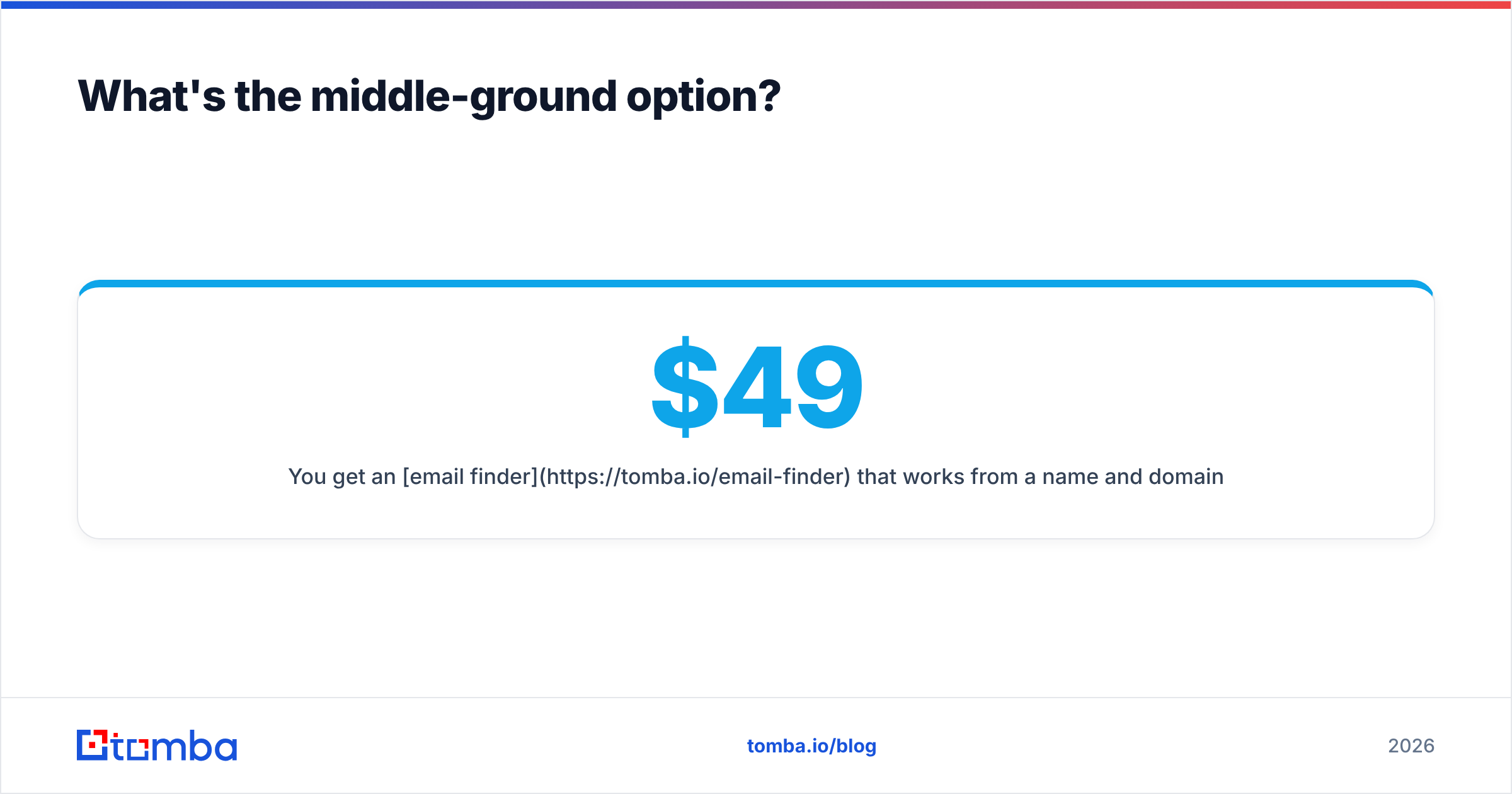
If Kaspr vs Xverum feels like a choice between two extremes, that is because it is. Say your volume is 3,000 contacts a month and you want neither seats nor an annual contract. That is the gap Tomba targets.
You get an email finder that works from a name and a domain, bulk processing for lists, catch-all handling, and verification from the same credit pool. A REST API, CLI, Chrome extension, Sheets add-on, and Excel add-in mean the same data reaches the SDR and the data pipeline. Pricing runs on credits — Free at 25 searches/mo, Starter at $49/mo, Growth at $99/mo, Pro at $249/mo — with no per-seat tax as the team grows.
Start with the free tier. Run 25 searches against contacts whose emails you already know, and measure the hit rate yourself. That five-minute test tells you more than any comparison table, including this one. Try the Tomba Email Finder and see where your ICP's coverage lands before you commit budget to a seat license or an annual data contract.
Related guides#
// get started
Find, verify and enrich your first contacts today
Start on the free plan with 25 searches a month, then scale when your team is ready.
Free plan · No credit card required · GDPR & CCPA
// about the author